
Digital Signage System
Zeour GRAVIA is a digital signage system for teams managing content across screens in service locations, buildings and campuses. A visual content editor, scheduling and screen groups support day-to-day publishing, with emergency broadcasts for selected displays.
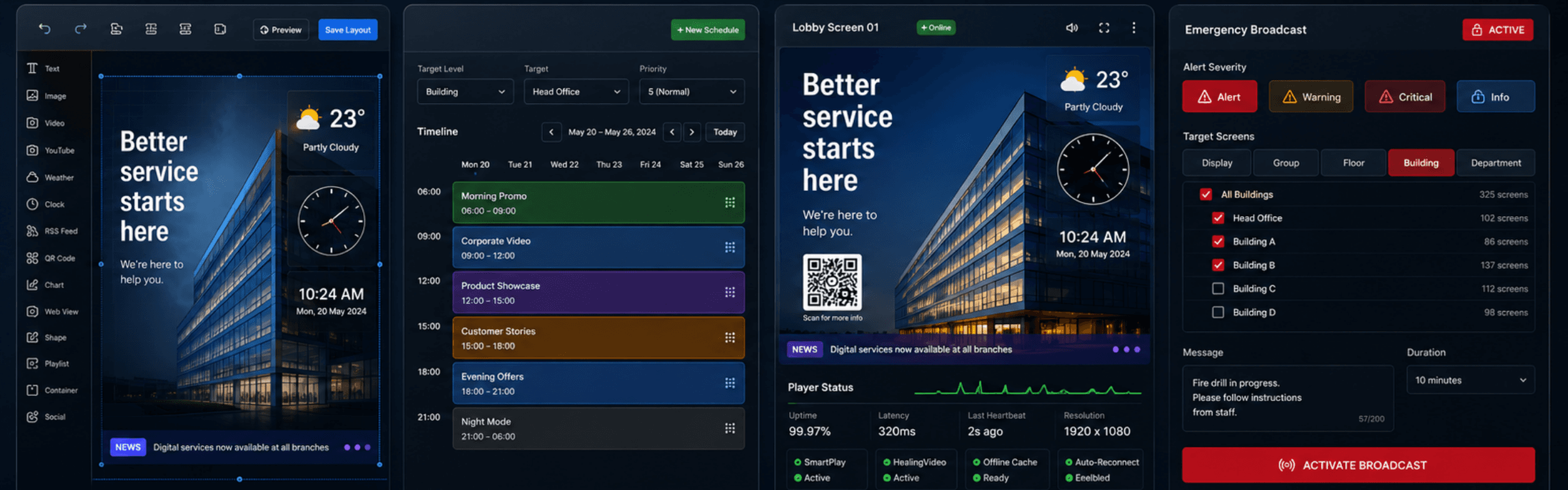
Create, Schedule and Manage Screen Content
Build layouts in the signage CMS, organise screens by location and schedule content for the intended audience. GRAVIA connects content administration with screen playback, so teams can maintain information across a display estate.
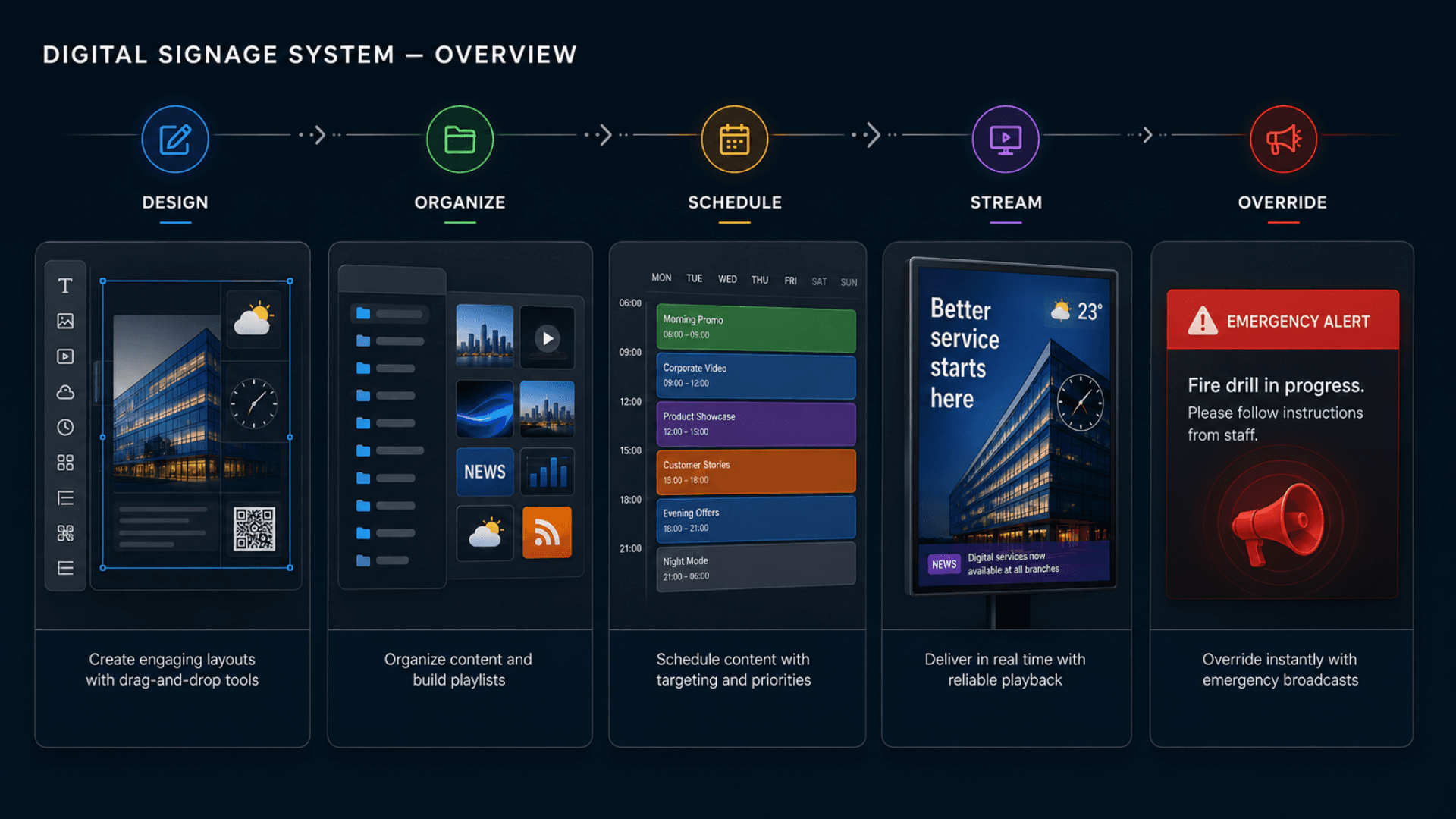
Screen Content, Queue Boards and Building Directions
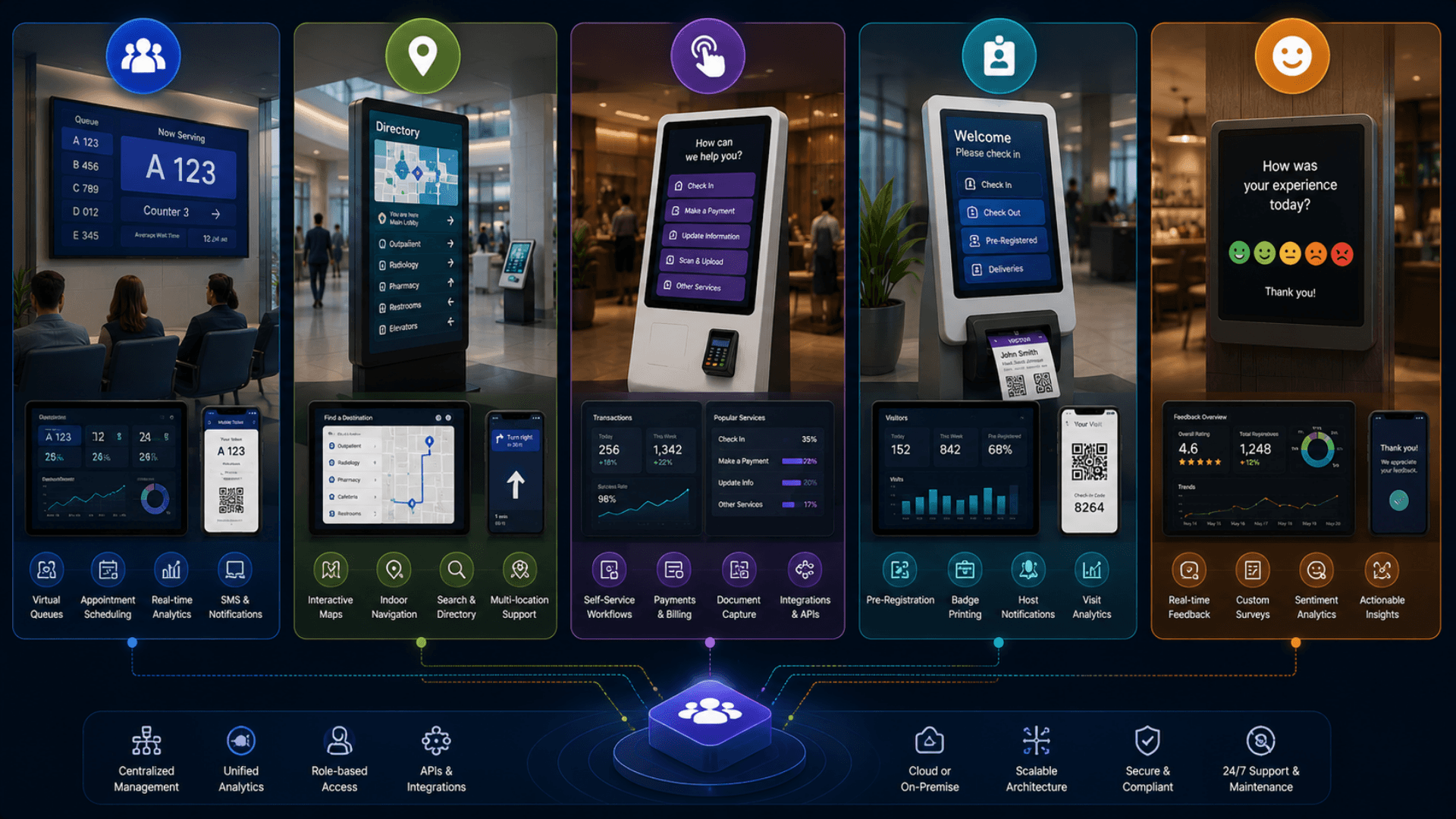
GRAVIA displays can present ticket calls from GLARUS queue management. Interactive route guidance is covered by the indoor wayfinding system, a distinct navigation workflow.
A self-service kiosk can combine active customer interactions with idle screen content. The visitor management system addresses reception and meeting-room information.
Before choosing a publishing workflow, use the multi-tenant digital signage CMS buyer’s guide to test tenant permissions, content scheduling and playback recovery with your proposed screen fleet.
Signage CMS, Media Playback and Screen Administration
Zeour GRAVIA is a multi-tenant digital signage CMS. The dashboard is the operator experience — content library, layout editor, playlist + schedule engine, emergency broadcaster, display map, analytics. The player runtime is a long-running web page that streams the active schedule to a physical display with sub-second update latency and a healing fallback chain that keeps the screen alive even when the network is shaky. Together they cover the full signage workflow — from upload through schedule through playback through audit — at the scale of single offices up to multi-thousand-screen estates.
Zeour GRAVIA — the multi-tenant digital signage CMS that powers thousands of screens for banks, hospitals, retail chains, airports, governments, and corporate campuses. Canvas WYSIWYG layout editor with 15 component types (video, image, text, YouTube, weather, clock, RSS, social, countdown, QR, charts, web view, playlists). Building → Floor → Department → Screen Group hierarchy. Day-of-week + time-window scheduling with priority. Emergency broadcasts to any subset of screens in seconds. Real-time updates, antivirus scanning on every upload, signed media URLs, 2FA, and HealingVideo fallback so screens never go blank. Cloud SaaS or on-premise. Runs one screen in one café as happily as thousands of screens across a national estate — GRAVIA is the same CMS at every size.
Key Functionalities
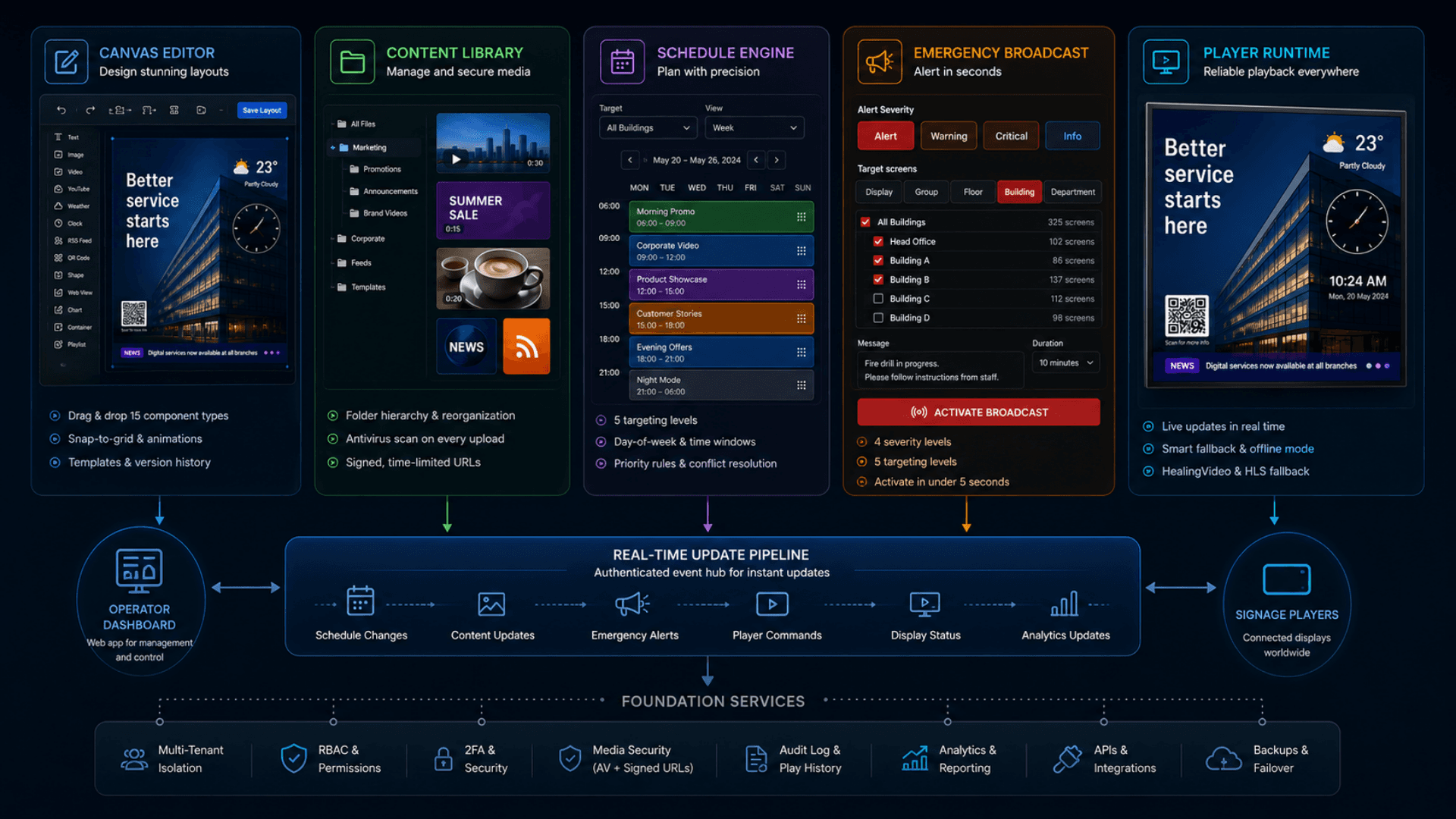
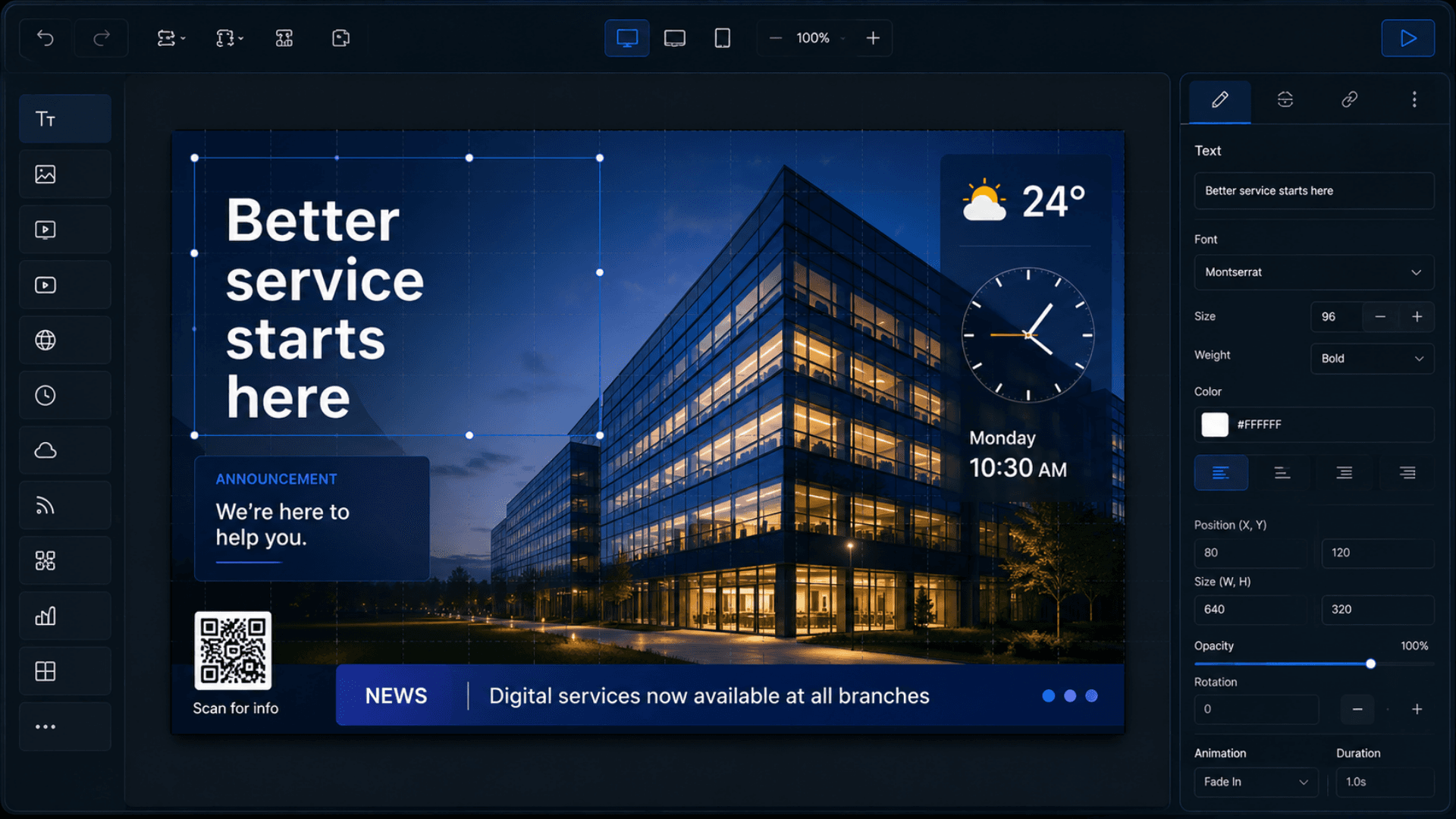
Canvas WYSIWYG Layout Editor
Drag components onto the layout canvas — resolution set per layout (1920×1080 by default; portrait, ultrawide, and video-wall sizes supported). Snap-to-grid, per-component animations, z-index, rotation, opacity. Versioned via LayoutHistory with undo / redo and rollback to any prior snapshot.
Canvas resolution set per layout (1920×1080 by default; portrait and video-wall supported). Drag 15 component types, position with snap-to-grid, set per-component animations.
- Drag-drop component palette with snap-to-grid
- 15 component types: Text · Image · Video · WebView · YouTube · Clock · Weather · Shape · Container · Playlist · QR · RSS · Countdown · Social · Data Viz
- Per-component config: position · z-index · rotation · opacity · animations
- Templates library + LayoutHistory versioning with undo / redo
15 Component Types
Text, Image, Video, WebView, YouTube, Clock, Weather, Shape, Container, nested Playlist, QR Code, RSS Feed, Countdown, Social Media, Data Visualization — all coexist on one canvas with independent config.
Content Library with Folder Tree
A nested folder tree (folder → subfolder → media). Upload videos / images / web tiles; every file is antivirus-scanned before serving; served via signed, short-lived URLs.
Playlist + Schedule Engine
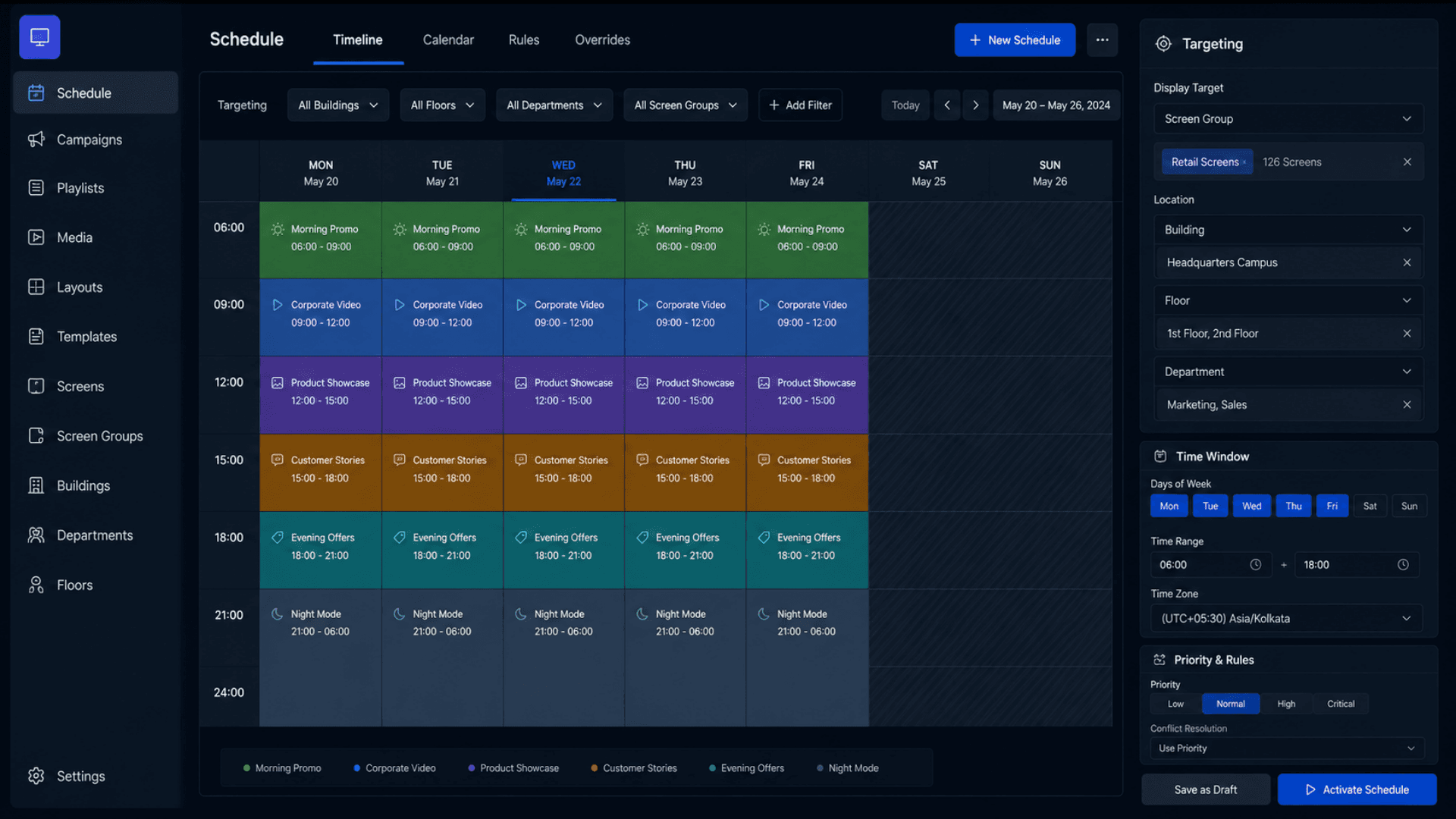
Playlists are ordered items with per-item duration overrides. Schedules target one of five levels (Display / Group / Floor / Building / Department) with day-of-week filters, time windows, and priority rules.
Emergency Broadcast System
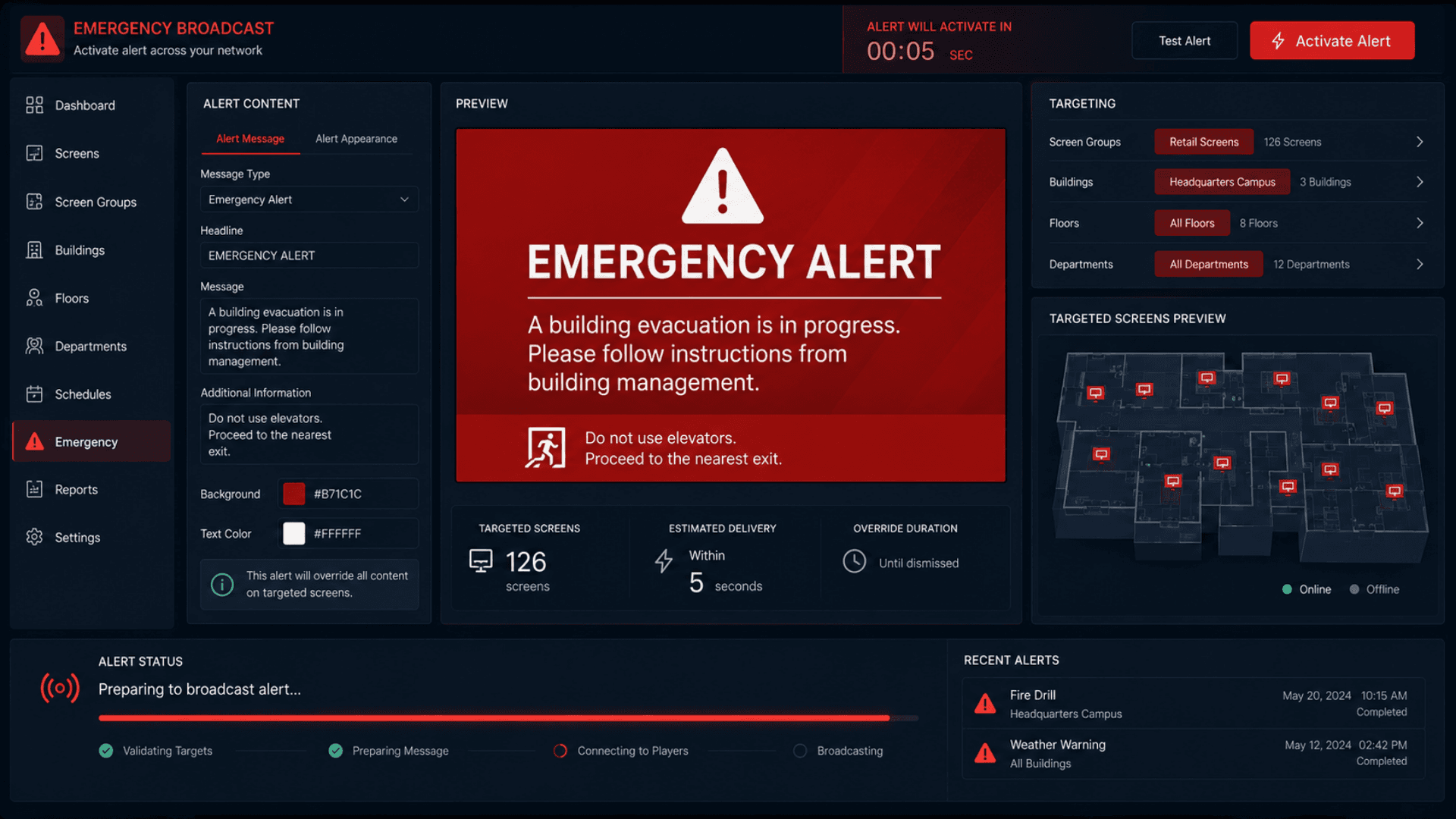
First-class Emergency model with four severity levels (Alert / Warning / Critical / Info). Override any subset of screens within 5 seconds; same targeting model as schedules.
First-class emergency override with severity levels — push to any subset of screens in seconds.
- Four severity levels: Alert · Warning · Critical · Info
- Same five targeting levels as Schedules
- Override active within 5 seconds across all targeted screens
- Deactivate from one button when the situation is over
Building → Floor → Department Hierarchy
Real physical org modeling. Buildings contain Floors; Floors contain Departments. ScreenGroups give an orthogonal flat layer for ad-hoc bundles. Role scoping (Building Manager / Department Manager) follows the hierarchy.
Floor Maps with Visual Screen Placement
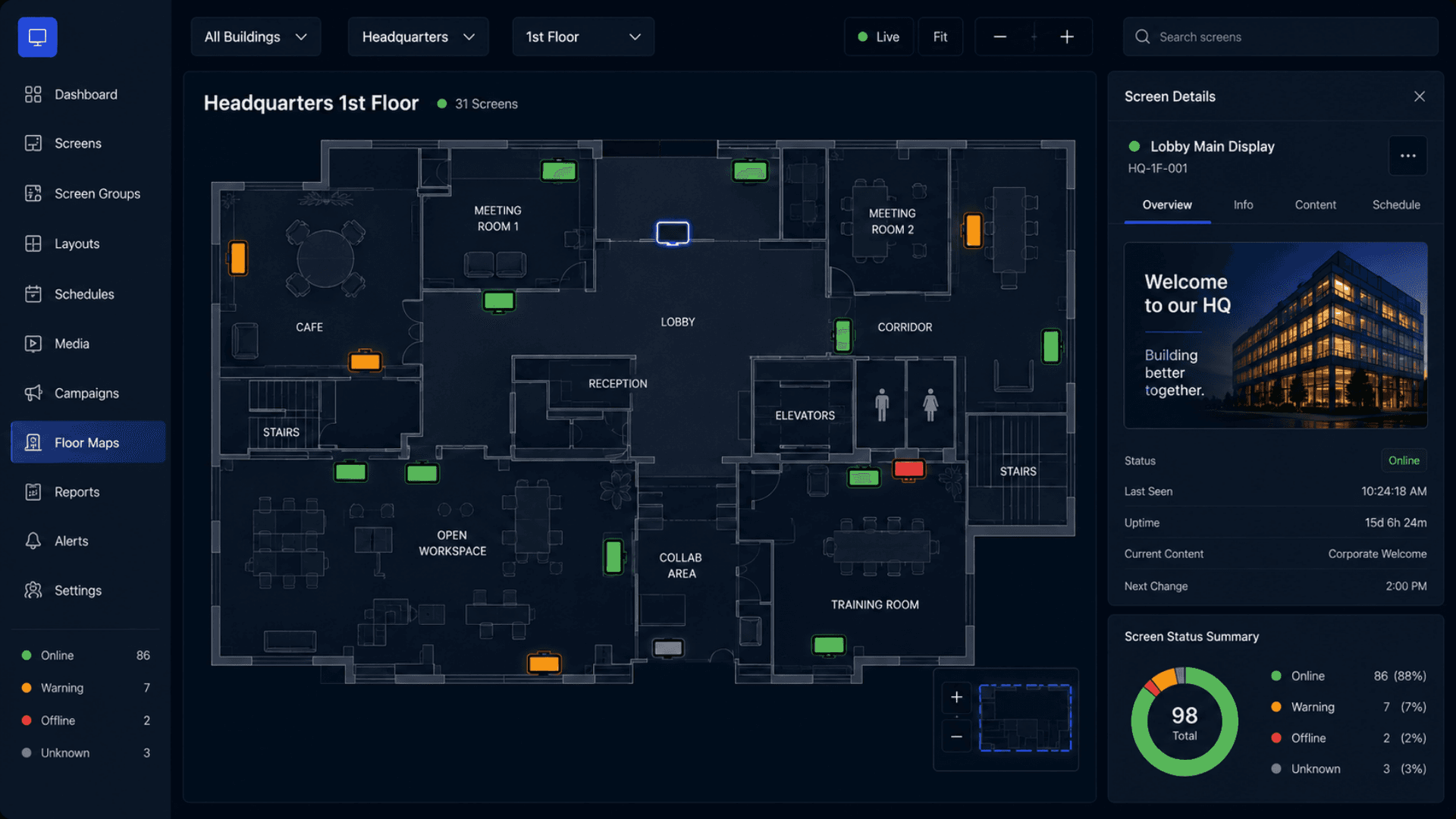
Upload a floor plan image; place each display visually via X/Y coordinates per floor. The admin dashboard shows a live map with each display dot colored by status — fastest way to spot a problem in a large estate.
Real-Time Player Pipeline
An authenticated real-time pipeline for both players (via display API key) and dashboard users. Live events cover schedule changes, content updates, emergency activations, player commands, and display status changes.
An authenticated real-time pipeline for both players (display API key) and dashboard users — sub-second updates.
- Schedule changes propagate in under a second
- HealingVideo HLS fallback prevents stalls
- SmartPlay chain: Layout → Playlist → Clock (never blanks)
- Offline mode + exponential reconnect with last-cached content
SmartPlay Fallback + HealingVideo
Players resolve Layout → Playlist → Clock so the screen never blanks. HealingVideo detects stalls and recovers automatically. Offline mode keeps the last-cached content playing while reconnecting.
Play-History Telemetry + Analytics
Every item completion reports back as a play-history entry. The analytics dashboard rolls up impressions per content / per display / per time window. Export to CSV / API for BI tools.
Display Pairing + Lifecycle
Each display has a hashed API key generated at pairing. A 30-second sweep marks unresponsive displays as offline and broadcasts to the dashboard. Per-display rate limiting prevents abuse.
Multi-Tenant Isolation
Every record is scoped to its organization. Every dashboard route enforces tenant scope before any data access. Cross-tenant access is logged and rejected without leaking existence.
Software Components
Operator Dashboard
GRAVIA CMS Dashboard
The operator experience — displays, content library, layout editor, playlists, schedules, emergencies, floor maps, analytics, users, roles, settings.
Canvas Layout Editor
Drag-drop component palette with snap-to-grid. Per-component config panel (text, YouTube URL, weather location, countdown target, RSS feed, and more). Undo / redo stack with auto-save and version history.
Analytics + Play History
Real-time impression counts per content / per display / per schedule window. Play-history telemetry feeds dashboards and exports.
Player Runtime
Long-Running Player Page
A web page that runs full-screen on the signage device indefinitely. Boots, fetches the resolved schedule, listens for live events, renders the active layout, reports heartbeat + play history.
HealingVideo Fallback
Detects video stalls and retries automatically; falls back to an alternate source if the primary fails. Result: screens never blank from a transient network glitch.
Offline Mode + Reconnect
Caches last-known schedule + media locally. Exponential reconnect on network loss. Reconciles to current state when connectivity returns.
Real-Time & API Layer
Authenticated Real-Time Pipeline
A live event pipeline for player and dashboard connections. Players authenticate via a display API key; dashboard users via signed sessions. Cross-tenant attempts are logged and rejected.
REST API
A full REST surface for content, displays, schedules, playlists, layouts, emergencies, users, roles, analytics, play history, floor maps, social, RSS, and weather. Token-gated scheduled tasks handle maintenance.
Display API Keys
Per-display keys, randomly generated and stored hashed. Validated with a safe comparison and rate-limited per display. The key is never returned to the dashboard after pairing.
Security & Compliance
Authentication + 2FA
Email-and-password sign-in with hashed credentials and signed sessions; mandatory TOTP 2FA in cloud mode (Google Authenticator / Authy / 1Password). Account lockout: 5 failed attempts → 15 min cool-down.
Media Security
Antivirus scan on every upload. Signed, short-lived media URLs — replay-resistant and time-bound.
Audit Logging
Structured security events: login attempts, real-time auth, cross-tenant access attempts, permission denials, secret rotations. Exportable for compliance review.
Hardened Security Headers
A Content Security Policy and other hardened headers are enforced at the edge in production, with an allow-list extensible to new trusted external sources.
Operations & Tooling
Standard Process Management
Production deployments run under standard process management with auto-restart, log rotation, and cluster mode.
Maintenance Tasks
Scheduled maintenance tasks flip stale displays to offline and surface schedule diagnostics for support.
Secret Rotation
A built-in routine rotates signing secrets and API-key salts. A file-backed secret manager is supported.
Hardware Components
GRAVIA Signage Controllers
GRAVIA06 (GLARUS Signage Controller)
Quad-core Cortex-A55, Mali-G52 (4K UHD output), 2GB DDR3, 16GB eMMC, HDMI+VGA, 3.5mm line-out, RJ-45 LAN, 2×USB 2.0, Android 11, PoE-powered. Designed for queue boards, lobby screens, and emergency-overlay use cases.
IPTV06VI (IP Video Encoder)
RJ45 Gigabit Ethernet, H.265/HEVC encoding, RTSP/HTTP/UDP/RTMP/HLS/RTP/SRT IP streaming, up to 3840×2160. For deployments that distribute live video to many displays from a single source.
Counter & Lobby Displays
SSD06 (LED Counter Display)
8-digit dot-matrix LED panel for queue calling. PoE 5V, IP40 (IP54 optional), viewing distance up to 25m. Pairs with the queue overlay on lobby TVs.
SSD066 AHW (LCD Counter Display)
13.3" Full-HD IPS counter screen with Android options, VESA mounting. For displays placed at each service counter.
Self-Service Kiosks
GLARUS Kiosk (KIOSAPP066)
18.5" or 21" capacitive touchscreen, Android / Windows, thermal printer, LAN + WiFi. Can run the GRAVIA player runtime in fullscreen kiosk mode for promotional / informational kiosks.
AUTO Free-standing Self-Service Kiosk (AUTO666-HW-L-AD)
up to 86" Full HD capacitive touchscreen, Android / Windows, weatherproof IP54-rated. For outdoor or 24/7 informational kiosk deployments.
Branch & Power Infrastructure
CONT06 Industrial Branch Server
For on-premise deployments. Ubuntu Linux local server. Runs the full GRAVIA stack at a single site.
Glarus_Hub (PoE Power Distribution)
Industrial 16-channel PoE hub with isolated channels and integrated power. Powers signage controllers, kiosks, and LED displays from a single rack point.
Digital Signage Architecture — GLARUS GRAVIA CMS
GRAVIA is deployed as a unified application whose dashboard and real-time pipeline run together. The dashboard is the operator brain; the player runtime is the eye on every physical screen. Multi-tenant by design — every record is scoped to its organization and enforced on every request. Cloud SaaS or on-premise — same platform, same operator experience, sovereign data.
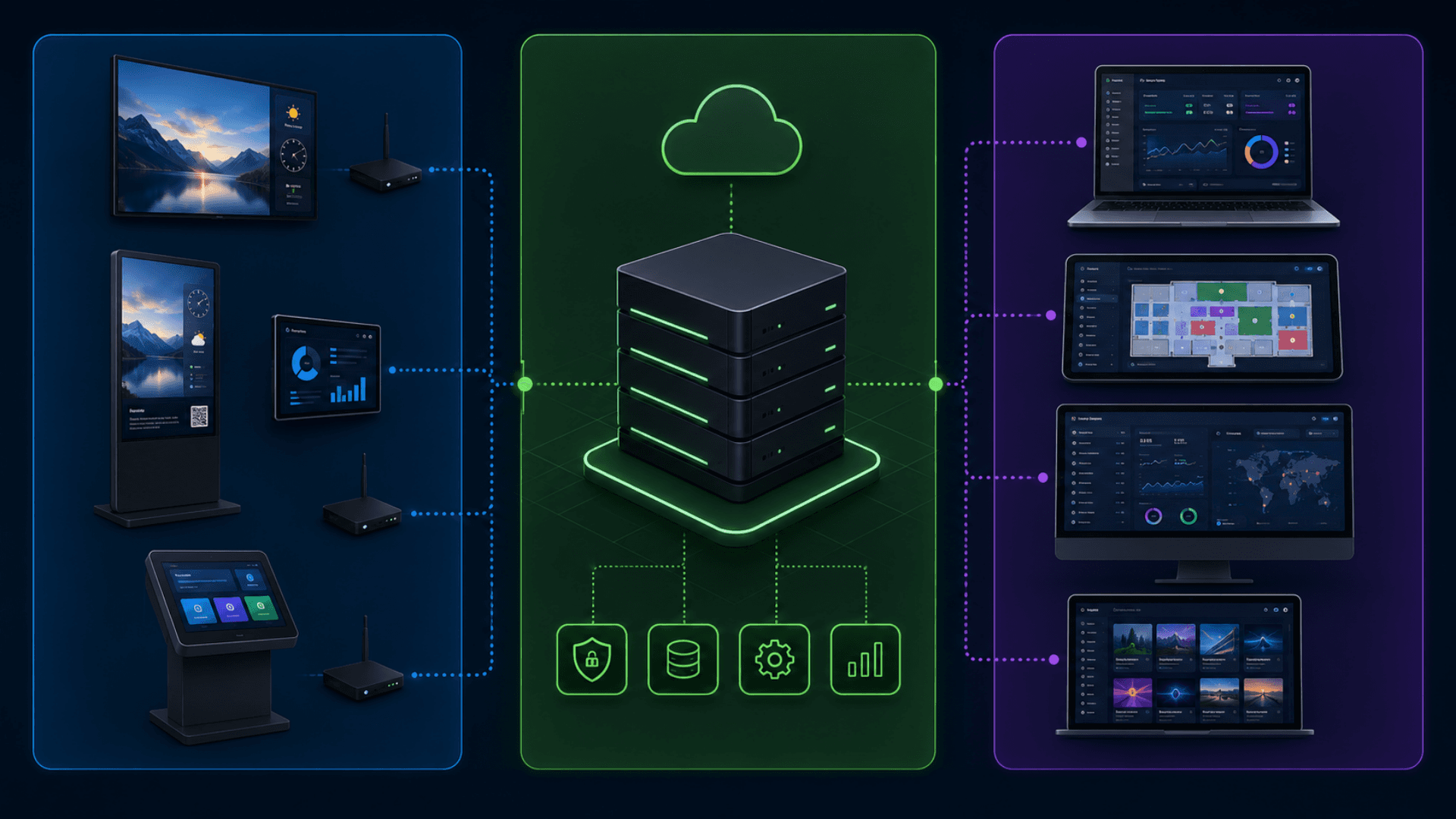
Tier 1 — Player Runtime
A long-running web page on every physical display
- A long-running player page that runs full-screen indefinitely on signage hardware
- Paired via a display-scoped API key (hashed at rest, compared safely, rate-limited)
- Resolves Layout → Playlist → Clock fallback chain — never blanks
- HealingVideo handles video stalls and recovers automatically
- Offline mode: last-cached schedule + media keeps playing; exponential reconnect on outage
- Live events trigger refresh without a page reload — schedule changes, content updates, emergency activations
Tier 2 — Central CMS (Cloud or On-Prem)
The operator brain — content, scheduling, and the real-time pipeline
- A unified application whose REST API and real-time pipeline run together
- An authenticated REST API for content, displays, schedules, playlists, layouts, emergencies, users, roles, analytics
- A real-time event hub that broadcasts to per-organization channels
- Multi-tenant data layer: every record is scoped to its organization and enforced on every request
- Background tasks: a 30-second display-offline sweep, plus an optional standalone watchdog
- Mandatory 2FA in cloud mode (TOTP), signed sessions, account lockout
- Media pipeline: antivirus scan → signed, time-limited URLs → time-bound delivery
Tier 3 — Operator Dashboards & Editors
The web app that admins, designers, and managers use every day
- Canvas WYSIWYG layout editor (drag-drop, snap-to-grid, 15 component types, version history)
- Content library with folder tree, drag-drop reorganization, antivirus status
- Playlist editor + schedule builder with day-of-week + time-window + priority
- Emergency broadcast console with 4 severity levels + 5 targeting levels
- Floor map visualizer (X/Y screen placement per floor, live status colors)
- Analytics dashboard: play-history impressions, per-screen status, audit log
- User + role management with granular permissions
Real-Time Update Pipeline
Real-time- An authenticated real-time channel for both player connections (display API key) and dashboard connections (signed session)
- Players join per-organization channels; cross-tenant events never leak
- Live events cover schedule changes, content updates, emergency activations, player commands (refresh / restart / update schedule), display status changes, and analytics updates
- A 30-second sweep flips unresponsive displays to offline and broadcasts status to dashboards
- An optional standalone watchdog adds further resilience
Digital Signage CMS vs USB Sticks vs Consumer Apps vs Enterprise — What You Need
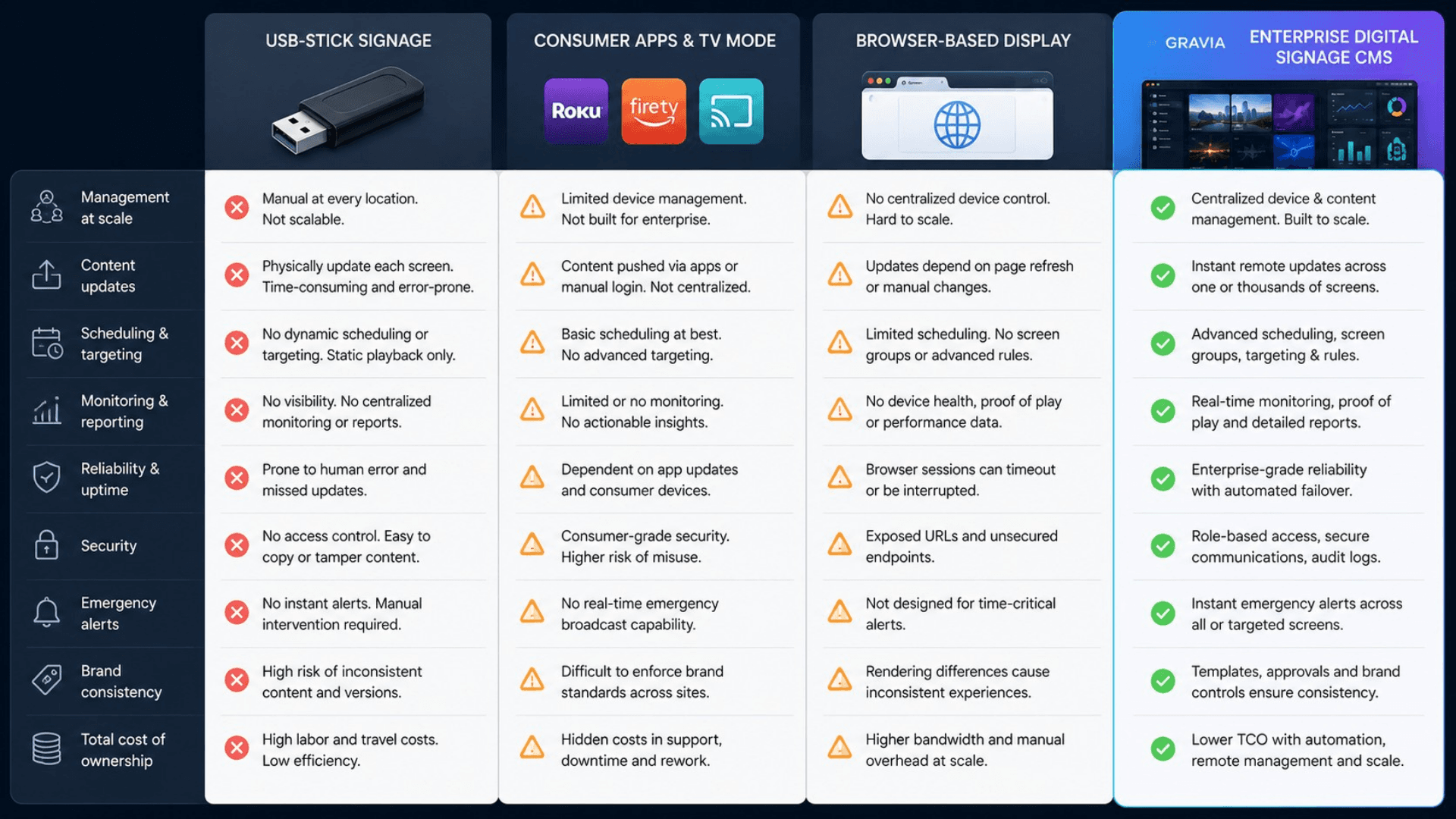
These categories are often conflated. USB-stick workflows are what you're replacing. Consumer signage apps handle one office. Enterprise CMSes — like GRAVIA — handle one to ten thousand screens across one to a hundred buildings with audit trails to defend.
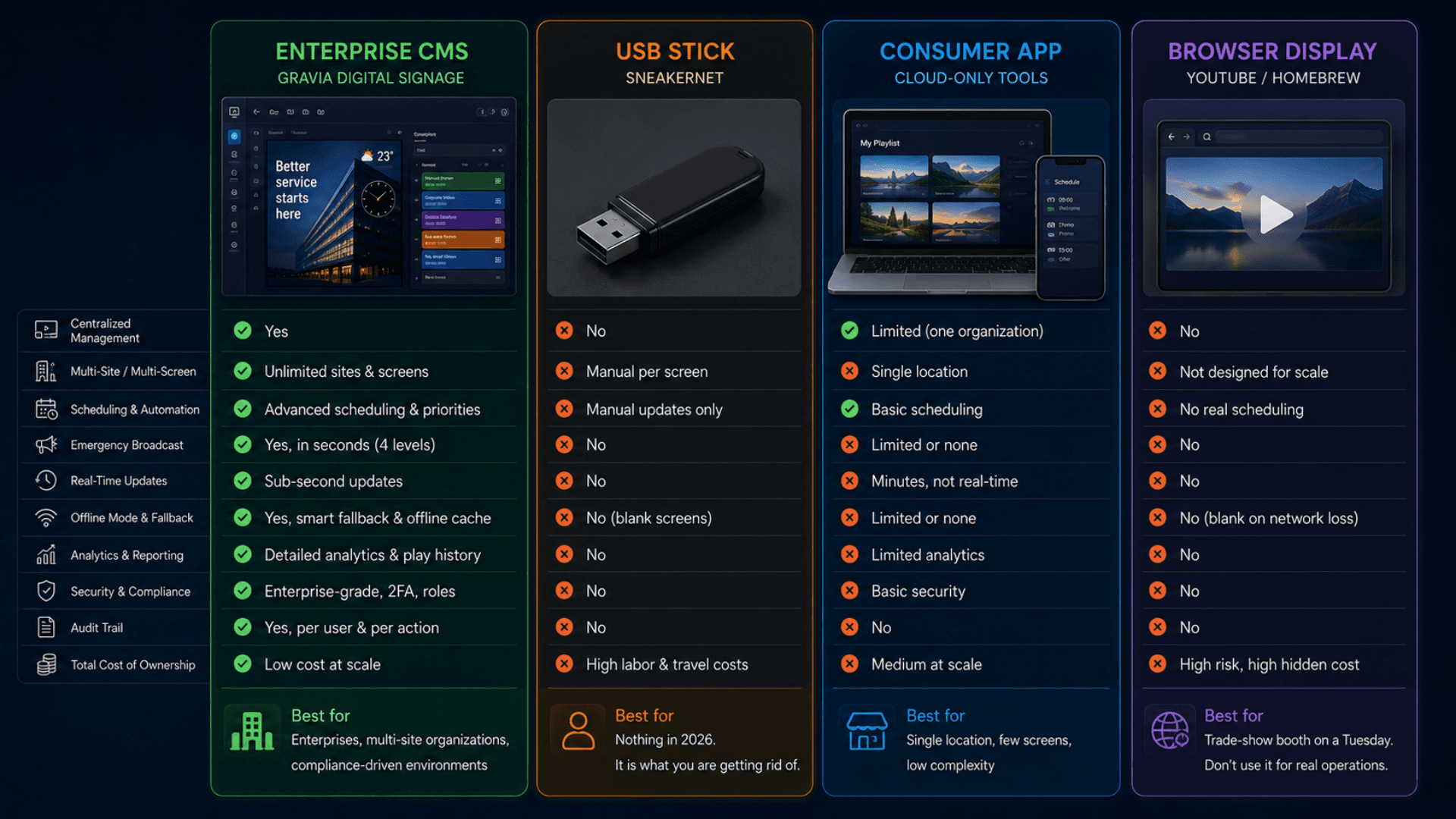
GRAVIA Digital Signage CMS (Enterprise)
Best for: Multi-site organizations with security obligations and an estate of any size — banks, hospitals, governments, retail chains, airports, universities.
- 15 component types · canvas WYSIWYG editor · template library + version history
- Building / Floor / Department / Group hierarchy + orthogonal Screen Groups
- Day-of-week + time-window scheduling with priority rules
- Emergency broadcast with 4 severity levels (sub-5-second activation)
- Real-time update pipeline + offline mode + HealingVideo fallback
- PlayHistory telemetry + analytics + per-screen audit trail
- Multi-tenant + role-based access + 2FA + antivirus + signed media URLs
- Cloud or on-premise + GDPR / HIPAA / PDPL / ISO 27001 aligned
USB Stick / Sneakernet
Best for: Nothing in 2026. It is what you are getting rid of.
- A USB stick with a video file on it
- Someone walks from screen to screen, plugs it in, hopes it autoplays
- No central control, no schedule, no audit, no analytics
- Different content on every screen because no one remembers who got the latest
- Six months in, half the screens still show last summer's promotion
Consumer Signage App
Best for: A single office with a handful of displays and no compliance overhead.
- Simple image / video slideshow editor
- One organization, one floor, one schedule
- Limited or no emergency override
- No real telemetry, no audit trail, no role scoping
- No multi-site hierarchy, no real-time pipeline, no offline mode
YouTube TV / Home-Brewed Browser Display
Best for: A trade-show booth on a Tuesday. Don't use it for the bank lobby.
- A web browser pointed at a YouTube link or static page
- No central management, no schedule, no telemetry
- No emergency override, no offline cache, no HealingVideo
- No audit, no security, no role scoping
- Customers see "no internet" or a black screen when the network blips
Digital Signage System — Deployment Checklist
A practical 5-phase rollout playbook for going live with GRAVIA — from a single-site pilot to a multi-thousand-screen estate. Use it as a project plan with your Zeour partner.
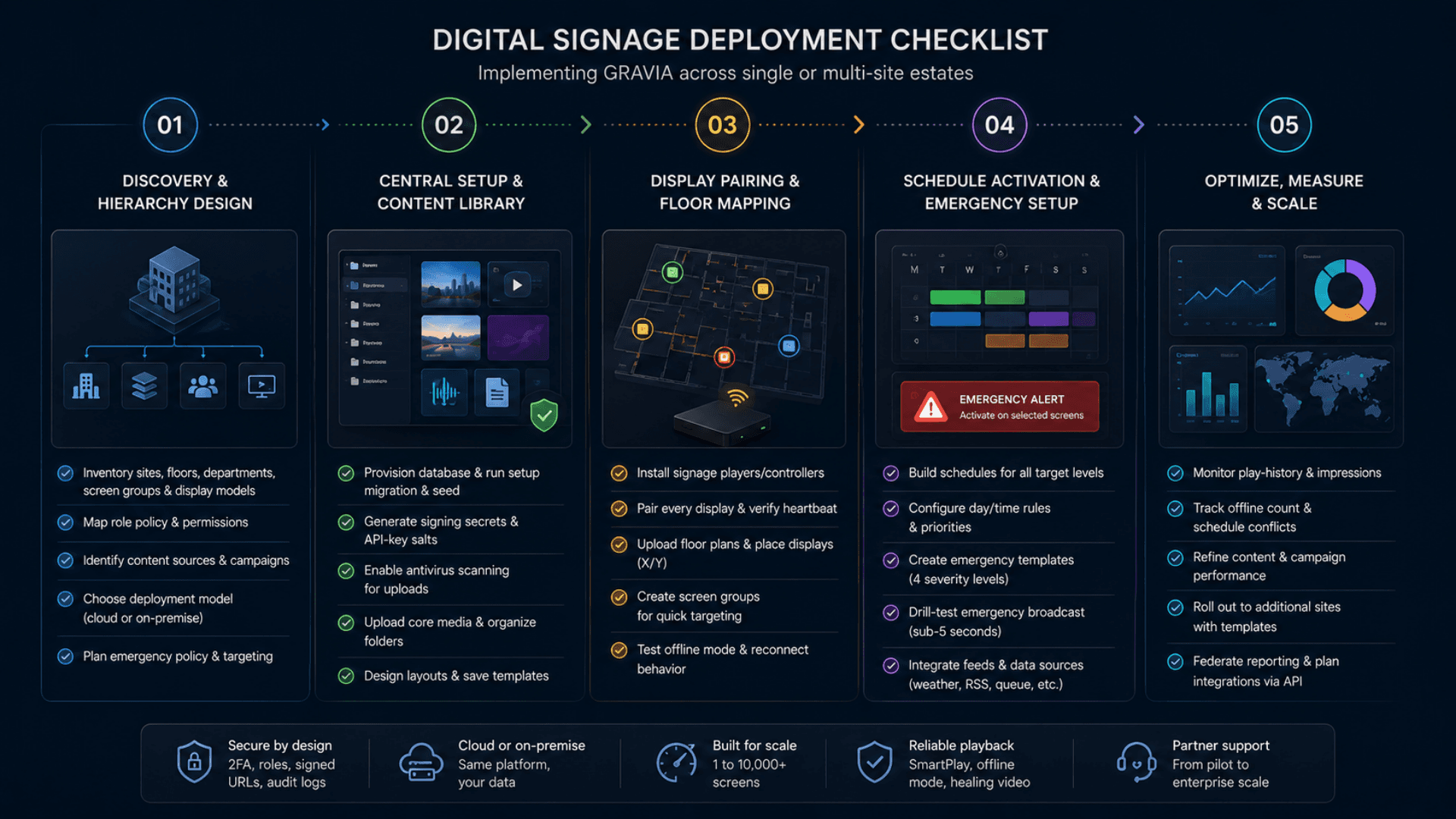
- 01
1) Discovery & Hierarchy Design
ChecklistInventory buildings, floors, departments, screen groups, and display modelsMap your role policy onto Admin / Building Manager / Department Manager / Content Designer / ReceptionIdentify content sources: brand video library, RSS feeds, weather locations, social accounts, scheduled campaignsDecide deployment model: managed cloud or on-premise (and choose data-residency region for cloud)Plan emergency-broadcast policy: severity levels, targeting rules, activation roles - 02
2) Central Setup & Content Library
ChecklistProvision the database and run the initial setup migration and seed (admin / org / role data)Generate the production signing secrets and API-key salts using the built-in rotation routineEnable antivirus scanning for media uploads in productionUpload core media to the content-folder tree; tag campaigns and assetsDesign starting layouts in the canvas editor; save as templates for reuse - 03
3) Display Pairing & Floor Mapping
ChecklistProvision GRAVIA06 signage controllers (or equivalent) at each locationPair every display: generate display-scoped API key, install on player device, verify heartbeatUpload floor plan images; place each display visually with X/Y coordinatesGroup displays into Screen Groups for ad-hoc bundles ("all cafeteria TVs")Smoke-test offline mode by simulating network disconnect — verify last-cached content plays - 04
4) Schedule Activation & Emergency Setup
ChecklistBuild initial schedules targeting each level (display / group / floor / building / department)Configure day-of-week + time-window filters; assign priorities for overlapping campaignsCreate Emergency templates (Alert / Warning / Critical / Info) with assigned targetingDrill-test emergency activation across a subset of displays; verify sub-5-second overrideWire integrations: queue management overlay, weather API, RSS feeds, social accounts - 05
5) Optimize, Measure & Scale
ChecklistTrack weekly: play-history impressions, offline-detection count, schedule conflicts, audit-log volumeUse analytics to refine campaign performance and content rotationRoll out to additional sites using the same templates with local overridesFederate reporting across sites for executive dashboardsPlan custom integrations (CRM / ERP / BI / queue management / wayfinding) via the REST API and real-time event streams
Digital Signage System Gallery
Visual highlights of GLARUS GRAVIA — the digital signage CMS deployed by banks, hospitals, governments, retailers, and airports worldwide.
Why USB-Stick Signage Fails
USB-stick signage updates are slow, manual, and impossible to govern at scale — here is why a digital signage CMS is essential.
USB-Stick Content Updates
Update content on 50 screens? Someone walks to each TV with a USB stick. Different content on each screen because no one remembers which got the latest. Six months in, half the screens still show last summer's promotion.
One-Click Updates Across the Estate
Upload new content; the schedule rules push it to every targeted screen in under a second. No USB sticks. No truck rolls. No drift between screens.
Single-Tenant Toy CMS
Consumer signage apps are designed for one organization, one floor, one schedule. They have no concept of Buildings or Floors or Departments or Screen Groups, and they certainly can't run an emergency broadcast across "all kiosks in Building B during business hours."
Multi-Tenant + Hierarchical Targeting
Building → Floor → Department → Display + orthogonal Screen Groups. Schedule once, target precisely. "All cafeteria TVs across the campus during lunch hours, priority 5" is a single rule.
No Real Emergency Override
When a fire alarm goes off, the bank lobby TV is still showing the mortgage promo. There's no central control to override every screen with a safety message in five seconds. Customers see your branding while the emergency is unfolding.
Emergency Broadcast in 5 Seconds
First-class Emergency model with 4 severity levels and 5 targeting levels. Activate from one button; every targeted screen overrides within seconds. Deactivate when the situation is over.
Network Blip = Black Screens
Network drops for 30 seconds. Every signage screen blanks. Customers see a black rectangle that says "no signal." Most signage software has no offline fallback, no HLS healing, no SmartPlay chain — just blank.
Zero Blank Screens — HealingVideo + SmartPlay + Offline Cache
Network blip? Last-cached content keeps playing while the player reconnects with exponential backoff. Video stall? HealingVideo retries with HLS fallback. No live schedule? SmartPlay falls back to clock. Screen is never blank.
No Telemetry, No Accountability
You bought 1,000 displays to run promotional content. Did the campaign actually play on all 1,000? You have no idea. There's no PlayHistory, no impression count, no per-screen confirmation. The marketing budget is dark.
PlayHistory + Analytics — Prove the Impression
Every item completion reports back. Real impression counts per content / per display / per time window. Export to BI. Marketing finally has data, not vibes.
No Audit Trail, No Compliance
A regulator asks "what was on the trading-floor TV between 14:00 and 16:00 on the day of the incident?" You have no record. Banks, hospitals, government, and defence need an audit trail per screen per minute — most signage CMSes don't have one.
Full Audit Trail Per Screen Per Minute
Schedule changes, content uploads, login attempts, emergency activations, cross-tenant access — all logged with actor + timestamp + structured metadata. Regulators get the timeline; security gets the trail.
Digital Signage Features
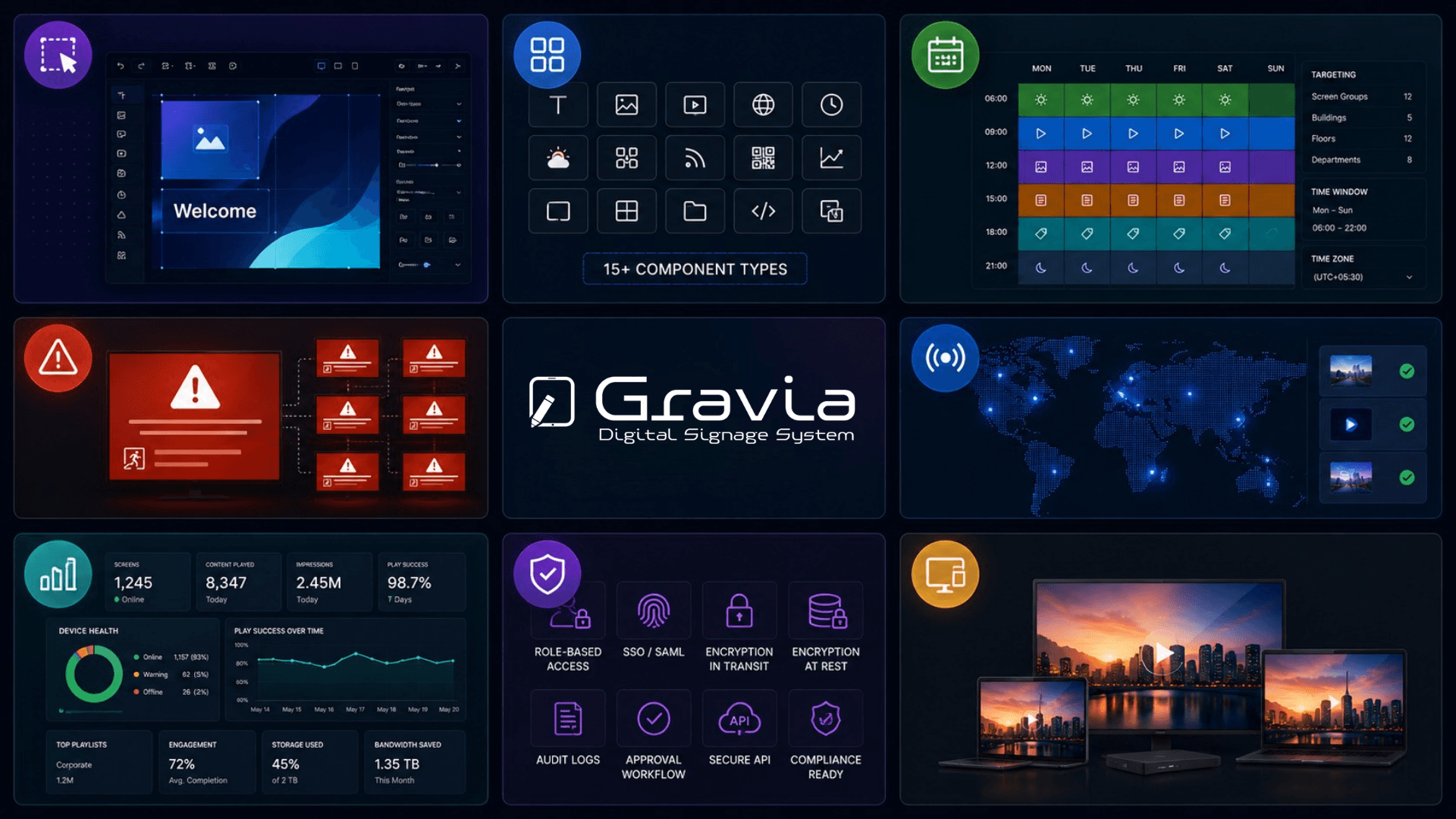
Canvas WYSIWYG Layout Editor — canvas resolution set per layout (landscape, portrait, video wall)
15 Component Types — Text, Image, Video, WebView, YouTube, Clock, Weather, Shape, Container, Playlist, QR Code, RSS, Countdown, Social Media, Data Visualization
Drag-Drop Component Palette with Snap-to-Grid + Per-Component Animations
Playlists with Ordered Items + Per-Item Duration Overrides
Schedules Targeting Display / Group / Floor / Building / Department
Day-of-Week + Time-Window Scheduling with Priority Rules
Emergency Broadcast (Alert / Warning / Critical / Info severity)
Building → Floor → Department Hierarchy + Screen Groups
Floor Maps with Visual Screen Placement (X/Y per display per floor)
Multi-Tenant Architecture (fully isolated per organization)
Real-Time Player Updates (sub-second on schedule change)
SmartPlay Fallback Chain — Layout → Playlist → Clock (never blanks)
HealingVideo with HLS Fallback (detects stalls and auto-retries)
Offline Mode with Last-Cached Content + Exponential Reconnect
Display Heartbeat + Auto-OFFLINE Detection (30s sweep)
PlayHistory Telemetry per Item Completion
LayoutHistory Versioning + Undo / Redo
Content Folder Tree with Drag-Drop Reorganization
Antivirus Scan on Every Media Upload
Signed, Time-Limited Media URLs (replay-resistant)
Per-Display API Keys (hashed at rest, rate-limited)
Mandatory 2FA in Cloud Mode (TOTP) + Account Lockout
Role-Based Access Control + Granular Permissions
OpenAPI / REST Surface for Custom Integrations
Cross-Tenant Audit Logging on Every Sensitive Action
Templates Library (Reusable Layout Starting Points)
Multilingual UI + Per-Layout Locale Switching (EN / AR with full RTL baseline, extensible to any locale)
GDPR / HIPAA / PDPL / ISO 27001 Aligned (cloud + on-prem)
Digital Signage Components
Signage CMS, Media Playback and Screen Administration.
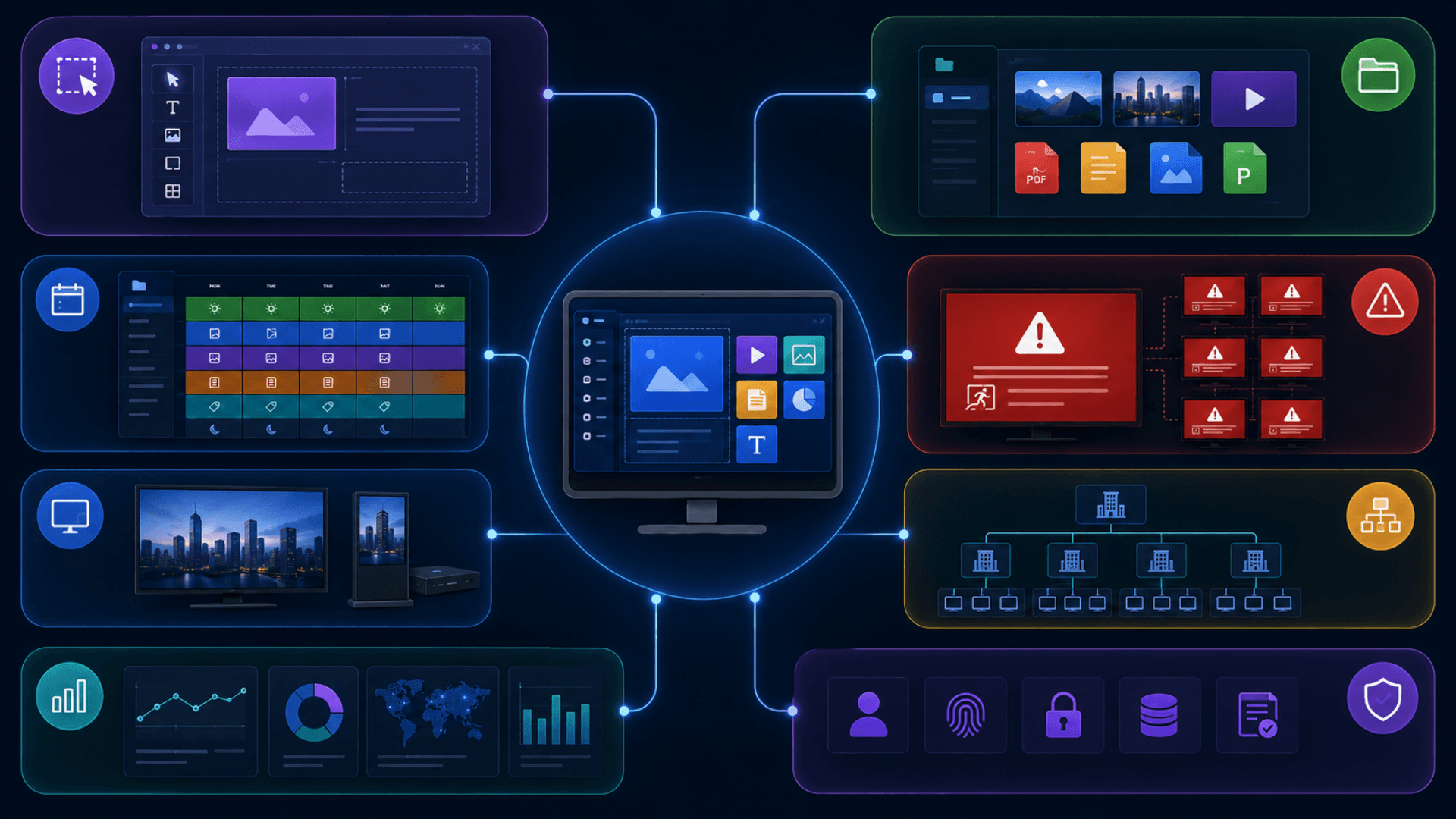
Content Library & Folders
Centralized media repository with folder hierarchy, antivirus scanning, and signed URL delivery.
- Nested content-folder tree (folder → subfolder → media)
- Antivirus scan on every upload
- Signed, time-limited media URLs
- Multi-format support: video (HLS / MP4 / WebM), image (PNG / JPG / WebP / SVG), web tiles, text
Playlist & Schedule Engine
Ordered playlists with per-item durations + a schedule engine that targets the exact subset of screens you need.
- Playlists with per-item duration overrides + auto-rotation
- Schedules target Display / Group / Floor / Building / Department
- Day-of-week filters + time windows + priority rules
- Schedule resolution per screen in real time
Display Hierarchy & Floor Maps
Real org structure modeled in the platform — Building → Floor → Department + orthogonal Screen Groups + visual floor maps.
- Building / Floor / Department / ScreenGroup nesting
- Floor maps with X/Y screen placement per floor
- Role scoping (Building Manager / Department Manager) follows hierarchy
- Live map dashboard with display status, schedule, last heartbeat
Telemetry & Analytics
PlayHistory captures every item completion; analytics dashboard turns it into actionable insight.
- Impression counts per content / per display / per time window
- Play-history telemetry feeds dashboards + exports (CSV / API)
- Offline detection via a 30-second sweep plus an optional standalone watchdog
- Audit log with actor + timestamp + structured metadata
Media Protection and Administrator Access
Built for regulated environments — antivirus, signed URLs, 2FA, lockout, hashed display keys, cross-tenant audit.
- Antivirus scan on every upload (production-mandatory)
- Signed, short-lived media URLs
- Mandatory 2FA in cloud mode (TOTP), account lockout, signed sessions
- GDPR / HIPAA / PDPL / ISO 27001 aligned; on-prem option for data sovereignty
Publishing Control Across Your Screens
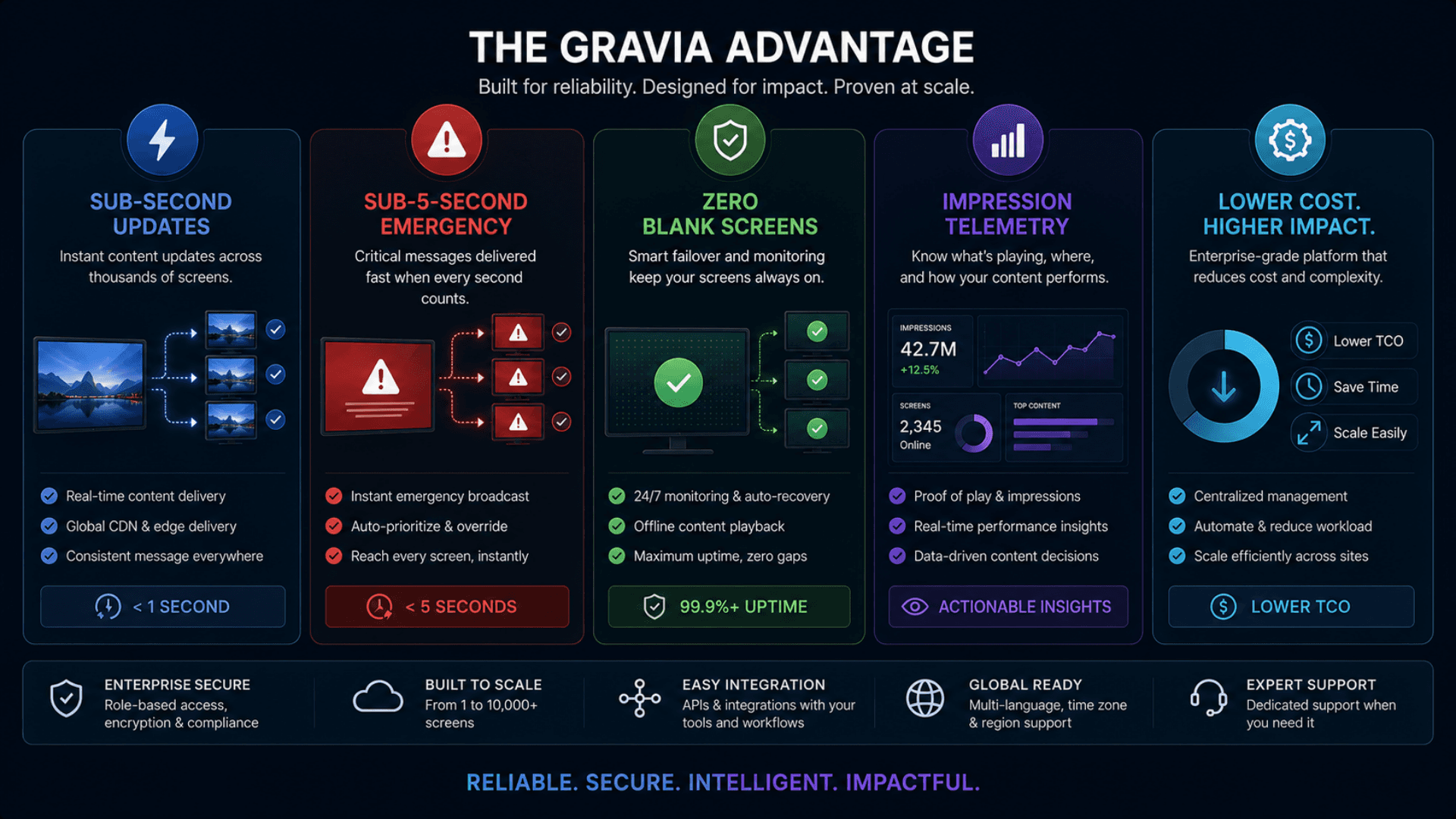
Update content across 1,000+ screens in under a second — no USB sticks, no truck rolls
Cut content-deployment cost by 80% versus manual screen-by-screen updates
Eliminate "blank screen of shame" with HealingVideo + SmartPlay fallback + offline mode
Activate emergency broadcasts on any subset of screens in 5 seconds
Standardize brand consistency across every site, automatically
Drive 25–40% more impression time per visitor with relevant, scheduled content
Free design teams from per-screen content adaptation — one layout, every resolution
Track real engagement with PlayHistory telemetry + analytics dashboard
Scale from 1 display to 10,000+ on one platform without rearchitecture
Future-proof with Open APIs, 15 component types, and a multi-platform player
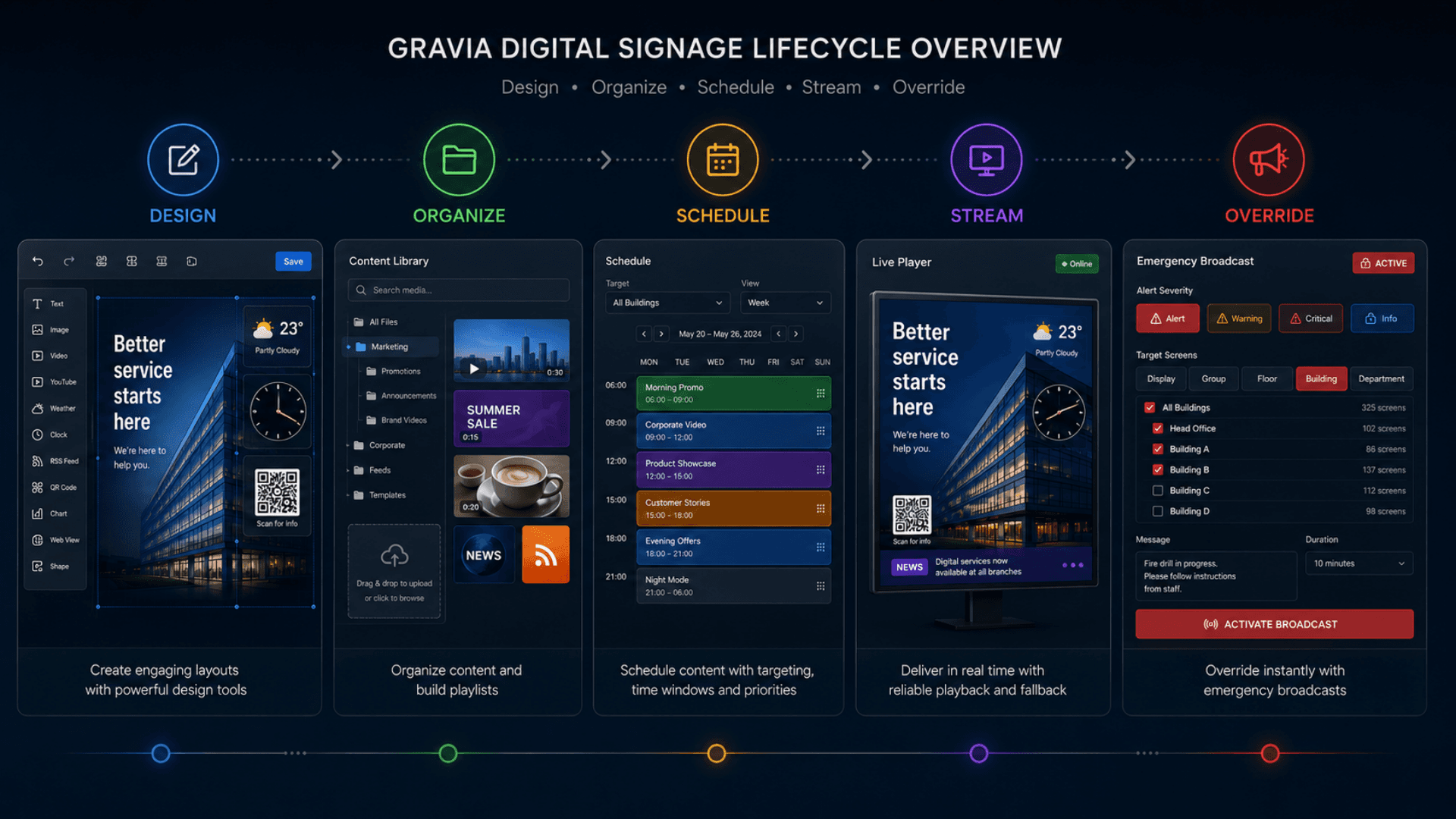
From Content Layout to Scheduled Playback
Prepare media, arrange layouts, choose target screens and publish a playback schedule.
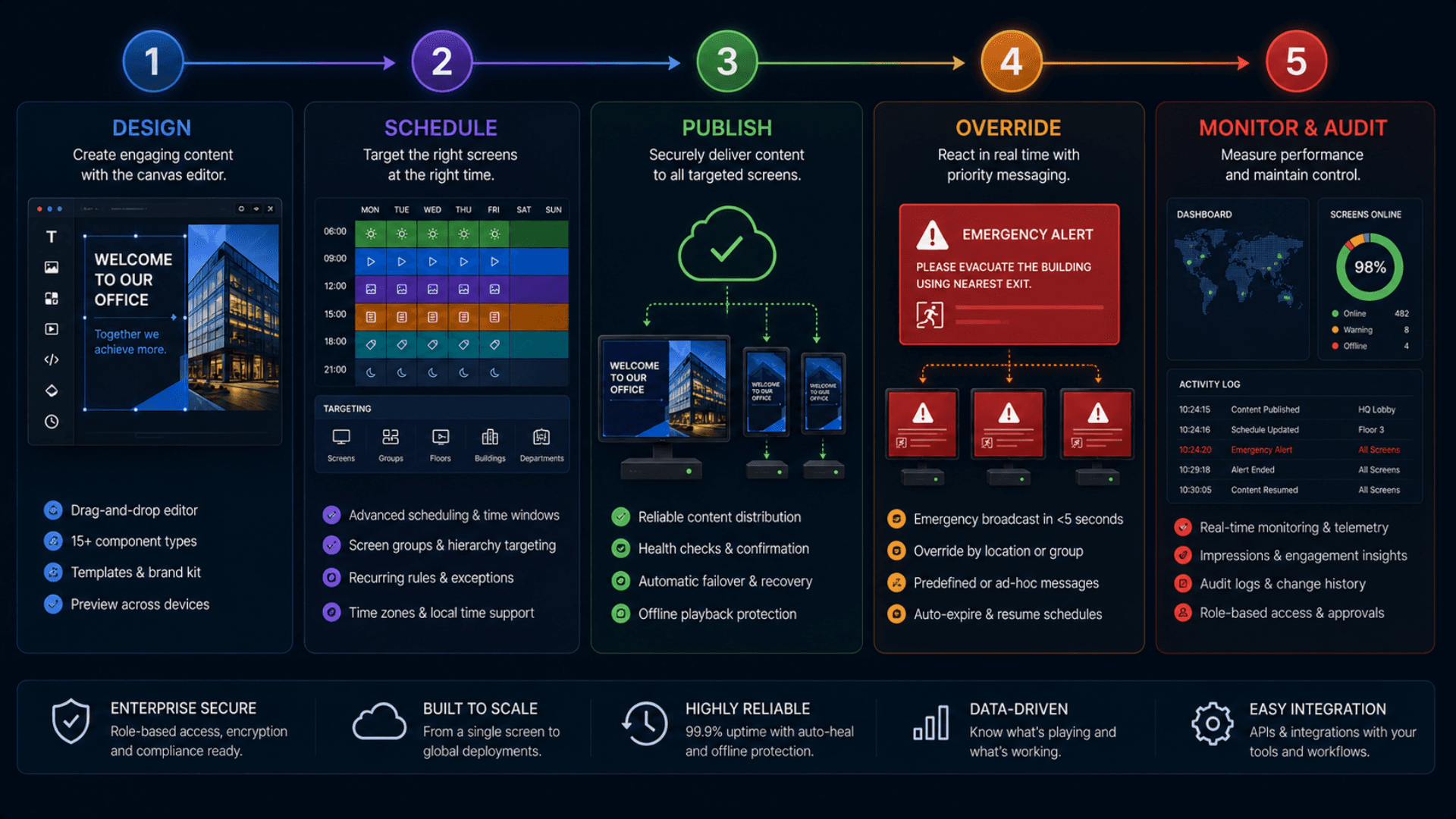
Design in the Canvas Editor
Drag components (text, video, YouTube, weather, clock, RSS, QR, social, charts) onto the layout canvas — its resolution is set per layout (1920×1080 by default; portrait and video-wall sizes supported). Position with snap-to-grid, tune per-component animations, save versions to LayoutHistory. Pick from the Templates library to start fast.
Organize Content & Playlists
Upload media to a content-folder tree (videos auto-scanned by antivirus before serving). Build ordered playlists with per-item duration overrides. All media is served via signed, short-lived URLs.
Schedule with Targeting
Create Schedules targeting Displays, Screen Groups, Floors, Buildings, or Departments. Set day-of-week filters, time windows, and priority. The engine resolves the active layout / playlist per screen automatically.
Players Stream Live
Each display runs the player runtime — paired via a display-scoped API key over an authenticated real-time connection. Schedule changes propagate in under a second; HealingVideo handles streaming stalls; offline displays fall back to cached content and reconnect with exponential backoff.
Override, Measure, Improve
Push emergency broadcasts to any screen subset in 5 seconds (Alert / Warning / Critical / Info). PlayHistory captures every item completion. Analytics dashboard shows engagement; the 30-second OFFLINE sweep flags any unresponsive display before someone notices a black screen.
Digital Signage Use Cases by Industry
Explore the service environments relevant to digital signage.
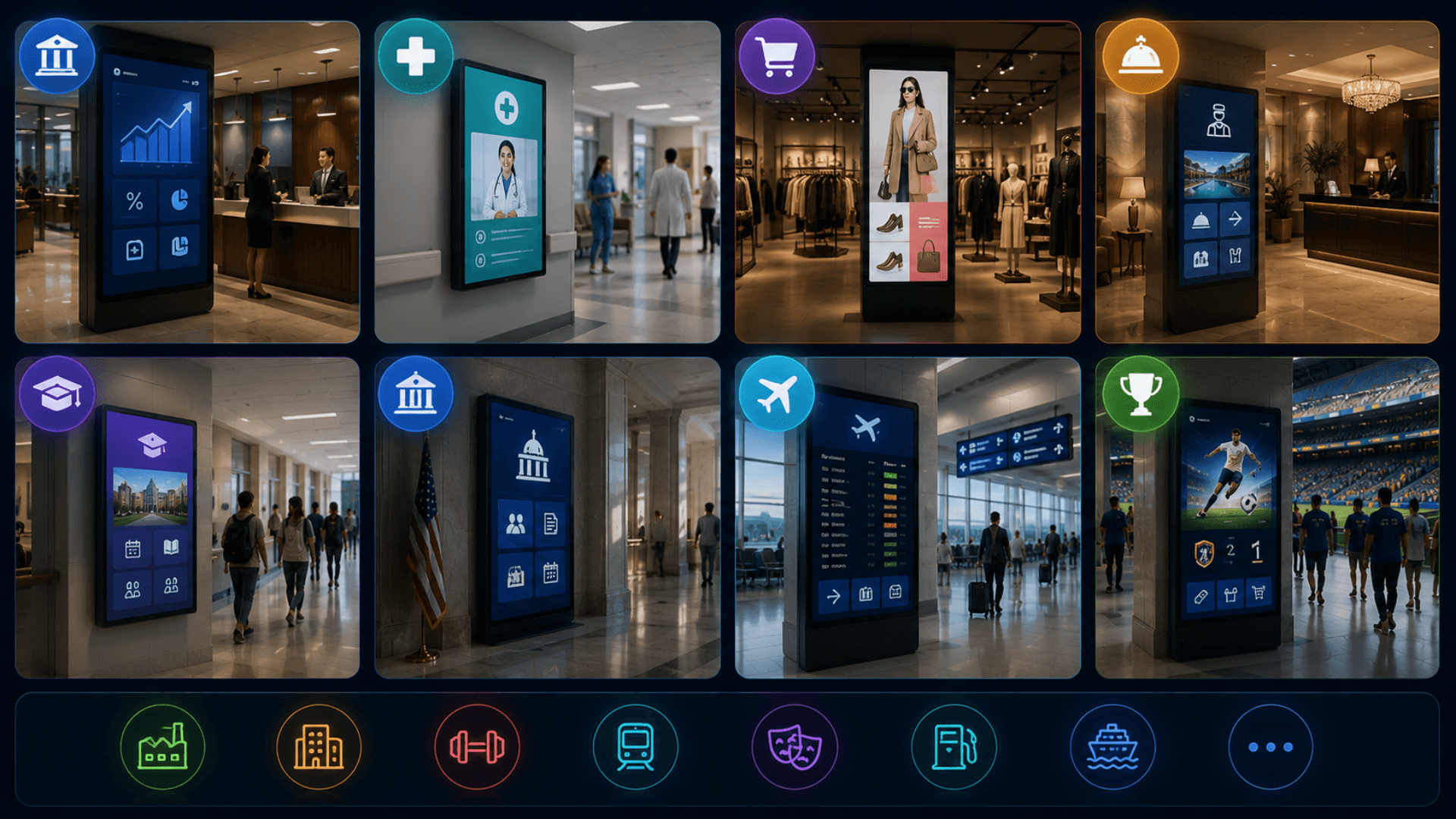
Open the deep dive by vertical
Customers running Digital Signage in production
3 featured deployments where Digital Signage ships today — a selection from a much wider production portfolio. Click any card for the full case-study deep dive.
Servizz.gov · Malta
Government citizen-services authority running 30+ service hubs across Malta on Zeour GLARUS queue management with GRAVIA digital signage at every hub.
Iraq Passport · 50+ branches
Zeour GLARUS queue management + GRAVIA digital signage deployed across 50+ Iraqi passport offices — single central rule configuration, per-branch execution.
IIB Bank · 20+ branches
GLARUS queue + GRAVIA signage + customer-feedback deployed across IIB Bank, a Sharia-compliant retail-banking network with 20+ branches — end-to-end branch transformation.
Digital Signage System FAQs
Get answers to the most common questions about our digital signage.
What is a digital signage CMS?
Can GRAVIA run just one or two screens for a small business?
How does GRAVIA digital signage work?
What content types can run on the displays?
What hardware can run as a display?
How does multi-screen scheduling work?
How does emergency broadcasting work?
What happens if a display goes offline?
Can I run YouTube, weather, clock, and RSS feeds together on one screen?
How is content updated on the screens?
Cloud SaaS or on-premise — which do customers pick?
Is GRAVIA Digital Signage GDPR / HIPAA / PDPL compliant?
How does Building → Floor → Department targeting work?
Can I use floor maps to visualize screen placement?
How is media security handled?
How does account security work?
How long does deployment take?
Can GRAVIA integrate with our existing systems?
Does it integrate with the rest of the GLARUS platform?
Is GRAVIA suitable for high-stakes lobbies like banks, hospitals, and airports?
How does GRAVIA pricing work?
Explore Related Solutions
Connect screen publishing to service calls, reception information and interactive visitor journeys.
Ready to Transform Your Operations with Digital Signage?
Discuss your workflows, deployment requirements and integration scope with the Zeour team.
Digital Signage — concepts you'll meet
Definitions for the operational terms that appear across this page. Tap any chip to read the long-form entry plus its cross-links.