
Self-Service Kiosk Solutions
Zeour builds self service kiosk software and hardware for organisations digitising customer transactions. Payment, ordering, identity verification and check-in workflows are tailored to the service, with touchscreen interfaces and peripherals selected together for each kiosk project.
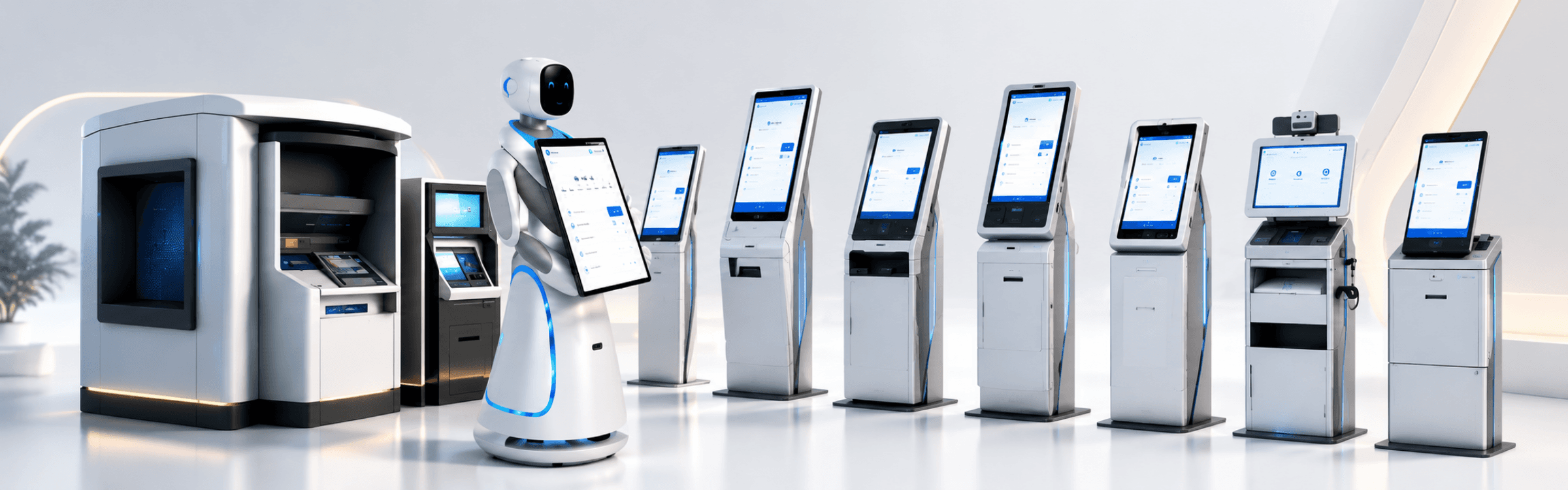
Custom Kiosk Software and Hardware
Start with the transaction your customer needs to complete, then define the interface, device components and system connections around it. Zeour's kiosk work spans payments, document capture, ordering and other self-service flows.
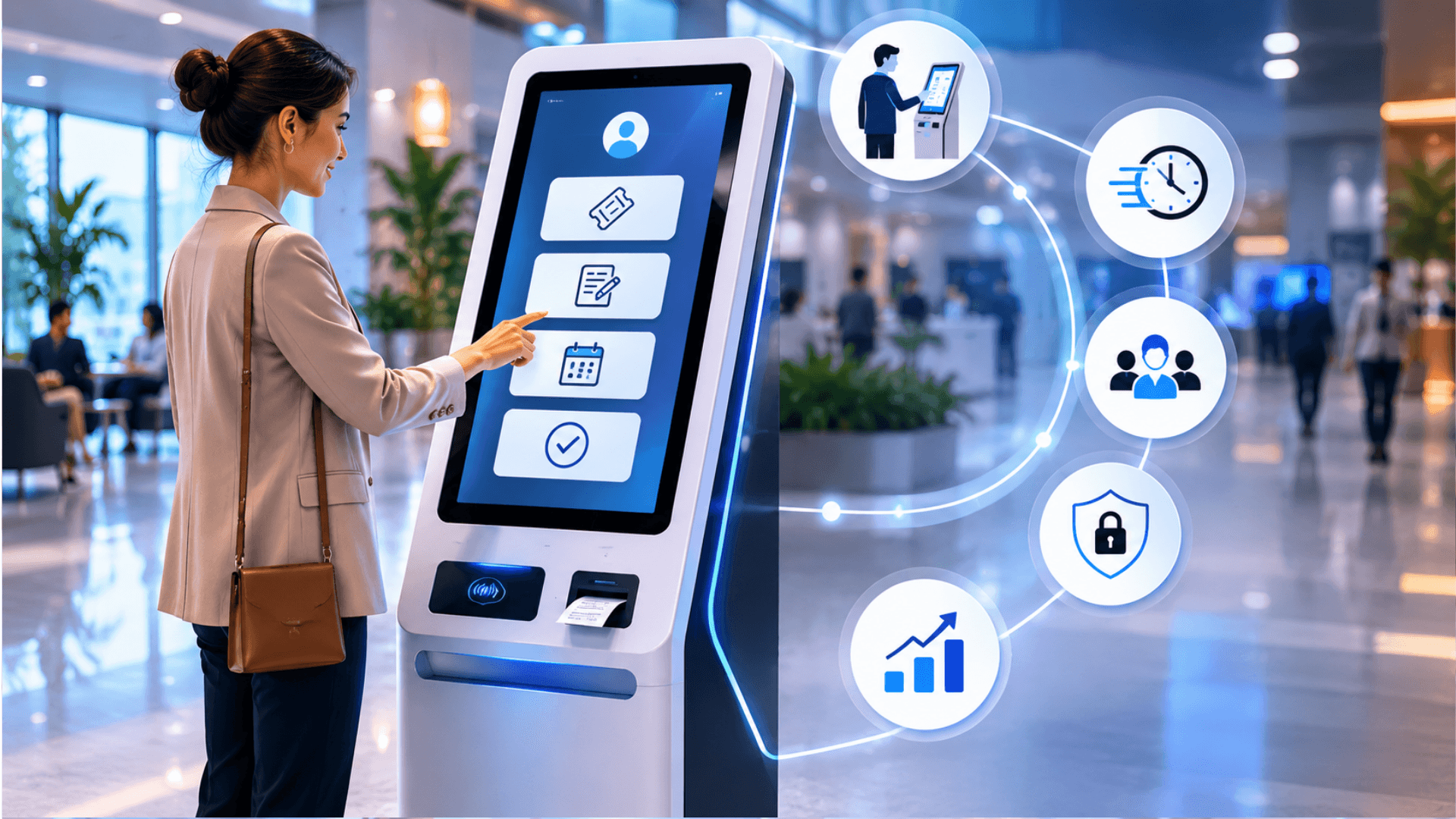
Choosing the Kiosk's Role
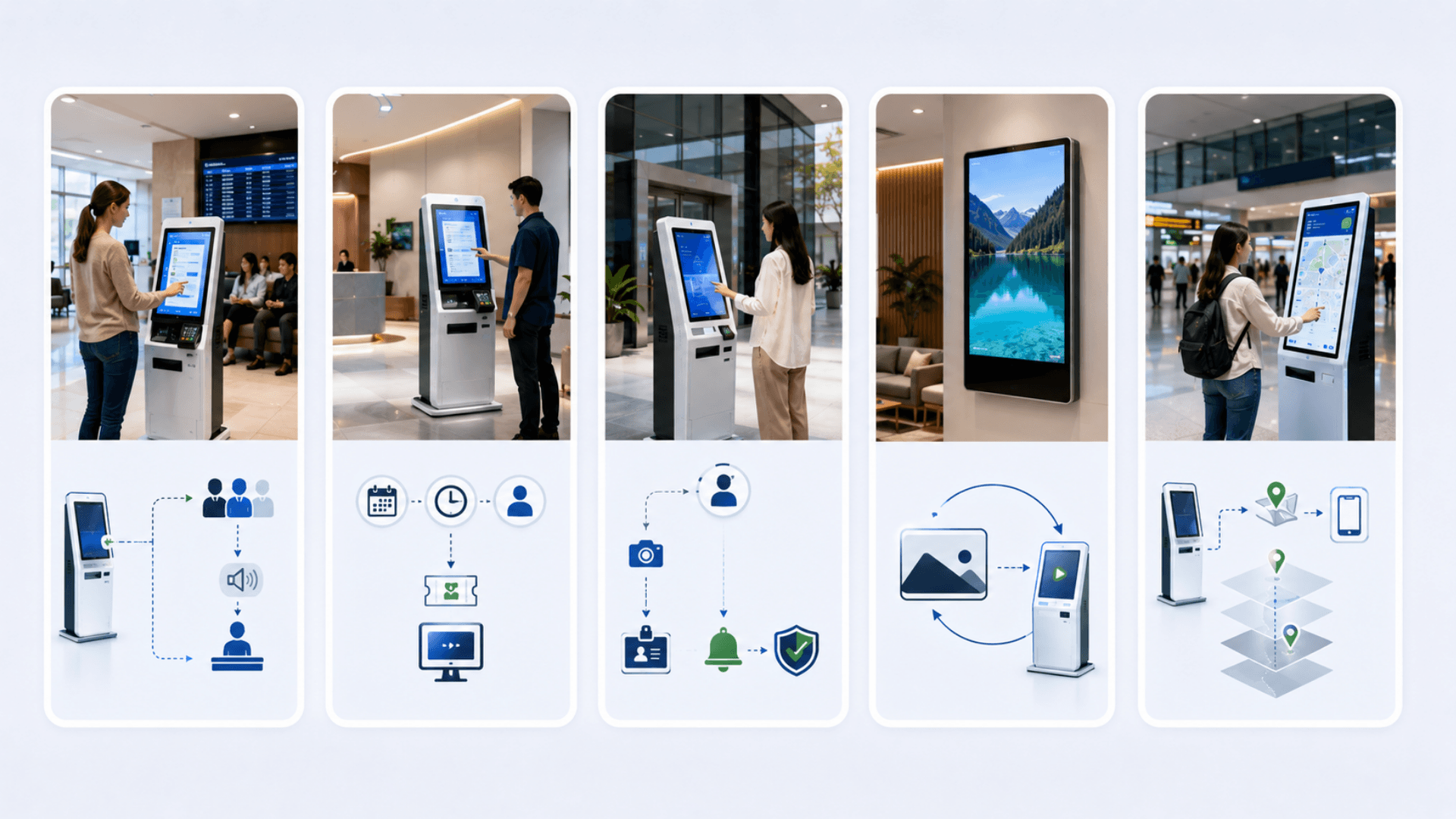
For issuing service tickets, explore queue management software. Reception check-in belongs with the visitor management system, which covers visitor records and host notifications.
Information terminals can provide indoor wayfinding, while digital signage content management supports screen content and idle-mode messaging.
Kiosk Workflows, Peripherals and System Connections
Zeour is a kiosk solutions company — not a kiosk product vendor. We engineer the software and the hardware together for the specific transactions you need to digitize: self-payment, self-ordering, KYC, SIM dispensing, charity donations, tender participation, utility billing, government citizen services, restaurant POS, bank self-service, taxi booking, and more. The deliverable is a kiosk that does exactly what your operation needs — not a generic terminal that almost-does-it. Software is built on a kiosk shell with payment, identity, integration, and compliance SDKs; hardware is configured from our enclosure catalog and peripheral vendor network. Central management, OTA updates, and field-replaceable modules keep the estate humming.
Zeour builds bespoke self-service kiosks end-to-end — software and hardware engineered together for the exact service you need to digitize. Self-payment kiosks (utilities, fines, fees, tuition, taxes), self-ordering for restaurants and QSR, charity donation kiosks, airport taxi-booking kiosks, telecom SIM-dispenser kiosks, bank self-service (cash deposit / withdrawal / cheque), KYC kiosks with passport / national ID / face match / fingerprint, tender-participation kiosks for government procurement, utility payment kiosks, government self-service citizen portals, restaurant self-ordering + POS integration, and more. Every deployment is custom-fitted to your operation; every kiosk integrates with your existing systems; every transaction is auditable. From a single kiosk pilot in one store to fleets across hundreds of branches — same software, same hardware line.
Key Functionalities
Self-Payment Across Every Path
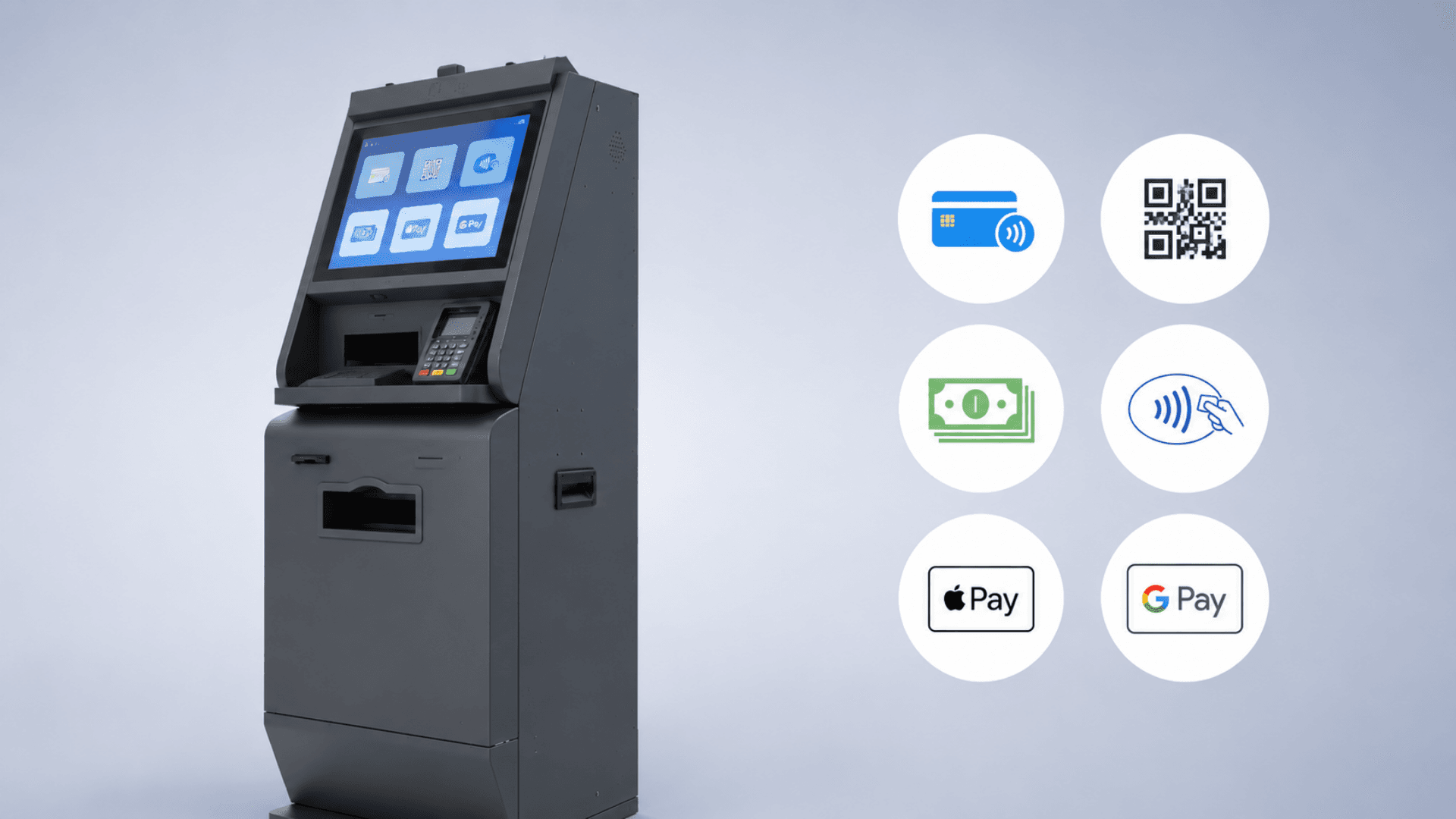
Cards (EMV chip + contactless), QR codes (regional schemes + Apple Pay / Google Pay), cash (acceptors + recyclers), bill aggregator gateways, mobile money. P2PE keeps PCI DSS scope minimal; acquirer integration uses your existing contract.
Self-Ordering & POS Integration
Restaurant / QSR / café self-ordering with menu management, modifiers, upsell prompts, allergen flags, and real-time POS integration (Oracle Micros, Aloha, Square, and other major / local POS platforms). Order tickets print to the kitchen; payment lands in your existing acquirer flow.
KYC & Identity Verification
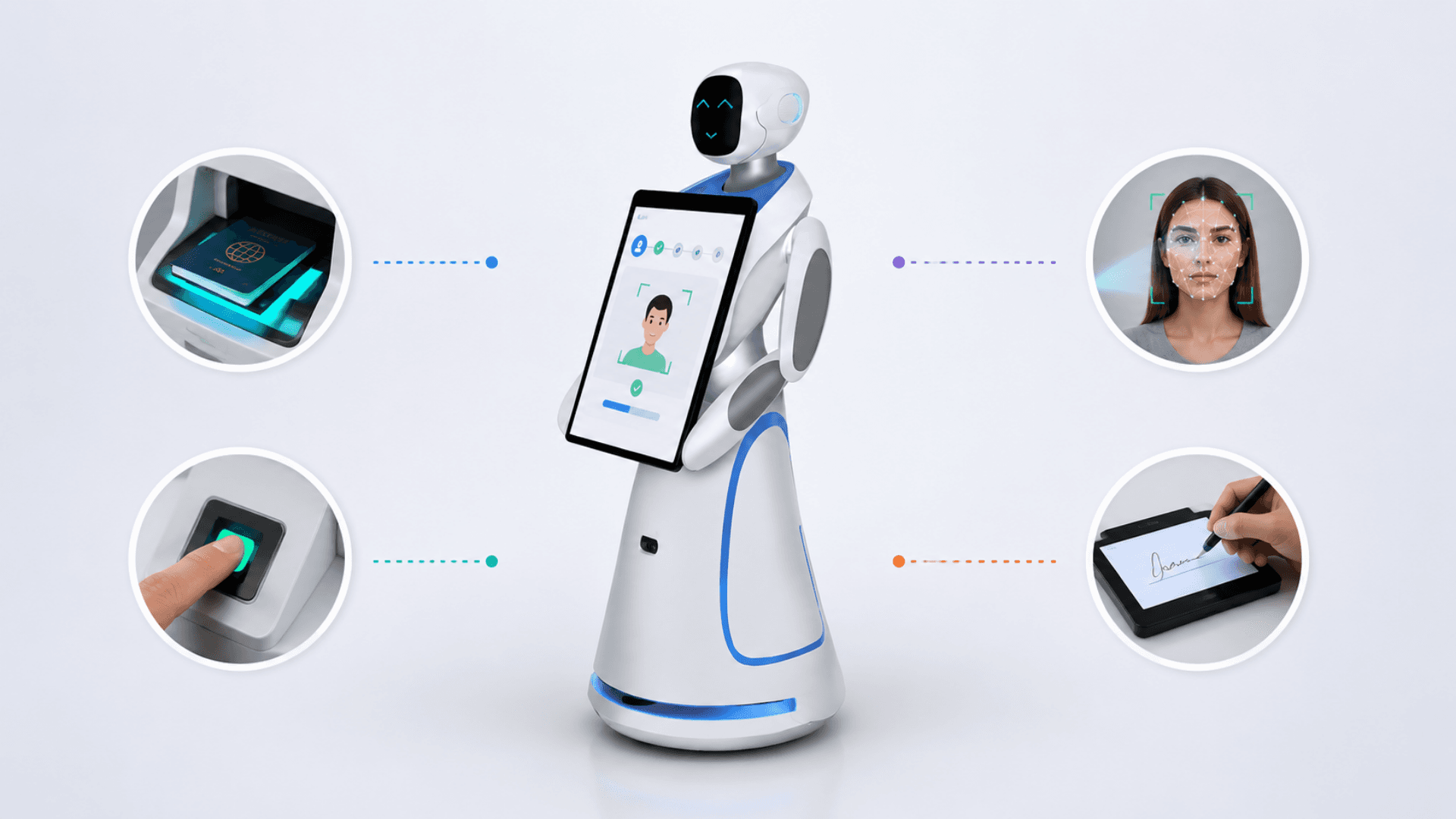
Multi-modal: passport MRZ + RFID chip, national ID, face match with liveness, fingerprint (FBI-certified), iris scan. Document validation against issuing-authority databases where permitted. Auditable KYC records for regulator inspection.
SIM Dispenser & Telecom Activation
eKYC + SIM dispensing in one kiosk: KYC capture → identity check → carrier activation → physical SIM dispense from a tray-loaded magazine → receipt + QR for activation status. Used by telcos for self-service SIM pickup at airports, retail, and visa centers.
Tender Participation
Government tender submission kiosks with document upload, digital signature (PKI), timestamped submission receipts, and integration to the procurement authority's back-office. Designed for ministries running open-tender processes with anti-fraud audit.
Utility & Bill Payment Aggregation
Multi-provider routing: electricity, water, gas, internet, telecom, government fees, parking, fines. Configurable per region and per provider. Receipts include provider reference, transaction code, and QR proof-of-payment.
Bank Self-Service
Cash deposit, cheque imaging, cash withdrawal (where licensed), account opening with KYC, card issuance, mini-statement, fund transfer. Integrates with the bank's core banking system (Temenos, Finacle, Mambu, etc.) through the bank's middleware layer.
Government Citizen Services
Permit renewal, certificate issuance, license payment, civil registry self-service. Integrates with the country's e-government interoperability gateway, identity provider, and payment gateway. Designed for citizen halls and ministry lobbies.
Charity & Donation
Multi-currency donation kiosks for NGOs, religious institutions, and fundraising drives. Multiple donation programs per kiosk, recurring-donation enrollment, receipt + tax-deduction PDF emailing, anonymous-mode toggle.
Receipt + Document Output
Thermal printers (60mm / 80mm, dual-roll, auto-cutter); label printers for retail / logistics; A4 page printer (rare, for permits / certificates); cryptographically signed PDF receipts emailed to the customer.
Centrally Managed UI + Branding
Kiosk UI is fully themable; branding (logo, colors, typography, voice tone) is centrally managed and pushed OTA. Multi-language with full RTL support; locale-specific content per region.
Health, Status & Audit
Per-kiosk health monitoring (peripheral state, paper / ink / cash levels, network), real-time alerts, structured audit log of every transaction with cryptographic chain (tamper-evident), and supervisor flows for cash reconciliation and exception handling.
Software Components
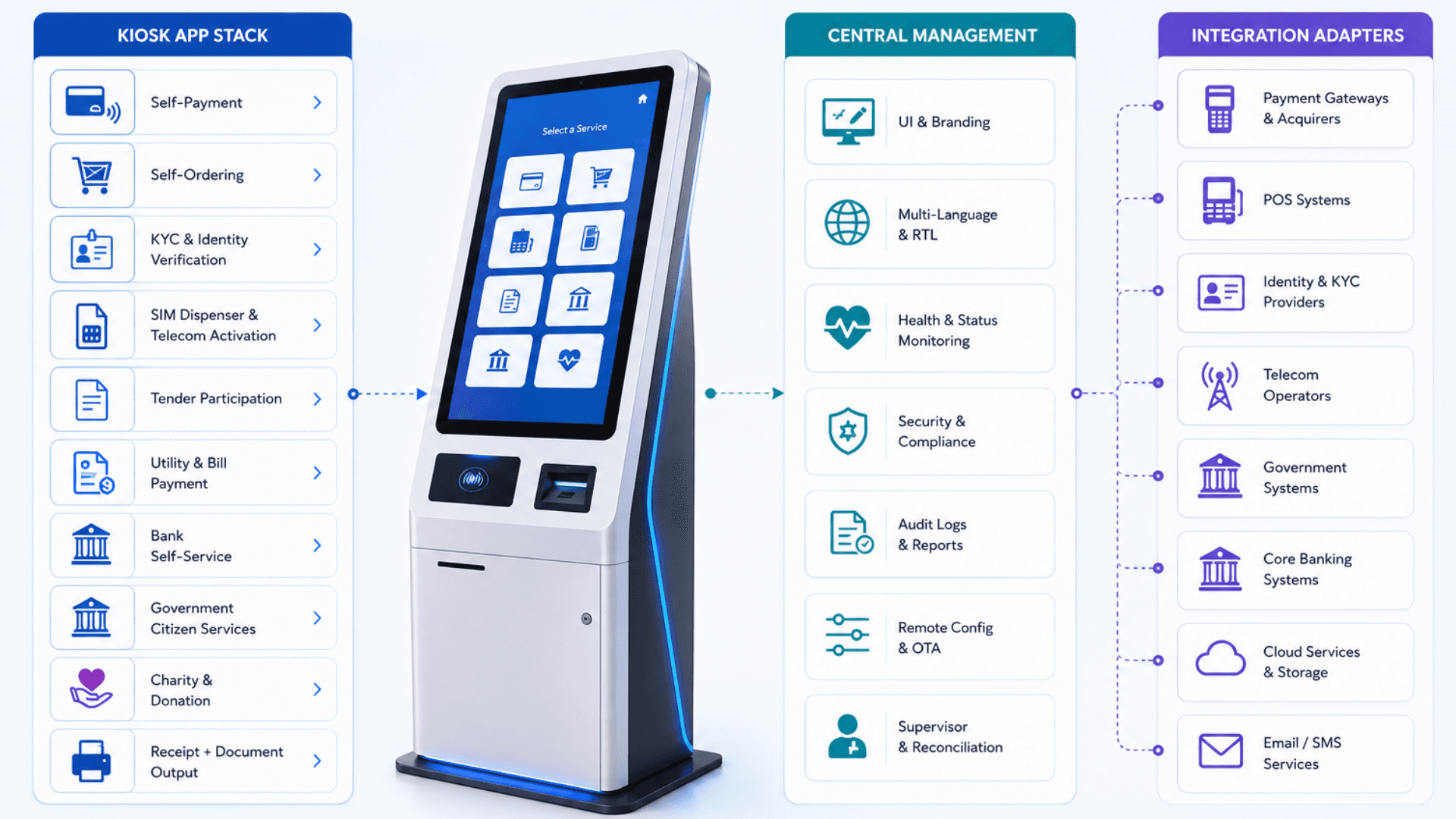
Kiosk Application Stack
Kiosk Shell + Browser Engine
Long-running kiosk-mode application with crash recovery, watchdog, idle reset, and tamper-resistant single-app lockdown. Supports Windows IoT, Linux (Ubuntu / Alpine), and Android (for AUTO666-class devices).
Branded Touchscreen UI
Custom UX designed per use case — payment, KYC, SIM dispense, self-ordering, etc. Multi-language with full RTL support, accessibility features (audio guidance, lower-reach mode, large tap targets), animations, and brand-specific theming.
Payment SDK
EMV chip + contactless card flows, QR (multi-scheme), Apple Pay / Google Pay, cash acceptor / recycler control, mobile money gateways. P2PE-tunneled card data so PCI DSS scope stays minimal.
Identity & KYC SDK
Passport reader integration (MRZ + RFID chip + photo OCR), national ID readers, face capture with liveness detection, fingerprint capture (FBI-certified scanners), iris scan. Document validation against issuing-authority APIs where permitted.
Integration Adapters
REST / SOAP / SDK adapters to CRM, ERP, banking core, POS, identity providers, government APIs, telecom OSS / BSS, payment gateways. Adapter library grows per project.
Central Management
Kiosk Management Console
Per-kiosk health / status / peripheral state, real-time alerts (paper-out, cash-low, peripheral-fault, network-down), OTA software / branding updates with staged rollout + automatic rollback on health-check failure.
Supervisor Console
Cash reconciliation, peripheral status, transaction lookup, exception handling, end-of-day reports. Used by floor staff at the kiosk location.
Audit + Compliance Layer
Per-transaction structured audit log with cryptographic chain (tamper-evident). Configurable retention; right-to-be-forgotten workflow; export to your compliance system or SIEM.
Analytics + Reports
Per-kiosk and per-estate dashboards: transactions per day, average ticket size, conversion / abandonment rate, peripheral fault counts, OEE-style availability metrics. CSV / API export for BI tools.
Security & Compliance
PCI DSS 4.0 Alignment
P2PE card data path, tokenization for stored references, ASV scans, compliance documentation, acquirer certification support. Card data never touches our application servers when P2PE is used.
GDPR / HIPAA / PDPL Alignment
Encryption in transit + at rest, configurable data retention, right-to-be-forgotten workflows, audit logging, RBAC, 2FA for admin / supervisor consoles.
Country-Specific KYC Frameworks
Per-country eKYC requirements (Saudi Arabia, UAE, EU, UK, US, India, Africa). Document-validation API integrations with issuing authorities. Liveness detection at the scanner.
Tamper & Anti-Fraud Hardware
Tamper-evident locks, anti-fishing cash slot sensors, CCTV-overlay metadata, signed receipts with QR proof-of-transaction, signed PDF documents for permits and tender submissions.
Integration Patterns
Banking Core (Temenos / Finacle / Mambu)
Account lookup, balance, mini-statement, fund transfer, cheque deposit imaging, card issuance, KYC update — through the bank's middleware (typically ESB or API gateway).
Payment Gateways
Stripe, Adyen, Network International, PayTabs, MyFatoorah, HyperPay, Checkout.com, regional acquirers. P2PE for card-present; tokenized for card-on-file scenarios.
Telecom OSS / BSS
Subscriber lookup, KYC submission, SIM activation, plan provisioning, top-up. Integration with Amdocs, Ericsson BSCS, or homegrown BSS platforms.
Government APIs
National identity, civil registry, e-government gateways (NLEAS / Yesser / similar), permit / certificate issuance APIs, payment gateways for government fees, tender submission portals.
POS Systems (Restaurant / Retail)
Oracle Micros / Simphony, Aloha, Square, IKentoo, and other local POS platforms. Order injection, payment finalization, ticket printing to kitchen, daily reconciliation.
Field Operations
OTA Update Pipeline
Staged rollout (canary → 10% → 100%), automatic rollback on health-check failure, signed update artifacts, per-kiosk update history.
Field-Replaceable Modules
Printer, scanner, card reader, cash module, biometric scanner all designed as field-replaceable units. 15-minute swap on average. SLA-driven replacement parts cache for high-volume deployments.
24/7 Health Monitoring
Watchdog process + heartbeat to central console; peripheral state polling; auto-recovery for common faults (paper-out reset, network reconnect, peripheral re-init). On-call escalation for hard faults.
Hardware Components
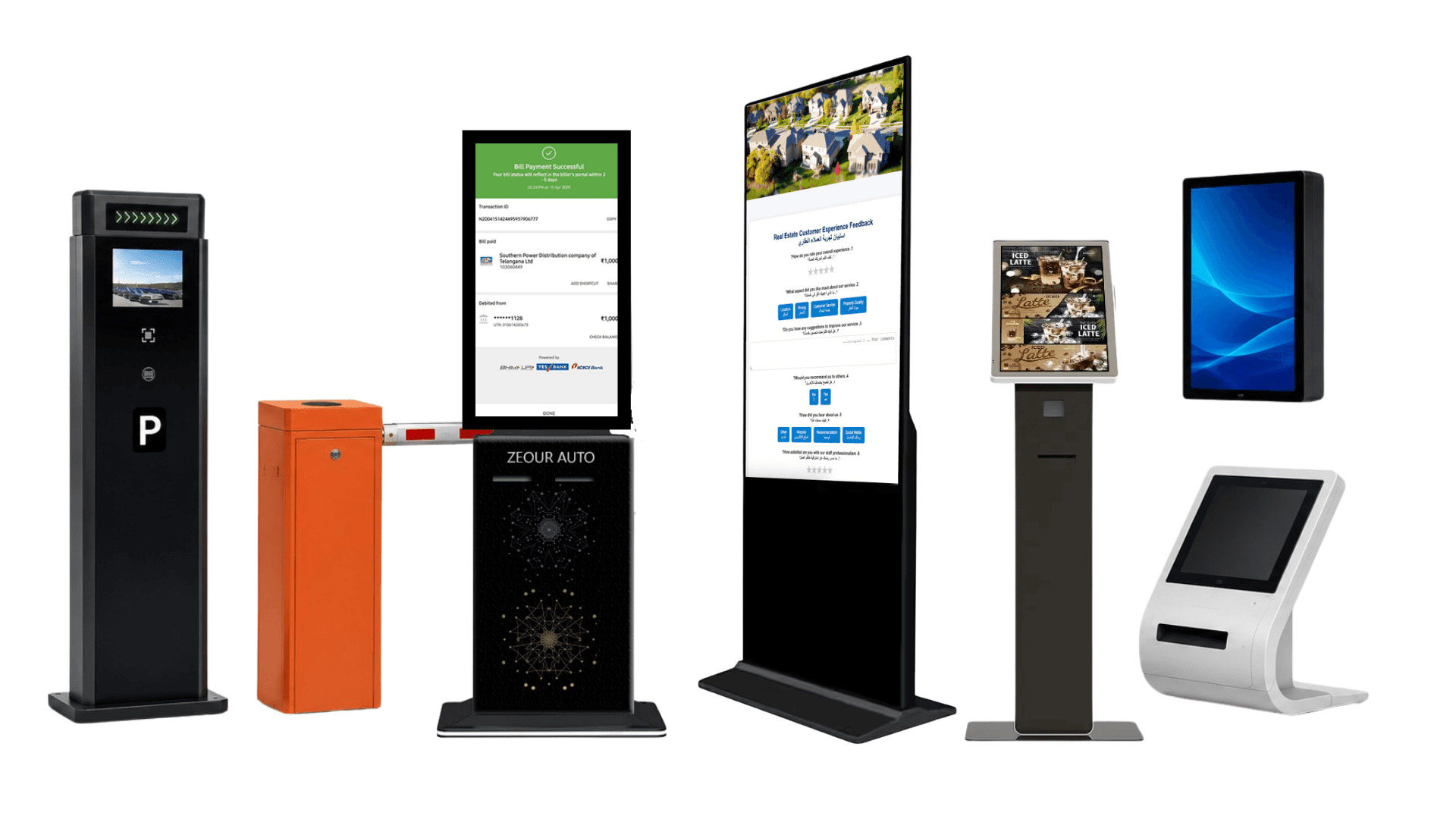
Free-Standing Kiosks (Lobby / Public Area)
AUTO Free-Standing Self-Service Kiosk (AUTO666-HW-L-AD)
15", 17", 21",32", 42", 55" Full HD capacitive touchscreen, Linux / Android / Windows OS, 80mm thermal printer, IP54-rated (24/7 outdoor / indoor harsh environments). Optional A4 / ID scanners, camera modules, biometric peripherals. Vandal-resistant.
KIOSAPP066 (GLARUS Kiosk Light)
18.5" or 21" capacitive touchscreen, Linux / Android / Windows, 60mm / 80mm thermal printer (dual optional), LAN + WiFi, aluminum edging with toughened glass. CE / RoHS / FCC certified. Compact lobby kiosk for branches and service centers.
KIOSAPP06 / GRAVIA Kiosks (KIOSGRV301 / KIOSGRV303)
Design-forward GLARUS and GRAVIA-branded kiosk variants for queue ticketing, wayfinding, and customer self-service. HW-S, HW-SS, and HW-LL form-factor options to fit different lobby footprints — touchscreen + thermal printer option; OS, peripherals, and cabinet finish configured per deployment.
Wall-Mounted & Counter-Top
Wall-Mounted Kiosks
15" / 21" capacitive touchscreens for corridor placement, queue ticket dispensers, wayfinding directories. VESA mount + integrated peripherals as needed.
Counter-Top Self-Order
Compact 13" / 15" counter-top touchscreens for restaurant self-ordering, retail self-checkout, hotel concierge desks. Integrated card reader + scanner.
Payment Peripherals
EMV Card Readers (P2PE)
Ingenico / Verifone / PAX devices certified for chip-and-PIN + contactless. P2PE tunneled card data; PCI DSS scope minimized.
Cash Acceptors & Recyclers
CashCode, JCM, MEI, Glory bill validators and recyclers. Deposit, dispense, change-giving, denomination management. Coin dispensers where required.
QR / NFC / Apple Pay / Google Pay
Camera-based QR scanners + NFC readers + Apple Pay / Google Pay support for contactless mobile payments.
Identity & Scanning
Passport / ID Readers
Full-page passport readers with MRZ OCR + RFID chip reading + visible-light + IR + UV imaging. National ID scanners. Document validation against issuing-authority databases where permitted.
Biometric Scanners
FBI-certified fingerprint scanners (Suprema / Crossmatch), face cameras with liveness detection, iris scanners. Template encryption at rest.
Document Scanners (A4 / Duplex)
Flatbed and duplex ADF scanners for permit applications, certificate uploads, tender submissions. OCR with auto-crop and de-skew.
Output & Output Hardware
Thermal Printers (60 / 80mm)
Receipt printers (60mm / 80mm width), auto-cutter, dual-roll option, label printers for retail / logistics. Star, Epson, Bixolon brands.
A4 Page Printers
Inkjet or laser printers for certificates, permits, tender receipts. Less common but supported for government deployments.
SIM Dispenser Module
Tray-loaded SIM dispenser for telecom kiosks. Holds 200-500 SIMs per magazine; tracks each SIM's ICCID; dispenses on successful eKYC + activation.
Branch Infrastructure
CONT06 Industrial Branch Server
For on-premise kiosk-management backends. Ubuntu Linux local server.
Glarus_Hub (PoE / RS485 Hub)
Industrial 16-channel PoE hub for powering kiosks, signage, peripherals from a single rack point. Resilient to flaky mains power.
Self-Service Kiosk Architecture — Custom Software + Hardware per Deployment
Zeour kiosks are deployed as a stack: a custom kiosk application running on a fit-for-purpose hardware build, talking to a central management plane and to your existing back-office systems through pre-built integration adapters. The same kiosk shell + OTA pipeline + management console serves every vertical we deliver — the bespoke layer is the transaction flow, the peripheral mix, and the integration depth. Cloud SaaS, on-premise, or hybrid.
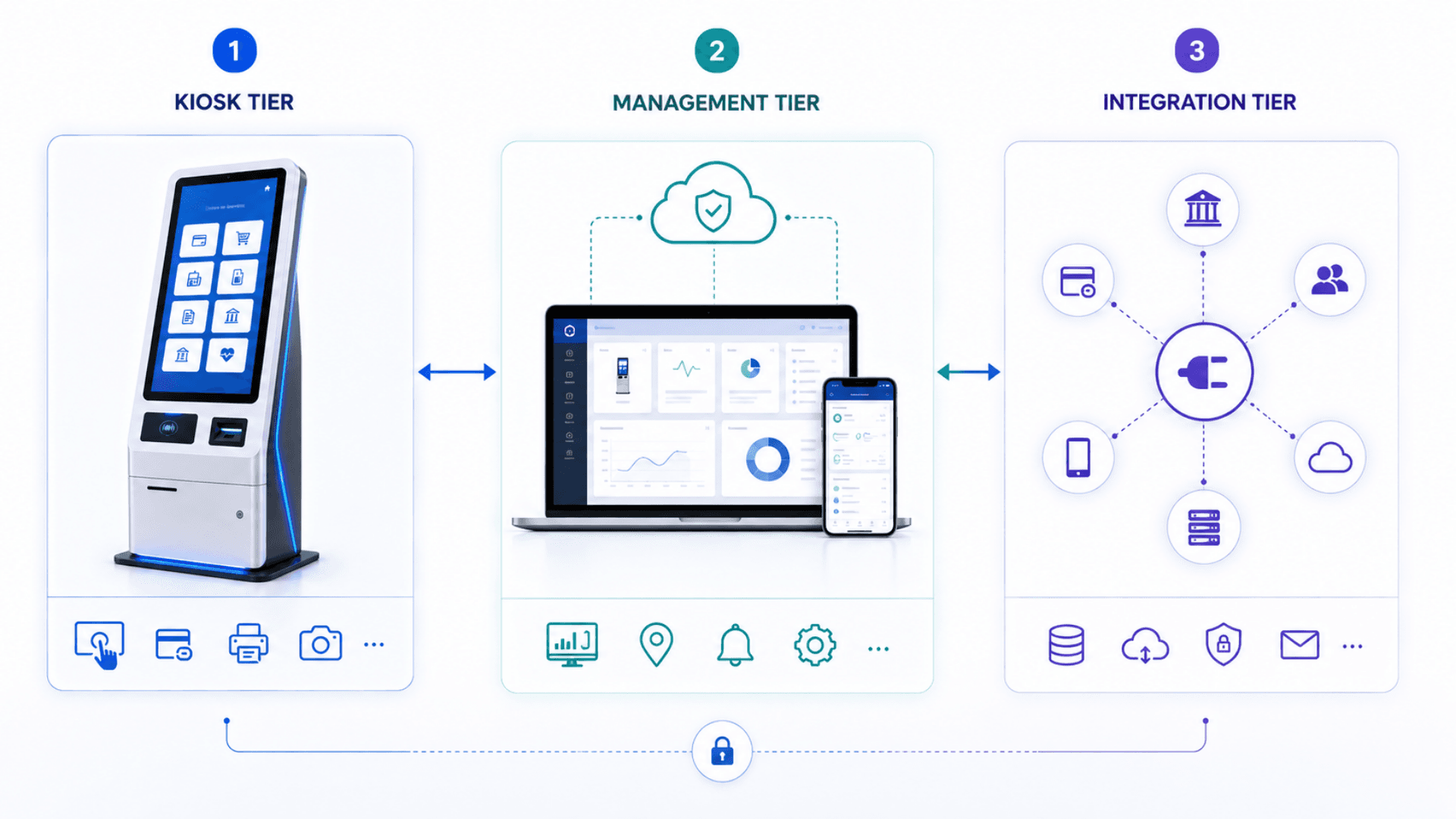
Tier 1 — The Kiosk Itself
Custom hardware + custom software per use case
- Hardware: free-standing (AUTO666) / lobby (KIOSAPP066) / GRAVIA / wall-mounted / counter-top, indoor / outdoor / IP54
- Peripherals: thermal printer, EMV card reader (P2PE), cash recycler, biometric scanner, document scanner, SIM dispenser, etc.
- Software: kiosk shell + branded UI + payment SDK + identity SDK + integration adapters
- Offline-tolerant operation, watchdog with auto-recovery, idle reset, tamper-evident lockdown
Tier 2 — Central Management Plane
Where the estate is operated
- Per-kiosk health / status / peripheral state in real time
- OTA software / branding updates with staged rollout + automatic rollback
- Real-time alerts (paper-out, cash-low, peripheral-fault, network-down)
- Per-kiosk audit trail of every transaction with cryptographic chaining
- Analytics + reports: transactions per day, average ticket size, conversion / abandonment, peripheral faults, uptime
- Supervisor console for cash reconciliation and exception handling
- Cloud SaaS or on-premise deployment per regulatory need
Tier 3 — Integration with Existing Systems
Where the kiosk meets your operation
- Banking cores (Temenos / Finacle / Mambu) via ESB or API gateway
- Payment gateways (Stripe / Adyen / Network International / PayTabs / local acquirers) — P2PE for card-present
- POS systems (Oracle Micros / Aloha / Square / local) — order injection + payment finalization
- Telecom OSS / BSS (Amdocs / Ericsson BSCS / homegrown) — subscriber lookup, eKYC, SIM activation
- Government APIs — national identity, civil registry, e-government interoperability gateway
- Identity providers (SAML / OIDC / national e-ID) for unified customer authentication
- CRM / ERP / BI / SMS / email — full enterprise integration library
Operational & Resilience Pipeline
Real-time- Health heartbeats from every kiosk to the central console — peripheral state, network state, cash / paper / ink levels
- Real-time alerts to operations + email / SMS / webhook for staff escalation
- Per-transaction audit log with cryptographic chaining (tamper-evident); cloud or on-premise sink
- OTA software / branding updates with staged rollout (canary → 10% → 100%) + automatic rollback on health-check failure
- Offline-tolerant modes — cached service catalogs, queued transactions, idempotent reconciliation on reconnect
- Dual-network failover (wired + LTE) for high-availability sites
- Field-replaceable modular hardware — printer / scanner / card-reader / biometric swap in 15 minutes
Bespoke Kiosks vs Off-the-Shelf vs Retrofitted POS vs Software-Only — What You Need
The kiosk market has four broad approaches. Three of them have visible cracks at enterprise scale. The fourth — bespoke software + hardware co-engineered for the specific transaction — is what Zeour does.
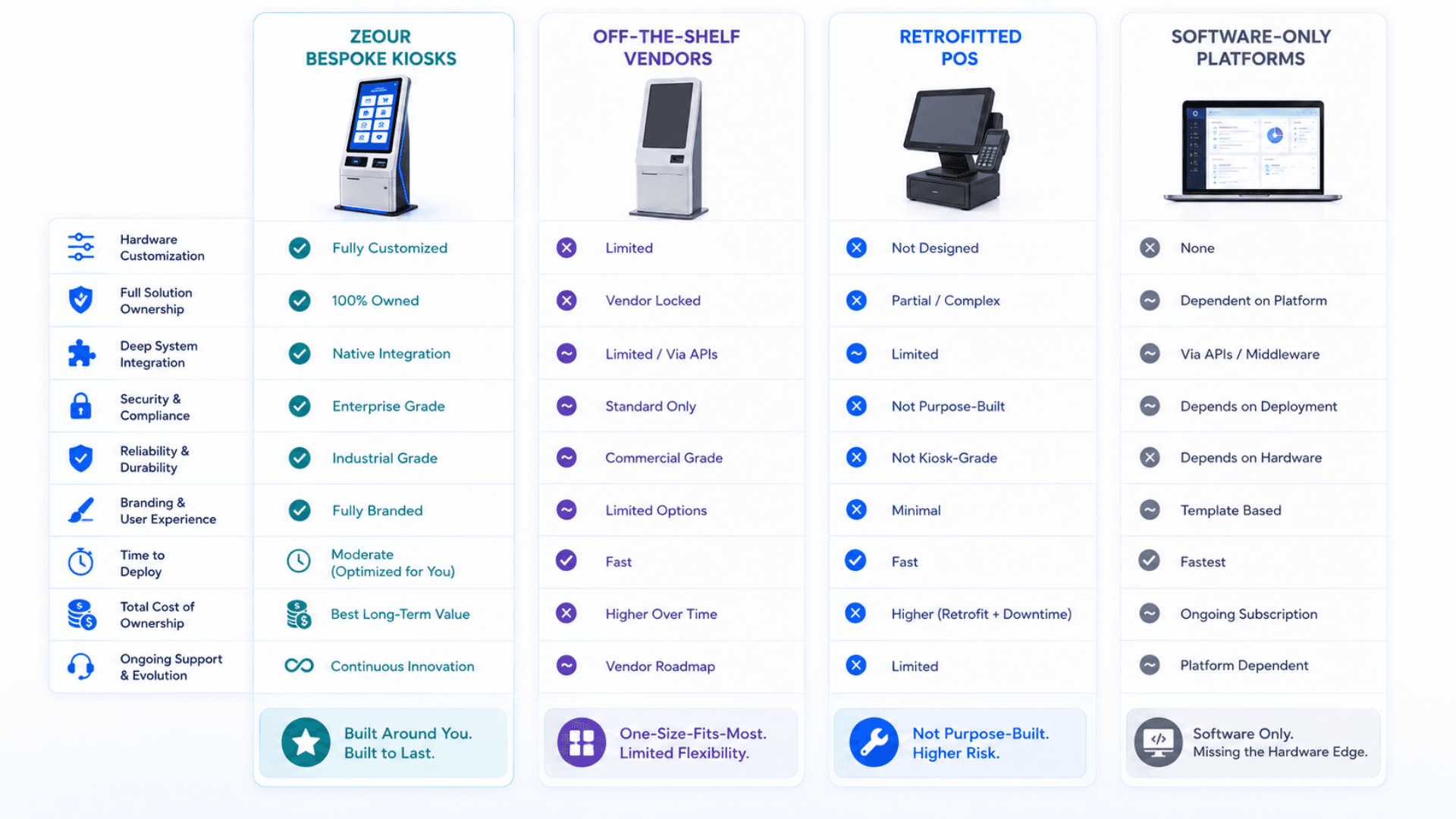
Zeour Bespoke Kiosks (Software + Hardware)
Best for: Real organizations digitizing real transactions — payment, KYC, SIM dispense, tender, utility, government, restaurant, bank — at single-site to multi-thousand-kiosk estate scale.
- Custom UX per vertical (self-payment / self-ordering / KYC / SIM / tender / utility / government / etc.)
- Custom hardware build from the GLARUS catalog + peripheral vendor network
- Open integration to banking core / payment / POS / telecom OSS / government API / CRM / ERP
- PCI DSS / GDPR / HIPAA / PDPL / ISO 27001 / country-specific KYC compliance engineered in
- Central management with OTA + field-replaceable modules + 99%+ uptime
- Cloud or on-premise backend with full audit trail
Off-the-Shelf Kiosk Vendor
Best for: Low-stakes use cases where the vendor's assumptions match yours exactly.
- Vendor-defined screen flows; limited customization beyond logo / colors
- Pre-set peripheral combinations; limited add-on options
- Vendor-defined integration patterns; bespoke integrations cost extra and lag
- Compliance posture inherited from the vendor; KYC / PCI / country-specific frameworks may not match
- Vendor lock-in for hardware and software updates
Retrofitted POS Terminal
Best for: Retail self-checkout where the POS vendor's self-service add-on is good enough.
- POS hardware + a self-service skin on the vendor's POS software
- Limited beyond retail self-checkout — no native KYC, SIM dispense, biometric, document scanning
- Cashier-era flow assumptions visible in the UX
- Tight POS integration as a feature; tight POS lock-in as a cost
- Compliance posture follows the POS vendor's posture (good for cards, often weak for KYC / personal data)
Software-Only Kiosk Platform
Best for: Customers who already have a kiosk hardware fleet and want a content-management layer.
- Software + management console; you source hardware separately
- No co-engineering of hardware + software — peripheral integration is on you
- No field service playbook; no hardware certification; no enclosure design
- Often works as a "content kiosk" but breaks down on transaction flows
- Cheap on day one; expensive when you have to manage a fleet without operational tooling
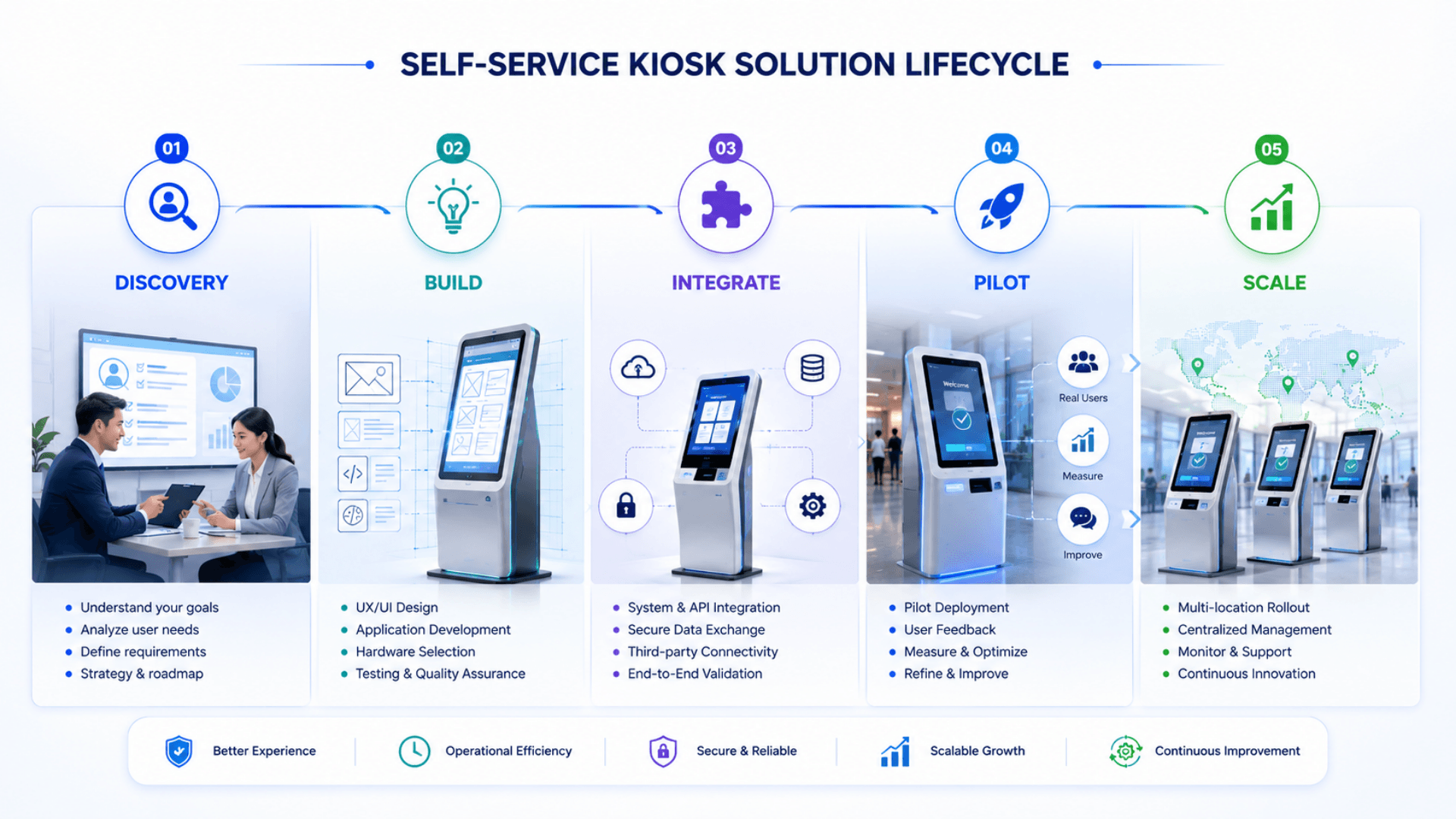
Self-Service Kiosk — Deployment Checklist
A practical 5-phase playbook for going live with bespoke Zeour kiosks — from kickoff through pilot to multi-site estate rollout. Use it as a project plan with your Zeour partner.

- 01
1) Discovery & Use-Case Engineering
ChecklistMap the exact transactions the kiosk must handle: services, payment paths, identity verification, document scanning, peripheralsIdentify integration endpoints: banking core, POS, payment gateway, telecom OSS, government APIs, CRM / ERPDetermine compliance scope: PCI DSS, GDPR / HIPAA / PDPL, country-specific KYC frameworks, ADA / EN 301 549 accessibilitySpecify environment: indoor / outdoor, IP rating, sunlight readability, climate, vandal-resistance, language coverageDecide deployment model — managed cloud backend, on-premise, or hybrid; data-residency requirements - 02
2) Hardware Configuration & Software Build
ChecklistConfigure hardware from catalog: enclosure (AUTO666 / KIOSAPP066 / counter-top / wall-mounted), industrial PC or Android, screen size, peripheralsBuild custom kiosk UX per vertical with multi-language, RTL, and accessibility featuresImplement payment flows (EMV P2PE + cash recycler + QR + Apple Pay / Google Pay) and KYC flows (passport + face + fingerprint)Build integration adapters to your existing systems (banking core, POS, OSS / BSS, government APIs, identity providers)Implement central management console + supervisor console + audit log pipeline - 03
3) Integration, Compliance & Certification
ChecklistConnect kiosk software to your existing systems through the adapter layer; perform end-to-end test scenariosComplete compliance certifications: PCI DSS (ASV + QSA), country-specific KYC (regulator validation), acquirer-side payment certificationPerform accessibility audits (WCAG 2.1 AA, ADA, EN 301 549)Penetration test the kiosk OS + application; remediate findings; sign-off security reviewDocument operator runbooks, supervisor procedures, escalation paths - 04
4) Pilot Deployment
ChecklistInstall 1-5 kiosks at a pilot site with on-site engineer support during go-live weekTrain reception, floor staff, and supervisors on the kiosk UX, supervisor console, cash reconciliation, and exception handlingMeasure for 2-4 weeks: throughput, conversion / abandonment rate, exception rate, uptime, peripheral fault count, customer NPSIterate on the UX based on observed customer behavior (rare gotchas, copy adjustments, accessibility tweaks)Sign off on the rollout-ready configuration before scaling further - 05
5) Estate Rollout & Continuous Improvement
ChecklistRoll out across the estate in waves using the same configuration template with site-specific overrides (language, branding, hardware mix)Operate health monitoring + OTA update pipeline + field-service playbook; target 99%+ fleet uptimeTrack per-kiosk and per-estate analytics: transactions, abandonment, average ticket, peripheral faults, OEE-style availabilityQuarterly review: optimize UX based on data, tune health-monitoring thresholds, plan peripheral refresh cyclesPlan vertical expansion: same hardware can often run additional flows (signage in idle, wayfinding, queue tickets) for higher ROI per kiosk
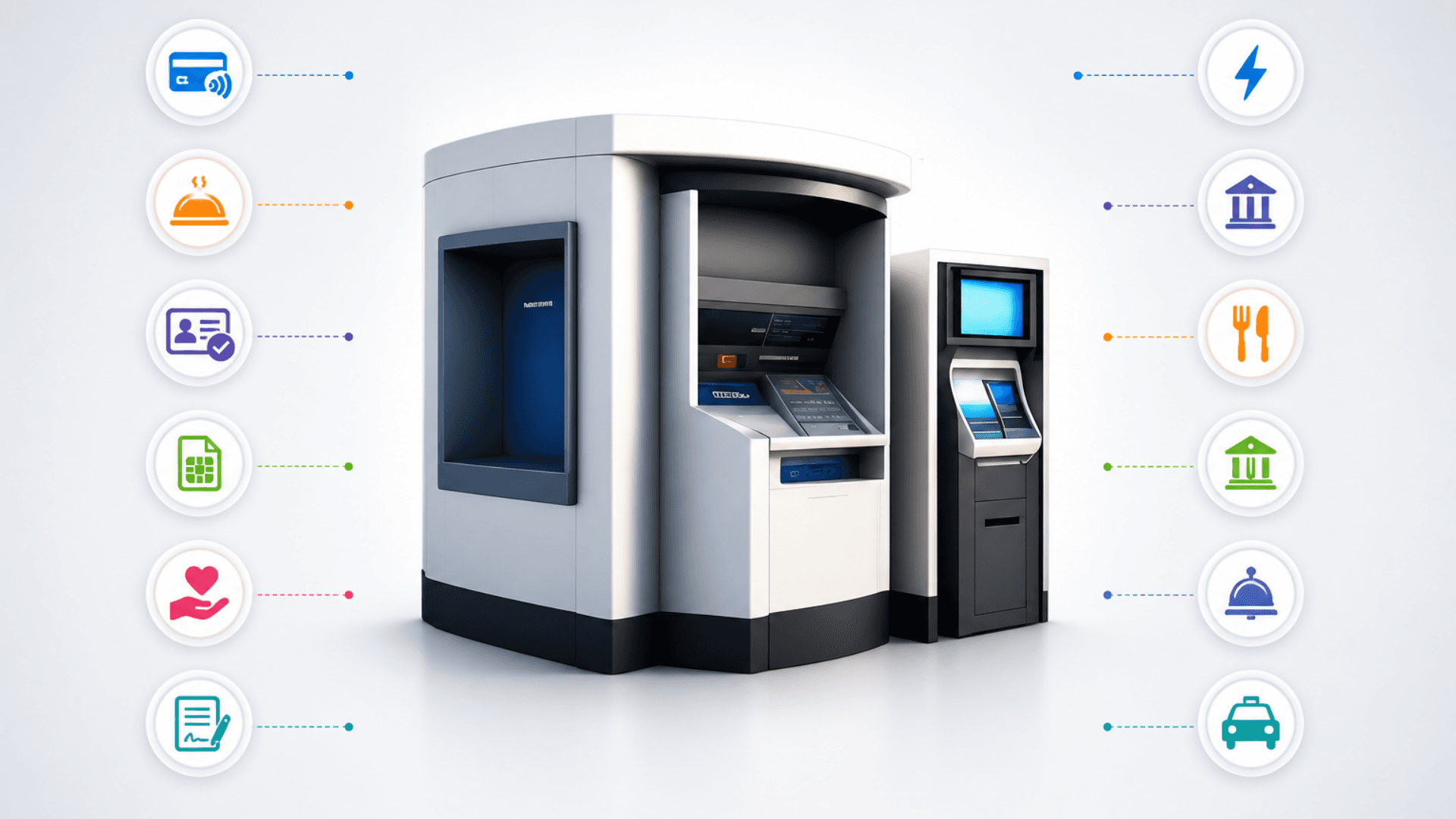
Self-Service Kiosk Gallery
Visual highlights of the verticals Zeour builds bespoke kiosks for — self-payment, self-ordering, KYC, SIM dispense, tender participation, utility payment, government, and more.
Why Counter-Only Service Fails
Counter-only service caps throughput and ties staff to routine transactions — here is why self-service kiosks are essential.
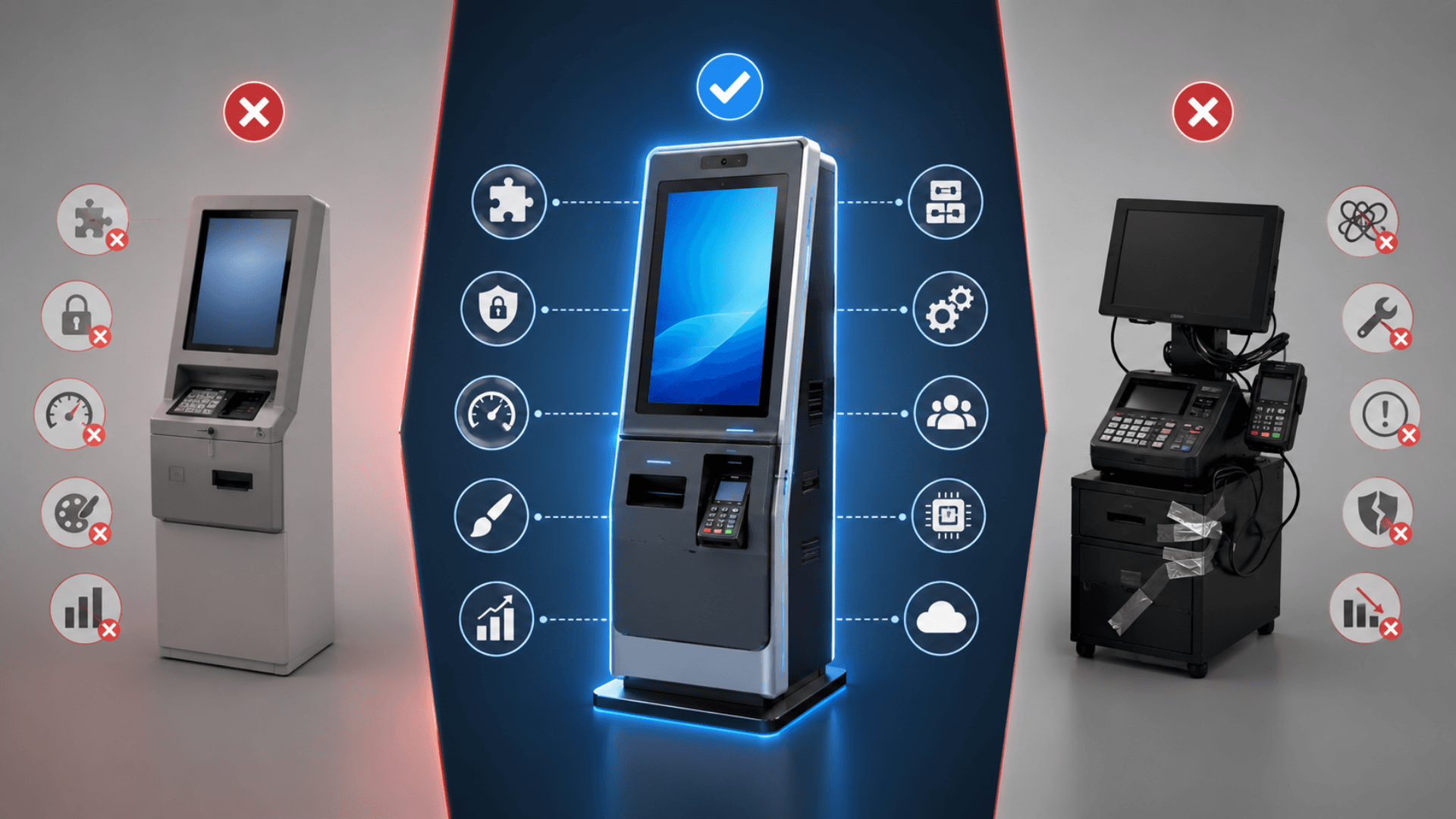
Off-the-Shelf Kiosks Force You to Fit the Vendor
The vendor's assumptions about payment paths, identity flows, peripheral choices, and integration patterns become your operation's constraints. For low-stakes use cases this works. For payment, KYC, SIM dispensing, or tender submission, you end up running a sub-optimal flow because the kiosk can't be customized to your reality.
Bespoke Software + Hardware Per Use Case
We co-engineer the kiosk to your exact transactions, your existing systems, your compliance posture, your brand, and your operational realities. No assumptions, no gaps, no "we don't support that yet."
Generic POS at a Self-Service Use Case
Retrofitting a generic POS terminal into a self-service kiosk leaves visible cracks — flow design wasn't built for an unattended customer, the UX has assumptions a cashier would smooth over, the peripherals don't handle high cycle counts. The customer figures it out, but the experience is rough and the abandonment rate is high.
Full Hardware Catalog + Vendor Network
Free-standing, wall-mounted, counter-top; indoor / outdoor / IP54-rated; with any peripheral combination — printers, scanners, biometrics, cash, EMV, NFC. Hardware and software ship together from one supplier.
No Hardware Means No Operational Reality
Software-only "kiosk platforms" sell a portal and expect you to source hardware separately. The result: hardware that doesn't match the use case, peripherals that don't integrate cleanly, no certification, no field-service playbook. When the thermal printer jams at 11pm on a Friday, who's on call?
Open Integration Library
CRM / ERP / banking core / POS / identity / government APIs / telecom OSS — pre-built adapter patterns with dozens of integrations behind them. Custom integrations are routine, not exotic.
No Integration Means a Stranded Kiosk
A kiosk that can't talk to your CRM, ERP, banking core, POS, government APIs, or telecom OSS is a clipboard. Customers complete a transaction at the kiosk, then a staff member re-enters the data into the real system. The whole point of self-service is lost.
Compliance-First Engineering
PCI DSS 4.0 alignment via P2PE, GDPR / HIPAA / PDPL data handling, country-specific KYC frameworks, signed audit logs. Legal signs off because we engineered for legal from day one.
No Compliance Posture Means Stop-Ship
PCI DSS for payments, GDPR / HIPAA / PDPL for personal data, country-specific KYC frameworks for banking and telecom, e-government interoperability for citizen services. A "kiosk" that hasn't engineered for these is a project that stops before launch because legal won't sign off.
Central Management + OTA + Field-Replaceable Modules
Real-time health monitoring across the whole estate, staged OTA rollouts with rollback, field-replaceable printer / scanner / card-reader / biometric / cash modules. 15-minute swap; 99%+ uptime.
No Field Service = Estate-Scale Pain
A kiosk fleet without health monitoring, OTA updates, and field-replaceable modules is a help-desk nightmare. Every paper jam becomes a truck roll; every software bug becomes a 100-kiosk USB-stick rollout. Operational cost balloons; uptime tanks.
One Platform Across Verticals
Self-payment + self-ordering + KYC + SIM dispense + tender + utility + government + restaurant + bank + hospitality kiosks — all on the same kiosk shell, same management console, same audit trail. Cross-vertical learnings compound.
Self-Service Kiosks Features
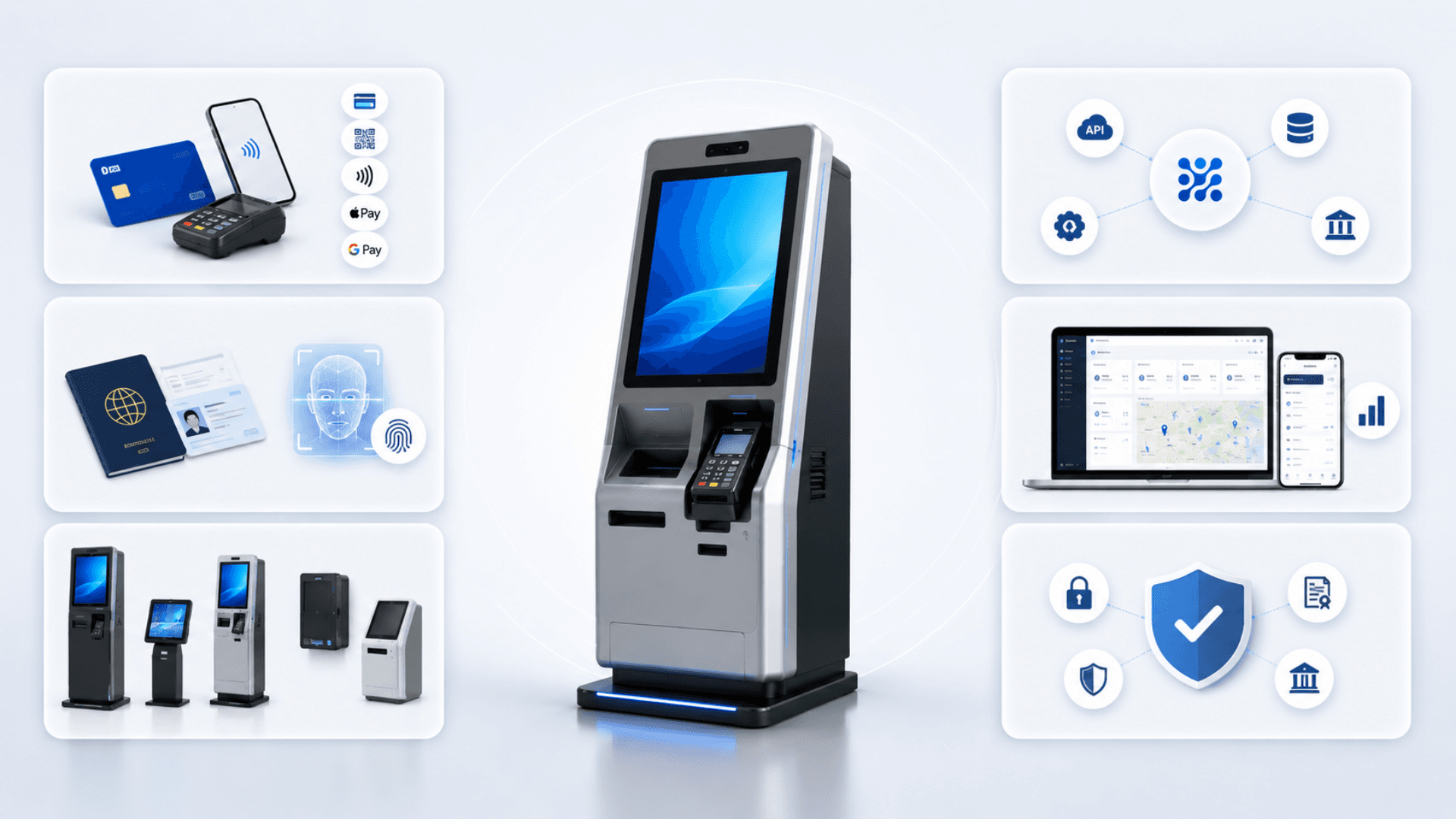
Bespoke Software + Hardware Co-Engineered Per Use Case
Self-Payment (Cards, Cash, QR, NFC, Apple Pay / Google Pay, Crypto)
PCI DSS 4.0-Aligned Payment Flows with EMV / P2PE
Cash Handling (Acceptors, Recyclers, Coin Dispensers, Dispense / Deposit / Change)
KYC & Identity Verification (Passport MRZ / OCR, National ID, Face Match, Fingerprint)
Document Scanning (A4 Flatbed, Duplex ADF, OCR with Auto-Crop)
Self-Ordering with Real-Time POS Integration (Restaurant / QSR / Cafe)
Bill / Utility Payment with Multi-Provider Routing
SIM Card Dispenser with eKYC + Activation (Telecom)
Branded Touchscreen UI with Animation, Multi-Language, RTL Support
Accessibility: AA / AAA Contrast, Audio Guidance, Lower-Reach Tap Zones, Wheelchair Profile
Receipt Printing (Thermal 60/80mm, Dual-Roll Option, Auto-Cutter)
Coupon / Voucher / QR Code Issuance with Cryptographic Signing
Barcode + QR Scanning (1D / 2D) + RFID + NFC Tap Readers
Biometric Capture (Fingerprint, Face, Iris) with Liveness Detection
Signature Pad + Photo Capture for KYC and Compliance
Weighing Scales + Label Printer Integration (Retail / Logistics)
Industrial PC + Android Variants + Outdoor IP54-Rated Models
Health / Status Monitoring with Auto-Recovery + Watchdog
24/7 Operation with Idle-Reset, Auto-Healing UI, Offline-Tolerant Modes
Centrally Managed Content + Branding via the GRAVIA Signage CMS
Per-Kiosk Audit Trail of Every Transaction
Open Integration: REST / SOAP / SDK to CRM, ERP, Banking, Government Gateways
Field-Replaceable Modules (Printer, Scanner, Card Reader) for Fast On-Site Service
GDPR / HIPAA / PDPL / ISO 27001 Aligned (Cloud or On-Premise Backend)
Self-Service Kiosks Components
Kiosk Workflows, Peripherals and System Connections.
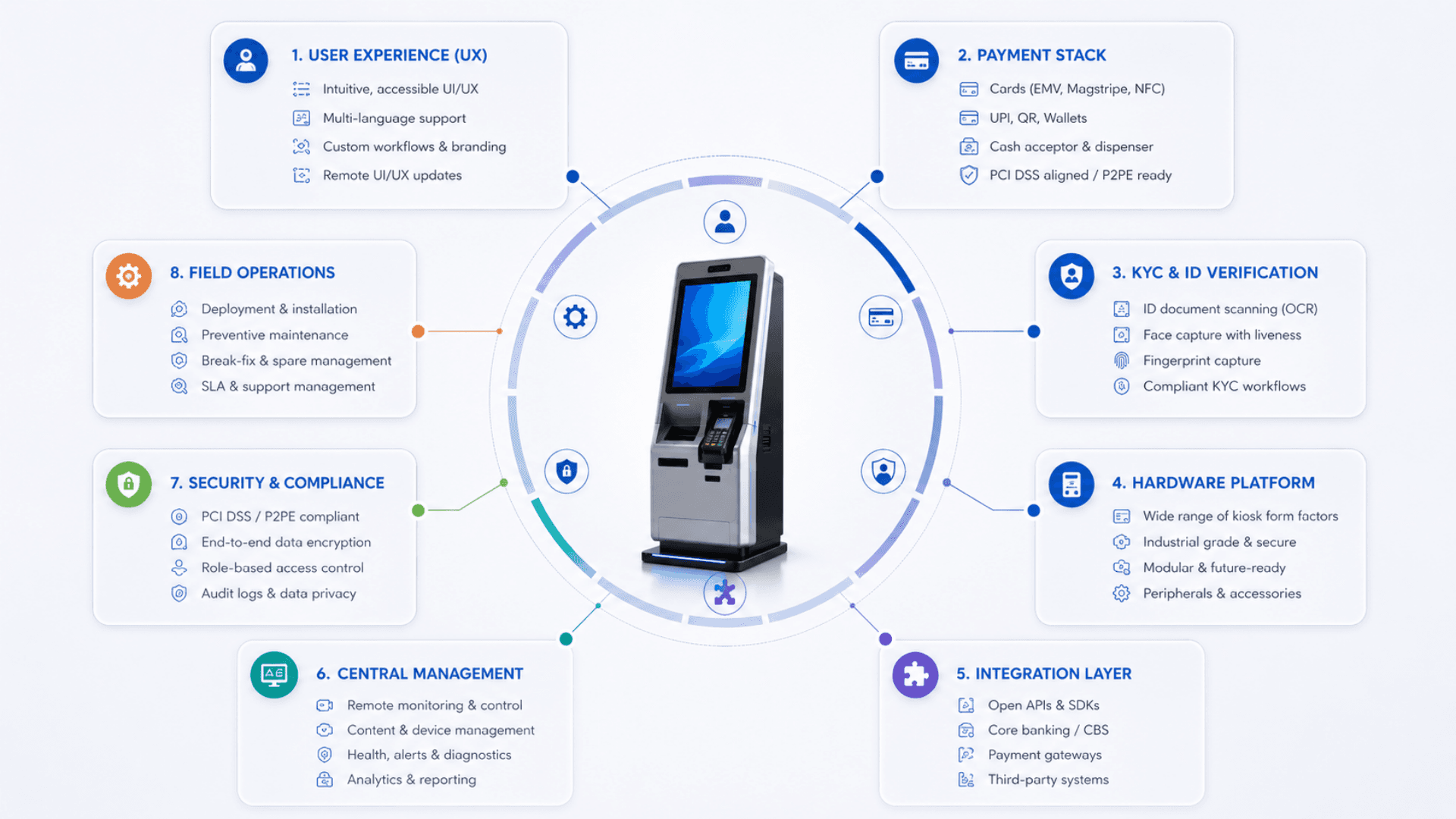
Bespoke UX Per Vertical
Self-payment, self-ordering, KYC, SIM dispense, tender, utility, government — each gets a UX engineered for its transaction.
- Custom screen flow per vertical (no generic template forced on the customer)
- Brand-specific theming: colors, typography, voice, motion
- Multi-language with full RTL support (Arabic, Hebrew, Urdu, more)
- Accessibility: WCAG 2.1 AA + ADA + EN 301 549 baseline
Payment Stack (Cards · Cash · QR · NFC)
Every payment path that matters to your customer, with PCI DSS 4.0 scope minimized via P2PE.
- EMV chip + contactless (P2PE tunneled — card data never touches our application)
- Cash acceptor + recycler (CashCode / JCM / MEI / Glory) with deposit / dispense / change
- QR (multi-scheme), Apple Pay, Google Pay, mobile money gateways
- Integration with your acquirer or our partner gateways (Stripe / Adyen / Network International / PayTabs / local)
Identity & KYC
Multi-modal verification — passport + national ID + face + fingerprint + iris — with liveness and audit trail.
- Passport MRZ + RFID chip + photo OCR (full-page readers)
- Face camera with liveness detection (defeats photo / video replay)
- FBI-certified fingerprint scanners with template encryption
- Document validation against issuing-authority databases (where permitted)
Hardware Catalog + Peripherals
Indoor / outdoor / free-standing / wall-mounted / counter-top — paired with any peripheral combination.
- AUTO666 free-standing (IP54), KIOSAPP066 lobby kiosk, GRAVIA kiosk variants, counter-top + wall-mounted
- Thermal printers (60mm / 80mm / dual-roll / auto-cutter), label printers, A4 page printers
- Cash recyclers, coin dispensers, EMV readers, QR / NFC, biometric scanners, document scanners, SIM dispensers
- Field-replaceable modules — 15-min swap on average
Open Integration Layer
The kiosk is only as useful as what it can talk to. Pre-built adapters cover most enterprise stacks.
- Banking cores (Temenos / Finacle / Mambu), payment gateways, telecom OSS / BSS
- CRM (Salesforce / Dynamics / HubSpot), ERP (SAP / Oracle), POS (Oracle Micros / Aloha / Square and other major platforms)
- Identity providers (SAML / OIDC / national e-ID), government APIs, SMS / email providers
- REST / SOAP / SDK adapters; webhooks; custom integrations on demand
Central Management + OTA
Per-kiosk health monitoring, OTA software updates, real-time alerts, supervisor flows.
- Health / status / peripheral state per kiosk in real time
- Staged OTA rollout (canary → 10% → 100%) with automatic rollback on health-check failure
- Real-time alerts (paper-out, cash-low, peripheral-fault, network-down)
- Supervisor console for cash reconciliation and exception handling
Compliance & Audit
PCI DSS, GDPR / HIPAA / PDPL, country-specific KYC — engineered in, not bolted on.
- PCI DSS 4.0 alignment via P2PE + acquirer certification support
- Tamper-evident audit log with cryptographic chaining per transaction
- Configurable data retention + right-to-be-forgotten workflows
- ISO 27001 controls applied across the management stack
Resilience & Field Operations
24/7 unattended operation is the design point. Resilience is engineered into every layer.
- Offline-tolerant modes with cached service catalogs and queued transactions
- Dual-network failover (wired + LTE) for high-availability sites
- Watchdog + heartbeat with auto-recovery for common faults
- Field-replaceable modular hardware — 15-min swap, 99%+ uptime in production
Self-Service Transactions and Staff Workload
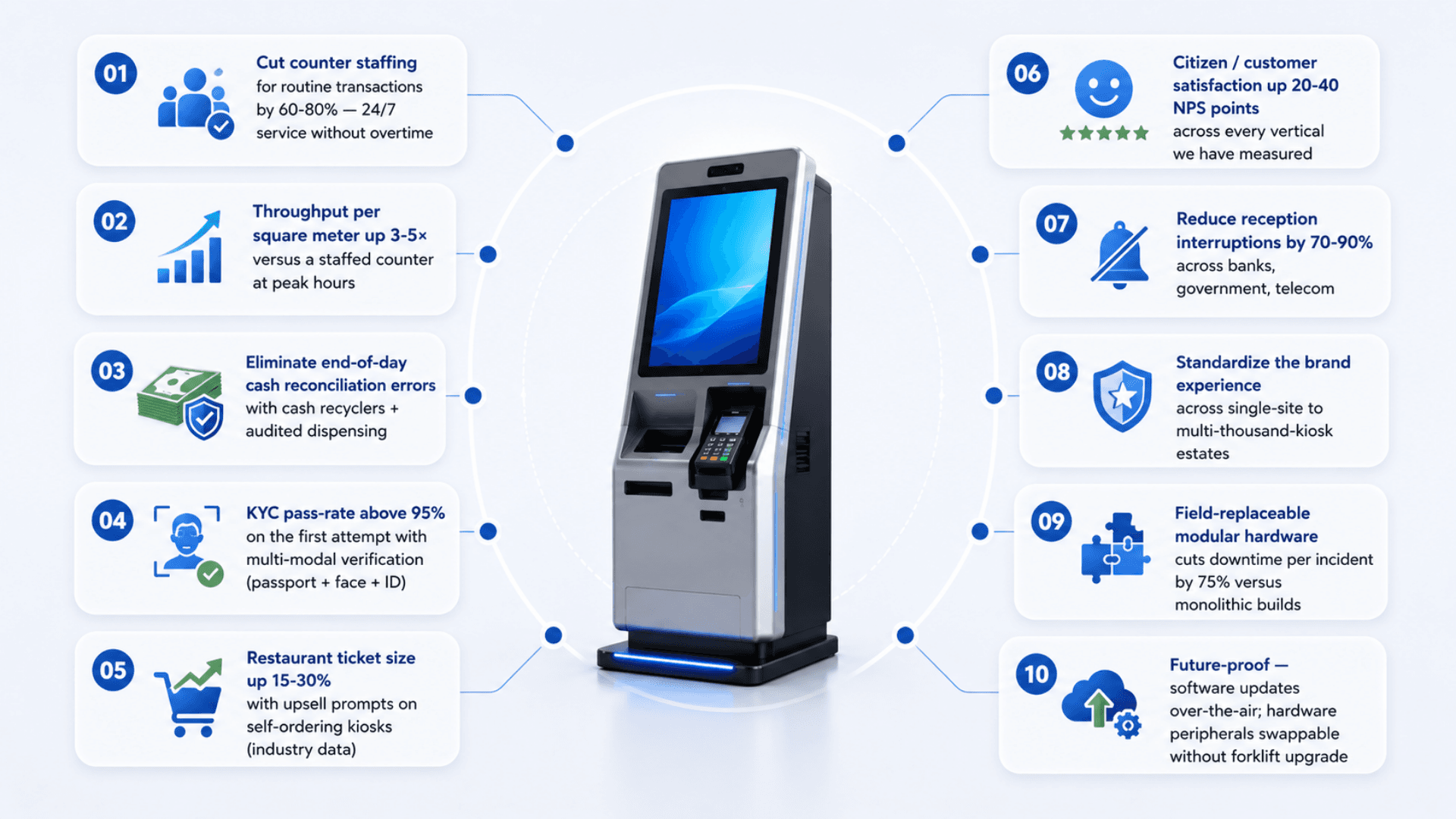
Cut counter staffing for routine transactions by 60-80% — 24/7 service without overtime
Throughput per square meter up 3-5× versus a staffed counter at peak hours
Eliminate end-of-day cash reconciliation errors with cash recyclers + audited dispensing
KYC pass-rate above 95% on the first attempt with multi-modal verification (passport + face + ID)
Restaurant ticket size up 15-30% with upsell prompts on self-ordering kiosks (industry data)
Citizen / customer satisfaction up 20-40 NPS points across every vertical we have measured
Reduce reception interruptions by 70-90% across banks, government, telecom
Standardize the brand experience across single-site to multi-thousand-kiosk estates
Field-replaceable modular hardware cuts downtime per incident by 75% versus monolithic builds
Future-proof — software updates over-the-air; hardware peripherals swappable without forklift upgrade
How a Custom Kiosk Project Takes Shape
Map the service workflow, select device components and validate the kiosk before rollout.
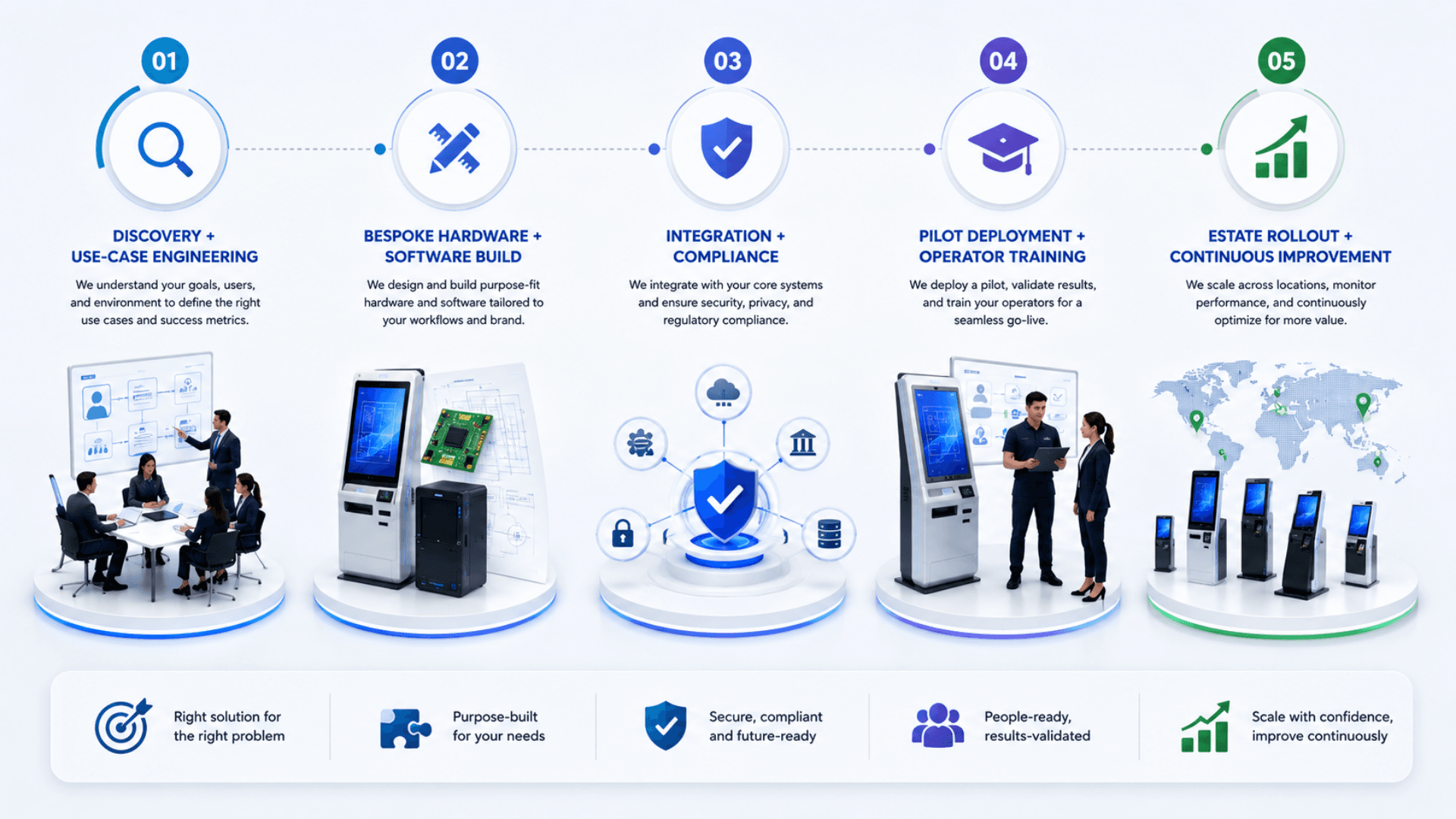
Discovery + Use-Case Engineering
We sit with your operations team to map the exact transactions the kiosk must handle: services, payment paths, identity verification, document scanning, hardware peripherals, integration endpoints, accessibility requirements, branding, language coverage, and 24/7 operational realities.
Bespoke Hardware + Software Build
Hardware is configured from the GLARUS catalog (industrial PC or Android, indoor / outdoor IP54, 21" / 32" / 43" displays, thermal printer 60/80mm, cash recycler, EMV reader, biometric scanner, etc.) — software is built with a kiosk shell, branded UI, payment SDK, identity SDK, integration layer, and admin console.
Integration + Compliance
We wire the kiosk into your existing systems — banking core, payment gateways, POS, ERP, CRM, identity providers, government APIs, telecom OSS / BSS. Compliance work covers PCI DSS for payments, GDPR / HIPAA / PDPL for personal data, and country-specific KYC frameworks.
Pilot Deployment + Operator Training
First wave (1-5 kiosks) goes live at a pilot site with on-site engineer support. Reception and floor staff are trained on the supervisor console (cash reconciliation, peripheral status, transaction lookup, exception handling). We measure throughput, conversion, exception rate, and uptime for 2-4 weeks.
Estate Rollout + Continuous Improvement
Once the pilot is stable we roll out across the estate with the same configuration templates. Health / status monitoring streams to your operations dashboard; per-kiosk audit trail flows to compliance; software updates ship over-the-air; field-replaceable modules keep downtime per incident under 30 minutes.
Self-Service Kiosks Use Cases by Industry
Explore the service environments relevant to self-service kiosks.
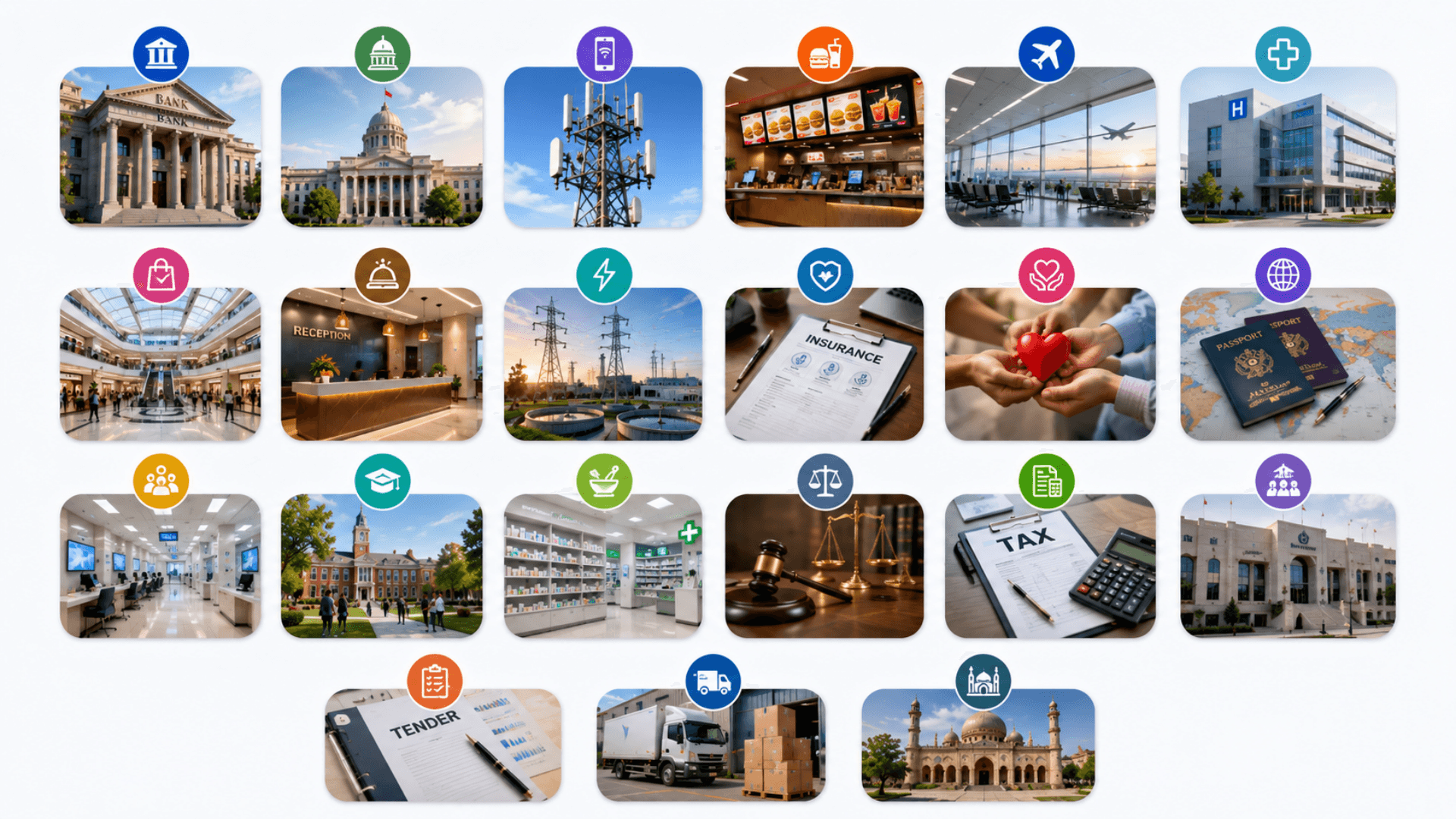
Open the deep dive by vertical
Customers running Self-Service Kiosks in production
3 featured deployments where Self-Service Kiosks ships today — a selection from a much wider production portfolio. Click any card for the full case-study deep dive.
Samsung · Self-Service
Zeour product-dispenser self-service kiosk for Samsung — browse Samsung devices and accessories, pay in cash, collect from the dispenser.
Airport Taxi · Baghdad
10 self-service taxi-booking kiosks at Baghdad airport — arrivals choose from 3 taxi companies, pick vehicle type, get an estimate and a printed receipt.
Ayn-Yateem · Charity
Over 36 self-service donation kiosks for Ayn-Yateem — donors choose a cause, enter a cash donation amount, and get a printed receipt — fully unmanned.
Self-Service Kiosk Solutions FAQs
Get answers to the most common questions about our self-service kiosks.
What types of self-service kiosks does Zeour build?
Can we start with just one self-service kiosk?
Why bespoke instead of off-the-shelf?
What hardware peripherals can you integrate?
How do payments work — and how is PCI compliance handled?
How does the KYC / identity verification flow work?
Can the kiosk operate without a constant network connection?
How are the kiosks managed remotely?
How long does a custom kiosk project take?
What does it cost?
Do you provide the hardware too, or only the software?
What about accessibility and inclusion?
How are kiosks updated and maintained in the field?
Can the kiosk integrate with our existing systems?
Is the kiosk software the same as the GLARUS CSA kiosk?
How do you handle cash deposits and dispensing securely?
Do you support outdoor and harsh-environment kiosks?
What's the data and privacy posture?
Is the kiosk part of the broader GLARUS platform?
Explore Related Solutions
Choose the software workflow that the kiosk will present to customers or visitors.
Ready to Transform Your Operations with Self-Service Kiosks?
Discuss your workflows, deployment requirements and integration scope with the Zeour team.
Self-Service Kiosks — concepts you'll meet
Definitions for the operational terms that appear across this page. Tap any chip to read the long-form entry plus its cross-links.