
Customer Feedback System
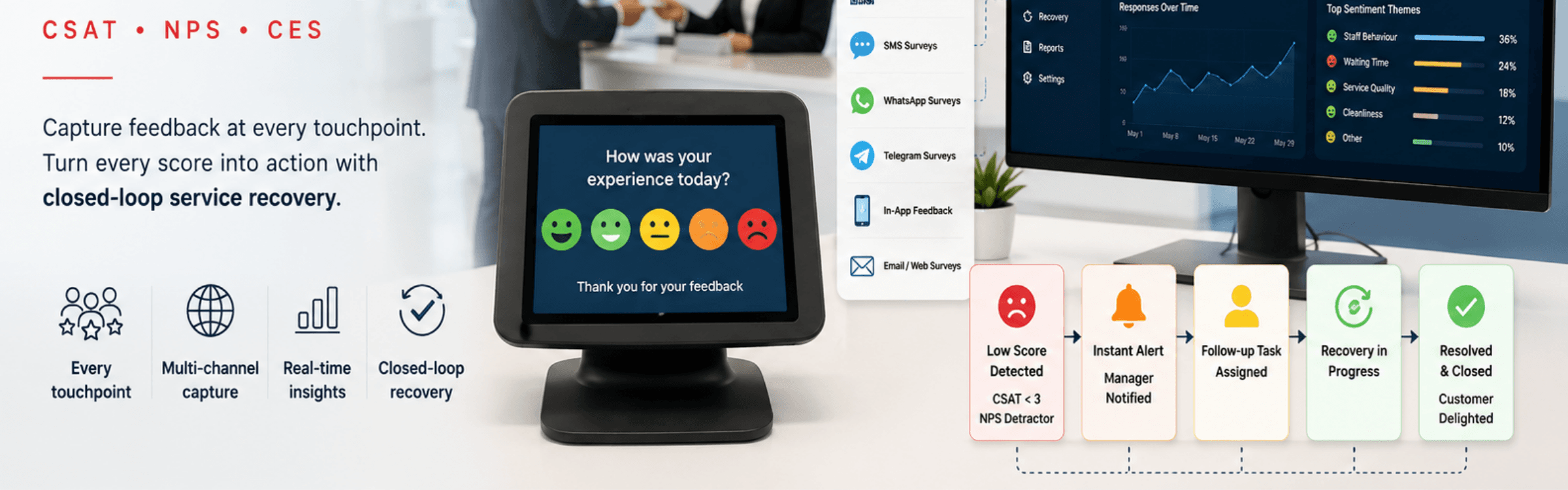
Zeour's customer feedback system helps service organisations measure the experience after a visit. Counter terminals and digital surveys collect CSAT, NPS and CES responses linked to service activity, while reporting and follow-up tools help managers investigate low scores.
Service-Linked Surveys and Follow-Up
Collect a response at the point of service and review it with the branch, counter and visit context. GLARUS combines MAGNO feedback terminals with digital channels, reporting and follow-up tasks for service recovery.
Measure the Experience at Service Touchpoints
The GLARUS queue management system ties feedback to a served ticket. For scheduled visits, explore appointment management, and for reception journeys review visitor management software.
Where feedback points to a wider process problem, digital transformation consulting can help assess the operational changes to consider.
Feedback Channels, Survey Metrics and Reporting
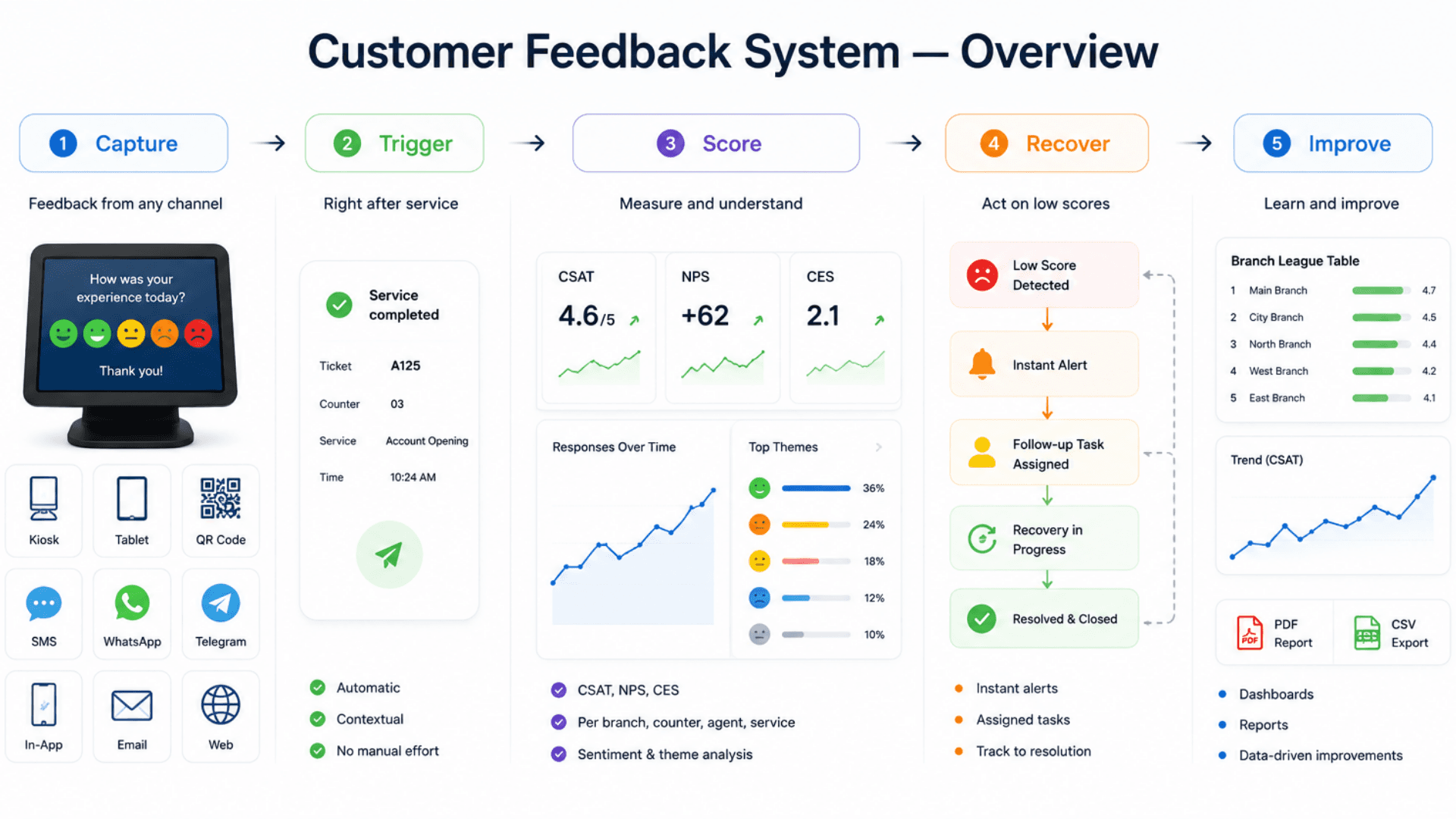
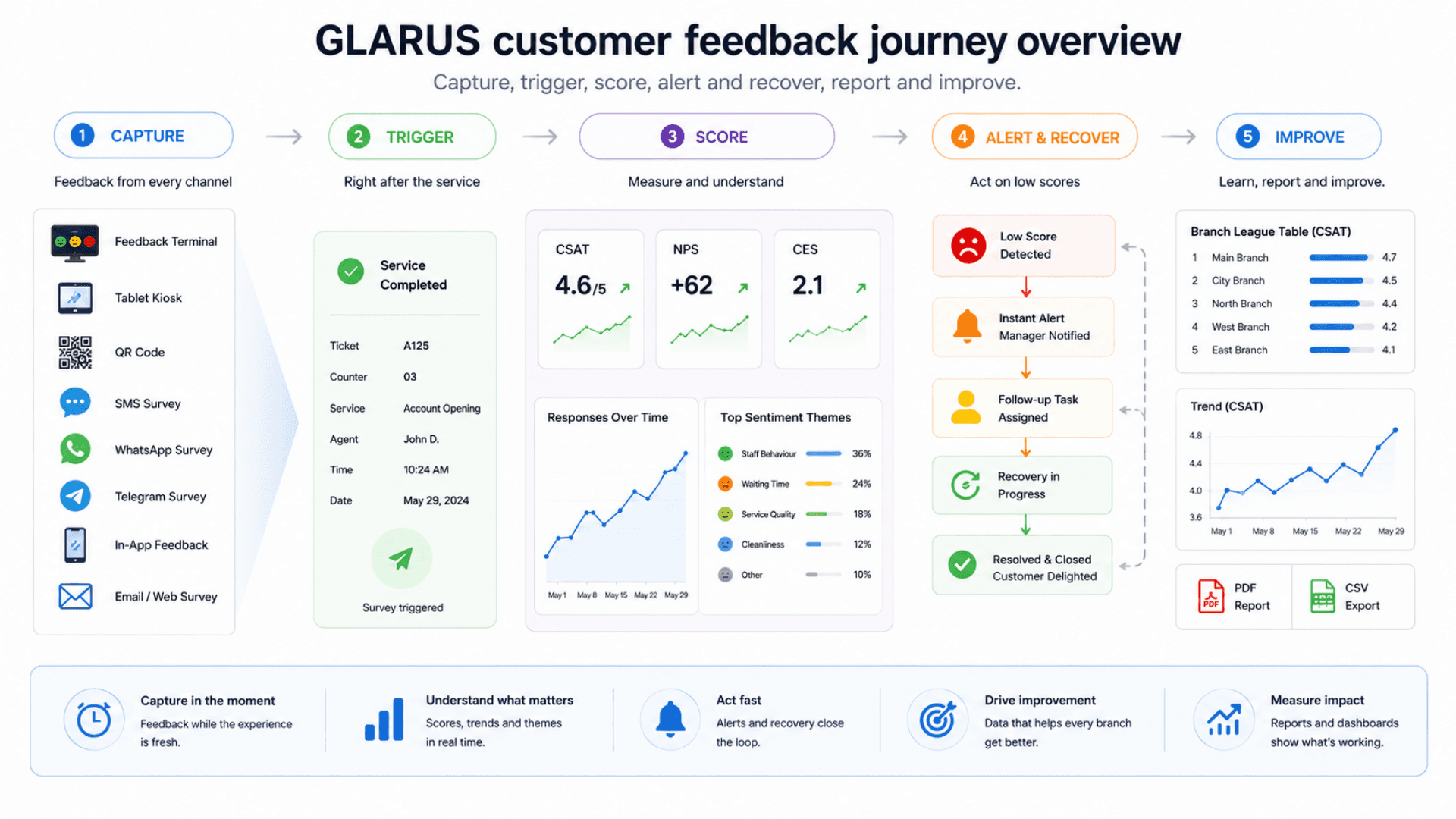
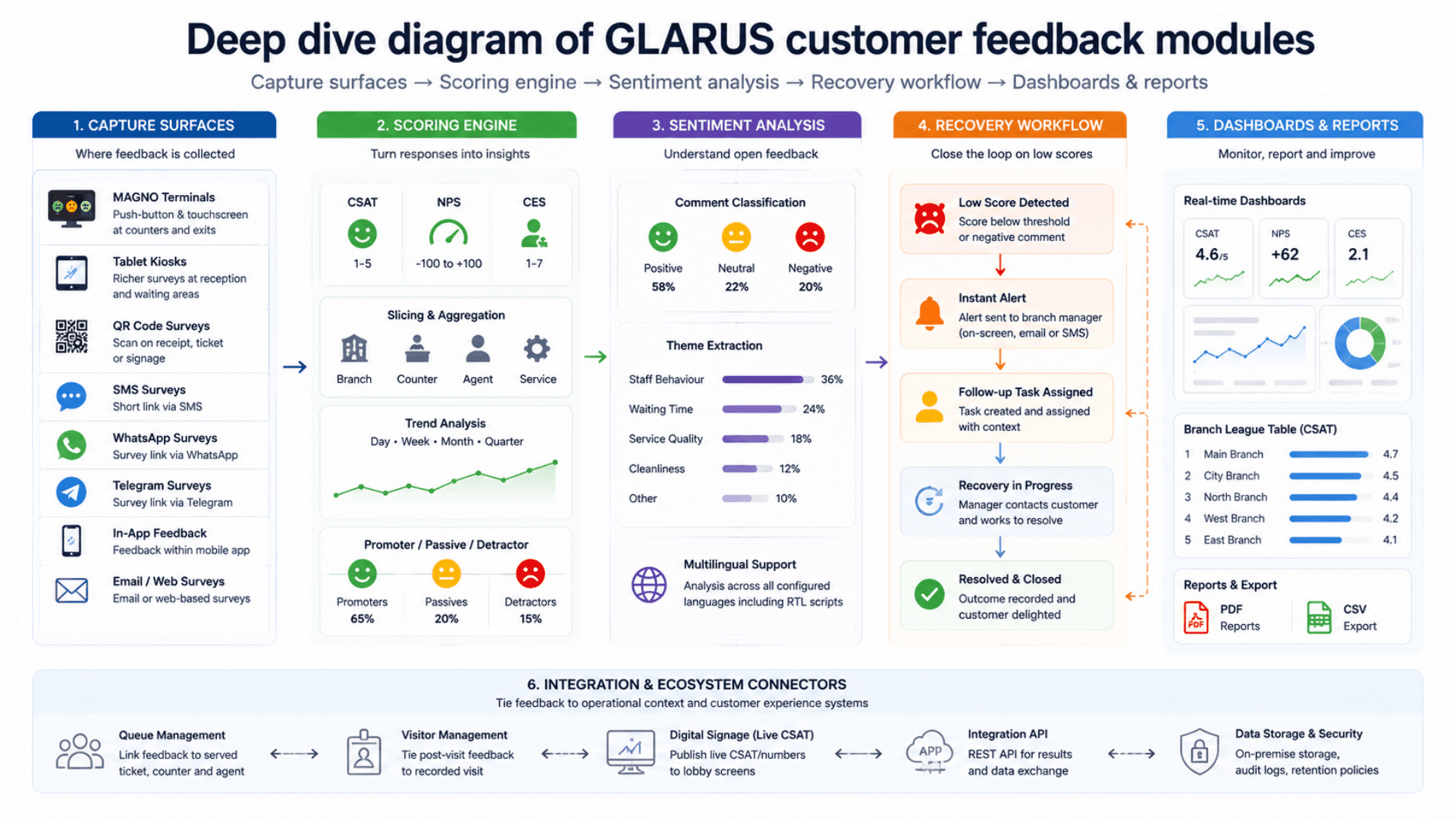
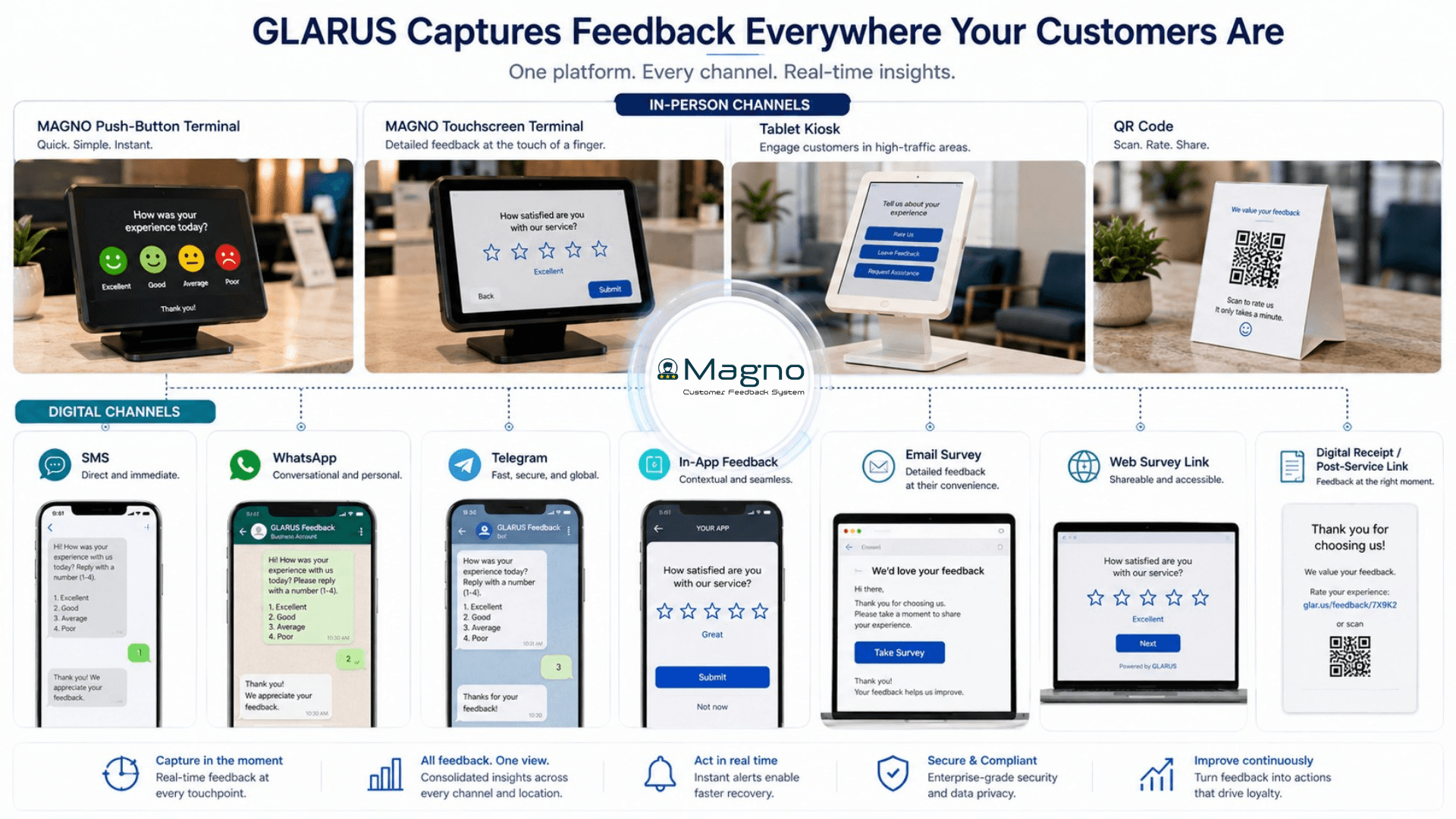
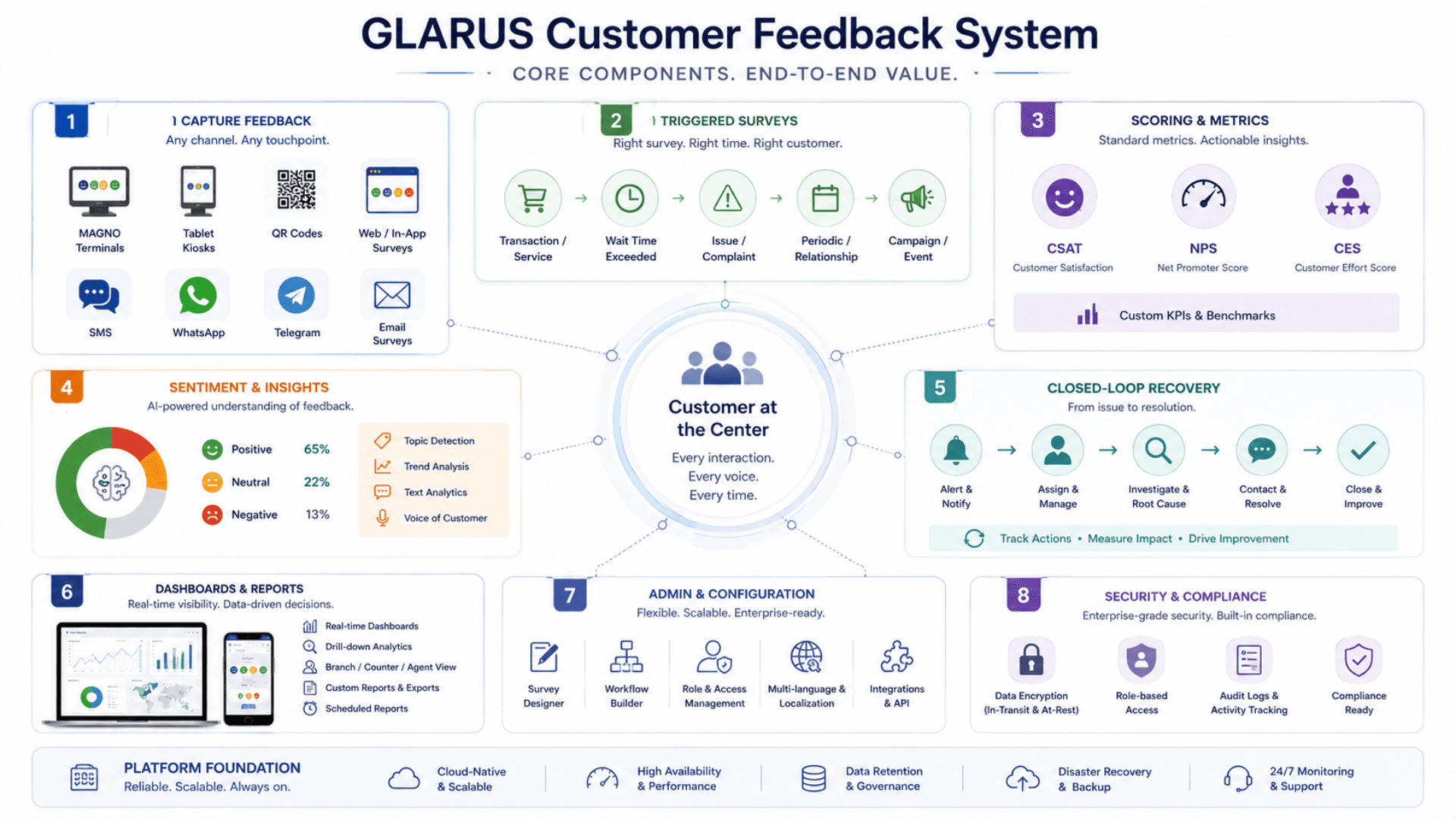
The Zeour GLARUS Customer Feedback System turns the voice of the customer into an operational loop. It captures across eight channels — MAGNO feedback terminals, tablet feedback kiosks, QR-code surveys, SMS, WhatsApp, and Telegram surveys, in-app feedback, and email and web surveys — and fires every survey as a triggered post-service event, so a score is always attached to a real transaction, counter, service type, and staff member. The scoring engine rolls responses into CSAT, NPS, and CES, sliced per branch, per counter, per agent, and per service; multilingual sentiment analysis reads free-text comments and extracts ranked themes. The closed-loop layer is where feedback becomes action: a low score raises an instant alert, opens an assigned follow-up task, and tracks the recovery to resolution. Real-time dashboards and trend analysis show how satisfaction moves; role-based admin gives administrators, branch managers, and agents the right view; and the platform is fully integrated with queue management, visitor management, and digital signage so feedback lives inside one customer-experience ecosystem. On-premise deployment keeps every comment sovereign.
Zeour GLARUS Customer Feedback System — the enterprise voice-of-customer suite deployed in banks, hospitals, government service halls, retail estates, telecom stores, and hospitality venues. It captures feedback where the experience actually happens: MAGNO feedback terminals at counters and exits, tablet feedback kiosks, QR-code surveys, SMS, WhatsApp, and Telegram surveys, in-app feedback, and email and web surveys. Every survey is triggered right after a service event, so the score is tied to the actual transaction — the counter, the service type, the time window, and the staff member who served the customer. CSAT, NPS, and CES roll up per branch, per counter, per agent, and per service; multilingual sentiment analysis turns free-text comments into themes. A low score raises an instant alert, opens a follow-up task for a manager, and tracks the recovery end to end — so feedback is not just measured, it is closed. It is fully integrated with GLARUS Queue Management, so every score is tied to the served ticket — the exact counter, service, and agent who delivered it. Sovereign on-premise deployment keeps every comment inside the operator's perimeter; engineered multilingual with full RTL; Zeour designs and ships the MAGNO terminals as well as the software. Measures one counter or a national branch network with equal ease — start with a single feedback terminal and grow on the same platform.
Key Functionalities
Multi-Channel Capture
One feedback engine fed by MAGNO terminals, tablet kiosks, QR-code surveys, SMS, WhatsApp, and Telegram surveys, in-app feedback, and email and web surveys. Every channel produces a comparable, context-tagged response.
One feedback engine fed by every channel customers actually use — at the counter and on their own phone.
- MAGNO push-button and touchscreen terminals at counters, exits, and service points
- Tablet feedback kiosks for richer surveys at reception and waiting areas
- QR-code, SMS, WhatsApp, Telegram, in-app, and email and web surveys for capture on the customer's own device
- Every channel feeds the same scoring and analytics — one consistent picture per branch
Triggered Post-Service Surveys
Surveys fire the moment a service event completes, so the response is automatically tied to the branch, counter, service type, time window, and staff member — not a faceless average.
Surveys fired by the transaction, so a score is never an anonymous average.
- A feedback request fires the moment a service event completes
- Responses auto-tagged with branch, counter, service type, and time window
- The serving staff member is attached to every score
- Quota and sampling controls keep response volume healthy at busy sites
CSAT / NPS / CES Scoring
A scoring engine that computes CSAT, NPS, and CES and breaks every metric down per branch, per counter, per agent, and per service, with day / week / month / quarter trend views.
A scoring engine that turns ratings into the three metrics that matter — sliced to the point of service.
- CSAT for service-event satisfaction; NPS for loyalty; CES for process effort
- Every metric broken down per branch, per counter, per agent, and per service
- Trend views across day, week, month, and quarter
- Promoter / passive / detractor segmentation for NPS
Multilingual Sentiment Analysis
Free-text comments are classified positive / neutral / negative and grouped into ranked themes, across every language the deployment is configured for, including RTL scripts.
Free-text comments read, classified, and grouped — so the richest feedback is never ignored.
- Positive / neutral / negative classification on every comment
- Automatic theme and topic extraction from open-ended responses
- Works across every configured language, including RTL scripts
- Ranked themes with sentiment and volume — what to fix first, at a glance
Closed-Loop Service Recovery
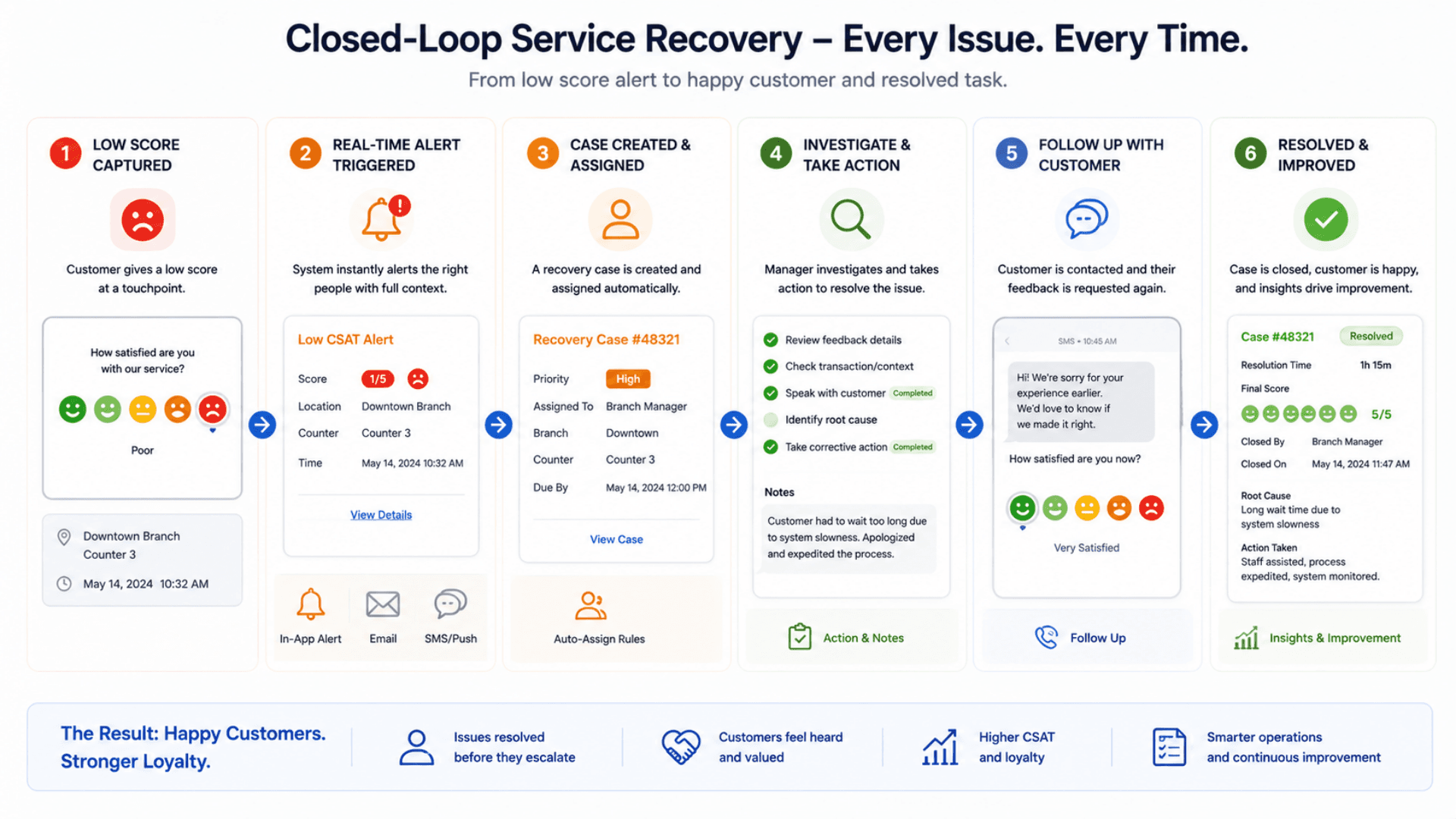
Low scores raise an alert, open an assigned follow-up task for a branch manager, and track the recovery through open, in progress, and resolved states — every detractor is followed up.
The layer that turns a low score into a resolved complaint and a retained customer.
- A low score raises an instant alert against configurable escalation rules
- A follow-up task is assigned to the responsible branch manager
- Recovery tracked through open, in progress, and resolved states
- Outcomes recorded for audit, coaching, and trend analysis
Alerting & Escalation Rules
Configurable rules trigger alerts by score threshold, branch, service, or recurrence, and route them to the right person via on-screen, email, or SMS channels.
Survey Builder
A drag-and-drop builder for rating, NPS, multiple-choice, and free-text questions, with branching logic so detractors and promoters see different follow-up questions.
Real-Time Dashboards & Trends
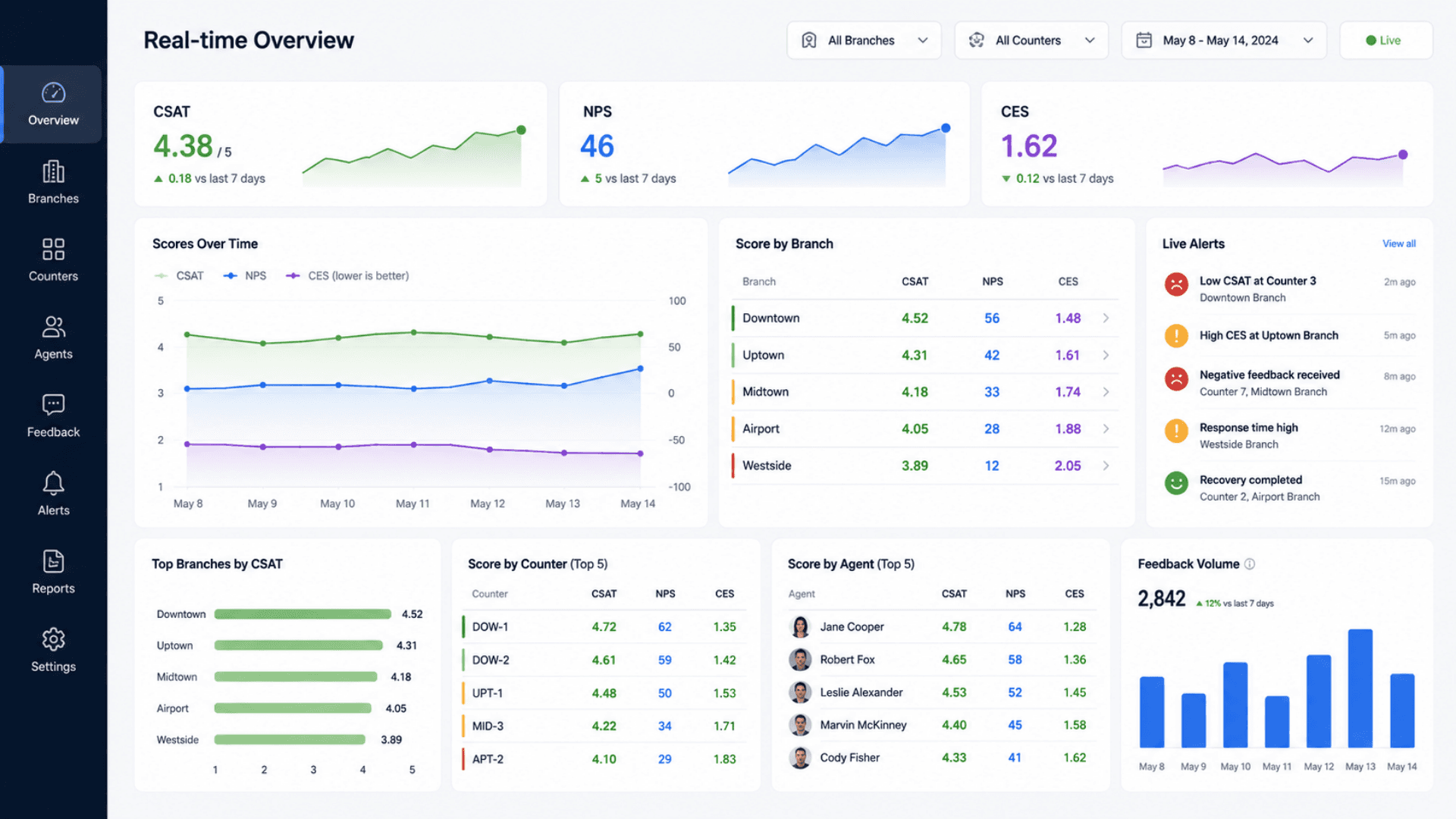
Live dashboards update as responses land; trend analysis shows how satisfaction moves over time, with branch league tables and per-agent scorecards for accountability.
Role-Based Admin
Distinct administrator, branch-manager, and agent views, so each role sees the surveys, scores, and recovery tasks it owns — and customer comments stay appropriately controlled.
Administrator, branch-manager, and agent views — each scoped to what that role owns.
- Administrator configures surveys, channels, escalation rules, branches, and users
- Branch manager owns their branch's scores and recovery queue
- Agent sees their own performance and the feedback tied to their counter
- Customer comments stay appropriately controlled by role
Ecosystem Integration
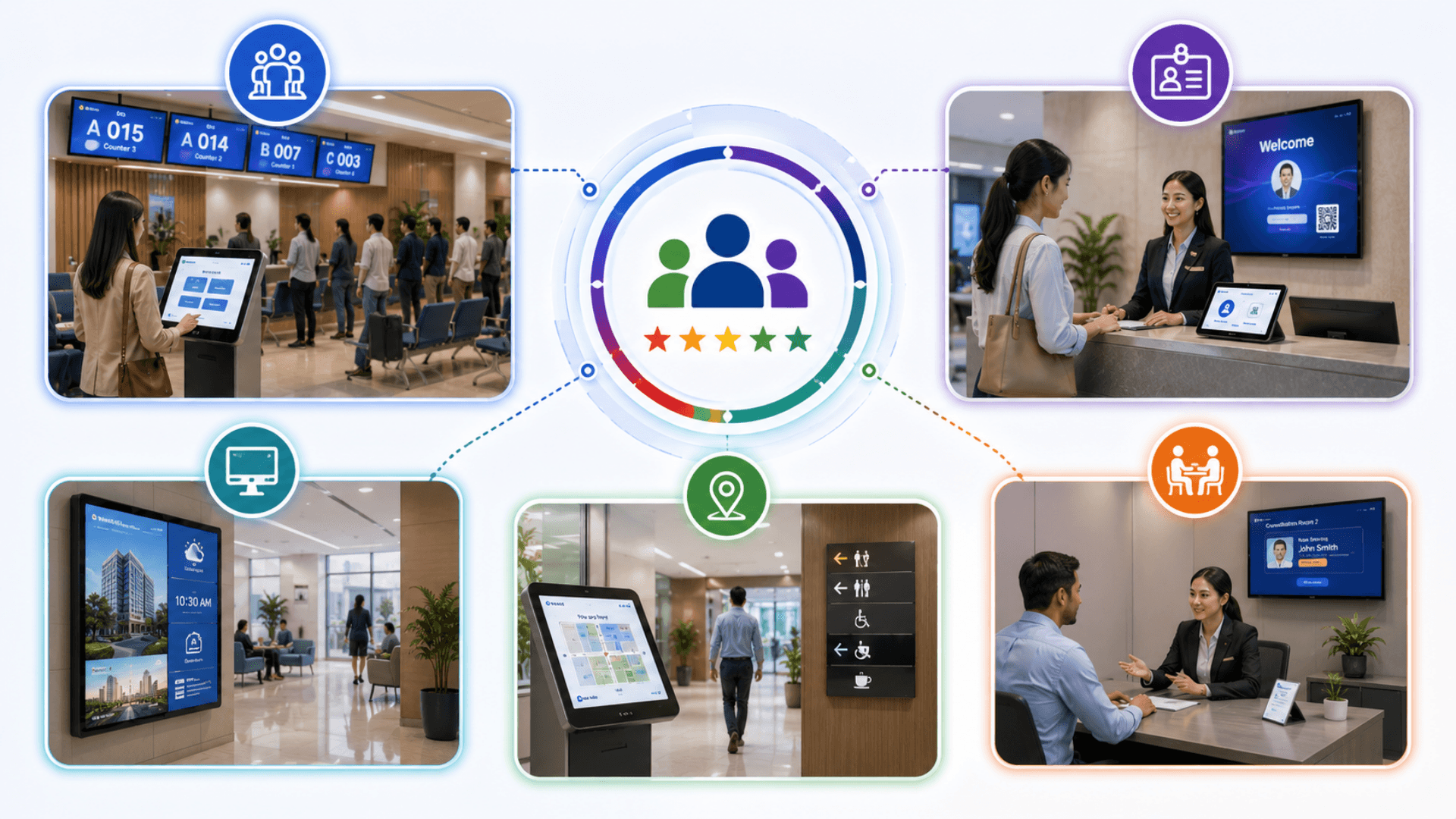
Feedback is fully integrated with GLARUS Queue Management — every score links to the served ticket, counter, and agent — and ties to the recorded visit from Visitor Management; live CSAT publishes to lobby screens via GRAVIA digital signage.
Reporting & Export
Scheduled and on-demand PDF and CSV reports for branch reviews and executive packs, plus audit-ready logging of every survey, alert, and recovery action.
Multilingual UI with Full RTL
English and Arabic ship as a production baseline with full RTL; any other locale is added per engagement. The terminal UI, surveys, and customer-facing email and SMS copy all switch per locale.
Software Components
Customer-Facing Surfaces
MAGNO Terminal App
The fast, full-screen survey runtime on the MAGNO feedback terminal — a one-tap push-button rating or a short touchscreen survey, multilingual and full-RTL aware, designed to be answered in seconds at a counter or exit.
Tablet Feedback Kiosk App
A richer survey experience for a tablet at reception or a waiting area — multi-question surveys with branching logic, idle reset between customers, and brand-matched styling.
Survey Web & Mobile Page
The survey opened on the customer's own device — from a QR code, an SMS, WhatsApp, or Telegram link, an in-app prompt, or an email survey. A clean, responsive survey that adapts to the configured locale and renders RTL automatically.
Feedback Engine & Analytics
Scoring Engine
Computes CSAT, NPS, and CES from incoming responses and slices every metric per branch, per counter, per agent, and per service, with trend aggregation across day, week, month, and quarter.
Sentiment & Theme Analysis
Classifies free-text comments as positive, neutral, or negative and extracts recurring themes, working across every configured language including right-to-left scripts.
Real-Time Dashboard
Live operational dashboard that updates as responses land — branch league tables, per-counter and per-agent scorecards, sentiment theme breakdowns, and trend charts.
Reporting & Export
Scheduled and on-demand PDF and CSV report generation for branch and executive reviews, with saved report templates and recipient lists.
Closed-Loop & Admin
Alerting & Escalation Engine
Evaluates incoming responses against configurable rules and raises instant alerts by score threshold, branch, service, or recurrence — routed via on-screen, email, or SMS channels.
Service-Recovery Workflow
Opens an assigned follow-up task on a low score, tracks it through open, in progress, and resolved states, and records the recovery outcome for audit and coaching.
Survey Builder & Channel Manager
A drag-and-drop survey builder with branching logic, plus configuration for which channels run which surveys, with quota and sampling controls to avoid fatigue.
Role-Based Admin Portal
Administrator, branch-manager, and agent roles with scoped views; user management, branch and service configuration, and an audit log of every survey, alert, and recovery action.
Integration & Platform
Ecosystem Connectors
Connectors that link feedback to the served ticket from GLARUS Queue Management and the recorded visit from Visitor Management, and publish live CSAT to GRAVIA digital signage.
Integration API
A REST API for pushing responses into a CRM or data warehouse and pulling survey results into the operator's own reporting — read endpoints for results, authenticated endpoints for writes.
Hardware Components
MAGNO Feedback Terminals
MAGNO Push-Button Feedback Terminal
A counter-mounted device with clear smiley or rating buttons for a one-tap satisfaction score — the fastest way to capture feedback at the moment of service without slowing the customer down.
MAGNO Touchscreen Feedback Terminal
A touchscreen feedback device for a short multi-question survey at counters, exits, and service points — multilingual, full-RTL aware, with Android options and an optional camera module. See the GLARUS hardware catalogue at /solutions/queue-management-system#hardware.
Tablet Feedback Kiosks
Tablet Feedback Stand
A secured tablet on a counter or floor stand running the tablet feedback kiosk app — for a richer survey at reception or in a waiting area, with anti-theft mounting for unattended placement.
Wall-Mounted Survey Display
A wall-mounted touchscreen near an exit for an estate that prefers a fixed survey point rather than a per-counter terminal.
Branch Server & Infrastructure
Industrial Branch Server
An on-premise branch server that runs the feedback stack locally, so a branch keeps capturing and scoring feedback even without an internet connection. Part of the GLARUS hardware line — see /solutions/queue-management-system#hardware.
PoE Power Distribution
Industrial PoE power distribution for powering MAGNO terminals and survey displays from a single rack point, resilient to flaky mains power.
Operator Workstations
Branch Manager Workstation
A standard desktop or laptop running the role-based admin portal in a browser — where the branch manager works recovery tasks, reviews scorecards, and reads sentiment themes.
Lobby CSAT Display
A GRAVIA-driven lobby screen that publishes live CSAT to the waiting area — turning a good score into visible proof for the next customer.
Customer Feedback Architecture — GLARUS Platform
The GLARUS Customer Feedback System runs across three coordinated layers over one shared data model. Customer-facing surfaces — MAGNO terminals, tablet kiosks, and the survey page on the customer's phone — capture responses. The central plane scores, analyses, alerts, and stores. Operator tools — the dashboards, the survey builder, and the recovery workflow — turn the data into action. Deployed on-premise on the operator's own infrastructure, every rating and comment stays sovereign; a managed deployment is available where speed of pilot matters more.
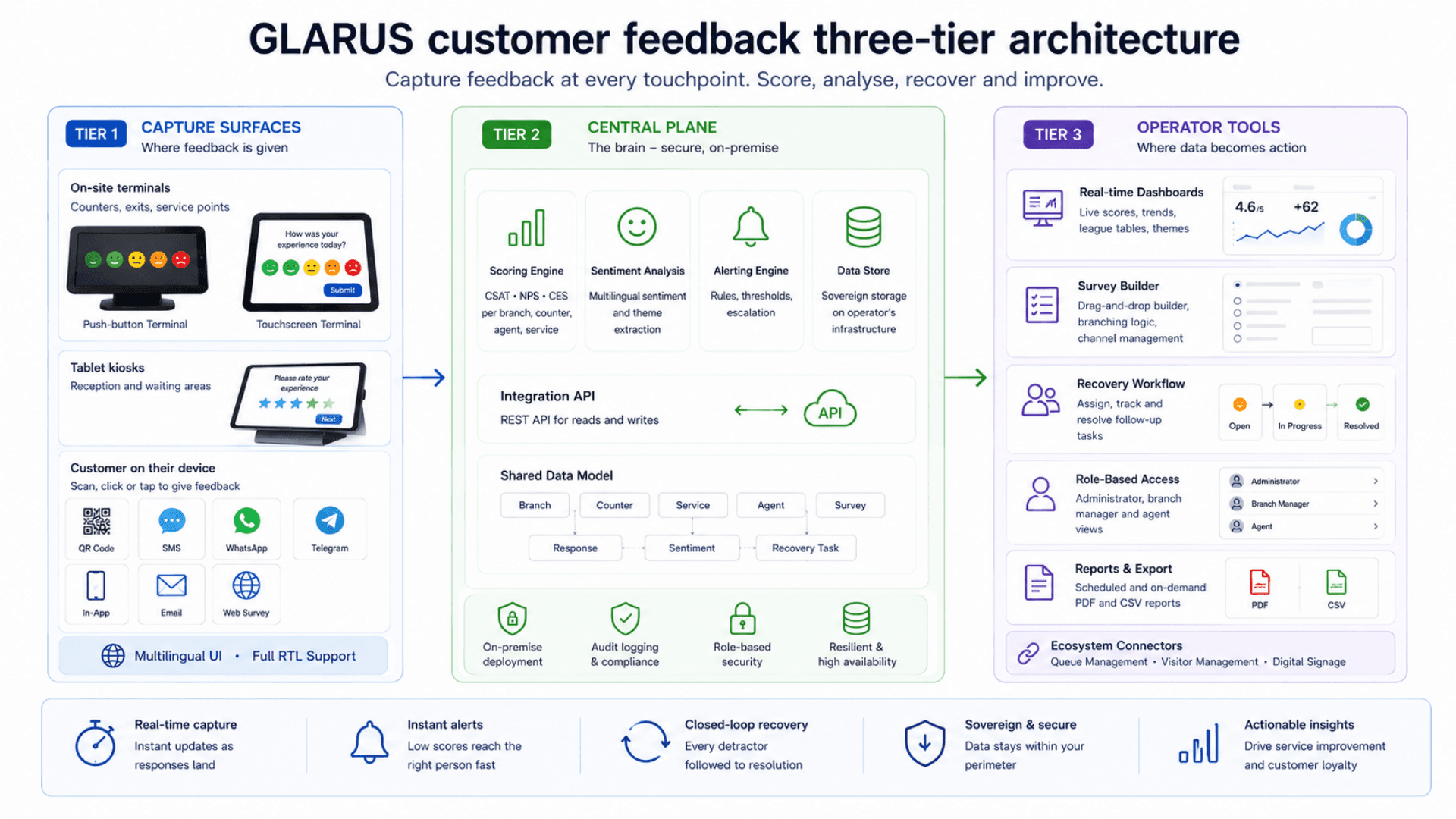
Tier 1 — Customer-Facing Surfaces
Where feedback is actually given
- MAGNO push-button and touchscreen feedback terminals at counters, exits, and service points
- Tablet feedback kiosks for richer surveys at reception and waiting areas
- Survey web and mobile page opened via QR code, an SMS / WhatsApp / Telegram link, an in-app prompt, or an email survey
- Multilingual UI with full RTL — fast enough to answer in seconds
- Idle reset between customers so every terminal greets the next person cleanly
Tier 2 — Central Plane
The brain — scoring, sentiment, alerting, storage
- Standalone application server deployable behind the reverse proxy of your choice
- Scoring engine computing CSAT, NPS, and CES sliced per branch, counter, agent, and service
- Multilingual sentiment and theme analysis on free-text comments
- Alerting and escalation engine evaluating responses against configurable rules
- A REST integration API — read endpoints for results, authenticated endpoints for writes
- A single shared data model — branch, counter, service, agent, survey, response, recovery task
- Sovereign on-premise storage; audit logging for every survey, alert, and recovery action
Tier 3 — Operator Tools
Where feedback becomes action
- Role-based admin portal — administrator, branch-manager, and agent views
- Drag-and-drop survey builder with branching logic and channel configuration
- Real-time dashboards with branch league tables and per-agent scorecards
- Closed-loop service-recovery workflow — assign, track, and resolve follow-up tasks
- Scheduled and on-demand PDF and CSV reporting for branch and executive reviews
- Ecosystem connectors to queue management, visitor management, and digital signage
Resilience & Real-Time Behavior
Real-time- Dashboards update as responses land — branches see today's satisfaction, not last night's batch
- Low-score alerts fire instantly so a detractor is followed up within minutes
- A branch server keeps capturing and scoring feedback even without an internet connection
- Survey capture is non-blocking — the terminal never makes a customer wait on a write
- Standalone build deployable behind any reverse proxy; sovereign on-prem or managed
- Survey templates and escalation rules configured once and applied across the whole estate
Feedback System vs Comment Cards vs Generic Survey SaaS vs DIY — What You Need
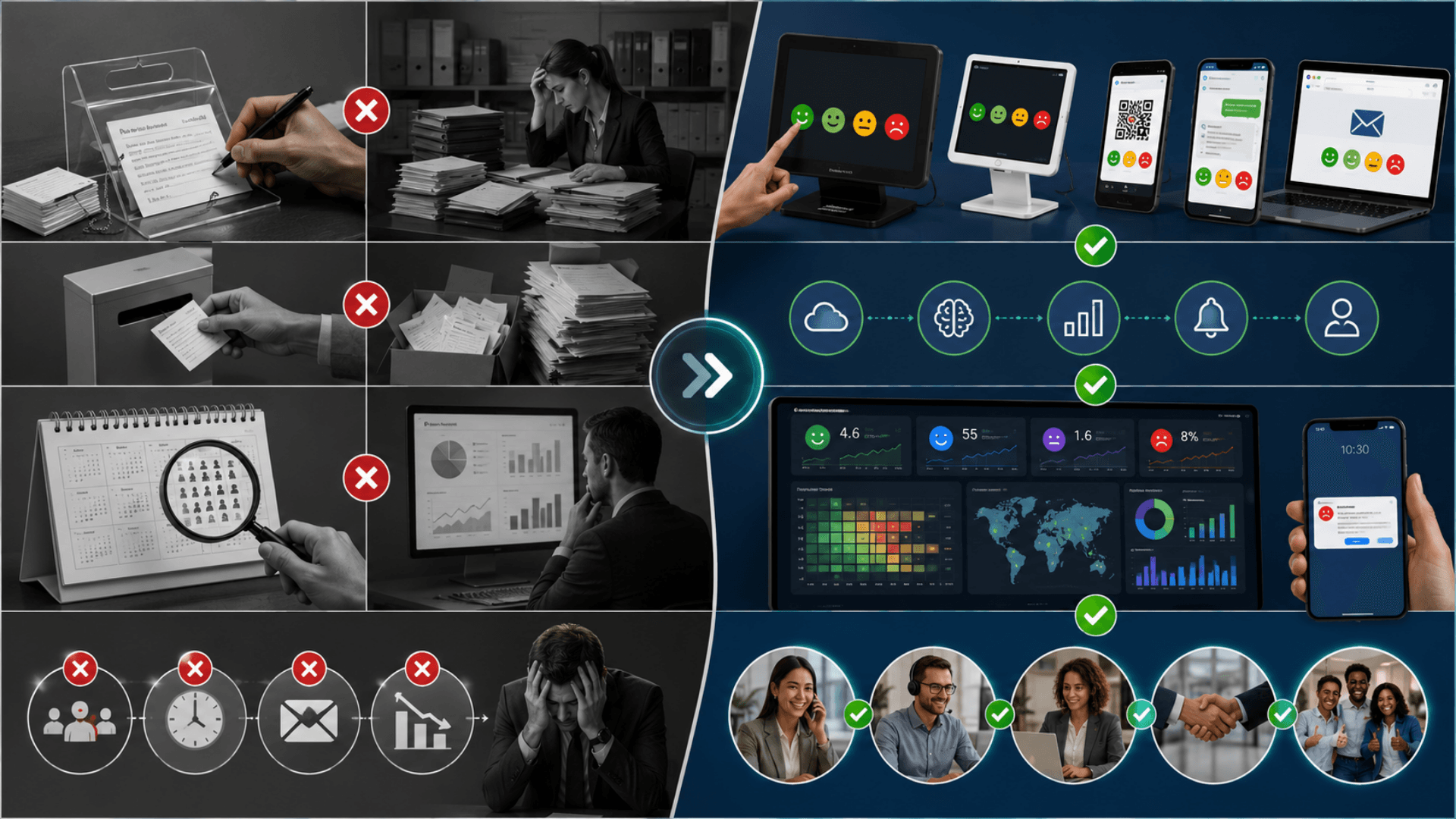
Most "customer feedback" in the world is still a paper comment box or a once-a-year survey. The next-most-common option is a generic cloud survey tool that captures responses but never closes the loop. An enterprise feedback platform like the GLARUS Customer Feedback System is the only category that captures in the moment, ties every score to a real transaction, and tracks recovery to resolution — on the operator's own infrastructure.
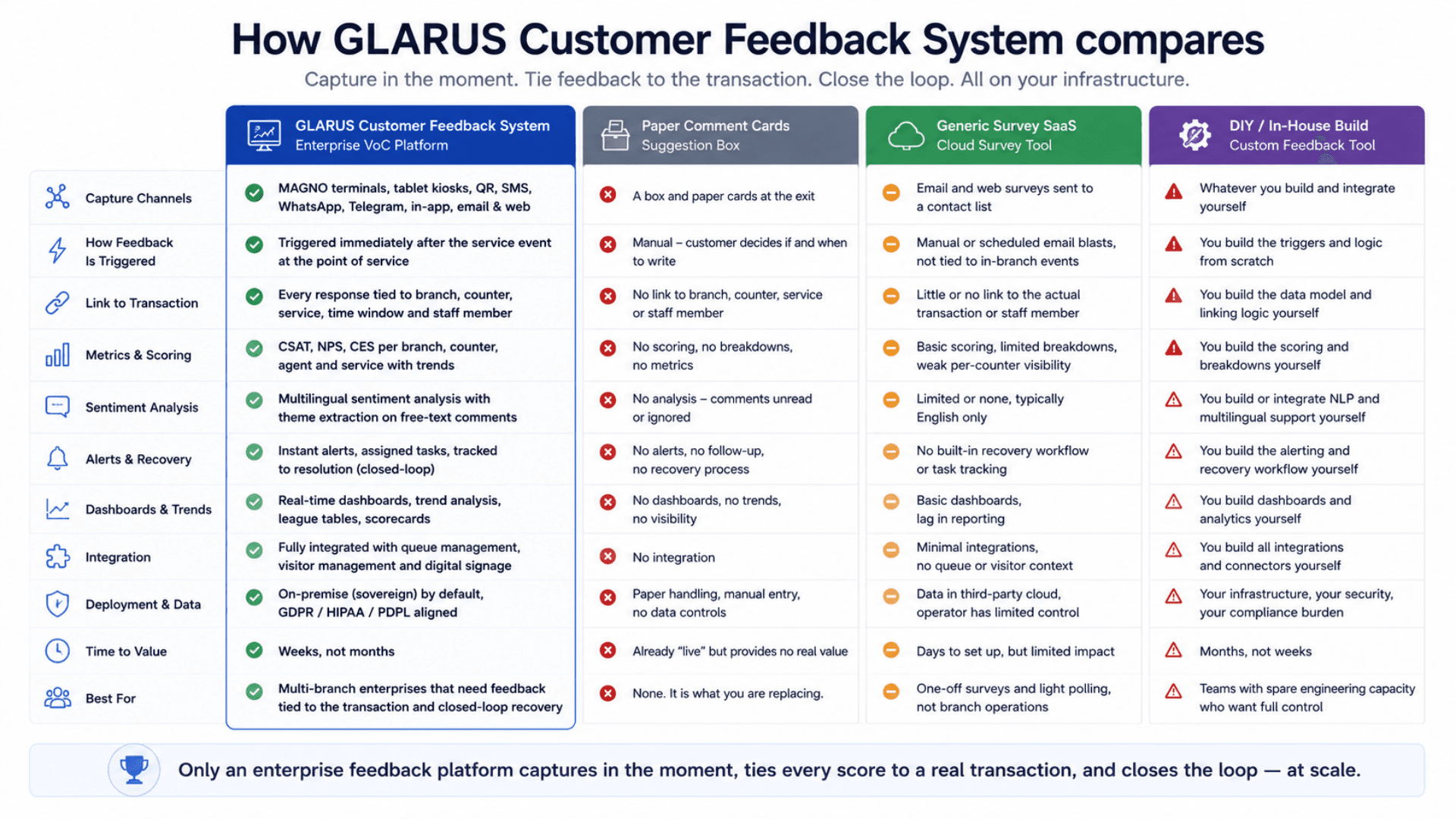
GLARUS Customer Feedback System (Enterprise VoC Platform)
Best for: Multi-branch operators — banks, hospitals, government, retail, telecom — that need feedback tied to the transaction, closed-loop recovery, and sovereign data.
- Multi-channel capture — MAGNO terminals, tablet kiosks, QR, SMS, WhatsApp, Telegram, in-app, and email and web surveys
- Triggered post-service surveys tied to branch, counter, service, time window, and agent
- CSAT, NPS, and CES scored per branch, counter, agent, and service with trend analysis
- Multilingual sentiment analysis with ranked theme extraction on free-text comments
- Closed-loop service recovery — instant alerts, assigned tasks, tracked to resolution
- Role-based admin, full integration with queue management / visitor management / digital signage, full RTL
- Sovereign on-premise deployment; GDPR / HIPAA / PDPL aligned
Paper Comment Cards & Suggestion Box
Best for: Nothing in 2026. It is what you are replacing.
- A box and a stack of cards by the exit; a handful of slips collected per month
- No sampling — captures only the angriest customers, or staff filling cards in
- No link between a comment and the branch, counter, service, or agent
- No sentiment analysis, no trend, no alerting, no recovery process
- Comments transcribed by hand into a spreadsheet that nobody reads
Generic Survey SaaS
Best for: One-off email surveys and quick polls where the operator does not need in-branch capture or closed-loop recovery.
- A cloud tool for sending email and web surveys to a contact list
- No on-site terminals, no triggered post-service capture at the counter
- Responses live in a third-party cloud the operator does not control
- Little or no link to the actual transaction, counter, or serving agent
- No service-recovery workflow and no integration with queue or visitor systems
DIY / In-House Build
Best for: Teams with spare engineering capacity that want full control and are prepared to own the maintenance.
- A custom-built survey form and a database the operator maintains itself
- No purpose-built MAGNO terminals — hardware sourced and integrated separately
- Sentiment analysis, alerting, and recovery workflow all built from scratch
- Multilingual and full-RTL support is the operator's engineering problem
- Ongoing security, scaling, and compliance burden falls entirely on the in-house team
Customer Feedback System — Deployment Checklist
A practical 5-phase rollout playbook for going live with the GLARUS Customer Feedback System — from a single-branch pilot to a multi-branch estate. Use it as a project plan with your Zeour partner.
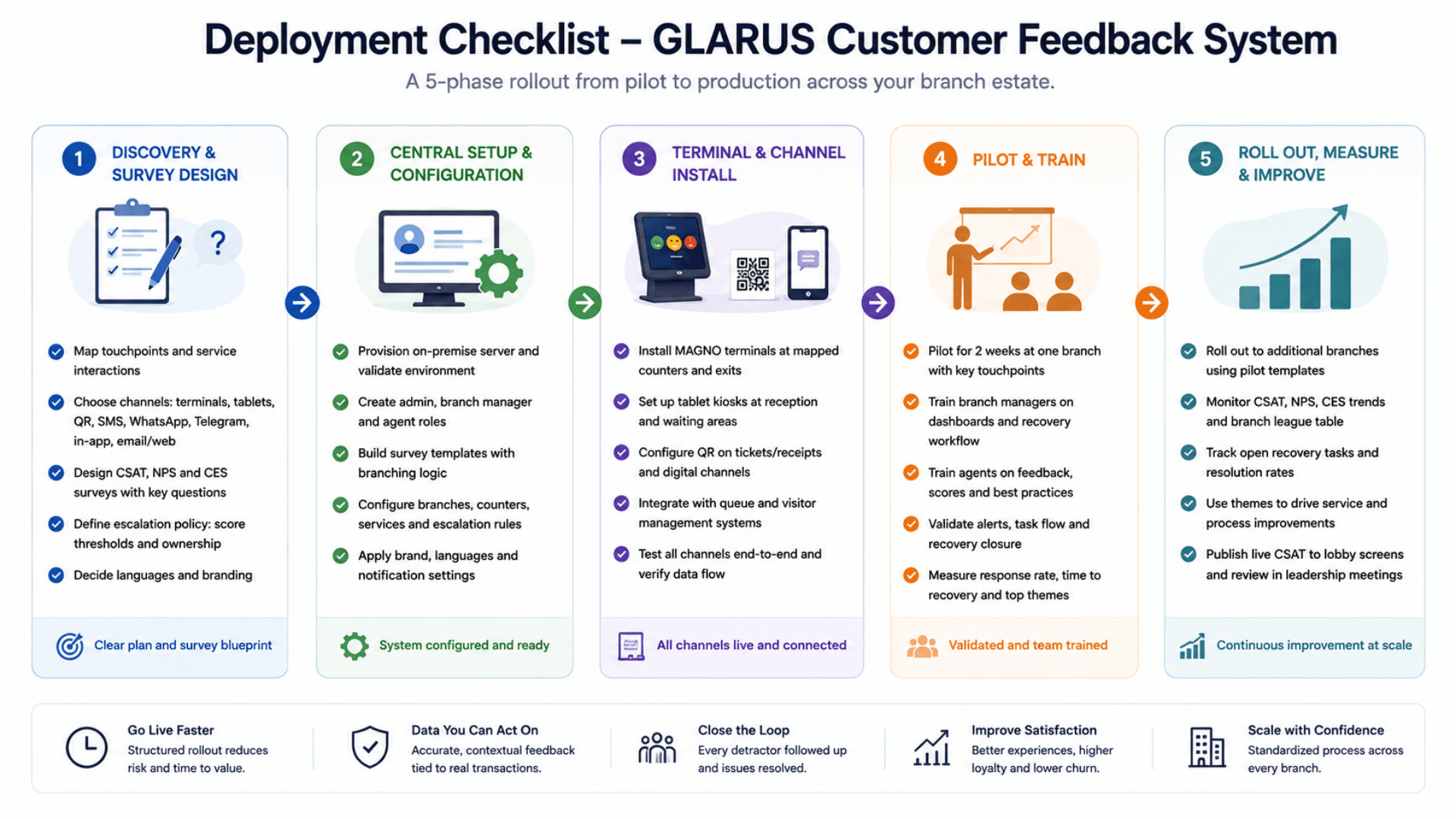
- 01
1) Discovery & Survey Design
ChecklistMap the touchpoints — which counters, exits, and service points need a feedback captureChoose the channel mix: MAGNO terminals, tablet kiosks, QR, SMS, WhatsApp, Telegram, in-app, and email and web surveysDesign the surveys — CSAT, NPS, and CES questions, plus the free-text prompts that matterDefine escalation policy — score thresholds, who is alerted, and how recovery is ownedDecide languages (English + Arabic baseline; add other locales per engagement) - 02
2) Central Setup & Configuration
ChecklistProvision the on-premise server and validate the deployment environmentCreate the first administrator account and the branch-manager and agent rolesBuild the survey templates in the drag-and-drop builder with branching logicConfigure branches, counters, services, and the escalation and alerting rulesMatch the terminal and portal styling to the operator's brand - 03
3) Terminal & Channel Install
ChecklistInstall MAGNO feedback terminals at the mapped counters, exits, and service pointsSet up tablet feedback kiosks at reception and waiting areas with anti-theft mountingConfigure QR-code printing on receipts and tickets; wire up the SMS, WhatsApp, Telegram, in-app, and email channelsConnect ecosystem integration — link feedback to served tickets and recorded visitsVerify each terminal and channel reports cleanly into the central dashboard - 04
4) Pilot & Train
ChecklistPilot for 2 weeks at one branch — terminals at the busy counters, two or three surveys liveTrain branch managers on the dashboard, the recovery workflow, and the scorecardsTrain agents on what their scores mean and how feedback ties to their counterValidate that low-score alerts fire and recovery tasks are picked up and closedMeasure response rate, time-to-recovery, and the first sentiment themes - 05
5) Roll Out, Measure & Improve
ChecklistRoll out to additional branches using the pilot's survey templates and escalation rulesTrack weekly: CSAT / NPS / CES trend, branch league table, open recovery tasks, top themesUse sentiment themes to prioritise service and process fixes across the estateCoach agents with per-counter scorecards; recognise top performers with the dataPublish live CSAT to lobby screens via digital signage and feed executive reviews
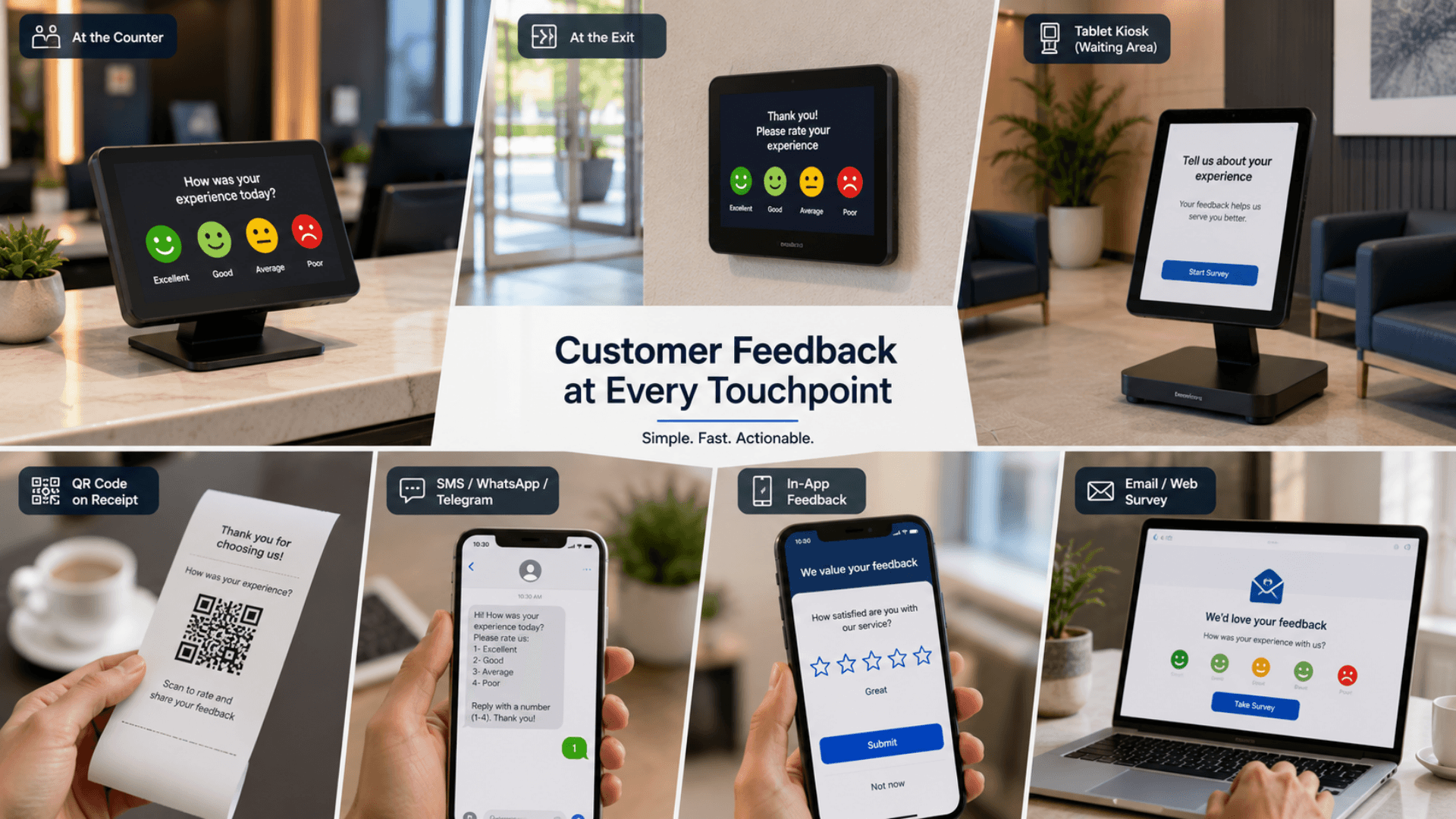
Customer Feedback System Gallery
Visual highlights of the GLARUS Customer Feedback System — the voice-of-customer platform deployed in banks, hospitals, governments, retail, and hospitality worldwide.
Why Comment Cards and Annual Surveys Fail
Paper comment boxes and once-a-year surveys measure satisfaction too late, too vaguely, and with no way to act — here is why a closed-loop feedback system is essential.
Feedback Arrives Far Too Late to Act On
An annual satisfaction survey tells you in March how customers felt last October. By then the agent has moved on, the customer has churned, and the branch has no idea which transaction went wrong. The signal arrives months after the moment it could have been fixed.
Triggered Surveys Capture Feedback in the Moment
A survey fires the second a service event completes — on a MAGNO terminal, a QR code, an SMS, WhatsApp, or Telegram message, an in-app prompt, or an email. Feedback is captured while the experience is fresh, response rates rise, and a manager sees a problem in minutes, not months.
Comment Boxes Capture Almost Nobody
A paper comment box at the exit collects a handful of slips a month — almost all of them from people angry enough to write, or from staff filling them in. There is no sampling, no context, and no way to know whether the box reflects the experience of the thousands of customers who walked past it.
Multi-Channel Capture Reaches Everyone
MAGNO terminals, tablet kiosks, QR, SMS, WhatsApp, Telegram, in-app feedback, and email and web surveys cover every customer and every preference. The estate gets a representative, continuously sampled signal instead of a few angry slips of paper.
No Link Between a Score and a Transaction
A generic survey produces a number — "we scored 3.8 out of 5." It cannot tell you which branch, which counter, which service, or which agent that number came from, so a manager has nothing concrete to coach against and no way to find the actual problem.
Every Score Is Tied to a Real Transaction
Because the survey is triggered by the transaction, every response carries its branch, counter, service type, time window, and staff member. CSAT, NPS, and CES break down to the exact point of service — so the problem is findable and coachable.
Free-Text Comments Pile Up Unread
When comments do come in, they land in an inbox or a spreadsheet that nobody has time to read. The richest feedback — the customer's own words — is the first thing to be ignored, because there is no way to turn a thousand comments into a short list of what to fix.
Sentiment Analysis Turns Comments Into Themes
Multilingual sentiment analysis reads every free-text comment, tags it, and groups it into ranked themes. Instead of an unread inbox, the operator gets a short, ordered list of what is actually driving dissatisfaction.
A Low Score Goes Nowhere
Even when a poor rating is captured, there is usually no process behind it. Nobody is alerted, nobody is assigned, the customer is never contacted, and the complaint is never resolved. The detractor leaves quietly, tells other people, and the operator never knows it happened.
Closed-Loop Recovery Catches Detractors
A low score raises an instant alert, opens an assigned follow-up task, and tracks the recovery to resolution. The branch manager contacts the customer, fixes the issue, and records the outcome — every detractor is followed up, and the recovery is auditable.
No Estate-Wide, Real-Time Picture
Branch reports are stitched together by hand, in different formats, and arrive too late to act on. Executives cannot see how satisfaction is trending across the estate today, cannot compare branches fairly, and cannot tell whether a service change made things better or worse.
One Live Dashboard for the Whole Estate
Real-time dashboards and trend analysis give every branch the same metrics and roll them into one executive view — branch league tables, per-agent scorecards, and sentiment themes — so leadership can see today what is moving and why.
Customer Feedback Features
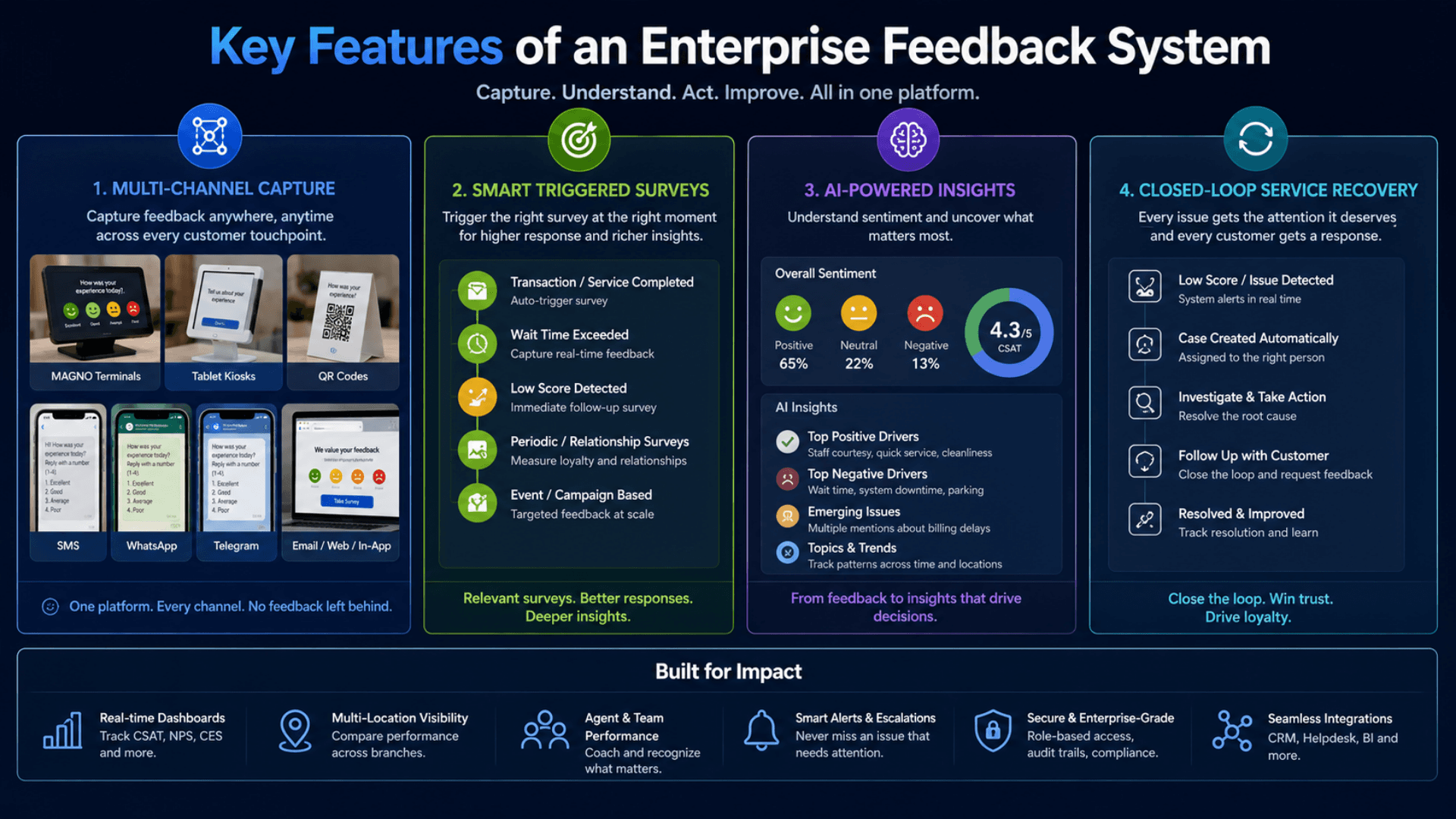
Multi-Channel Capture — MAGNO Terminals, Tablet Kiosks, QR, SMS, WhatsApp, Telegram, In-App, and Email / Web Surveys
On-Site MAGNO Feedback Terminals (push-button and touchscreen) at Counters, Exits, and Service Points
Triggered Post-Service Surveys Fired Right After the Service Event
Feedback Tied to the Actual Transaction — Counter, Service Type, Time Window, and Staff Member
CSAT Tracking Broken Down Per Branch, Per Counter, Per Agent, and Per Service
NPS Capture with Promoter / Passive / Detractor Segmentation
CES (Customer Effort Score) for Process- and Journey-Level Friction
Multilingual Sentiment Analysis on Free-Text Comments (positive / neutral / negative + theme tags)
Automatic Theme and Topic Extraction from Open-Ended Responses
Real-Time Dashboards Updated as Responses Land
Trend Analysis Over Time — Day, Week, Month, and Quarter Views
Closed-Loop Service Recovery — Alert, Assign a Follow-Up Task, Track Resolution to Close
Instant Low-Score Alerts to Branch Managers via On-Screen, Email, or SMS Channels
Configurable Alerting and Escalation Rules (by score threshold, branch, service, or recurrence)
Role-Based Admin — Distinct Admin, Branch Manager, and Agent Views
Per-Agent and Per-Counter Scorecards for Coaching and Recognition
Drag-and-Drop Survey Builder — Rating, NPS, Multiple Choice, and Free-Text Question Types
Survey Logic and Branching So Detractors and Promoters See Different Follow-Up Questions
Quota and Sampling Controls to Avoid Survey Fatigue at High-Traffic Sites
Fully Integrated with GLARUS Queue Management — Every Score Tied to the Served Ticket, Counter, and Agent
Visitor Management Integration — Ties Post-Visit Feedback to the Recorded Visit
Live CSAT Published to Lobby Screens via GRAVIA Digital Signage
Multilingual UI with Full RTL — English + Arabic Baseline, Any Locale Per Engagement
Anonymous and Identified Feedback Modes with Per-Survey Consent Controls
Scheduled and Exportable Reports — PDF and CSV for Branch and Executive Reviews
Audit-Ready Activity Logging for Every Survey, Alert, and Recovery Action
GDPR / HIPAA / PDPL Aligned — Comment Retention Policies and Data-Subject Controls
Sovereign On-Premise Deployment for Full Data Sovereignty
Customer Feedback Components
Feedback Channels, Survey Metrics and Reporting.
Real-Time Dashboards & Reporting
Live operational visibility for branches and one rolled-up picture for executives.
- Dashboards that update as responses land — no overnight batch
- Branch league tables and per-agent and per-counter scorecards
- Trend analysis showing how satisfaction moves over time
- Scheduled and on-demand PDF and CSV reports for branch and executive reviews
Security & Compliance
Built for regulated environments — anonymous modes, retention controls, audit log, on-prem option.
- Anonymous and identified feedback modes with per-survey consent controls
- Configurable comment retention policies and data-subject controls
- Audit-ready logging of every survey, alert, and recovery action
- GDPR / HIPAA / PDPL aligned; sovereign on-premise deployment
Service Insight and Follow-Up Accountability

Catch unhappy customers within minutes — not in a quarterly survey nobody reads
Close the loop on 100% of low scores with assigned, tracked recovery tasks
Pinpoint which branch, counter, service, or agent is dragging satisfaction down
Lift CSAT and NPS across the estate with feedback tied to the real transaction
Cut churn by recovering detractors before they leave for a competitor
Turn free-text comments into ranked themes instead of an unread inbox
Coach agents with objective per-counter scorecards instead of anecdotes
Give executives one live dashboard instead of stitched-together branch reports
Meet GDPR / HIPAA / PDPL with on-premise storage and comment retention controls
Run one customer-experience stack — feedback, queue, visitor, signage — not four tools
From Service Event to Feedback Follow-Up
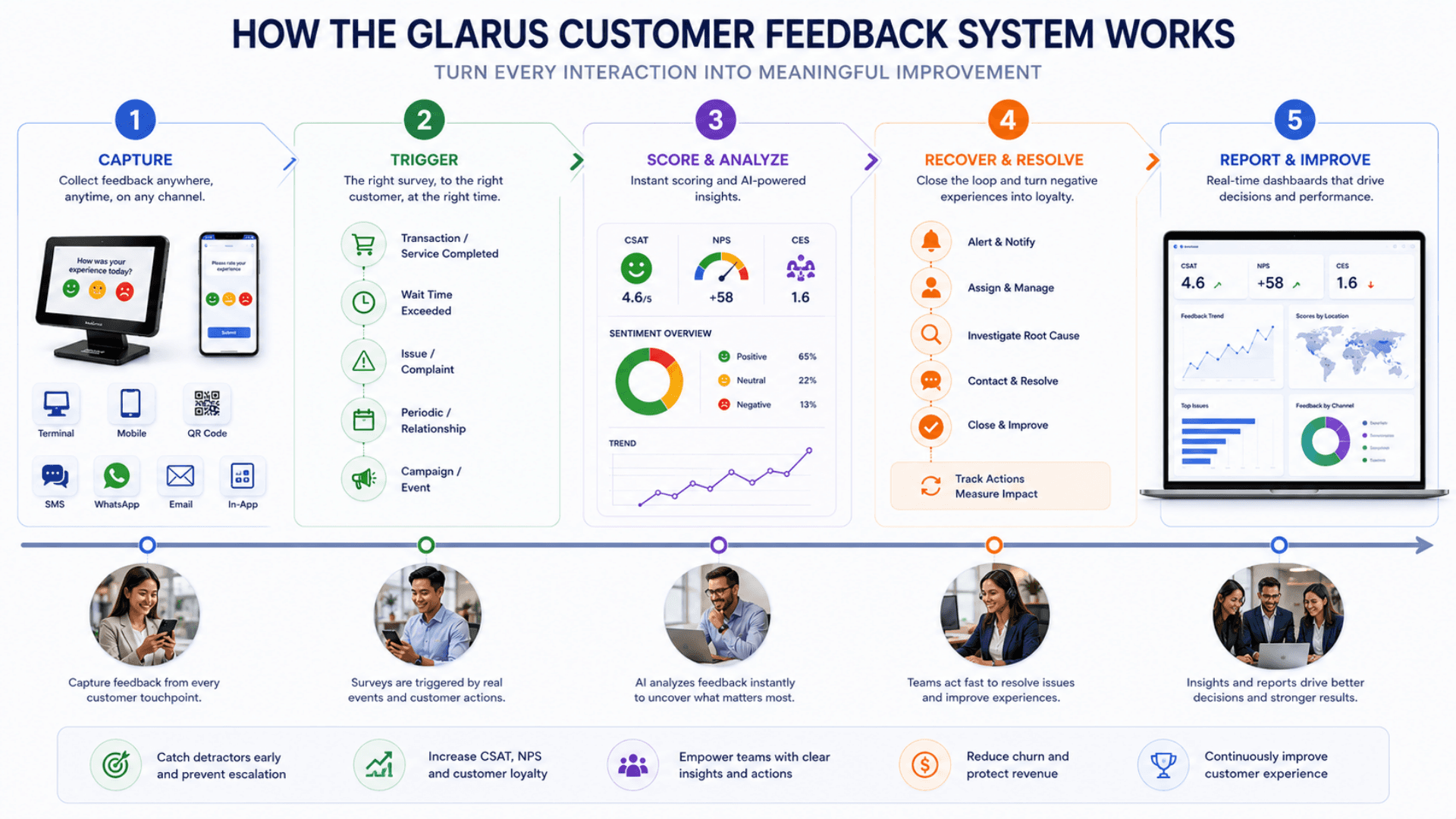
Capture the response, analyse the score and comments, then track any follow-up needed.
Capture at the Touchpoint
The customer gives feedback where the experience happened — a push-button or touchscreen MAGNO terminal at the counter or exit, a tablet feedback kiosk, a QR code on the receipt, an SMS, WhatsApp, or Telegram message, an in-app prompt, or an email survey. The terminal UI is fast, multilingual, and full-RTL aware, so a rating takes seconds and nobody is left puzzling over the screen.
Trigger Right After Service
A feedback request fires the moment a service event completes. Because the survey is triggered by the transaction, the response carries context automatically — which branch, which counter, which service type, which time window, and which staff member. The score is never an anonymous average; it is attached to a real moment of service.
Score and Analyse
Ratings roll up into CSAT, NPS, and CES, broken down per branch, per counter, per agent, and per service. Multilingual sentiment analysis reads free-text comments, tags them positive, neutral, or negative, and extracts recurring themes — so a thousand comments become a ranked list of what to fix first.
Alert and Recover
A low score raises an instant alert against the configured escalation rules. A follow-up task is assigned to the responsible branch manager, who contacts the customer, resolves the issue, and records the outcome. The recovery is tracked end to end — open, in progress, resolved — so no detractor slips through.
Report and Improve
Real-time dashboards and trend analysis show how satisfaction moves over days, weeks, and quarters. Per-agent scorecards drive coaching; branch league tables drive accountability. Live CSAT can be published to lobby screens via GRAVIA digital signage, and scheduled PDF / CSV reports feed branch and executive reviews.
Customer Feedback Use Cases by Industry
Explore the service environments relevant to customer feedback.

Open the deep dive by vertical
Customers running Customer Feedback in production
2 featured deployments where Customer Feedback ships today — a selection from a much wider production portfolio. Click any card for the full case-study deep dive.
IIB Bank · 20+ branches
GLARUS queue + GRAVIA signage + customer-feedback deployed across IIB Bank, a Sharia-compliant retail-banking network with 20+ branches — end-to-end branch transformation.
Bawasel Aljibal · Apple Support
Queue management plus customer-feedback tablets at Bawasel Aljibal's Apple support repair shop — ticketed intake and post-service customer feedback.
Customer Feedback System FAQs
Get answers to the most common questions about our customer feedback.
What is a customer feedback system?
Can a small business with one site use the customer feedback system?
Is the Customer Feedback System cloud or on-premise?
How does the system capture feedback?
What are triggered post-service surveys?
What metrics does it track — CSAT, NPS, CES?
How does the sentiment analysis work?
What is closed-loop service recovery?
How does it integrate with the rest of the GLARUS ecosystem?
What languages does the feedback system support?
Is it GDPR / HIPAA / PDPL compliant?
How does role-based access work?
How long does deployment take?
How does it scale across a large branch estate?
How do we get started?
Explore Related Solutions
Link feedback to the service journey and use findings to guide operational improvements.
Ready to Transform Your Operations with Customer Feedback?
Discuss your workflows, deployment requirements and integration scope with the Zeour team.
Customer Feedback — concepts you'll meet
Definitions for the operational terms that appear across this page. Tap any chip to read the long-form entry plus its cross-links.