
Clinic Management System
Zeour MediCare is a clinic management system and EMR for small and mid-sized healthcare practices. Patient records, appointments, clinical notes, prescriptions, laboratory workflows and billing sit within one application, with on-premise operation and role-based access for the clinic team.
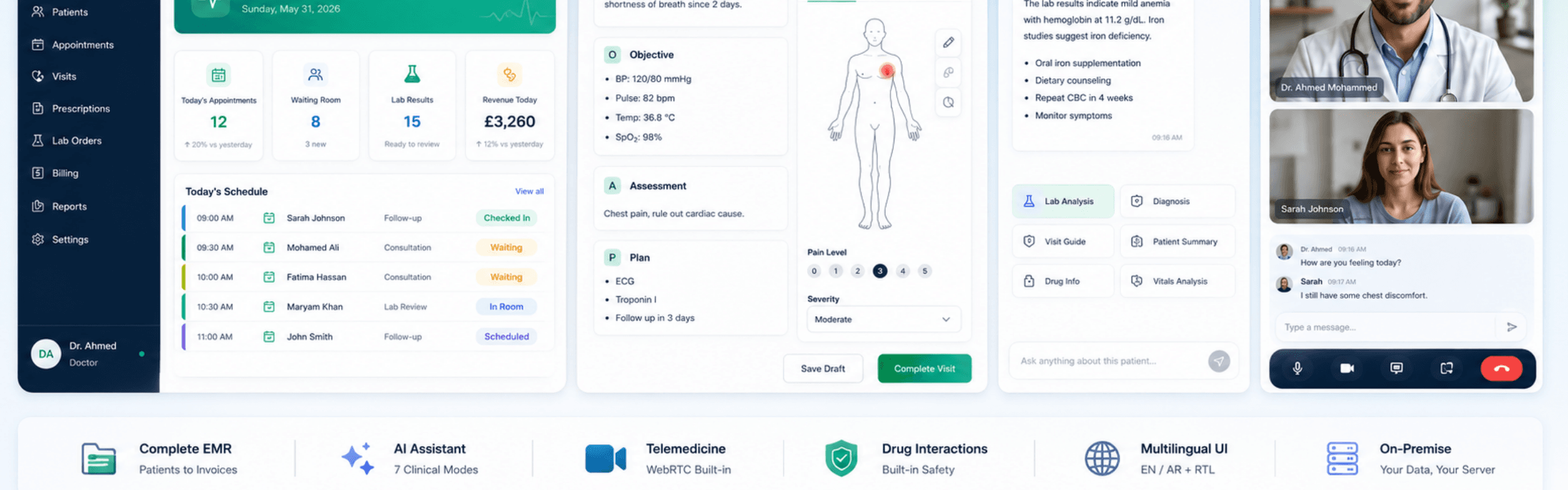
Patient Records and Daily Clinic Operations
Connect the administrative and clinical stages of a visit, from reception and patient history to notes, prescriptions and payment. MediCare also includes patient-facing tools and the clinical assistant described in the detailed modules below.
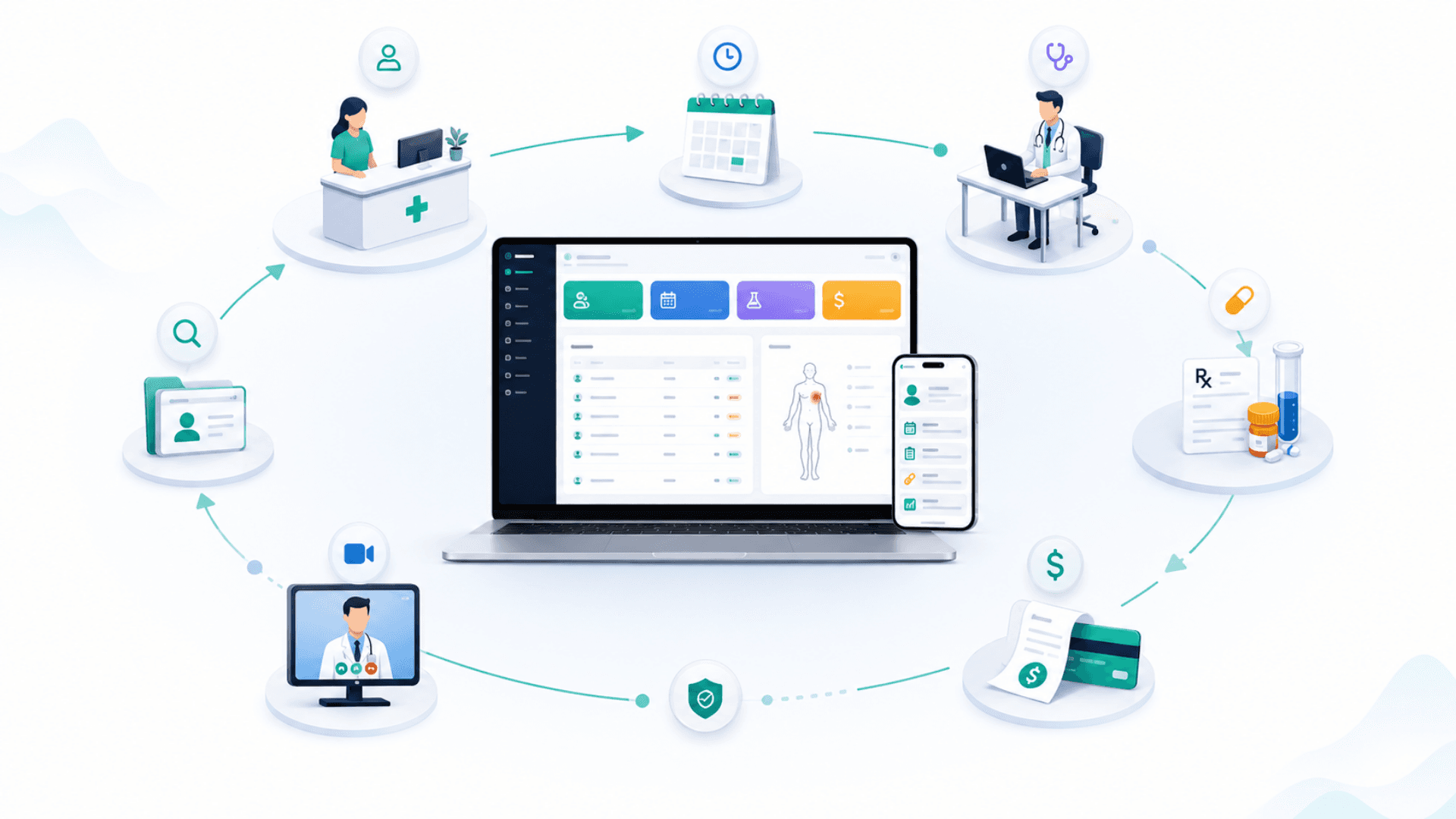
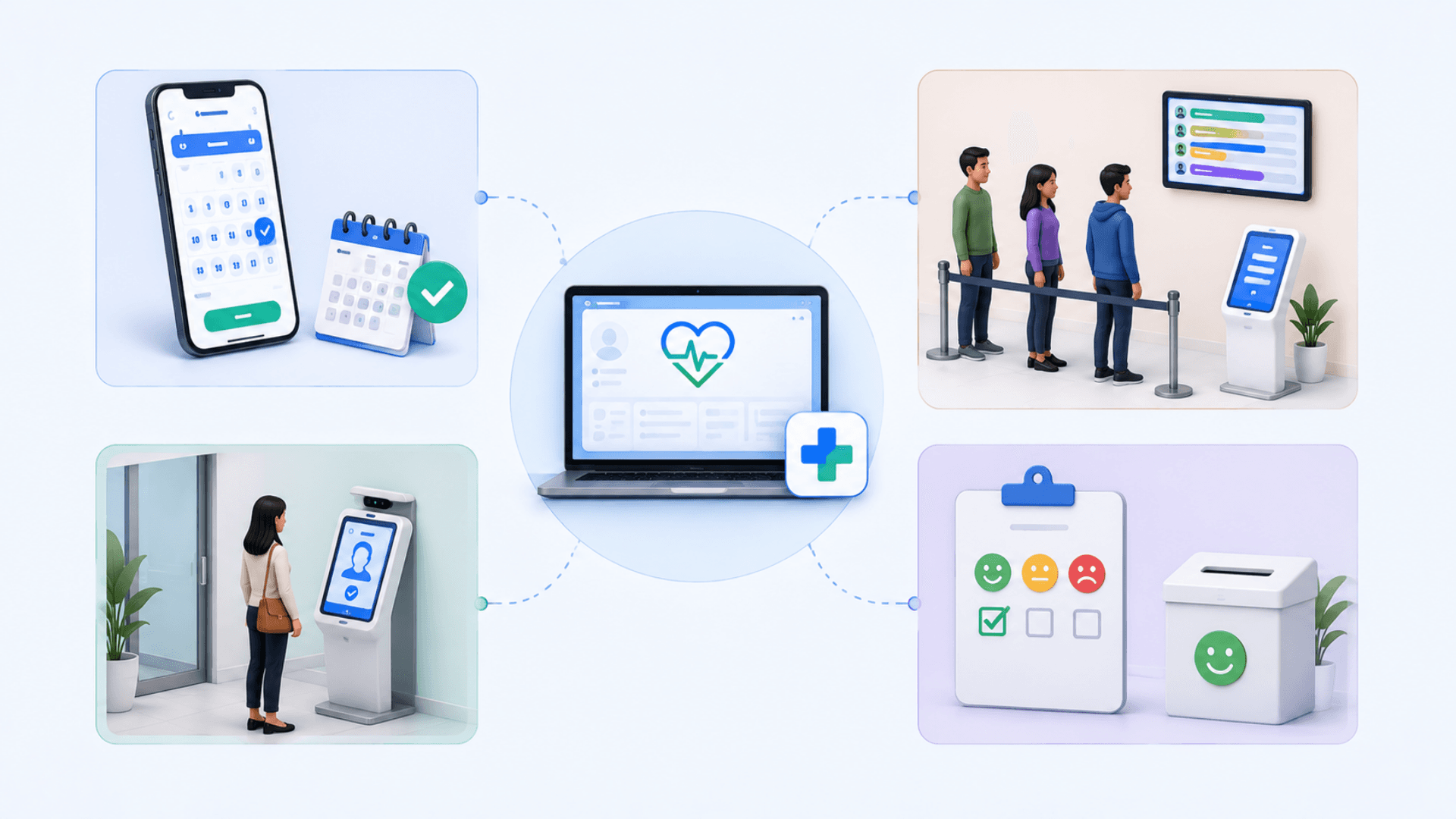
Coordinating the Patient's Arrival
Practices evaluating scheduling as a separate service can review the online appointment system. For waiting-room flow and counter calls, explore queue management for service locations.
A self-service kiosk solution can address arrival workflows. The customer feedback system focuses on measuring the service experience after a visit.
EMR Modules, Clinical Workflows and Practice Administration
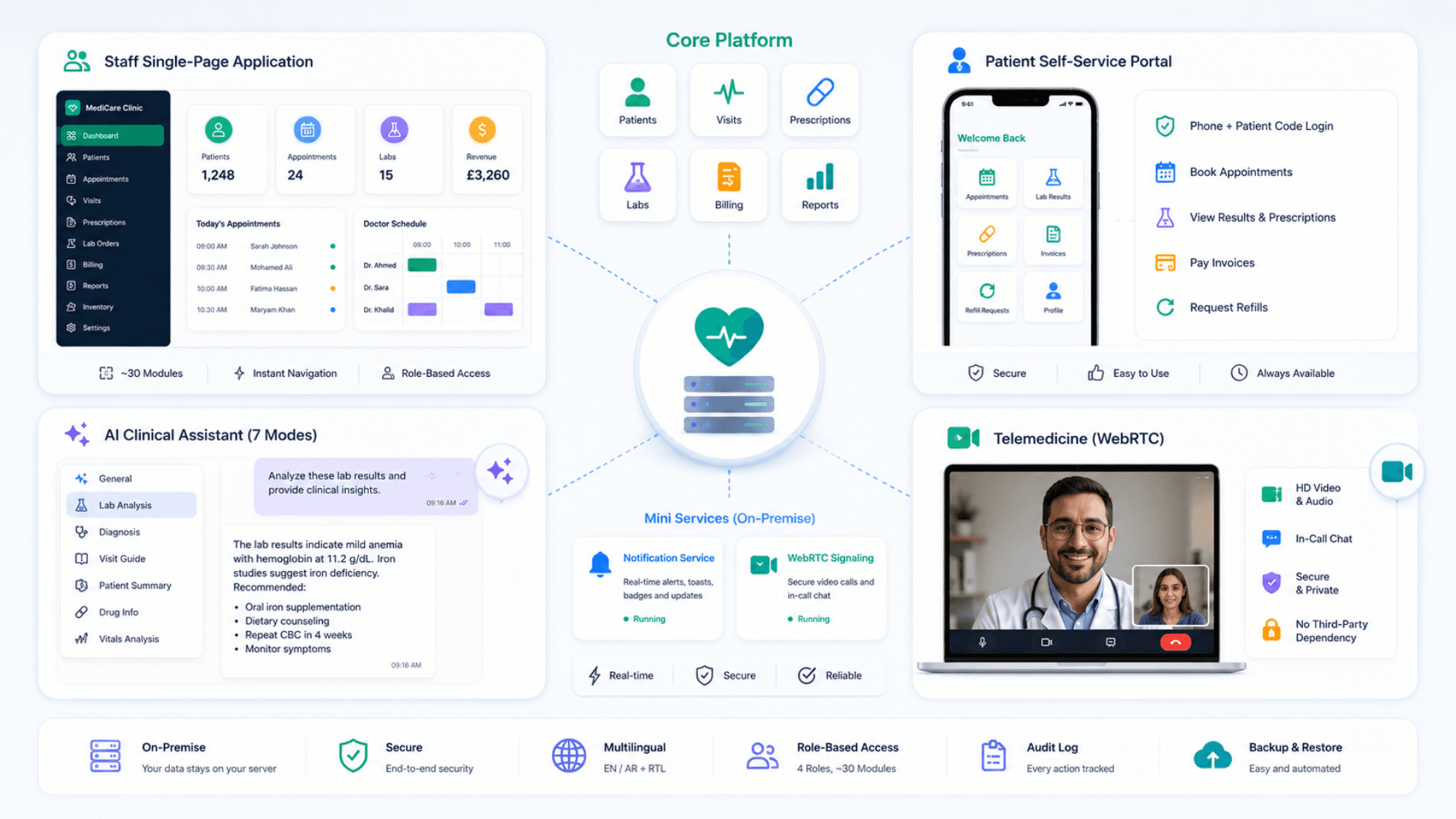
MediCare is a single-page application designed to run on modest clinic hardware. The staff interface is fast and reload-free — page switching is instant, simple to deploy, and easy to back up. Two optional real-time services handle live toasts / waiting-room updates and self-hosted WebRTC signaling for telemedicine. A separate patient self-service portal authenticates by phone + patient code. The whole application runs on a single server inside the clinic. Engineered multilingual — (with full RTL) as the production baseline, extensible to any locale per engagement.
Zeour MediCare — the multilingual on-premise clinic and EMR management system for small-to-mid healthcare practices. Covers patients (records, allergies, conditions, medications, body diagrams), appointments + visits with SOAP notes, prescriptions with drug-interaction checks, lab orders + samples + results, billing + payments + invoicing, inventory, expenses, referrals, medical certificates, refill requests, patient communications, telemedicine (WebRTC), an AI clinical assistant (OpenAI-powered with 7 modes), a patient self-service portal, and a full role-based access model across Admin, Doctor, Reception, and Lab Tech roles. Engineered multilingual — (with full RTL) as the production baseline, extensible to any locale — and runs locally on a single server. Sized for real clinics — from a solo practitioner on one server to 50-doctor polyclinics and multi-site groups.
Key Functionalities
Complete Patient Records
Multilingual names, patient code (P-0001), national / passport ID, blood type, insurance, allergies, conditions, surgeries, current medications, alerts, avatar. Cascading delete from patient → children prevented for patients with history (referential integrity).
Body Diagram Annotations
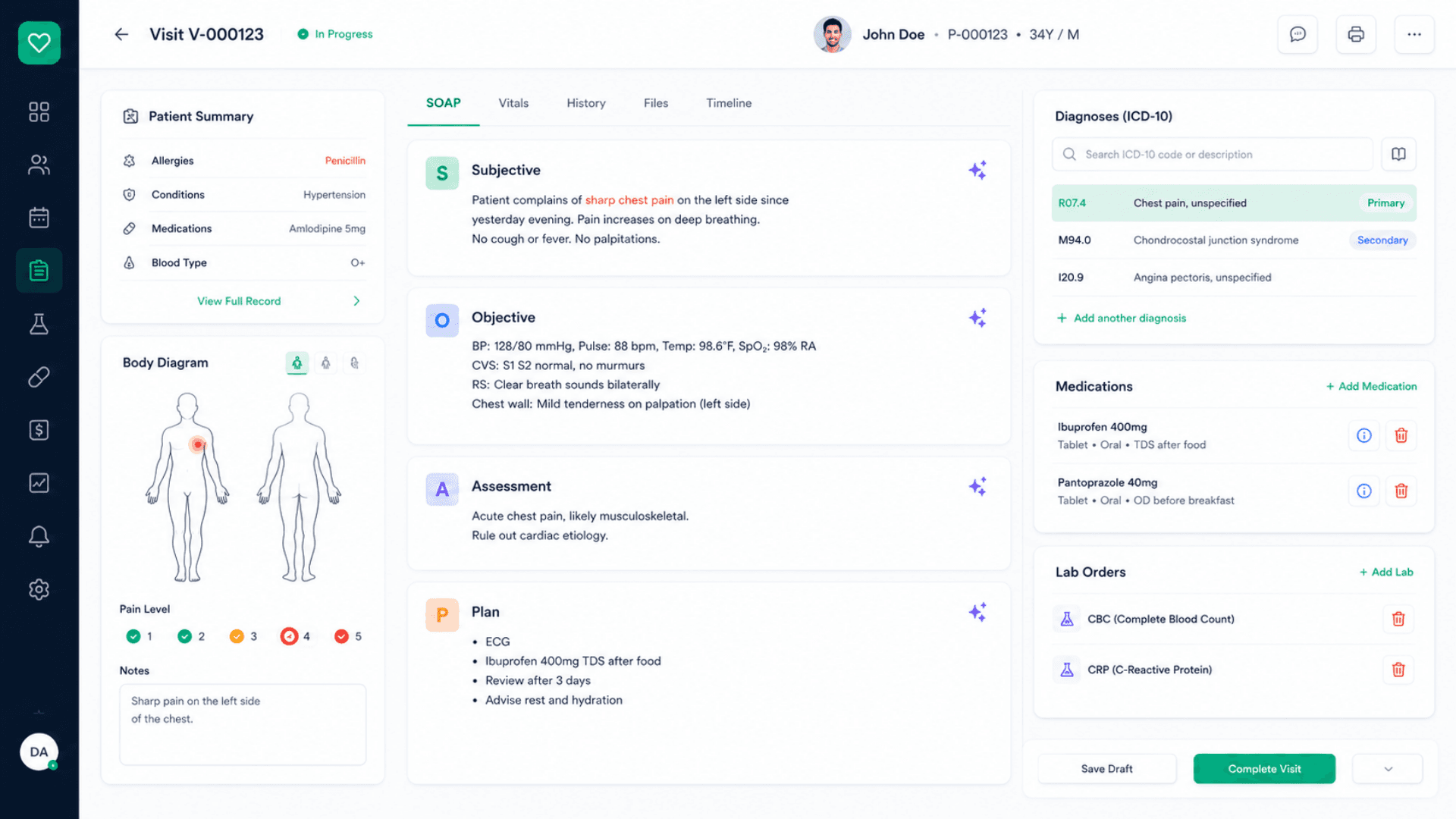
Click anywhere on a body view (front / back / side per body system) to mark pain locations. Capture pain level, severity, notes. Trends visible over time — useful for chronic pain, post-op, and physical therapy.
Appointments + Waiting Room + Doctor Schedule
30-minute default slots, drag-and-drop calendar, waiting-room queue with real-time updates. Multiple appointment types and statuses; the doctor schedule view supports kanban-style organization.
SOAP Visits with Templates
Each visit (V-0001) records Subjective / Objective / Assessment / Plan. SOAP templates per chief complaint (chest pain, follow-up, pediatric well-visit, etc.). Inline editing; auto-save; full version visible in patient timeline.
Diagnoses + ICD-10
Local ICD-10 catalog (no network call). Search by code or description. Multiple diagnoses per visit with primary / secondary distinction.
Prescriptions + Drug Interactions
Add medications from local catalog; in-process interaction check against patient's existing medications and other items in this prescription; doctor sees warnings inline; can override with documented reason.
Prescribe from a local catalog; interactions are checked in-process against the patient's existing medications.
- Per-visit prescription with multiple items
- In-process interaction check against patient meds + other items
- Doctor sees warnings inline, can override with documented reason
- Prescription analytics: top meds, refill patterns, doctor-level metrics
Lab Orders + Samples + Results
Order labs from the visit; each test becomes a tracked sample with a full status lifecycle. The Lab Tech worklist orders samples by priority. Results post back to the visit; out-of-range values flagged.
Telemedicine (WebRTC)
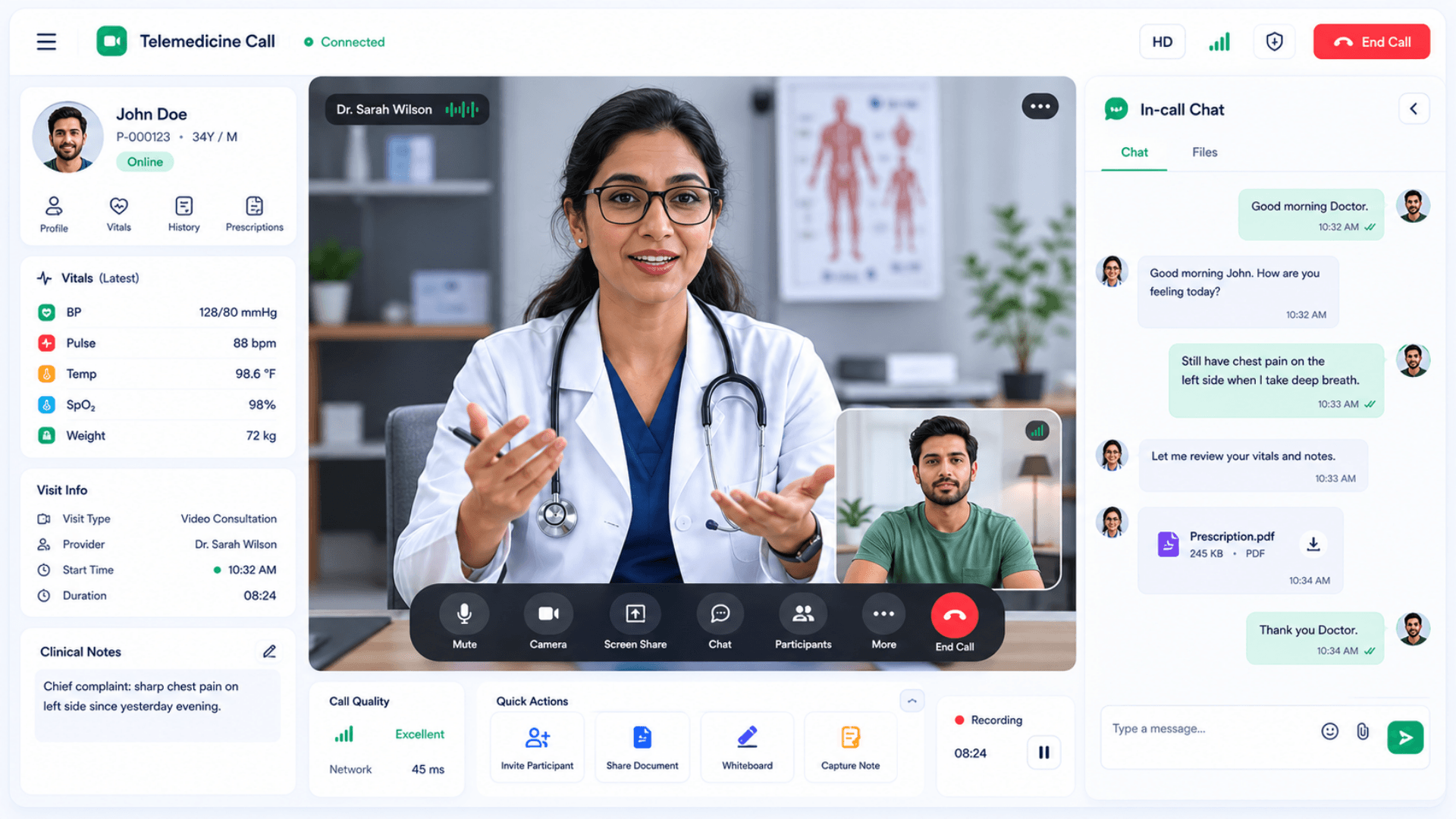
Built-in video call between doctor and patient. A self-hosted signaling service connects the two peers; video and audio stream peer-to-peer. In-call chat included. The patient joins via a secure tokenized link.
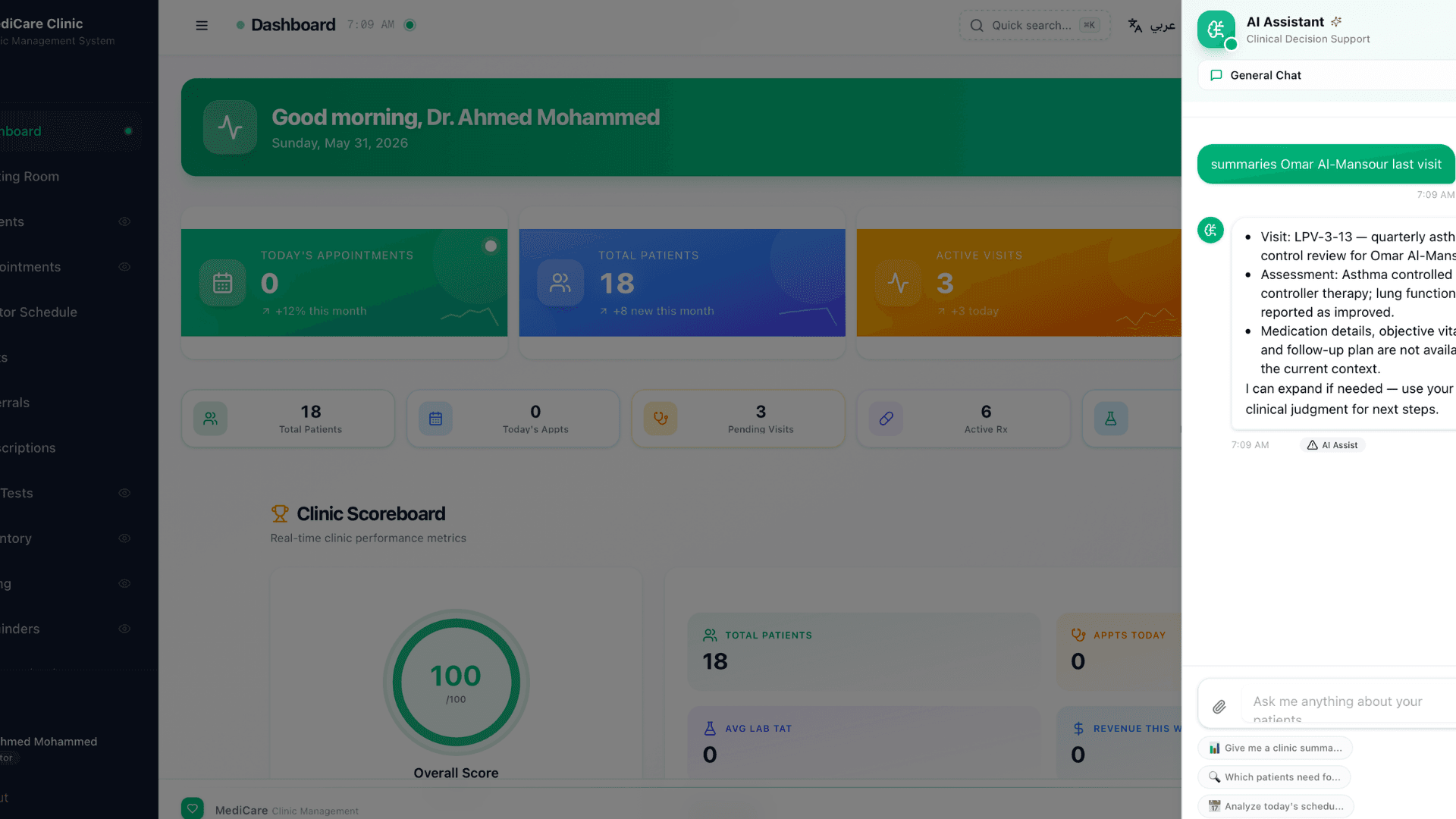
AI Clinical Assistant (7 Modes)
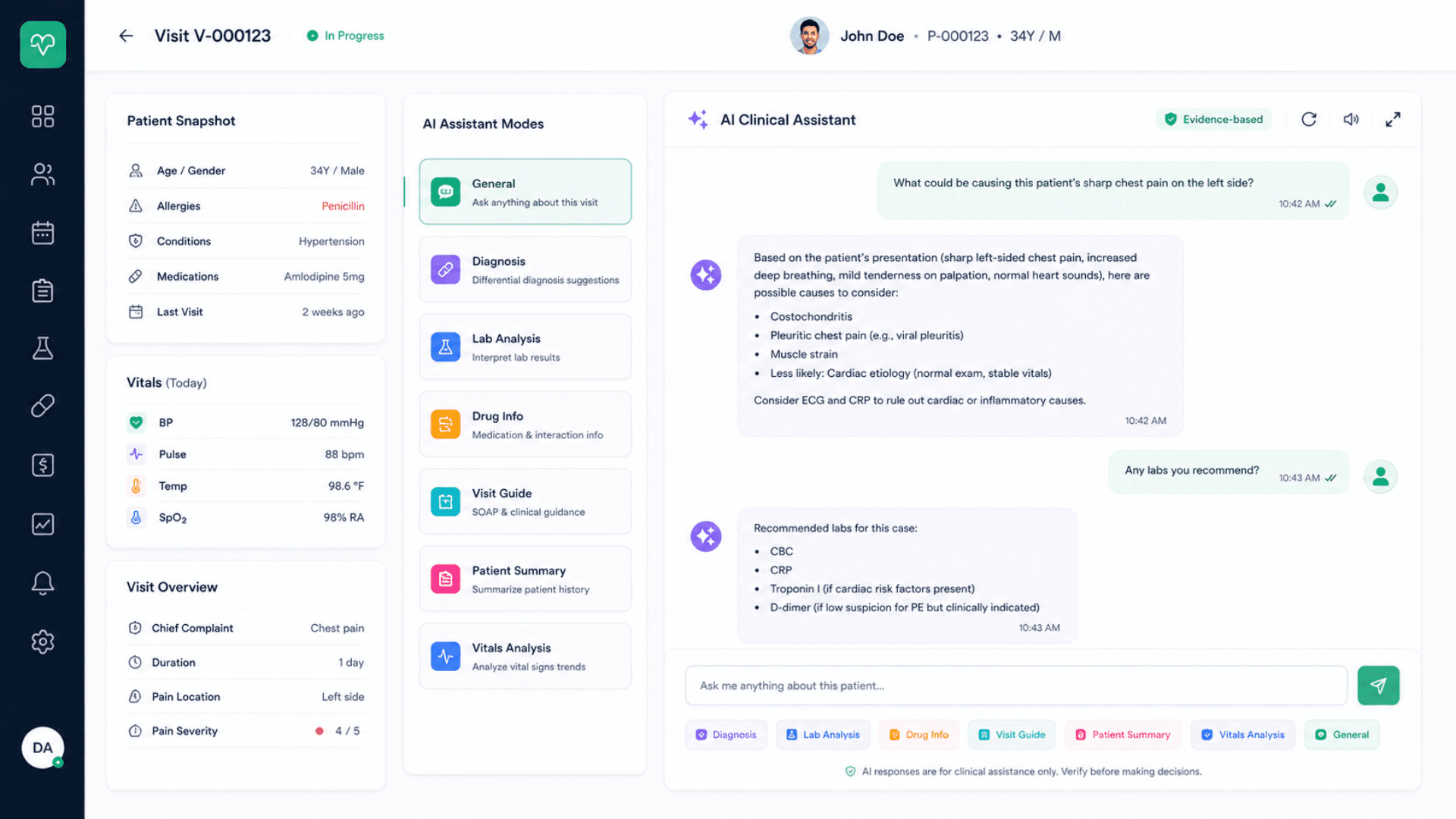
OpenAI-powered. Modes: general, lab-analysis, diagnosis, visit-guide, patient-summary, drug-info, vitals-analysis. System prompt enforces evidence-based, short-by-default, multilingual replies. Context assembled from patient + visit data.
OpenAI-powered assistant with seven clinical modes. Evidence-based, multilingual, short-by-default.
- Modes: general, lab-analysis, diagnosis, visit-guide, patient-summary, drug-info, vitals-analysis
- Context auto-assembled from patient + visit data
- Configurable OpenAI model
- System prompt enforces evidence-based replies; never claims certainty
Patient Self-Service Portal
Phone + patient-code login. Patients view appointments, request new ones, see visits + prescriptions + lab results, view + pay invoices, submit refill requests. Separate auth path from staff; same audit log.
Lightweight passwordless portal for patient appointment booking + result viewing + refills.
- Phone + patient-code login
- View appointments, visits, prescriptions, lab results, invoices
- Request new appointments + refill requests
- Same audit log as staff actions
Invoicing + Payments + Inventory + Expenses
Integer-amount accounting (currency configurable per operator); multiple line items; multiple payment methods; PDF export. Inventory tracks medications + consumables. Expense tracking for operational costs.
Certificates + Referrals + Refills + Communications
Generate medical certificates (sick leave, fitness, vaccination); referrals to specialists; handle refill requests from the portal; patient communications history; announcements for staff and patients.
Real-Time Updates
A notification service fans out toasts / badge updates / waiting-room state / lab-result-ready events. Best-effort: the app degrades gracefully if the notification service is offline.
Multilingual UI with Full RTL
Engineered multilingual — (with full RTL) as the production baseline; right-to-left languages switch the whole layout automatically. French, Spanish, German, Portuguese, Italian, Dutch, Turkish, Urdu, Hindi and any other locale are added per engagement.
Software Components
Application
Single-Page Clinic App
A single-page staff application — page switching is instant, with no full reloads between screens. Fast on low-end clinic hardware.
Single-Tenant Database
One database per clinic, easy to back up and restore. Referential integrity protects patient and doctor records from destructive deletes.
Modern, Lightweight Runtime
Built on a modern, lightweight web stack with a polished component layer — quick to install, quick to start, light on clinic hardware.
Auth & Authorization
Staff Authentication
Email-and-password sign-in for clinical staff. Production deployments are hardened to the operator's security policy — hashed credentials, signed sessions, and encrypted transport.
Patient Portal Authentication
Patients sign in to the self-service portal with their phone number and patient code. Portal actions are recorded in the same audit log as staff actions.
Role-Based Access (4 Roles × ~30 Modules)
View / create / edit / delete permissions defined per role per module. Admin has full access; Doctor, Reception, and Lab Tech are each scoped to their workflow.
Route-Level Enforcement
Every protected API route validates the caller's identity and role against the permission matrix before doing any work — a forged URL leaks nothing.
Real-Time Services
Notification Service
Fans out real-time toasts, badge updates, waiting-room state, and lab-result-ready events to the clinic UI. Best-effort — the app degrades gracefully if it is offline.
WebRTC Signaling Service
Connects doctor and patient for telemedicine calls — room-based, one room per call. Handles call setup and in-call chat; video and audio stream peer-to-peer.
Single-Hostname Routing
The reverse proxy routes the main app and the real-time services through one hostname, so patients and staff never see separate ports or domains.
AI & Clinical Aids
AI Clinical Assistant
Powered by a configurable OpenAI model. 7 modes: general / lab-analysis / diagnosis / visit-guide / patient-summary / drug-info / vitals-analysis. The system prompt enforces evidence-based, short-by-default, multilingual replies.
Local ICD-10 Catalog
A full ICD-10 code list is bundled with the app and searched in-process — no network call, so diagnosis search keeps working offline.
Local Drug Interaction Dataset
Drug-pair interaction warnings are checked in-process whenever a prescription is composed. Offline-friendly and auditable.
Medical Catalog + Templates
A built-in procedures / services catalog, SOAP templates, visit templates, consent forms, specializations, and body-systems metadata — all editable per clinic.
Exports & Reporting
PDF Export
Generates invoices, prescriptions, certificates, lab reports, referrals, and treatment plans. Multilingual rendering with the clinic logo and branding; configurable templates.
CSV Export
Exports list views (patients, appointments, visits, prescriptions, lab orders, invoices) for ingestion into BI, accounting, or external systems.
Reports, Dashboards & Clinic Scoreboard
Patient flow, revenue, top diagnoses, prescription analytics, per-role activity, and KPIs — surfaced in dashboards and a clinic scoreboard.
Hardware Components
Server (On-Premise)
CONT06 Industrial Branch Server
Ubuntu Linux local server. Runs the full MediCare application for a single clinic. Compact, fanless options available.
Standard Workstation
Any modern x86 server / desktop with 8+ GB RAM and SSD storage. MediCare runs comfortably with hundreds of concurrent patient records.
Reception Hardware
Reception Workstation
Standard PC with 22" / 24" touchscreen for fast patient registration + appointment booking + triage vitals capture.
GLARUS Self-Service Kiosks (Optional)
KIOSAPP066 / AUTO666 for patient self-check-in: scan QR code, confirm appointment, print queue ticket. Integrates with the main app via REST.
Thermal Receipt Printer
For appointment reminders, queue tickets, payment receipts. 60mm / 80mm options.
Clinical Hardware
Doctor Workstation
Standard PC with 22"+ display for visit documentation + SOAP notes + AI assistant. Optional secondary display for AI / lab results.
Vital Signs Equipment (Optional Integration)
Most clinics capture vitals manually via the on-screen form. For higher-end clinics, BP cuffs / pulse oximeters / spirometers with USB / Bluetooth can integrate via a small bridge service.
Telemedicine Camera + Audio
Any USB / built-in webcam + microphone works for the WebRTC video call. Recommended: HD webcam + noise-cancelling headset.
Lab Hardware
Lab Tech Workstation
Standard PC with 22" display showing the lab worklist + sample lifecycle + results entry. Multiple workstations supported.
Lab Equipment (Optional Integration)
Direct integration with analyzers / spirometers / ECG / ultrasound: typically via a region-specific HL7 bridge or vendor-specific SDK. Out-of-scope for the demo seed; available for production deployments.
Patient-Facing Hardware
Patient Mobile / Web Device
Any modern browser works for the patient self-service portal + telemedicine join page. No app install required.
Optional Telemedicine Setup at the Patient Side
A standard smartphone or laptop with camera + mic is sufficient. Bandwidth requirement: ~1 Mbps up / down for HD video, less for SD.
MediCare Clinic Management Architecture
MediCare is a single application that serves both the staff interface and the patient portal. Two optional real-time services add live toasts / waiting-room updates and self-hosted WebRTC signaling for telemedicine, and the reverse proxy routes everything through one hostname. Single-tenant on-premise by default; cloud-hosted edition available.
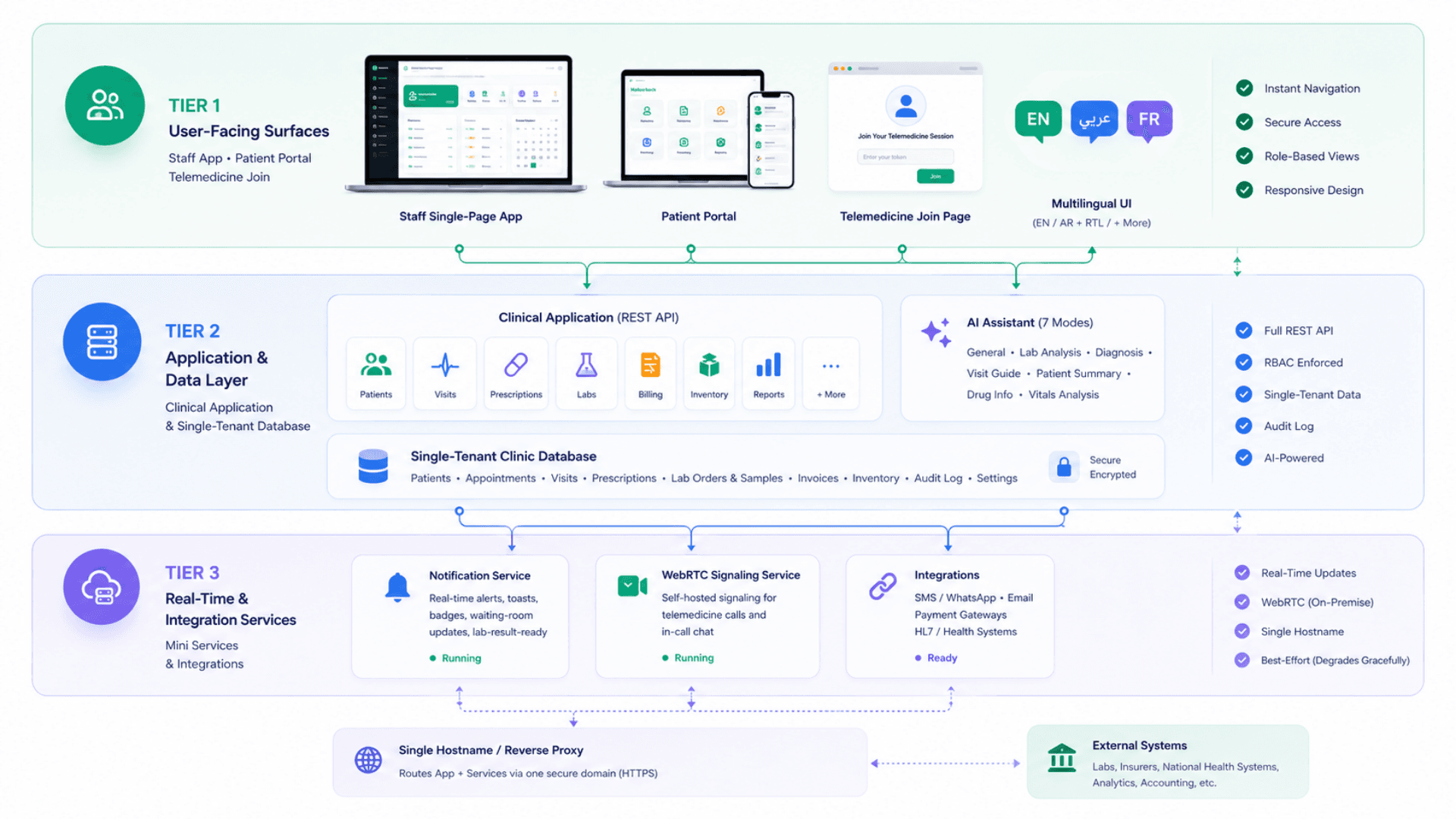
Tier 1 — User-Facing Surfaces
Staff app + Patient Portal + Telemedicine join page
- Staff single-page app — instant page switching, no full reloads between screens
- ~30 clinical screens — dashboard, patients, visits, prescriptions, lab, billing, telemedicine, settings, and more
- Patient self-service portal — same app, separate authentication (phone + patient code), separate screens
- A secure tokenized telemedicine join page for patients
- Multilingual UI (with full RTL, extensible to any locale); light / dark theme; accessibility considered
Tier 2 — Application & Data Layer
The clinical application and its single-tenant database
- A full REST API with role-based access enforced on every protected route
- ~30 API resource families: patients, visits, prescriptions, lab tests, invoices, expenses, inventory, certificates, referrals, refills, communications, announcements, reports, dashboard, audit logs, settings, and more
- An AI assistant endpoint with 7 modes; context assembled from patient + visit data
- A single clinical database — patients, appointments, visits, prescriptions, lab orders + samples, invoices, inventory, expenses, audit log
- Human-readable record codes (P-0001 / V-0001 / RX-0001 / INV-0001) — count-based, single-tenant
- Document uploads stored with the records they belong to (suitable for small clinics)
Tier 3 — Real-Time & Integration Services
Notification + WebRTC signaling + single-hostname routing
- A notification service — live fan-out of toasts / badges / waiting-room state / lab-result-ready events
- A self-hosted WebRTC signaling service for telemedicine calls + in-call chat
- A reverse proxy that routes the main app and the real-time services through one hostname
- The real-time services are best-effort: the app degrades gracefully if they are offline
- Optional integrations: SMS / WhatsApp providers for reminders, national health systems via HL7 bridges, payment gateways for portal payments
Operational & Resilience Pipeline
Real-time- Real-time toasts and waiting-room updates via the notification service (degrades gracefully if down)
- WebRTC peer-to-peer video / audio; the signaling service only handles call setup, never the media
- Scheduled database backups to local NAS, object storage, or other targets
- Single-file restore: recovery in minutes, recovery point matching your backup cadence
- Audit log captures every clinical action — compliance ready for regional health regulators
- AI assistant responses are briefly cached to reduce cost; timeout is configurable
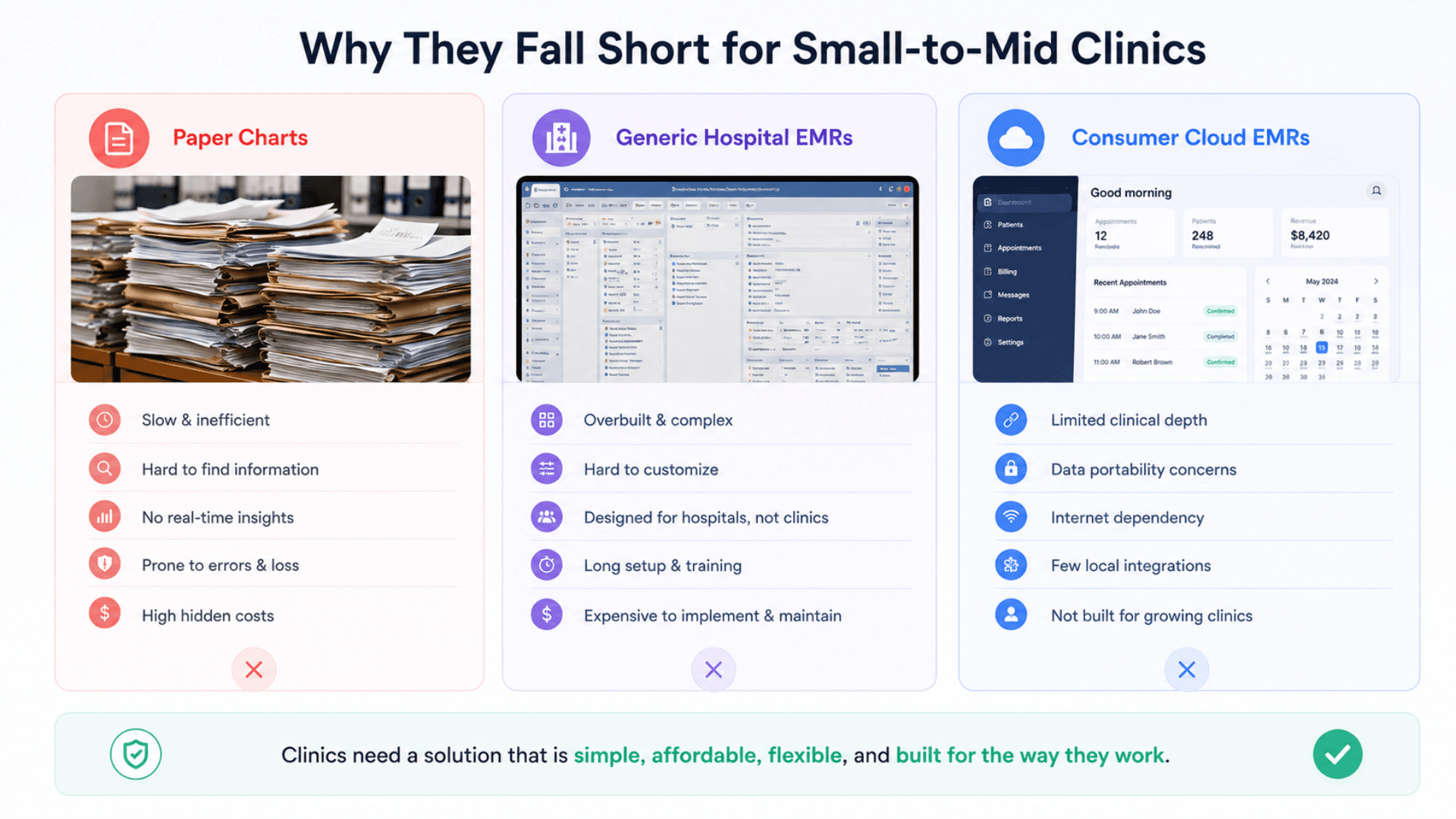
MediCare vs Hospital EMR vs Consumer Cloud EMR vs Paper Charts — What You Need
Most clinic-management options sit at the extremes: massive hospital-grade systems built for hundreds of seats, or consumer-grade cloud EMRs that store your patient data on a US server. MediCare sits in the gap — small-to-mid clinic software, on-premise, multilingual, AI-enabled.
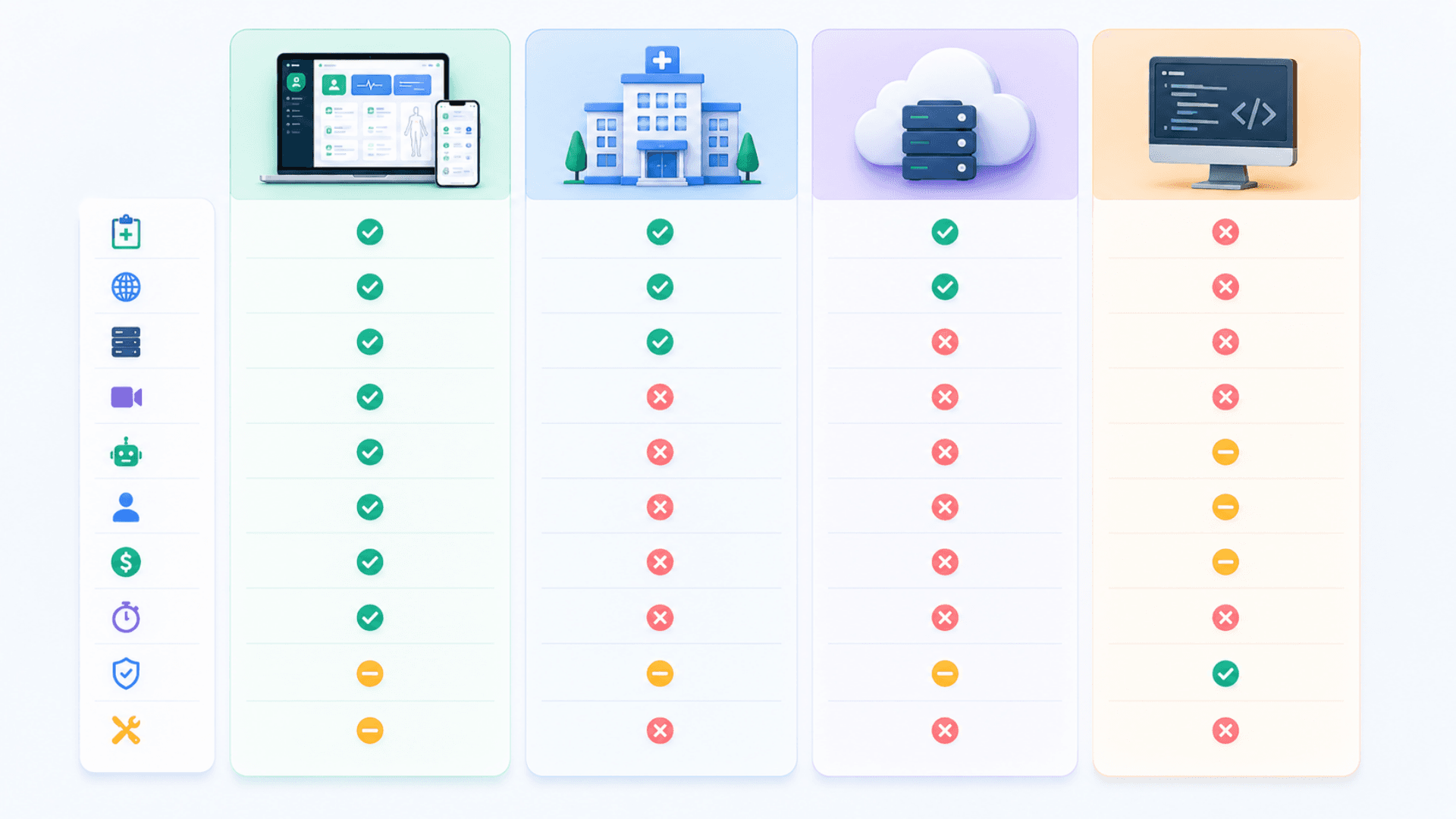
MediCare Clinic Management System
Best for: Small-to-mid clinics (1-50 doctors), multilingual or non-English populations, on-premise data sovereignty, full clinical workflow with AI assistance and built-in telemedicine.
- Complete EMR — patients, appointments, SOAP visits, prescriptions, lab, billing, inventory
- Multilingual with full RTL; hand-rolled i18n; extensible to more languages
- Built-in telemedicine (WebRTC) — no third-party fees, no patient data on Zoom
- AI clinical assistant with 7 modes — 40-60% cut in documentation time
- Patient self-service portal (phone + patient code) — appointment booking + refills + results
- On-premise default — patient data stays on your server
- Single-week deployment, sub-$10k typical TCO for small clinics
Hospital-Grade EMR (Epic / Cerner / Allscripts)
Best for: Hospital systems with hundreds of seats and budgets in the millions.
- Massive feature set covering inpatient + outpatient + ER + surgery
- Heavy integration with hospital systems (PACS, lab analyzers, pharmacy)
- Six-to-seven-figure pricing + implementation costs
- 12-24 month implementation timelines
- US-centric clinical workflow; localization is custom work
- Overkill for a 1-10 doctor clinic
Consumer Cloud EMR (Practice Fusion / Kareo / DrChrono)
Best for: US-based small clinics with US patients and no data-residency concerns.
- Cloud-hosted in US data centers — patient data leaves your country
- English-only (with limited Spanish in some products); rarely multilingual
- Subscription pricing per provider per month
- No built-in telemedicine — usually integrates with a third party
- Limited control over your own data; vendor decides retention policy
- Operational dependency on internet uptime
Open-Source EMR (OpenEMR / OpenMRS)
Best for: Technically self-sufficient clinics with in-house engineering.
- Free to license; self-hosted
- Decade-old UI/UX; steep learning curve for clinical staff
- Customization requires engineering effort
- No built-in AI assistant; no modern WebRTC telemedicine
- Community support; commercial support requires a partner
- Operational burden of running production yourself
MediCare Clinic — Deployment Checklist
A practical 5-phase rollout playbook for going live with MediCare at a single clinic, then scaling to multi-site if needed. Use it as a project plan with your Zeour partner.
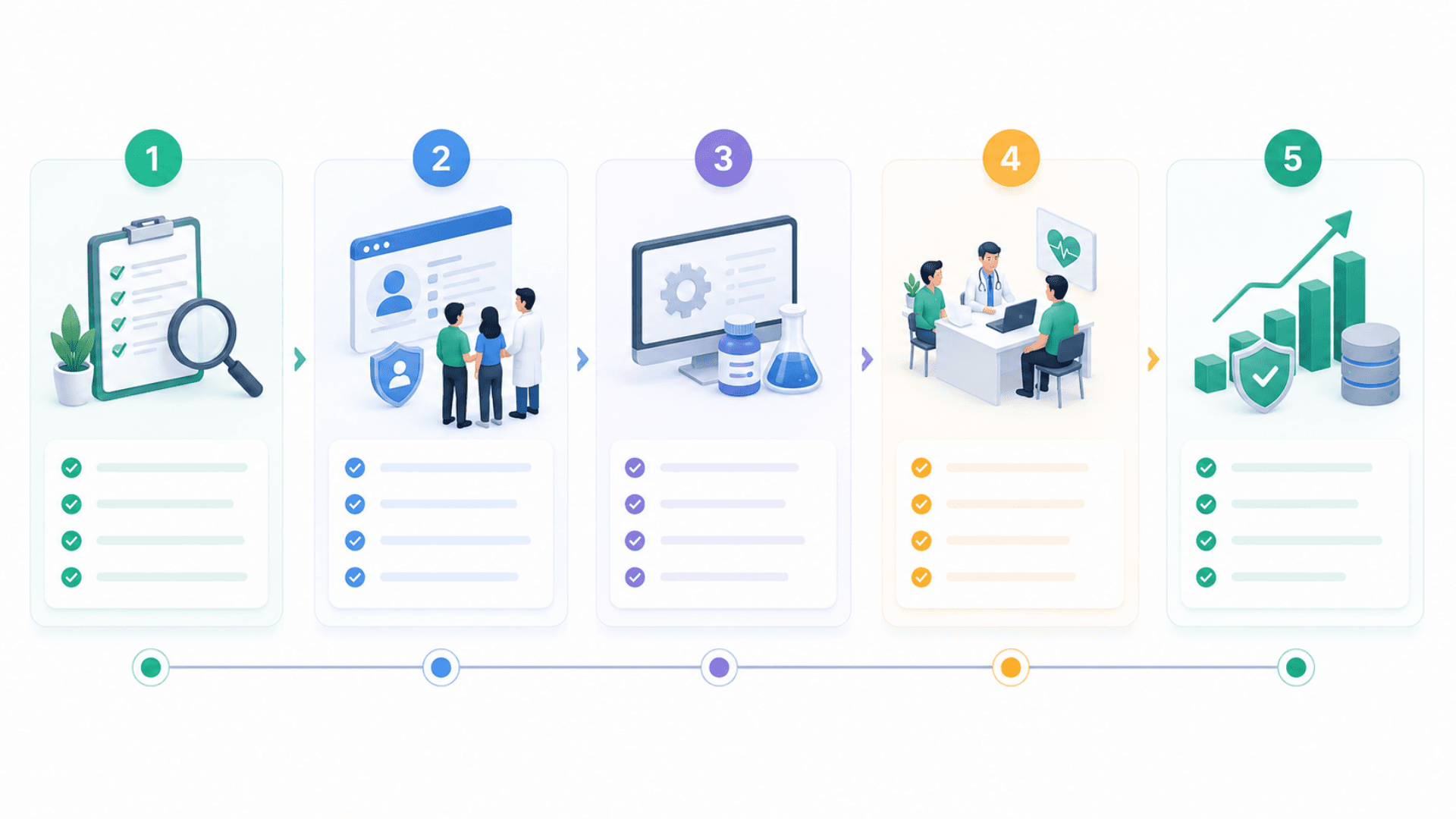
- 01
1) Discovery & Clinic Configuration
ChecklistInventory specializations, doctors, reception staff, lab techs, room layout, languages, billing currency, insurance providersDecide deployment model — on-premise (default) or cloud-hostedPlan data import: paper charts (manual or scanned), existing EMR (export + custom import script), no migration (fresh start)Set up the server (CONT06 industrial PC or standard server) with the MediCare application and its databaseConfigure clinic settings, branding, default currency, default language - 02
2) User Setup & RBAC
ChecklistCreate admin user; bootstrap specializations + procedure catalog + medical templatesAdd doctor, reception, lab-tech users with role assignmentsConfigure reception-doctor assignments (which reception serves which doctor)Review RBAC matrix; customize per-clinic permission tweaks if neededWalk-through with each role: what they see, what they can do - 03
3) Clinical Configuration
ChecklistImport / configure ICD-10 catalog (default included; add regional ICD codes if needed)Configure drug-interaction dataset (default included; expand with regional formulary)Set up SOAP / visit / consent templates per specialtyConfigure body-systems metadata if needed (extend default body diagram coverage)Test AI assistant — configure OpenAI API key + verify all 7 modes - 04
4) Pilot Week + Training
ChecklistTrain reception on patient registration + appointment booking + triage vitals + invoicingTrain doctors on SOAP notes + prescriptions + lab orders + AI assistant + telemedicineTrain lab tech on lab worklist + sample lifecycle + results entryPilot with real patients for 1 week; sit-by during first sessions; collect friction pointsIterate on templates / RBAC / clinic settings based on feedback - 05
5) Optimize, Backup & Scale
ChecklistConfigure automated backups of `db/custom.db` to NAS / S3 / object storageSet up monitoring (uptime, disk space, audit-log volume, AI cost)Roll out patient self-service portal to existing patients via SMS / email invitationTrack KPIs: visit documentation time, refill-request throughput, no-show rate, NPSPlan multi-site expansion if applicable (additional MediCare instances per clinic, central reporting via CSV export)
MediCare Clinic Management Gallery
Visual highlights of MediCare — the multilingual on-premise clinic management system for small-to-mid healthcare practices.
Why Paper Charts Fail
Paper charts are slow to search, easy to lose, and impossible to audit — here is why a multilingual electronic medical record is essential.
Paper Charts Don't Survive Audits
A regulator asks for chronological records of every visit, prescription, and lab result for a patient over five years. Paper charts produce a stack of paper. Some pages are in one folder, some in another, some are illegible. Compliance becomes a manual reconciliation exercise.
Complete Audit Trail by Design
Every patient-data access, every prescription, every lab result, every invoice writes to the audit log with timestamp + user + entity + structured metadata. Regulator queries are a click away. Configurable retention; right-to-be-forgotten workflow.
Generic EMRs Are Too Big, Too Expensive, Too English-Only
Hospital-grade EMRs (Cerner, Epic) are built for hundreds of seats and cost six-to-seven figures. They're overkill for a 1-10 doctor clinic. They're also rarely multilingual, never Arabic-first, and assume US-centric clinical workflow.
Sized for the Clinic, Not the Hospital
MediCare is built for 1-50 doctors in a single building (or a small cluster). It runs on one server, one database, one application. Setup in a week, not a year. Cost-of-ownership in the thousands, not the millions.
Consumer EMRs Lock Your Data in the Cloud
Practice Fusion, Kareo, DrChrono store your patient data on US-based servers. For clinics in the EU, GCC, MENA, or any country with health-data residency rules, that's legally problematic. For clinics with intermittent internet, it's operationally problematic.
On-Premise = Data Sovereignty
The entire stack runs on your server. Patient data never leaves your clinic. Internet outages don't stop operations. Compliance with EU GDPR, GCC PDPL, regional health-data laws is a deployment decision, not a software-vendor decision.
Telemedicine Means Zoom Subscriptions
Most small clinics doing telemedicine use Zoom or Google Meet — third-party fees, no patient-data integration, no recording governance, no fit with the rest of the clinical workflow.
Telemedicine Built In
WebRTC video calls between doctor and patient. A self-hosted signaling service runs on your own machine — no Zoom subscription, no Twilio fees, no third-party access to your patient calls. In-call chat included.
No AI Means Slower Documentation
A 30-minute visit produces 5-10 minutes of SOAP-note writing. Across a busy clinic that's hours of admin per doctor per day. Without an AI assistant trained on clinical context, doctors fall back to dictation or shorthand, and the chart quality suffers.
AI Clinical Assistant in 7 Modes
Built-in OpenAI-powered assistant that helps the doctor write SOAP notes, suggests differential diagnoses, interprets lab panels, flags drug interactions, summarizes patient history, analyzes vital-sign trends. Cuts documentation time 40-60%.
No Portal = Phone Calls All Day
Without a self-service portal, every appointment booking, every prescription refill, every result inquiry is a phone call. Reception spends most of the day on the phone instead of with patients in front of them.
Patient Access Beyond the Reception Desk
Patients book appointments, request refills, view their results, pay invoices — without phoning reception. Login is phone + patient code. The audit log captures everything they do.
MediCare Clinic Features
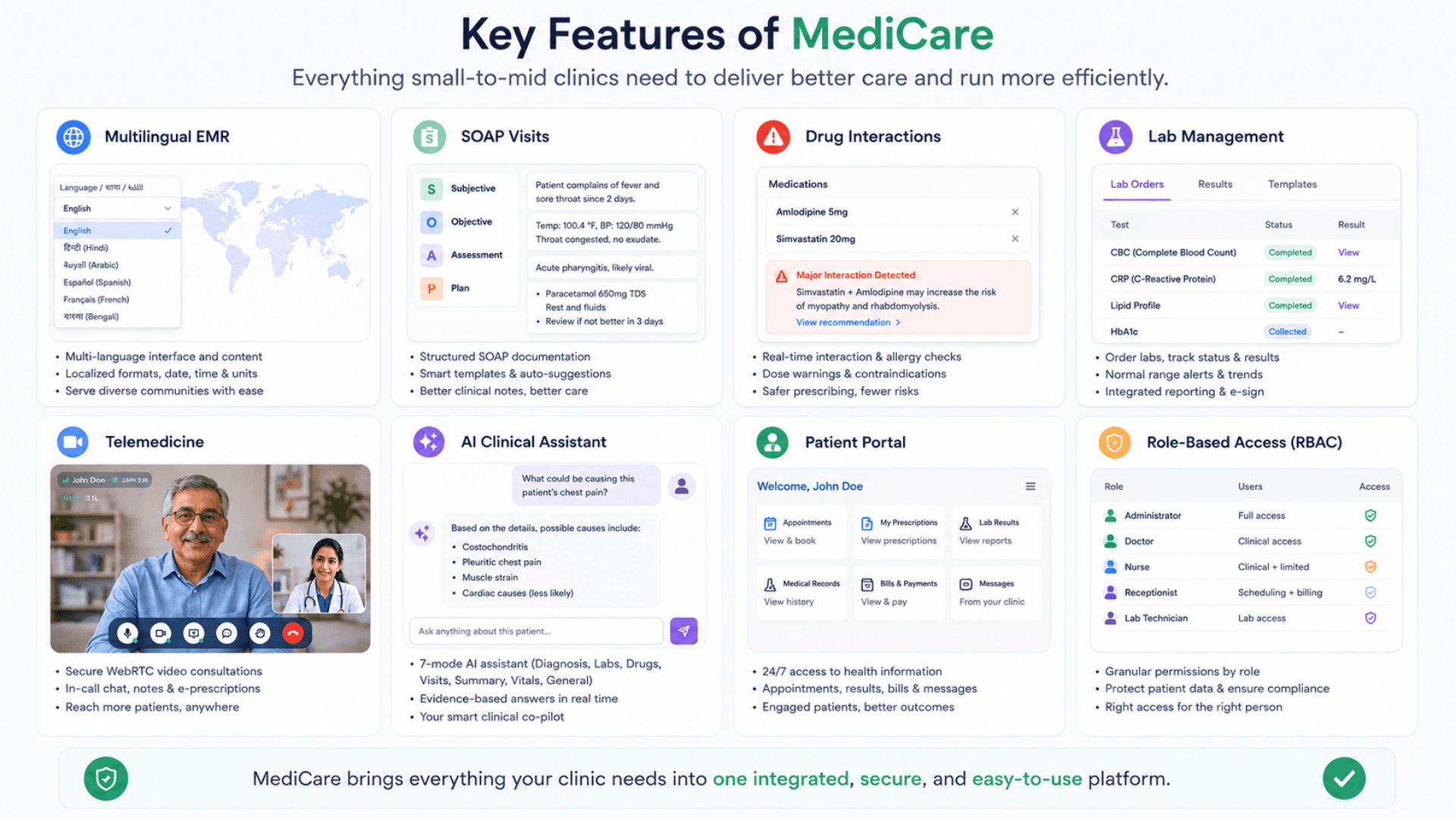
Complete Patient Records — Multilingual (EN / AR), with Allergies, Conditions, Surgeries, Medications, Alerts
Body Diagram Annotations with Pain Level, Severity, System, View (front / back / side)
Appointments + Waiting Room + Doctor Schedule (30-min default, drag-and-drop calendar)
Visit Records with Full SOAP Notes (Subjective / Objective / Assessment / Plan)
Vital Signs Capture per Visit + Standalone Triage Vitals
Diagnoses with Local ICD-10 Search + Suggestions (no external API call)
Prescriptions with Drug-Interaction Checking + Prescription Analytics
Lab Orders → Samples (full lifecycle) → Results with Worklist + Stats
Medical Certificates + Referrals + Refill Requests + Treatment Plans
Telemedicine (WebRTC) — Doctor & Patient Video Calls with In-Call Chat
AI Clinical Assistant — 7 Modes including Lab Analysis, Diagnosis, Visit Guide, Patient Summary, Drug Info, Vitals Analysis
Patient Self-Service Portal (Phone + Patient Code Login)
Invoicing + Payments + Multiple Payment Methods (integer-amount accounting)
Inventory Management + Expense Tracking + Refill Inventory
Patient Communications + Announcements + Reminders + Audit Log
Real-Time Notifications & Toasts Across the Clinic UI
Self-Hosted WebRTC Telemedicine Signaling + In-Call Chat
RBAC Across 4 Roles (ADMIN / DOCTOR / RECEPTION / LAB_TECH) × ~30 Modules
Full Multilingual UI — English & Arabic Baseline with Full RTL, Extensible to Any Locale
PDF Export for Invoices, Prescriptions, Reports, Certificates
CSV Export for All List Views + Custom Reports
Drag-and-Drop Calendar + Kanban-Style Schedules
SOAP / Visit / Consent Templates Library (Reusable Starting Points)
Document Attachments (Polymorphic — Patient / Visit / Prescription / Lab Order)
Body Systems Metadata + Specializations Catalog + Medical Catalog of Procedures
Single-Tenant Database — Easy to Back Up and Restore
Lightweight Single-Server Deployment — Runs on Modest Clinic Hardware
Cloud or On-Premise (single-tenant clinic deployment model)
MediCare Clinic Components
EMR Modules, Clinical Workflows and Practice Administration.
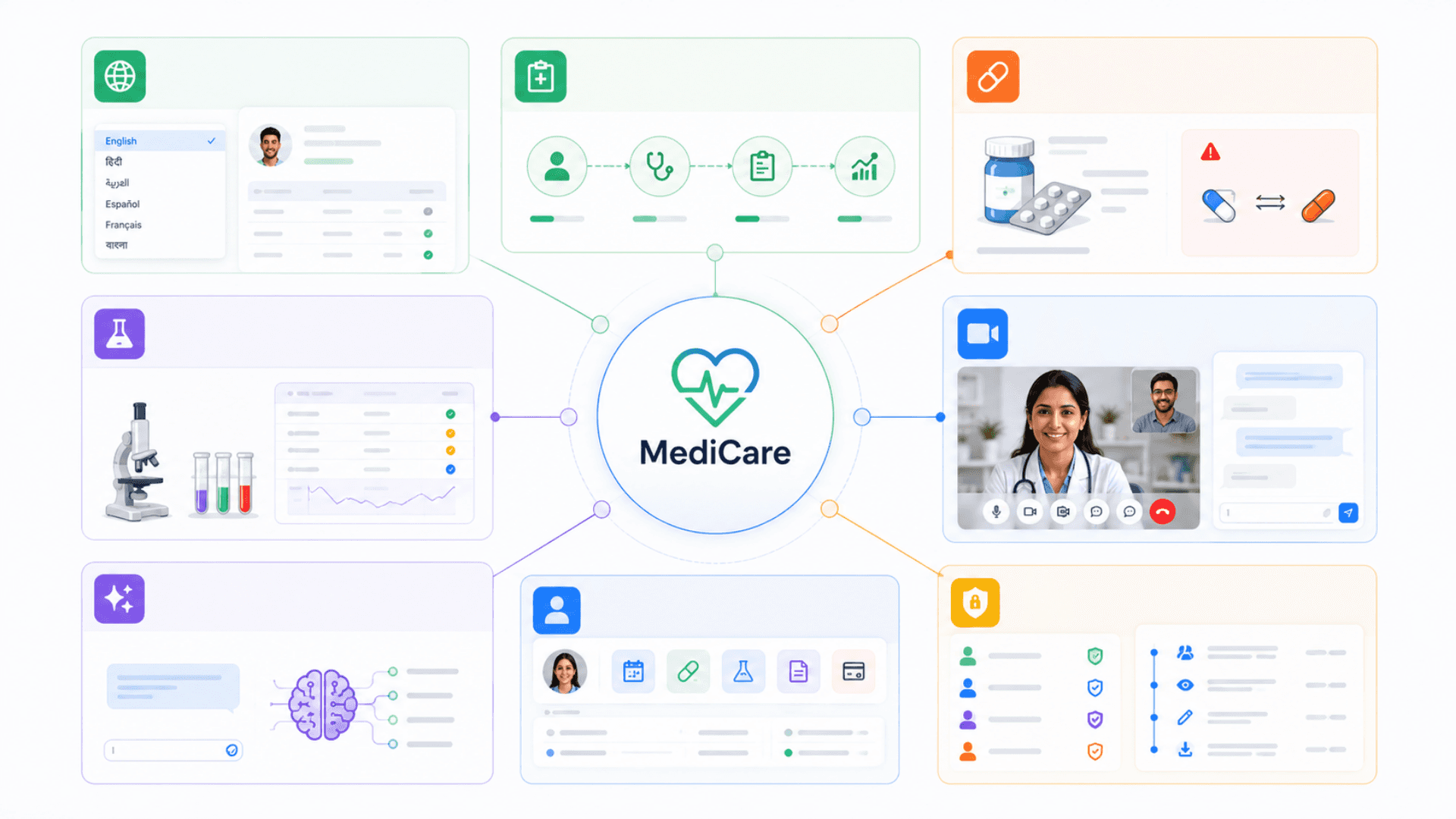
Multilingual Patient Records
Every clinical entity carries parallel language fields. Right-to-left languages switch the entire UI to RTL automatically.
- Parallel language fields throughout the records (names, diagnoses, notes, and more)
- One-tap UI language switching
- PDF output renders the correct script automatically (LTR / RTL)
- Multilingual baseline; any other locale added per engagement
Complete Clinical Workflow
From patient registration through appointment, triage, SOAP visit, prescription, lab order, and follow-up.
- Patient records with body-diagram annotations + medications + allergies
- Appointments + waiting room with drag-and-drop calendar
- SOAP visits with templates (chief-complaint patterns)
- Diagnoses with local ICD-10 search; no network call
Lab Orders → Samples → Results
Full lifecycle from order at the visit to results posted back.
- Lab order created from visit → multiple lab items → multiple samples
- Sample status lifecycle: collected, in-progress, completed, cancelled, and more
- Lab Tech worklist prioritized by sample status and priority
- Results auto-populate the visit; out-of-range values flagged
Built-In Telemedicine (WebRTC)
Doctor-patient video calls with no third-party dependency.
- Self-hosted WebRTC signaling — relays the connection peer-to-peer
- Doctor launches from the in-app Telemedicine page
- Patient joins via a secure tokenized link
- In-call chat included; recording optional
RBAC + Audit Log
Four roles × ~30 modules × four permissions. Every action audited.
- Admin / Doctor / Reception / Lab Tech roles with a full permission matrix
- Access enforced on every protected route
- Audit log captures every clinical action with user + entity + metadata
- Right-to-be-forgotten workflow for compliance
Record Continuity and Practice Administration
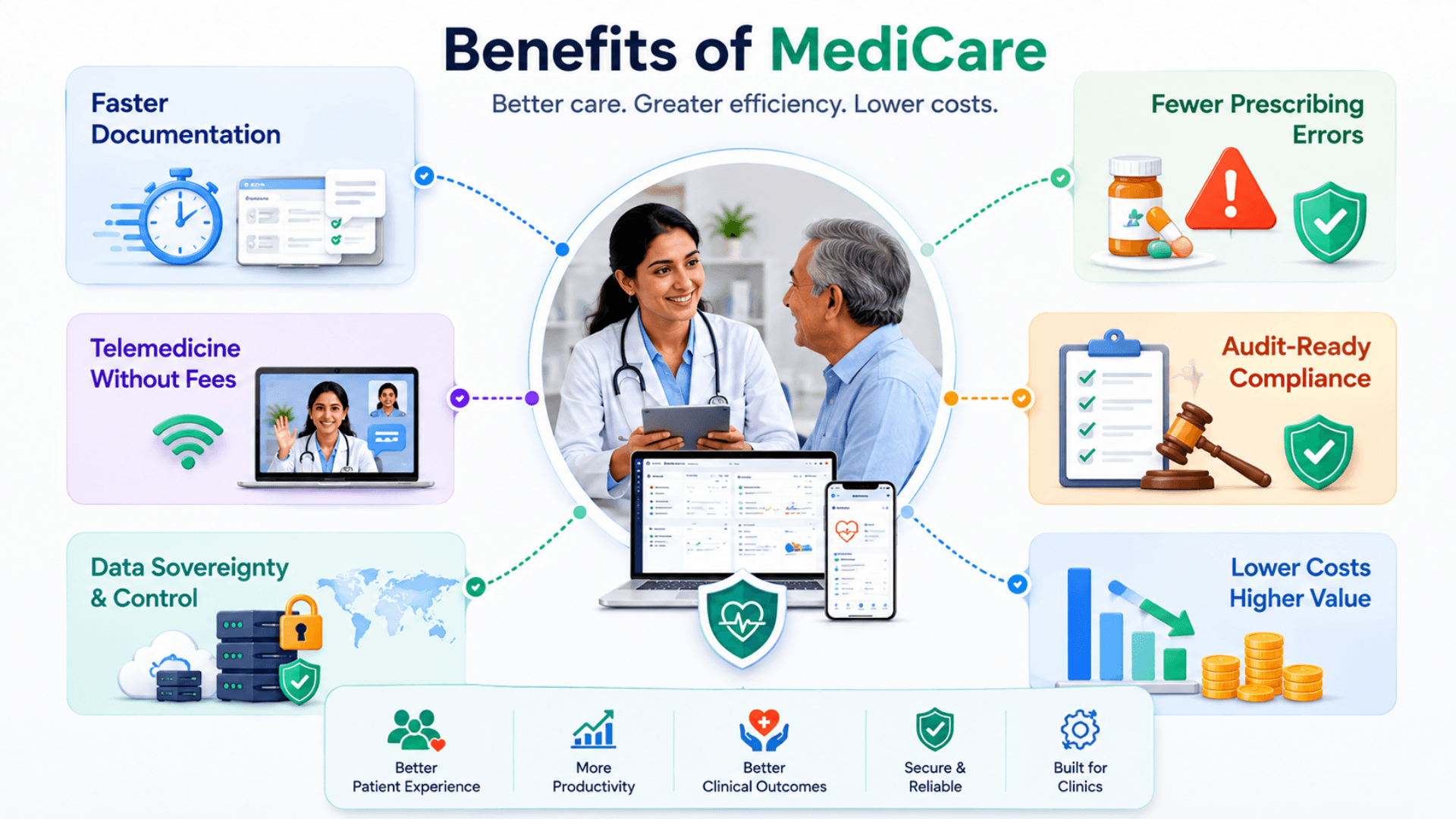
Replace paper charts with a complete multilingual EMR — first day operational, day-one ROI
Cut visit documentation time by 40-60% with SOAP templates + ICD-10 quick-search + AI assistant
Reduce prescribing errors with built-in drug-interaction checking + AI lab-analysis mode
Enable telemedicine without third-party fees — WebRTC signaling runs on your own server
Improve patient retention with the self-service portal (refills, appointments, results)
Standardize clinical workflow across doctors with shared SOAP / consent / visit templates
Cut reception load with patient-portal appointment booking + refill requests
Track every clinical action with the audit log — compliance-ready for medical inspections
Run entirely on-premise for sovereign patient data — every record lives on your server
One multilingual UI for staff and patients — Arabic / English with full RTL, no third-party translation
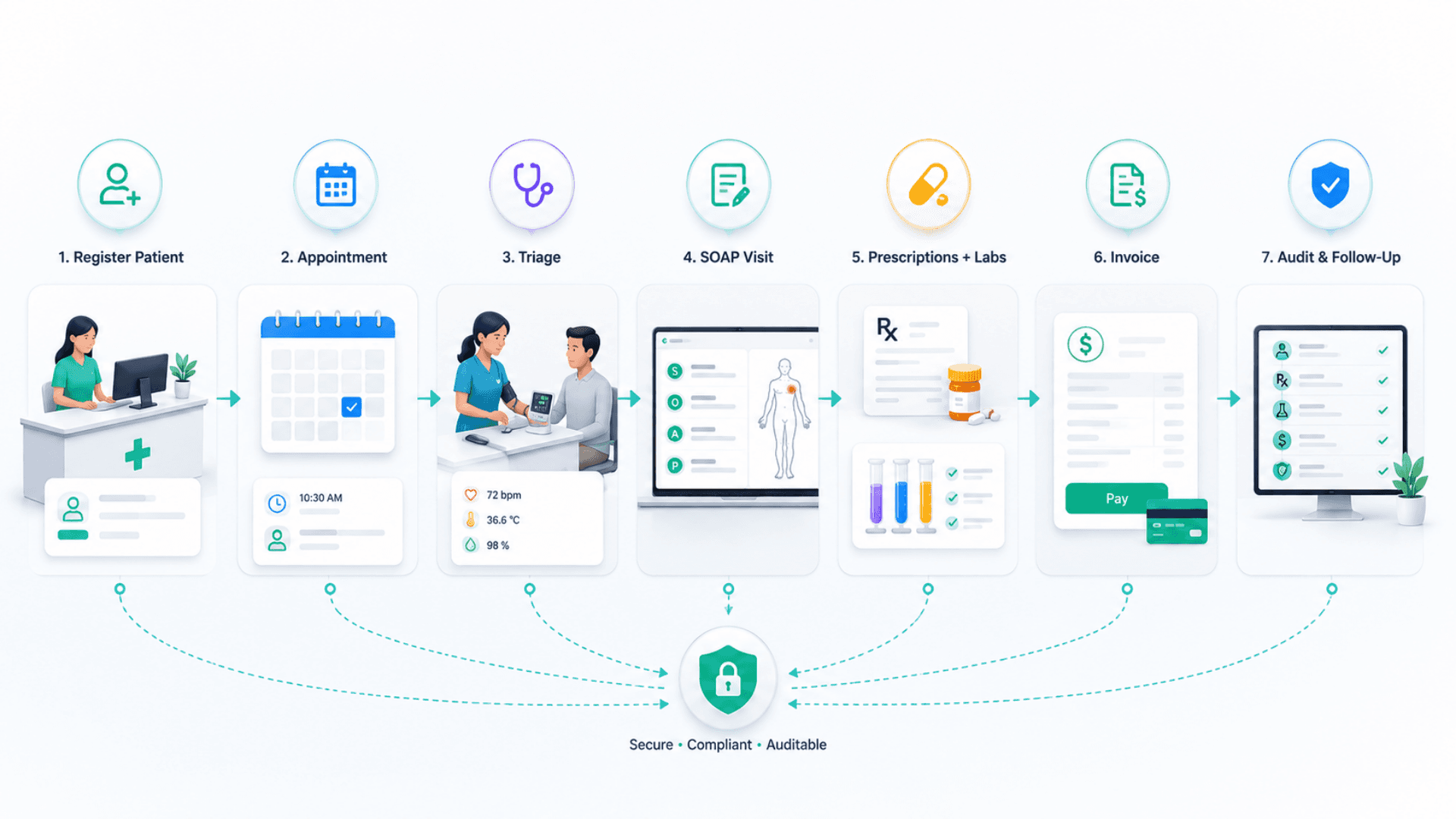
The Patient Visit in MediCare
Trace the patient record through booking, consultation, investigation and follow-up.
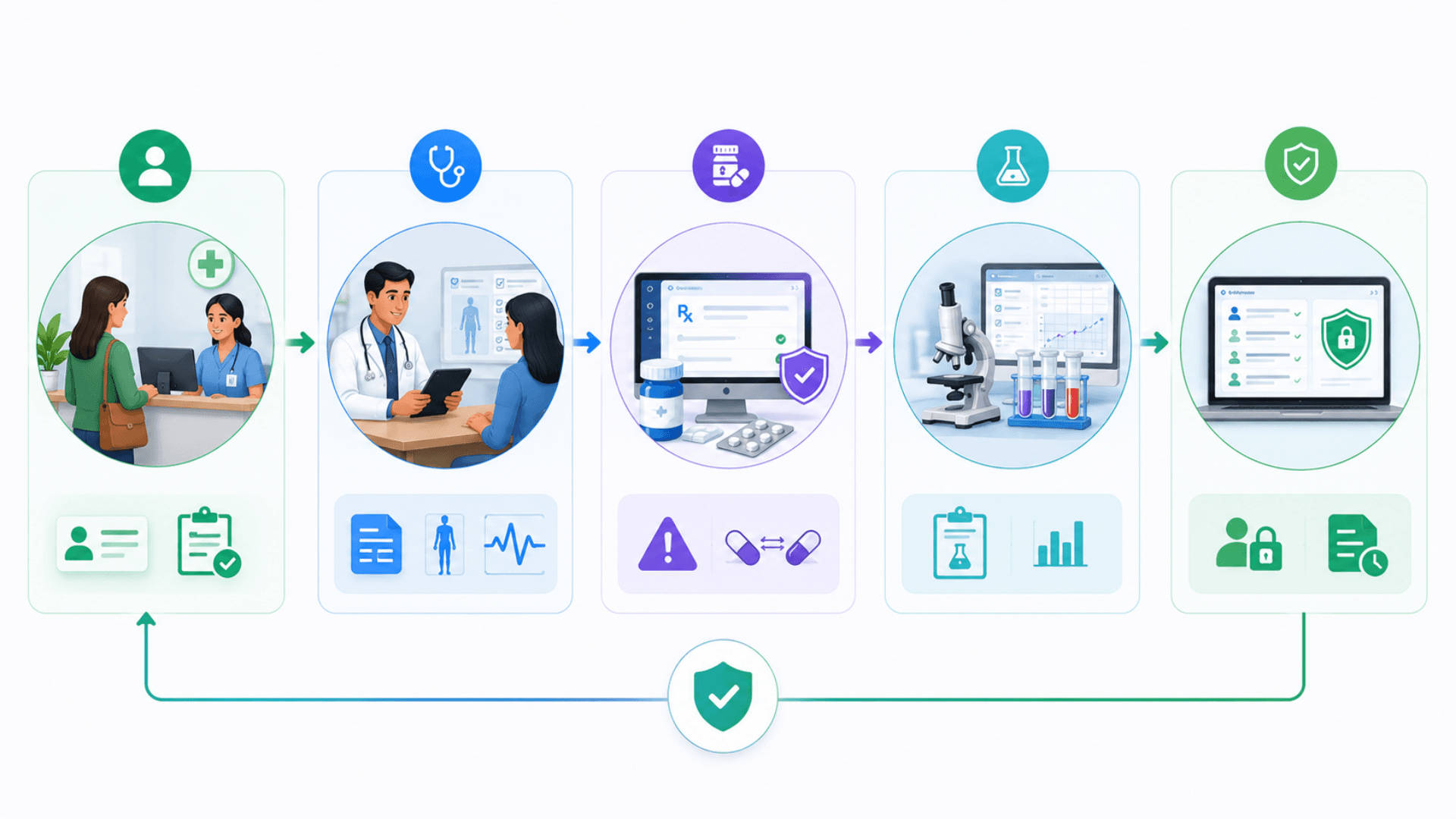
Register Patient (or Self-Register)
Reception creates a patient record (multilingual names, P-0001 code, national ID, blood type, insurance, allergies). Or the patient self-registers via the portal with phone + patient code. An avatar photo is captured and stored with the record.
Book Appointment + Triage
Drag-and-drop the appointment onto the doctor schedule (default 30 min). On arrival, reception captures triage vitals (BP, pulse, temp, SpO2, weight). The waiting-room queue updates in real time.
Doctor Consultation + SOAP Visit
Doctor opens the visit (V-0001), works through Subjective / Objective / Assessment / Plan with SOAP templates. ICD-10 search for diagnoses; AI assistant available in 7 modes (diagnosis suggestions, vitals analysis, lab analysis, drug info, visit guide, patient summary, general). Body-diagram annotations capture pain location + level.
Prescribe, Order Labs, Print Documents
Prescribe with built-in drug-interaction checks. Order labs — samples enter the full sample-tracking lifecycle. Print prescription, medical certificate, treatment plan, referral as PDF. Trigger telemedicine if needed via the built-in WebRTC video module.
Invoice, Pay, Audit, Follow-Up
Generate invoice (integer-amount accounting; currency configurable per operator — GBP, EUR, USD, AED, SAR and any other). Capture payment (cash, card, transfer). Refill requests come back through the portal. Every action lands in the audit log. Reports + dashboards roll up patient flow, revenue, top diagnoses, and prescription analytics.
MediCare Clinic Use Cases by Industry
Explore the service environments relevant to medicare clinic.

Open the deep dive by vertical
Clinic Management System FAQs
Get answers to the most common questions about our medicare clinic.
What is MediCare Clinic Management System?
Is MediCare suitable for a solo practitioner or very small clinic?
How does the multilingual UI work?
What is the AI Clinical Assistant?
How does telemedicine work?
What roles does the RBAC system support?
What is the patient self-service portal?
How does lab order + sample management work?
How is billing handled?
Does it work with ICD-10?
How are prescriptions and drug interactions handled?
Is MediCare HIPAA / GDPR / PDPL compliant?
What clinical templates are included?
How does the body-diagram feature work?
How long does deployment take?
What does it integrate with?
How is patient data backed up?
Does it scale to large hospitals?
Is MediCare cloud-hosted or on-premise?
How long does a MediCare deployment take?
How does MediCare pricing work?
Explore Related Solutions
Review the front-desk and service-experience tools alongside MediCare's clinical workflows.
Ready to Transform Your Operations with MediCare Clinic?
Discuss your workflows, deployment requirements and integration scope with the Zeour team.
MediCare Clinic — concepts you'll meet
Definitions for the operational terms that appear across this page. Tap any chip to read the long-form entry plus its cross-links.