
Online Appointment System
Zeour's online appointment system lets customers book service visits against available branch and service capacity. Booking channels, reminders and self-service changes support the pre-visit journey, while appointment-to-ticket conversion connects scheduled arrivals with the GLARUS branch queue.
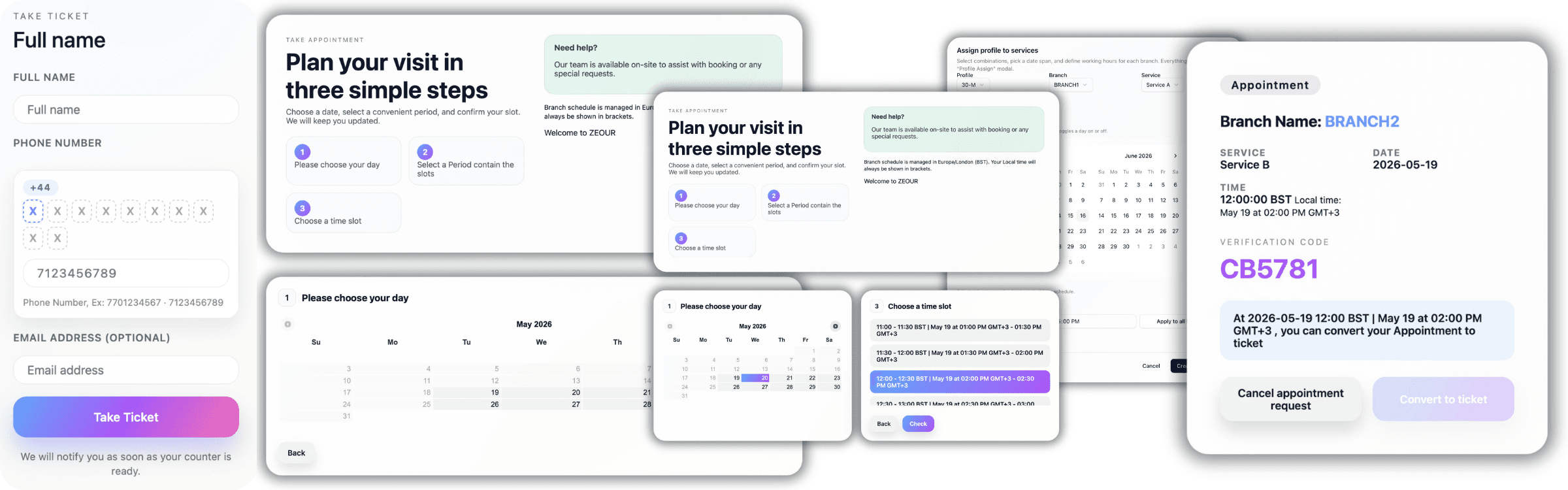
Service-Based Booking and Branch Capacity
Set working hours, slot durations and capacity rules centrally, then let customers choose an available visit time. Staff can follow bookings, changes and no-shows alongside the live service operation.
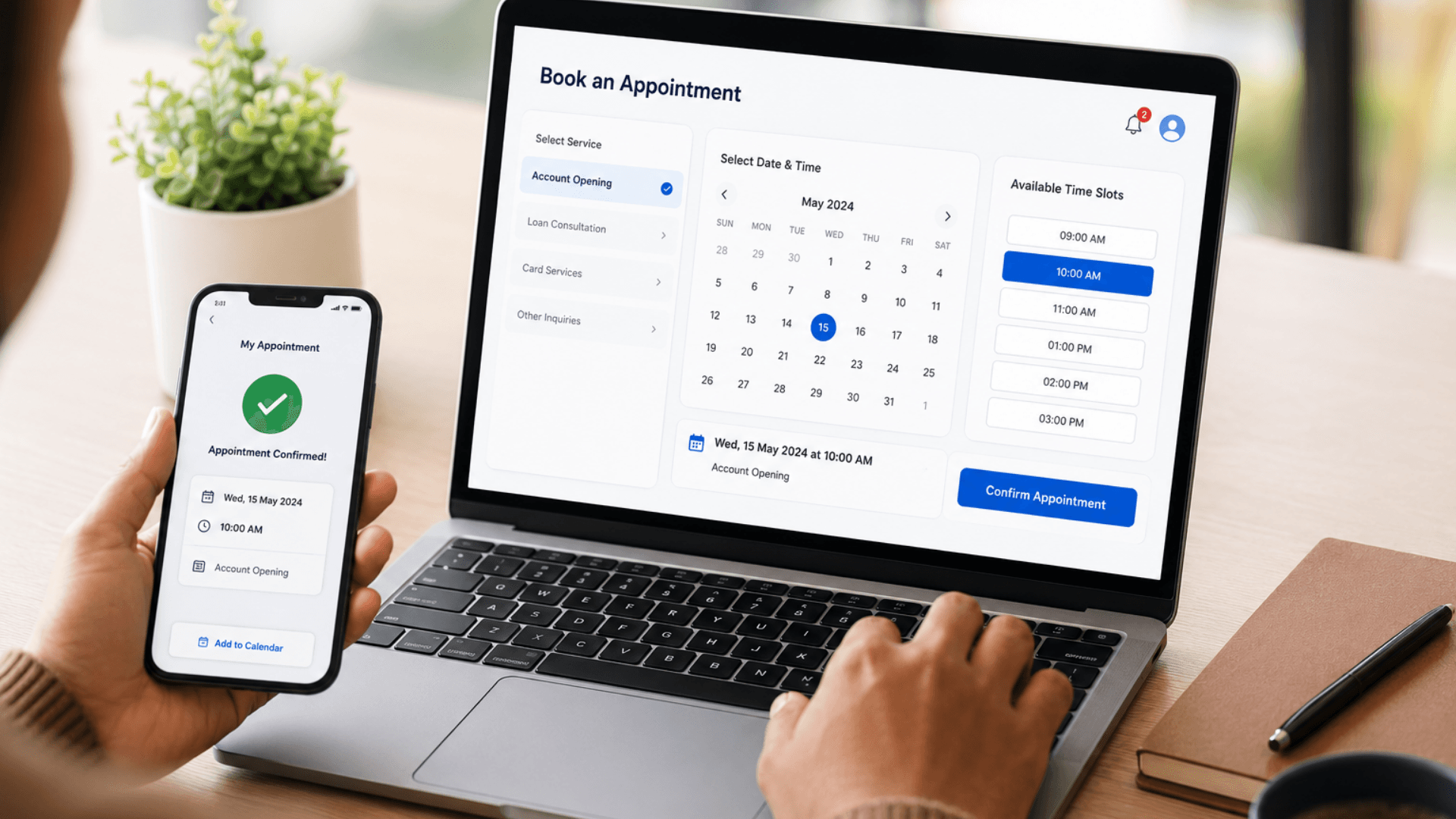
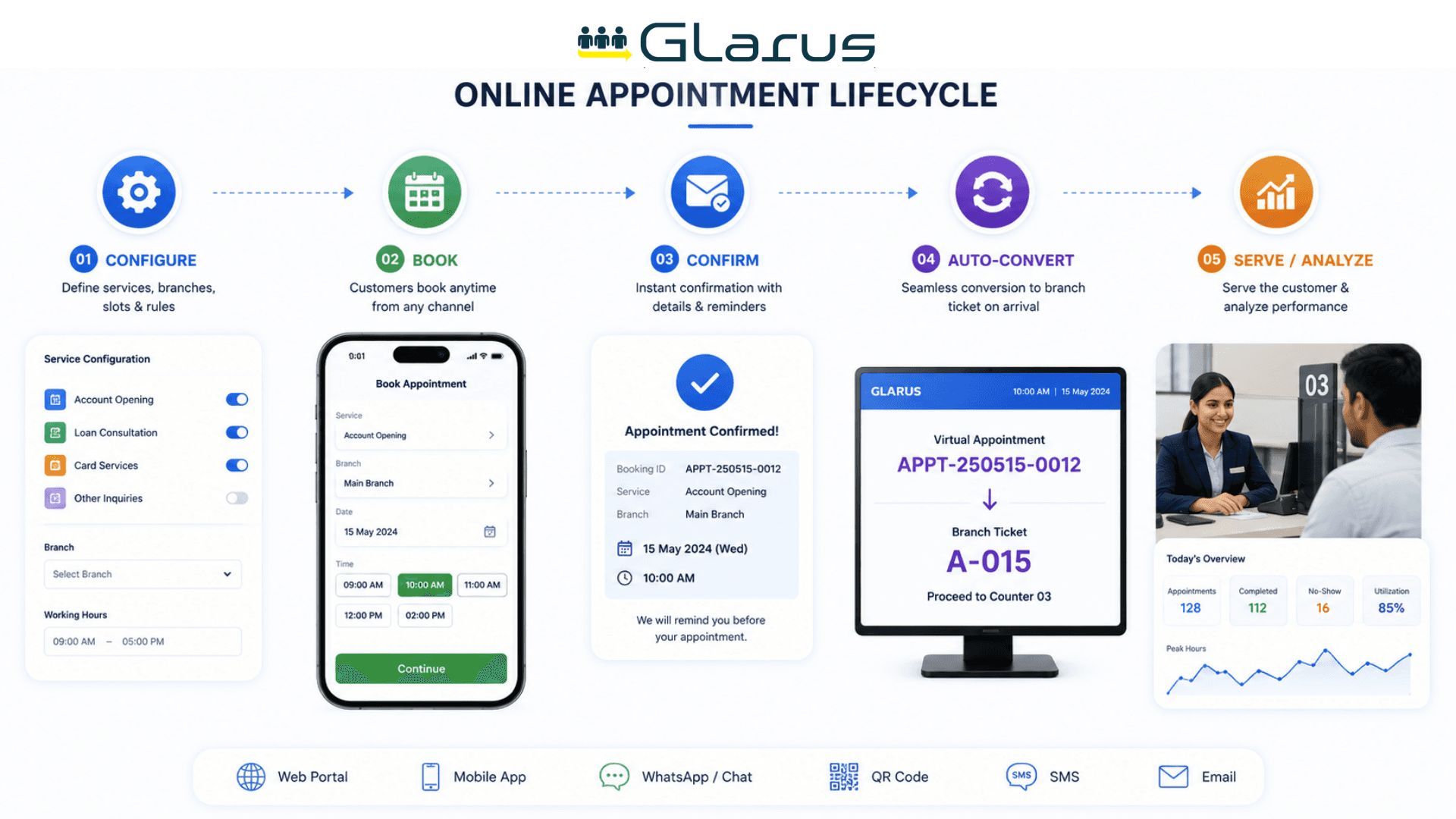
Connecting Bookings to Arrival
The queue management system handles service order after appointments convert to live tickets. Customers who want to wait remotely without reserving a future slot can use virtual queuing.
A self-service kiosk can support on-site booking and arrival confirmation. For practices needing clinical records as well as scheduling, review the MediCare clinic management system.
Scheduling Rules, Reminder Channels and Booking APIs
Zeour GLARUS appointments is the customer-facing scheduling layer of the broader GLARUS branch operations platform. The booking flows live in MobileWCSA (Laravel + Vue, customer-facing) — mobile app, web portal, WhatsApp, Telegram, ChatBot, SMS. The rules — which services accept appointments, slot duration, branch hours, capacity, lead time, cancellation policy — live in MSA / GLITT (the central control plane). At the right moment, appointments auto-convert into live branch tickets in EMS (the operator cockpit at each branch). The result: customers self-book, get reminded, walk in, and are called by name — without ever queueing.
Zeour GLARUS MobileWCSA Appointments — the customer-facing online appointment platform built on top of the GLARUS branch operations stack. 24/7 self-service booking via mobile app, web portal, WhatsApp, Telegram, ChatBot, or SMS. 15-minute slot granularity with central rule configuration in MSA / GLITT. Automatic conversion of appointments into live branch tickets ~10 minutes before slot time — visitors arrive and are called by name. Email / SMS / WhatsApp / Telegram reminders, multi-branch scheduling, identity verification (passport / national ID / OTP), and a full audit trail. GDPR / HIPAA / PDPL aligned, cloud or on-premise. Works for a solo practice with one calendar just as well as for a multi-branch, multi-department network.
Key Functionalities
Omnichannel Booking Flow
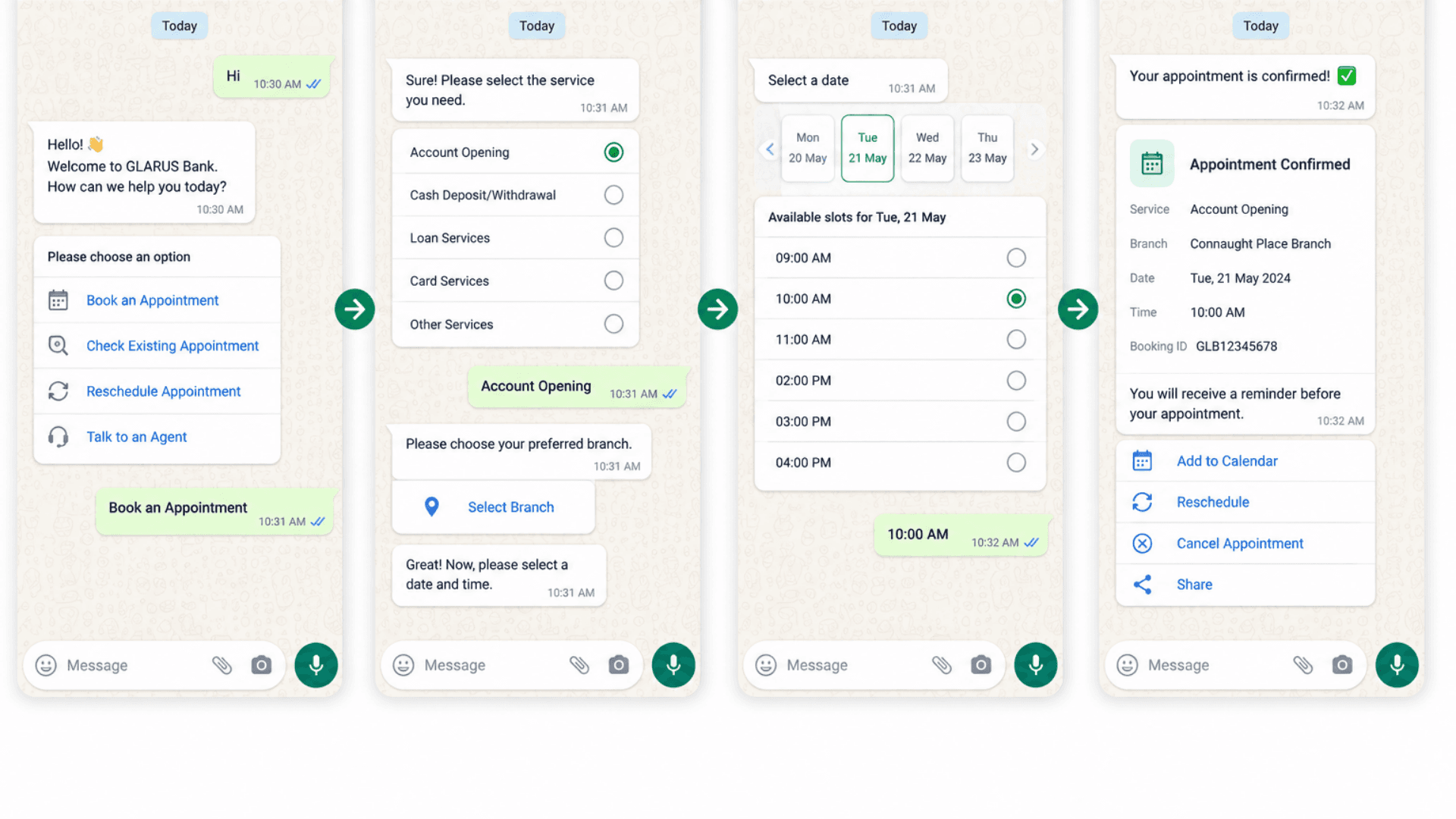
Mobile app, web portal, WhatsApp Business, Telegram, ChatBot, SMS, and on-site kiosk — all booking against the same slot grid, same customer profile, same audit trail. Customer's channel preference is stored on their record for follow-up reminders.
Centrally Managed Slot Rules
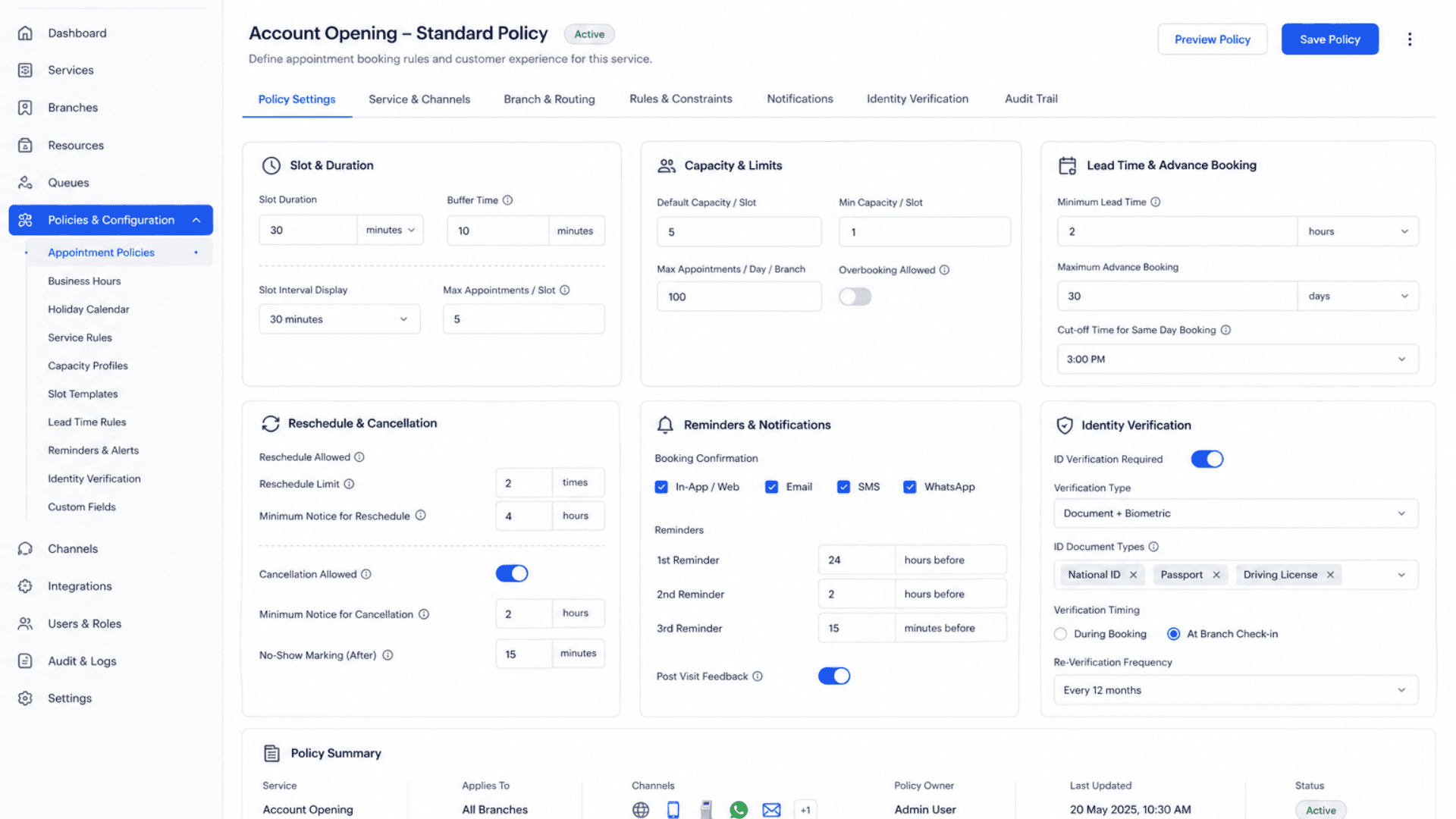
Admins configure appointment policy once in MSA / GLITT: which services accept appointments, slot duration, branch hours, capacity per slot, lead time for conversion, cancellation policy, identity verification requirements, and reminder cadence.
Real-Time Slot Availability
Redis + Laravel Echo broadcasting ensures slot state is consistent across every channel. Two customers can't book the same slot for the same counter; capacity is enforced live; high-traffic appointment days (visa centers, vaccination drives) scale without conflict.
Identity Verification at Booking
Configurable per service — email OTP, SMS OTP, national ID, passport number, customer code, SAML / OIDC for SSO. Required for regulated industries (banking, government, embassies). Booking rejected on mismatch without leaking existence.
Multi-Channel Notifications
Confirmation + ICS calendar invite + pre-visit reminders via Email, SMS, WhatsApp Business, Telegram, and mobile push. Configurable cadence (24h / 4h / 30 min) per service. Resilient outbox pattern with retry — no notification ever lost.
Auto-Convert to Live Ticket
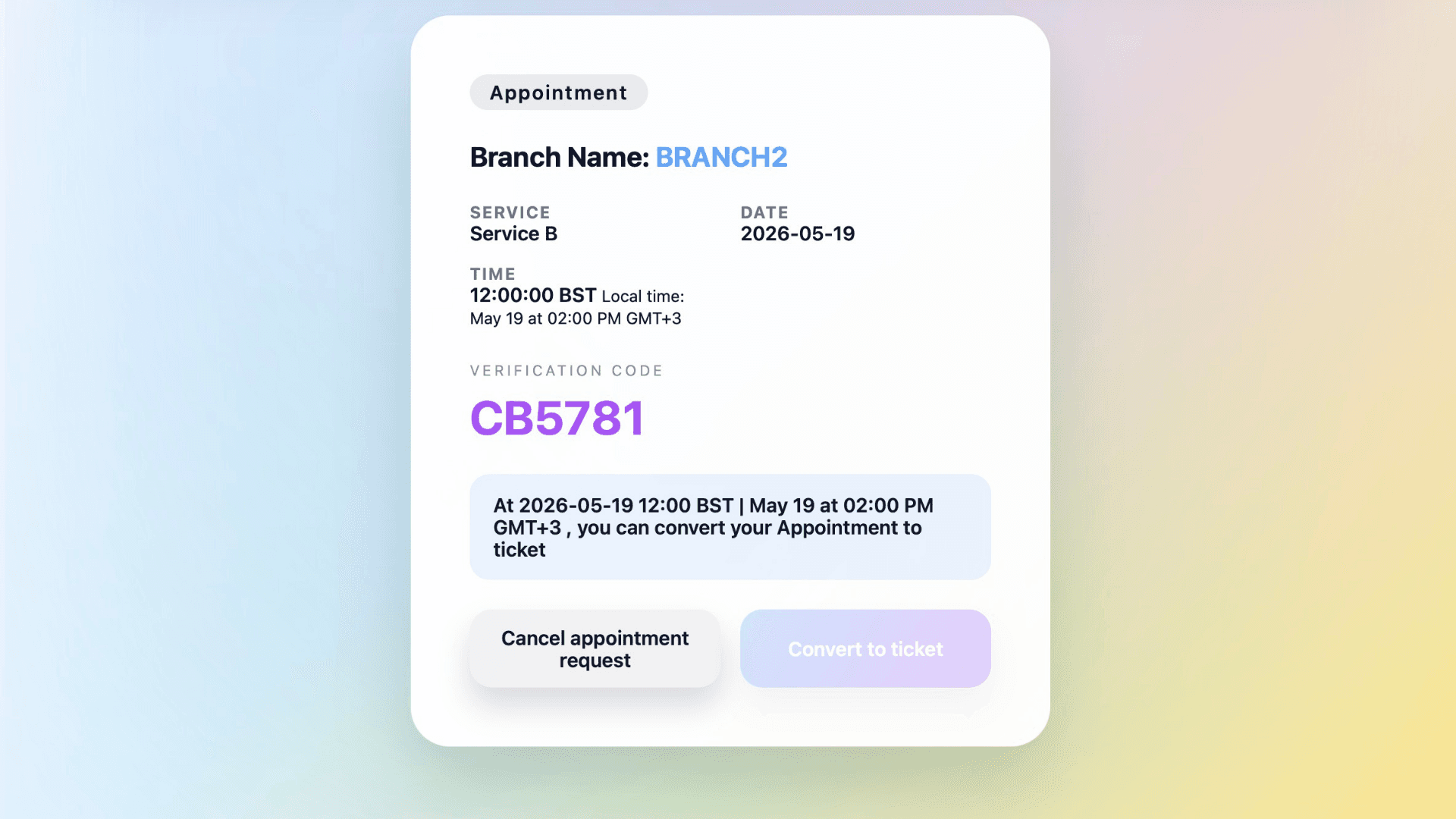
Each appointment carries a `convert_to_ticket_time` (typically ~10 minutes before slot, configurable). Scheduled worker converts the appointment into a live EMS branch ticket at that moment. Early-arrival kiosk flow also converts on-demand. No-show auto-expires after the window.
Reschedule + Cancel Self-Service
Configurable cancellation policy per service. Self-service from mobile / web / WhatsApp; assisted reschedule by reception. Every action audited. No-show counts tracked per customer for future risk gating.
Per-Customer Profile + History
One customer record holds phone, email, language preference, channel preference, priority flag (VIP / disabled / pregnant), and the full booking + conversion history across every branch. Reception can pull the history during arrival or rescheduling.
Multi-Branch + Multi-Country Scoping
One MobileWCSA installation serves any number of branches across any number of countries. Each branch has its own working hours, services, and capacity. Each country has its own locale defaults; per-region data residency for cloud deployments.
Webhook Events for External Systems
Every booking, reschedule, cancellation, conversion, and no-show fires a webhook to your CRM / HIS / ERP / SMS provider / BI tool. Full OpenAPI specification for partner integrations.
Analytics + Audit
Dashboards: bookings per channel, slot utilization, no-show rate, top services, daily / weekly / monthly trends. Full audit log per appointment for compliance and incident review.
Audit-ready records and operational dashboards.
- Bookings per channel, slot utilization, no-show rate, top services
- Daily / weekly / monthly trend lines + per-branch and per-country breakdowns
- Full audit log per appointment (booking, reschedule, cancellation, conversion)
- Configurable data retention + right-to-be-forgotten workflow
Resilient Worker Pipeline
Scheduled jobs for slot generation, conversion-on-time, expired-appointment cleanup, reminder dispatch, and analytics rollup. Branch-local execution where appropriate so a WAN outage never blocks branch operations.
Software Components
Customer-Facing Booking
MobileWCSA — Web + Mobile Booking
Laravel + Vue customer-facing app that powers booking on web and mobile. 24/7 self-service slot selection, identity verification, confirmation, ICS calendar invite, and reschedule / cancel flows.
WhatsApp Business + Telegram + ChatBot
Conversational booking flows over WhatsApp Business Cloud API, Telegram, and a configurable website / Messenger ChatBot. Same slot grid, same confirmation experience.
SMS Booking
Low-bandwidth path for feature-phone users. Book a slot via SMS commands; receive confirmation and reminders via SMS.
On-Site Kiosk Booking
CSA self-service kiosks include an appointment-booking flow for walk-up bookings on the day-of or for future visits.
Central Control Plane (MSA / GLITT)
Appointment Policy Engine
Slot duration, branch hours, capacity per slot, lead time for conversion, cancellation policy, identity verification requirements, reminder cadence — all centrally managed and propagated to every branch.
Customer & Branch Configuration
Customer records (phone, email, language, channel preference, priority flags), branch hierarchy, service catalog, multi-language content packs.
MSA Frontend
Modern dashboard for the control plane — appointment configuration, branch management, customer search, analytics, audit log viewing.
Branch Execution (EMS)
EMS Counter Cockpit
Branch-side operator UI where appointments convert into live tickets at the right moment. Operators call, repeat, transfer, or no-show; appointment metadata follows (code, customer name, identity verification status).
Branch-Local Database
Each branch holds its own copy of today's appointments + tickets. Resilient to WAN outages — local execution continues even if MSA is unreachable; reconciles when connectivity returns.
Auto-Conversion Worker
Branch-side scheduled job that promotes appointments into live tickets at `convert_to_ticket_time`. Idempotent and retry-safe.
Real-Time + Notifications
Redis + Laravel Echo Broadcasting
Sub-second slot-state propagation across every channel. Prevents double-bookings; powers live appointment-status updates on mobile clients.
Multi-Channel Notification Outbox
Email (SMTP / Microsoft Graph), SMS (Twilio / MessageBird / Vonage / Infobip), WhatsApp Business Cloud API, Telegram, mobile push. Resilient outbox with retry, lease locking, and deduplication.
ICS Calendar Invites
METHOD:REQUEST ICS files attached to confirmation emails. Outlook / Google / Apple Calendar compatible. Timezone-aware (Europe / London default, configurable).
Webhook Dispatcher
Booking / conversion / cancellation / no-show events fire signed webhooks to external CRM / HIS / ERP / BI systems with retry on transient failure.
Operations & Security
Scheduled Worker Jobs
Slot generation, conversion-on-time, expired-appointment cleanup, reminder dispatch, analytics rollup. Bearer-token-gated endpoints for cron drivers.
REST API + Bearer Auth
Full booking / management API. Customer-scoped Bearer tokens (with `temporary_password` flow for first-time onboarding). OpenAPI specification for partner integrations.
Audit Log
Every booking, reschedule, cancellation, conversion, and access event logged with actor / timestamp / structured metadata. Compliance-ready.
Rate Limiting + Lockout
Sensitive endpoints (login, booking, cancellation) rate-limited per customer + IP. Account lockout on repeated failures. Auto-expiry of unused appointment codes.
Hardware Components
Customer-Facing Hardware
GLARUS Self-Service Kiosks (KIOSAPP066 / AUTO666)
On-site appointment-booking kiosk with thermal printer, capacitive touch, multi-language UI. Walks customers through service / day / slot selection without reception involvement.
QR Stands & Posters
Wall-mounted QR codes that open the WhatsApp / Telegram / web booking flow on the customer's phone — no app download required.
Branch Operations
EMS06 Hardware Keypad
Multi-function counter keypad with 8-digit LCD for calling appointments and walk-in tickets from the operator counter.
SSD06 LED Counter Display
8-digit dot-matrix LED panel showing the appointment / ticket being served at each counter.
CounterDSA LCD Display
10", 13.3", 15" Full-HD per-counter screen with appointment / customer details on call.
Waiting Area + Signage
GRAVIA Digital Signage Controller (GRAVIA06)
Drives lobby TVs showing upcoming appointments + currently-called numbers. Updates in real time as appointments convert.
CONT06 Industrial Branch Server
On-premise branch controller that runs the full GLARUS stack locally — including branch-side EMS + appointment conversion worker.
Appointment Architecture — GLARUS MobileWCSA + MSA + EMS Pipeline
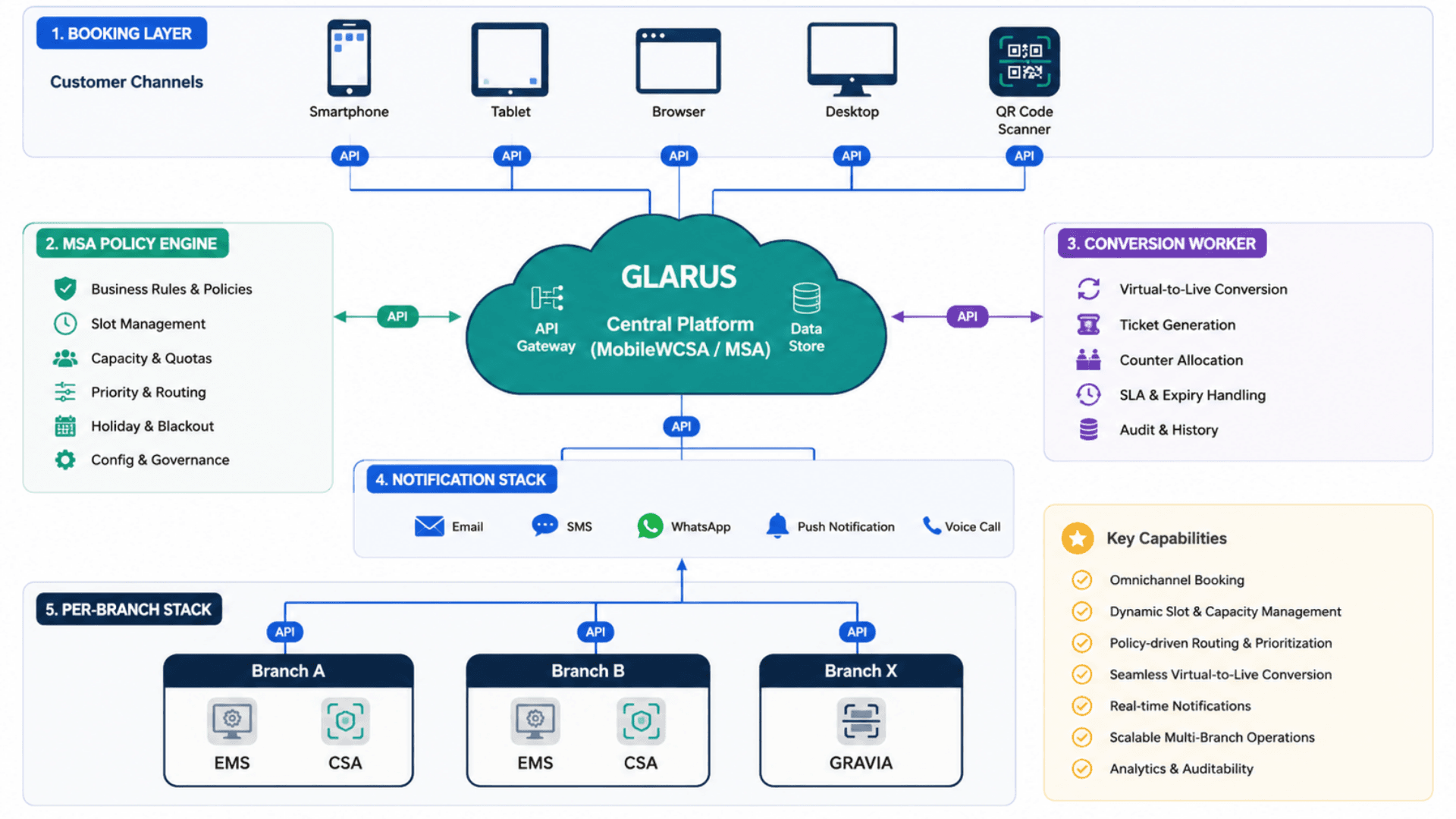
GLARUS appointments is a three-tier system that splits responsibilities cleanly: customer-facing booking lives in MobileWCSA, central policy lives in MSA / GLITT, branch execution lives in EMS. The integration moment — appointment auto-converting to a live branch ticket — is what makes this an operations system instead of a calendar tool. Cloud SaaS or on-premise; same architecture, same operator experience, sovereign data where required.
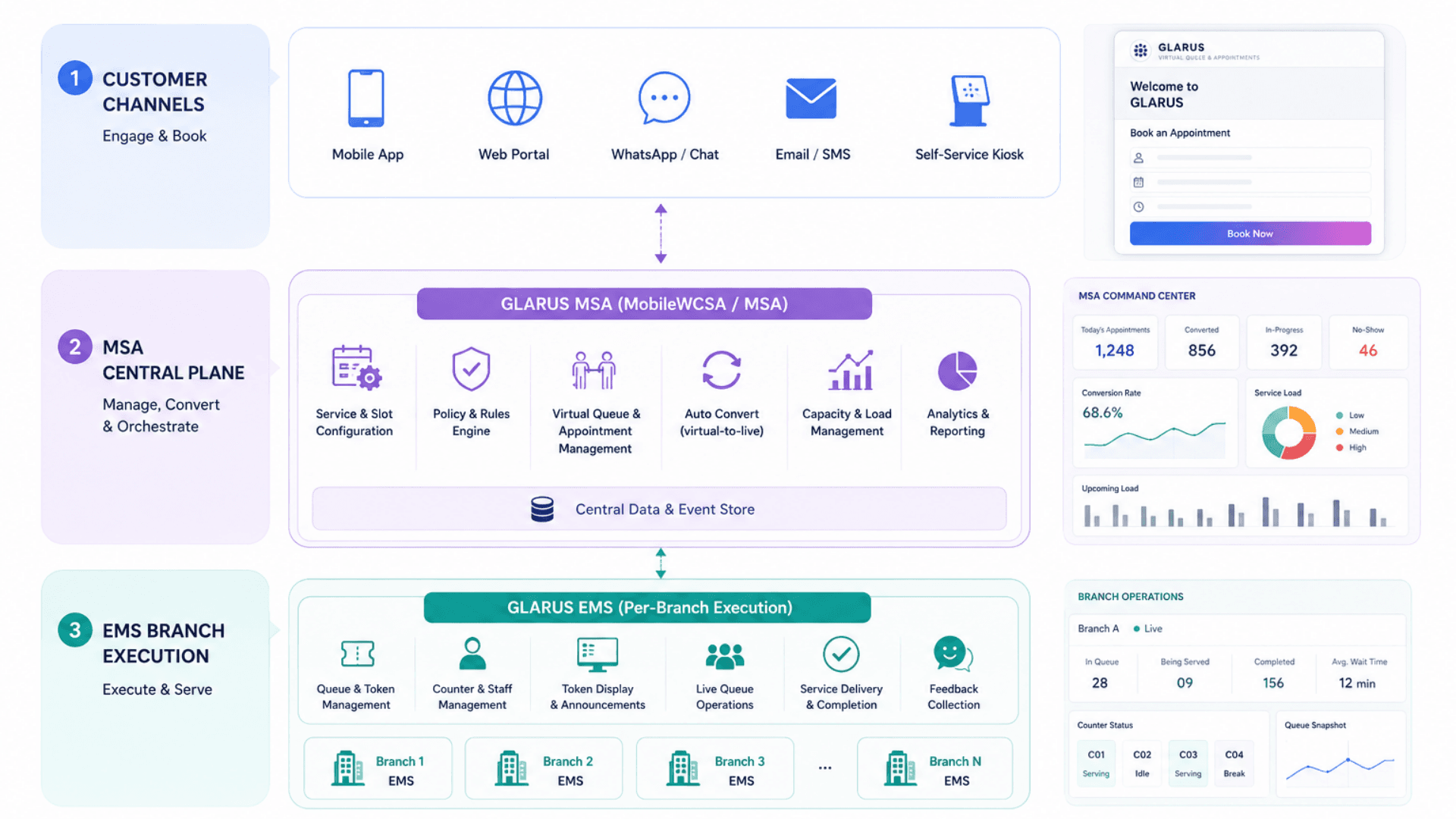
Tier 1 — Customer Channels
Where customers actually book — mobile, web, WhatsApp, kiosk
- MobileWCSA web portal (Laravel + Vue) — responsive booking flow with slot picker, identity verification, confirmation
- Native mobile apps (iOS + Android) — same flow, push notifications, offline-tolerant
- WhatsApp Business Cloud API + Telegram + ChatBot — conversational booking on the channels customers already use
- SMS booking — feature-phone path for low-bandwidth markets
- CSA on-site kiosks — walk-in bookings + appointment-holder confirm-on-arrival
Tier 2 — Central Plane (MSA / GLITT)
Policy, customer records, slot rules, analytics
- Appointment policy engine — slot duration, branch hours, capacity, lead time, cancellation rules, identity requirements
- Customer record store — phone, email, language preference, channel preference, priority flags, full booking history
- Multi-language content packs — confirmations, reminders, error messages per locale
- Webhook dispatcher — signed events to CRM / HIS / ERP / BI / SMS providers
- MSA Frontend — modern operator dashboard for the control plane
Tier 3 — Branch Execution (EMS)
Where appointments become live tickets and operators serve customers
- Branch-local EMS operator cockpit — calls appointment-converted tickets alongside walk-in and virtual queue tickets
- Auto-conversion worker — promotes appointment → live ticket at `convert_to_ticket_time`
- Branch-local database — resilient to WAN outages; reconciles on connectivity recovery
- Counter displays (LED / LCD) + GRAVIA queue boards showing converted appointments + walk-ins
- Customer feedback capture at end of service
Real-Time + Notification Pipeline
Real-time- Redis + Laravel Echo broadcast slot state across every customer channel — two customers can't book the same slot for the same counter
- Confirmation + ICS calendar invite delivered on booking via the customer's preferred channels (Email / SMS / WhatsApp / Telegram / push)
- Pre-visit reminders fire at configurable intervals (24h / 4h / 30 min) through a resilient outbox with retry
- Auto-conversion worker promotes appointment to live ticket at `convert_to_ticket_time` — typically 10 min before slot
- Webhook dispatcher fires signed events for every state change — retry-safe with exponential backoff
- No-show window expiry runs as a scheduled job — appointments past the window are auto-marked NO_SHOW
Online Appointment System vs Calendar Tools vs Phone Booking vs Standalone Schedulers — What You Need
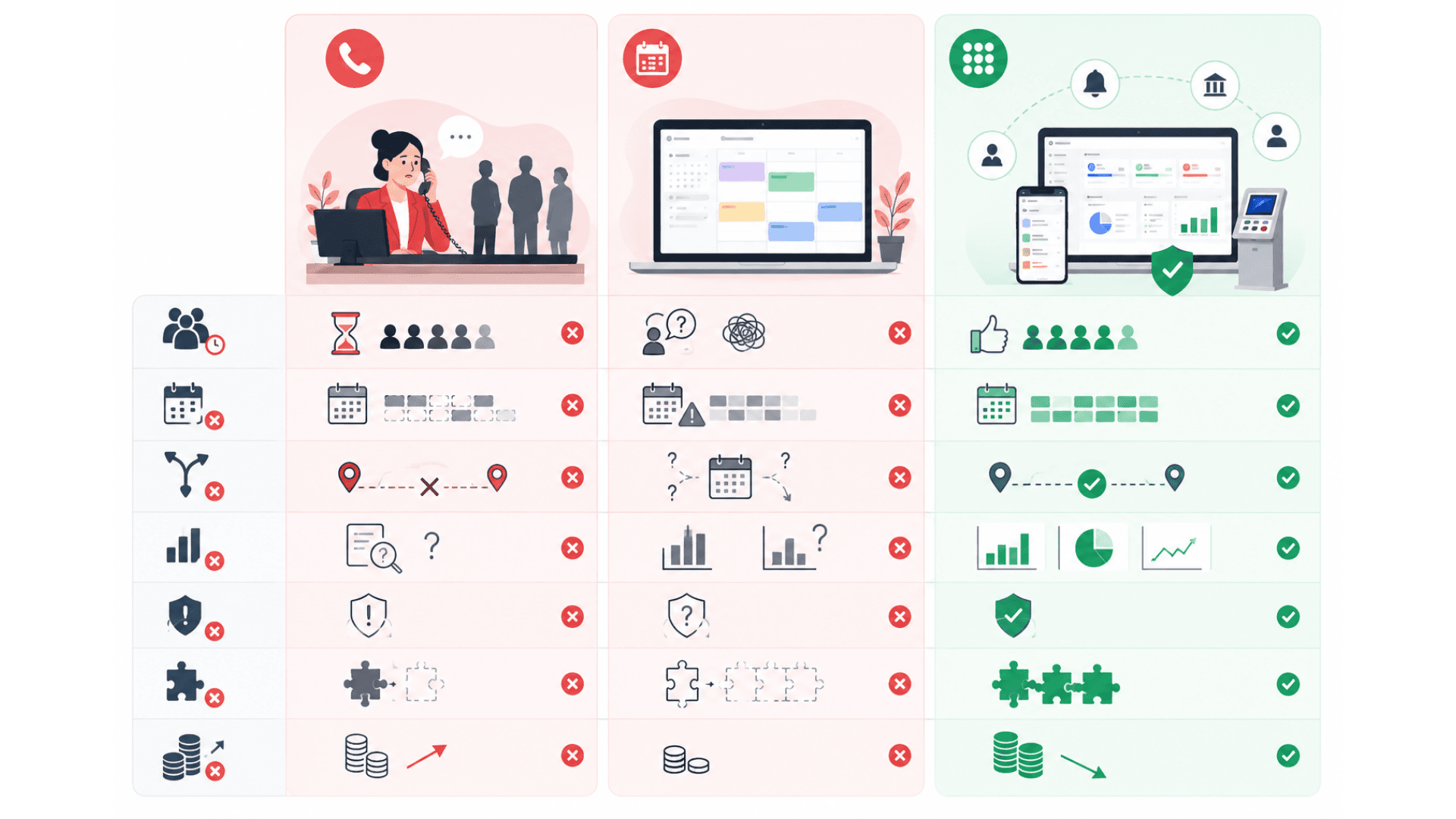
Most "appointment" tools are calendars. They show a time on a screen. An enterprise appointment system like GLARUS MobileWCSA is the only category that closes the loop — appointment converts to live branch ticket, audit trail is regulator-ready, integration is native, and identity verification is built in.
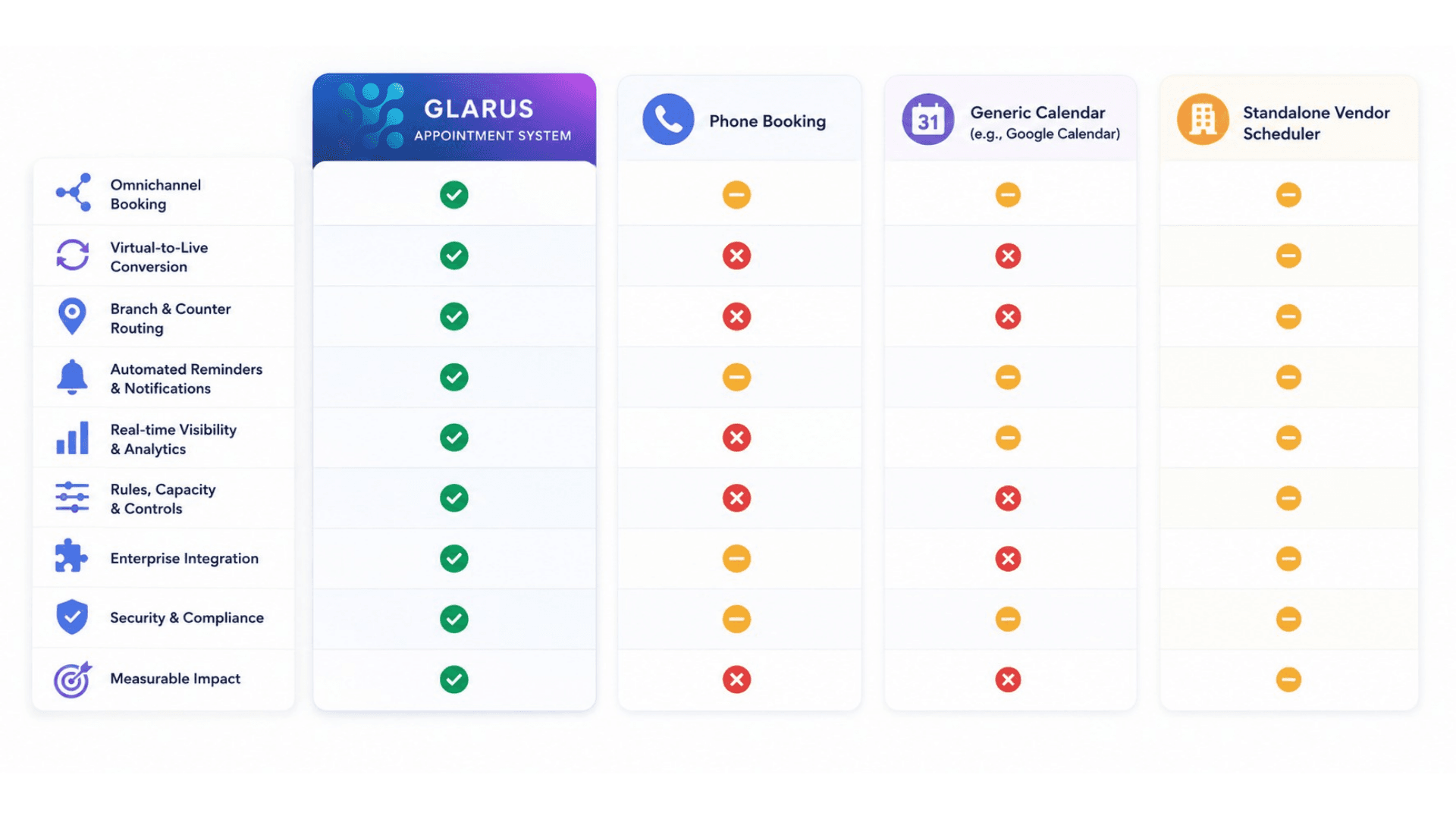
GLARUS Online Appointment System
Best for: Real organizations with branches, services, capacity rules, identity requirements, and a need to integrate with branch operations.
- Omnichannel booking (mobile / web / WhatsApp / Telegram / ChatBot / SMS / kiosk)
- Centrally managed slot rules + per-service / per-branch / per-counter capacity
- Automatic conversion of appointments into live EMS branch tickets
- Multi-channel notifications + ICS calendar invites + identity verification
- Multi-branch / multi-country / multi-language with full audit trail
- Full GLARUS platform integration (queue, kiosk, signage, wayfinding, visitor, feedback)
- Cloud or on-premise · GDPR / HIPAA / PDPL / ISO 27001 aligned
Phone-Based Reception Booking
Best for: Nothing in 2026. It is what you are getting rid of.
- Customer calls reception during business hours
- Reception types the booking into a spreadsheet or Outlook calendar
- Double-bookings when two callers reach two phones at the same time
- No reminders, no audit trail, no analytics
- No-show rates of 20–35% with no path to improve
Generic Calendar Tool (Calendly / Acuity / etc.)
Best for: Solo consultants and small offices with a single calendar to share.
- Time-slot picker on a web page, syncs to Google / Outlook calendar
- Basic email reminders, no WhatsApp / Telegram / SMS in most plans
- No identity verification, no multi-branch capacity rules
- No integration with a queue management system — appointment doesn't become a live ticket
- Audit trail is "the calendar"; compliance posture is "trust us"
Standalone Queue-Vendor Scheduler
Best for: Customers who already have that vendor's queue system and want a matched scheduler.
- Vendor-specific scheduling that integrates with their queue product
- Limited channels — usually web + email, sometimes SMS
- Vendor-specific data model that doesn't federate across multi-country deployments cleanly
- Licensing tied to the vendor's entire stack
- Limited webhook / API extensibility
Online Appointment System — Deployment Checklist
A practical 5-phase rollout playbook for going live with GLARUS MobileWCSA Appointments — from a single-branch pilot to a multi-country estate. Use it as a project plan with your Zeour partner.
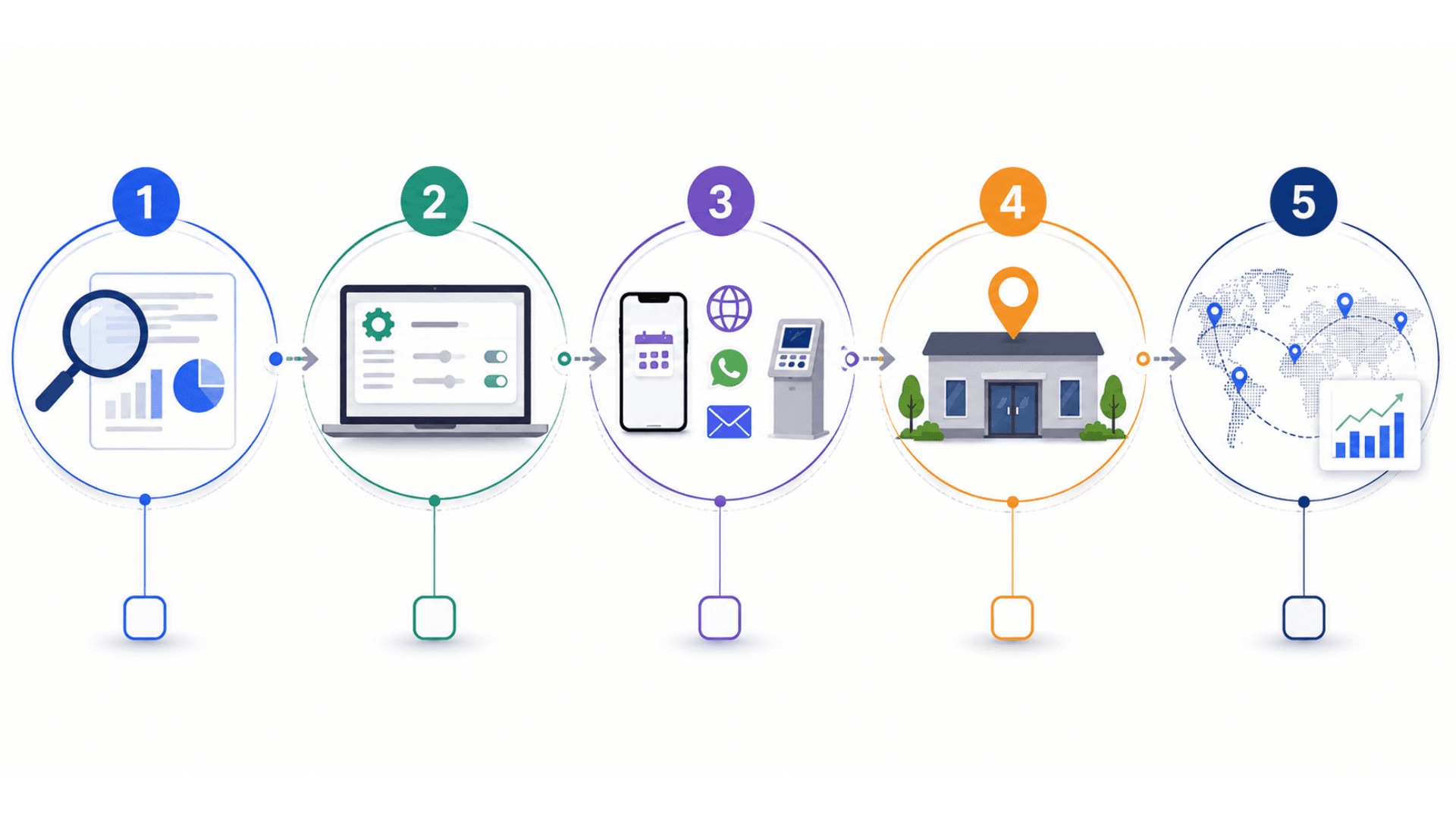
- 01
1) Discovery & Policy Design
ChecklistInventory branches, services, working hours, current appointment volume, current no-show ratesDecide slot duration per service (5 / 10 / 15 / 30 / 60 min) and per-slot capacityDefine identity verification policy per service (none / email OTP / SMS OTP / national ID / passport / SSO)Set cancellation and reschedule rules per service (free up to 24h / limited within 24h / locked at conversion lead time)Choose channels for launch: which mix of mobile / web / WhatsApp / Telegram / ChatBot / SMS / kioskDecide deployment model — managed cloud (with regional data residency) or on-premise - 02
2) Central Configuration (MSA / GLITT)
ChecklistProvision MSA + branch databases; configure branches, services, working hours, capacitySet up appointment policy: slot grids, conversion lead time, cancellation policy, identity verificationConfigure reminder cadence per service (24h / 4h / 30 min) and channel preferencesProvision notification providers — SMTP / Microsoft Graph for email, Twilio / MessageBird / Infobip for SMS, WhatsApp Business Cloud API account, Telegram bot tokenConfigure ICS template + timezone (default Europe / London, override per branch)Set up RBAC for admins (per-country / per-branch / per-service scoping) - 03
3) Channel Setup
ChecklistPublish mobile apps (iOS App Store + Google Play) with brandingDeploy web booking flow at https://book.your-domain.com (or path on existing site)Onboard WhatsApp Business account, get template messages approved, configure conversational flowConfigure Telegram bot + ChatBot conversational flowsSet up SMS booking shortcode if usedConfigure CSA kiosks for on-site appointment booking + confirm-on-arrival - 04
4) Pilot Branch Go-Live
ChecklistPick a pilot branch with moderate appointment volume and engaged reception staffTrain reception team on the admin UI, assisted reschedule flow, and customer support escalationsRun a friends-and-family booking cohort for 1 week to validate the end-to-end flowMonitor: booking success rate, conversion-on-time rate, no-show rate, reminder delivery rateTune slot capacity and reminder cadence based on real dataScale to the full pilot branch — measure outcomes for 2 to 4 weeks before further rollout - 05
5) Multi-Branch / Multi-Country Scale
ChecklistRoll out to additional branches in waves using the same configuration templates with local overridesAdd languages as the deployment expands — locale-aware confirmations + reminders + ICS invitesFederate analytics dashboards across branches / countries for executive reportingPlan custom integrations — CRM (Salesforce / Dynamics / HubSpot), HIS (Epic / Cerner), ERP (SAP / Oracle), identity (SAML / OIDC), BI (Power BI / Tableau / Looker)Optimize: tune slot rules based on no-show patterns; consider deposit / pre-payment for high-risk slotsAnnual policy review — adjust slot capacity, reminder cadence, cancellation rules based on accumulated data
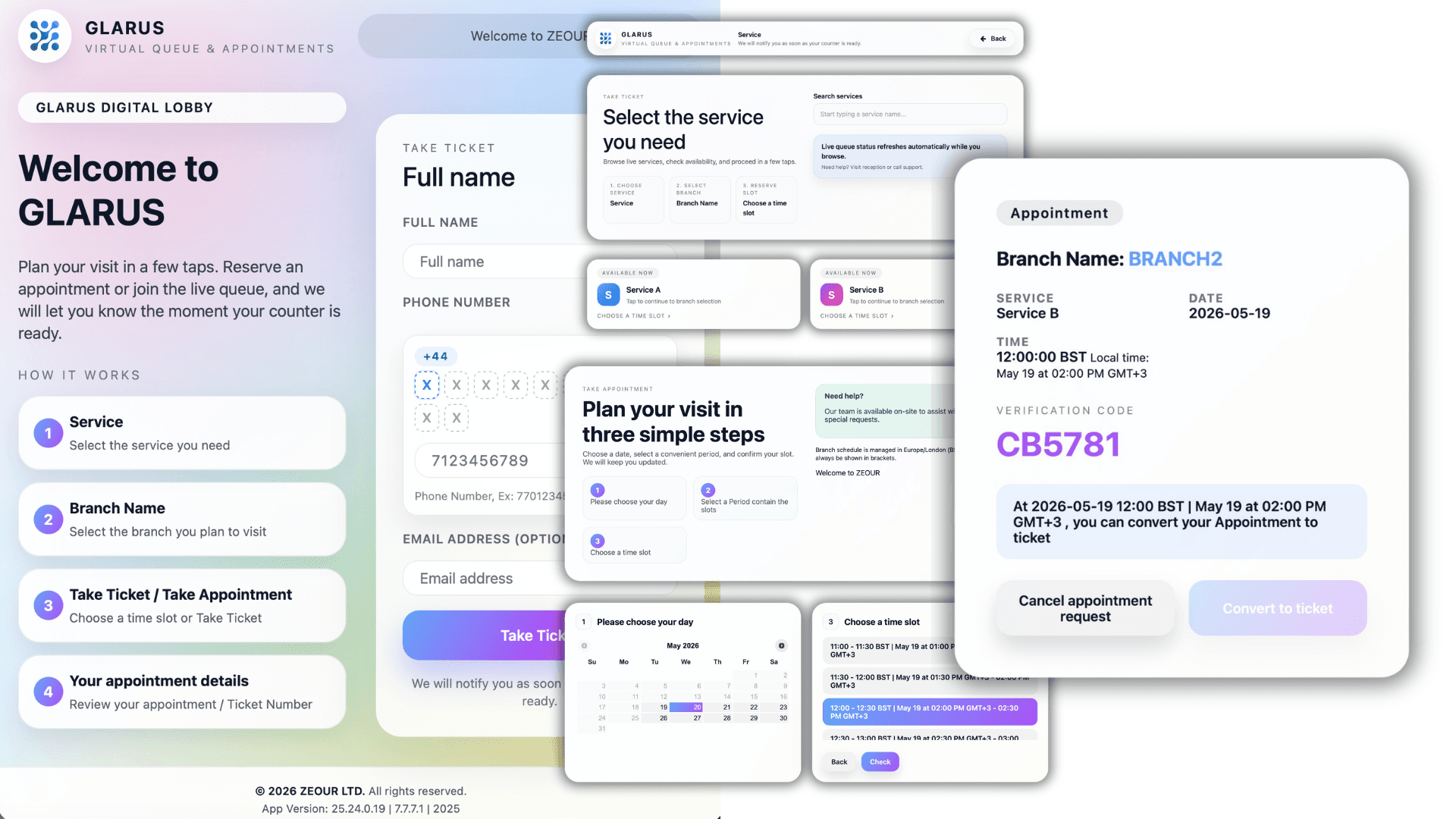
Online Appointment System Gallery
Visual highlights of GLARUS MobileWCSA Appointments — the customer-facing scheduling layer of the GLARUS branch operations platform.
Why Phone-and-Paper Booking Fails
Phone-and-paper booking drives no-shows, double-bookings, and front-desk overload — here is why an online appointment system is essential.
Phone-Reception Bottleneck
Receptionists spend 30–50% of their day on "I'd like to book an appointment for…" calls. Customers wait on hold. Slots get double-booked because two callers were on different phones. The reception desk becomes a switchboard instead of a concierge.
Self-Service Across Every Channel
Customers book on the channel they already use — mobile, web, WhatsApp, Telegram, ChatBot, SMS, or kiosk. Reception load for routine bookings drops 70–90%. Receptionists go back to concierge work.
Calendars Don't Talk to the Queue
Generic scheduling tools (Calendly, Acuity, custom forms) sit completely separate from the branch operations stack. The appointment shows up in a Google Calendar; nothing tells the queue cockpit. The customer arrives, finds no ticket, and goes back to reception — defeating the point of the appointment.
Appointments Auto-Convert to Live Tickets
`convert_to_ticket_time` (typically 10 minutes before slot) triggers a worker that promotes the appointment into a live EMS ticket. The customer arrives, sees their name on the queue board, and is called. No double-checking. No "we're still trying to find your appointment."
No-Show Rates Above 20%
Email confirmation gets buried; SMS is unreliable; the customer just forgets. Industry studies show 20–35% no-show rates for healthcare, banking, and government appointments. That's burned capacity that could have served a walk-in instead.
Multi-Channel Reminders + ICS Invites
Confirmation + ICS calendar invite immediately on booking. Reminders at 24h, 4h, and 30 min via Email + SMS + WhatsApp + Telegram. No-show rate drops 30–50% within the first month, every time.
No Identity Verification
Anyone can book any slot under any name. Banks, embassies, government service centers, and visa offices need to know that the person booking is the person who shows up. Generic scheduling tools have no built-in identity step.
Verify Identity Before the Visit
Configurable per service: national ID, passport, SMS OTP, customer code, or external SAML / OIDC SSO. Regulated industries get the verification they need without scaring off the rest.
Single-Branch Tools at Multi-Branch Companies
A bank with 50 branches running 50 separate appointment calendars is 50 separate problems. Customers can't see availability across branches; staff in one branch can't see a customer's history at another; reports don't roll up.
One Platform, Every Branch, Every Country
One MobileWCSA installation serves any number of branches across any number of countries. Centralized policy in MSA, branch-local execution, customers can hold one profile and book anywhere.
No Audit Trail, No Compliance Posture
A regulator asks "when did this visa applicant first book, and how many times did they reschedule?" Most scheduling tools have a calendar view, not an audit log. GDPR / HIPAA / PDPL compliance becomes a manual reconciliation exercise.
Full Audit Trail + Compliance Posture
Every booking, reschedule, cancellation, conversion, and access event logged with actor + timestamp + structured metadata. Configurable retention. Right-to-be-forgotten workflow. GDPR / HIPAA / PDPL aligned by design.
Appointments Features
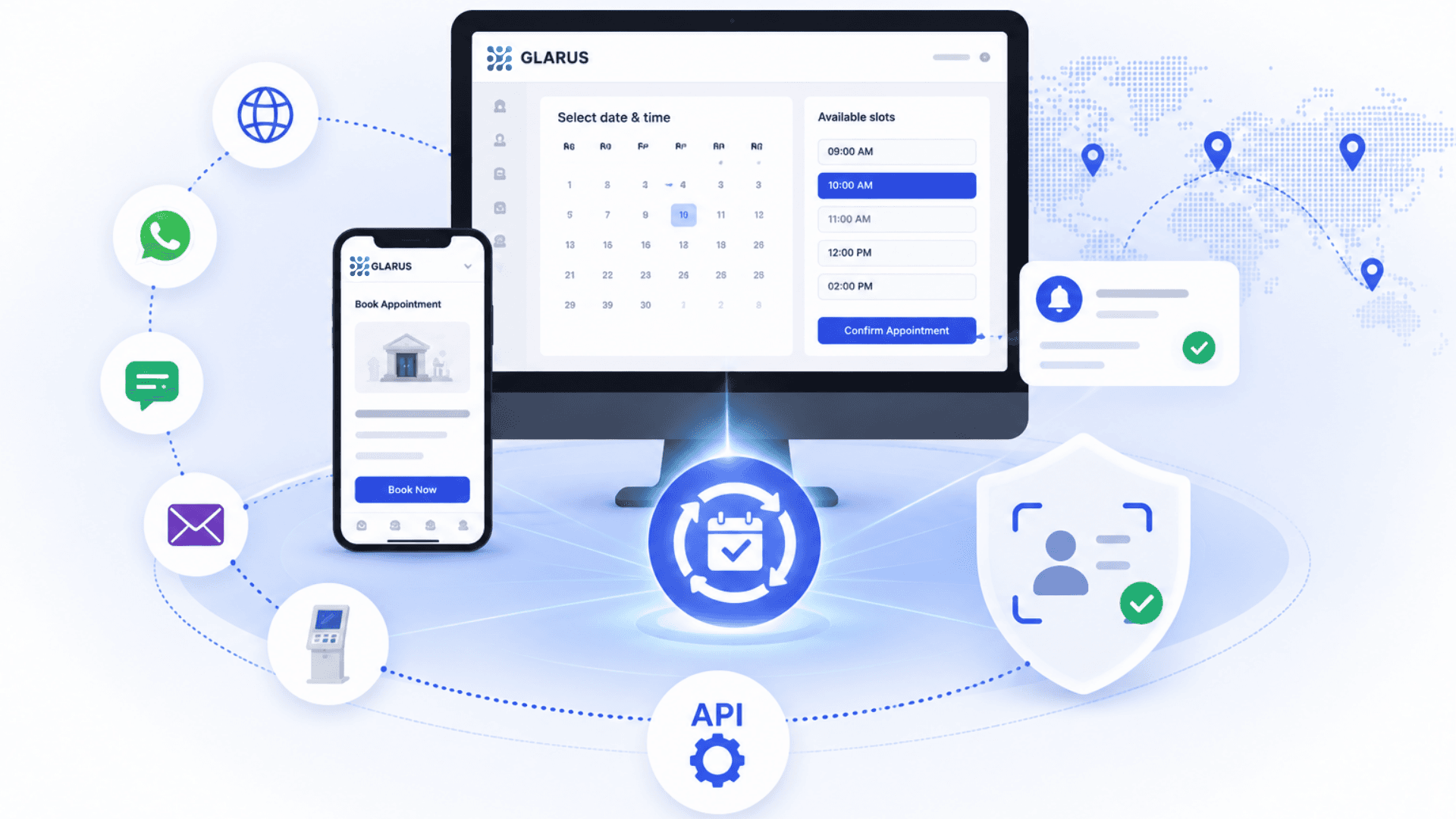
Omnichannel Booking — Mobile App, Web, WhatsApp, Telegram, ChatBot, SMS, Kiosk
15-Minute Slot Granularity (Configurable in MSA: 5 / 10 / 15 / 30 / 60 min)
Centrally Managed Slot Rules + Branch Working Hours (MSA / GLITT)
Per-Service, Per-Branch, Per-Counter Capacity Caps
Automatic Conversion of Appointments into Live Branch Tickets
Configurable Pre-Conversion Lead Time (default ~10 minutes before slot)
Multi-Channel Notifications: Email · SMS · WhatsApp · Telegram · Push
Pre-Visit Reminder Cadence (configurable: 24h, 4h, 30min, etc.)
Identity Verification (Passport / National ID / OTP / Appointment Code)
Per-Customer Appointment History + Priority Flags (VIP / Disabled / Pregnant)
Multi-Branch + Multi-Country Customer Profile (one identity, every branch)
Self-Service Reschedule + Cancel (with configurable cancellation policy)
No-Show Detection + Auto-Expiry of Unconverted Appointments
Calendar Invites (ICS METHOD:REQUEST) — Outlook / Google / Apple
Real-Time Slot Availability (Redis + Laravel Echo broadcasting)
REST API for External Bookings (Bearer-token authenticated)
Webhook Events for Booking / Cancellation / Conversion / No-Show
Multi-Language UI with Full RTL (Multiligual baseline; extensible to any locale per engagement)
Branding + Theming (Custom Logo, Colors, White-Label Available)
Analytics Dashboard: Bookings, Conversions, No-Show Rate, Slot Utilization
Cron-Driven Expired Appointment Cleanup
GDPR / HIPAA / PDPL / ISO 27001 Aligned (Cloud or On-Premise)
Resilient Email Outbox with Retry (no notification ever lost)
Audit Log of Every Booking, Reschedule, Cancellation, and Conversion
Appointments Components
Scheduling Rules, Reminder Channels and Booking APIs.
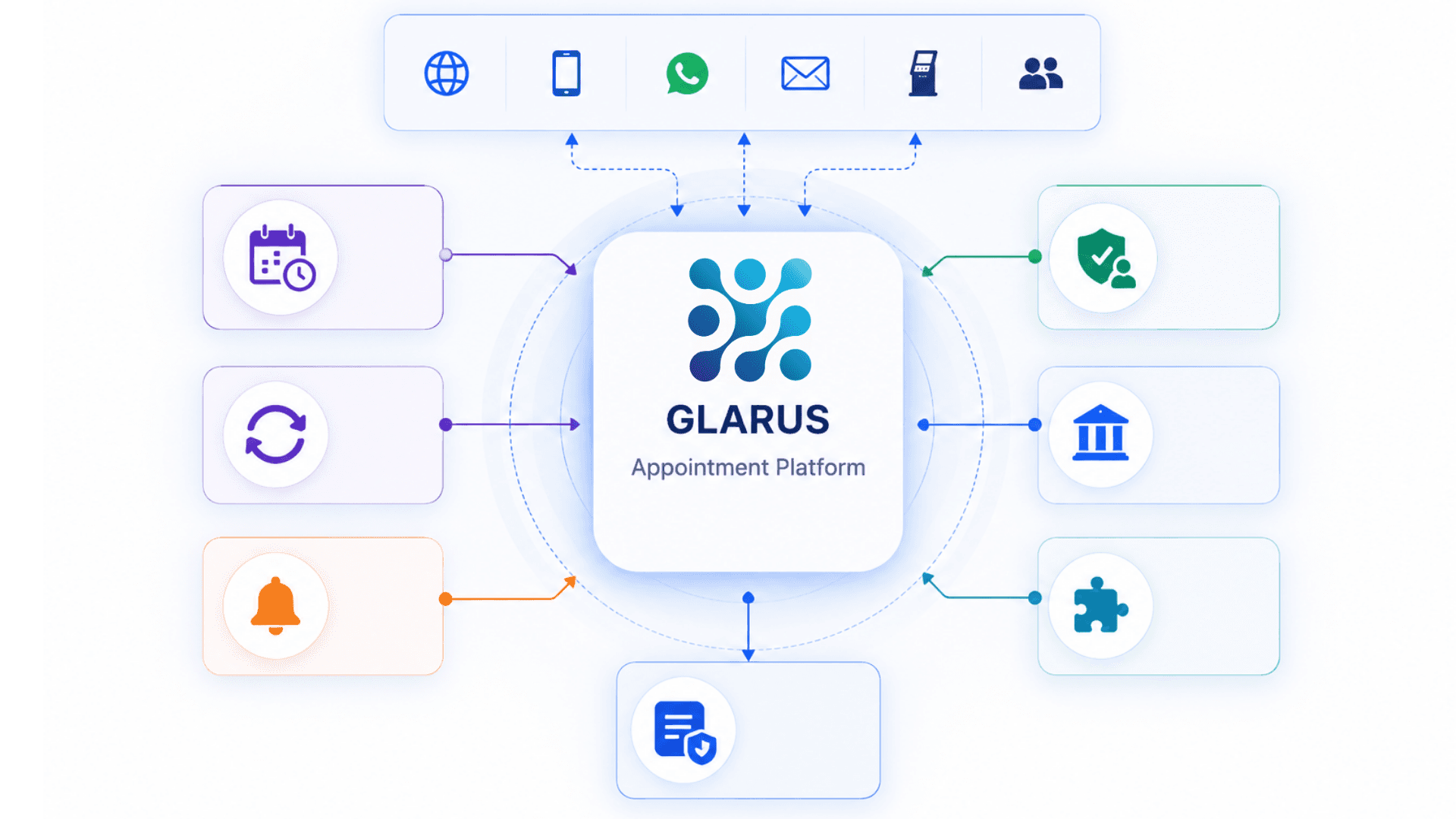
Omnichannel Booking Layer
Every channel a customer might use, with consistent slot availability and confirmation experience.
- Mobile app (iOS + Android), responsive web portal
- WhatsApp Business Cloud API, Telegram, ChatBot conversational flows
- SMS booking for feature-phone / low-bandwidth markets
- On-site CSA kiosk booking for walk-ins and future visits
Slot Engine + Capacity Enforcement
15-minute slot granularity (configurable 5 / 10 / 15 / 30 / 60 min) with real-time capacity enforcement via Redis.
- Per-service slot duration and capacity rules
- Branch working hours + holiday calendars in MSA / GLITT
- Redis-backed Laravel Echo broadcasting for live slot state
- Server-side validation rejects double-booking even on race-conditions
Auto-Conversion to Live Ticket
The integration that makes GLARUS appointments different from a calendar tool.
- `convert_to_ticket_time` calculated per appointment (default ~10 min before slot)
- Branch-side worker promotes appointment → live EMS ticket at the right moment
- Kiosk recognition for early-arrival on-demand conversion
- No-show auto-expiry after configurable window
Multi-Channel Notification Stack
Confirmation, reminders, and ICS calendar invites delivered through every channel.
- Email (SMTP / Microsoft Graph), SMS (Twilio / MessageBird / Vonage / Infobip)
- WhatsApp Business Cloud API, Telegram, mobile push notifications
- Resilient outbox with retry + lease locking + deduplication
- ICS METHOD:REQUEST invites (Outlook / Google / Apple)
Identity Verification Stack
Configurable per service — match the verification to the risk profile.
- Email OTP, SMS OTP, national ID, passport number, customer code
- SAML / OIDC for single-sign-on with corporate / government IdPs
- Rate-limited booking endpoints with timing-safe compare
- Audit-logged verification attempts with structured metadata
Multi-Branch / Multi-Country Scoping
One installation serves any number of branches across any number of countries.
- Centralized policy in MSA, branch-local execution in EMS
- Per-country locale defaults + per-region data residency
- Cross-branch customer profile (one identity, every branch)
- Per-branch role scoping for operators
REST API + Webhooks
Bearer-token-authenticated API for external bookings; signed webhooks for downstream systems.
- POST /api/book_appointment / cancel_appointment / convert_appointment_to_ticket
- Slot lookup, customer management, appointment history endpoints
- Booking / conversion / cancellation / no-show webhooks (signed, retry-safe)
- OpenAPI specification + Postman collection + partner SDK
Slot Utilisation and Appointment Attendance
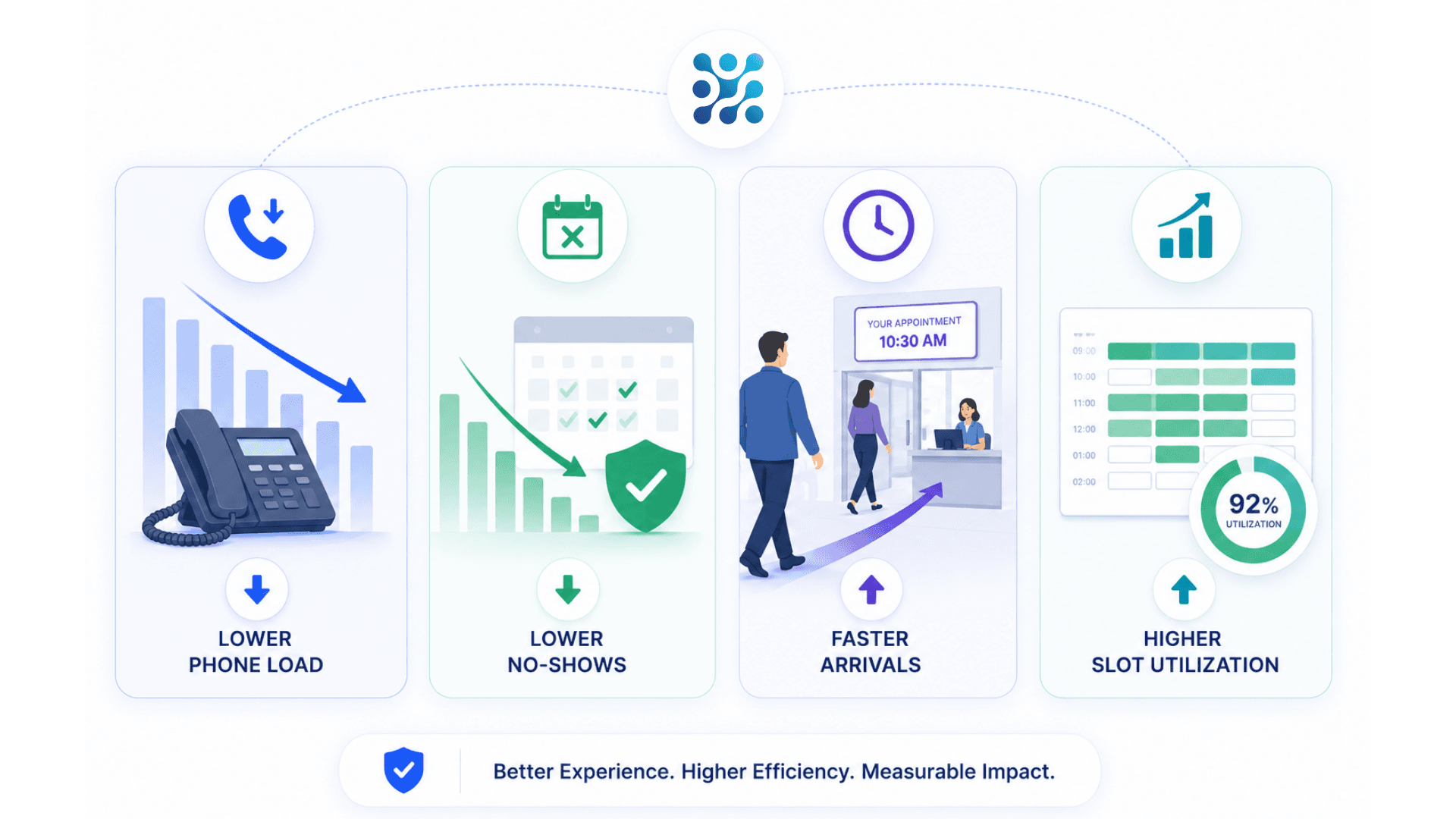
Cut "phone reception" load for appointments by 70–90% via 24/7 self-service
Reduce no-show rates by 30–50% with timely multi-channel reminders
Shorten branch wait time on arrival to under 2 minutes per appointment
Eliminate double-booking with central slot rules and per-counter capacity caps
Improve customer satisfaction (CSAT / NPS) at banks, hospitals, and embassies by 20–40 points
Free reception staff to handle complex cases instead of routine scheduling
Standardize the booking experience across single-branch, multi-branch, and multi-country estates
Generate audit-ready records for compliance (GDPR, HIPAA, PDPL, regulatory inspections)
Convert appointment → live ticket automatically so the queue cockpit always reflects reality
Future-proof with omnichannel APIs, identity verification, and full GLARUS platform integration
From Available Time Slot to Served Appointment
Booking, confirmation, reminders and arrival conversion bring a scheduled visit into the branch workflow.
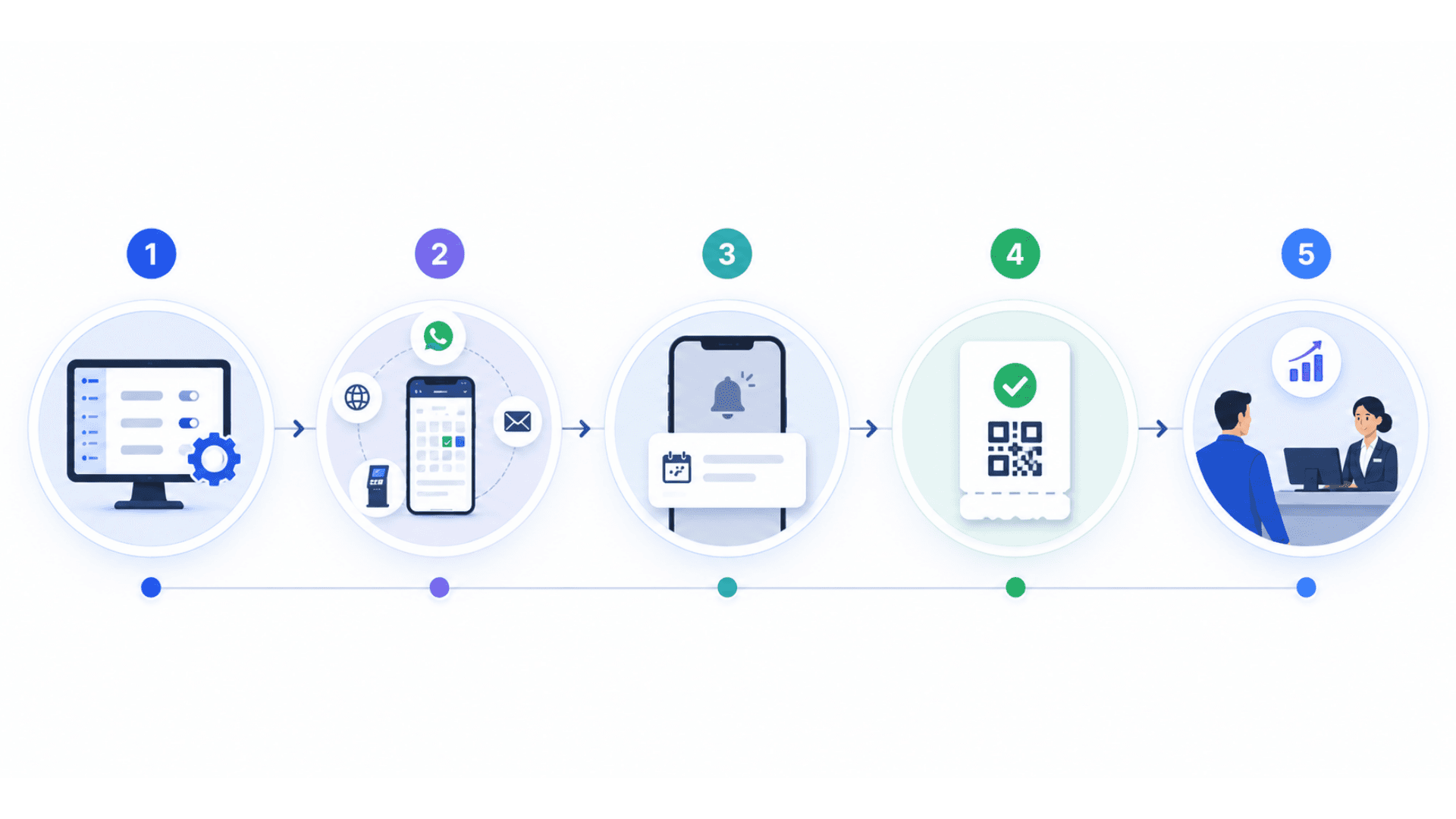
Configure Rules in MSA / GLITT
Admins define the appointment policy centrally: which services accept appointments, slot duration (5 / 10 / 15 / 30 / 60 min), branch working hours, per-slot capacity, lead time for conversion, cancellation rules, and required identity verification. Rules cascade to every customer-facing channel.
Customer Books (Anywhere)
Customer opens the mobile app, web portal, WhatsApp Business chat, Telegram bot, ChatBot, or SMS flow. They pick a branch, a service, a day, and an open 15-minute slot. Capacity is enforced live (Redis-backed) so two customers never book the same slot for the same counter.
Confirm + Reminders
The system returns an appointment code (e.g. AB1234) and convert_to_ticket_time. A confirmation goes out via the customer's preferred channels (Email + SMS + WhatsApp + Telegram). An ICS calendar invite is attached. Pre-visit reminders fire at configurable intervals (24h, 4h, 30 min).
Convert the Appointment on Arrival
About 10 minutes before the slot (configurable), the appointment converts automatically into a live branch ticket on the EMS counter cockpit. If the customer arrives early, the kiosk recognizes them and lets them confirm-on-arrival to trigger conversion immediately.
Serve, Audit, Analyze
Operator calls the ticket from EMS — appointment metadata follows (appointment code, customer name, identity verification status). The full booking + conversion lifecycle lands in the audit log. Analytics roll up: booking volume per channel, no-show rate, slot utilization, top services, daily / weekly / monthly trends.
Appointments Use Cases by Industry
Explore the service environments relevant to appointments.
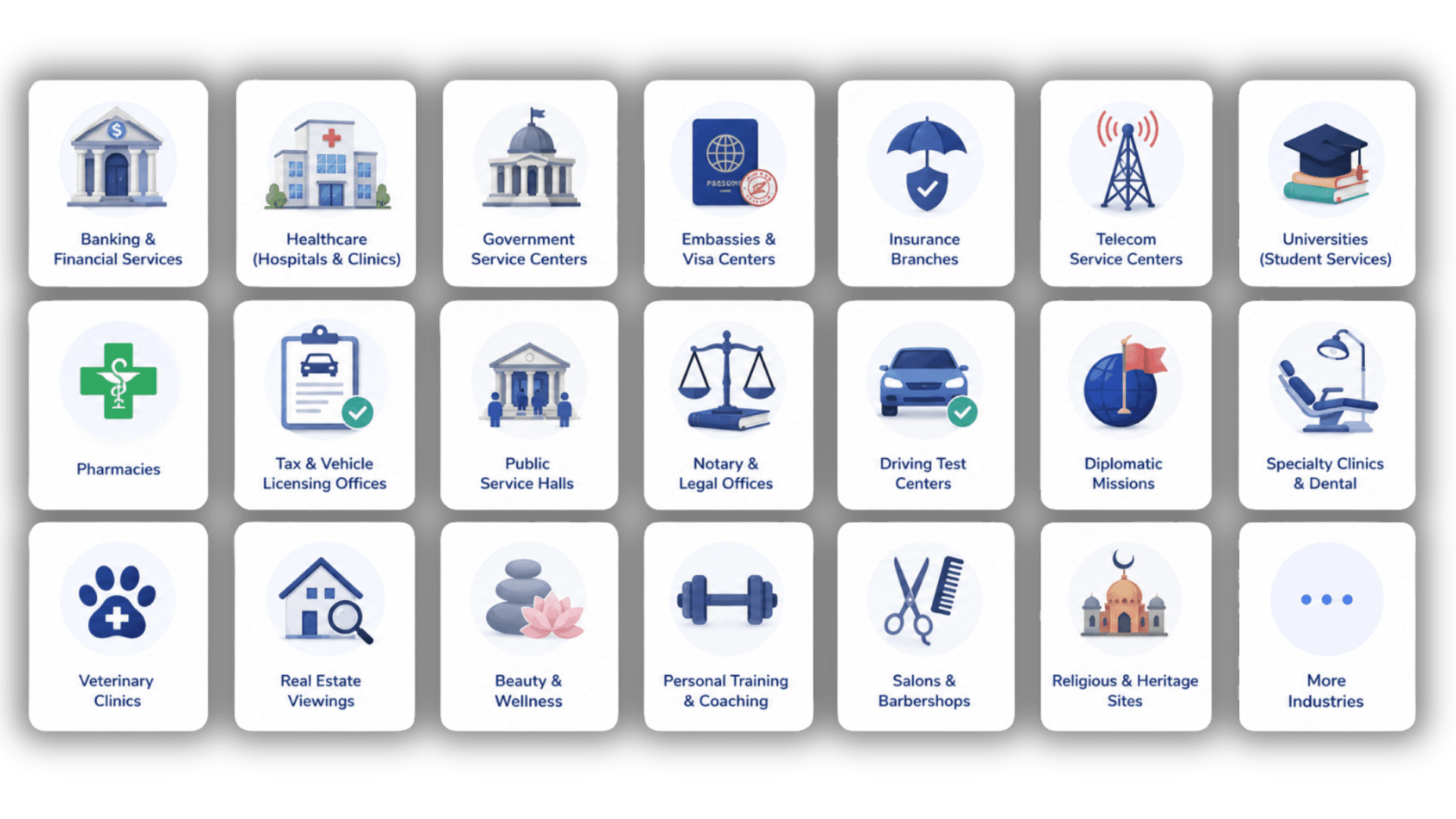
Open the deep dive by vertical
Online Appointment System FAQs
Get answers to the most common questions about our appointments.
What is an online appointment system?
Does the appointment system fit a solo practice or single location?
How does the GLARUS appointment system work?
How does the appointment-to-ticket conversion work?
What channels can customers book through?
What slot durations are supported?
How does identity verification work at booking?
Can customers reschedule or cancel?
How do reminders work?
Does it integrate with the rest of the GLARUS platform?
How does multi-branch / multi-country deployment work?
Is GLARUS appointments GDPR / HIPAA / PDPL compliant?
How does it handle no-shows?
How is real-time slot availability handled?
Is there an API for external bookings?
How long does deployment take?
Cloud or on-premise?
How does pricing work?
Can I white-label it?
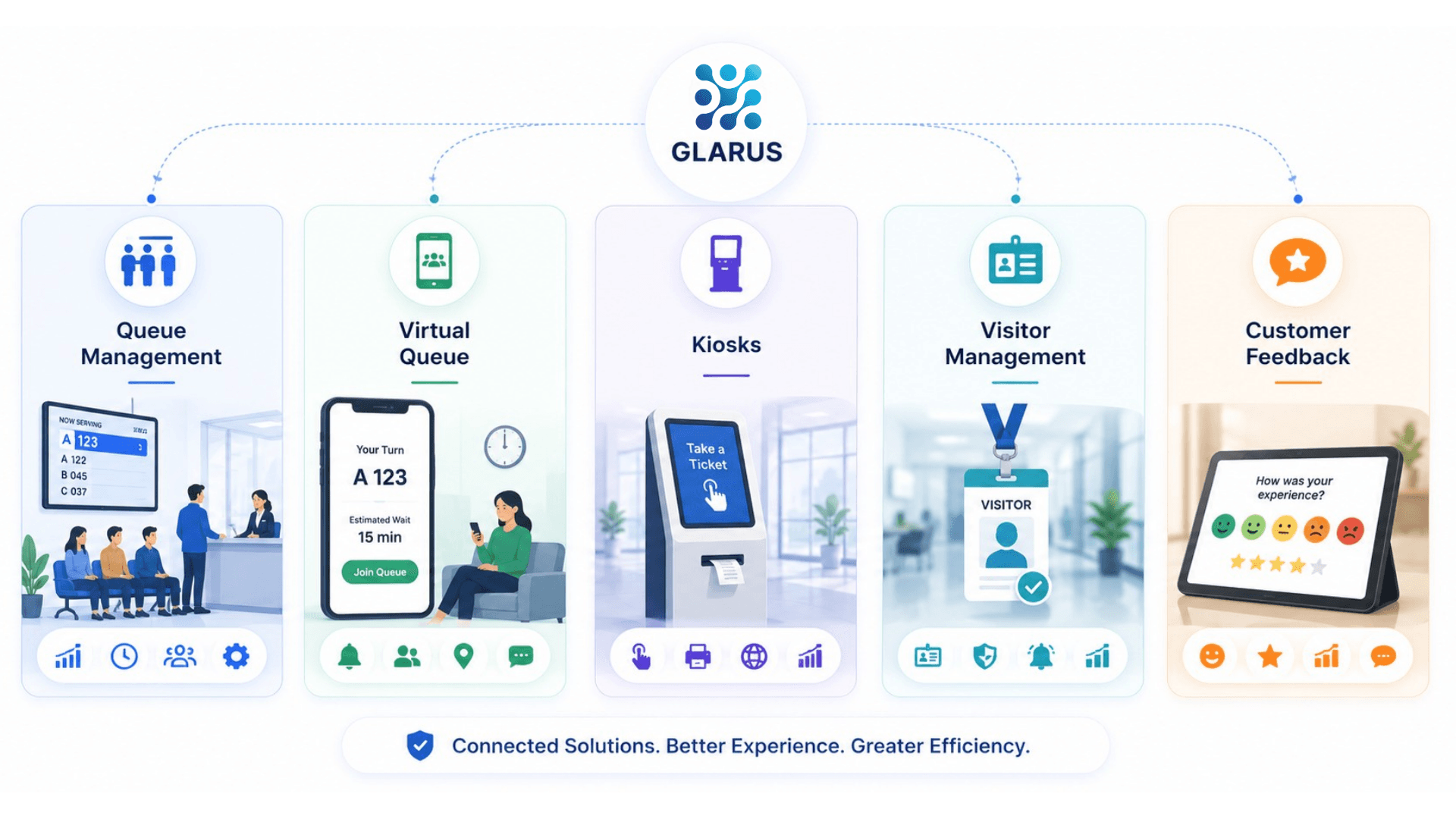
Explore Related Solutions
Review the arrival channels and service workflows that follow an appointment booking.
Ready to Transform Your Operations with Appointments?
Discuss your workflows, deployment requirements and integration scope with the Zeour team.
Appointments — concepts you'll meet
Definitions for the operational terms that appear across this page. Tap any chip to read the long-form entry plus its cross-links.