
Queue Management System
Zeour GLARUS is an enterprise queue management system for organisations managing customer flow at service branches. It combines walk-in ticketing, counter calling, queue displays and central reporting, with virtual queues and appointments connected to the same service operation.
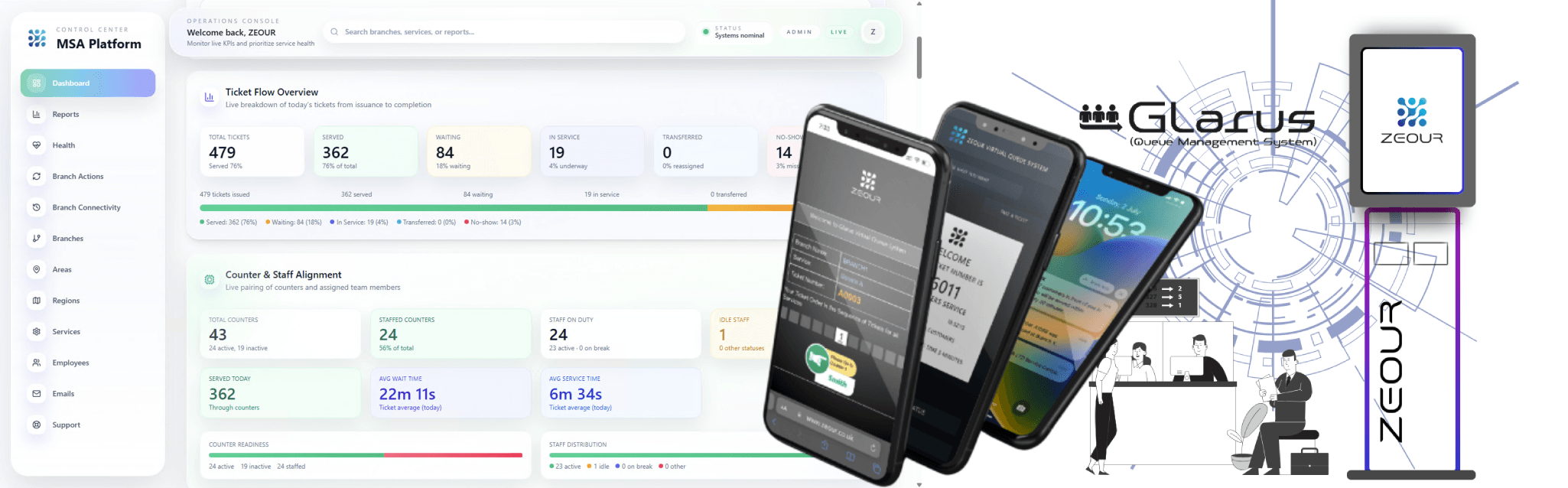
Enterprise Queue Management Software
Manage the visit from arrival to service completion, with branch teams handling tickets and supervisors reviewing performance across locations. Central configuration keeps service rules, branding and reporting consistent while supporting branch-specific operations.
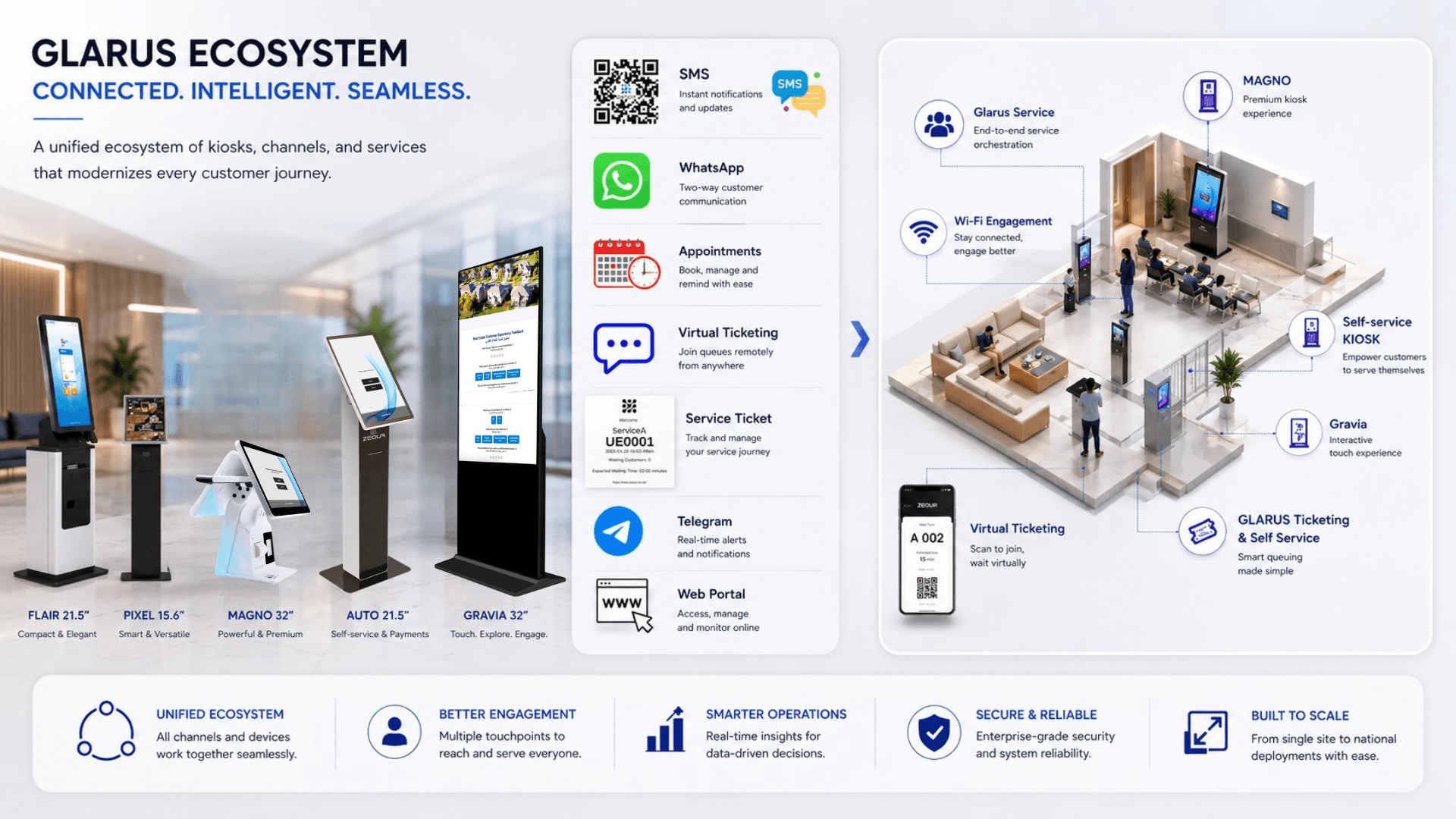
Virtual Queues, Appointments and Customer Touchpoints
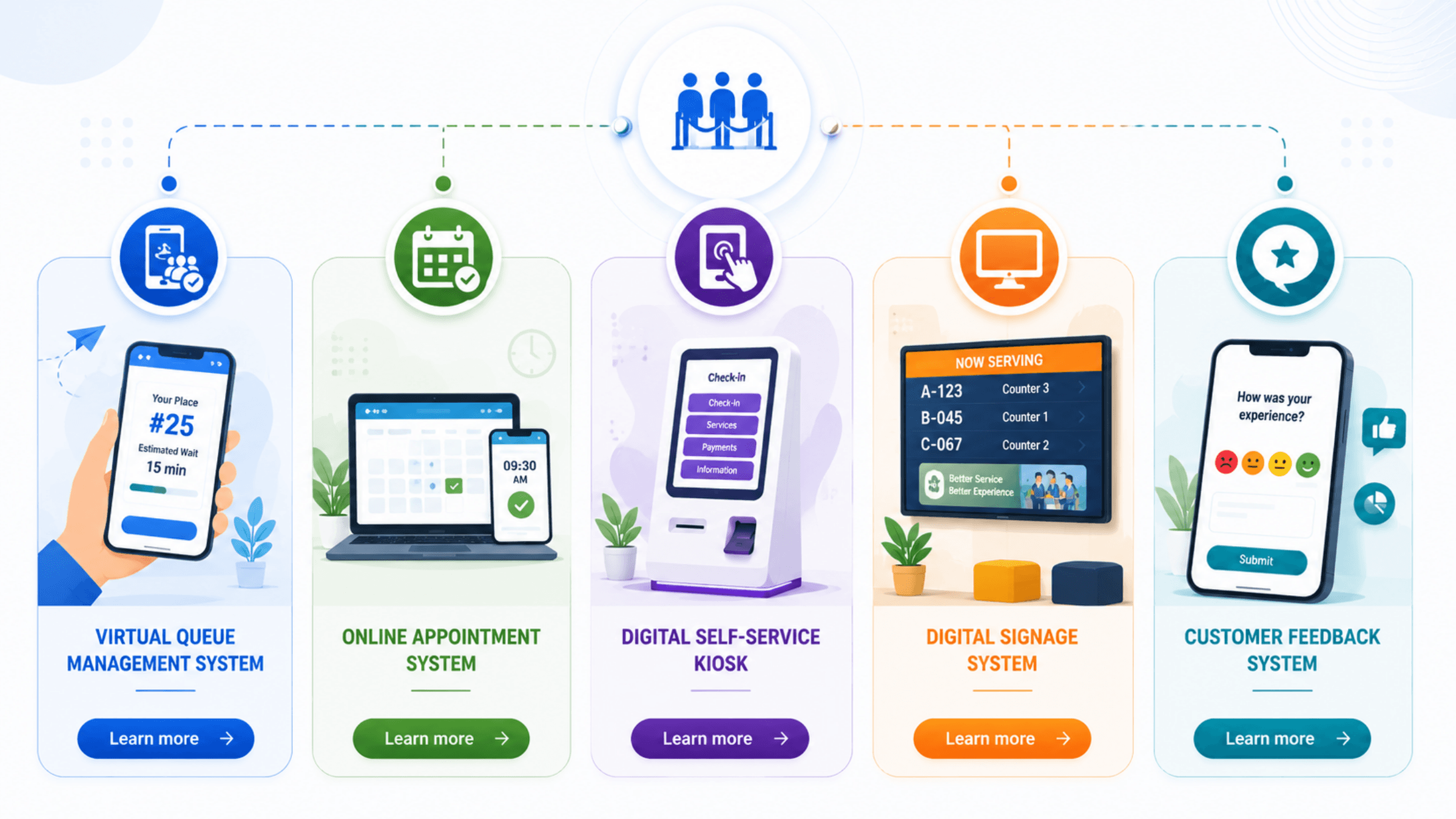
Use virtual queue management when customers need to join remotely, and the online appointment system when they need a scheduled time slot. Both connect to the branch ticket lifecycle; queue management governs the live service order.
A self-service kiosk solution handles on-site interactions. Digital signage software manages screen content, including queue boards, while the customer feedback system links post-service responses to the visit.
For an operational evaluation, use the guide to improving customer service with queue management. Teams planning citizen-service centres can review the Oman government queue-management checklist for workflow and pilot questions.
Queue Management Software, Hardware and Architecture
Zeour GLARUS is a complete queue management ecosystem built for real-world branch operations. It combines a central control plane (configuration, licensing, dashboards, reporting), branch-level execution (operators, counters, ticket lifecycle), customer touchpoints (kiosks and mobile virtual queue), and synchronized waiting-area experiences (digital signage, counter displays, audio announcements) — all integrated with Zeour’s industrial-grade hardware.
Run high-throughput service centers with Zeour GLARUS — an end-to-end Queue Management System (QMS) spanning central configuration (MSA/GLITT), branch operations (EMS), self-service kiosks (CSA), virtual queuing + appointments (MobileWCSA), and synchronized queue boards + announcements (GRAVIA) with Zeour industrial hardware. Engineered for every scale — the same software runs a single-branch pharmacy with one kiosk and one counter display, a five-branch clinic group, and 460+ branch national estates, so you never re-platform as you grow.
Key Functionalities
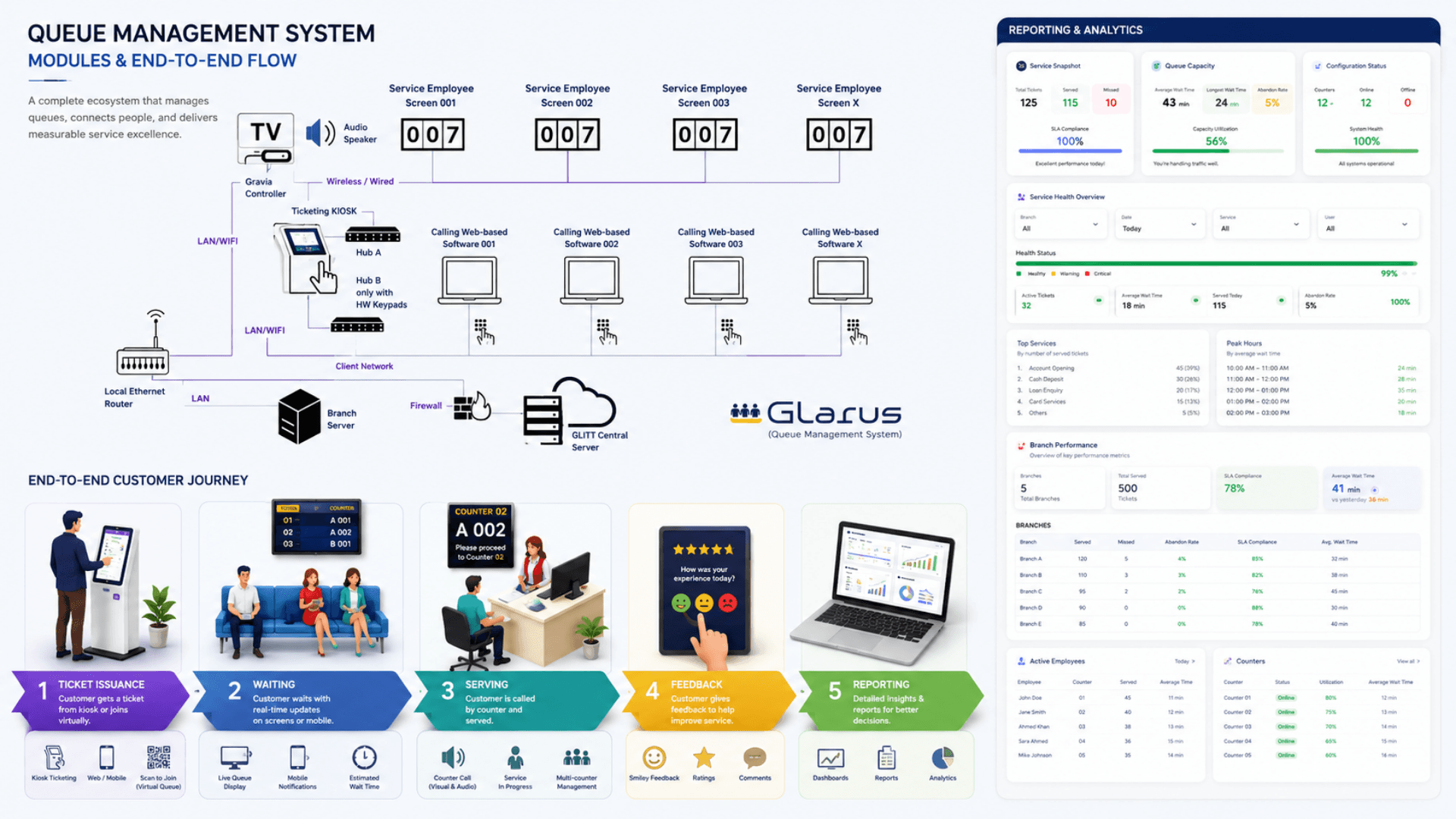
Centralized Governance (MSA / GLITT)
Configure branches, services, counters, ticket rules, kiosk flows, signage playlists, staff access, and licensing from one central control plane.
Branch Operations (EMS)
Run the live queue: call next, repeat, transfer, no-show, break management, counter sessions, and branch-level metrics — optimized for high-throughput service centers.
Walk-In Ticket Issuance (CSA Kiosk)
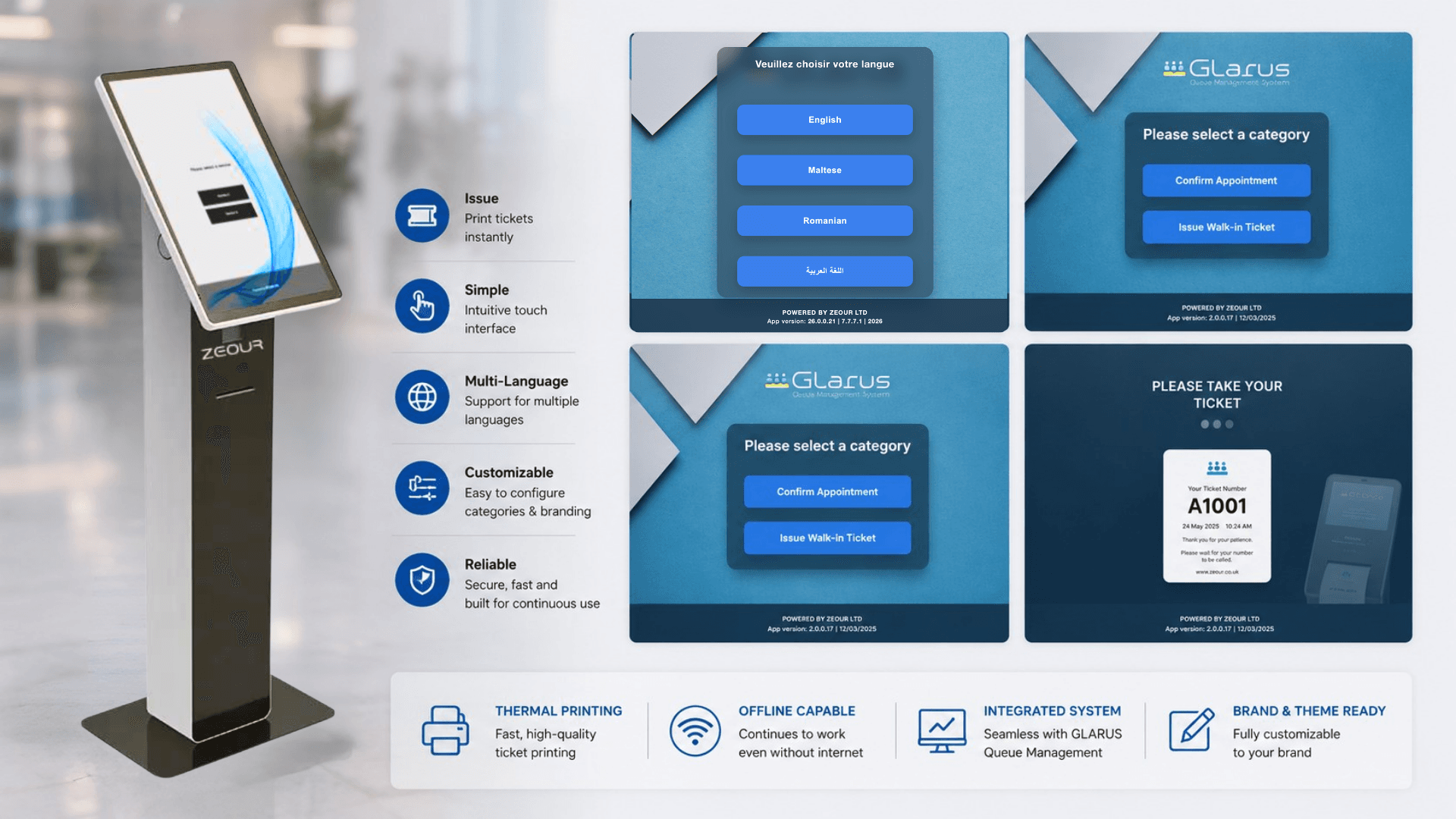
Multilingual self-service kiosk for service selection and ticket printing, with configurable telephone/document flows and appointment validation.
Virtual Queue & Appointments (MobileWCSA)
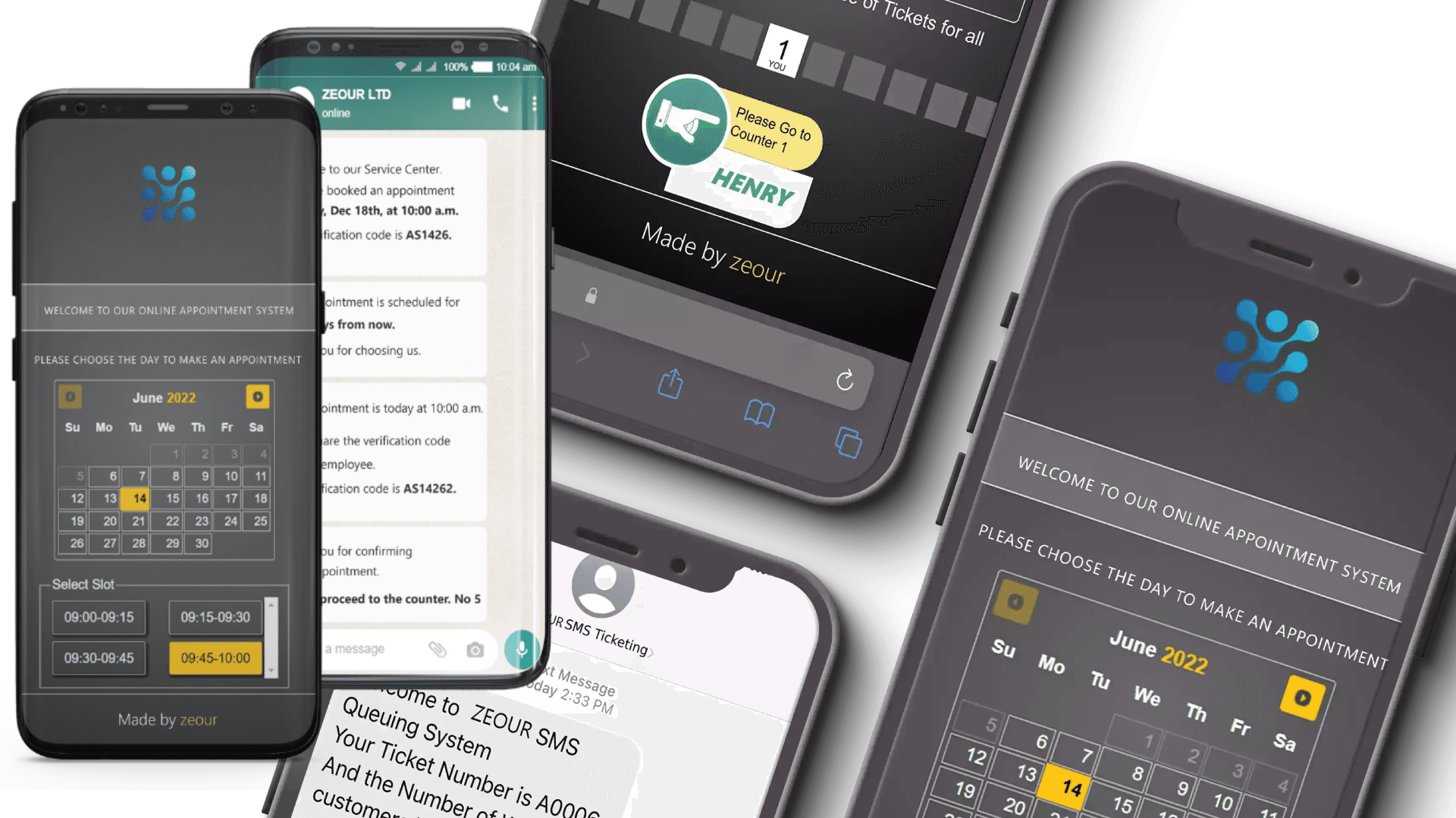
Let customers book appointments or take virtual tickets remotely, view live wait-time estimates, and receive real-time status updates.
Waiting-Area Experience (GRAVIA Display)
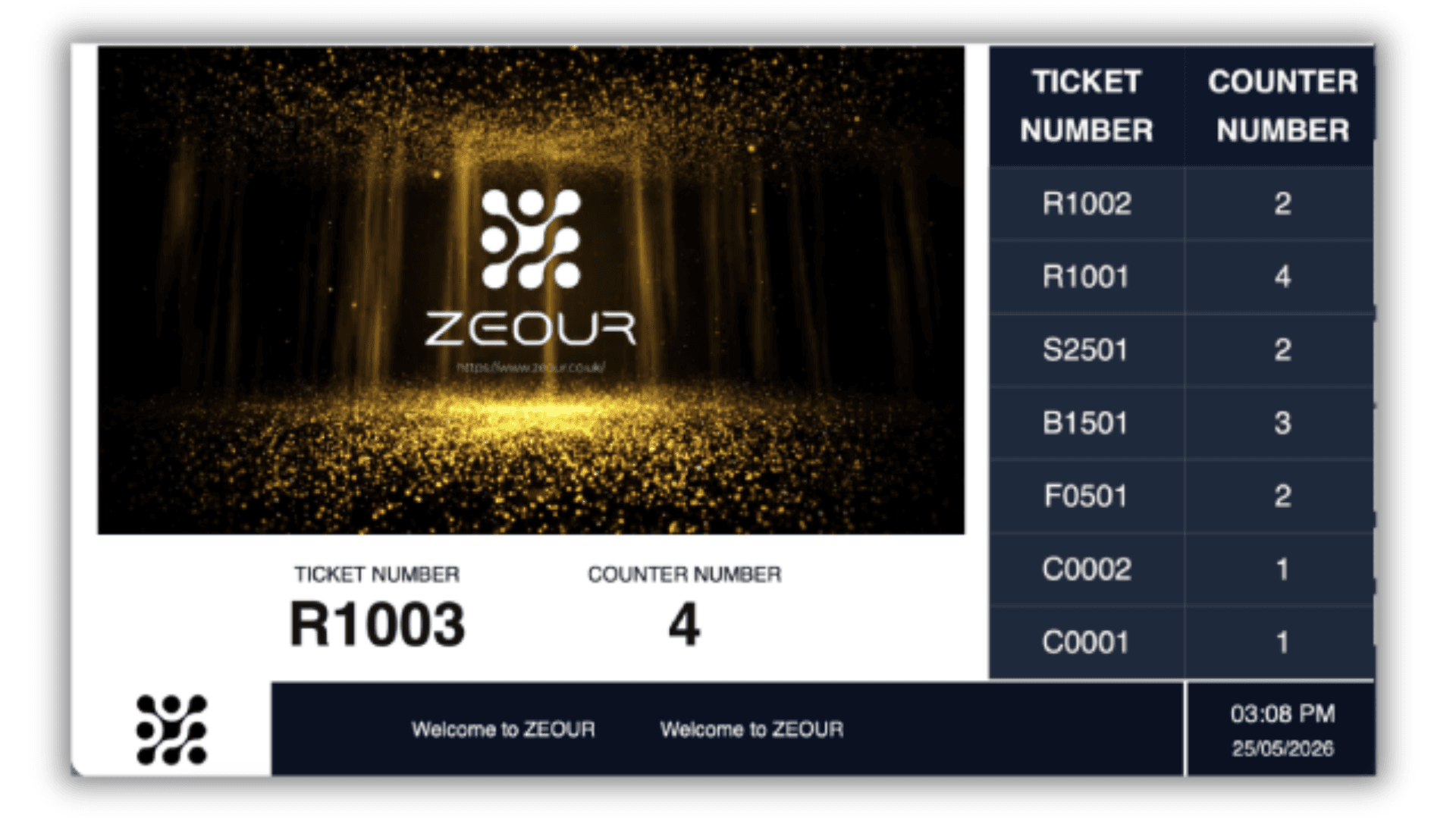
Show queue boards, media playlists, RSS tickers, and multilingual voice announcements triggered by real-time ticket calls.
Counter & LED Displays (CounterDSA / SSD)
Provide counter screens (LCD) or LED call displays for ticket + counter numbers, synchronized with EMS events.
Hardware Bridges (Keypad / RS485)
Integrate physical keypads and RS485 LED ecosystems with authenticated APIs and reliable event propagation.
Reporting & Analytics
Capture operational KPIs (waiting time, service time, peak hours, throughput) and export reports for management decisions.
Customer Feedback & Knowledge Flows
Collect post-service feedback and provide self-help knowledge trees to reduce counter load and improve first-time resolution.
Software Components
Central Control Plane
Central Configuration and Reporting — MSA / GLITT
Central governance for services, branches, counters, kiosk flows, digital signage layouts/playlists, user access, licensing, dashboards, and reporting.
Dashboards & Reporting
Cross-branch KPIs and exports (service performance, employee performance, peaks, throughput) for operational leadership and compliance.
Central Administration Dashboard — MSA Frontend
A modern dashboard UI for the control plane that consumes versioned APIs for configuration and analytics workflows.
Ops Control (Infrastructure Console)
Operational admin console for branch lifecycle, IP/config changes, health visibility, recovery tooling, and backup/restore workflows.
Branch Operations
Queue Operator and Ticket Management — EMS
Ticket lifecycle engine: call next/repeat/transfer, counter sessions, breaks, notifications, and branch-level monitoring.
Glarus Config / Ops Control
Operational tooling for managing branch configuration, subsystem toggles, and health visibility across deployments.
Real-Time Broadcasting (Redis + Echo/Pusher)
Live queue updates propagate from EMS/CSA to displays and customer channels using Redis + Echo Server (or Pusher) with resilient fallbacks.
Customer Touchpoints
Self-Service Queue Kiosk — CSA
Walk-in ticket issuance and appointment verification with configurable multilingual flows and ticket design.
Virtual Queue and Appointment Portal — MobileWCSA
Remote ticketing and appointment journeys with wait-time visibility and real-time queue status updates.
Feedback & Flow
Customer feedback collection plus self-help knowledge trees to guide customers before they take a ticket.
Appointment Validation & OTP (Optional)
Configurable appointment verification flows at kiosks and customer channels (where enabled by the control plane).
Presentation & Displays
Queue Boards and Announcements — GRAVIA Display
Queue boards with playlist scheduling, RSS tickers, and real-time call overlays for waiting areas.
LCD Counter Displays — CounterDSA
LCD-based per-counter display alternative for showing current/next tickets at service windows.
Media Scheduling & Zoning
Centralized content control for screen zoning, playlists, overlays, and announcements aligned to queue events.
Hardware Components
Self-Service Kiosks & Ticket Issuers
GLARUS Kiosk Light (KIOSAPP066 HW-S)
17", 18.5” or 21” optional display, 10-point capacitive touch, Android / Windows OS, thermal 60mm/80mm printer (dual optional), LAN + WiFi, aluminum edging with toughened glass, CE/RoHS/FCC.
AUTO Free-standing Self-Service Kiosk (AUTO666-HW-L-AD)
Free-standing vandal-resistant IP54-rated kiosk designed for 24/7 operation. 32", 42", or 55" Full HD capacitive touchscreen, Android / Windows OS, 80mm thermal printer, optional A4/ID scanners and camera modules KYC etc.
KIOSAPP06 Kiosk
Self-service kiosk platform option (get in touch with us for hardware variants and configurations).
GRAVIA Kiosk Models (KIOSGRV301/KIOSGRV303)
GRAVIA-branded kiosk hardware variants for queue ticketing and customer self-service (get in touch with us for model options).
Digital Signage Controllers
GRAVIA06 HW (Signage + Announcements Controller)
Quad-core Cortex-A55, Mali-G52 (4K UHD), 2GB DDR3, 16GB eMMC, HDMI+VGA (up to 4K), 3.5mm line-out, RJ-45 LAN, 2×USB 2.0, Android 11, built for queue overlays, playlists, and multilingual audio announcements.
IPTV06VI (IP Video Encoder)
RJ45 100/1000 Base‑T Ethernet output (DHCP/static), H.265/HEVC encoding with IP streaming support (RTSP/HTTP/UDP/RTMP/HLS/RTP/SRT) and resolutions up to 3840×2160.
Counter Calling Displays
SSD06 HW (LED Ticket + Counter Display)
8-digit dot matrix LED layout (ticket + counter), viewing distance up to 25m, adjustable brightness (≥600 cd/m²), PoE 5V power, IP40 (IP54 optional), compatible with Glarus_Hub RS485 controller.
SSD066 AHW (LCD Counter Display)
10", 13.3", 15" Full HD (1920×1080) IPS screen with Android options, VESA mounting, and multiple connectivity options.
Branch Controllers & RS485 Infrastructure
CONT06 (Industrial Branch Server PC)
CUbuntu Linux local server, HDMI/VGA, Ethernet, WiFi antennas, 12V/3A DC power, CE/RoHS/FCC — designed to run branch-level GLARUS apps locally.
Glarus_Hub (Industrial RS485 Hub)
Industrial rail 16×RS485 hub with isolated channels and integrated power distribution (DC12V, up to 15W per channel), IP40 aluminum shell, operating -40°C to +85°C, MTBF >100,000 hours.
Glarus POE Power Adapter
Industrial-grade PoE power adapter options (12V/24V/48V/52V; up to 120W) for device power distribution.
Operator & Counter Devices
EMS06 Hardware Keypad
Multi-function button keypad with 8-digit LCD display for called/waiting numbers, with wired/wireless options and optional PoE.
Customer Feedback Devices
MAGNO Customer Feedback Touch Screen (MAGNO066 AHW)
Customer feedback touchscreen device family with Android options, connectivity modules, and optional camera.
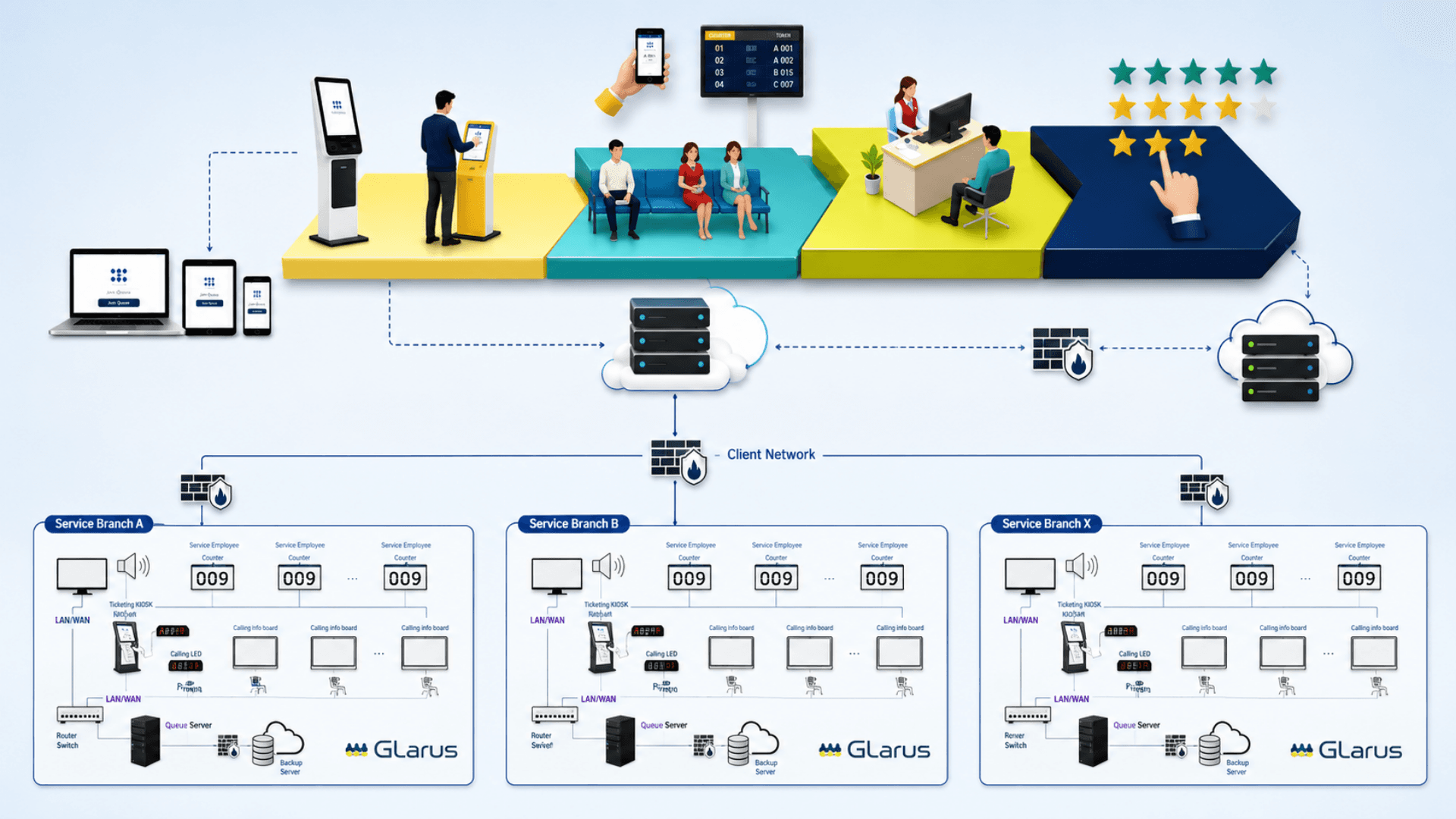
GLARUS Platform Architecture (Central + Branch + Hardware)
GLARUS is deployed as a complete ecosystem. Central services manage configuration, licensing, dashboards, and reporting, while each branch runs locally for responsiveness and resilience. Hardware devices run thin shells that wrap branch web apps for printing, announcements, and calling displays.
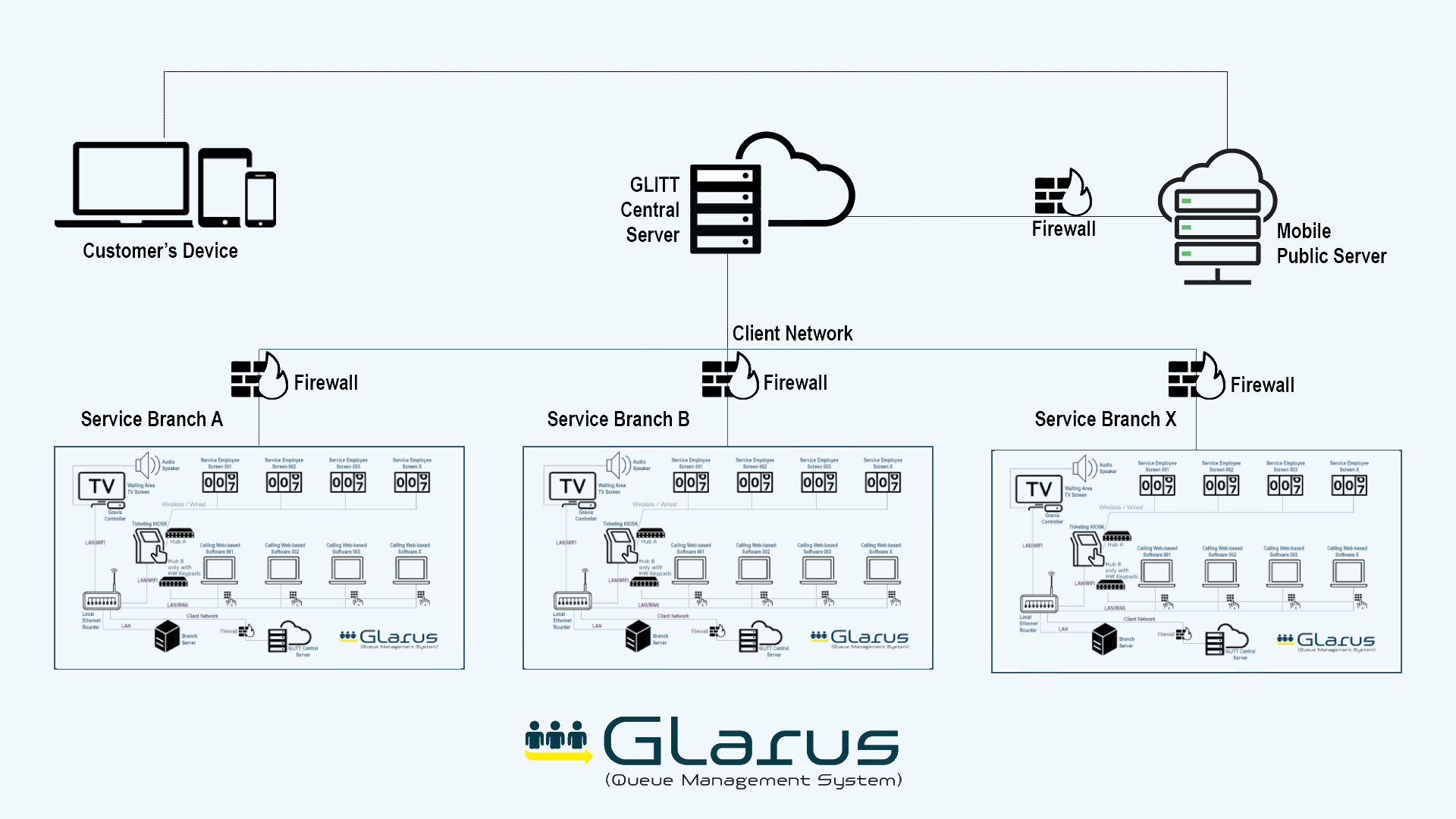
Tier 1 — Central VM (One per organization)
Uses central database and provides governance
- MSA / GLITT: central control plane for services, branches, counters, ticket rules, kiosk flows, signage, dashboards, and reporting
- MSA Frontend: modern dashboard UI consuming versioned control plane APIs
- MobileWCSA: customer virtual queue + appointments experience (central metadata + live status)
- Ops Control: infrastructure console for branch lifecycle, health, recovery, and operational tooling
Tier 2 — Branch Server (One per physical branch)
Runs the live queue locally (branch database)
- EMS: operator cockpit and ticket lifecycle engine (owns branch schema)
- CSA: self-service kiosk web app for walk-in tickets and appointment validation
- Display: GRAVIA queue boards with overlays, playlists, and announcements
- CounterDSA: per-counter LCD display alternative (current/next tickets)
- Keypad: APIs bridging physical keypads and calling devices
- Feedback: in-branch feedback collection and customer experience prompts
Tier 3 — Branch Hardware Devices
Thin shells installed on devices (wrap branch web apps)
- Kiosk Shell: loads CSA fullscreen and prints thermal tickets via branch APIs
- Controller App (GRAVIA): loads the Display app and stays synced with call events
- SSD LED Connector: polls branch APIs and pushes ticket/counter payloads to LED panels
- Industrial controllers infrastructure (CONT06, Glarus Hub) for reliable branch operations
Real-Time Updates
Real-time- Primary: Redis + Laravel Echo Server (or Pusher) broadcasts ticket-call events to Display, Counter screens, and customer channels
- Secondary: hardware connectors can use polling where required (e.g., LED connector)
- Designed for branch resilience: local branch apps continue to operate even when WAN connectivity is unstable
Queue Management vs Virtual Queuing vs Appointments — What You Need
These terms are often used interchangeably in search, but they solve different parts of customer flow. GLARUS combines them into one end-to-end queue system so customers, staff, and waiting areas stay synchronized.
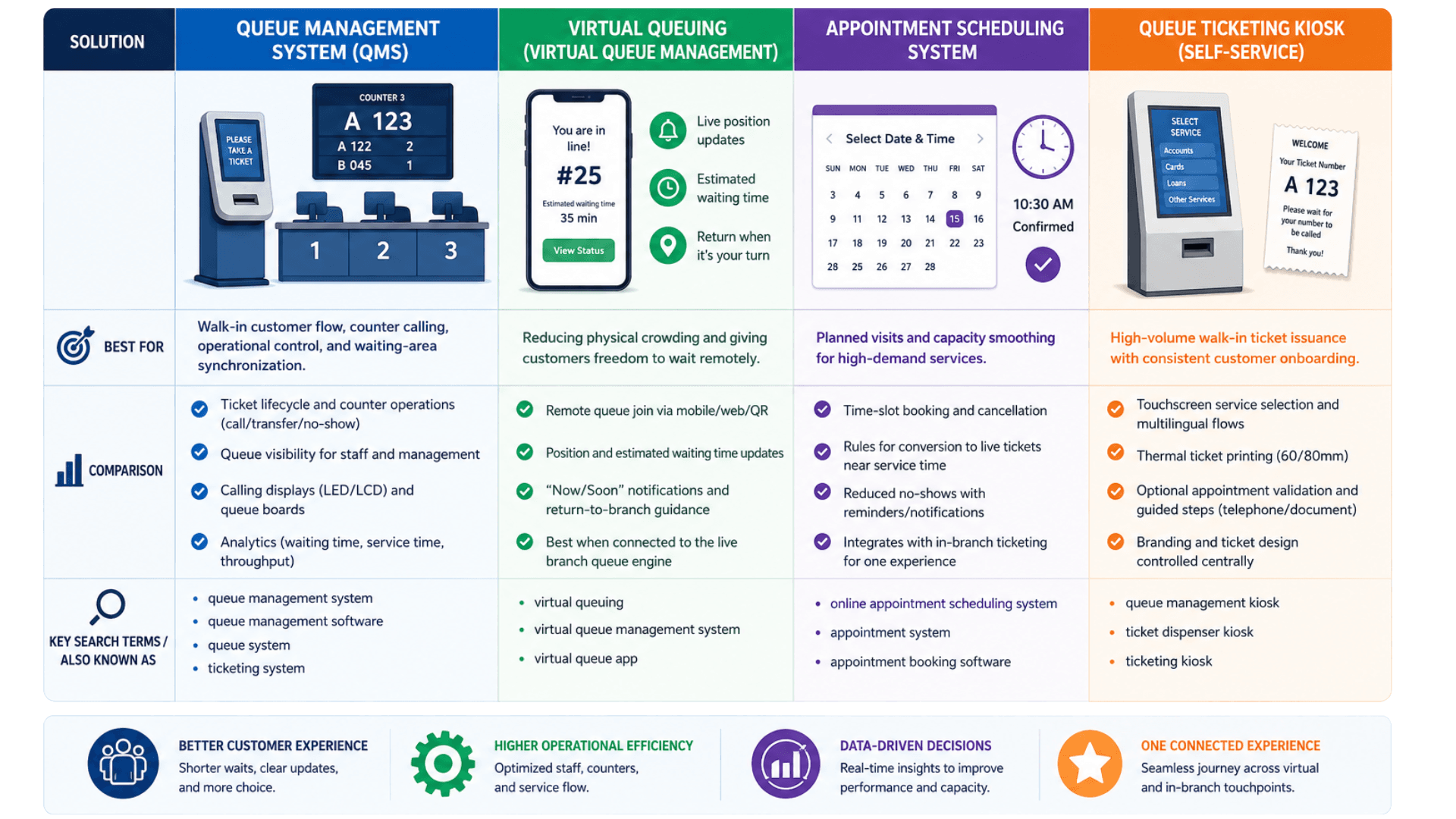
Queue Management System (QMS)
Best for: Walk-in customer flow, counter calling, operational control, and waiting-area synchronization.
- Ticket lifecycle and counter operations (call/transfer/no-show)
- Queue visibility for staff and management
- Calling displays (LED/LCD) and queue boards
- Analytics (waiting time, service time, throughput)
Virtual Queuing (Virtual Queue Management)
Best for: Reducing physical crowding and giving customers freedom to wait remotely.
- Remote queue join via mobile/web/QR
- Position and estimated waiting time updates
- “Now/Soon” notifications and return-to-branch guidance
- Best when connected to the live branch queue engine
Appointment Scheduling System
Best for: Planned visits and capacity smoothing for high-demand services.
- Time-slot booking and cancellation
- Rules for conversion to live tickets near service time
- Reduced no-shows with reminders/notifications
- Integrates with in-branch ticketing for one experience
Queue Ticketing Kiosk (Self-Service)
Best for: High-volume walk-in ticket issuance with consistent customer onboarding.
- Touchscreen service selection and multilingual flows
- Thermal ticket printing (60/80mm)
- Optional appointment validation and guided steps (telephone/document)
- Branding and ticket design controlled centrally
Queue Management System Deployment Checklist
A practical rollout checklist to ensure the queue system, virtual queuing, digital signage, and hardware devices work together from day one.
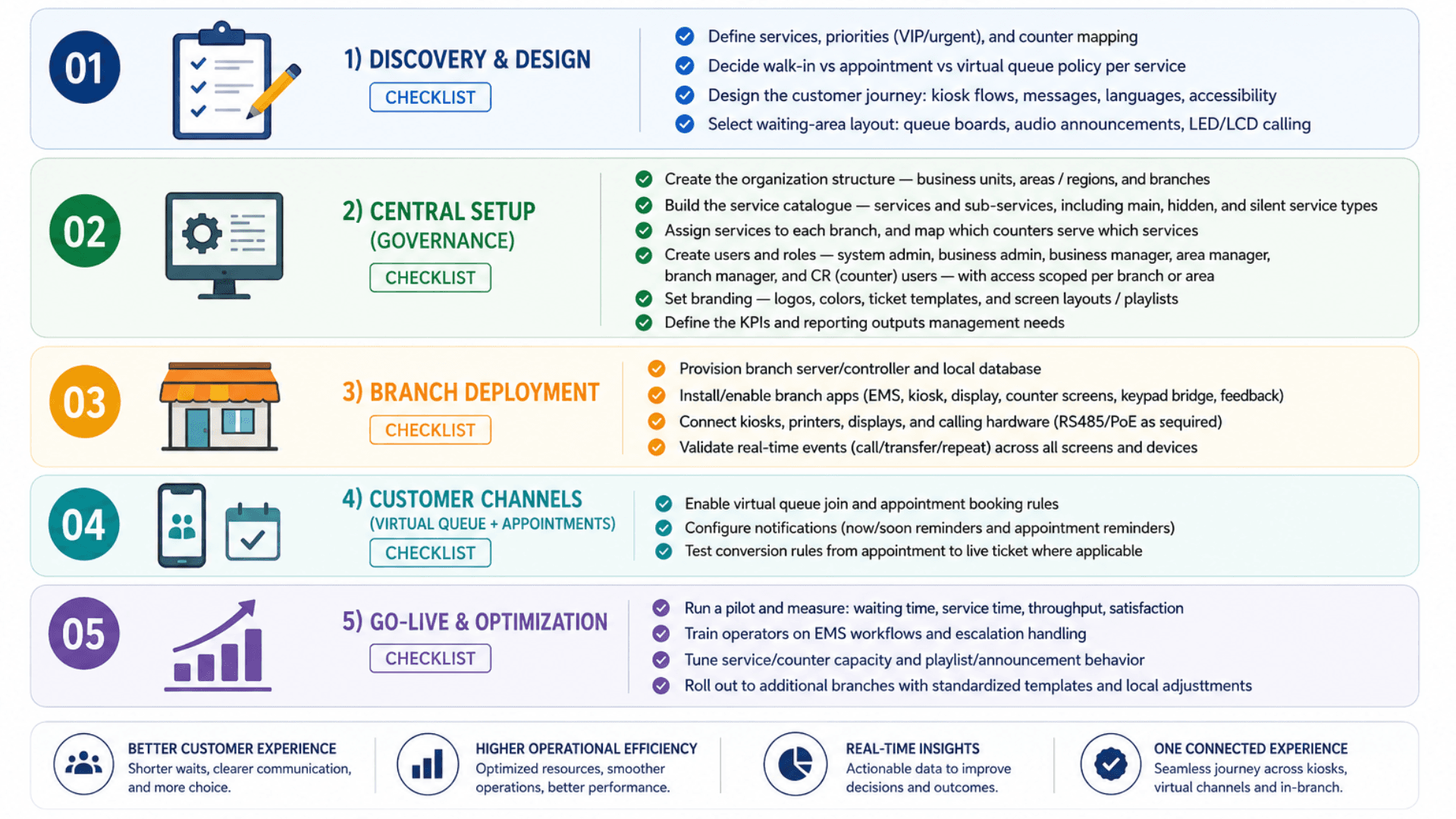
- 01
1) Discovery & Design
ChecklistDefine services, priorities (VIP/urgent), and counter mappingDecide walk-in vs appointment vs virtual queue policy per serviceDesign the customer journey: kiosk flows, messages, languages, accessibilitySelect waiting-area layout: queue boards, audio announcements, LED/LCD calling - 02
2) Central Setup (Governance)
ChecklistCreate the organization structure — business units, areas / regions, and branchesBuild the service catalogue — services and sub-services, including main, hidden, and silent service typesAssign services to each branch, and map which counters serve which servicesCreate users and roles — system admin, business admin, business manager, area manager, branch manager, and CR (counter) users — with access scoped per branch or areaSet branding — logos, colors, ticket templates, and screen layouts / playlistsDefine the KPIs and reporting outputs management needs - 03
3) Branch Deployment
ChecklistProvision branch server/controller and local databaseInstall/enable branch apps (EMS, kiosk, display, counter screens, keypad bridge, feedback)Connect kiosks, printers, displays, and calling hardware (RS485/PoE as required)Validate real-time events (call/transfer/repeat) across all screens and devices - 04
4) Customer Channels (Virtual Queue + Appointments)
ChecklistEnable virtual queue join and appointment booking rulesConfigure notifications (now/soon reminders and appointment reminders)Test conversion rules from appointment to live ticket where applicable - 05
5) Go-Live & Optimization
ChecklistRun a pilot and measure: waiting time, service time, throughput, satisfactionTrain operators on EMS workflows and escalation handlingTune service/counter capacity and playlist/announcement behaviorRoll out to additional branches with standardized templates and local adjustments
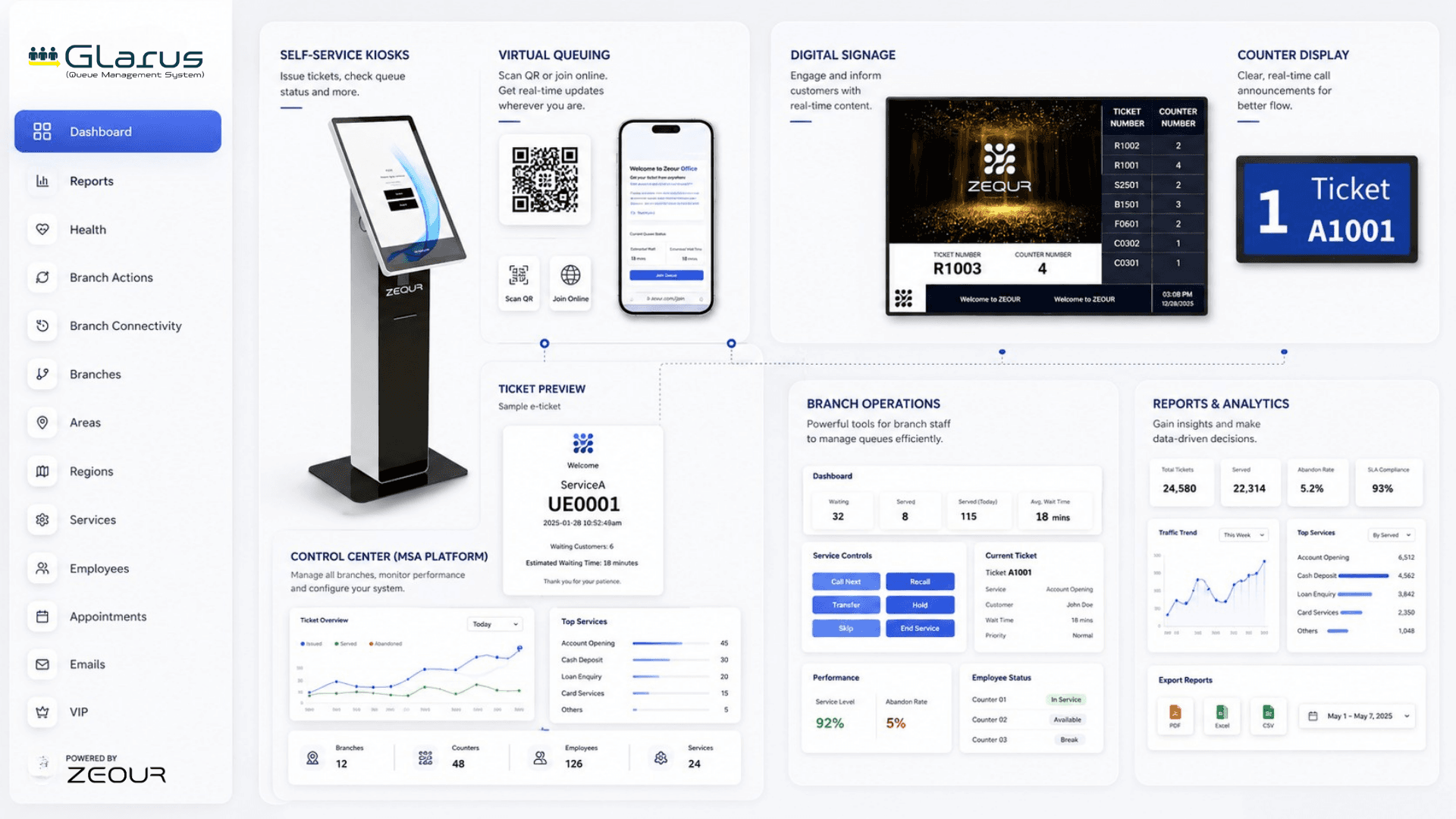
Queue Management System Gallery
Visual highlights of the GLARUS Queue Management System — self-service kiosks, counter calling, queue boards, branch operations, and the hardware that runs them.
Why Traditional Queue Management Fails
Manual lines and single-queue FIFO cap throughput and frustrate customers — here is why a modern queue management system is essential.
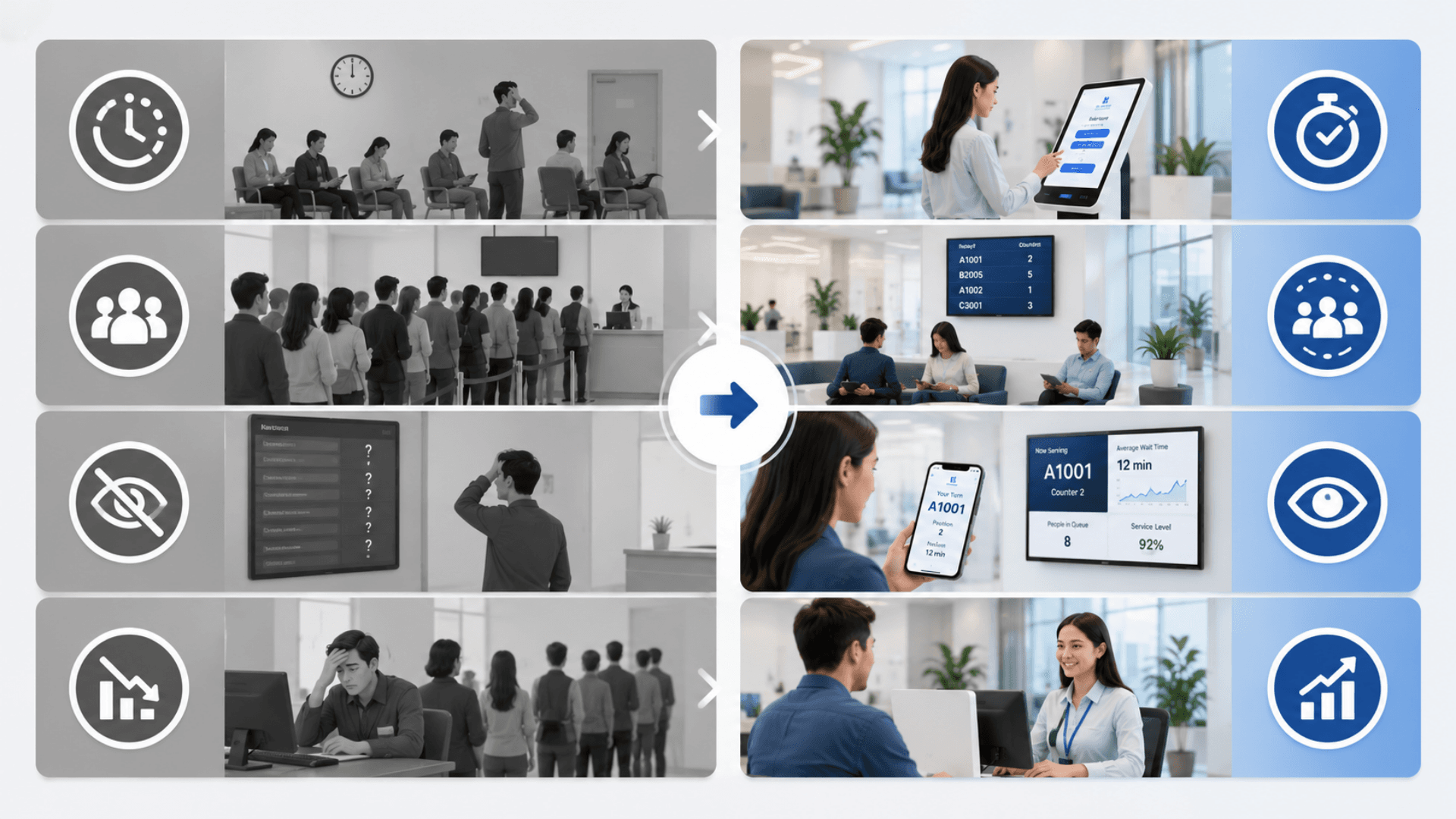
Customer Frustration
Long, visible waits lead to negative experiences, reduced satisfaction, and customers who do not return or recommend the brand. Studies show 73% of customers abandon a queue if the wait is too long, and 91% never come back to that branch.
Dynamic Customer Flow Management
EMS intelligent algorithms dynamically place tickets and adjust calling priority, reducing wait times and preventing bottlenecks before they form — even when peaks shift hour by hour.
Inefficient Operations
Staff struggle to manage unpredictable queue lengths, leading to uneven workloads, idle counters during off-peak, and service bottlenecks during the rush — straight SLA breaches.
Remote Queue Joining (MobileWCSA)
Customers join from anywhere — mobile, web, WhatsApp, Telegram, ChatBot, SMS, or QR — and wait wherever they prefer; arriving only when their “Now” notification fires.
Lost Revenue
Dissatisfied customers abandon purchases, premium customers churn silently, and cross-sell opportunities disappear because customers arrive frustrated rather than relaxed and engaged.
Data-Driven Insights
Real-time per-branch dashboards plus aggregated cross-estate analytics give managers waiting time, service time, throughput, no-show, and channel mix — actionable in the moment, not the next quarter.
No Data Visibility
Without real-time analytics, branch managers cannot identify bottlenecks, balance counters across services, or make data-driven staffing decisions. Reports are stitched together manually and arrive too late to act on.
Automated Notifications
Configurable “Soon” / “Now” alerts via push, SMS, WhatsApp, or email reduce perceived wait time, eliminate confusion, and lift CSAT across every service.
No-Show & Abandonment Drag
Paper-ticket queues do nothing to remind customers or convert appointments. No-show rates of 15 to 30% are typical for appointment-style services — burning counter capacity that could have served the next customer.
Reminder + Conversion Engine
Appointments and virtual tickets convert automatically into live branch tickets near service time. Combined with reminders this typically cuts no-show rates by 30 to 50% within the first month.
Fragmented Channels & No Single Source of Truth
Walk-in customers, phone bookings, online appointments, and virtual tickets often live in disconnected systems. Cross-channel customer journeys are invisible, and reporting cannot be trusted across the estate.
One Queue, Every Channel
Walk-in, virtual, appointment, and callback tickets all live in the same EMS queue with one set of priority rules. Reports cover every channel together — no manual reconciliation, no blind spots.
Queue Management Features
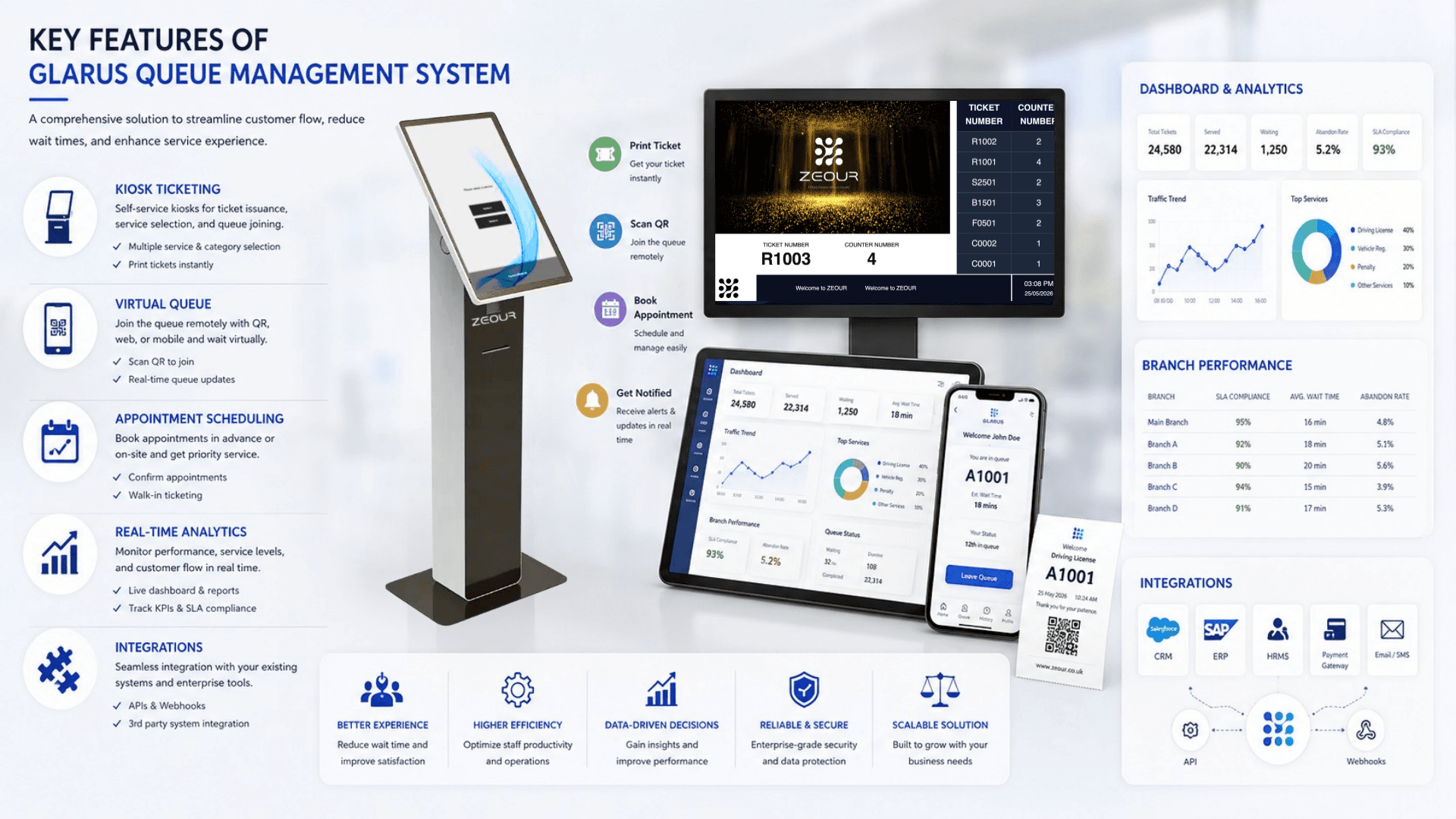
Central Configuration & Governance (MSA / GLITT)
Branch Ticket Lifecycle Engine (EMS)
Self-Service Ticket Issuance Kiosks (CSA) with Printing
Virtual Queue & Online Appointments (MobileWCSA)
Digital Signage Queue Boards & Multilingual Announcements (GRAVIA)
Counter Calling via LED (SSD) or LCD Counter Screens (CounterDSA)
Hardware Integration (Keypad / RS485 / Branch Controllers)
Real-Time Queue Monitoring & Live Updates
Multi-Branch / Multi-Region Management
Dynamic Resource Allocation & Load Balancing
Customer Notifications (Now/Soon Alerts)
Customer Feedback Collection & Insights
Analytics, Dashboards, and Operational Reporting
Branding, Ticket Design, and Content Playlists
Integration Readiness (APIs / CRM / Digital Channels)
Queue Management Components
Queue Management Software, Hardware and Architecture.
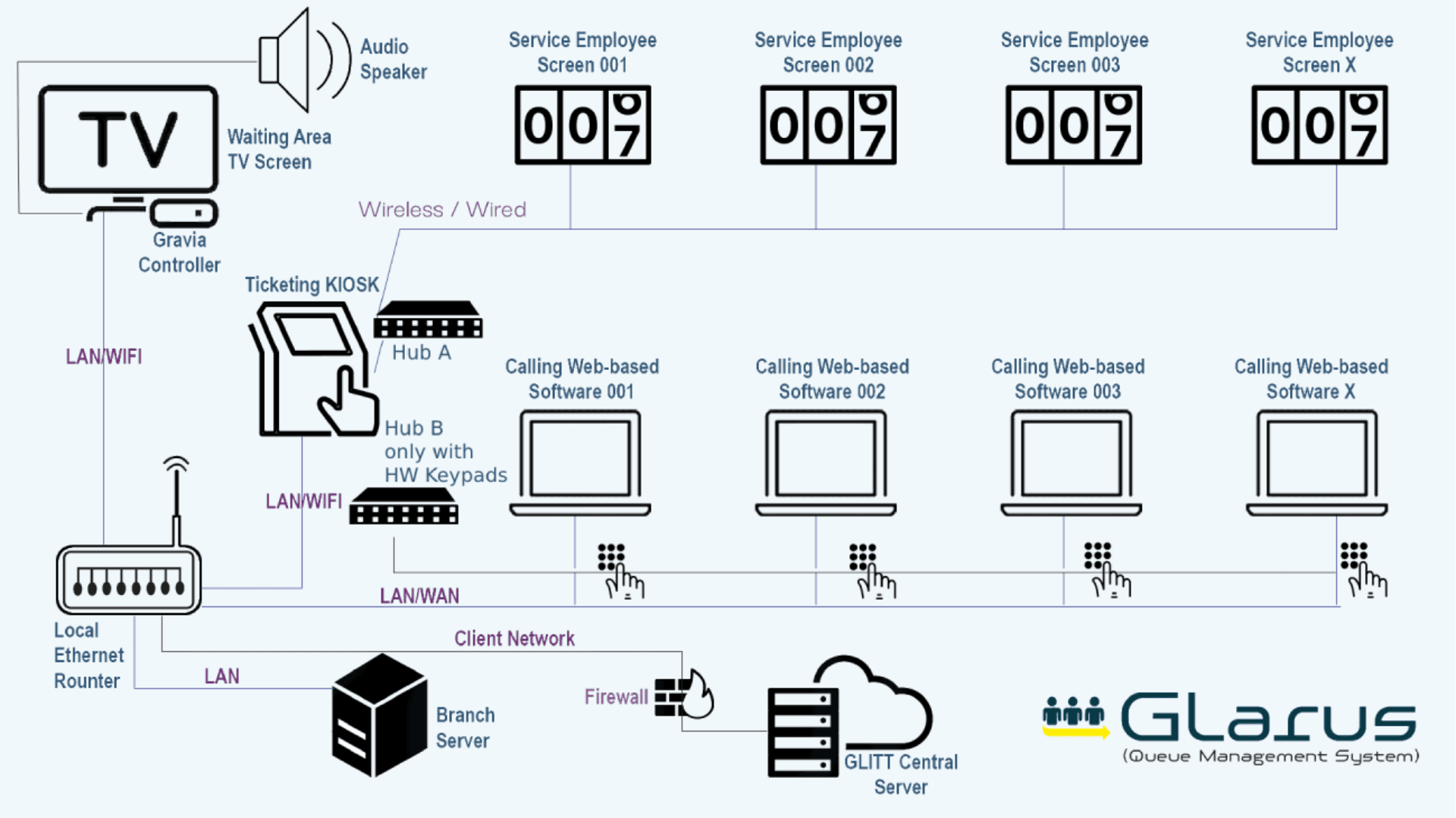
Central Control Plane (MSA / GLITT)
The operational brain of GLARUS. Centrally define how every branch runs, then roll out changes safely across your estate.
- Branch/area/service/counter configuration
- Kiosk flows, ticket design, and branding
- Digital signage layouts, playlists, RSS tickers, and media libraries
- Dashboards, reporting, and cross-branch KPIs
Branch Execution (EMS + Branch Database)
Designed for real service centers. EMS owns the branch schema and runs the live ticket lifecycle with high responsiveness.
- Call next / repeat / transfer / no-show workflows
- Counter sessions, break management, and operator controls
- Real-time queue telemetry for displays and devices
- Supports branch-local execution with centralized governance
Self-Service Kiosk Ticketing (CSA + Windows Kiosk Shell)
A complete kiosk experience for walk-in traffic: multilingual service selection, ticket issuance, and optional appointment validation.
- Kiosk shell wraps the CSA web app for stable fullscreen operation
- Thermal ticket printing (60/80mm; dual optional)
- Configurable telephone/document flows and UX slides
- Health checks and resilient kiosk behavior in branch environments
Virtual Queue + Appointments (MobileWCSA)
Let customers engage before they arrive: take a virtual ticket, book an appointment, and track live status and wait estimates.
- Virtual tickets and appointment scheduling flows
- Live queue updates and customer status notifications
- Designed to integrate with branch execution and reporting
- Reduces physical crowding and improves customer experience
Queue Boards + Announcements (GRAVIA Display)
A waiting-area experience that stays in sync with ticket-call events: queue boards, overlays, and multilingual voice announcements.
- Real-time call events via Redis/Echo/Pusher (with fallbacks)
- Central media scheduling with zones and playlists
- Controller app wraps the display web app for TV installations
- Supports marketing loops and information overlays alongside queue data
Hardware & Device Ecosystem (LED / RS485 / Controllers)
GLARUS includes the software + device bridges needed to run industrial calling hardware reliably at branch scale.
- SSD LED call displays synchronized with EMS ticket events
- RS485 infrastructure via Glarus Hub for secure signal/power management
- Branch controller/server hardware (CONT06) to run local apps
- Optional IPTV encoders for IP video distribution in complex deployments
Waiting Time, Throughput and Branch Visibility
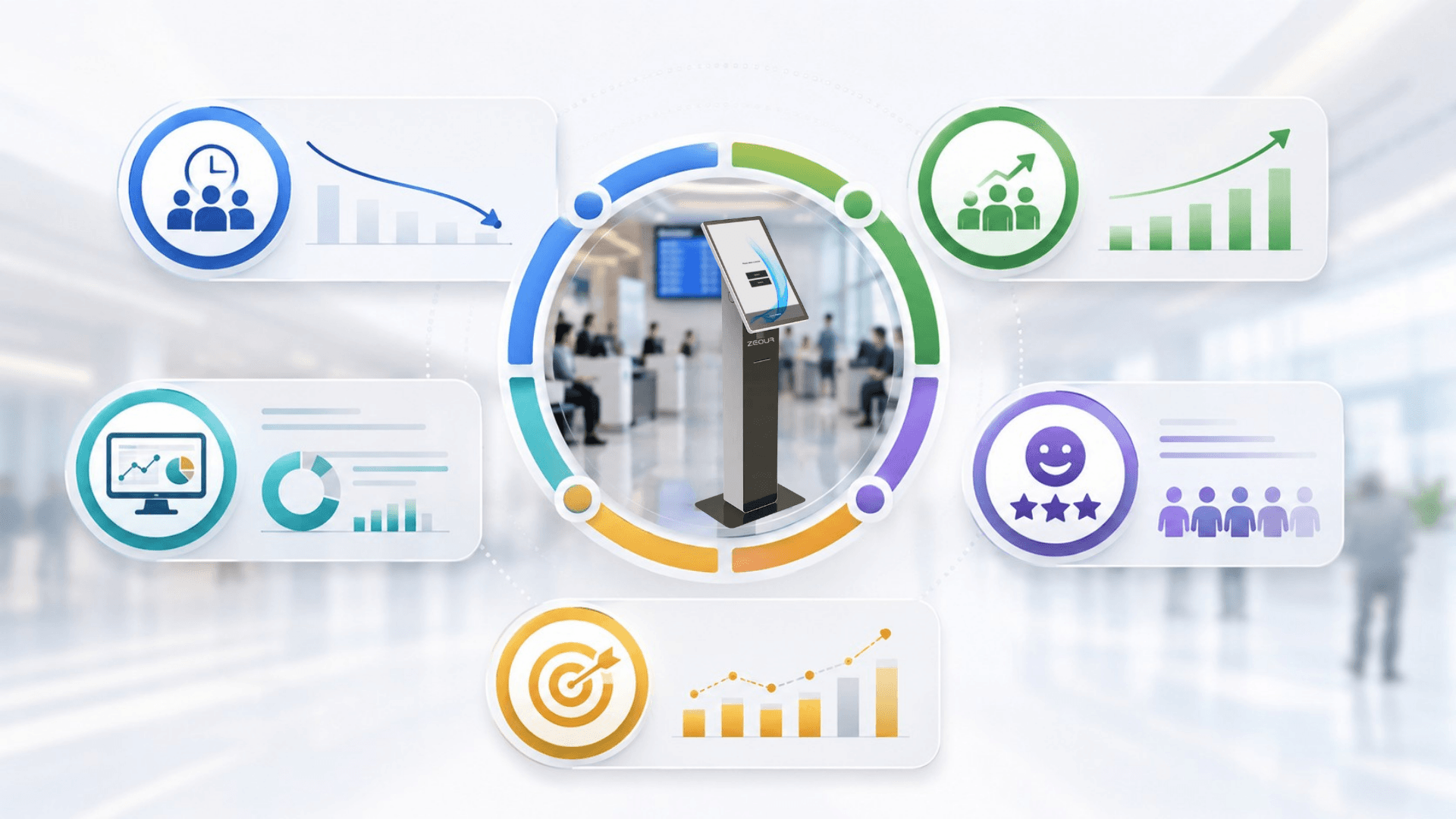
Reduce customer wait times by up to 60%
Lift branch throughput by 30 to 50% during peak hours
Cut no-show rates by 30 to 50% with reminders and virtual-to-live conversion
Increase customer satisfaction (CSAT) and NPS by 20 to 40 points
Boost staff productivity by 25 to 40% with demand-aware counter allocation
Reclaim 60 to 80% of waiting-area footfall via the virtual queue channel
Standardize the customer journey across single, multi-branch, and multi-country estates
Gain real-time operational visibility plus deep historical analytics for SLA management
Reduce branch operating cost by streamlining counter, service, and announcement flow
Future-proof with an omnichannel, integration-ready architecture (cloud + on-prem, 99.9% uptime SLA)
How the Queue Management System Works
Follow a ticket from check-in through service allocation, counter calls and reporting.
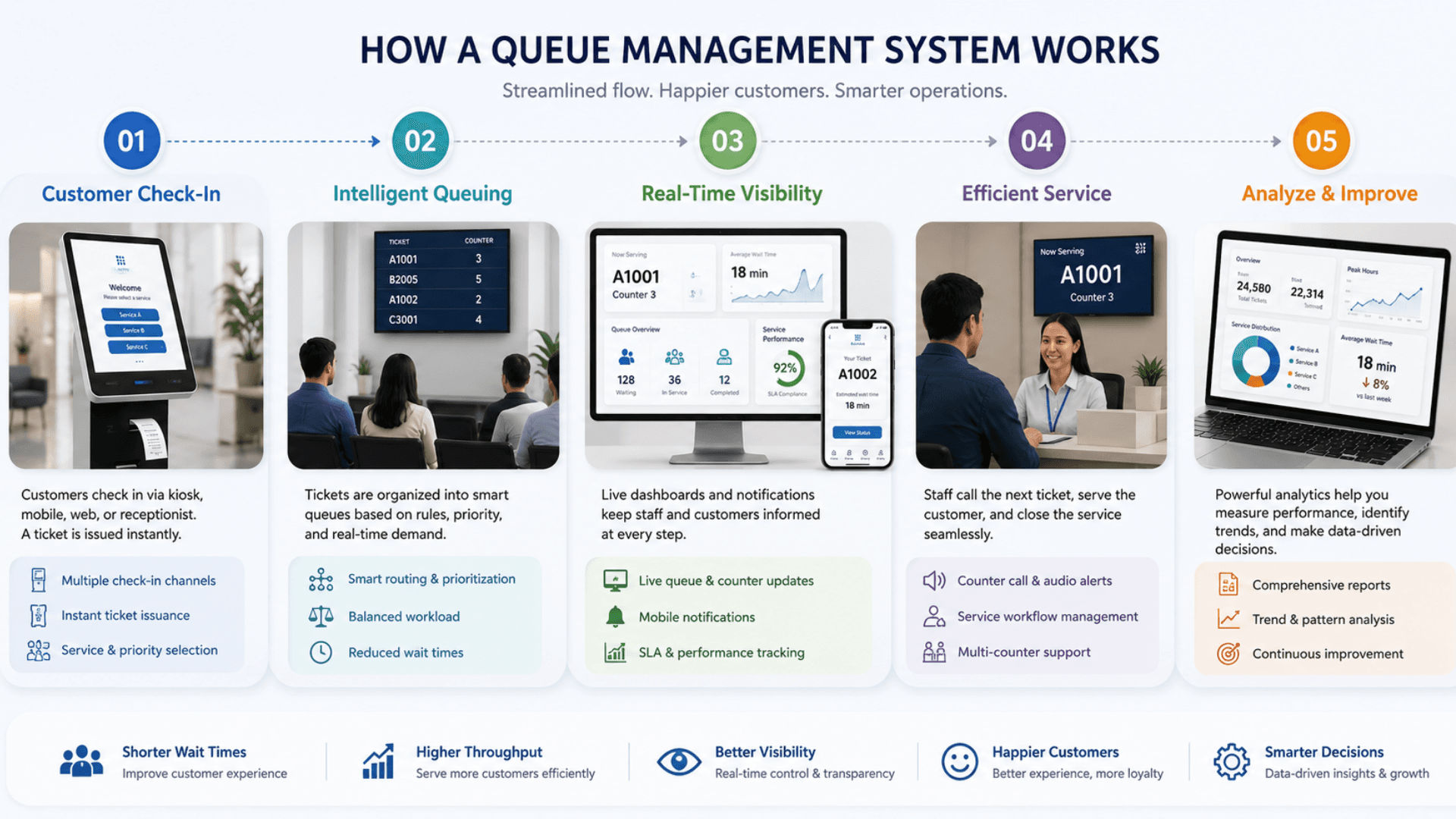
Customer Check-In
Customers check in via the CSA self-service kiosk, the mobile app, web portal, WhatsApp, Telegram, ChatBot, SMS, or QR code — issuing a ticket bound to the right service, branch, and counter group.
Intelligent Queuing
EMS applies service, priority, VIP, and appointment rules to place each ticket; live estimated wait time recalculates continuously based on counter throughput and active services.
Real-Time Visibility
GRAVIA queue boards, CounterDSA / SSD LED counter displays, and customer channels stay synchronized through Redis + Laravel Echo broadcasts in under a second end-to-end.
Efficient Service
Operators call, repeat, transfer, or mark no-show from the EMS cockpit; LED panels and signage display the call instantly; multilingual voice announcements play automatically.
Analyze & Improve
EMS pushes minute-by-minute snapshots to MSA; dashboards track waiting time, service time, no-show, abandonment, CSAT, and peak load — feeding capacity, staffing, and continuous-improvement decisions.
Queue Management Use Cases by Industry
Explore the service environments relevant to queue management.
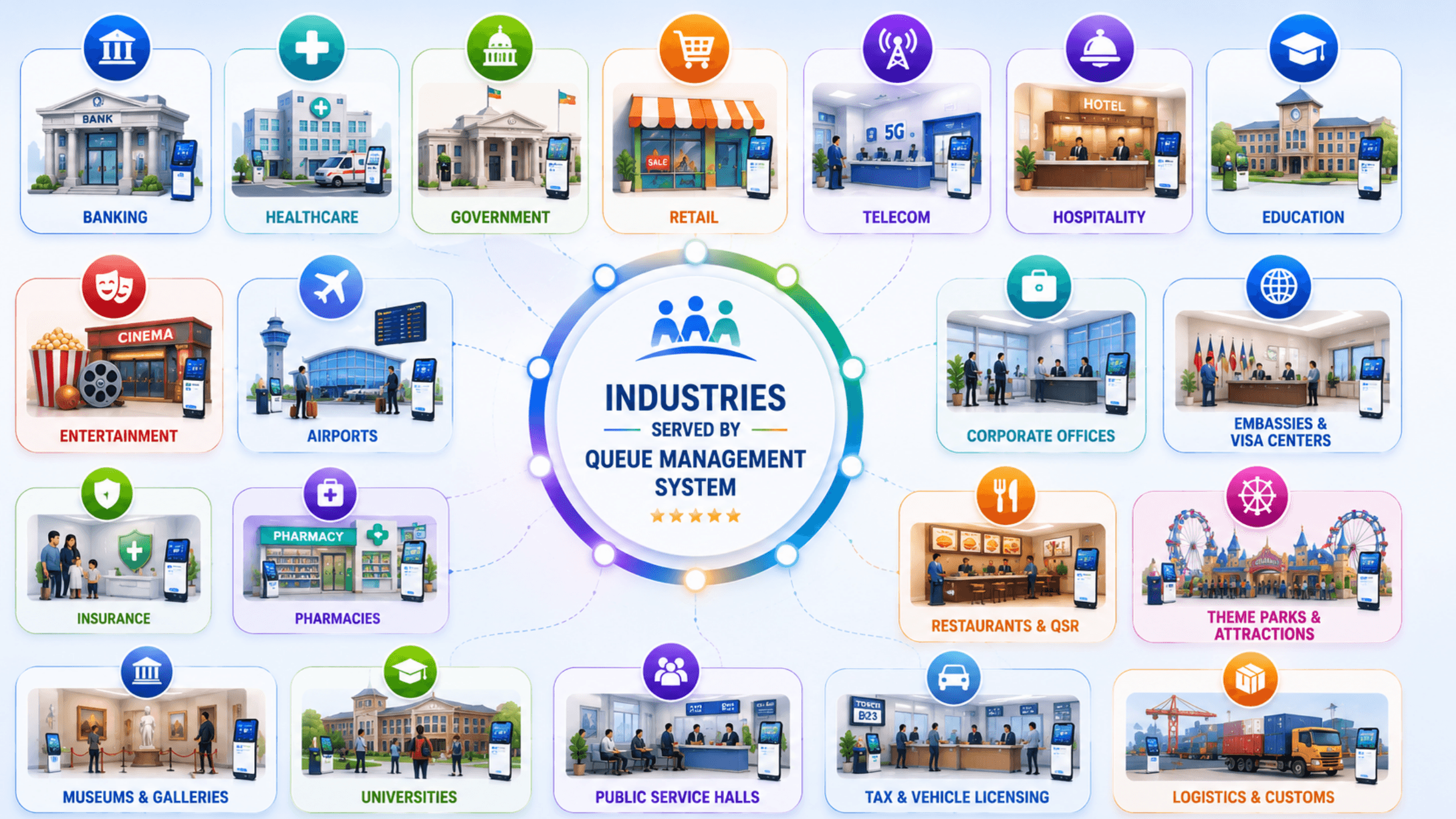
Open the deep dive by vertical
Customers running Queue Management in production
10 featured deployments where Queue Management ships today — a selection from a much wider production portfolio. Click any card for the full case-study deep dive.
Servizz.gov · Malta
Government citizen-services authority running 30+ service hubs across Malta on Zeour GLARUS queue management with GRAVIA digital signage at every hub.
Transport Ministry · Malta
Zeour GLARUS queue management deployed across all Ministry of Transport service hubs in Malta — vehicle licensing, driver services, transport permits.
MoH · Kuwait
Zeour GLARUS at the Ministry of Health Kuwait outpatient clinic — citizen self-service kiosk, EMS06 keypads, LED counter displays and GRAVIA signage.
Romanian Consulate · Birmingham UK
Zeour GLARUS queue management deployed at the Romanian Consulate in Birmingham UK — consular-services flow for citizens, document renewals, certifications.
KNB · London UK
Zeour GLARUS queue management deployed at Kuwait National Bank's London UK branch — relationship banking flow with appointment + walk-in segmentation.
Iraq Passport · 50+ branches
Zeour GLARUS queue management + GRAVIA digital signage deployed across 50+ Iraqi passport offices — single central rule configuration, per-branch execution.
Aljanoob Bank
Zeour GLARUS queue management deployed at Aljanoob Bank — branch transformation with per-visit-reason segmentation and live supervisor view.
AUI · Student Services
Zeour GLARUS queue management at the American University of Iraq — 19 counters for admission and student services, self-service kiosk, GRAVIA + EMS.
IIB Bank · 20+ branches
GLARUS queue + GRAVIA signage + customer-feedback deployed across IIB Bank, a Sharia-compliant retail-banking network with 20+ branches — end-to-end branch transformation.
Bawasel Aljibal · Apple Support
Queue management plus customer-feedback tablets at Bawasel Aljibal's Apple support repair shop — ticketed intake and post-service customer feedback.
Queue Management System FAQs
Get answers to the most common questions about our queue management.
What is a Queue Management System (QMS)?
Is the queue management system right for a small business or a single branch?
What is virtual queuing (virtual queue management) and how does it work?
What is the difference between a queue system and an appointment system?
Which software modules are included in Zeour GLARUS queue management?
How does GLARUS handle multi-branch queue management?
Can GLARUS run branch-local (on-prem) and still be centrally managed?
What hardware is used in a complete queue management system deployment?
Do you support queue management kiosks and ticket printers?
Do you support digital signage queue boards and voice announcements?
Do you support LED calling displays and counter screens?
Does the system provide real-time queue updates?
What analytics and reports can a queue management system provide?
Can GLARUS integrate with CRM, ERP, SMS/email, and other systems?
Is the queue management system suitable for banks, hospitals, telecom, and government service centers?
How long does it take to implement a queue management system?
How much does a queue management system cost?
How does GLARUS handle no-shows, late arrivals, and reschedules?
Is GLARUS queue management GDPR, HIPAA, PDPL, and ISO 27001 compliant?
Does the queue management system support multiple languages, regions, and currencies?
How do I choose the best queue management system for my organization?
Explore Related Solutions
Explore the customer-facing channels that connect to branch ticketing and service reporting.
Ready to Transform Your Operations with Queue Management?
Discuss your workflows, deployment requirements and integration scope with the Zeour team.
Queue Management — concepts you'll meet
Definitions for the operational terms that appear across this page. Tap any chip to read the long-form entry plus its cross-links.