
Smart Parking Management System
Zeour's smart parking management system gives parking operators RFID card management, barrier control and transaction oversight. It combines an on-premise operations platform with Android kiosks, pricing profiles and customer self-service tools for managing access and prepaid parking activity.
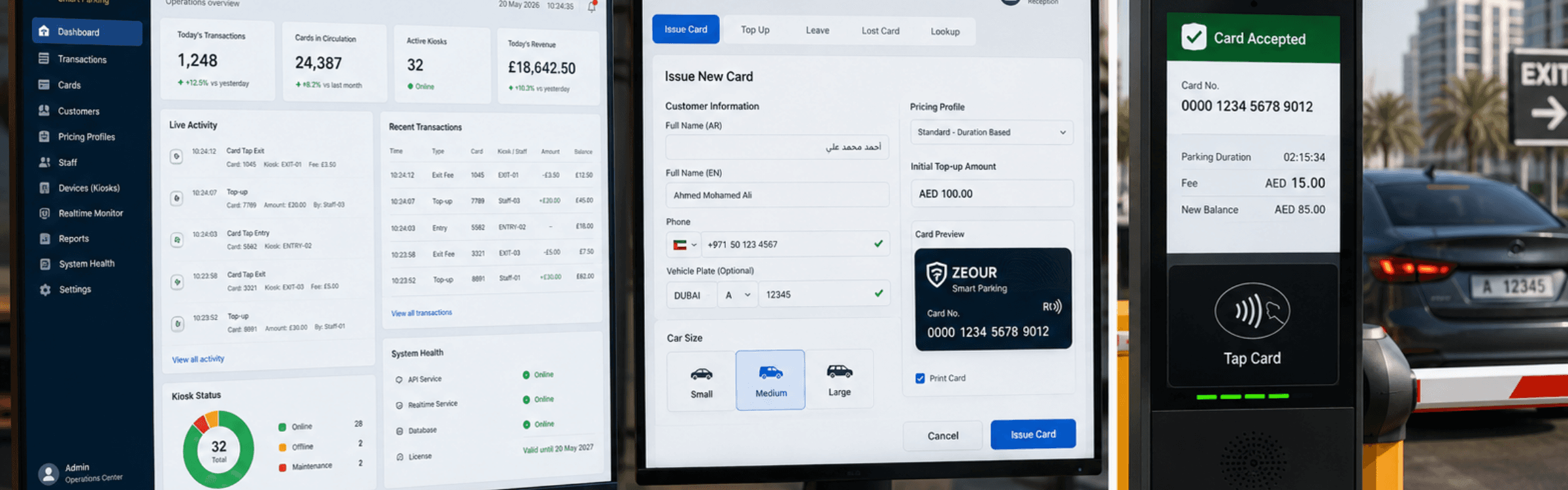
RFID Access and Parking Operations
Manage cards from issuance and top-up through exit, with staff tools for daily operations and an admin view of activity. Android kiosks connect the software workflow to RFID readers and barrier gates.
Parking as Part of a Site Visit
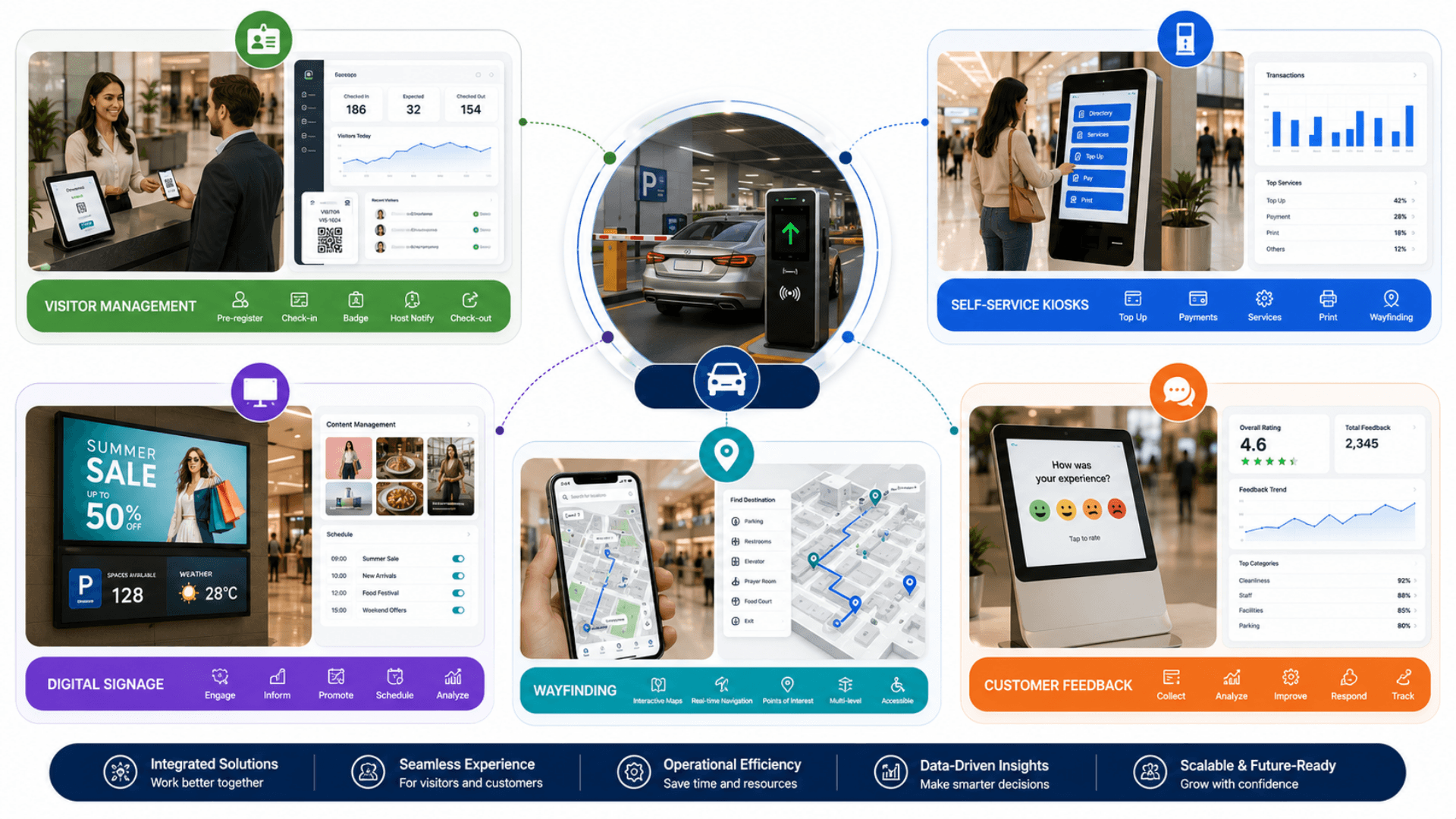
For the journey beyond the gate, review visitor management and indoor wayfinding. They address registration and directions inside the premises.
Explore custom self-service kiosks for other site transactions. Digital signage covers information screens that communicate with arriving visitors.
Parking Cards, Kiosk Devices and Operator Controls
The Zeour Smart Parking System has two parts: an on-premise web platform (admin, staff, and customer surfaces, the REST API, and the real-time monitoring service) and an Android kiosk app that drives RFID card readers and barrier gates directly. The web platform and kiosk app are deployed together. Offline-validated licensing, device approval for every kiosk, full RTL support, configurable currency, and configurable phone validation are first-class — every one of those is a configuration knob, not a hardcode. The system is engineered for operators worldwide who run their own infrastructure — UK, EU, Americas, GCC, MENA, Africa, Asia.
Zeour Smart Parking — a complete on-premise smart parking platform: RFID card lifecycle (issue, top-up, transfer, lost replacement, card-tap exit), staff card-management console, admin operations center with pricing profiles per car size, no-login customer self-service portal, real-time monitoring (live activity, transactions, alerts), an Android kiosk fleet that drives RFID card readers and barrier gates directly with a hardware watchdog, and offline-validated sovereign licensing that ties each deployment to the operator's own server. Single-tenant deployment on the operator's own infrastructure; ships engineered multilingual with full RTL as a production baseline — configurable for any locale and currency per engagement. Scales from one gate at a single lot to multi-site operations — the same sovereign licensing model at every size.
Key Functionalities
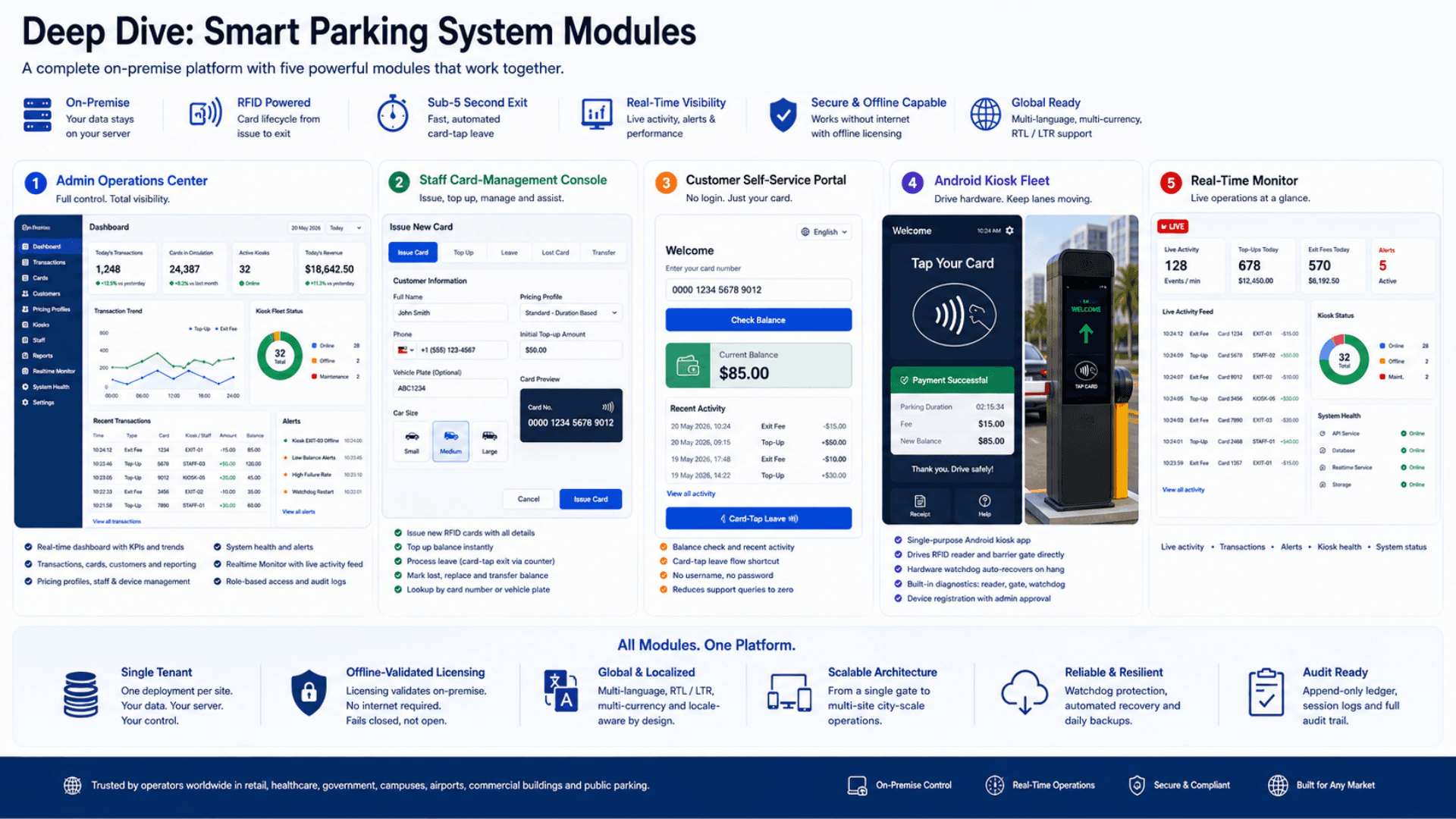
Three Role Surfaces, One Codebase
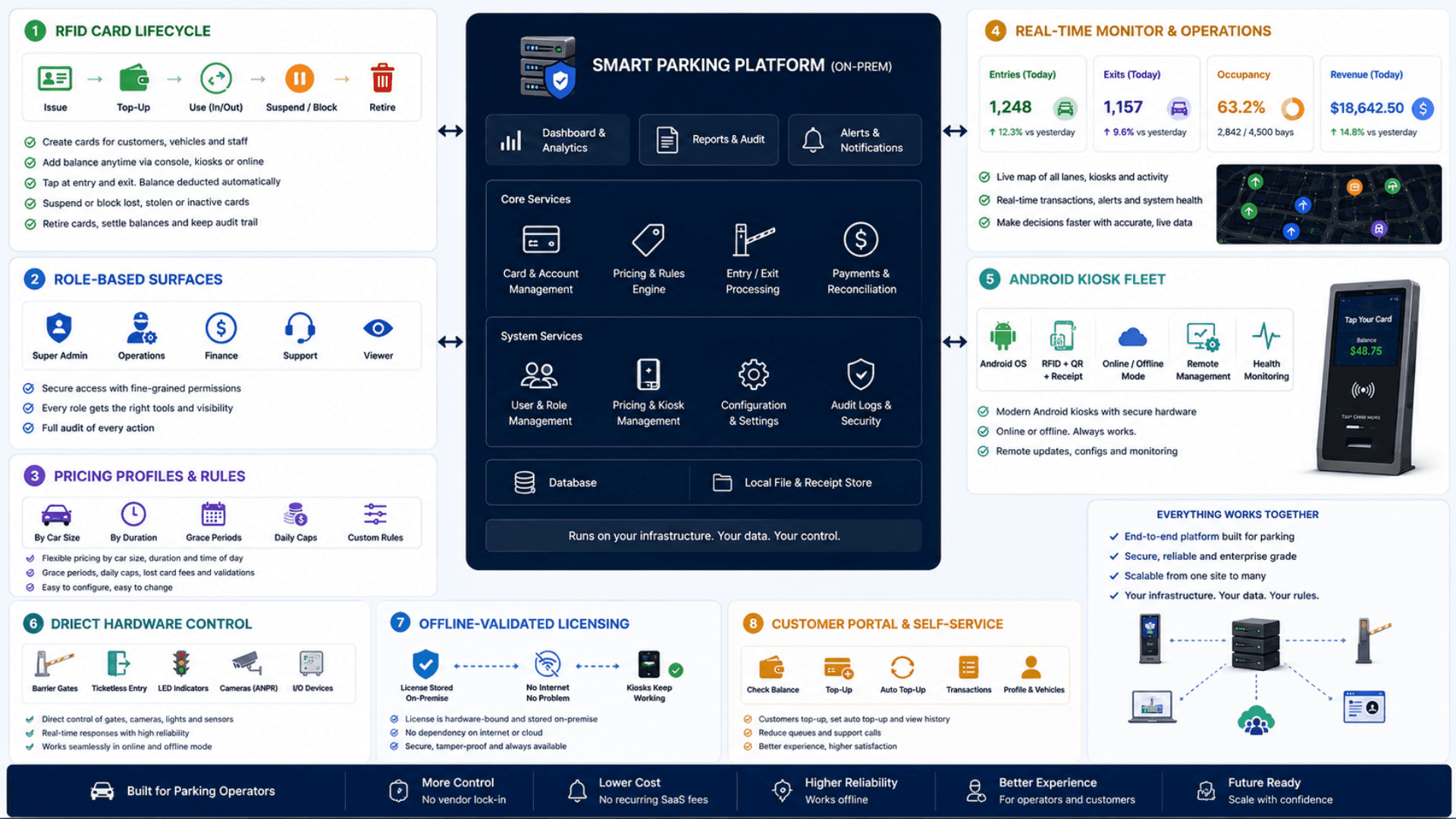
The web app delivers three distinct UX surfaces: Admin (operations center, dashboard, transactions, pricing, system health, realtime monitor), Staff (card-management console — issue, top-up, leave, lost), and Customer (no-login balance check + card-tap leave). Each surface authenticates differently and only sees what it should.
RFID Card Lifecycle
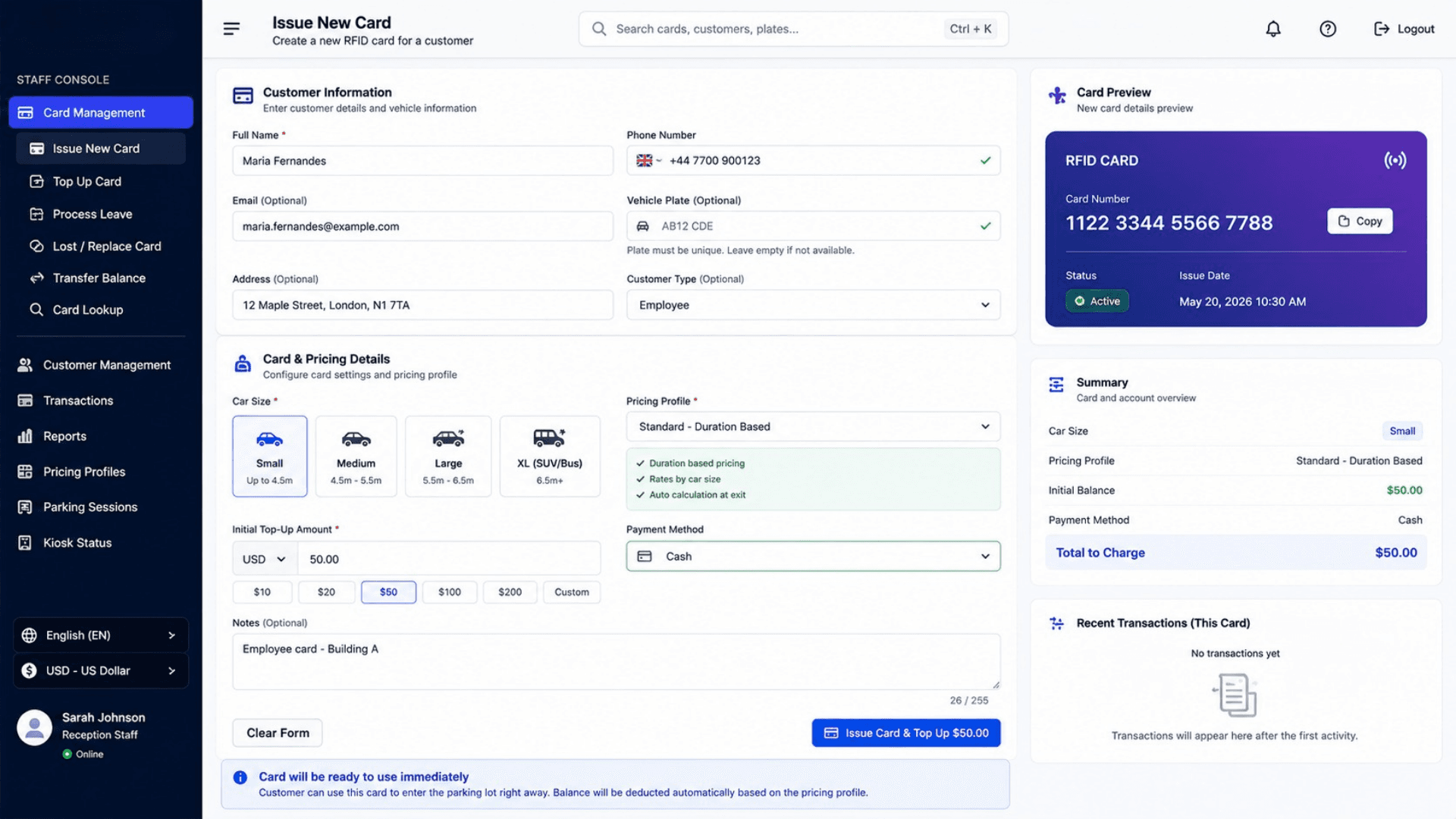
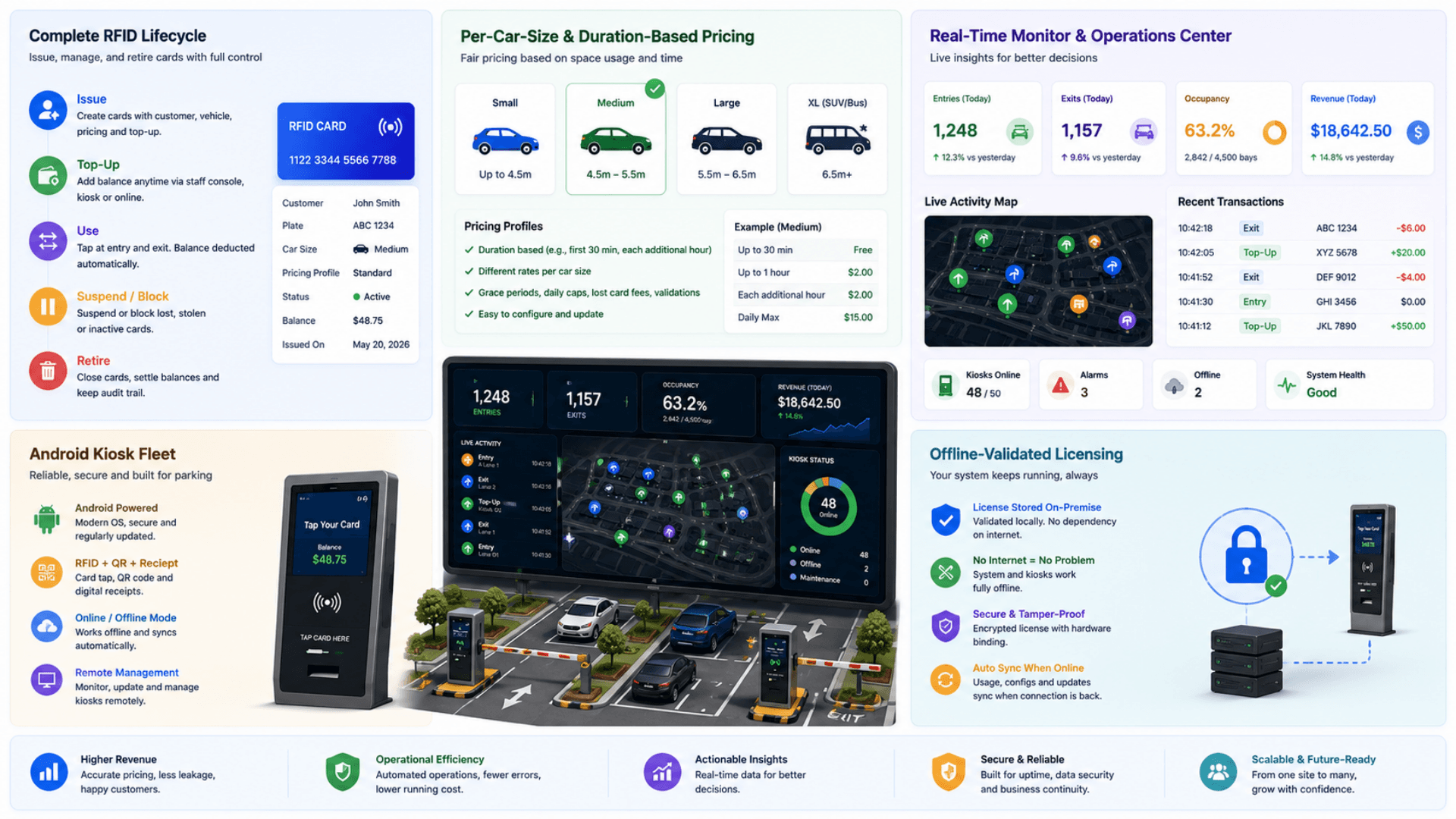
Cards are the unit of customer identity. Each has a unique card number, an optional unique vehicle plate, a car size (small / medium / large), an assigned pricing profile, a current balance, and an optional linked customer. Full lifecycle: issue, top-up, transfer balance, mark lost + replace, deactivate.
Flexible Pricing Profiles
Pricing is built around per-customer pricing profiles. Each profile uses one of two models — a fixed fee at exit (a flat charge per car size) or a duration-based charge calculated from the time parked — and a simple flat-rate plan is available alongside for operators who want it. New cards are issued against a pricing profile. At the exit gate the kiosk reads the profile, calculates the right fee for that card, and proceeds.
Each pricing profile uses one of two models — a fixed fee at exit per car size, or a duration-based charge from the time parked. Cards are assigned to a profile; the kiosk applies the right model and fee automatically at exit.
- Two models per profile — fixed fee at exit or duration-based
- Multiple pricing profiles (per customer segment, per zone, per time window)
- A simple flat-rate plan is available alongside
- Profile assignment can change per card without re-issuing it; pricing changes are immediate and audit-logged
Transaction Ledger (Append-Only, Auditable)
Every balance change creates a transaction record — top-up, parking fee, refund, or balance transfer — with the post-transaction balance snapshot. The ledger reconstructs the balance independently of the cached column, so discrepancies are detectable and reportable.
Parking-Session Audit Trail
Every leave creates a parking-session record capturing the fee charged and the pricing model used. Sessions are auditable by card, by date range, by staff member who processed the leave, and by the kiosk that handled the gate.
Customer Self-Service Portal (No Login)
The public customer portal lets a customer enter their card number and see balance, recent activity, and a card-tap leave shortcut. By design, the customer's identity is the card — no username, no password, no credential-theft surface. Reduces support volume dramatically.
Real-Time Monitoring Service
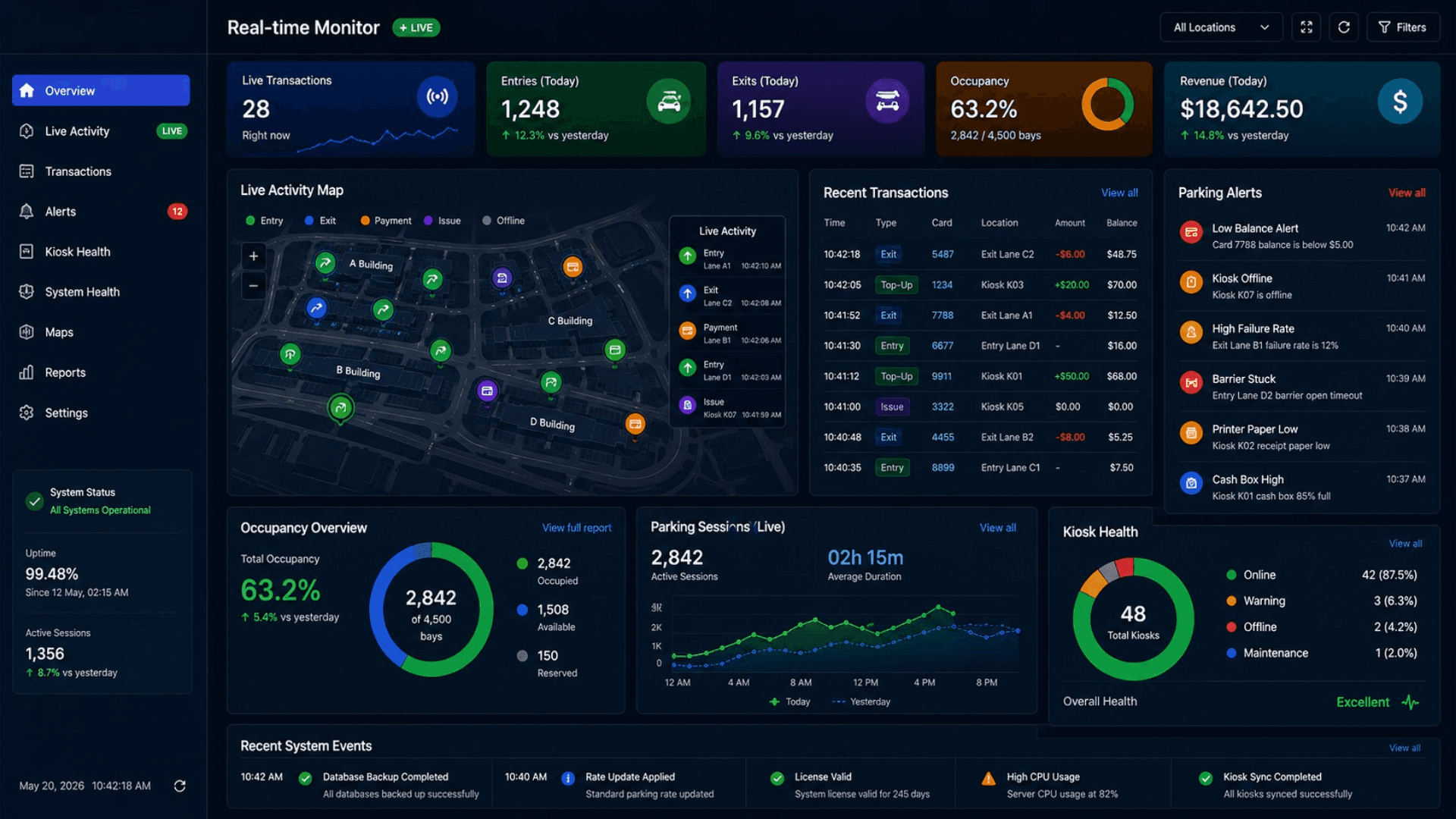
A standalone monitoring service fans out live activity (each card action), real-time stats, recent transactions, recent cards, running totals, and parking alerts to the admin's Realtime Monitor. Events are emitted from the API on every balance change.
Android Kiosk Fleet with Device Approval
Each Android kiosk has a unique device identity. On first boot it self-registers with the operations center. An admin reviews the request and approves (or rejects) it. Only approved devices are allowed to run kiosk-only operations. Every kiosk request carries its identity and updates its last-seen timestamp.
Kiosk Drives the Hardware Directly
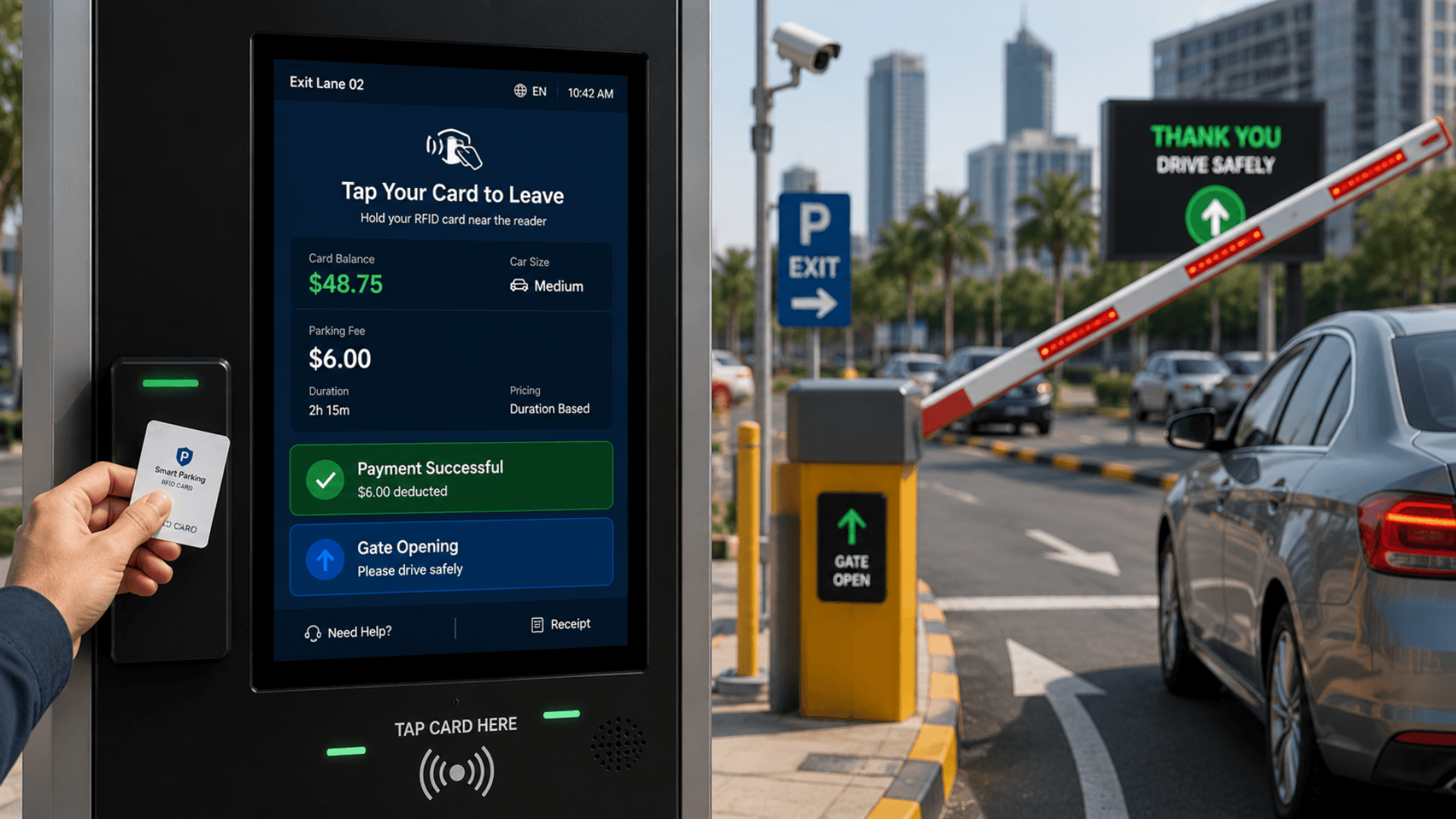
The kiosk drives the RFID card reader and the barrier gate directly — there is no third-party middleware in the loop. It also feeds a hardware watchdog at fixed intervals, so a hung kiosk recovers itself automatically without an on-site visit.
Offline-Validated Licensing
Each deployment is governed by an offline-validated licence tied to the operator's own server. The licence validates entirely on-premise — no phone-home, no SaaS dependency, no internet connection required. If the licence is invalid or expired, the application fails closed, locking down with a branded notice instead of serving the page.
Software Components
Web Platform
Web Application + REST API
Server-rendered admin, staff, and customer surfaces plus a full REST API. Packaged as a lightweight single-binary deployment.
Structured Data Model
Customers, cards, transactions, pricing plans and profiles, parking sessions, admin and staff users, and device registrations — a single-tenant database per site.
Lightweight Runtime
Runs on a modern, lightweight web stack with a polished component layer. RTL is enforced at the document root for Arabic-baseline deployments.
Reverse Proxy
A reverse proxy fronts the application and routes traffic to the web app and the monitoring service through one hostname.
Auth & Licensing
Admin + Staff Authentication
Email-and-password sign-in with hashed credentials; each session token has a configurable lifetime. Every protected route validates the session and short-circuits on failure.
Device (Kiosk) Authentication
Every kiosk request carries its device identity, checked against the approved device list and rejected if missing or not approved. It composes with staff authentication on kiosk-only operations such as the leave flow.
Offline-Validated Licensing
An offline-validated licence ties each deployment to the operator's own server. It validates entirely on-premise with no phone-home. If the licence is invalid or expired, the application fails closed — it locks down with a branded notice instead of serving the page.
Realtime & Integration
Real-Time Monitoring Service
A standalone monitoring service that fans out live activity, real-time stats, recent transactions, recent cards, running totals, and parking alerts to the admin Realtime Monitor.
REST API
A full REST API covering authentication, the card lifecycle (issue, top-up, leave, lost), card lookup, the admin operations center (dashboard, transactions, activity, analytics, system health, cards, staff and admin users, devices, pricing), and device registration. Every protected route uses the auth model described above.
Payment Gateway Hook Points
The transaction ledger is gateway-agnostic. Plugging in a regional payment gateway is a per-deployment integration that sits in front of the top-up transaction step. Reference implementations are available.
Android Kiosk
Single-Purpose Kiosk App
A purpose-built Android kiosk app, landscape-locked and RTL-capable, with the system UI hidden so the panel does one job and one job only.
On-Device Persistence
Server host and hardware settings persist on the device, surviving reboots and over-the-air updates.
API Client
The kiosk calls the web platform over the operator LAN, carrying its device identity on every request, for card balance lookups, the leave flow, and device registration and status.
Direct Hardware Control
The kiosk drives the RFID card reader and the barrier gate directly — no third-party middleware — and feeds a hardware watchdog at fixed intervals so a hung panel recovers itself.
Hardware Diagnostics Screen
A built-in diagnostics view accessible from the kiosk header. It tests the card reader, the barrier-gate output, and the watchdog so an installer can verify a lane in seconds.
Hardware Components
Server (Operator Site)
Industrial Branch Server
A compact industrial Linux server that comfortably hosts the full Smart Parking platform for a single site (tens of thousands of cards, hundreds of kiosks).
Standard Linux Server
Any x86 server with 8+ GB RAM and SSD storage. For large sites we deploy an HA pair behind a load balancer.
Kiosk Hardware
Standard Android Kiosk Panel
The kiosk app runs on standard Android kiosk panels with hardware-watchdog support — operators can source panels from their preferred vendor.
RFID Card Reader
A standard RFID card reader, driven by the kiosk directly with no third-party middleware in the loop.
Barrier-Gate Output
A relay-controlled output that drives the barrier gate, triggered by the kiosk on every successful card-tap-to-leave.
Hardware Watchdog
A hardware watchdog the kiosk app feeds at fixed intervals. If the app hangs, the watchdog reboots the panel automatically — no on-site visit required.
Barrier & Lane Hardware
Electric Barrier Gate
Any standard electric barrier gate with a relay-controlled "open" input works. Wiring is straightforward: the kiosk triggers the relay, and the relay opens the barrier motor.
Vehicle Loop Detector
Optional but recommended: ground-loop or radar-based vehicle detector at each lane to prevent gate-close-on-vehicle accidents.
Loop-Triggered Safety Camera (Optional)
For high-value sites we recommend a per-lane ANPR camera as a secondary identity factor; integrates with our Visitor Management System for cross-checked entry / exit logs.
Customer Cards
EM4100 / EM4200 RFID Cards
Standard 125 kHz EM4100 / EM4200 RFID cards (printable). The card number is the customer's primary identifier.
MIFARE Classic / DESFire Cards (Optional)
For higher-security deployments we support MIFARE Classic and MIFARE DESFire cards on a compatible reader. Adds cryptographic challenge-response on top of the existing card-number identity.
Operator Workstations
Reception Workstation
Standard PC with 22"+ touchscreen for staff card issuance + top-up + leave processing.
Admin / Operations Workstation
Standard PC with a 24"+ display showing the operations center: dashboard, transactions, realtime monitor, system health, pricing profiles, staff CRUD.
Thermal Receipt Printer (Optional)
For top-up receipts and leave-fee receipts. 60mm or 80mm thermal printer with USB or LAN.
Smart Parking Three-Tier Architecture
A clean three-tier architecture: Android kiosks at the edge talk to the on-prem web platform over the operator's LAN; the web platform fans out real-time events to the admin's operations center; the licence validates offline. Single-tenant deployment per site, with optional regional clustering for very large operators.
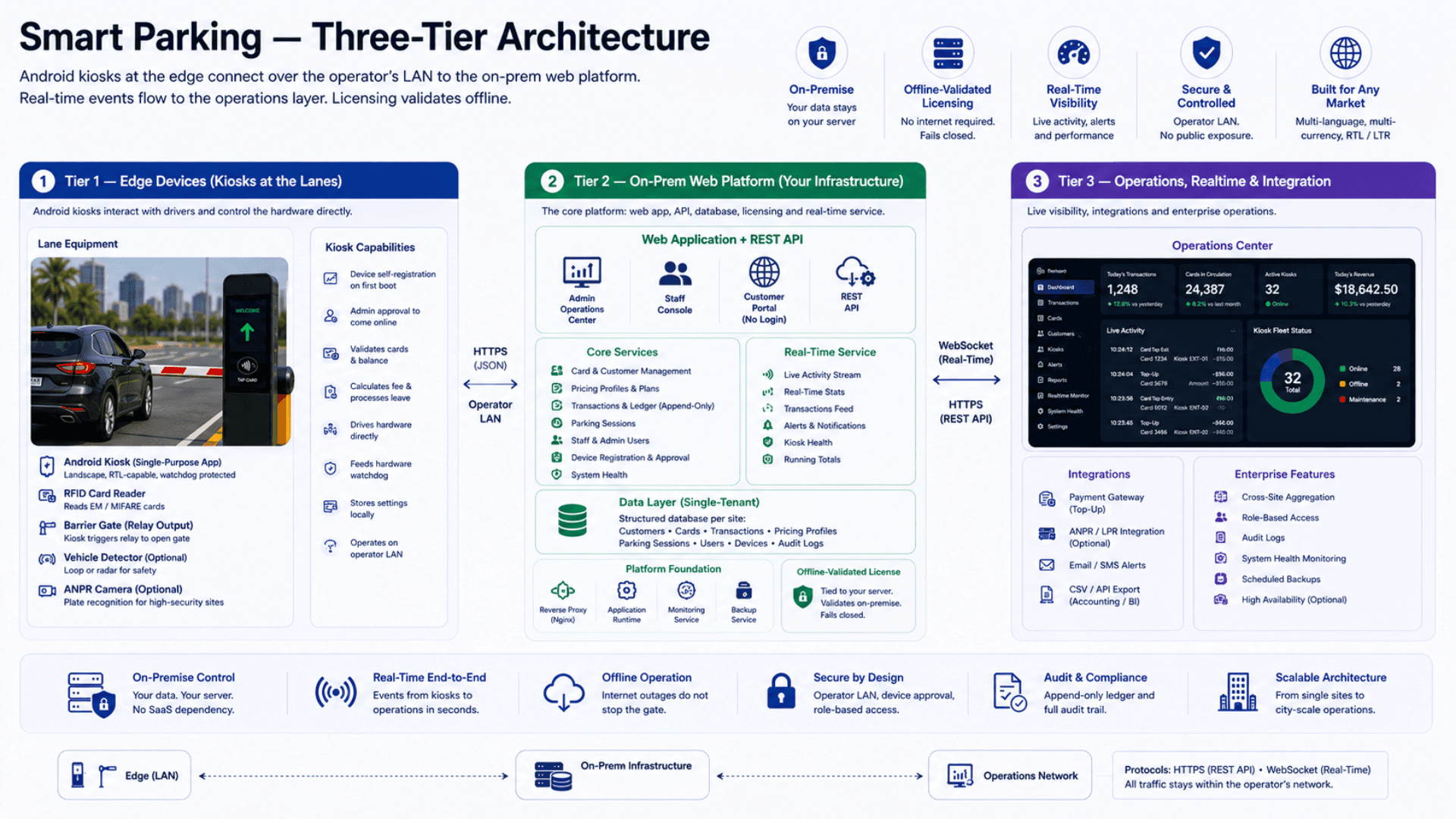
Tier 1 — Edge Devices
Android Kiosks · RFID Card Readers · Barrier Gates
- Single-purpose Android kiosk app (landscape-locked, RTL-capable)
- Device self-registration on first boot; admin approval to come online
- The kiosk drives the RFID card reader and the barrier gate directly — no third-party middleware
- Standard RFID card readers
- Relay-controlled barrier-gate output
- Hardware watchdog fed at fixed intervals
- LAN-operated (operator-controlled network, no public exposure)
Tier 2 — On-Prem Web Platform
The web platform, database, and licensing
- A full REST API covering admin, staff, customer, device, and kiosk surfaces
- Resource coverage spans cards, customers, transactions, pricing profiles, staff, admin users, devices, system health, and analytics
- Three role surfaces in the same codebase: admin, staff, and a no-login customer portal
- Structured data model: customers, cards, transactions, pricing plans and profiles, parking sessions, admin and staff users, device registrations
- A lightweight runtime for the web server and the real-time monitoring service
- A reverse proxy fronting the platform
- Offline-validated sovereign licensing, tied to the operator's own server
Tier 3 — Operations, Realtime & Integration
Realtime Monitor · WebSocket Events · Integrations
- Realtime Monitor view in the admin operations center
- Live events: activity, stats, recent transactions, recent cards, running totals, parking alerts
- Optional payment-gateway integration sitting in front of the top-up transaction step
- Optional ANPR camera integration per lane as a secondary identity factor
- CSV / API export for accounting + BI ingestion at the operator HQ
- Cross-site aggregation (a scaled-out real-time layer and a clustered database tier) for city-scale operators
- Offline operation by design — internet outages do not stop the gate
Operational & Resilience Pipeline
Real-time- Realtime activity / stats / alerts (degrades gracefully if the service is down)
- Token-based admin + staff auth (configurable session lifetime); device auth via per-kiosk registration and approval
- Append-only transaction ledger reconstructs the balance independently of the cached column
- Daily database backups to local NAS / object storage; recovery in minutes, recovery point matching backup cadence
- Offline-validated licensing tied to the operator's own server — physical theft of the database file alone cannot run the system elsewhere
- Watchdog-fed kiosks auto-reboot on hangs; driving the hardware directly removes third-party middleware as a failure mode
Smart Parking vs Ticket Printers vs SaaS Parking Platforms vs Generic Open-Source
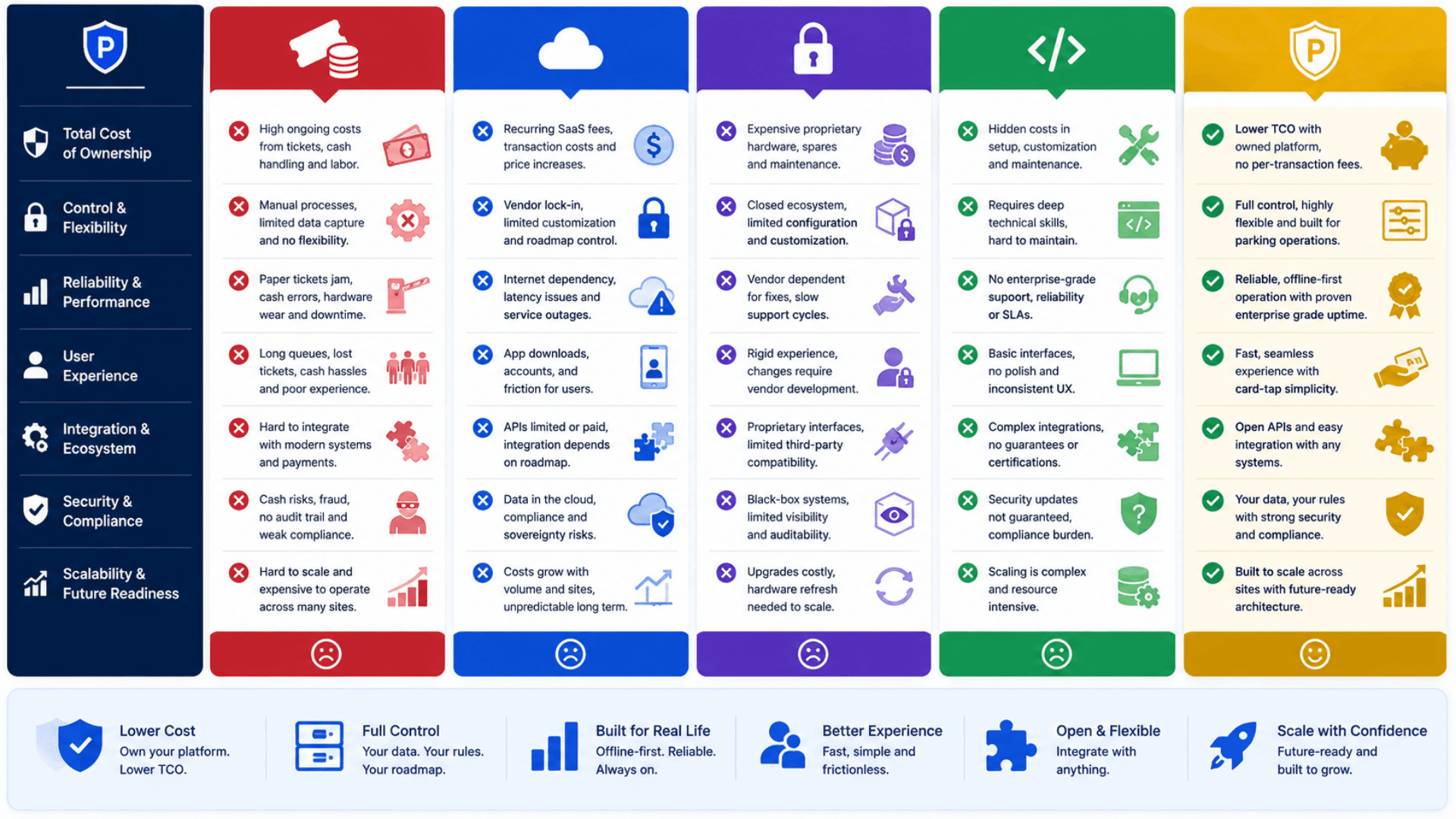
Most parking operators sit at one of three extremes today: tickets-and-cash at the gate (high labor, high shrinkage), SaaS cloud platforms (offshore data, monthly subscription), or open-source projects (DIY, no kiosk path). Zeour Smart Parking sits where serious operators actually need to be: on-premise, RFID-card-based, with flexible pricing, a kiosk fleet, and a realtime monitor.
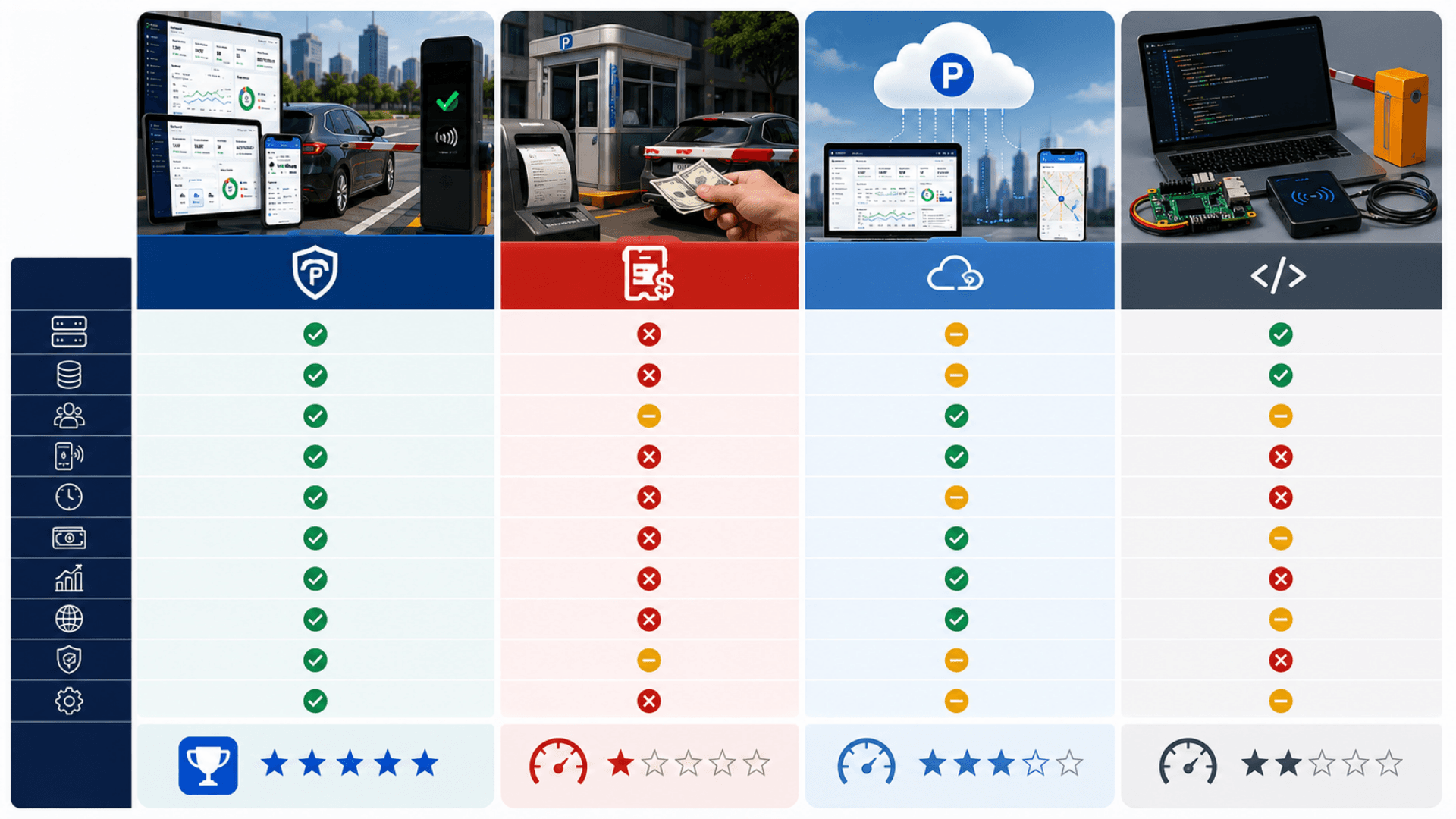
Zeour Smart Parking
Best for: Operators of malls, hospitals, office towers, government compounds, universities, and city-scale public parking who need on-premise control, RFID lifecycle, multi-kiosk fleet management, and live operations visibility.
- On-premise default — customer data stays on your server
- RFID card lifecycle with an append-only transaction ledger
- Three role surfaces (admin / staff / customer) in one codebase
- Android kiosk fleet with device registration + admin approval; the kiosk drives the hardware directly
- Multilingual with full RTL as a production baseline; configurable currency; re-localizable to any market in days
- Built-in realtime operations monitor
- Offline-validated sovereign licensing tied to the operator's own server
- Two pricing models — fixed fee at exit or duration-based — calculated automatically and shown on screen
Ticket Printer + Cash at the Gate (Legacy)
Best for: Operators who haven't modernized yet — and are paying for it daily.
- Ticket-stock cost on every entry
- Cash-handling shrinkage at the gate (industry average 3-7%)
- High labor cost (24/7 gate operators)
- No realtime visibility into operations
- Manual end-of-shift reconciliation
- No customer self-service
SaaS Parking Platforms (US / EU Cloud)
Best for: Operators with US / EU operations and no data-residency concerns.
- Cloud-hosted in US / EU data centers
- Monthly subscription per kiosk + per transaction
- No control over your own data
- Limited support for RTL languages or configurable currency formatting
- Internet outage takes the gate down
- Generic hardware path; not engineered to drive the kiosk and barrier gate directly
Generic Open-Source Parking
Best for: Technically self-sufficient operators with strong in-house engineering and patience for DIY.
- Free to license
- No kiosk app — operators build their own or skip kiosks
- No hardware controller — no built-in way to drive card readers and barrier gates
- No realtime monitor; no device registration or approval workflow
- Community support; commercial support requires a partner
- Operational burden of running production yourself
Smart Parking — Deployment Checklist
A practical 5-phase rollout for going live with Zeour Smart Parking at a single site, then scaling across sites. Use this as the project plan with your Zeour partner.
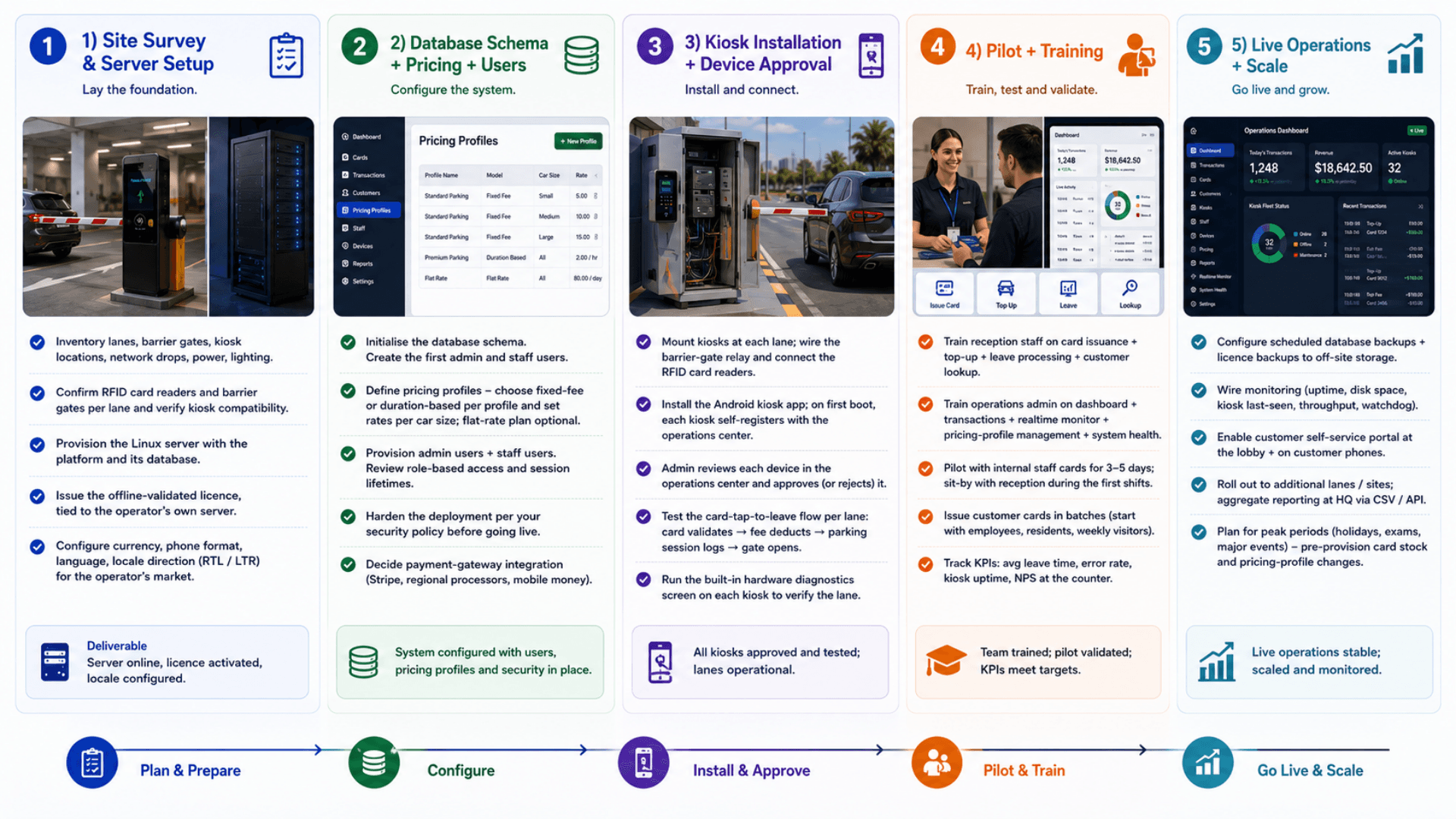
- 01
1) Site Survey & Server Setup
ChecklistInventory lanes, barrier gates, kiosk locations, network drops, power, lightingConfirm the RFID card readers and barrier gates per lane and verify kiosk compatibilityProvision the Linux server (an industrial branch server or equivalent) with the platform and its databaseIssue the offline-validated licence, tied to the operator's own serverConfigure currency, phone format, language, locale direction (RTL / LTR) for the operator's market - 02
2) Database Schema + Pricing + Users
ChecklistInitialise the database schema; create the first admin and staff usersDefine pricing profiles — pick the fixed-fee or duration-based model per profile and set rates per car size; a simple flat-rate plan is available alongsideProvision admin users + staff users; review role-based access and session lifetimesHarden the deployment per your security policy before going liveDecide payment-gateway integration (Stripe, regional card processors, domestic mobile-money) — if any - 03
3) Kiosk Installation + Device Approval
ChecklistMount kiosks at each lane; wire the barrier-gate relay and connect the RFID card readersInstall the Android kiosk app; on first boot, each kiosk self-registers with the operations centerAdmin reviews each device in the operations center and approves (or rejects) itTest the card-tap-to-leave flow per lane: card validates → fee deducts → parking session logs → gate opensRun the built-in hardware diagnostics screen on each kiosk to verify the lane - 04
4) Pilot + Training
ChecklistTrain reception staff on card issuance + top-up + leave processing + customer lookupTrain operations admin on dashboard + transactions + realtime monitor + pricing-profile management + system healthPilot with internal staff cards for 3-5 days; sit-by with reception during the first shiftsIssue customer cards in batches (start with mall employees, residents, weekly visitors, etc.)Track KPIs: avg leave time, transaction error rate, kiosk uptime, NPS at the counter - 05
5) Live Operations + Scale
ChecklistConfigure scheduled database backups + licence backups to off-site storageWire monitoring (uptime, disk space, kiosk last-seen status, transaction throughput, watchdog reboots)Enable customer self-service portal at the lobby + on customer phonesRoll out to additional lanes / additional sites; aggregate reporting at the operator HQ via CSV / API exportPlan for peak periods (holidays, exams, major events) — pre-provision card stock and pricing-profile changes
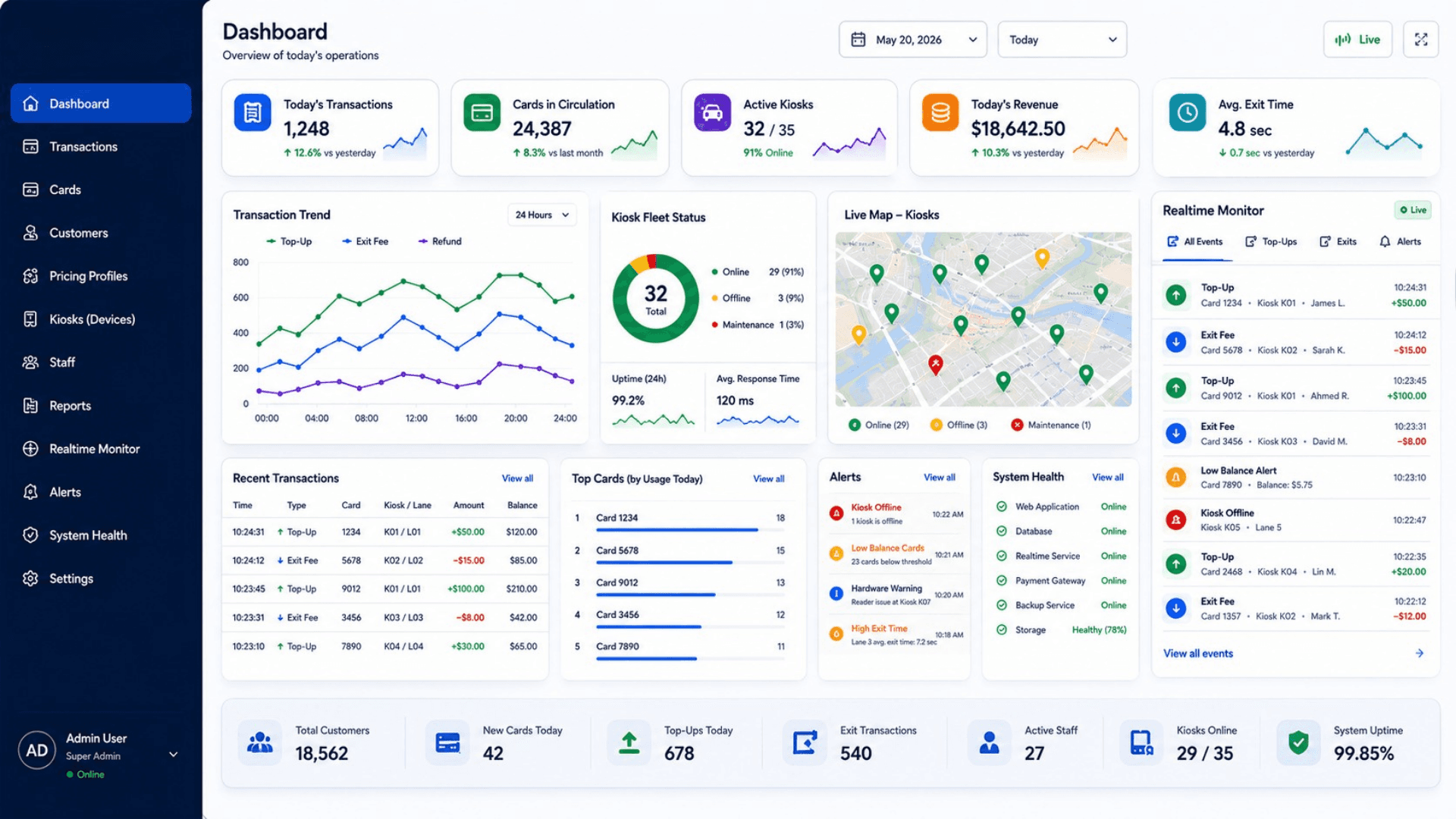
Smart Parking Management Gallery
Visual highlights of Zeour Smart Parking — RFID lifecycle, kiosk fleet, real-time monitoring, and on-prem licensing.
Why Ticket-and-Cash Parking Fails
Ticket-and-cash gates are slow, leak revenue, and need staffing every shift — here is why an RFID smart parking system is essential.
Ticket Printers Are a Cash-Handling Liability
Traditional ticket-on-entry + cash-on-exit operations bleed money in three ways: ticket-stock cost, cash-handling shrinkage at the gate, and gate-operator labor 24/7. Reconciliation at end-of-shift is manual and error-prone.
Prepaid RFID Cards Eliminate Cash at the Gate
Customers pay at the staff counter, balance lives on the card, the gate is cash-free. Every transaction flows through the audited ledger with post-transaction snapshots. Cash shrinkage at the gate goes to zero overnight.
SaaS Parking Platforms Send Your Data Offshore
Most commercial parking platforms are SaaS-only and host transactions, customer PII, and card data in a foreign cloud. For sovereignty-sensitive operators worldwide that's legally and operationally problematic — data residency rules and intermittent international links make it untenable.
On-Premise Default = Data Stays in the Country
The entire platform — web app, database, monitoring service, and licensing — runs on the operator's own server inside their perimeter. Data residency is a deployment decision, not a vendor decision.
Proprietary Gate Hardware Locks Operators In
Many barrier-gate vendors ship closed, bundled software with their hardware. That forces operators into a single vendor's ecosystem — switching to better software, or fixing a hardware bug, means waiting on that vendor for every fix or change.
The Kiosk Owns the Hardware Path End to End
The kiosk app drives the RFID card reader and the barrier gate directly — there is no proprietary middleware in the loop. The operator owns the hardware path end to end and is never waiting on a third-party vendor to ship a fix.
Generic Domestic Solutions Are Underbuilt
Many domestic parking operators worldwide still run on spreadsheets + a barrier-gate relay + a cash drawer. Operations don't scale, audits are impossible, lost cards are a constant battle, and cash leakage is endemic.
Sovereign-First, Audited Like an Enterprise
RTL Arabic + LTR English baseline, configurable currency, configurable phone validation — with the operations discipline of an enterprise SaaS: full Transaction ledger, append-only audit trail, role-based auth, realtime monitor, kiosk fleet management. Operators get both.
Manual Fee Calculation Slows the Gate
When a gate operator keys in the fee by hand — or a customer argues the minutes on a printed ticket — every exit turns into a negotiation. The lane backs up, shifts run long, and end-of-shift reconciliation never quite ties out.
Automated Pricing the Customer Can See
The kiosk calculates the charge the instant the card taps — a flat fee per car size or a duration-based rate, whichever the pricing profile uses — deducts it, and shows it on screen. Nothing is keyed in by hand, the fee is transparent, and the gate opens in under 5 seconds.
No Realtime Visibility = No Operations Discipline
Without live dashboards, operators discover hardware failures hours after they happen, find out about cash-handling anomalies at end-of-day reconciliation, and have no visibility into per-staff or per-kiosk performance.
Realtime Monitor = Operations Discipline by Default
The admin's realtime monitor surfaces every card action, every transaction, every system-health change in seconds. Hardware fault on Kiosk #4? You see it instantly. Unusual top-up pattern? You see it instantly.
Smart Parking Features
RFID Card Lifecycle — Issue, Top-Up, Transfer, Mark Lost, Replace
Staff Card-Management Console (issue at counter, top up, process leave, look up by card or vehicle plate)
Admin Operations Center — Dashboard, Transactions, Staff, Devices, Pricing Profiles, System Health, Realtime Monitor
Customer Self-Service Portal — No Login (balance check + card-tap leave flow)
Two Pricing Models per Profile — Fixed Fee at Exit or Duration-Based
Per-Car-Size Pricing Profiles (small / medium / large) Assigned per Card; Simple Flat-Rate Plan Available
Append-Only Transaction Ledger with Post-Transaction Balance Snapshots (top-ups, parking fees, refunds, transfers)
Configurable Currency — any locale per engagement
Configurable Phone Validation — country-specific prefix and format set per deployment
Real-Time Monitoring — Live Activity, Stats, Transactions, Parking Alerts
Multi-Kiosk Android Fleet with Device Registration + Admin Approval Workflow
Android Kiosk — Single-Purpose, Landscape-Locked, RTL-Capable, Watchdog-Protected
Kiosk Drives RFID Card Readers and Barrier Gates Directly — No Third-Party Middleware
Hardware Watchdog Auto-Recovers a Hung Kiosk Without an On-Site Visit
Built-In Hardware Diagnostics Screen on Each Kiosk
Offline-Capable Operations — Licensing Validates Without an Internet Connection
Offline-Validated Sovereign Licensing Tied to the Operator's Own Server
License-Expired Failsafe — App Locks Down with a Branded Notice Instead of Failing Open
Per-Card Customer Records (locale-aware names, phone, optional vehicle plate)
Vehicle-Plate Uniqueness Enforced at the Database Level (one card per plate)
Parking-Session Audit Trail (every leave creates a timestamped session record)
Token-Based Auth for Admin + Staff (configurable session lifetime)
Kiosk-Only Operations Gated by Device Approval (non-approved devices are refused)
System Health + Admin Realtime Monitor (operator sees what every kiosk is doing right now)
Lightweight Single-Binary Deployment (runs on a small Linux box)
Structured Data Model: Customers, Cards, Transactions, Pricing Plans & Profiles, Parking Sessions, Admin & Staff Users, Device Registrations
LAN-Operated Android Kiosks (operator-controlled network, no public exposure required)
Internationalization-Ready — Pluggable Currency, Phone Format, Date Format, and Locale Direction (RTL/LTR)
Smart Parking Components
Parking Cards, Kiosk Devices and Operator Controls.
RFID Card Lifecycle Management
Card is the unit of customer identity. Full lifecycle from issuance through transfer, replacement, and deactivation.
- Unique card number + optional unique vehicle plate enforced at the database level
- Car size (small / medium / large) drives pricing
- Assigned pricing profile per card
- Append-only transaction ledger with post-transaction balance snapshots
Three Role Surfaces
Admin operations center, staff card-management console, no-login customer portal — one codebase, three UX surfaces.
- Admin: dashboard, transactions, staff, devices, pricing, system health, realtime monitor
- Staff: issue, top-up, leave, lost, customer lookup
- Customer: balance check + card-tap leave (no login)
- Distinct auth paths per surface; token TTLs separately configurable
Real-Time Operations Monitor
A standalone real-time monitoring service surfacing live activity to the admin operations center.
- Live events: activity, stats, recent transactions, recent cards, running totals, parking alerts
- Drives the admin Realtime Monitor view
- Updated on every balance change
- Fault-tolerant: the app degrades gracefully if the monitoring service is offline
Android Kiosk Fleet
Single-purpose Android kiosk, device registration with admin approval, direct hardware control.
- Landscape-locked, RTL-capable, system UI hidden
- Device registration with an admin approval workflow
- Drives the card reader and barrier gate directly, with a hardware watchdog
- Built-in hardware diagnostics screen accessible from the kiosk header
Direct Hardware Control
The kiosk drives RFID card readers, barrier gates, and a hardware watchdog directly — no third-party middleware required.
- Drives standard RFID card readers directly
- Triggers the barrier-gate output on a successful leave
- Feeds a hardware watchdog at fixed intervals
- Works with standard hardware from the operator's preferred vendor
Offline-Validated Sovereign Licensing
An offline-validated licence ties each deployment to the operator's own server. It validates on-premise with no phone-home; if invalid or expired, the app fails closed with a branded notice.
- Validated entirely on-premise — no phone-home, no SaaS dependency
- Tied to the operator's own server
- Fails closed (a branded notice) rather than failing open
- Resale or unauthorized cloning of the system is infeasible
Customer Self-Service Portal
A no-login customer portal. The customer enters their card number and sees their balance, recent activity, and a card-tap leave shortcut.
- No username, no password, no credential-theft surface
- Customer identity is the physical card
- Reduces support volume to zero for balance inquiries
- Designed for thin LAN clients — works on basic Android tablets in the lobby
Gate Operations and Transaction Visibility
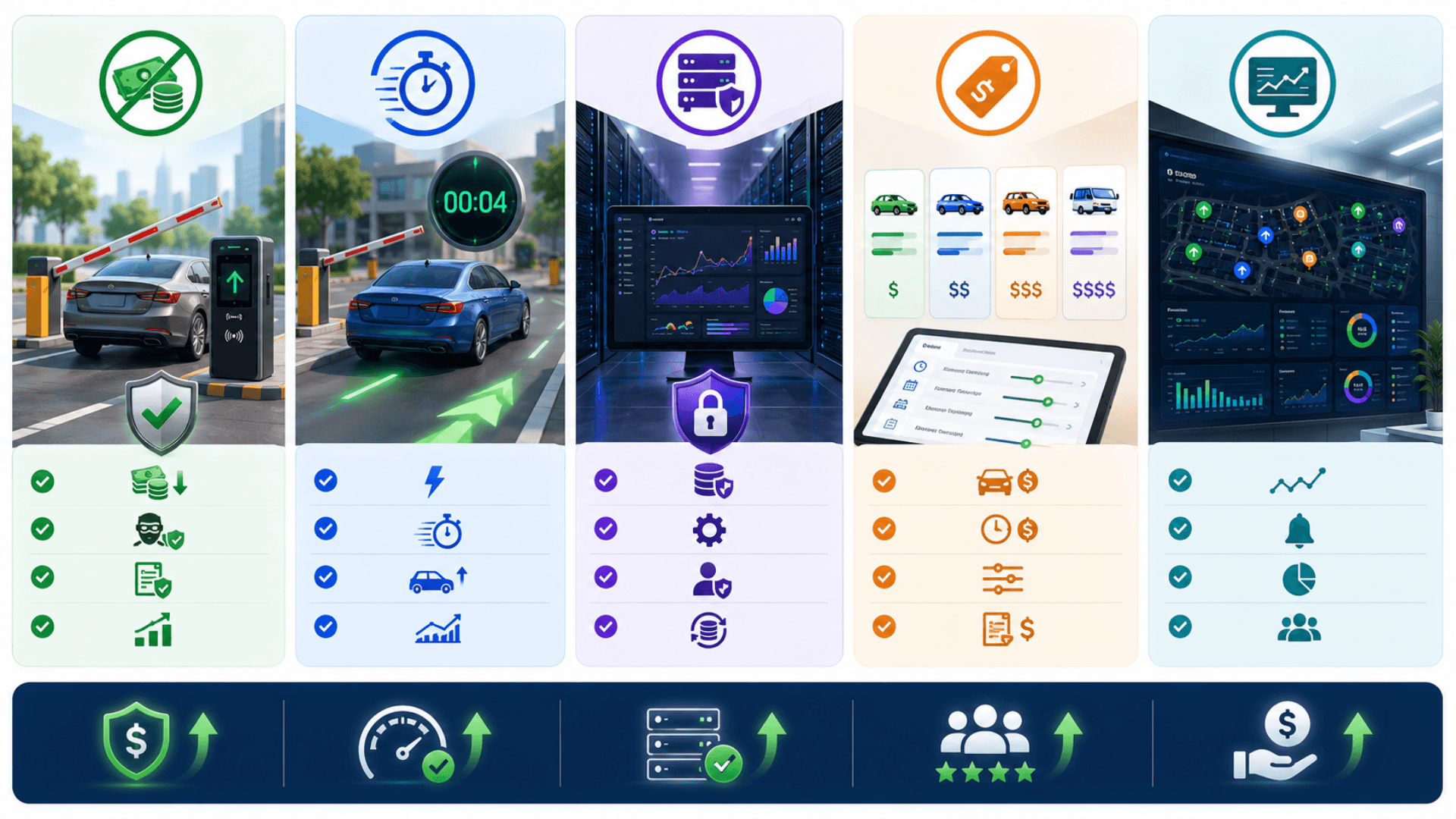
Replace ticket printers and gate operators with RFID cards + barrier kiosks — day-one labor savings on every shift
Cut leave-time at the gate to under 5 seconds — the kiosk calculates the fee (fixed or duration-based), deducts it, opens the barrier, and logs the session
Eliminate cash-handling losses with prepaid top-ups — every transaction flows through the audited ledger
Run entirely on-premise on the operator's LAN — no SaaS dependency, no internet outage takes the gate down
Per-car-size pricing lets one car park handle small cars, sedans, and SUVs/buses at correct rates without operator override
Live realtime monitor surfaces hardware faults, kiosk disconnects, and unusual transactions in seconds — not days
Device registration with admin approval prevents rogue kiosks from being plugged into the network and used to issue cards
Offline-validated sovereign licensing ties each deployment to the operator's own server — resale or unauthorized cloning is infeasible
Locale-aware out of the box (RTL Arabic baseline; configurable currency and phone format per operator) — drops in for any market with a small re-localisation pass
Re-localizable for any market in days, not months — currency, phone, language, locale direction are all configurable
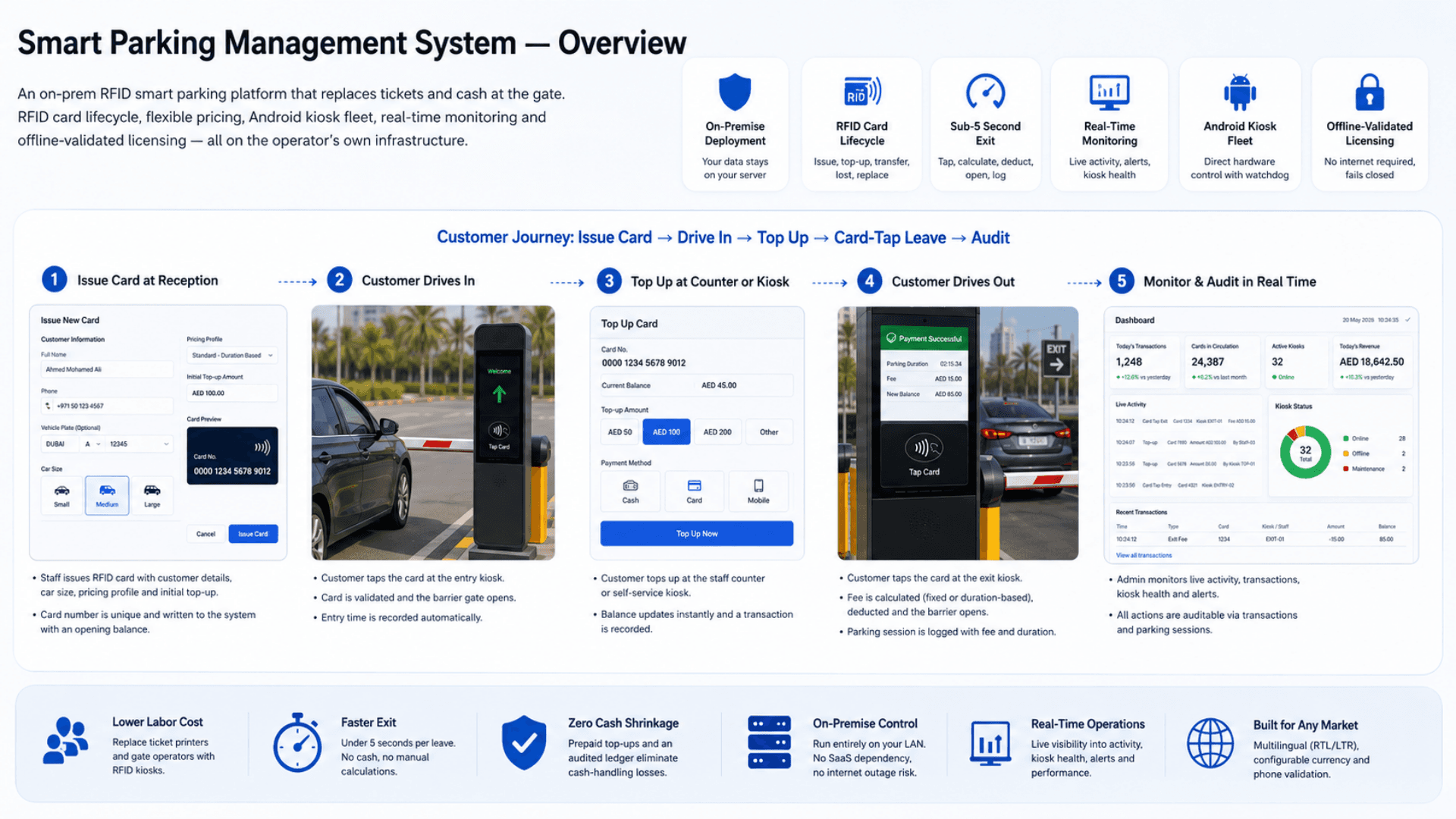
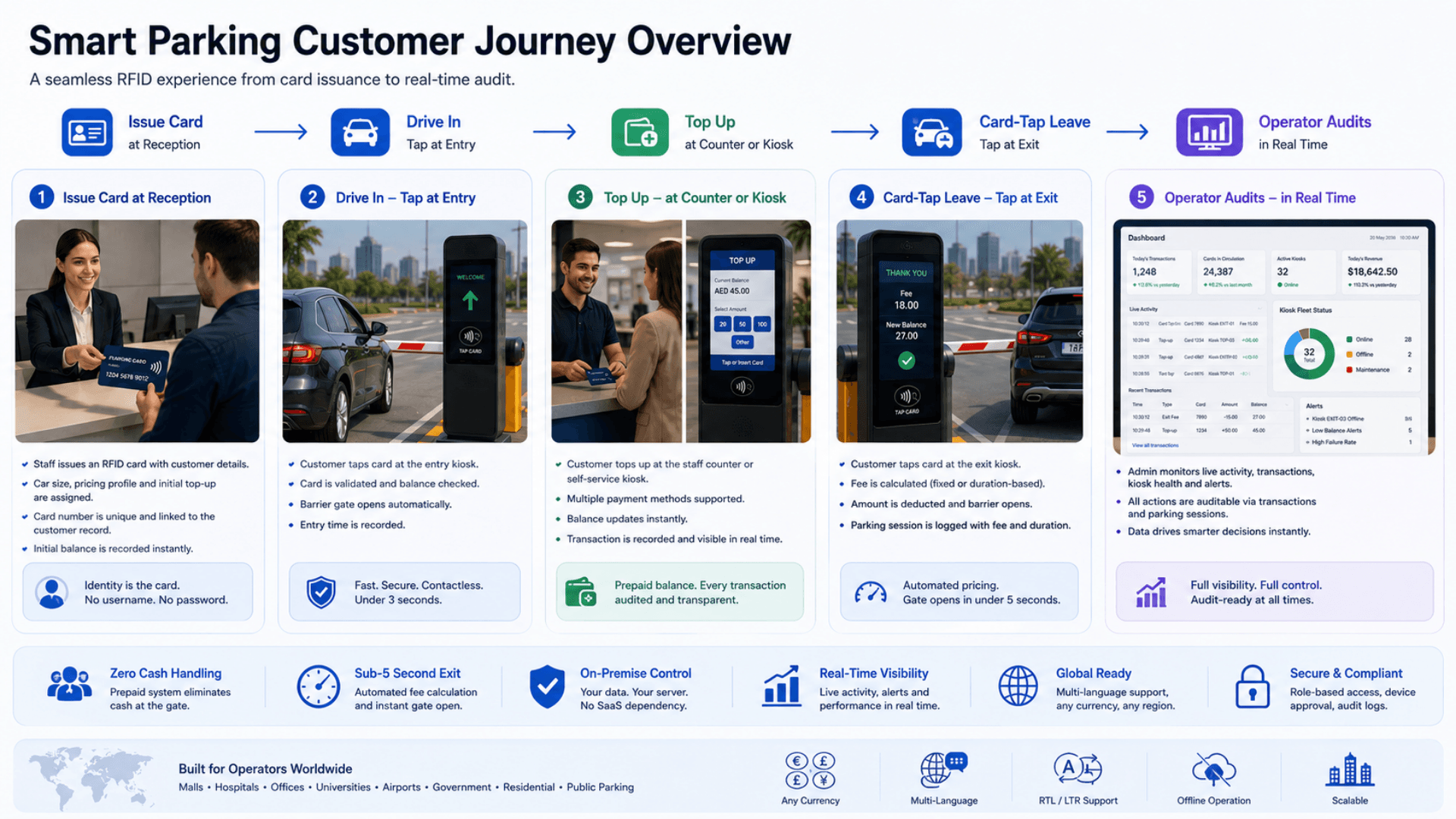
From RFID Card Issuance to Parking Exit
Follow the card and transaction lifecycle through registration, access, payment handling and departure.
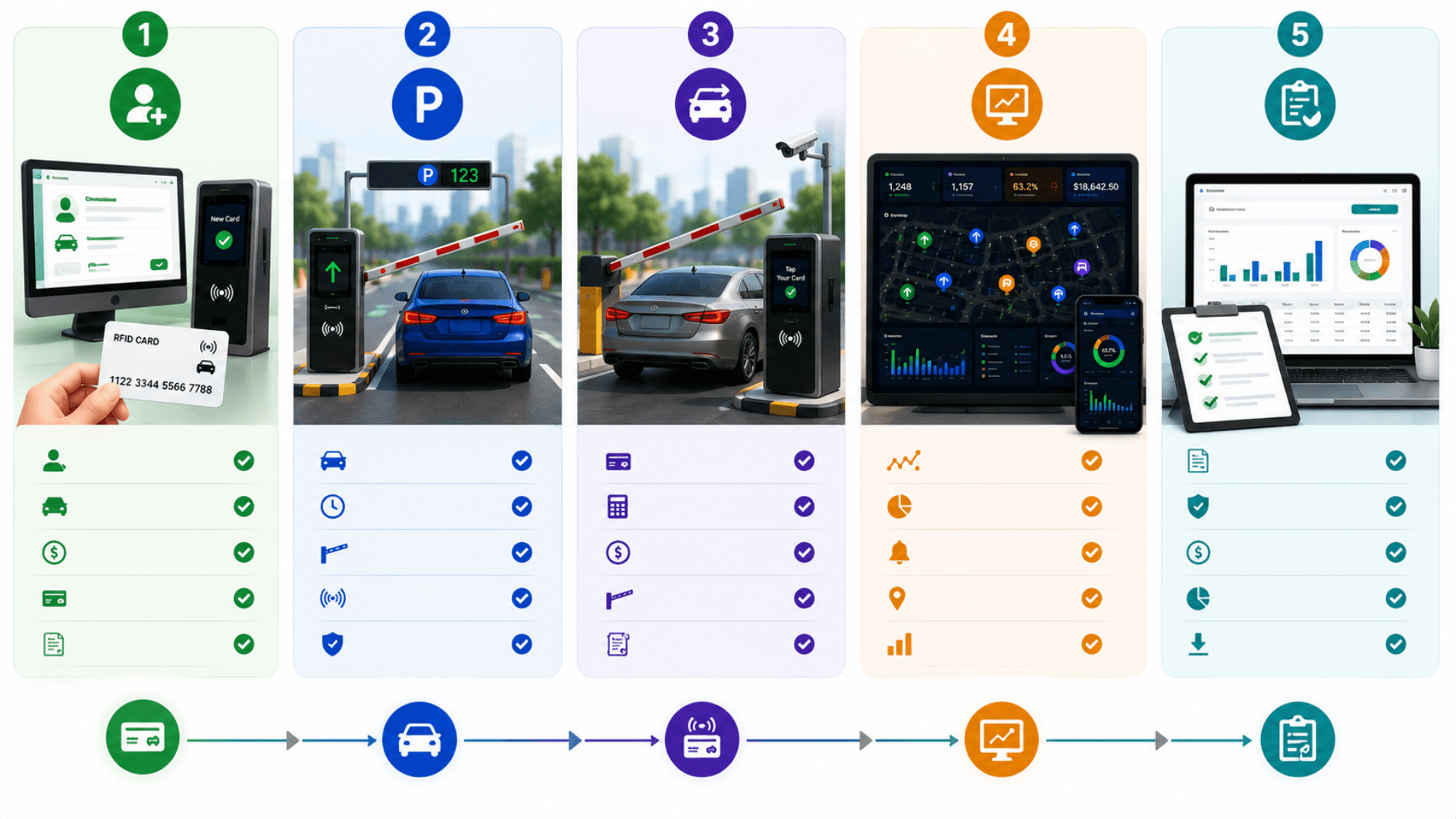
Issue Card at Reception
Staff issues a new RFID card to a customer: locale-aware name, locale-aware phone format, optional vehicle plate, car size (small / medium / large), pricing profile, initial top-up amount. The system mints a unique card, writes the customer and card records, and records the initial top-up transaction with the post-transaction balance.
Customer Drives Into the Lot
The customer pulls up to the entrance kiosk and taps the RFID card. The Android kiosk reads the card via the RFID reader, validates the card and its balance, and opens the barrier gate directly.
Top Up at Counter or Kiosk
When the balance runs low, the customer tops up at the staff counter (or self-service kiosk). Each top-up writes a transaction with the post-transaction balance snapshot and triggers a live activity event so the admin's realtime monitor sees it instantly.
Customer Drives Out
At the exit kiosk, the customer taps the card. The kiosk processes the leave atomically: it reads the car size and pricing profile, calculates the fee — a flat charge per car size, or a duration-based amount from the time parked — deducts it, writes the parking-fee transaction with the new balance, records the parking session, and opens the barrier gate. End-to-end: under 5 seconds.
Operator Monitors + Audits in Real Time
Admin opens the operations center: dashboard KPIs, today's transactions, recent activity, system health per kiosk, pricing-profile management, staff and admin user management. The Realtime Monitor streams live activity, stats, recent transactions, and parking alerts. Every action is auditable from the transaction ledger and parking-session history.
Smart Parking Use Cases by Industry
Explore the service environments relevant to smart parking.
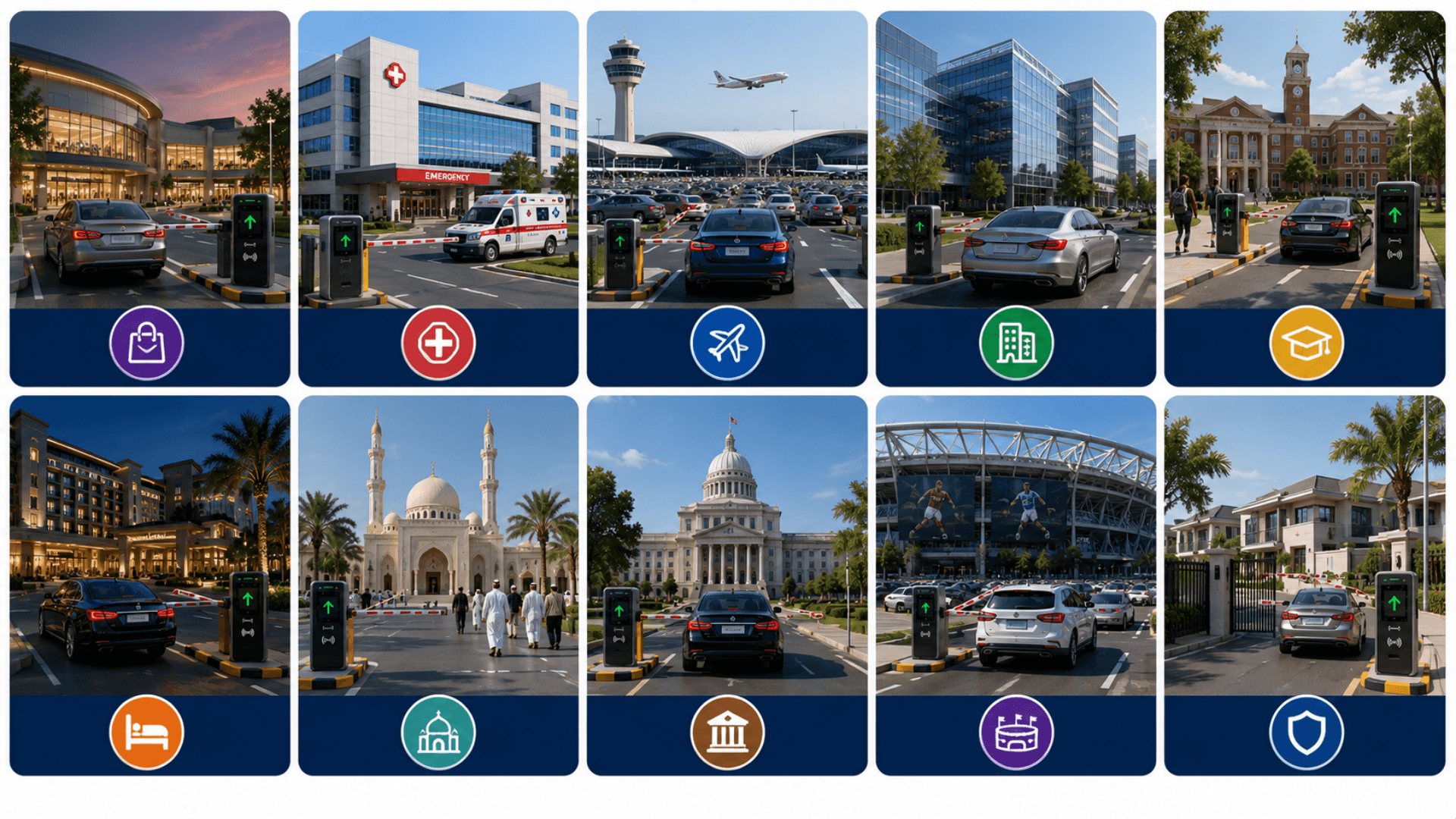
Open the deep dive by vertical
Smart Parking Management System FAQs
Get answers to the most common questions about our smart parking.
What is the Zeour Smart Parking Management System?
Is Smart Parking viable for a single small car park?
Is Smart Parking cloud-hosted or on-premise?
How does the RFID card lifecycle work?
How does pricing work — a fixed fee or by duration?
What hardware do the kiosks run on? Can we use our own?
How is the licensing model designed?
How does real-time monitoring work?
What auth model does the system use?
Is the admin / staff / customer UI multilingual?
Which currency and phone format does it use?
How do you prevent cash-handling losses and fraud?
What happens when a card is lost?
Can the customer portal be used without an account?
How long does deployment take?
How does it scale to large operators?
Does it integrate with payment gateways for the customer portal?
Is it GDPR / PDPL compliant?
Explore Related Solutions
Consider the registration, directions and information visitors need after entering the site.
Ready to Transform Your Operations with Smart Parking?
Discuss your workflows, deployment requirements and integration scope with the Zeour team.
Smart Parking — concepts you'll meet
Definitions for the operational terms that appear across this page. Tap any chip to read the long-form entry plus its cross-links.