
Virtual Queue Management System
A virtual queue management system lets customers join a service queue remotely and follow their position before arriving. Zeour GLARUS supports mobile, web and messaging channels, with notifications and conversion to a live branch ticket on arrival for customer service locations.
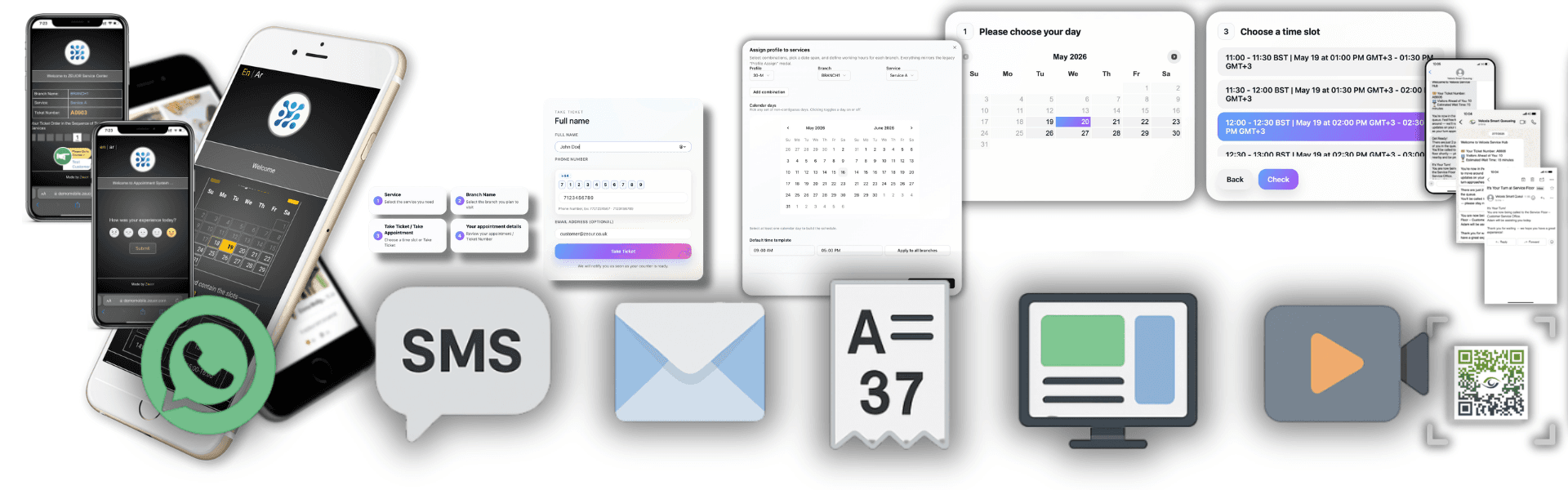
Remote Queue Joining and Arrival Management
Give customers a way to wait outside the service area while staff retain a shared view of demand. MobileWCSA connects remote joining, estimated waiting times and arrival handling to the branch operation.
Remote Waiting or a Scheduled Visit?
A virtual ticket holds a place in the live service flow. Appointment booking software serves customers who need a future time slot, while GLARUS queue management coordinates ticket handling at the branch.
On arrival, customers can interact with a self-service check-in kiosk. Queue displays and digital signage communicate counter calls inside the service area.
Remote Queue Channels, Notifications and Branch Synchronisation
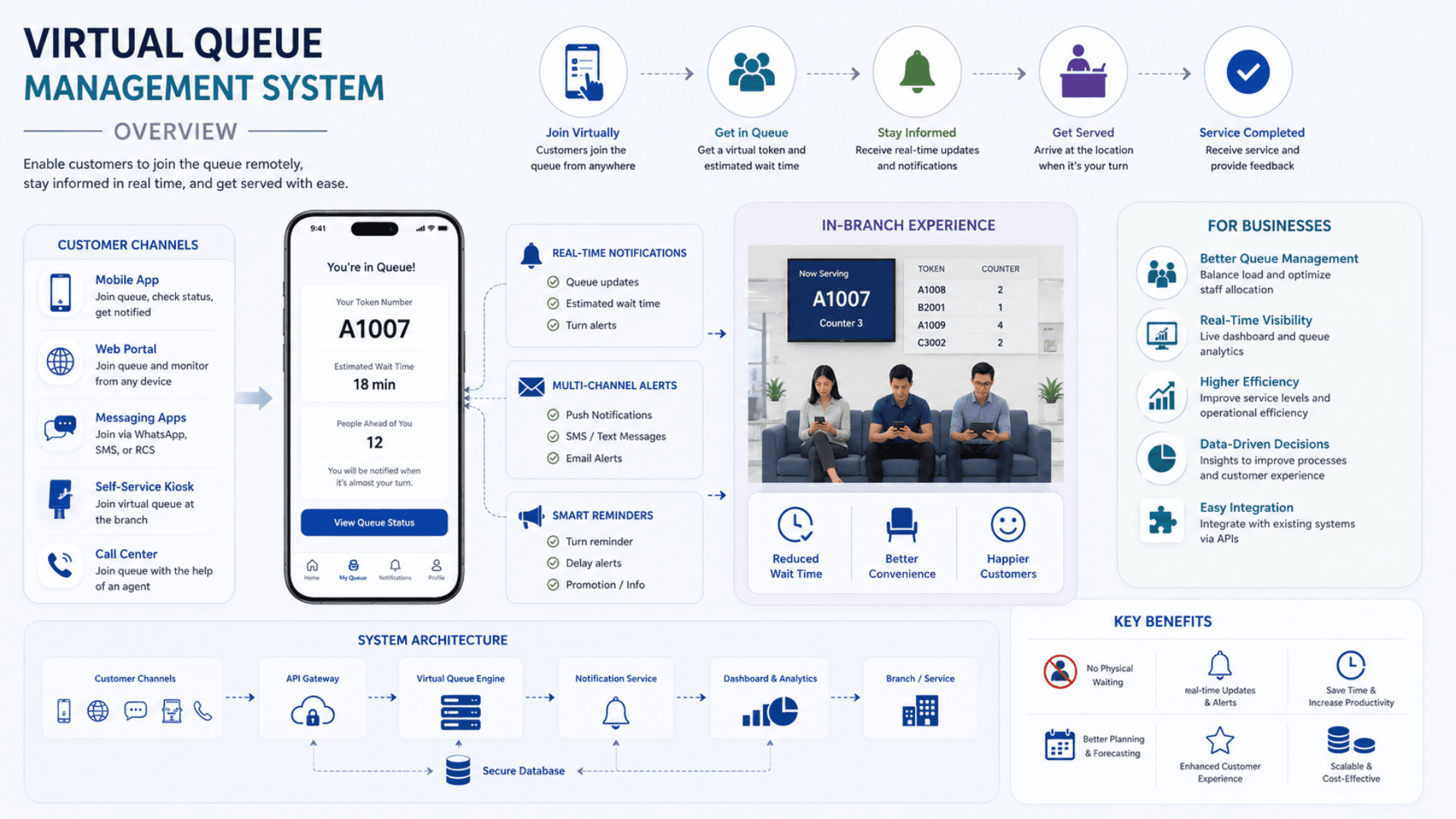
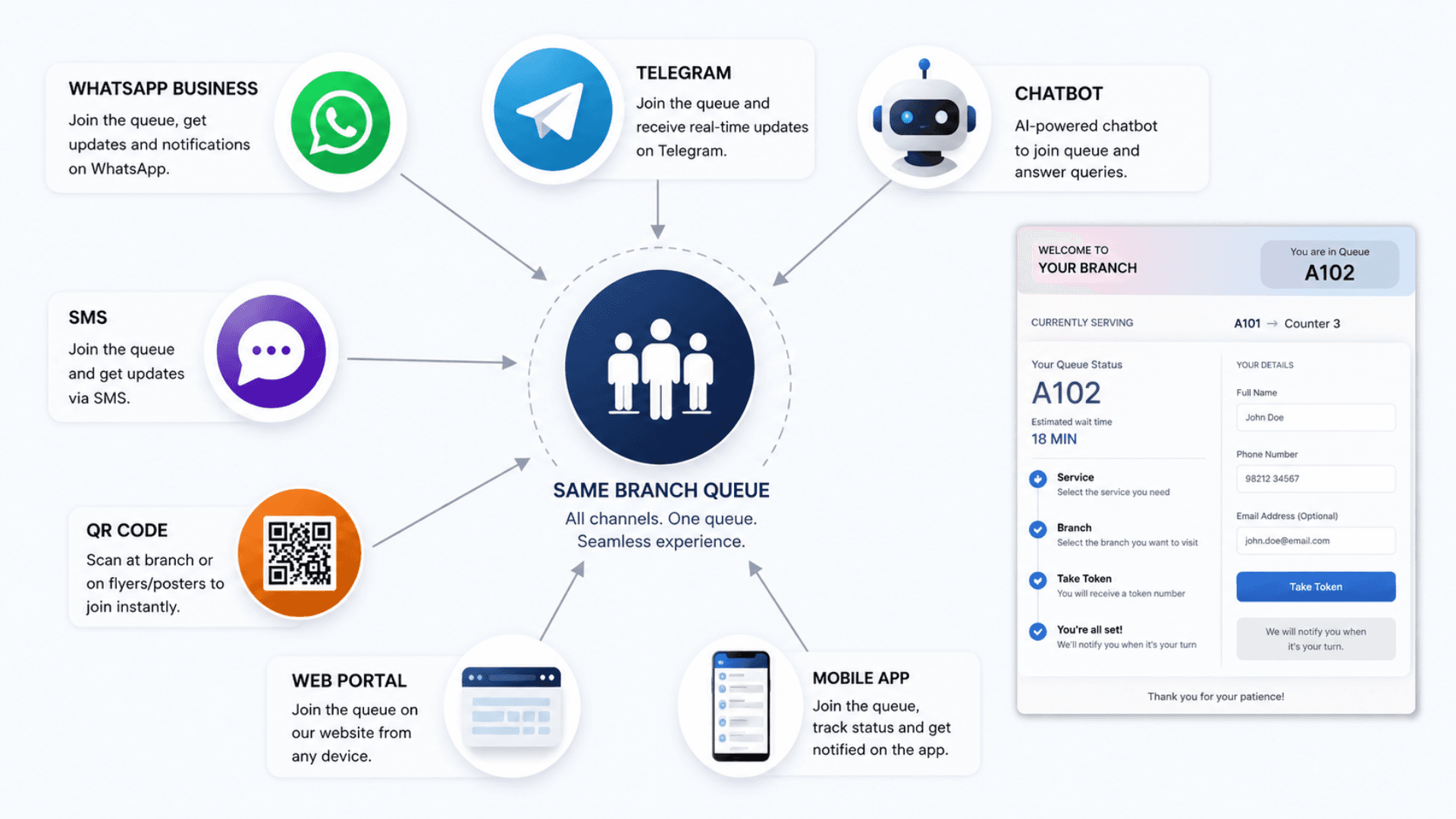
Zeour MobileWCSA is the customer-facing virtual queue + appointment booking module of the GLARUS ecosystem. It removes the need for customers to wait in a physical line by giving them a remote on-ramp into the live branch queue — via mobile app, web, WhatsApp, Telegram, ChatBot, QR code, or SMS — and keeping them informed with live position updates, predictive wait times, and timely notifications until it is their turn. Behind the scenes it talks to the GLARUS central control plane (MSA / GLITT) and to each branch's EMS operator cockpit over signed APIs and a real-time event layer (Redis + Laravel Echo / Pusher), so a virtual ticket and a walk-in ticket are first-class citizens of the same queue.
Zeour MobileWCSA — the global Virtual Queue Management System (VQMS) of the GLARUS platform. Let customers join the queue from a mobile app, web portal, WhatsApp, Telegram, ChatBot, SMS, or QR code; see live position and accurate wait times; receive “now/soon” notifications; and convert seamlessly into a live branch ticket on arrival. Designed for banks, hospitals, government, telecom, retail, hospitality, and high-throughput service centers worldwide. Fits any size of operation — one walk-in clinic or barbershop works the same as a national multi-branch network.
Key Functionalities
Omnichannel Remote Queue Join
Customers join from anywhere through their preferred channel — native mobile app (iOS / Android), web portal, WhatsApp Business, Telegram, website / Messenger ChatBot, QR code, or plain SMS — no physical presence required until service time.
Live Position & Predictive Wait Time
Each virtual ticket shows a live position in the branch queue and an estimated wait time calculated from current load, active counters, and rolling service-time averages — recalculated on every queue event.
Every customer sees a live, honest view of where they stand and how long until they are served.
- Real-time position visible on every channel — recalculated on each queue event
- Predictive ETA from current load, active counters, and rolling service-time averages
- Confidence bands so customers know how firm the estimate is
- Self-service reschedule, cancel, or extend without operator intervention
Smart Now / Soon Notifications
Configurable “Soon” and “Now” alerts (e.g. 15, 10, and 5 minutes ahead) delivered through push, SMS, WhatsApp, or email — telling each customer exactly when to head over.
Appointment Booking & Reminders
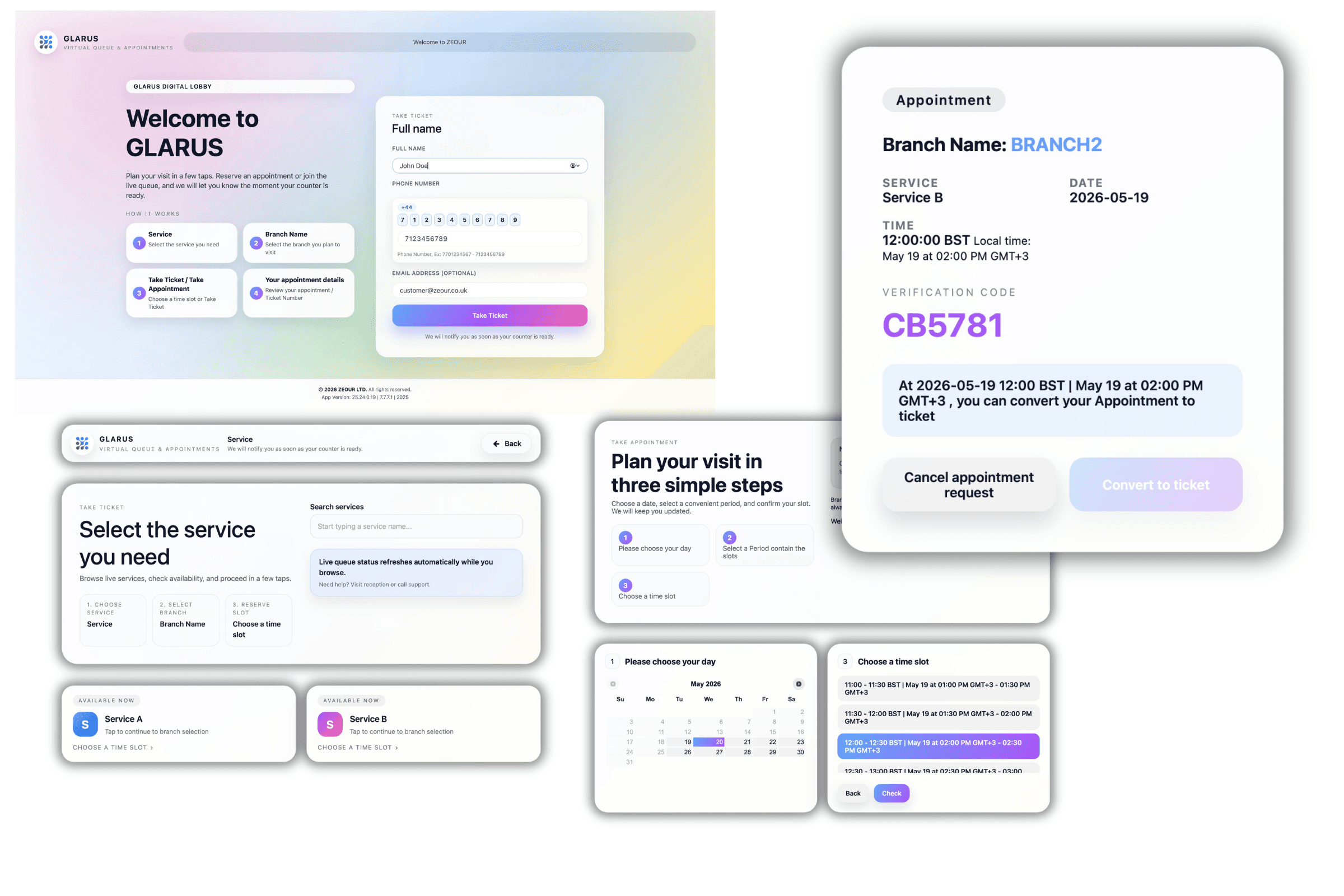
Customers can also pre-book a specific date / time slot. Appointments convert into live branch tickets near service time, with reminders to cut no-shows by 30 to 50%.
Self-Service Reschedule & Cancel
Customers can extend their slot, reschedule, or cancel cleanly from the app — reducing operator load and keeping the queue honest.
Identity & Eligibility Verification
Optional OTP, document, national e-ID, or appointment-code verification at join time — for regulated services in banking, healthcare, and government.
Priority, VIP & Accessibility Rules
Per-service priority rules for VIP customers, urgent cases, accessibility needs, and time-sensitive appointments — applied automatically at queue insertion.
Virtual → Live Ticket Conversion
On arrival (or a configurable trigger), the virtual ticket converts into a live EMS branch ticket; the operator calls it from the same EMS counter cockpit as walk-ins.
Real-Time Event Broadcasting
Events (join, position-change, call, transfer, no-show, served) propagate over Redis + Laravel Echo (or Pusher) to mobile clients, digital signage, and counter displays — under a second end-to-end.
Branding, Theming & White-Label
Brand colors, logos, custom domain, push-notification copy, and per-language content — full white-label support for resellers and OEM partners.
Multi-Language (RTL / LTR)
Native multi-language UI with right-to-left support for Arabic / Hebrew / Urdu and locale-specific notification templates.
Analytics, CSAT & NPS
Per-branch and aggregated dashboards covering wait time, service time, no-show, abandonment, channel mix, peak load, and customer feedback scores.
Integration-First Architecture
REST APIs, webhooks, and event streams for CRM (Salesforce, Dynamics, HubSpot), ERP (SAP, Oracle), identity (SAML / OIDC / national e-ID), SMS gateways, WhatsApp Business API, and payment providers.
GDPR / HIPAA / PDPL Compliance
TLS in transit, encryption at rest, configurable retention, right-to-be-forgotten, RBAC, audit logging, 2FA — aligned with GDPR, HIPAA, PDPL, and ISO 27001 controls.
Software Components
Customer-Facing Applications (MobileWCSA)
Mobile Apps (iOS / Android)
Branded native apps to join the queue, track live position, receive push notifications, and manage appointments.
Responsive Web Portal
No-download, fully responsive web journey for any browser — ideal for one-time visitors and embedded into bank / hospital portals.
WhatsApp Business / Telegram / ChatBot
Conversational join flows over WhatsApp Business Cloud API, Telegram, and a configurable website / Messenger ChatBot.
SMS Channel
A lightweight SMS path for customers without smartphones or in low-bandwidth areas — join, receive position, get the “Now” alert.
QR Code Check-In
Touchless on-site check-in: scan a QR poster or NFC tag, get a virtual ticket on the phone — no app download required.
Central Control Plane (MSA / GLITT)
Service & Branch Configuration
Define services, branches, opening hours, capacity, priority rules, notification templates, and per-service grace periods.
Multi-Tenant Branding
Centrally manage brand colors, logos, custom domains, app icons, splash screens, and language packs for every branch.
Real-Time & Historical Dashboards
Live cross-branch queue status plus historical analytics, CSAT / NPS, and SLA reporting for management.
Branch Operations (EMS)
EMS Operator Cockpit
The branch-side cockpit where operators call, transfer, repeat, or no-show tickets — virtual and walk-in tickets sit in the same list.
Virtual → Live Conversion Engine
When a customer arrives (geofence, QR scan, or “I'm here” tap), the virtual ticket promotes into the live EMS queue.
Branch Database (Resilient)
Branch-local database keeps the queue running even if the WAN link is unstable; syncs back to the central plane when online.
Real-Time & Integration Layer
Redis + Laravel Echo Server
Sub-second event broadcasting for join, position, call, and notification events across mobile clients and in-branch devices.
Pusher Channel (Optional)
Pusher-compatible fallback channel for mobile clients on restrictive networks.
REST APIs & Webhooks
Inbound and outbound APIs for ticket events, identity verification, payment confirmation, CRM enrichment, and BI exports.
SMS / WhatsApp / Email Gateway Adapters
Pluggable adapters for Twilio, MessageBird, Vonage, Infobip, WhatsApp Business Cloud API, SES, SendGrid, and local SMS providers.
Synchronized Branch Experience
GRAVIA Digital Signage
Queue boards show the virtual-ticket holder being called the same way as a walk-in — with multilingual voice announcements.
CounterDSA / SSD LED Displays
Per-counter screens and LED panels display the ticket + counter number from the same real-time event stream.
Feedback Module
Captures CSAT / NPS at the end of service — feeds back into the same analytics layer for service improvement.
Hardware Components
Customer Check-In Points
QR Code Stands & NFC Tags
Touchless check-in at the branch entrance — scan to join the queue without downloading an app.
GLARUS Self-Service Kiosks (KIOSAPP066 / AUTO666)
On-site kiosks (touchscreen + thermal printer) that issue both paper tickets and QR-code virtual tickets, integrated with the same backend.
Waiting-Area Displays
GRAVIA Digital Signage Controller (GRAVIA06)
Signage controller driving queue boards, playlists, and multilingual voice announcements in the waiting area.
SSD LED Counter Display (SSD06)
8-digit dot-matrix LED panels for ticket + counter calling at up to 25m viewing distance, synchronized with the live queue.
SSD LCD Counter Display (SSD066 AHW)
10", 13.3", 15" Full-HD per-counter LCD alternative for showing current and next tickets at service windows.
Branch Server & Infrastructure
CONT06 Industrial Branch Server
Compact branch controller running the branch-local apps that the virtual queue talks to.
Glarus_Hub (RS485)
Industrial 16-channel RS485 hub for synchronizing LED calling displays with the live queue at large branches.
Operator & Feedback Devices
EMS06 Hardware Keypad
Multi-function operator keypad with 8-digit LCD for calling, repeating, and transferring tickets from the counter.
MAGNO Feedback Touch Screen (MAGNO066 AHW)
Per-counter customer feedback touchscreen for capturing CSAT / NPS scores immediately after service.
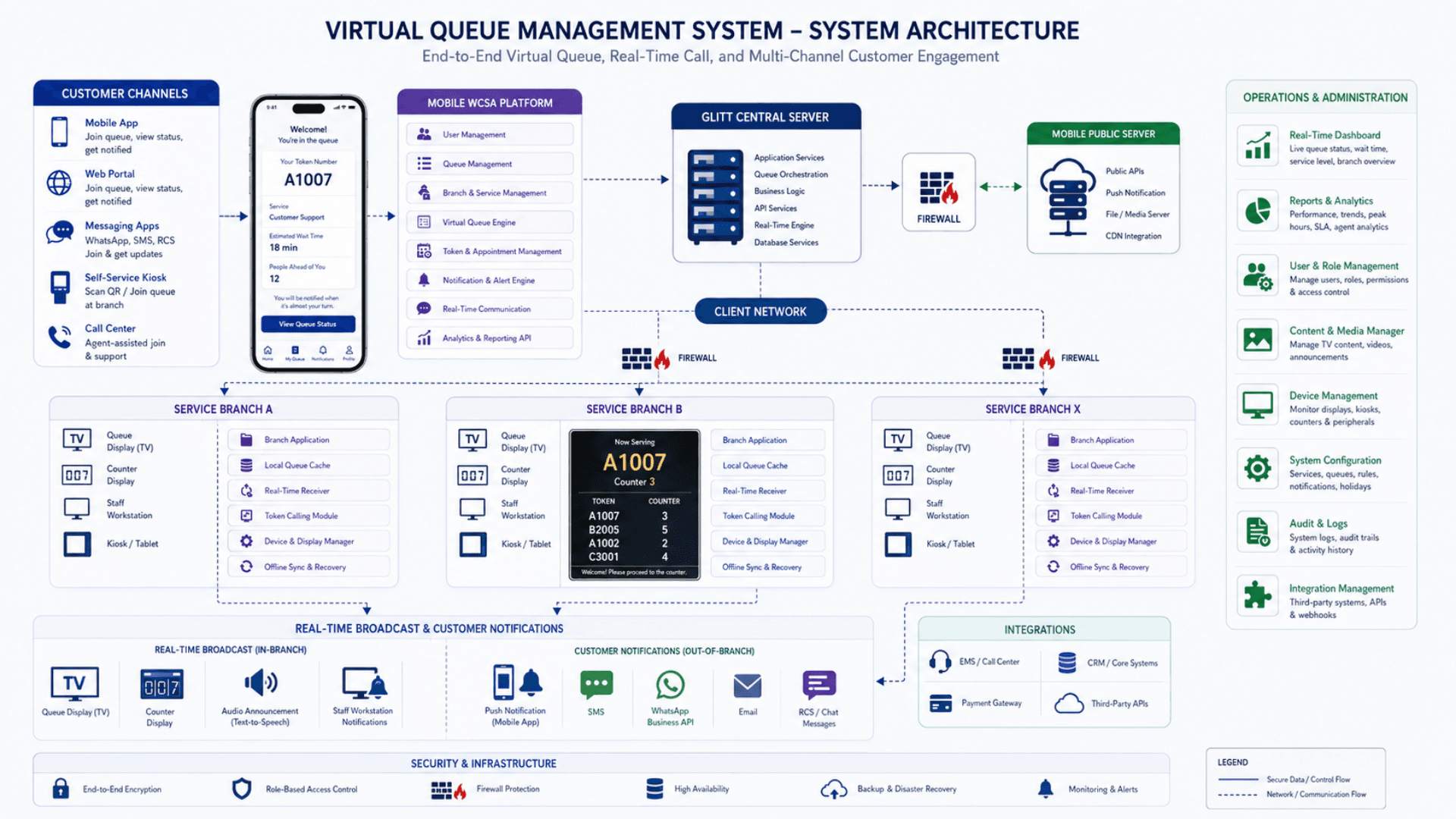
Virtual Queue Architecture — How MobileWCSA Fits the GLARUS Platform
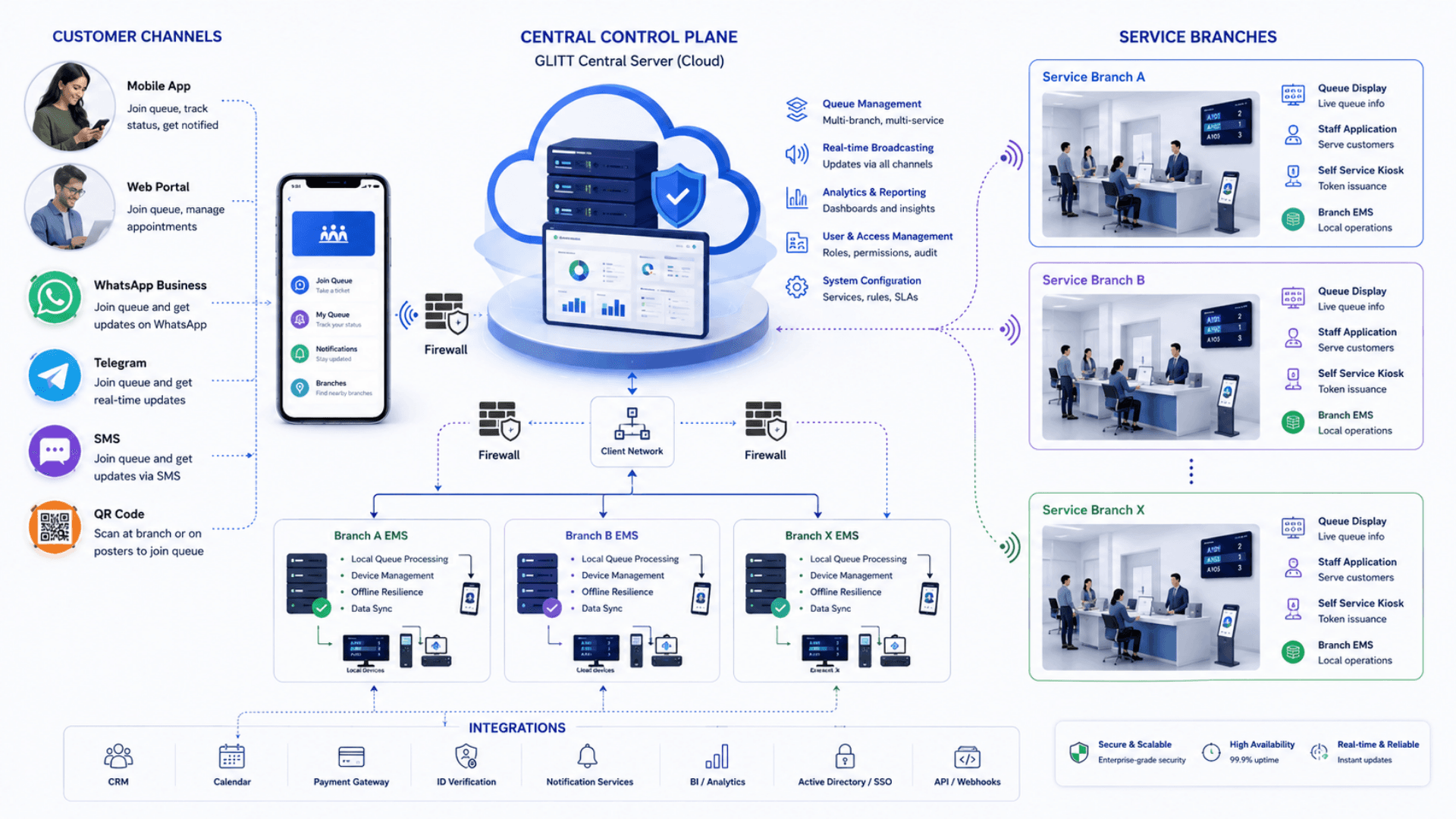
GLARUS MobileWCSA is deployed as part of a three-tier topology so virtual tickets, walk-in tickets, and appointments all live in one queue. The central plane governs configuration, branding, and reporting; each branch runs its own resilient local stack; mobile clients and in-branch hardware stay synchronized through a real-time event layer. The result: an enterprise-grade virtual queue management system that holds up at multi-branch, multi-region, multi-country scale.
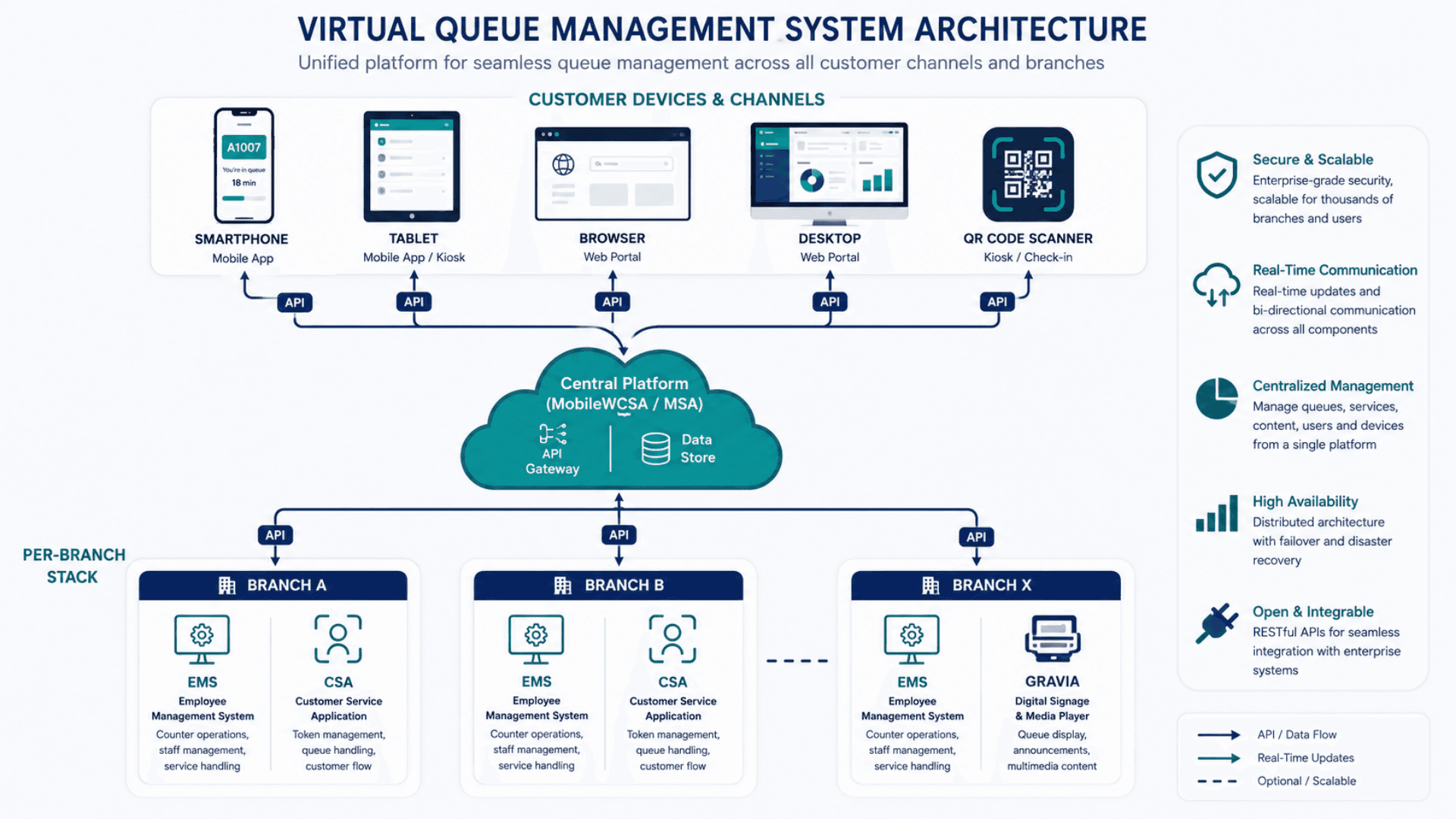
Tier 1 — Customer Devices & Channels
Wherever the customer is, the queue is one tap away
- Branded native mobile apps (iOS / Android) with push notifications and live queue UI
- Responsive web portal — embeddable in bank, hospital, and government customer portals
- WhatsApp Business Cloud API, Telegram, Messenger / website ChatBot conversational flows
- SMS path for feature-phone users and low-bandwidth networks
- QR codes and NFC tags for contactless on-site check-in
Tier 2 — Central Control Plane (Per Organization)
One control plane governs the whole estate
- MobileWCSA backend: virtual ticket lifecycle, appointment engine, notification orchestration
- MSA / GLITT: service / branch / counter configuration, branding, language packs, dashboards, reporting
- Real-time broadcaster: Redis + Laravel Echo Server (Pusher-compatible fallback) on a dedicated channel
- Integration layer: REST APIs, webhooks, CRM / ERP / identity / payment / SMS / WhatsApp connectors
Tier 3 — Branch Stack (Per Physical Location)
The branch keeps running even when the WAN is unstable
- EMS — operator cockpit that calls virtual and walk-in tickets from the same list
- CSA self-service kiosk app for on-site walk-in ticketing alongside virtual
- GRAVIA digital signage with queue boards and multilingual voice announcements
- CounterDSA / SSD LED counter displays for per-counter calling
- Branch-local database for resilience; signed snapshot push back to the central plane
- Optional Glarus_Hub RS485 infrastructure for industrial calling hardware
Real-Time Update Pipeline
Real-time- Primary: Redis + Laravel Echo Server broadcasts queue events (joined, position-change, called, transferred, no-show, served) to all mobile clients and in-branch devices in under a second
- Pusher-compatible fallback channel for mobile clients on restrictive corporate or carrier networks
- Branch-local execution: each branch app keeps operating against its local database even if the central link is degraded; events sync back when connectivity returns
- End-to-end TLS, signed webhook payloads, and RBAC across every tier
Virtual Queue vs Walk-In QMS vs Appointment vs Callback — What You Need
Search engines treat these as separate categories, but in reality they’re complementary parts of one customer-flow stack. GLARUS combines them so a customer can walk in, take a virtual ticket, book an appointment, or request a callback — and end up in the same live branch queue.
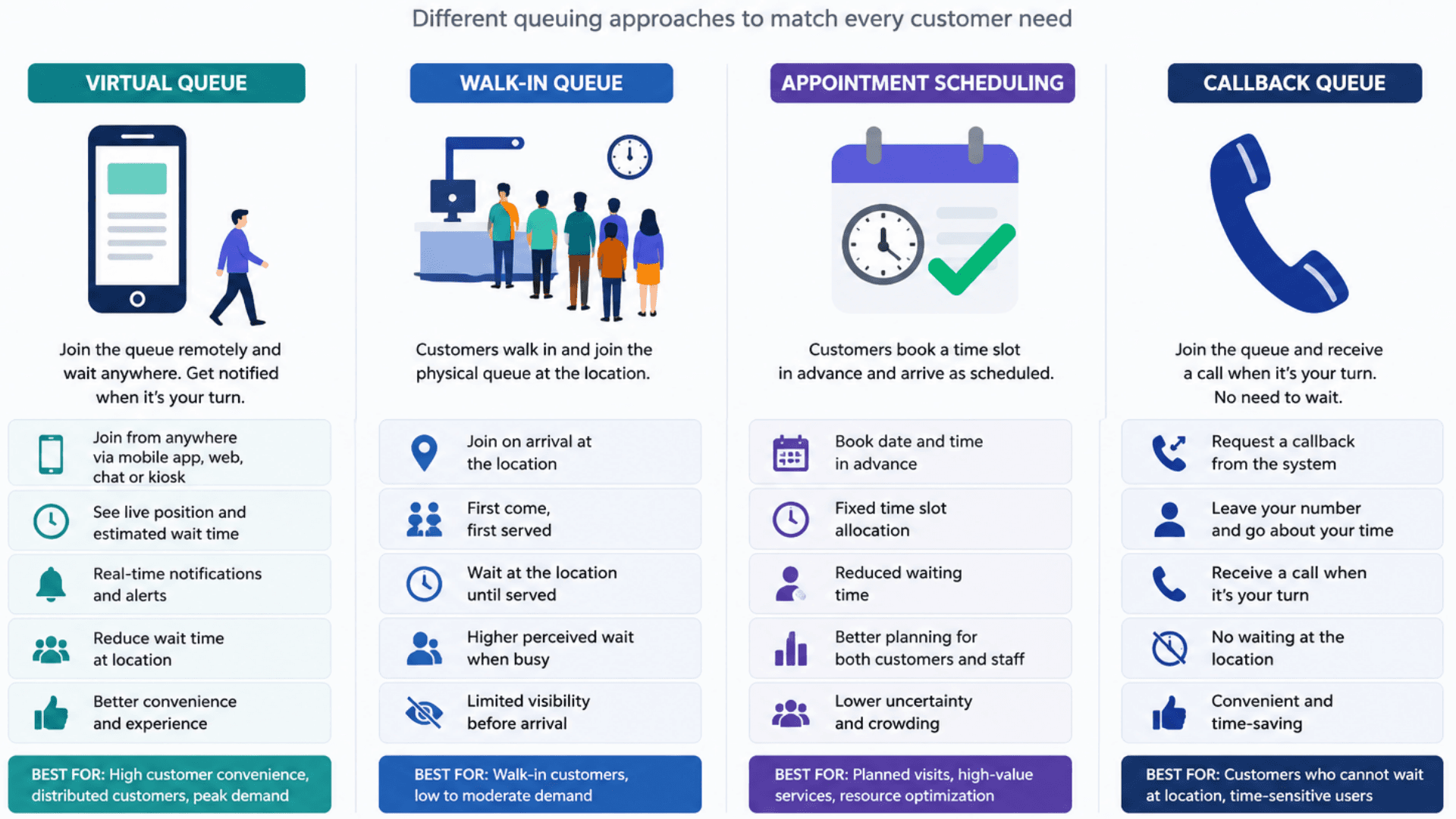
Virtual Queue Management System (VQMS)
Best for: Reducing on-site crowding and giving customers the freedom to wait remotely while the queue moves.
- Remote join via mobile / web / WhatsApp / Telegram / ChatBot / QR / SMS
- Live position and predictive estimated wait time
- “Now / Soon” notifications via push, SMS, WhatsApp, or email
- Virtual-to-live ticket conversion on arrival at the branch
- Multi-channel analytics, CSAT, and SLA reporting
Walk-In Queue Management System (QMS)
Best for: Customers who arrive in person and want a paper ticket from a kiosk.
- Self-service kiosks with multilingual flows and thermal ticket printing
- EMS branch cockpit with call / repeat / transfer / no-show workflows
- Queue boards and counter calling displays
- Operational KPIs (waiting time, service time, throughput)
Appointment Scheduling System
Best for: Planned visits, capacity smoothing, and reducing no-shows for high-demand services.
- Time-slot booking with per-service capacity caps
- Reminder cadence over the customer’s preferred channel
- Automatic conversion into a live branch ticket near service time
- Combined no-show and abandonment analytics with virtual / walk-in tickets
Callback / Virtual Hold Queue
Best for: Customers who do not want to wait at all — get called back when their turn arrives.
- No live waiting time at all; customers continue their day
- Outbound call or push when a counter becomes available
- Useful for service centres with unpredictable peaks (e.g. visa appeal day)
- Pairs naturally with virtual queue inside the same engine
Virtual Queue Management System — Deployment Checklist
A practical 5-phase rollout playbook for going live with GLARUS MobileWCSA — from pilot branch to multi-country estate. Use it as a project plan with your Zeour partner.
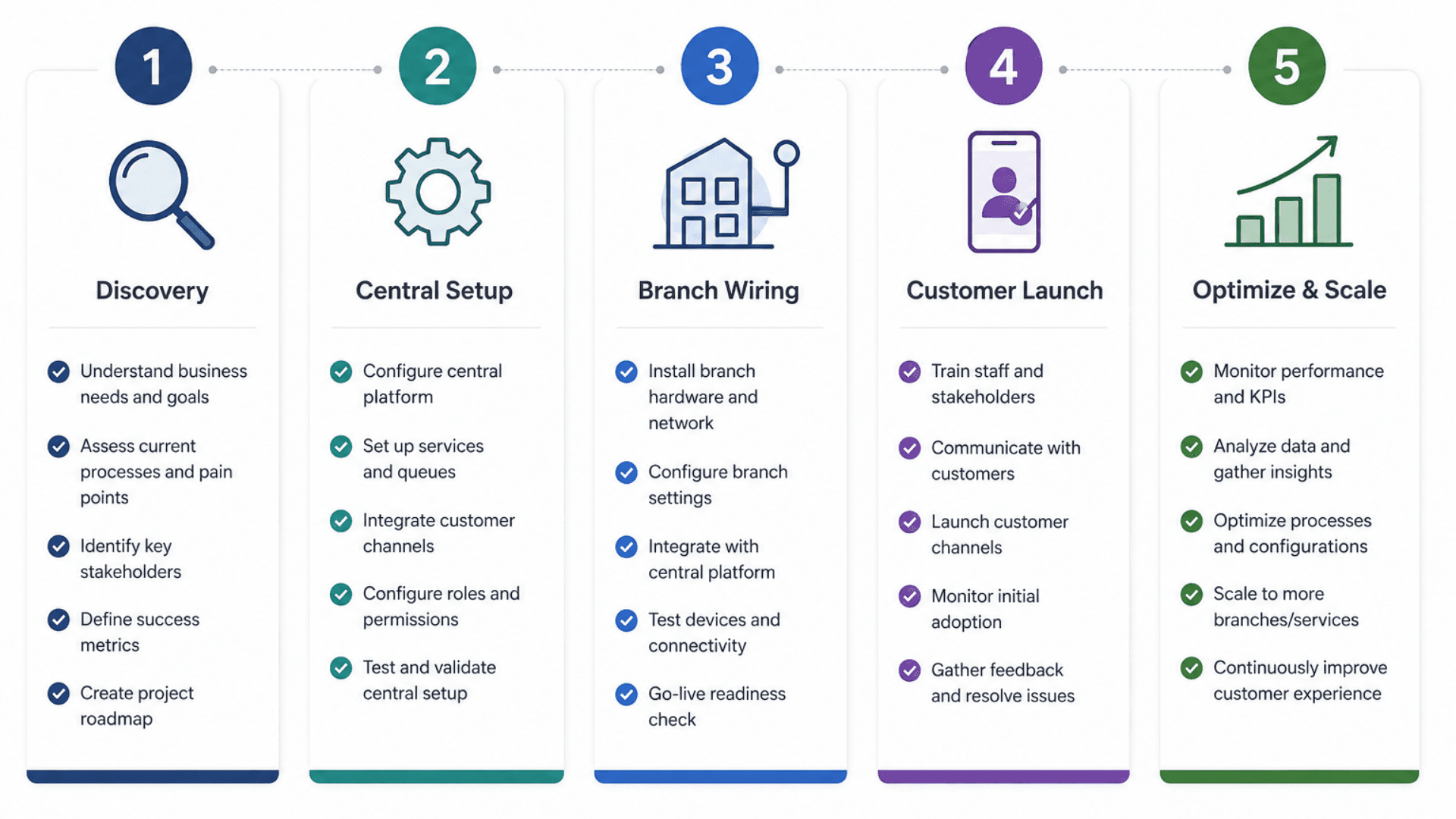
- 01
1) Discovery & Customer-Journey Design
ChecklistMap services, peak patterns, priority / VIP rules, and accessibility requirements per branchDecide walk-in vs virtual vs appointment policy per servicePick the customer channels you will launch with: mobile app / web / WhatsApp / Telegram / ChatBot / SMS / QRDefine notification cadence (“Soon” and “Now” lead times) and message tone of voice per localeAgree the “virtual → live” conversion trigger (geofence, QR on arrival, or “I’m here” tap) - 02
2) Central Configuration (MSA / GLITT)
ChecklistCreate the organization structure — business units, areas / regions, and branchesBuild the service catalogue — services and sub-services, including main, hidden, and silent service types; set opening hours, capacity, and priority / VIP rules per serviceAssign services to each branch, and map which counters serve which servicesCreate users and roles — system admin, business admin, business manager, area manager, branch manager, and CR (counter) users — with access scoped per branch or areaUpload branding: logos, colors, custom domain, app icons, splash screens, language packsConfigure WhatsApp Business / SMS gateway / push provider credentials, and identity verification (OTP / national e-ID / appointment code) per serviceDefine KPIs, SLAs, and the dashboards management needs - 03
3) Branch & Integration Wiring
ChecklistProvision branch servers and the branch-local DB for EMS / CSAConnect EMS, CSA, GRAVIA, CounterDSA, and calling hardware (RS485 / PoE) as requiredWire integrations: CRM, ERP, identity provider, SMS / WhatsApp gateway, paymentValidate real-time events (join, call, transfer, no-show, served) end-to-end across mobile clients and in-branch screensSmoke-test the virtual → live ticket conversion path in real conditions - 04
4) Customer-Facing Launch
ChecklistSubmit branded mobile apps to the Apple App Store and Google PlayPublish the web portal, register the WhatsApp Business number, configure the Telegram / ChatBotDeploy QR posters and NFC tags at branch entrancesRun a soft launch with a friends-and-family cohort before full marketing pushTrain front-line staff on the EMS cockpit and the new virtual-ticket workflow - 05
5) Optimize, Measure & Scale
ChecklistTrack KPIs weekly: wait time, service time, no-show, abandonment, channel mix, CSAT, NPSTune predictive ETA parameters and notification lead times based on real dataA / B test notification copy, reminder cadence, and reschedule rules to reduce no-shows furtherRoll out to the next wave of branches using the same templates with local overridesFederate dashboards across regions and countries for executive reporting
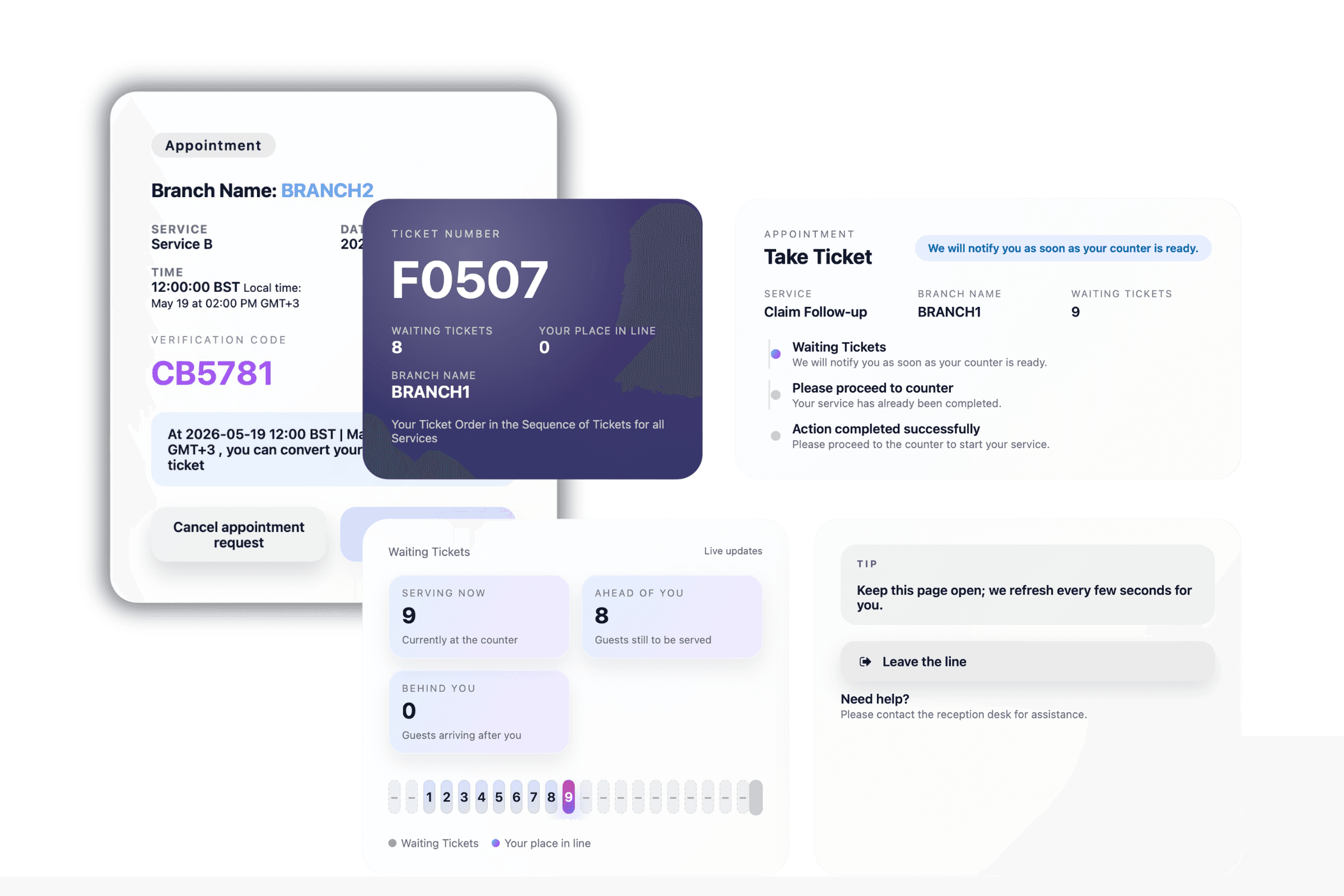
Virtual Queue Management System Gallery
Visual highlights of GLARUS MobileWCSA — the virtual queue and appointment platform inside the GLARUS ecosystem.
Why Physical Queues Fail
Physical lines block the lobby, force customers to wait on-site, and turn staff into crowd control — here is why virtual queueing is essential.
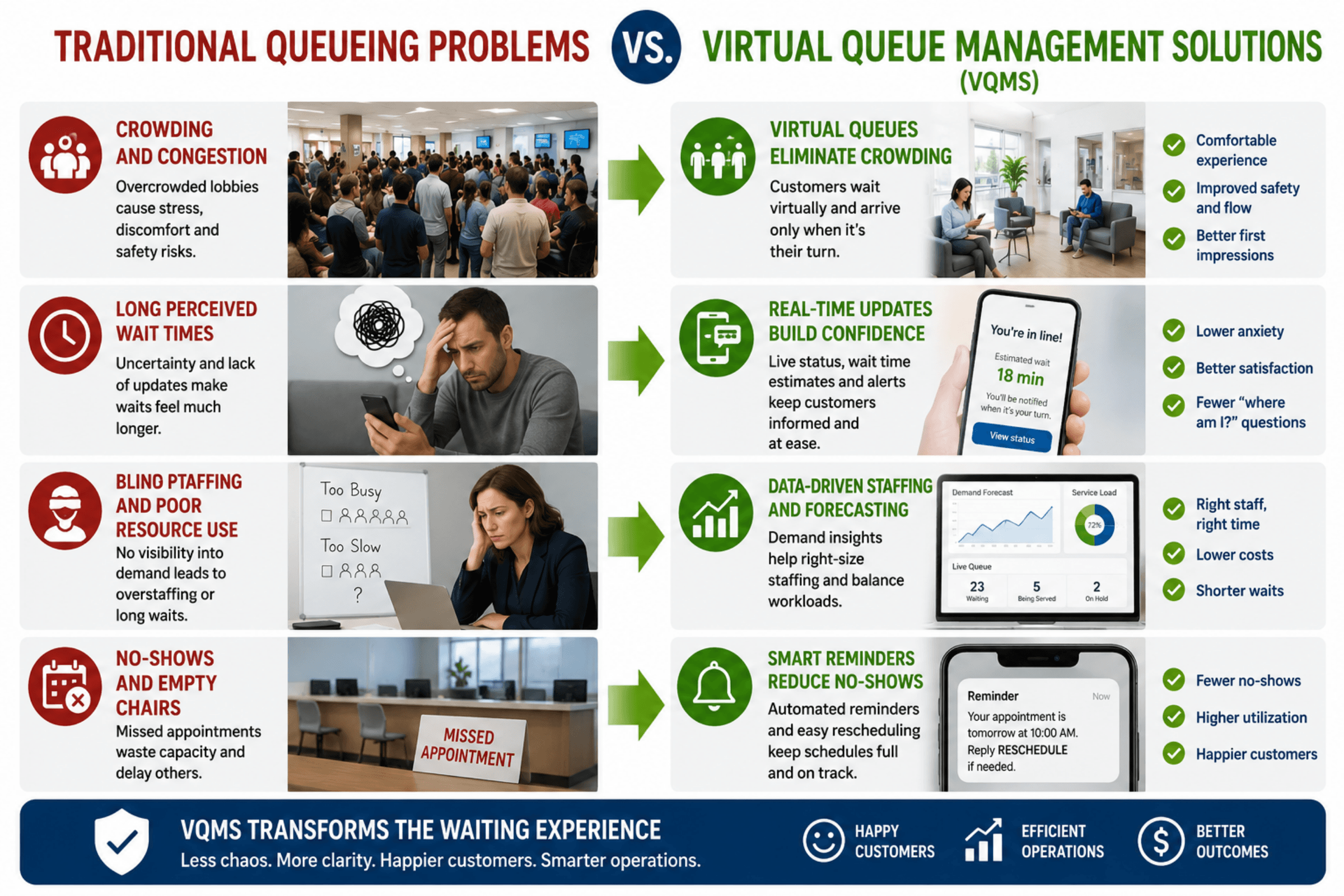
Physical Crowding & Safety Risk
Paper-ticket queues force customers into a confined waiting area. Peak-hour congestion creates safety incidents, breaches social-distancing guidance, and damages the in-branch experience — especially in clinics, embassies, and government halls.
Wait Anywhere, Arrive Just in Time
MobileWCSA lets each customer join the queue from wherever they are — home, office, café, car — and walk in only when the “Now” notification arrives. Lobby footfall drops 60 to 80% on day one.
Long Perceived Waits
A 20-minute wait looking at a packed lobby feels like 40. Without visible position or an honest ETA, frustration compounds. Industry studies show 73% of customers abandon a queue if the wait feels too long, and 91% of them never come back to that branch.
Live Transparency Builds Trust
Each customer sees a live queue position and a predictive ETA that recalculates with every event. Perceived wait time falls by up to 70% because uncertainty is gone, and CSAT scores rise as a direct result.
Wasted Customer Time
Customers stuck in a physical line cannot use their time productively. The cost is real: in retail it is lost basket size, in healthcare it is missed working hours, in banking it is dissatisfied premium customers who silently churn.
Productive Waiting = Higher Revenue
Customers reclaim their waiting time. In retail they keep browsing (basket size goes up); in healthcare they wait in comfort; in banking they remain calm and engaged, ready for cross-sell and advisory conversations.
Blind Staffing & SLA Misses
Without real-time demand data and channel-level analytics, branch managers cannot predict peaks, balance counters across services, or hit waiting-time SLAs. Staff is over-allocated when it is quiet and overwhelmed at the rush.
Demand-Aware Staffing
Real-time channel-aware analytics tell each branch manager where the load is coming from and how it is trending. Counter assignments and break schedules can be adjusted live — and the central plane benchmarks across the whole estate.
No-Show & Abandonment Drag
Paper-ticket queues do nothing to remind customers, so no-show rates of 15 to 30% are typical for appointment-style services — burning counter capacity that could have served the next customer.
Notifications That Actually Show Up
Reminders go out via the channel the customer used to join — push, SMS, WhatsApp, or email — at configurable times. No-show rates typically fall by 30 to 50% within the first month.
Fragmented Channels & No Single Source of Truth
Walk-in customers, phone bookings, and online appointments often live in disconnected systems. Reports are stitched together manually; cross-channel customer journeys are invisible to the business.
One Queue, Every Channel
Virtual, walk-in, appointment, and callback tickets all live in the same EMS branch queue with one set of priority rules. Reports and SLAs cover every channel together — no manual reconciliation.
Virtual Queue Features
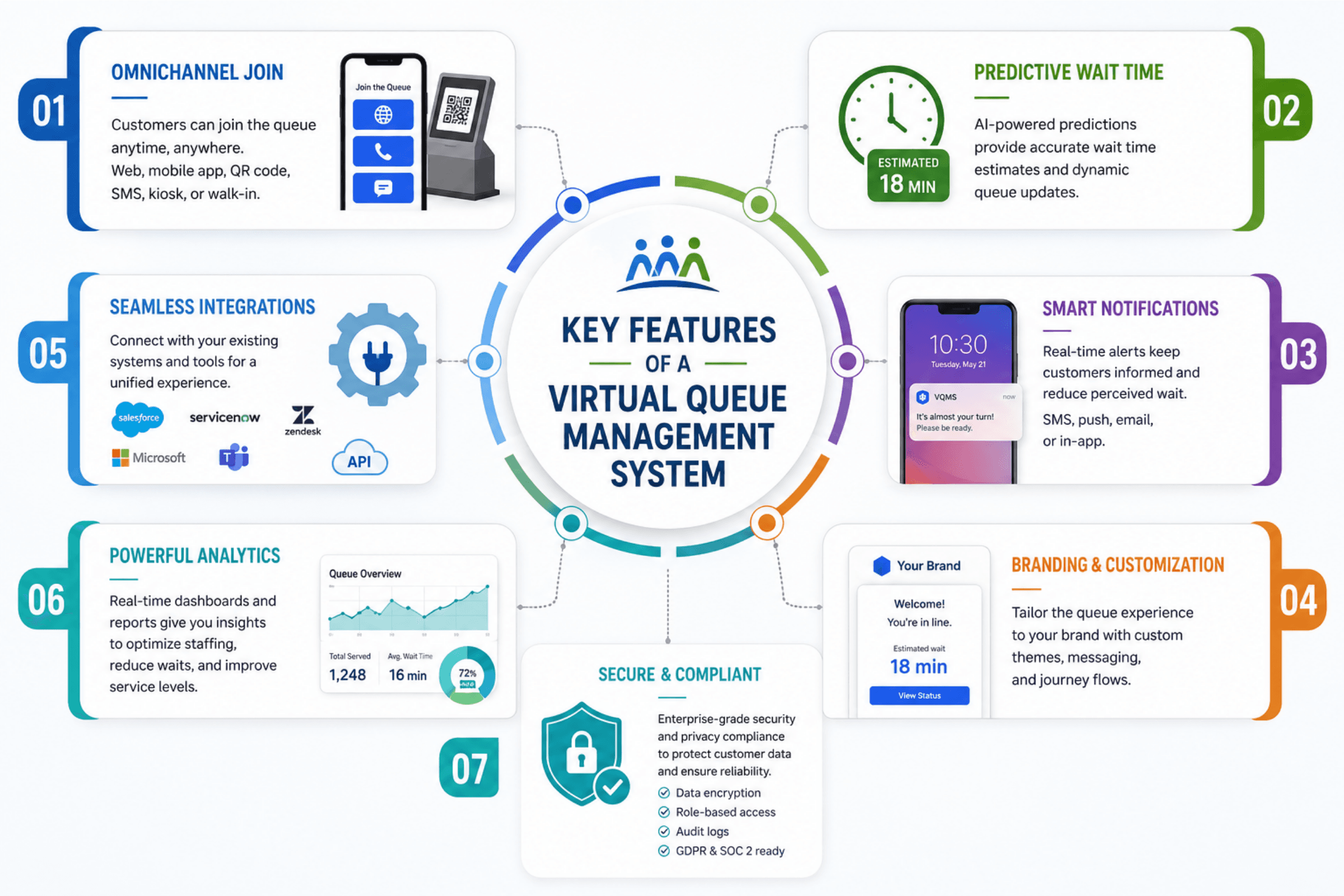
Remote Queue Join (Mobile / Web / WhatsApp / Telegram / SMS / QR / ChatBot)
Real-Time Position Tracking with Live Updates
Accurate Estimated Wait Time (Predictive, Recalculated Live)
“Now / Soon” Notifications via Push, SMS, Email, and WhatsApp
Online Appointment Booking with Reminders & Reschedule
Conversion of Virtual Tickets to Live Branch Tickets (EMS Sync)
Branch / Service / Counter-Level Multi-Tenant Configuration
Multi-Branch, Multi-Region, Multi-Country Deployments
Multi-Language Support (RTL / LTR) with Localized Messaging
Customer Identity Verification (OTP, Document, Appointment Code)
No-Show Detection, Grace Periods, and Automatic Recovery
Priority / VIP / Accessibility Queue Rules
Real-Time Broadcasting (Redis + Laravel Echo / Pusher) with Fallbacks
CRM / ERP / SMS Gateway / Payment / Identity API Integrations
White-Label Branding, Logos, Themes, and Custom Domains
Real-Time Analytics: Wait Time, Service Time, Abandonment, NPS
GDPR / HIPAA / PDPL / ISO 27001-Aligned Data Protection
Cloud-Hosted or On-Premise Deployment Options
99.9% Uptime SLA with Multi-Region Failover (Cloud)
Worldwide Reseller, Partner, and Implementation Network
Virtual Queue Components
Remote Queue Channels, Notifications and Branch Synchronisation.
Omnichannel Remote Queue Access
Empower customers to enter the queue from any channel they already use — meeting every demographic and every device.
- Native mobile apps for iOS and Android with branded UI and push notifications
- Responsive web portal — no download, embeddable in existing portals
- WhatsApp Business, Telegram, and Messenger / website ChatBot conversational flows
- QR code and NFC for instant contactless on-site check-in
- SMS path for low-bandwidth or feature-phone users
Smart “Now / Soon” Notification Engine
Deliver the right message, on the right channel, at the right moment — no app required.
- Push, SMS, WhatsApp, and email channels with per-customer preference
- Configurable lead times (e.g. 15, 10, 5 minutes ahead) per service
- Per-locale message templates with RTL / LTR support
- Automatic suppression when the customer has already arrived
Virtual → Live Branch Ticket Conversion
A virtual ticket isn’t a separate world — it becomes a first-class ticket in the live branch queue at the right moment.
- Geofence, QR-on-arrival, or “I'm here” trigger options
- Automatic promotion into the EMS counter cockpit on arrival
- Same priority and routing rules as walk-in tickets
- No re-queueing for the customer — one journey end-to-end
Appointments + Virtual Queue, Unified
Run scheduled appointments and on-demand virtual tickets through the same engine — and report on them together.
- Time-slot booking with capacity controls per service
- Automatic reminders to cut no-show rates by 30 to 50%
- Auto-promotion of appointments into live tickets near service time
- Combined waiting-time, service-time, and no-show analytics across channels
White-Label Branding & Localization
A virtual queue your customers see as yours — not the vendor’s.
- Brand colors, logos, custom domain, app icons, splash screens
- Per-language content (RTL / LTR) with locale-aware messaging
- Branch- and service-specific theming inside one app
- OEM / reseller white-label packaging available
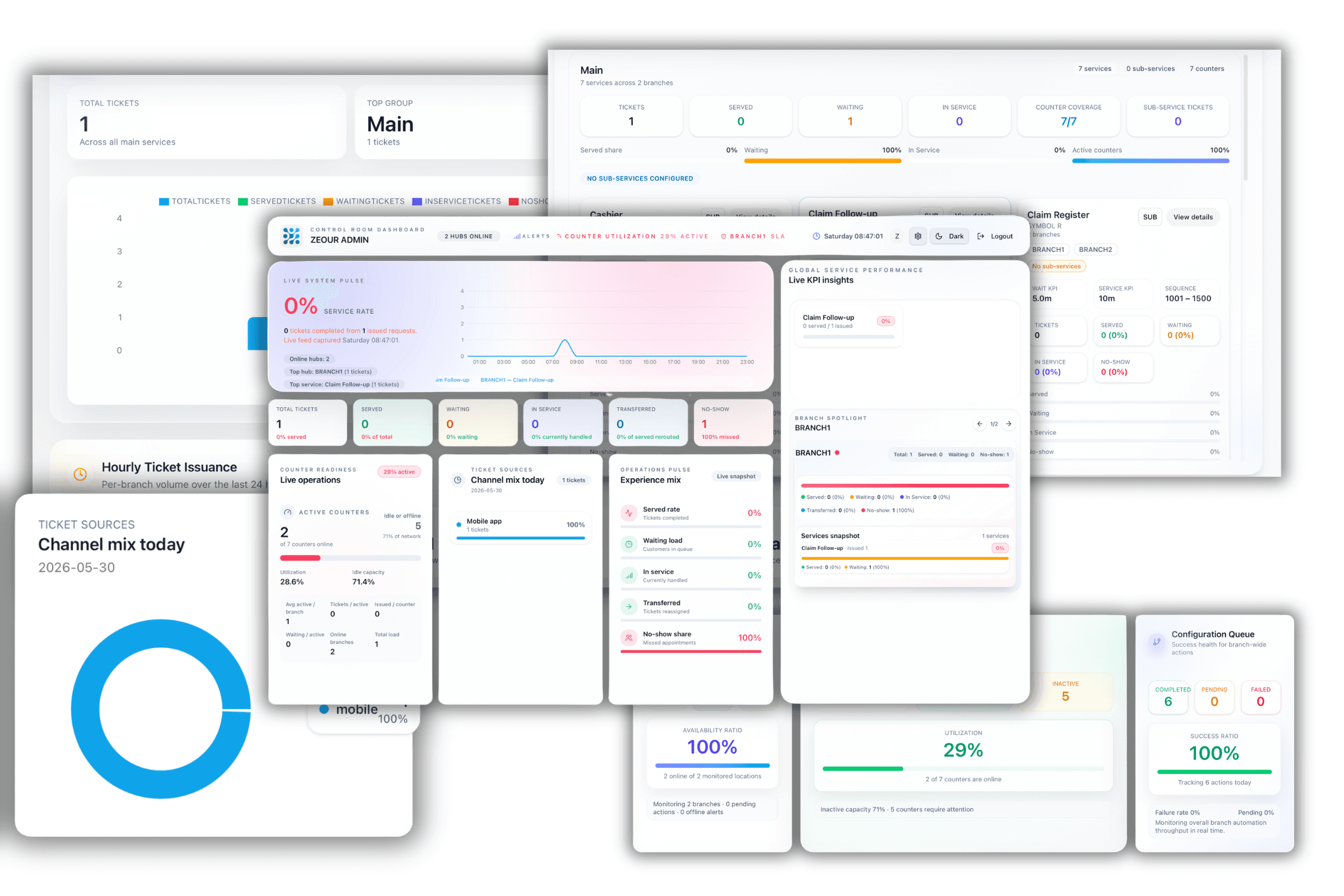
Real-Time Operations & Analytics
Live operational visibility for staff, and deep historical analytics for management.
- Real-time per-branch dashboard for the floor manager
- Aggregated cross-branch and cross-country dashboard for the central team
- KPIs: wait time, service time, no-show, abandonment, channel mix, peak load
- CSV / Excel / API export to Power BI, Tableau, Looker, and other BI tools
Enterprise Integrations & Security
Slot into your existing ecosystem — and meet the security bar that regulators expect.
- REST APIs and webhooks for CRM, ERP, identity, payment, and SMS gateways
- Connectors for Salesforce, Dynamics, HubSpot, SAP, Oracle, SAML / OIDC IdPs
- TLS in transit, encryption at rest, RBAC, 2FA, audit logging
- GDPR / HIPAA / PDPL / ISO 27001-aligned controls, with on-prem option for data sovereignty
- 99.9% uptime SLA with multi-region failover (cloud edition)
Customer Flexibility and Waiting-Area Capacity
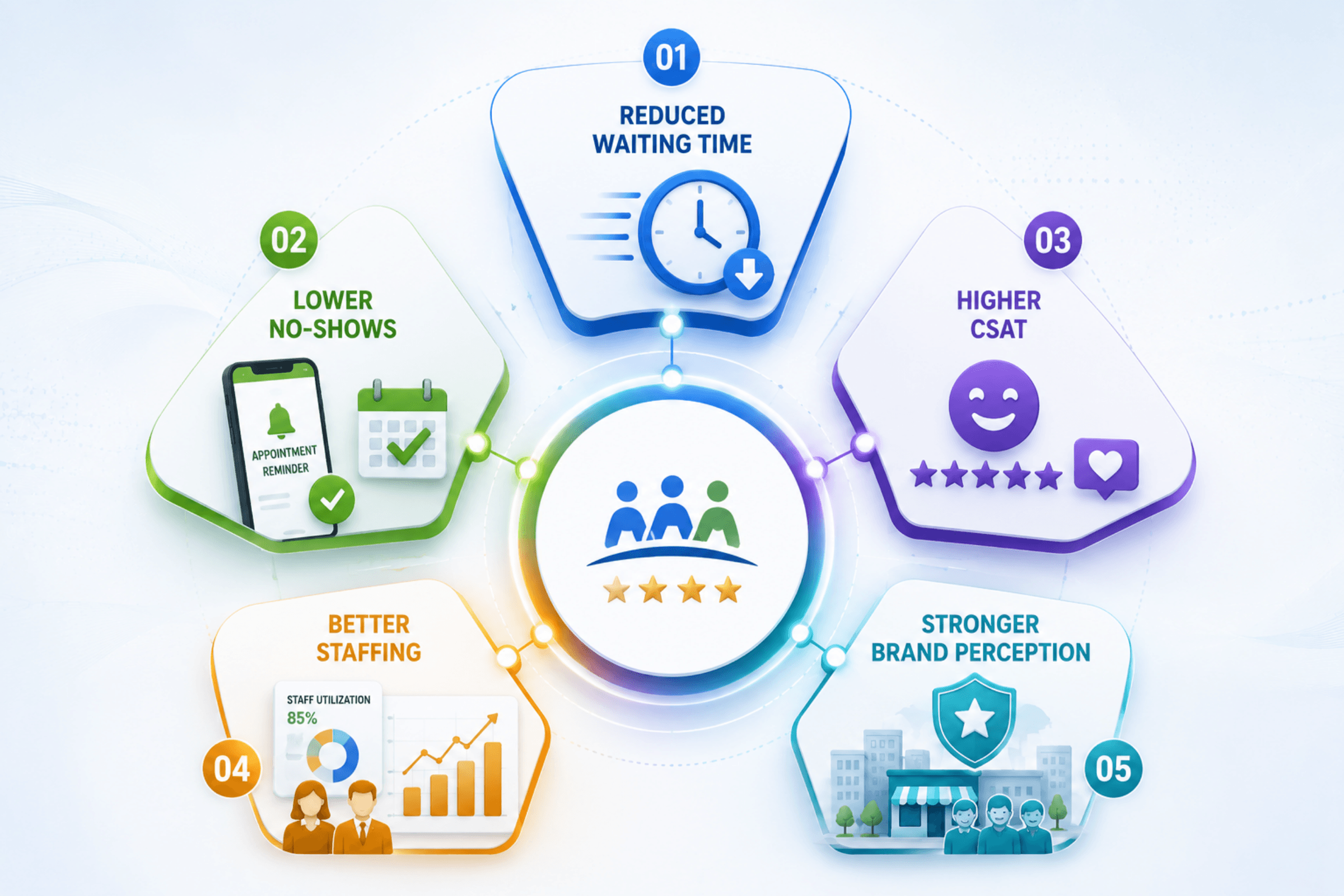
Cut physical crowding in waiting areas by up to 80%
Reduce perceived wait time by up to 70% with live transparency
Lower no-show rates by 30–50% via timely notifications and reminders
Increase customer satisfaction (CSAT/NPS) and Google review ratings
Reclaim 25–40% of customer time previously lost to physical queues
Improve staff allocation with real-time demand and arrival forecasting
Boost in-store dwell time, basket size, and cross-sell opportunities
Standardize the customer journey across single- and multi-branch estates
Meet public-health and accessibility expectations with contactless flows
Future-proof your CX with an omnichannel, integration-ready platform
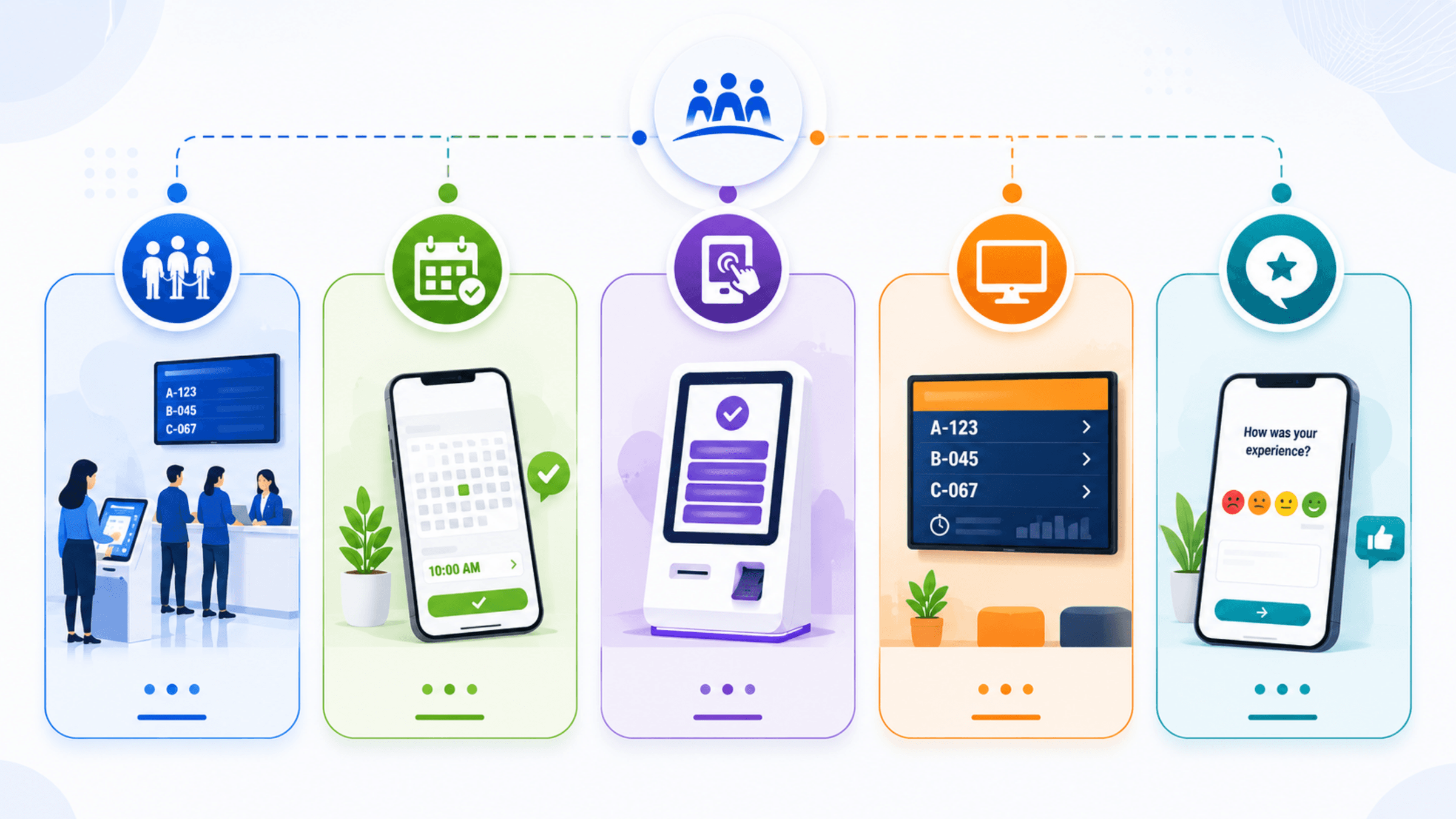
From Remote Queue Join to Branch Service
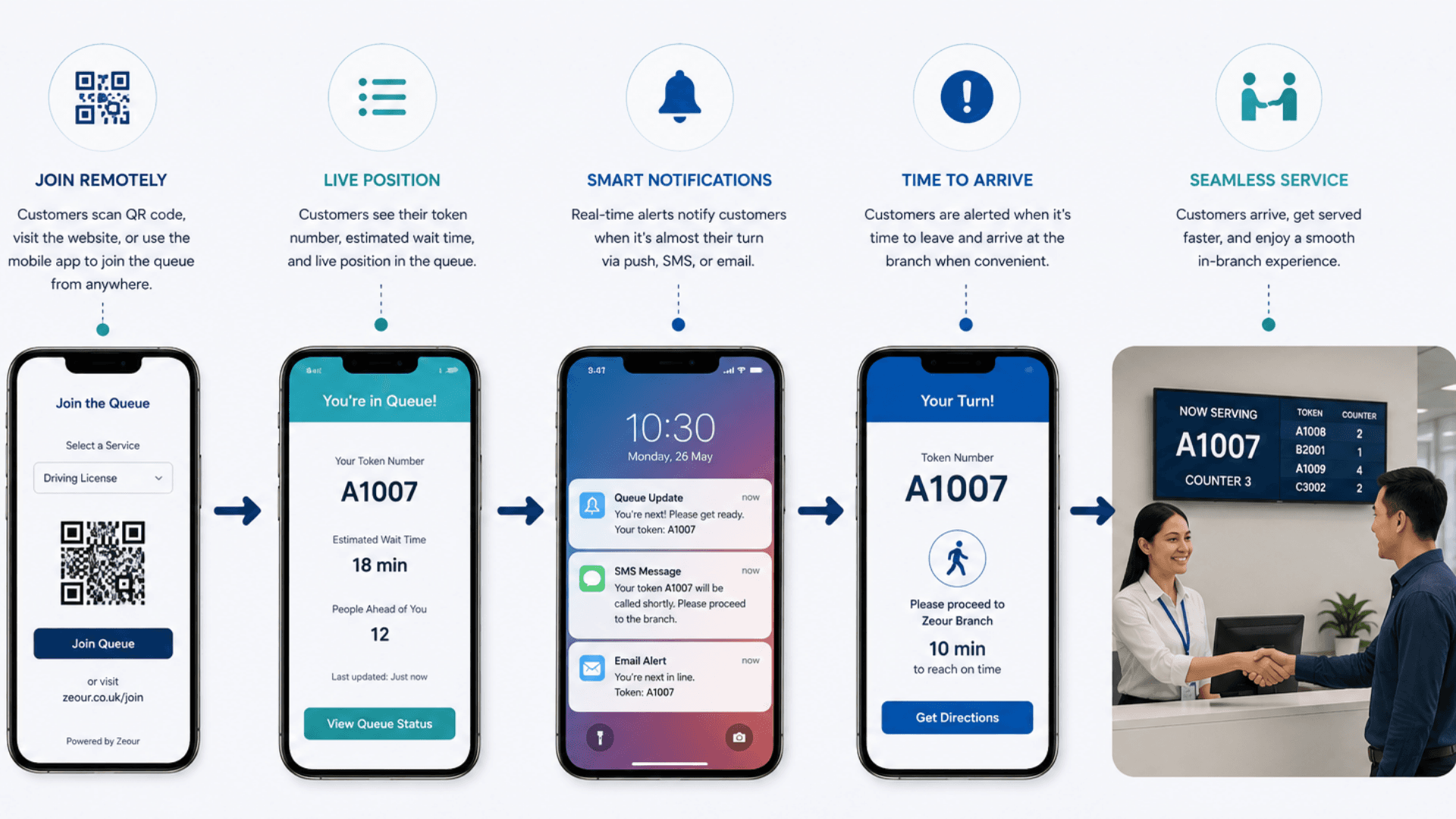
Customers select a service, follow live updates and arrive ready to enter the branch queue.
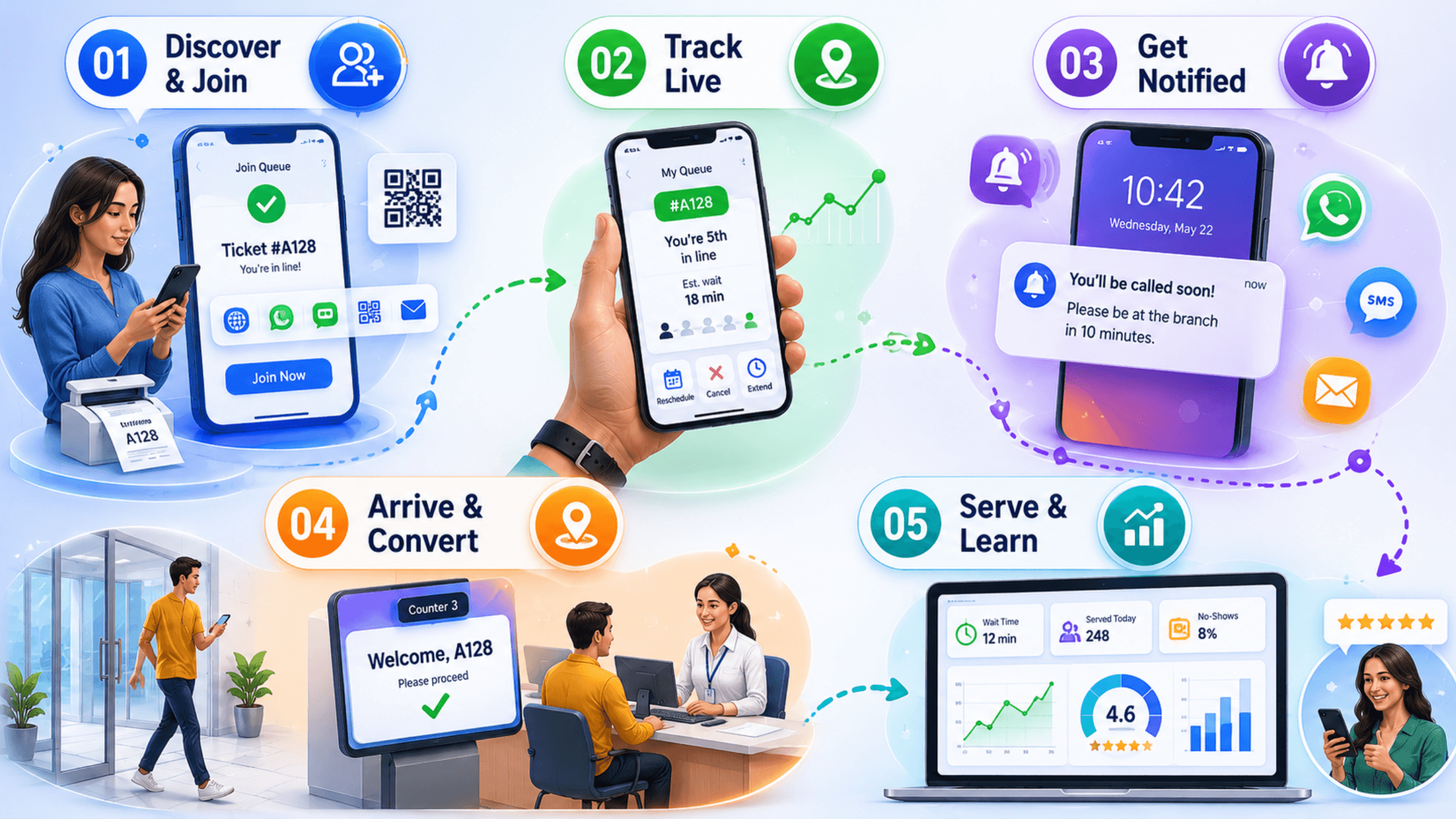
Discover & Join
Customers join the queue from anywhere — mobile app, web portal, WhatsApp / Telegram chat, ChatBot, QR code, SMS, or a kiosk-printed virtual ticket — and receive a unique ticket with live position and estimated wait time.
Track Live
The MobileWCSA app shows real-time queue position and a predictive ETA that recalculates automatically as the branch progresses, with the ability to reschedule, cancel, or extend the slot.
Get Notified
Smart “Soon” and “Now” alerts arrive via push, SMS, WhatsApp, or email when the customer should head over — configurable per service (e.g. 5 / 10 / 15 minutes ahead) and per channel.
Arrive & Convert
On arrival, the virtual ticket converts seamlessly into a live branch ticket on the EMS counter screen — no re-queueing — and the customer is called the moment a counter is free.
Serve & Learn
EMS records the full lifecycle (waiting time, service time, transfer, no-show). The Feedback module captures CSAT/NPS, and the analytics dashboard turns it into actionable insight for staffing and SLA management.
Virtual Queue Use Cases by Industry
Explore the service environments relevant to virtual queue.
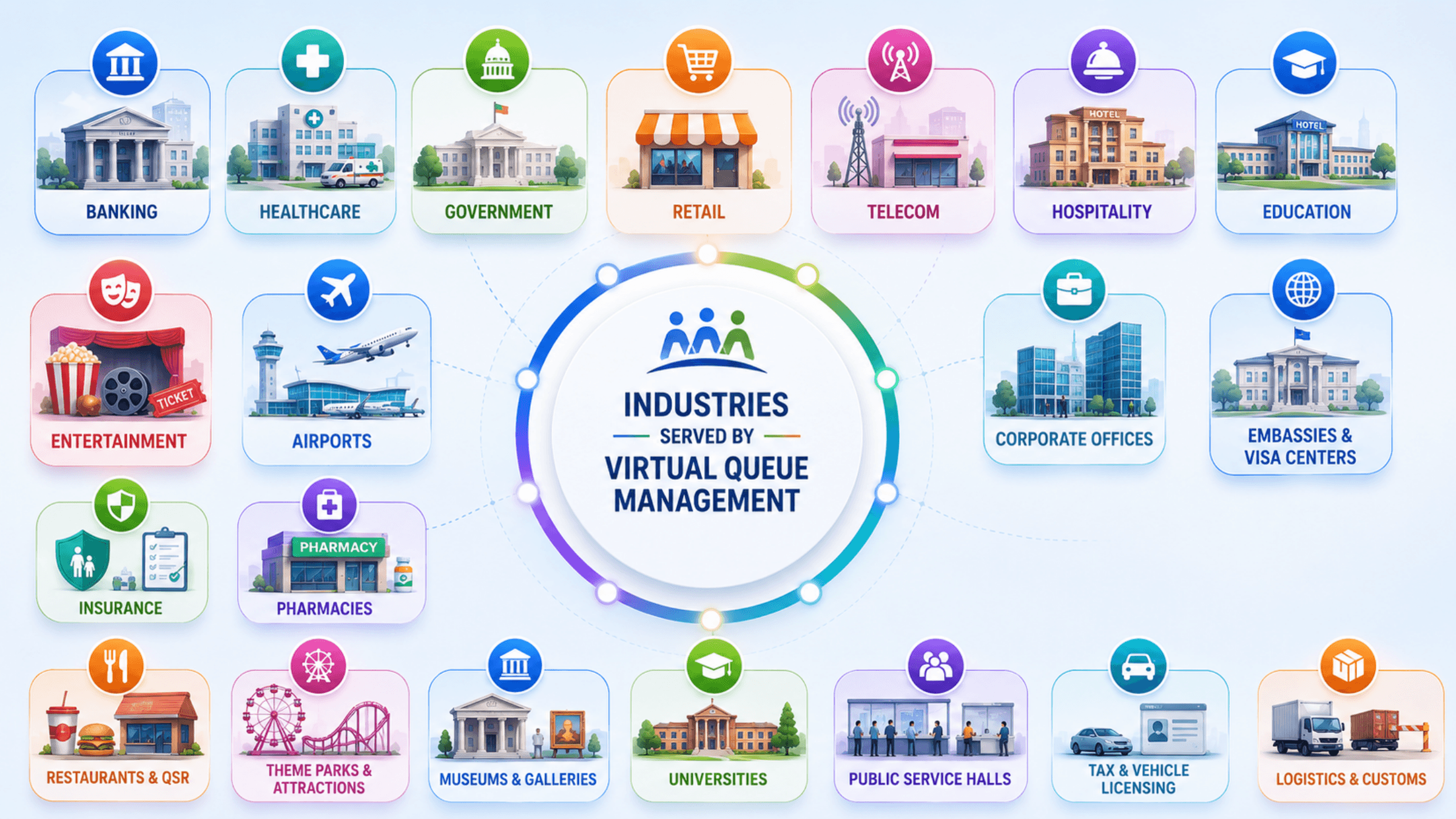
Open the deep dive by vertical
Customers running Virtual Queue in production
1 featured deployment where Virtual Queue ships today — a selection from a much wider production portfolio. Click any card for the full case-study deep dive.
Virtual Queue Management System FAQs
Get answers to the most common questions about our virtual queue.
What is a Virtual Queue Management System (VQMS)?
Can a small business with one location use virtual queueing?
How does a virtual queue management system work?
What is the difference between virtual queuing, walk-in queue management, and appointment booking?
Which channels can customers use to join the virtual queue?
How accurate are the estimated wait times?
Does virtual queueing replace physical kiosks and signage?
Can MobileWCSA integrate with our CRM, ERP, identity, payment, and SMS providers?
Is the virtual queue cloud-hosted or on-premise?
How does virtual queueing handle no-shows, late arrivals, and reschedules?
Does the system support multiple branches, regions, and languages?
How does virtual queueing reduce crowding and improve safety?
What analytics and KPIs does a virtual queue management system provide?
Is the virtual queue system secure and compliant (GDPR, HIPAA, PDPL, ISO 27001)?
How long does it take to implement a virtual queue management system?
How much does a virtual queue management system cost?
Which industries get the most value from virtual queue management?
Can MobileWCSA work standalone, or does it need the full GLARUS platform?
Is Zeour's virtual queue management system available worldwide?
Explore Related Solutions
Connect remote waiting with the arrival and service tools used at your branch.
Ready to Transform Your Operations with Virtual Queue?
Discuss your workflows, deployment requirements and integration scope with the Zeour team.
Virtual Queue — concepts you'll meet
Definitions for the operational terms that appear across this page. Tap any chip to read the long-form entry plus its cross-links.