
Visitor Management System
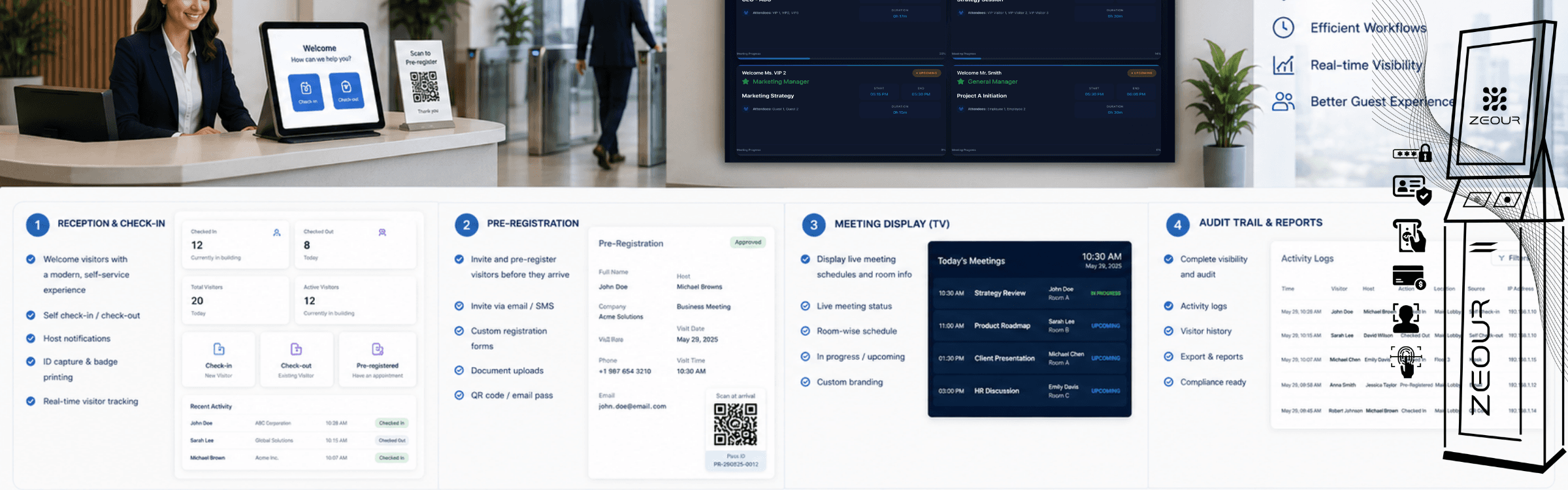
Zeour's visitor management system supports reception teams handling guests at offices, campuses and other controlled premises. Pre-registration, identity checks, badge printing and host notifications connect arrival with visit records and oversight across reception points.
Visitor Registration and Reception Oversight
Prepare for expected guests and record who arrives, whom they are visiting and when they leave. GLARUS VMS brings reception workflows, smart card handling and meeting-room information into the visitor operation.
Helping Visitors Arrive and Find Their Destination
A visitor check-in kiosk gives guests a self-service arrival point. The indoor wayfinding system helps them locate their destination after registration.
Use digital signage for reception and meeting-room information. For service centres that also handle waiting customers, review the separate customer queue management platform.
For reception shared by building management and tenant organisations, the UAE enterprise visitor-management guide provides handover scenarios and data-access tests to include in your evaluation.
Visitor Check-In, Access Roles and Visit Records
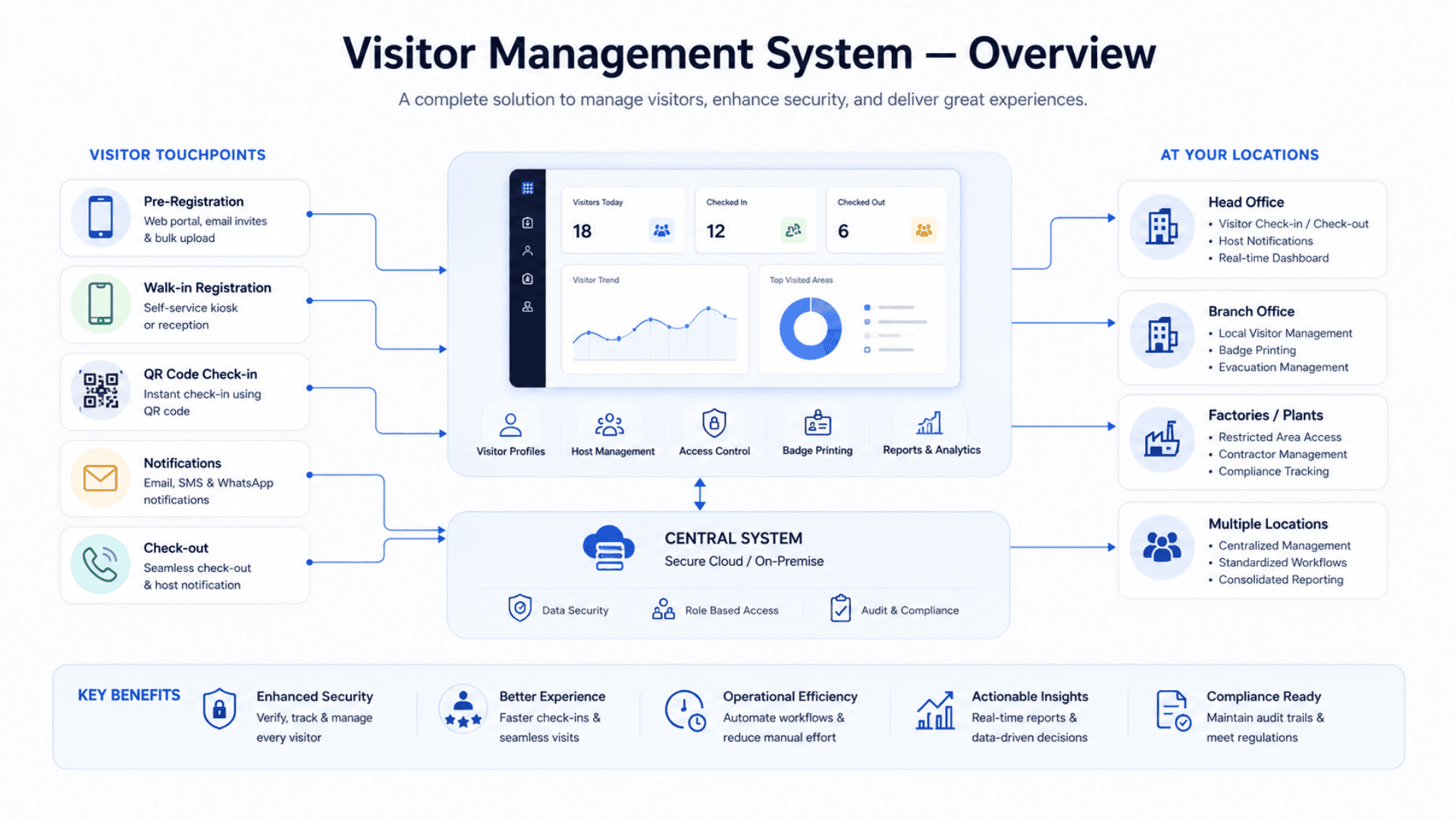
GLARUS VMS is two integrated applications working as one. The first is the operator backend — reception and admin UIs, a full REST and real-time API surface, role-based access, the resilient email outbox, the scheduled tasks, and every byte of visitor data. The second is the read-only Meeting Display companion that runs on TVs and kiosks in meeting rooms and lobbies, pulling live reservation data from the backend over an authenticated channel. Together they cover the whole visitor journey — from host pre-registration, through arrival and badge print, to live tracking and audit-ready reporting — while keeping the lobby experience fast and the back-office picture honest.
Zeour GLARUS VMS — the end-to-end visitor management platform deployed by governments, banks, hospitals, defence sites, and corporate campuses worldwide. Pre-registration with ICS calendar invites, photo-capture identity verification, smart card inventory, role-based admin (Reception / Building Manager / Department Manager / Admin), full audit trail, auto-checkout for forgotten visits, and a meeting-room display companion app that updates live as bookings change. GDPR / HIPAA / PDPL aligned, cloud or on-premise. Right-sized for every front desk — a single reception with one tablet runs the same platform as multi-site corporate estates.
Key Functionalities
Pre-Registration & Walk-In Flows
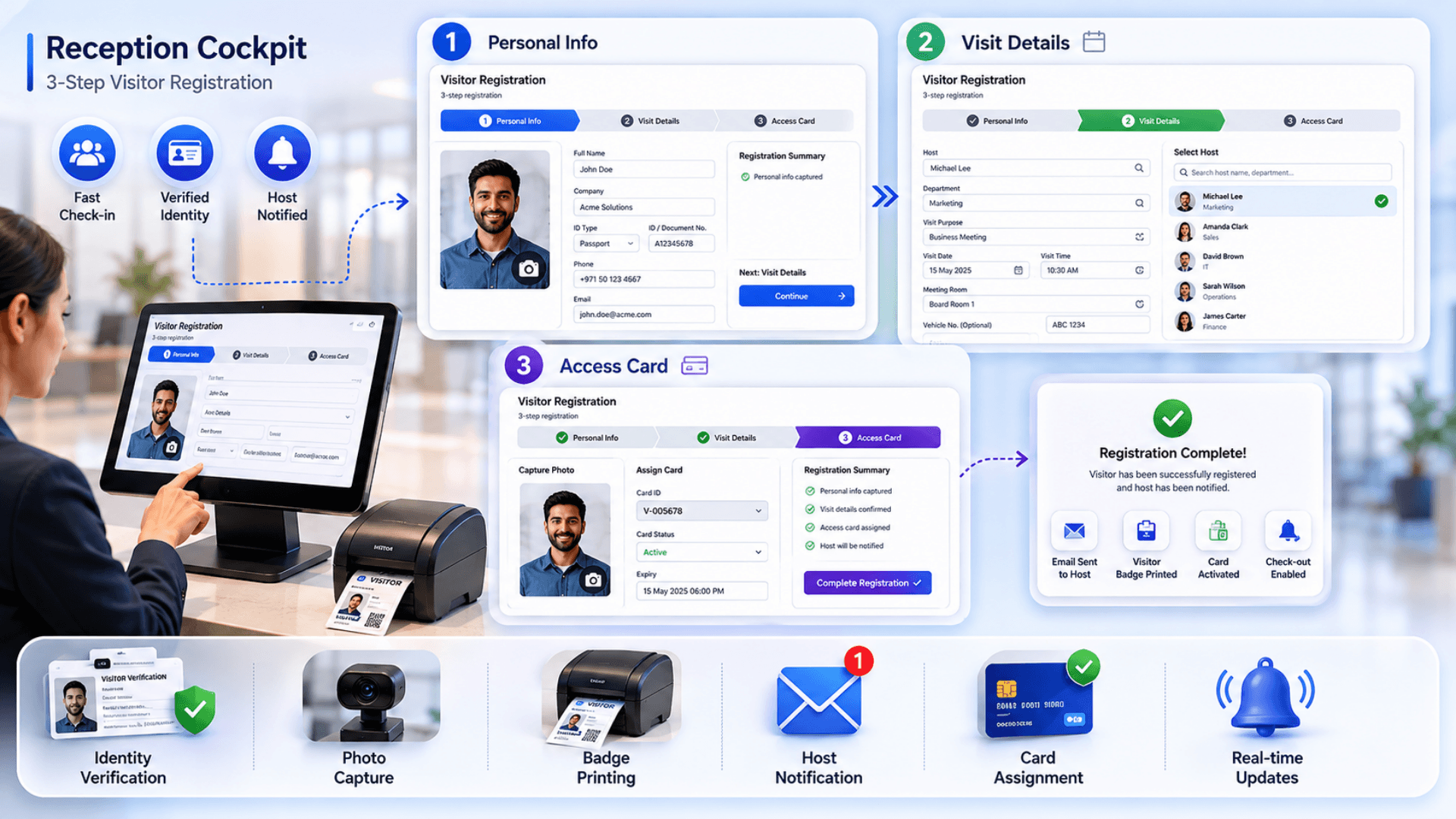
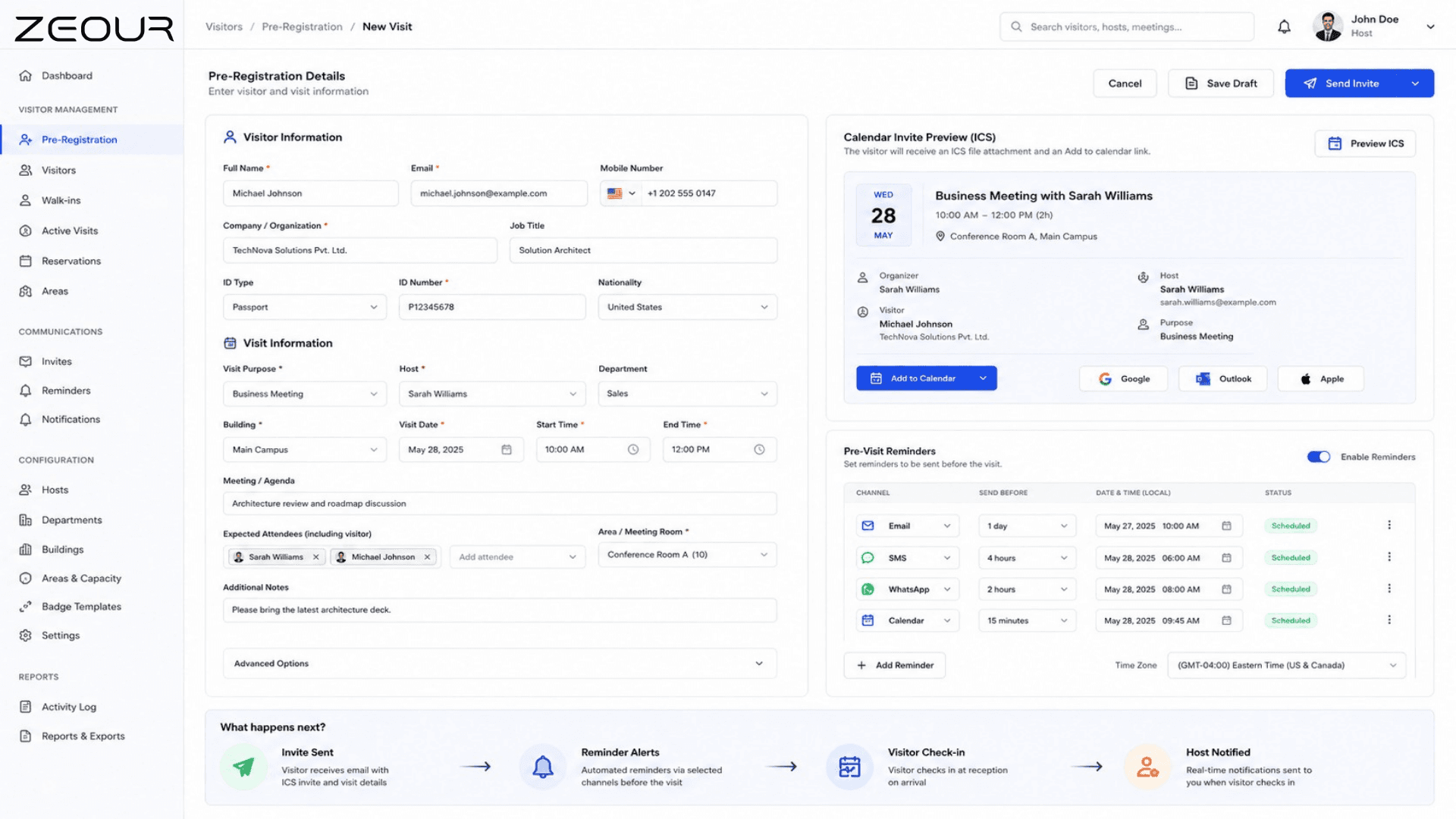
Host pre-registers visits from the web app and the visitor receives an ICS calendar invite + pre-visit reminder. Walk-in arrivals go through a 3-step reception wizard with photo capture and instant badge printing.
Identity Verification & Photo Capture
Capture national ID, company, host, vehicle plate, and a photo for every visitor. Photo is stored with the visit and surfaced in the activity log for incident review.
Building → Department → Host Hierarchy
Three-level org model. Building Managers are scoped to their sites, Department Managers to their departments. Hosts roll up to departments which roll up to buildings — exactly how a real organization is structured.
Area Capacity & Reservation Overlap
Each area (meeting room, lobby, demo space) has a capacity cap. Overlapping reservations are rejected with 409 CAPACITY_EXCEEDED — no double-booking. Reservations carry meeting title + attendee metadata that powers the meeting display.
Smart Card Inventory (Active / Lost / Retired)
Every visitor card is tracked as inventory. Assignment history, current state, and rotation are visible on the admin UI. Lost or retired cards are taken out of rotation automatically.
Host Notifications
Email delivery over standard SMTP or Microsoft 365. The resilient email outbox retries failed sends, so a temporary mail-server outage never loses a notification.
Calendar Invites (ICS)
Standards-compliant ICS invites with a Google Calendar "Add to calendar" link, configurable timezone, and an option to force UTC. Works with Outlook, Google Calendar, Apple Calendar.
Pre-Visit Reminders & Security Escalations
Cron-driven pre-visit reminder emails go out at a configurable lead time. Overdue visits trigger an automatic escalation to the security team email so the on-site team can investigate while the visit is still fresh.
Auto Check-Out for Forgotten Visits
Every 15 minutes, a cron auto-closes visits past the configured overdue threshold. Reports never show stale active visits. The auto-close is written to the audit log with the system actor.
Meeting Room Display Integration
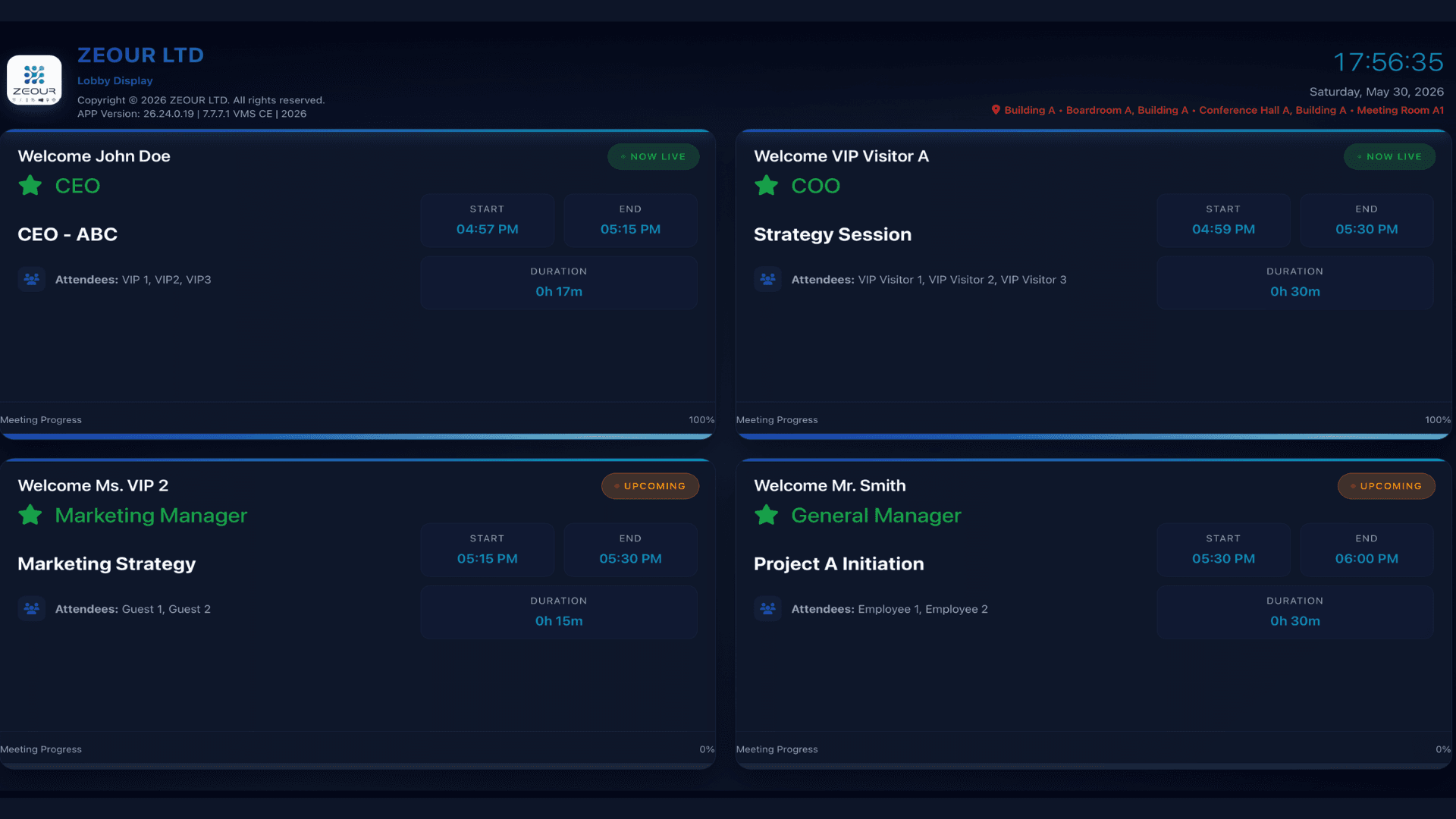
Paired Meeting Display companion app runs on TVs and kiosks in meeting rooms, refreshing in under a second when a reservation moves. Read-only and token-authenticated — can't be tampered with from the lobby.
Visitor + reservation feed drives live meeting-room TVs. No more "Welcome ACME" sticky notes.
- Paired Meeting Display companion app
- Per-screen area mapping (one screen → multiple areas, one area → multiple screens)
- Sub-second refresh on every reservation state change
- Read-only, token-authenticated — display can't be tampered with from the lobby
Activity Log & Compliance Reporting
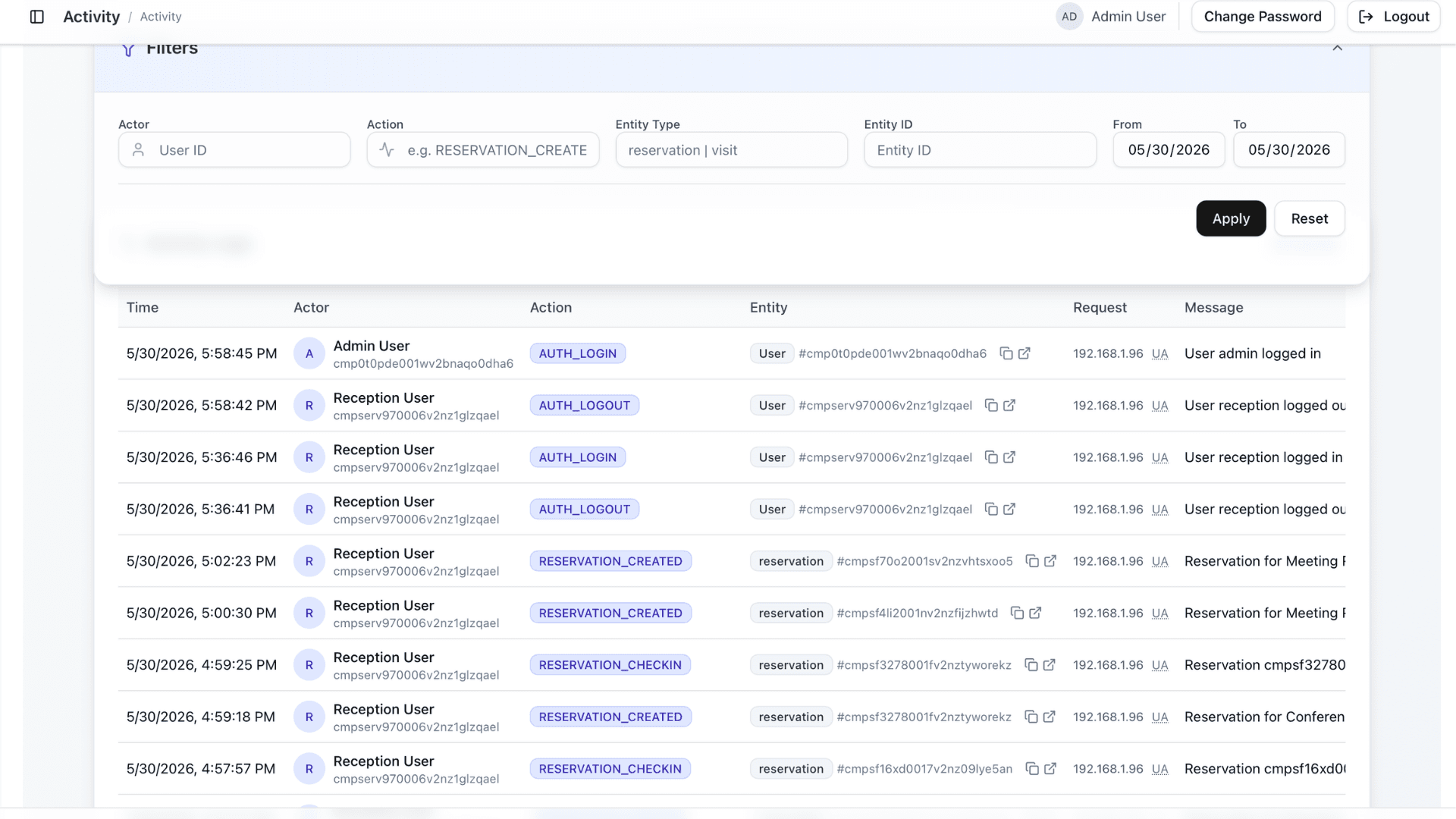
Every state change writes a row to the activity log with actor, action, entity type, entity ID, and JSON metadata. Reports export to CSV / PDF for audits. Daily metrics roll up to dashboards for trend analysis.
Role-Based Access + Multi-Site Scoping
Five roles (Admin / Building Manager / Department Manager / Reception / Basic Access) with route-level enforcement. Users can be scoped to specific buildings or departments via per-user area-access controls.
Software Components
Operator Applications
Reception & Admin Backend
The operator backend and source of truth for every visitor, visit, reservation, host, card, and admin action. Powers the reception wizard, admin dashboards, reports, and the full REST and real-time API surface.
Meeting Display Companion
A standalone app for meeting-room TVs and lobby kiosks. Read-only by design — it never writes data. Pulls live reservation feeds from the backend over an authenticated channel with per-screen token access.
API & Integration Layer
OpenAPI Specification
A full machine-readable OpenAPI contract covering visitors, visits, reservations, cards, hosts, departments, areas, reports, and admin operations. Drives client-SDK generation and partner integrations.
Real-Time Event Stream
An authenticated real-time event stream for live updates to admin UIs — visitor created / checked out, reservation created / checked in / checked out, dashboard counters, and display refresh broadcasts.
Live Display Feed
A one-way live push channel for the Meeting Display companion. Reservation changes broadcast to mapped screens in under a second. Firewall-friendly and lightweight on the display device.
Authentication & Security
Signed Sessions + Role-Based Access
Signed session tokens in secure, same-site cookies. Five role gates enforced at the route level, with a fixed session lifetime and inactivity auto-logout synchronised across tabs.
Rate Limiting & Idempotency
Rate limiting on every sensitive action (login, mail test, card lookup, scheduled tasks). Idempotency support on sensitive operations such as reservation check-in prevents duplicate writes.
Display Access Tokens
Per-screen access tokens, stored hashed, plus a global fallback token. The display app authenticates via a request header only — tokens are never accepted from the URL.
Email & Calendar
Email Outbox with Retry
A resilient outbox pattern — an immediate send is attempted first; failures are queued and drained by a scheduled job with retry counting and lease locking. No notification is ever lost.
SMTP or Microsoft 365 Transport
Choose between standard SMTP and Microsoft 365 as the email transport. Both support modern authentication and encrypted delivery.
ICS Calendar Invites + Google Calendar Link
A standards-compliant ICS invite is attached to every host notification, plus a Google Calendar "Add to calendar" link in the email body. Timezone is configurable, with a force-UTC option for organizations that prefer it.
Operations & Observability
Scheduled Tasks
Every scheduled task (auto-checkout, reminders, escalations, daily metrics, outbox drain) is securely token-gated and can be driven by any standard scheduler.
Activity Log + Daily Metrics
Every business-impactful action writes an activity-log entry. A daily metrics rollup runs overnight and feeds dashboards and trend reports.
Health Monitoring & Process Management
A token-gated health endpoint for uptime monitoring. Production deployments run under standard process management with configurable log rotation.
Hardware Components
Reception & Self-Service Points
Reception Touchscreen Terminals
Touchscreen at the front desk running the 3-step registration wizard. Optimized for capacitive touch and quick photo capture via attached webcam.
Visitor Self-Service Kiosks (KIOSAPP066, AUTO666)
On-site kiosks with thermal badge printer, webcam, and (optionally) a passport/document scanner. Customers verify identity and print their own badge without queueing at reception.
Webcam / Camera for Photo Capture
USB / built-in camera captures the visitor photo. Photo is stored with the visit record and surfaced in the audit log for incident review.
Badge & Card Equipment
Thermal Badge Printer (60 / 80 mm)
Print branded visitor badges on arrival with visitor name, photo, host, area, and a colored expiry / category bar. Inventory tracked in the VMS, so a missing roll triggers an admin alert.
RFID / NFC / Barcode Visitor Cards
Physical visitor cards (RFID, NFC, or barcode) tracked as inventory with Active / Lost / Retired states. Optional integration with corporate access-control systems for door provisioning.
Meeting Room Displays
GRAVIA Display Controller (GRAVIA06)
Signage controller running the Meeting Display app in fullscreen kiosk mode. Drives meeting-room TVs with live reservation data.
Meeting Room TVs (HD or 4K)
Any HDMI display works. Default UI is rendered at 1920×1080 and scaled to fit; 4K screens benefit from the higher pixel density.
Per-Counter Lobby Screens (CounterDSA)
Optional lobby screens showing today's expected visitors, building emergency contacts, and the company's welcome message.
Branch Infrastructure
CONT06 Industrial Branch Server
Compact branch server PC for on-premise deployments. Ubuntu — runs the full GLARUS VMS stack at a single site.
Glarus_Hub (PoE / RS485 Infrastructure)
Industrial 16-channel PoE / RS485 hub for powering kiosks, badge printers, and signage at sites with limited mains availability.
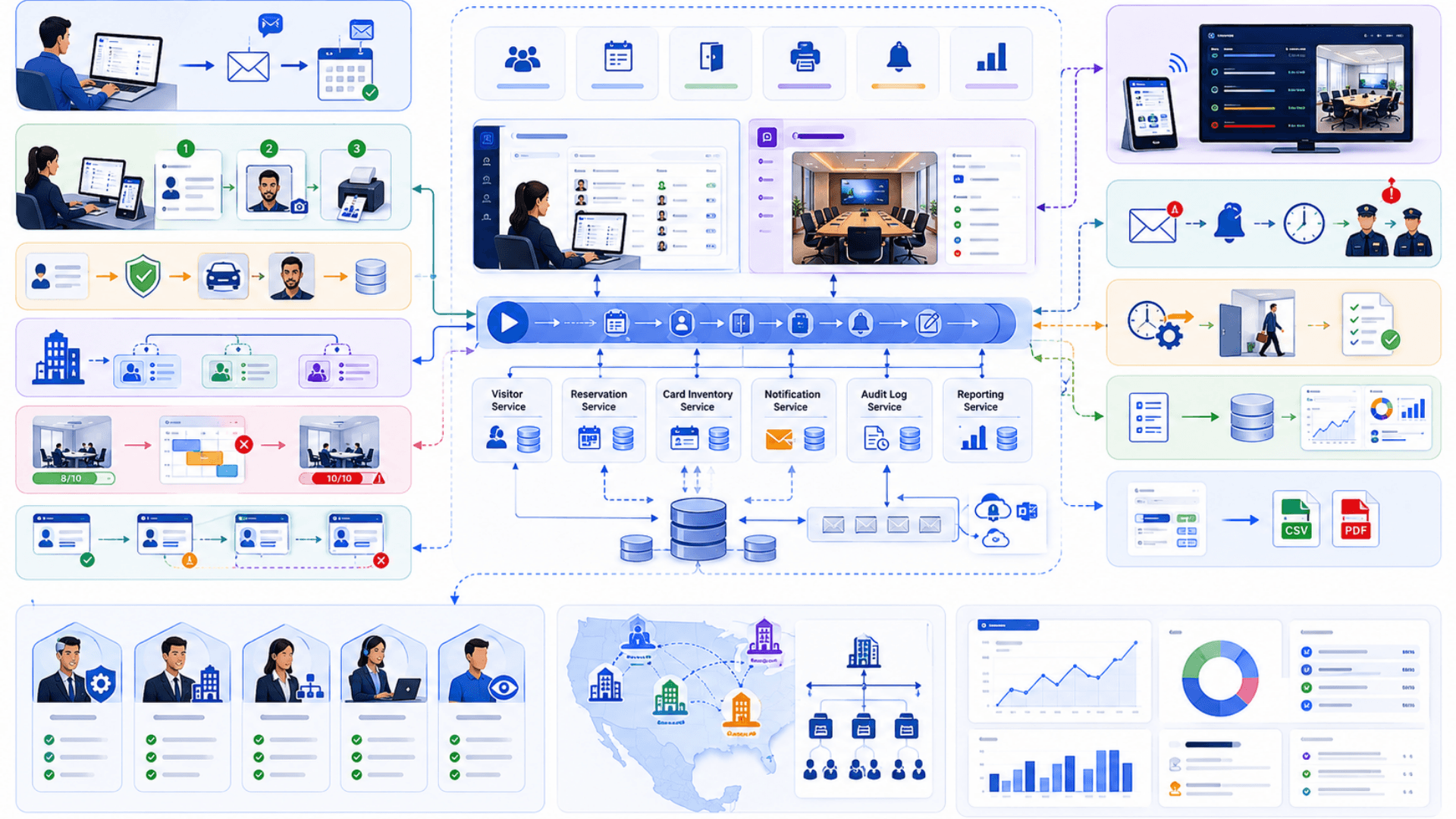
Visitor Management Architecture — GLARUS VMS Platform
GLARUS VMS is deployed as two integrated applications working as one system. The first is the source of truth — the operator backend — which holds every visitor, visit, reservation, host, card, and admin action. The second is the read-only Meeting Display companion that runs on TVs and kiosks in meeting rooms and lobbies. Together they cover the whole visitor journey while keeping the lobby experience fast and the back-office picture honest. Cloud or on-premise — same platform, same operator experience, sovereign data.
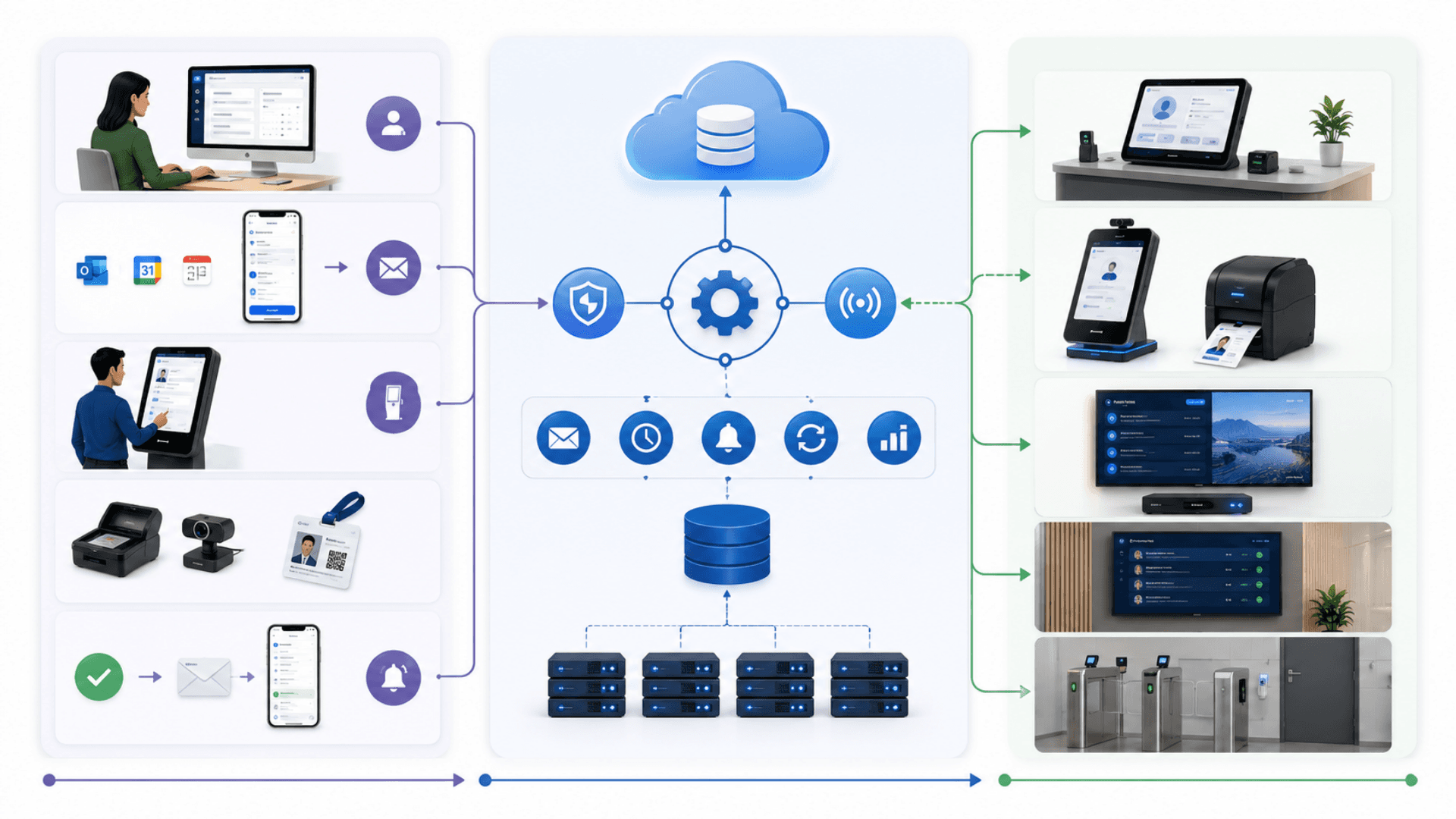
Tier 1 — Customer & Visitor Channels
Wherever the visit starts, the platform absorbs it
- Host pre-registration via the operator web app (Reception / Admin / Manager roles)
- Visitor inbound: ICS calendar invite + pre-visit reminder email (Outlook / Google / Apple)
- On-arrival channels: reception 3-step wizard, self-service kiosk, optional ID / document scanner
- Real-time notifications back to the host: email + in-app live event
Tier 2 — Central Plane
The source of truth for all visitor data
- A full REST API surface, described end-to-end by an OpenAPI specification
- An authenticated real-time event stream for live admin UI updates, horizontally scalable for high traffic
- A one-way live push feed to the Meeting Display companion
- A resilient email outbox with retry + lease locking; SMTP or Microsoft 365 transport
- Scheduled tasks: pre-visit reminders, overdue-visit escalations, auto-checkout, daily metrics, outbox drain
- An activity log capturing every business action with actor + timestamp + structured metadata
Tier 3 — Site Stack (per location)
Reception, lobby, and meeting-room devices that present the experience
- Reception touchscreen terminal running the registration wizard
- Self-service kiosk (KIOSAPP066 / AUTO666) with thermal badge printer and webcam
- Meeting-room TVs running the Meeting Display companion via a GRAVIA Android signage controller
- Per-counter / lobby screens for welcome content and today's expected visitor list
- Optional integration into existing physical access-control (HID / Lenel / Genetec) for badge provisioning
Real-Time Update Pipeline
Real-time- An authenticated real-time event stream for admin UIs — visitor created / checked out, reservation state changes, dashboard counter updates
- A one-way live feed for the Meeting Display companion — sub-second refresh on any reservation move
- Resilient email outbox: every host notification is queued so a temporary mail-server outage never loses a message
- TLS in transit, encryption at rest, and hardened security headers for production deployments
Visitor Management vs Paper Logbook vs Sign-In App vs Access Control — What You Need
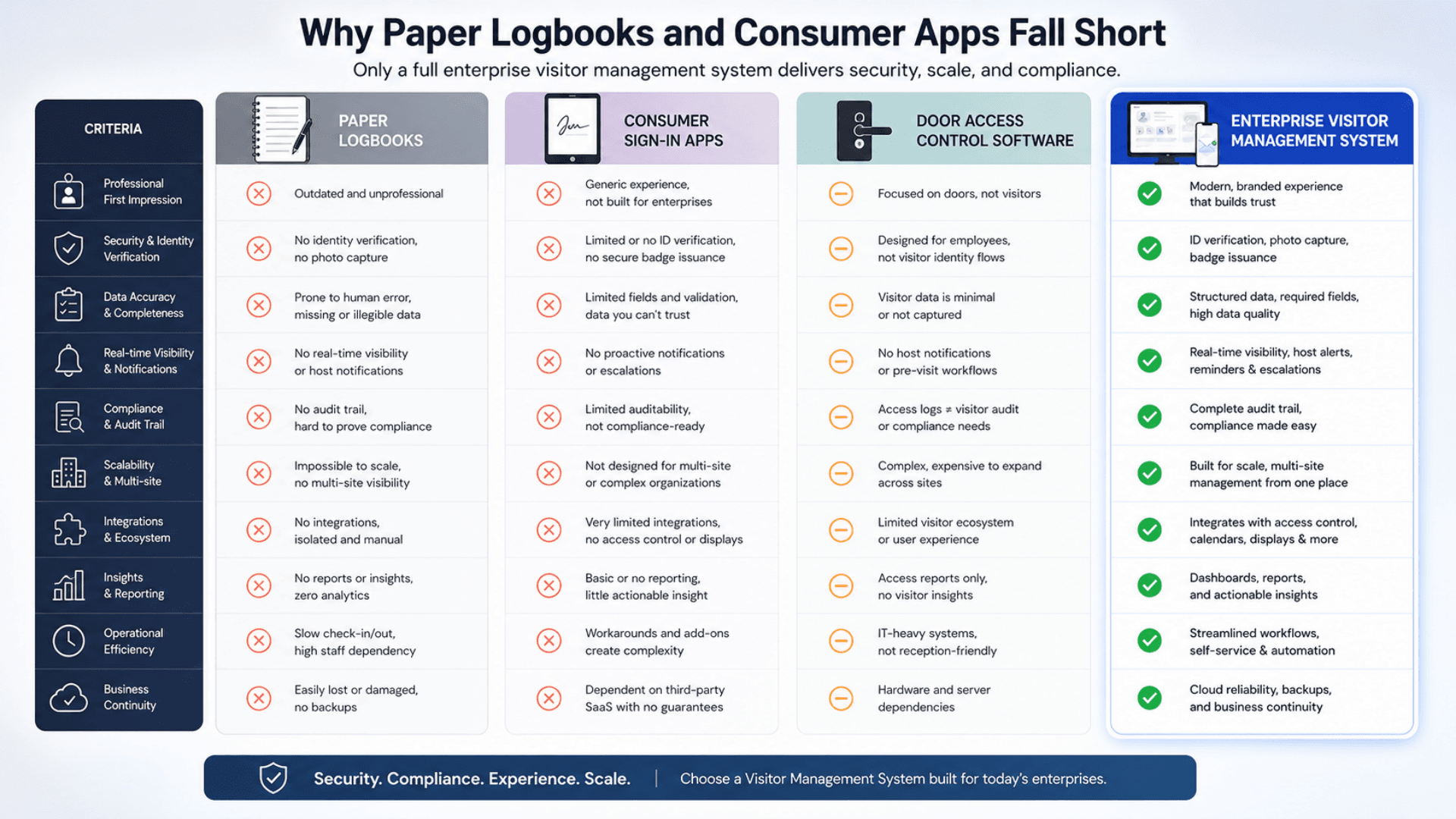
These categories are often conflated. A paper logbook is what you're replacing. A consumer sign-in app handles one channel of the problem. Door access control handles entry — not the visitor. A full visitor management system is the whole picture. GLARUS VMS sits in the last column.
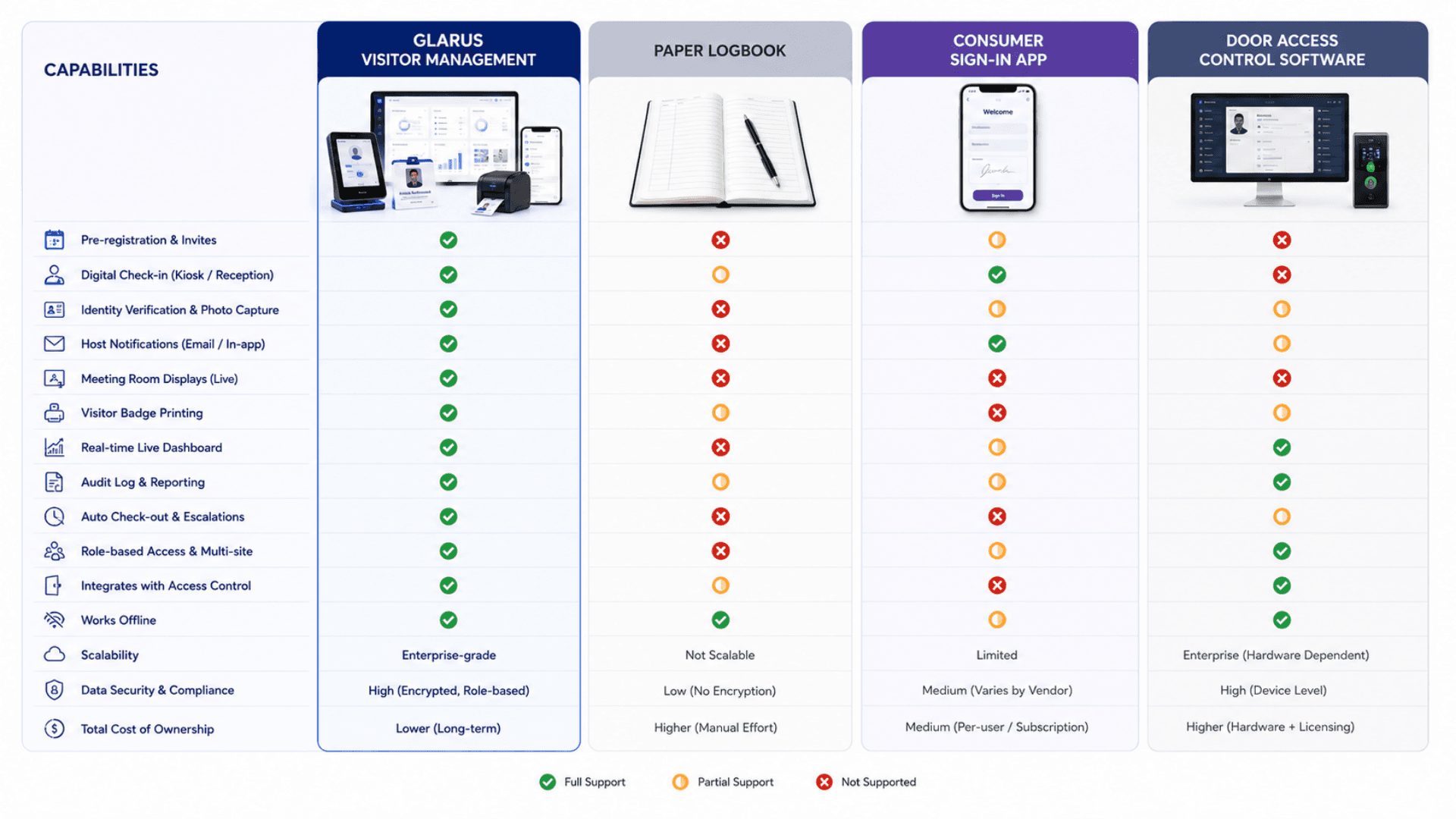
Visitor Management System (VMS)
Best for: Real organizations with hosts, reservations, multiple buildings, security obligations, and an audit trail to defend.
- Pre-registration + walk-in flows + identity verification + photo capture
- Card inventory with Active / Lost / Retired state tracking
- Real-time host notifications + overdue-visit escalations + auto-checkout
- Meeting-room display integration with sub-second refresh
- Full audit trail + role-based access + multi-site scoping
- OpenAPI for custom CRM / HR / access-control integrations
Paper Visitor Logbook
Best for: Nothing in 2026. It is what you are getting rid of.
- A spiral-bound book with previous visitors' names visible to the next signer
- No pre-registration, no notifications, no audit trail, no reports
- GDPR / PDPL / HIPAA exposure on every entry
- Manual reception data entry, ~3 minutes per visitor
Consumer Sign-In App
Best for: Small offices with a single front desk and no compliance overhead. Solves visitor sign-in only.
- iPad-based check-in flow
- Basic host email notification
- Limited reporting; no real audit trail
- No card inventory, no overdue escalation, no meeting-room display, no multi-site role scoping
Physical Access Control System
Best for: Provisioning doors and turnstiles. Knows which badge unlocked which reader at what time.
- Reader / lock control via HID, Lenel, Genetec, etc.
- Badge inventory and credential management
- Door event logs and incident review
- No visitor pre-registration, no host notification, no calendar invites, no meeting-room display, no reception workflow
Visitor Management System — Deployment Checklist
A practical 5-phase rollout playbook for going live with GLARUS VMS — from a single-site pilot to a multi-country estate. Use it as a project plan with your Zeour partner.
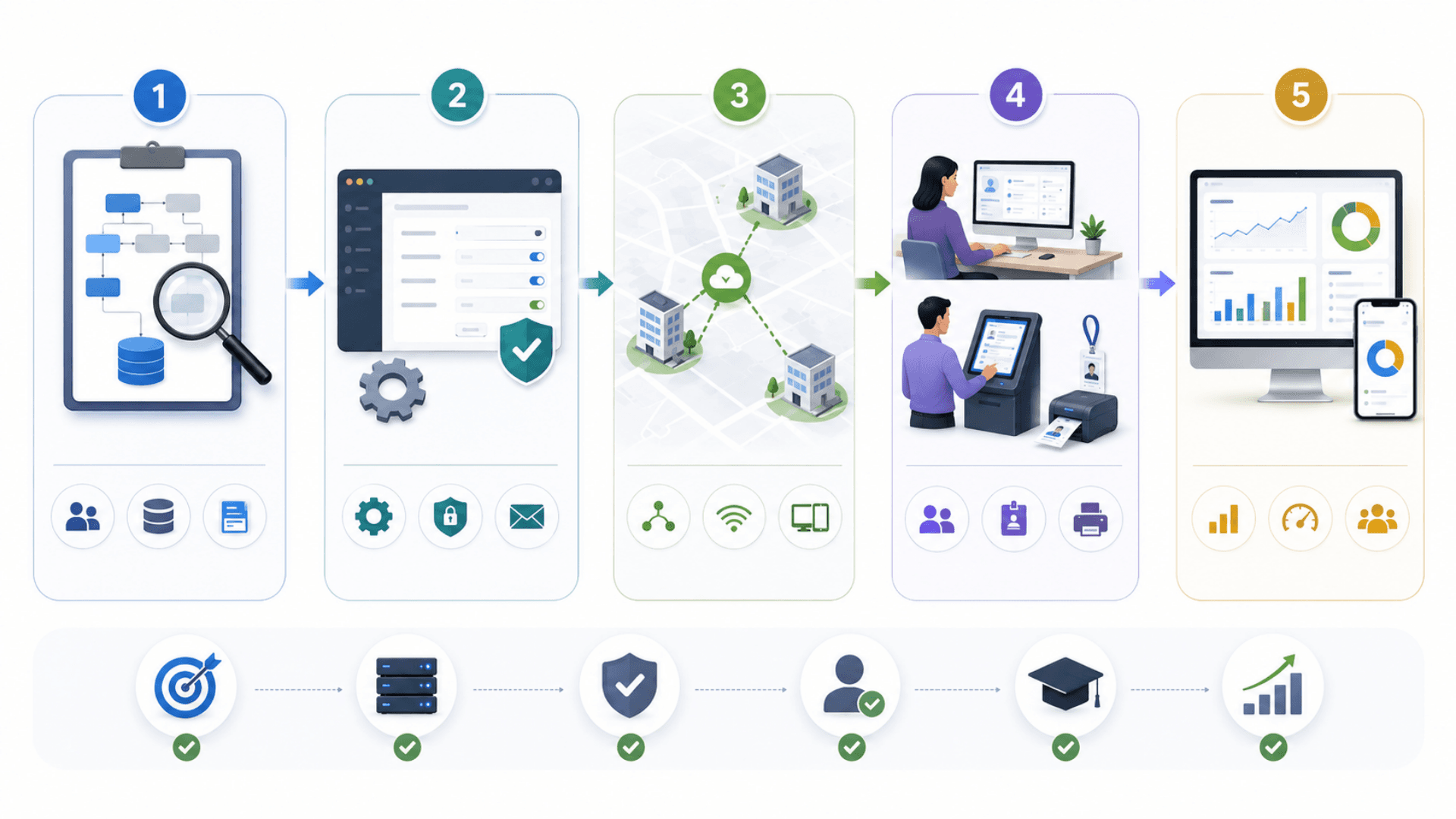
- 01
1) Discovery & Data Model
ChecklistInventory buildings, departments, hosts, areas with capacity caps, and clearance / classification tiersMap your role policy onto Admin / Building Manager / Department Manager / Reception / Basic AccessDecide pre-visit reminder cadence, overdue-visit threshold, and auto-checkout windowIdentify the email transport: SMTP or Microsoft 365 — and provision credentialsDecide deployment model: managed cloud (regional residency) or on-premise (full sovereignty) - 02
2) Central Configuration
ChecklistProvision the database and run the initial setup migration and seedConfigure branding (logo, primary color, locale, timezone)Configure email transport, calendar timezone, and ICS / UTC behaviorSet rate-limit envelopes per sensitive endpoint (login, card lookup, mail test, cron tasks)Create initial admin user(s); enable inactivity auto-logout and HTTPS enforcement - 03
3) Site Wiring
ChecklistDeploy reception terminal(s) with webcam + thermal badge printer at each siteDeploy any self-service kiosks (KIOSAPP066 / AUTO666); provision GLARUS hardwareProvision GRAVIA signage controllers for meeting-room TVs and map screens to areasWire optional access-control integration (HID / Lenel / Genetec) for badge provisioningConfigure per-screen display access tokens; pin to specific screens if needed - 04
4) Host & Reception Launch
ChecklistTrain hosts on pre-registration workflow + ICS calendar invite behaviorTrain reception on the 3-step registration wizard + card assignment + photo captureTest the full happy path end-to-end: pre-register → arrive → check-in → notify → check-out → auditTest overdue escalation, auto-checkout, and meeting-display refreshPilot for 2 weeks; measure check-in time, no-show rate, host satisfaction - 05
5) Optimize, Measure & Scale
ChecklistTrack weekly: reception check-in time, no-show rate, overdue escalation count, audit-log volumeTune pre-visit reminder cadence and overdue threshold based on real dataRoll out to additional sites using the same templates with local overrides (timezone, language, branding)Federate reporting across sites for executive dashboardsPlan custom integrations (CRM / HR / access control / BI) via the OpenAPI specification
Visitor Management System Gallery
Visual highlights of GLARUS VMS — the visitor management platform built for governments, banks, hospitals, embassies, and defence worldwide.
Why Paper Visitor Logbooks Fail
Paper visitor logbooks leak data, lose the audit trail, and slow reception down — here is why a modern visitor management system is essential.
Paper Logbooks Are GDPR / PDPL Liabilities
Every visitor signs into a book where the previous visitor's name, company, host, and arrival time is right above theirs — personal data visible to whoever signs next. That alone is a compliance breach in the EU, UK, GCC, and most regulated industries.
Encrypted Database + Per-Field Access Control
Visitor data lives in an encrypted database with TLS in transit, role-based access at the route level, and audit logging on every read of sensitive fields. Right-to-be-forgotten is a one-click admin action. GDPR / HIPAA / PDPL aligned out of the box.
Reception Bottlenecks at Peak Times
Monday mornings, end-of-quarter audits, conference days — the queue builds. Reception types every field by hand, three minutes per visitor. The lobby gets ugly. Important guests are kept waiting next to delivery drivers.
Pre-Registration Eliminates the Front-Desk Queue
Hosts pre-register visits from the web app. Visitors get an ICS calendar invite + pre-visit reminder. On arrival reception confirms in 30 seconds. Lobby throughput goes up 3 to 4× at the same headcount.
No Real Audit Trail
When the auditor asks "who came to see the CFO last Tuesday and what time did they leave?" — the paper logbook says "Joe (smudged), 14:00, host: J." That isn't an audit trail. It's a memo.
Every Action Logged with Actor + Timestamp + Metadata
The activity log captures every visitor, reservation, card, host, and admin action with actor identity, timestamp, entity reference, and structured metadata. Export to CSV / PDF for the auditor.
Lost Cards Cost Money + Risk
Visitor badges and access cards disappear. There's no inventory. The lobby team reorders fresh stock; old cards stay in circulation; a former contractor swipes back in on a Friday night. Nobody notices for months.
Smart Card Inventory with State Tracking
Every card is a row with Active / Lost / Retired state and a complete assignment history. Lost cards drop out of rotation; retired cards are taken out of inventory. The lobby never re-issues a stale card by mistake.
Forgotten Check-Outs Skew Reporting
Visitors leave without signing out. By Friday the system says 47 active visitors when really there are 12. Your evacuation muster sheet is wrong. Your dashboards are wrong. Your security model is wrong.
Auto Check-Out + Overdue-Visit Escalation
Forgotten visits auto-close after a configurable threshold. Overdue visits escalate to the security team email every 30 minutes until acknowledged. Your dashboards and evacuation sheet reflect reality.
Disconnected Visitor + Booking + Display + Access Control
You have one spreadsheet for visitors, another for room bookings, a third for the access-control system, and a TV in the lobby that says "Welcome ACME" because someone updated it by hand. Nothing reconciles.
One Platform — Visitors, Rooms, Cards, Displays
GLARUS VMS unifies visitor flow, room reservations, card inventory, and meeting-room displays into one system with one audit trail and one set of reports. The lobby TV updates itself. Nothing reconciles by hand.
Visitor Management Features
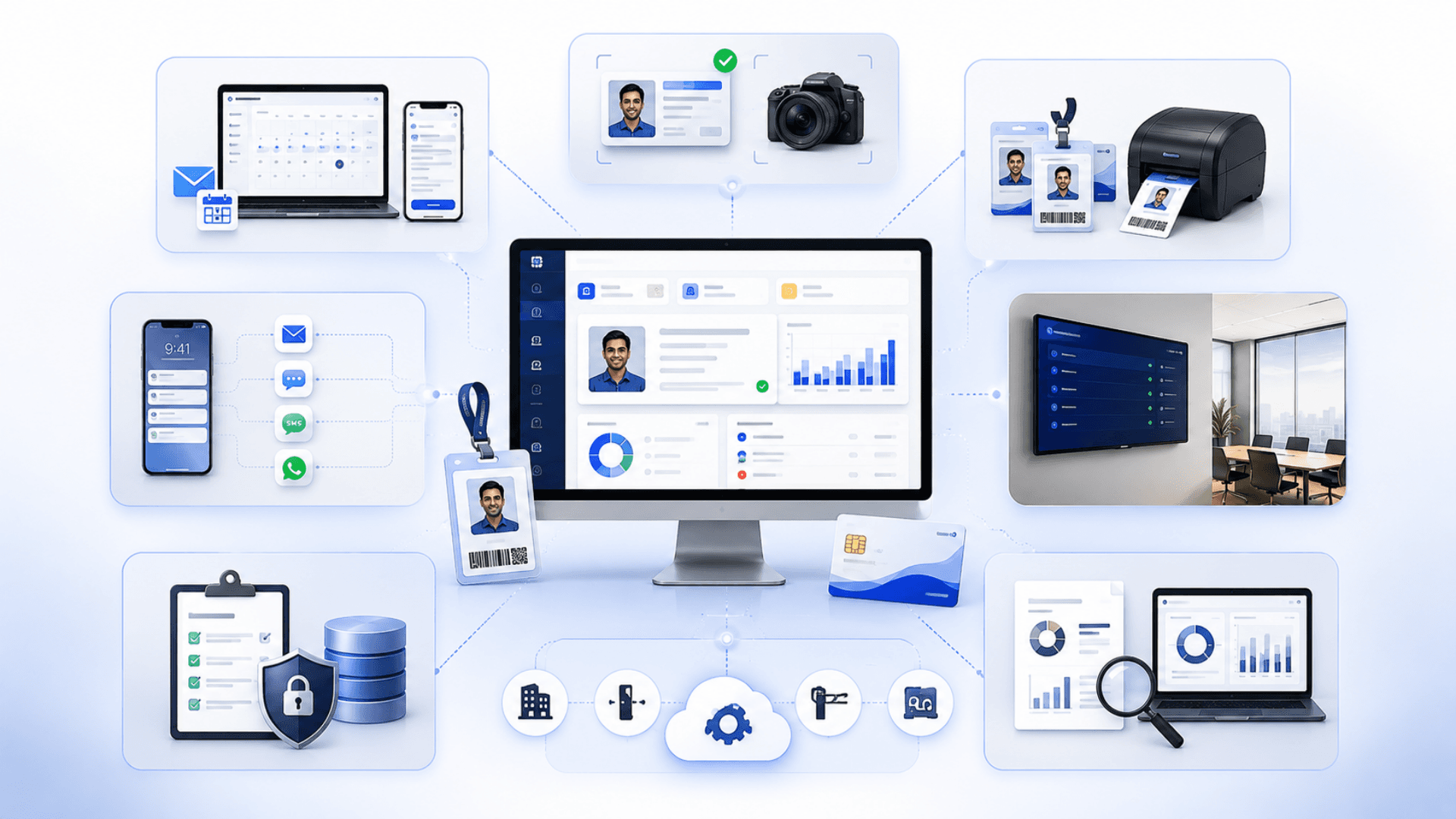
Pre-Registration with ICS Calendar Invites (Outlook / Google / Apple)
Self-Service Kiosk + Reception Walk-In Flows
Identity Verification & Photo Capture
Building → Department → Host Hierarchy
Area Capacity & Reservation Overlap Enforcement
Smart Card Inventory (Active / Lost / Retired states)
Card Assignment History & Lookup (rate-limited, role-gated)
Host Notifications via SMTP or Microsoft 365
Pre-Visit Reminder Emails (configurable lead time)
Overdue-Visit Security Escalations
Auto Check-Out for Forgotten Visits
Real-Time Updates Across Reception, Admin, and Display Screens
Meeting Room Display Integration (TV / kiosk companion app)
Role-Based Access Control (5 distinct roles)
Multi-Building, Multi-Department Scoping per User
Full Audit Trail (every action logged with actor + metadata)
Daily Metrics & Reports (CSV / PDF / API export)
Resilient Email Outbox with Retry & Lease Locking
OpenAPI Specification for Custom Integrations
Inactivity Auto-Logout (configurable, cross-tab synchronized)
Multilingual Reception & Visitor UI (EN / AR with full RTL as baseline, extensible to any locale)
GDPR / HIPAA / PDPL / ISO 27001 Aligned (cloud or on-premise)
Horizontally Scalable for High-Traffic, Multi-Site Estates
Visitor Management Components
Visitor Check-In, Access Roles and Visit Records.
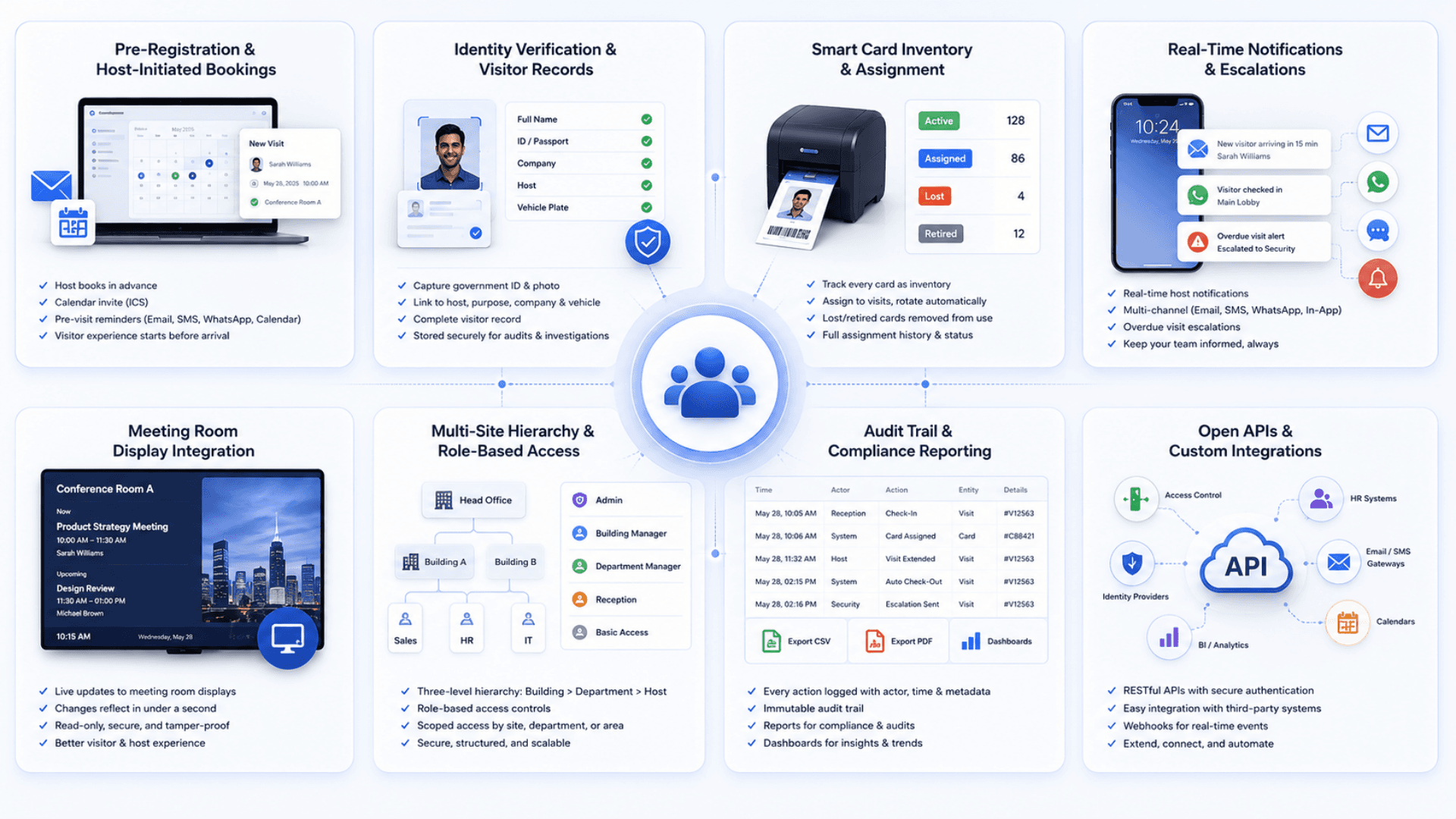
Pre-Registration & Host-Initiated Bookings
Move the work off the front desk. Hosts schedule visits from the web app; visitors get a calendar invite + pre-visit reminder.
- Web-based host pre-registration with required and optional visitor fields
- Standards-compliant ICS calendar invites with Outlook / Google / Apple support
- Configurable pre-visit reminder lead time (e.g. 60 minutes before)
- Mandatory meeting-room metadata when display integration is enabled
Identity Verification & Visitor Records
Capture everything you need in one structured place: who, where, why, and a photo.
- National ID / passport / company badge capture at reception
- Photo capture via attached webcam, stored with the visit record
- Unique visitor record keyed by national ID for return-visit recognition
- Optional document scanning via supported scanner hardware
Smart Card Inventory & Assignment
Every visitor card is tracked as inventory with full state and assignment history. No more stale cards in circulation.
- Active / Lost / Retired card states with audit history
- Card assignment history per visit (who carried it, when, where)
- Rate-limited, role-gated card lookup
- Optional access-control system provisioning (HID, Lenel, Genetec)
Real-Time Notifications & Escalations
Hosts know within seconds. Overdue visits don't slip through the cracks.
- Instant host email via SMTP or Microsoft 365
- Real-time in-app notifications over an authenticated event stream
- Pre-visit reminder job with configurable lead time
- Overdue-visit escalations to security email every 30 minutes until ack
Multi-Site Hierarchy & Role-Based Access
Real organizations have Buildings, Departments, and Hosts. The VMS knows that.
- Building → Department → Host data model
- Five distinct roles (Admin / Building Manager / Department Manager / Reception / Basic Access)
- Route-level access control — even forged URLs don't leak data
- Per-user area-access scoping
Audit Trail & Compliance Reporting
Every action recorded; every report exportable; every auditor satisfied.
- Activity-log entry per business action (actor, action, entity, timestamp, metadata)
- Daily metrics rollup with trend dashboards
- Reports for visits / reservations / utilization / SLA with detailed + PDF + export variants
- Configurable data retention + right-to-be-forgotten admin workflow
Open APIs & Custom Integrations
No lock-in. Connect VMS to whatever you already run.
- Full OpenAPI specification for custom integrations
- Authenticated real-time events for live admin UI integrations
- Live push feed for read-only display / reporting consumers
- Integration patterns documented for CRM, HR, access control, identity (SAML / OIDC), and BI
Reception Workload and Visitor Accountability

Replace paper logbooks (and the GDPR liability they carry) on day one
Cut reception check-in time by 60–80% via host pre-registration
Reduce no-shows by 30–50% with timely pre-visit reminders
Slash card loss and replacement cost with active inventory tracking
Eliminate stale visitor records with auto check-out and overdue escalations
Meet GDPR / HIPAA / PDPL audit demands with a complete activity trail
Standardize visitor security across single, multi-building, and multi-campus estates
Free reception staff to handle high-value guests instead of admin
Tie visitor flow to meeting-room displays — TVs update the moment a booking moves
Future-proof with an OpenAPI contract for CRM / HR / access-control integrations
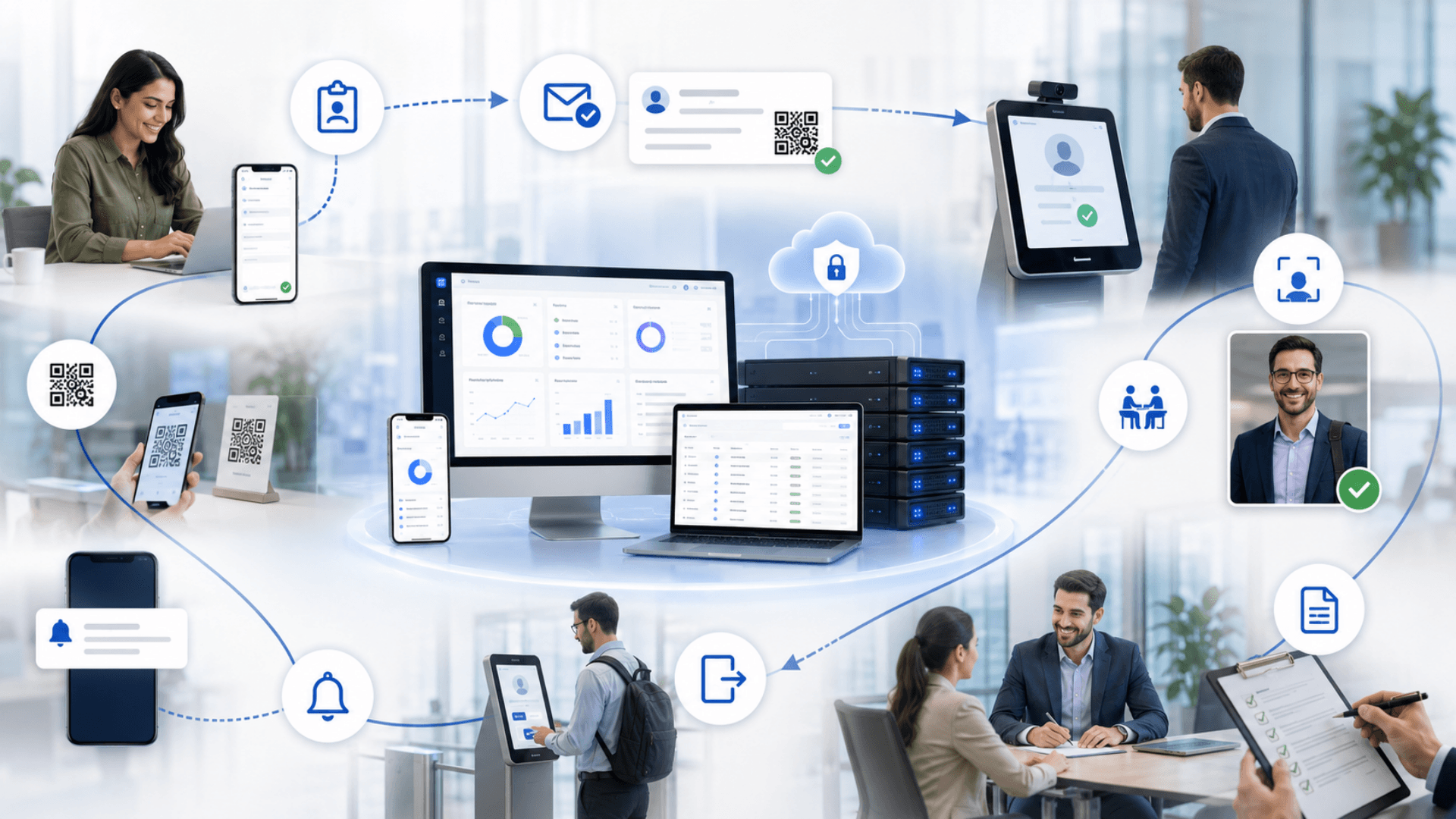
From Visitor Invitation to Check-Out
Follow the guest journey through registration, identity checks, host notification and departure.
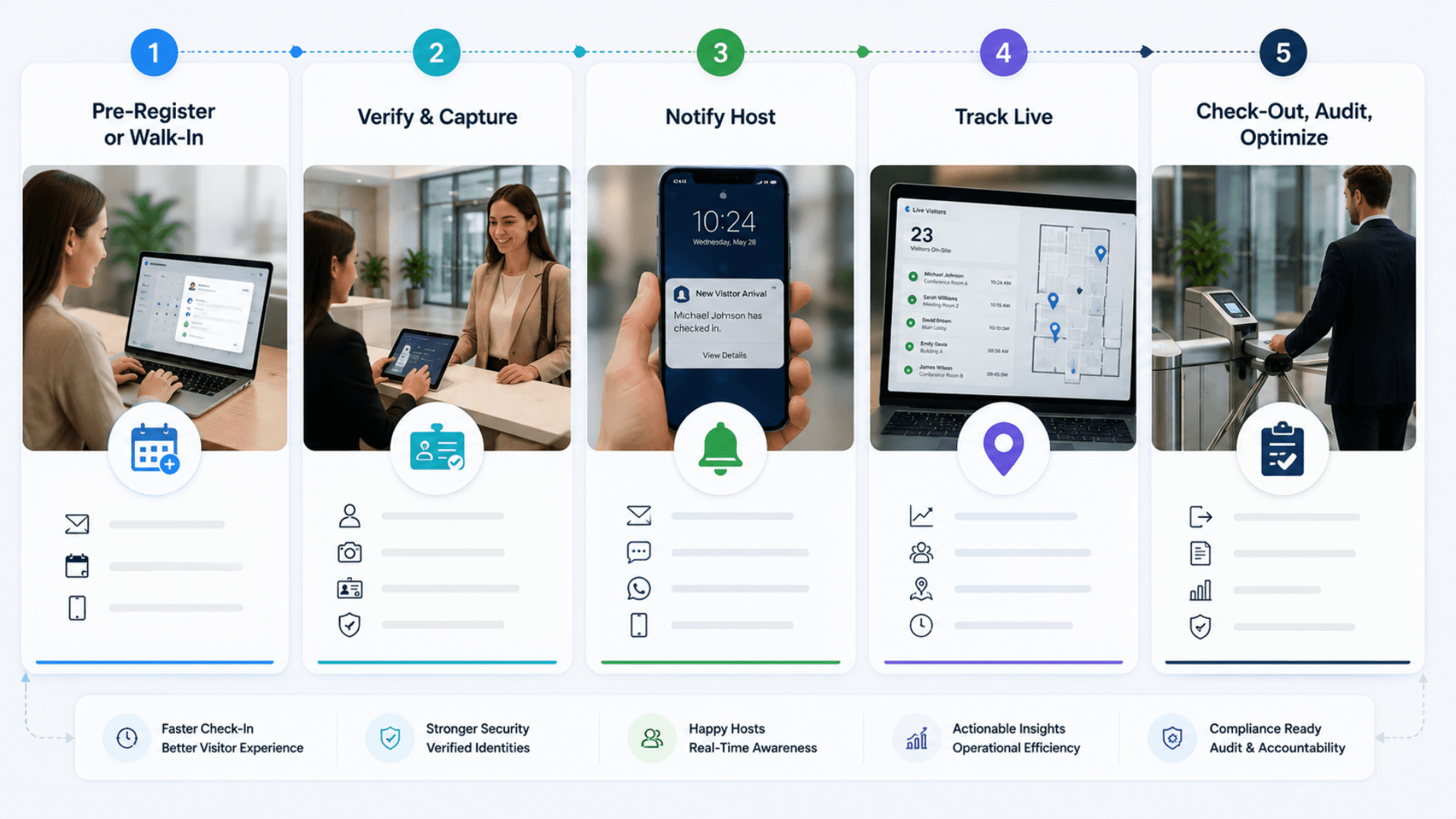
Pre-Register or Walk-In
Host pre-registers the visit from the web app; the visitor receives an ICS calendar invite + a pre-visit email reminder. Walk-in visitors are handled by reception via a 3-step registration wizard with photo capture.
Verify & Capture
Reception verifies ID, snaps a photo, prints a badge, and assigns a card from the active inventory. Every field is captured against the visitor record; every action is written to the audit log.
Notify Host
The host receives an instant email and a real-time in-app notification. If the visit is for a booked meeting room, the GRAVIA meeting display updates within a second.
Track Live
Active visitors are visible on the reception dashboard with overdue / due-now chips. Visits past the configured overdue window trigger automatic escalations to the security team email.
Check-Out, Audit, Optimize
Visitor checks out (or is auto-closed by the cron). Daily metrics roll up to the dashboards; the full audit trail exports to CSV / PDF for compliance audits and incident reviews.
Visitor Management Use Cases by Industry
Explore the service environments relevant to visitor management.

Open the deep dive by vertical
Customers running Visitor Management in production
2 featured deployments where Visitor Management ships today — a selection from a much wider production portfolio. Click any card for the full case-study deep dive.
MFCR Ministry · Malta
Visitor management + ground-floor wayfinding deployed at the Ministry's main building in Malta — visitor registration, host notifications and meeting-area booking; hosted on MITA Azure.
OQBI · Oman
Visitor management custom-built for OQBI in Oman — host-initiated workflow, clinic + HSE clearance, four visit types across two headquarters buildings.
Visitor Management System FAQs
Get answers to the most common questions about our visitor management.
What is a Visitor Management System (VMS)?
Is the visitor management system suitable for a small office with one reception?
How does a digital visitor management system work?
What's the difference between a digital VMS and a paper visitor logbook?
Why does pre-registration matter?
How does the meeting room display integration work?
Does the VMS integrate with our calendar and email system?
How are visitor cards managed?
What happens if a visitor doesn't check out?
Can the VMS handle multiple buildings or campuses?
How is role-based access controlled?
Is GLARUS VMS GDPR, HIPAA, PDPL, and ISO 27001 compliant?
Cloud or on-premise — which do most customers pick?
How long does VMS implementation take?
How do escalations work for overdue visits?
Does it support multiple languages?
How does it scale for high-traffic lobbies (banks, hospitals, government halls)?
What custom integrations are possible via the API?
Is it suitable for embassies, government, and defence?
Explore Related Solutions
Support reception with arrival terminals, building directions and visitor information screens.
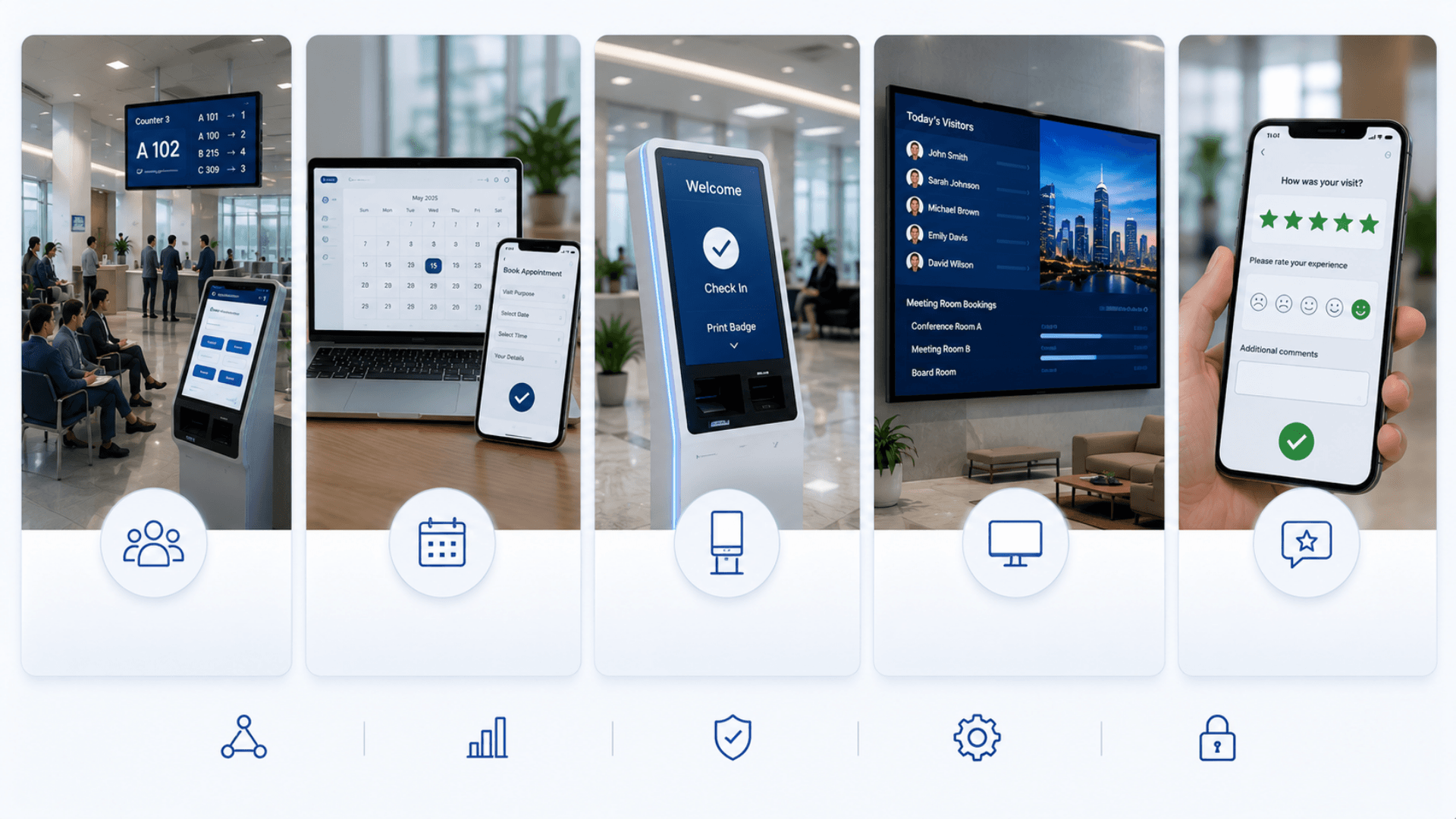
Ready to Transform Your Operations with Visitor Management?
Discuss your workflows, deployment requirements and integration scope with the Zeour team.
Visitor Management — concepts you'll meet
Definitions for the operational terms that appear across this page. Tap any chip to read the long-form entry plus its cross-links.