
Indoor Wayfinding System
Zeour's indoor wayfinding system helps visitors find rooms, departments and facilities inside buildings. Touchscreen kiosks provide multi-floor routes, with QR handoff so visitors can continue on their phones. Administrators maintain destinations, maps and routing for the site.
Interactive Building Maps and Multi-Floor Directions
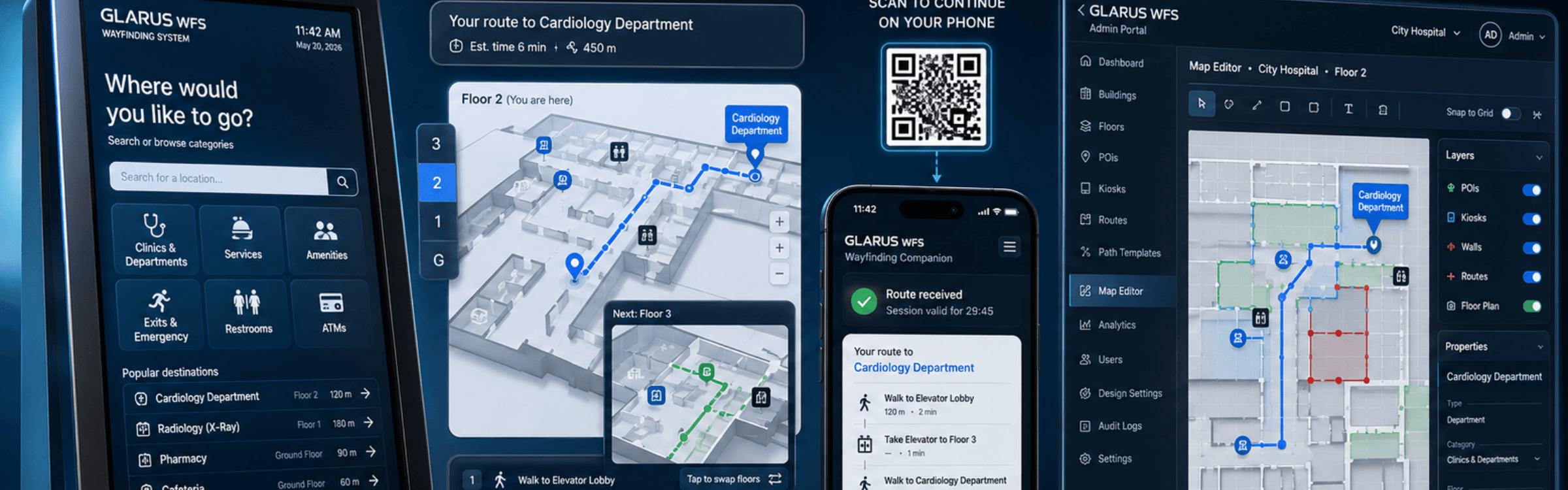
Help visitors choose a destination and follow a route through the building. GLARUS WFS combines kiosk navigation with map editing, routing around walls and connections between floors through lifts, stairs and escalators.
Directions Within the Visitor Journey
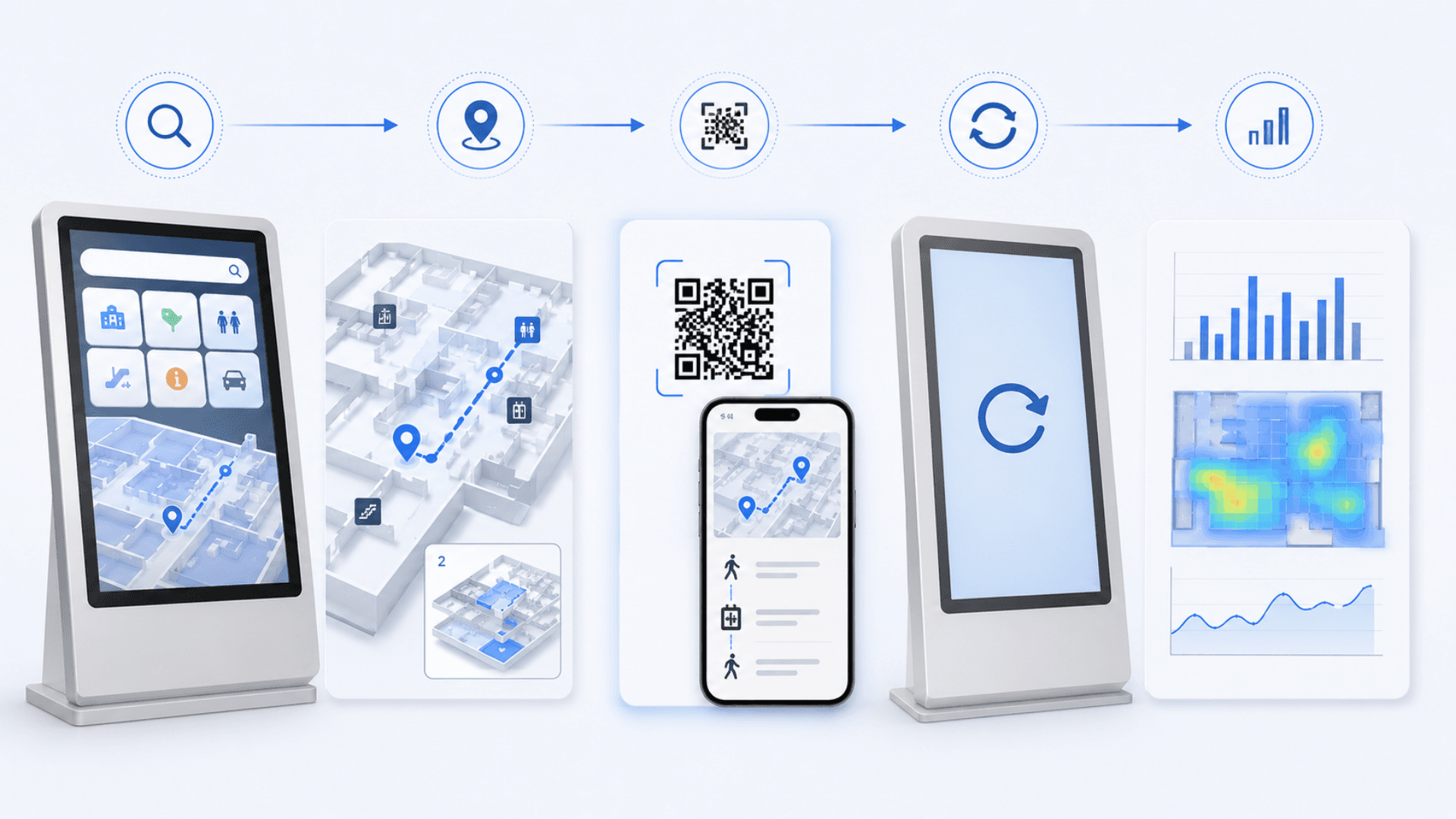
The visitor management system handles registration before guests navigate to their destination. A self-service kiosk solution provides the physical interaction point for building directions.
Use digital signage software for scheduled information screens. For customers waiting for a service after arrival, queue management handles ticket order and counter calls.
Wayfinding Maps, Route Calculation and Mobile Handoff
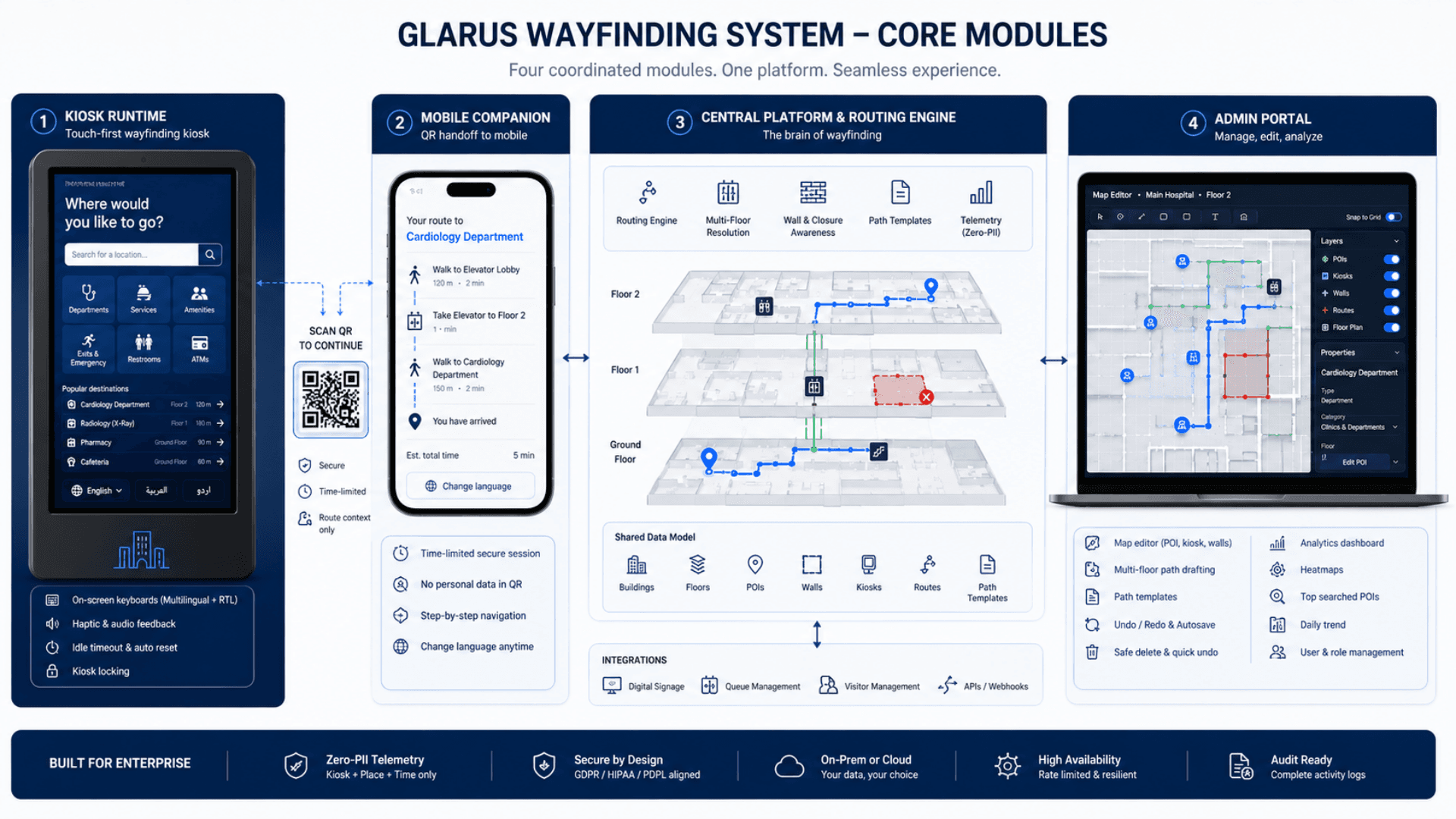
Zeour GLARUS WFS powers three coordinated surfaces — a touch-first wayfinding kiosk, a QR-handoff mobile companion, and a full admin portal — over a single shared data model. The kiosk does the heavy lifting: a wall-aware shortest-path routing engine that guides visitors around walls and closures, multi-floor picture-in-picture switching, on-screen keyboards in any configured locale, idle timeouts that always reset the screen, and haptic and audio touch feedback for that hardware-grade feel. The admin portal is the operator brain: a map editor with snap-to-grid POI / kiosk / wall placement, multi-floor path drafting with named templates, undo / redo with autosave, and a zero-PII analytics dashboard that surfaces searches, sessions, and per-floor heatmaps. Telemetry never carries personal data — only kiosk, place and timestamp.
Zeour GLARUS WFS — the enterprise indoor-navigation suite deployed in hospitals, airports, shopping centres, universities, government buildings, and corporate campuses. Touch-first wayfinding kiosks with on-screen keyboards in Multilingual (full RTL) as a production baseline; any other locale is added per engagement. QR handoff lets visitors continue navigation on their phone with a time-limited secure session. Smart multi-floor routing with picture-in-picture floor switching, a wall-aware shortest-path routing engine that guides visitors around walls and closures, multi-floor route resolution across elevators / stairs / escalators, and an admin map editor for placing POIs, kiosks and walls, drafting multi-floor paths, and snap-to-grid drawing. GDPR-aligned — telemetry never carries personal data. As relevant to one medical-centre lobby as to an airport — deployments are sized to a single building or a whole campus.
Key Functionalities
Touch-First Kiosk Runtime
Full-screen wayfinding terminal. Search, browse categories, view route, switch floors, hand off to mobile. Optimized for standard touchscreen hardware with non-blocking telemetry and haptic and audio touch feedback.
A full-screen kiosk runtime that runs on mounted hardware. Optimized for standard touchscreens.
- Full-screen, responsive kiosk app built for tight render cycles on standard hardware
- On-screen keyboard with Multilingual layouts plus haptic and audio touch feedback
- Idle timeouts that always reset the screen to greet the next visitor cleanly
- Kiosk locking so only one client ever owns a given physical screen
QR Handoff Mobile Companion
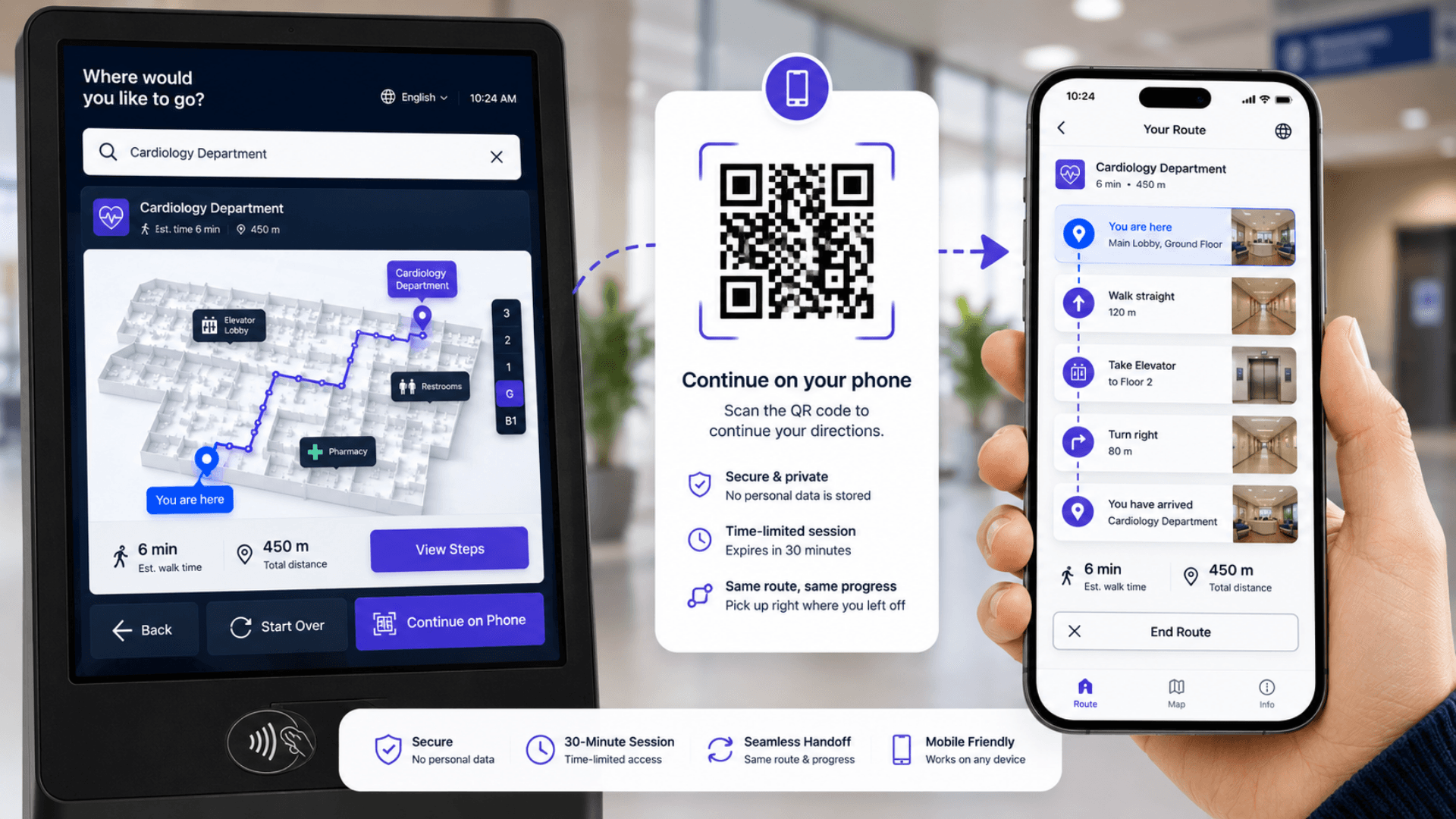
A QR code carrying only the route context — your starting point and destination, no personal data — opens the mobile companion on the visitor's phone with a time-limited secure session. The visitor can switch language without losing the route.
Multi-Floor Picture-in-Picture
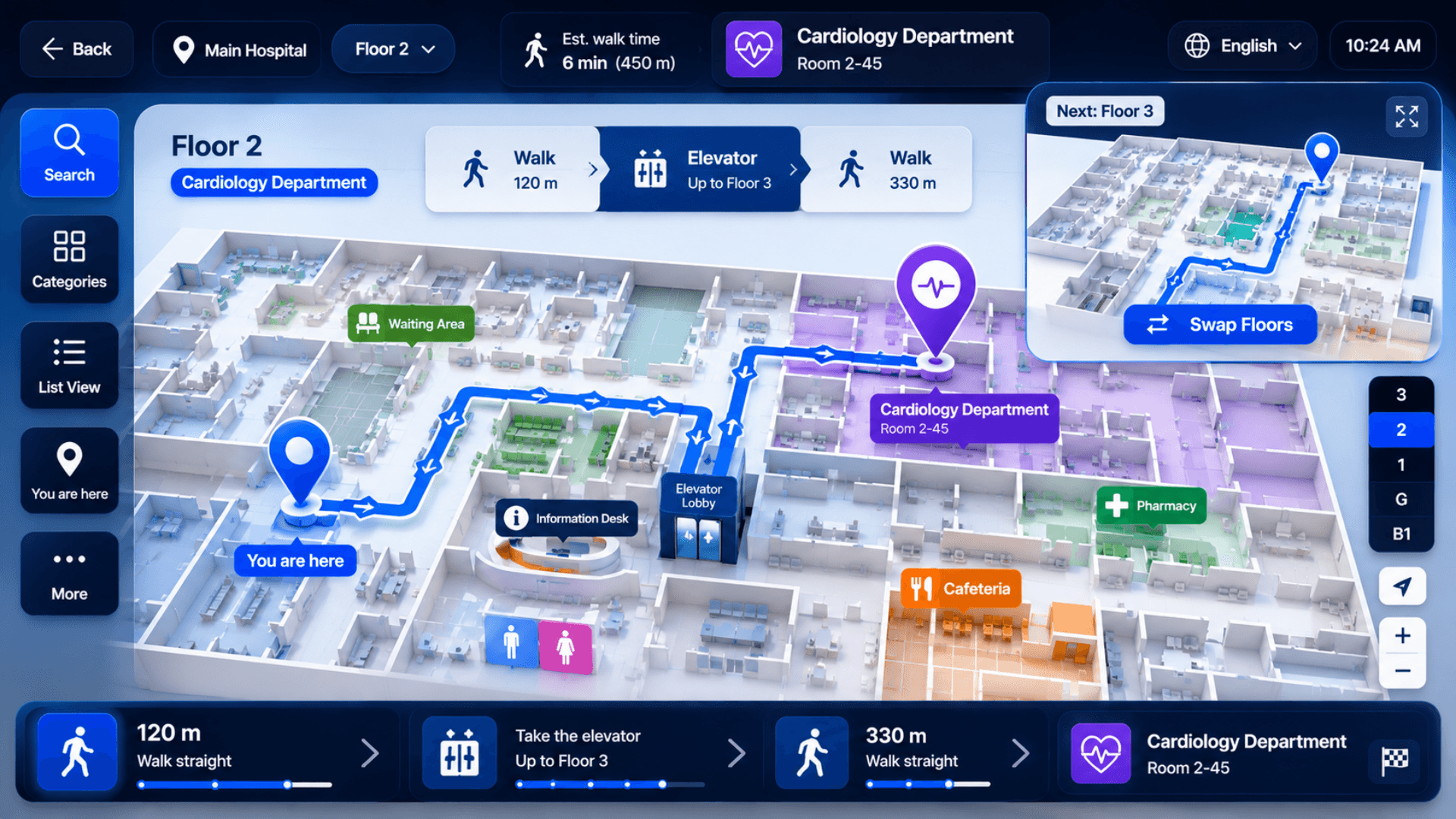
When a route crosses floors, the upcoming floor is shown in a corner PiP that the visitor can swap with the main view. Critical for hospitals, airports, and convention centers.
Wall-Aware Routing Engine
Routes resolve in milliseconds. The routing engine resolves the shortest in-floor route, validated against the building's wall geometry, so visitors are always guided around walls and corridor closures.
Multi-Floor Route Resolution
Multi-floor transitions (elevators / stairs / escalators) are resolved automatically and ordered into clear "walk → transition → walk" steps with an estimated walk time.
On-Screen Keyboards (multilingual)
Per-language keyboard layouts with automatic RTL; any other locale drops in per engagement. Audio and haptic touch feedback give every keypress a hardware-grade feel.
Admin Map Editor
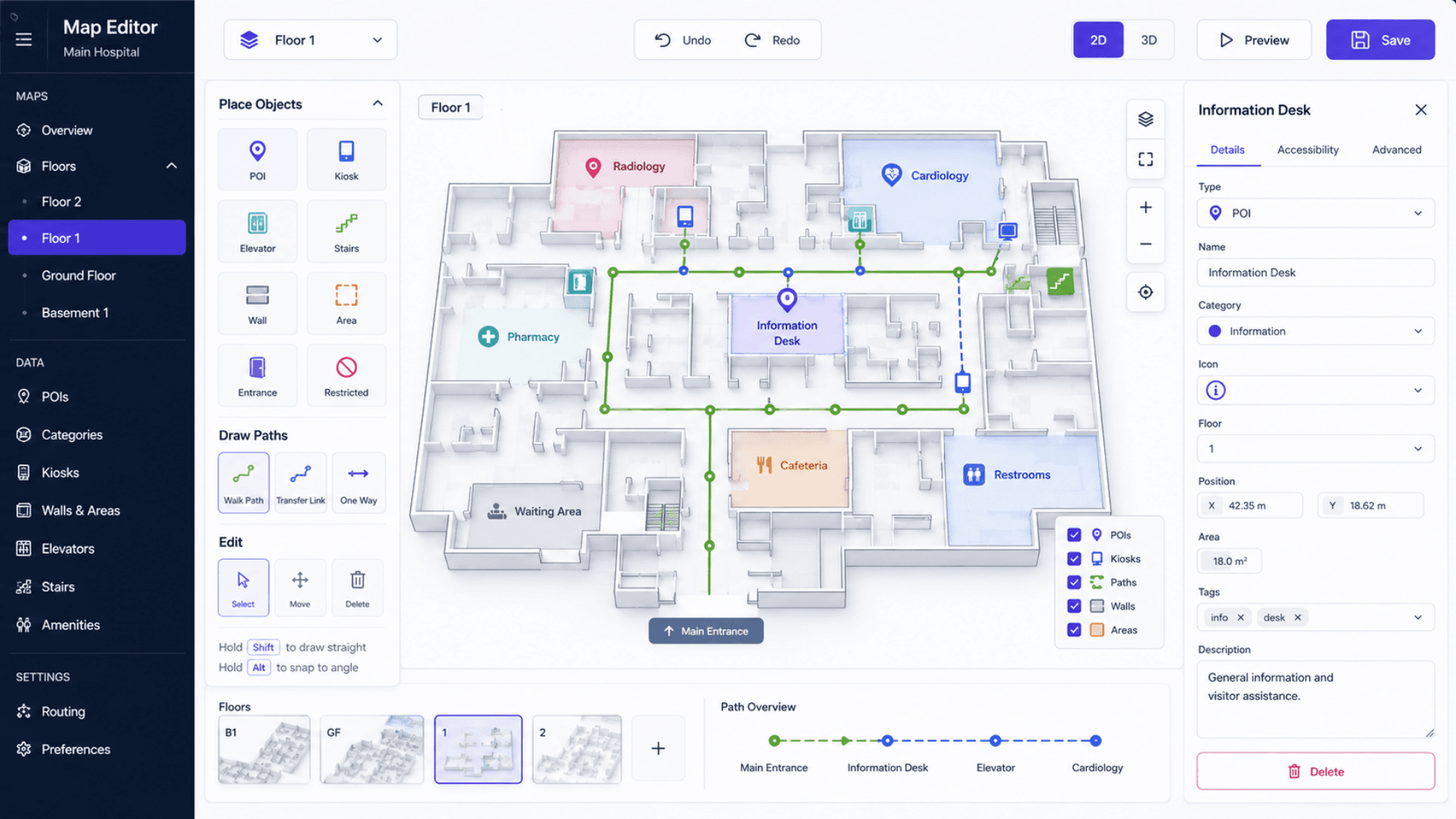
WYSIWYG canvas for placing POIs (10 types), placing kiosks, drawing wall polygons, drafting multi-floor paths, and saving named path templates. Snap-to-grid drawing, keyboard shortcuts, and continuous autosave.
Full WYSIWYG canvas for POIs, kiosks, walls, and multi-floor paths. Built for daily use by facility teams.
- POI placement (10 types), kiosk placement, wall polygon drawing, multi-floor path drafting
- Snap-to-grid drawing with keyboard shortcuts for fast editing
- Named path templates reusable across many destinations
- Continuous autosave with recoverable drafts; undo / redo + per-layer visibility
Building → Floor → POI Hierarchy
A clear physical org model — buildings contain floors, floors contain POIs and kiosks. POIs and kiosks use safe delete with a quick undo window. Each floor carries its own uploaded floor-plan image.
Real physical org structure modeled in the platform. POIs are categorized, indexed, and safely deletable.
- A clear Building → Floor → POI / Kiosk / Wall / Route data model
- 10+ POI types: rooms, services, amenities, exits, emergency, ATMs, restrooms, etc.
- Safe delete with a quick undo window on POIs and kiosks
- Per-floor editor locking prevents conflicting concurrent edits
Route Graph with Emergency Mode
Routes are typed (elevator / stairs / escalator) and can be flagged for availability and for emergency use. Emergency mode filters out elevators and prioritizes stairs and designated exits.
Idle Timeouts + Conflict-Safe Editing
Idle timeouts always reset the kiosk to greet the next visitor cleanly. Kiosk locking and per-floor editor locking prevent conflicting edits across clients and admins.
Zero-PII Telemetry & Analytics
Search and navigation events flow over non-blocking, rate-limited telemetry that never slows the kiosk UI. The dashboard shows total searches, sessions, active kiosks, per-floor heatmaps, most-searched POIs, and a daily trend.
Multilingual UI with Full RTL
Multilingual (RTL) ship as a production baseline; any other locale is added per engagement. RTL layout is applied automatically for right-to-left scripts.
Software Components
Visitor-Facing Applications
Wayfinding Kiosk
Touch-first, full-screen kiosk runtime optimized for mounted touchscreen hardware. Search, categories, map, route, and QR handoff — built for tight render cycles and a responsive feel on standard kiosk hardware.
Mobile Companion
Lightweight page that opens from the kiosk's QR code with a time-limited secure session, renders a step-by-step navigation card with an estimated walk time, and lets the visitor switch language without losing context.
Kiosk Landing Experience
Animated entry screen with a language picker and a single CTA into kiosk mode. The kiosk auto-resolves itself by QR code, kiosk ID, or active-kiosk-by-building fallback.
Admin Portal
Admin Dashboard
Tabbed management for buildings, floors, POIs, kiosks, and routes. POIs and kiosks use a safe delete with a quick undo window. Bulk operations supported.
Map Editor
Full WYSIWYG canvas. POI and kiosk placement, wall polygon drawing, multi-floor path drafting, and named path templates. Snap-to-grid drawing, keyboard shortcuts, undo / redo, and continuous autosave.
Analytics
Dashboard with per-floor navigation heatmaps, most-searched POIs, top categories, kiosk activity, a daily trend, and total searches and sessions counters.
Users + Design Settings
Admin user management — create, edit, deactivate accounts and force a password reset. A live design-token editor lets you match the kiosk and portal to your brand.
Routing & Pathfinding Engine
Wall-Aware Shortest-Path Routing
Resolves the shortest in-floor route between the visitor's position and their destination, validated against the building's wall geometry so visitors are always guided around walls and closures. Millisecond resolution on typical building sizes.
Wall & Closure Awareness
Routes are checked against the building's wall geometry before they are drawn; corridor closures are modelled as walls so the engine routes visitors around them automatically.
Multi-Floor Route Resolution
Resolves which elevator, staircase or escalator to take and orders the journey into clear walk and transition steps with an estimated walk time. Honors per-route availability and emergency flags.
Named Path Templates
Reusable multi-floor path geometry. Admins draft a path once in the editor and reuse it across many POIs in the same building.
API & Integration
REST API
Read endpoints serve kiosks the buildings, floors, POIs, walls, routes, and navigation they need; mutating endpoints are gated behind an authenticated admin session. Telemetry endpoints are rate-limited.
Session-Based Admin Auth
Session-based admin authentication with hashed passwords. A default session lifetime with an optional extended "remember me" window, plus brute-force lockout on repeated failed logins.
Security & Compliance
Zero-PII Telemetry
Kiosk, place and timestamp only. No cookies on the visitor side and no fingerprinting. GDPR-aligned by design.
Audit Logging
Structured audit logging for all admin changes to users, floors, walls, POIs, routes, kiosks, path templates, buildings, and design settings. Stream it to your log platform for compliance retention.
Rate Limiting + Lockout
Telemetry and other endpoints are rate-limited; mutating actions require an authenticated admin session; repeated failed logins trigger a brute-force lockout.
Validated Configuration Writes
Design-setting changes are authenticated and validated for size and shape before they are applied, so configuration writes stay safe.
Hardware Components
Kiosks (Touch-First Terminals)
AUTO Free-Standing Kiosk (AUTO666-HW-L-AD)
up to 86" Full HD capacitive touchscreen, Android / Windows, weatherproof IP54-rated for 24/7 operation. Ideal for outdoor and high-traffic indoor lobbies (hospitals, malls, airports).
GLARUS Wayfinding Kiosk (KIOSAPP066)
18.5" or 21" capacitive touchscreen, Android / Windows, LAN + WiFi, thermal printer option, aluminum bezel. Compact form factor for corridor and reception placement.
GRAVIA Wayfinding Kiosk (KIOSGRV301 / KIOSGRV303)
Design-forward GRAVIA-branded kiosk variants for wayfinding-first deployments — HW-S, HW-SS, and HW-LL form-factor options to fit different lobby and corridor footprints. Touch-first interaction; cabinet finish, screen size, and OS configured per deployment.
Wall-Mounted & Information Displays
GRAVIA Signage Controller (GRAVIA06)
Quad-core Cortex-A55 Android signage controller. Drives wall-mounted wayfinding signage and information displays. PoE-powered, HDMI + VGA output up to 4K.
IPTV06VI (IP Video Encoder)
For deployments that distribute live wayfinding video across many displays from a central source. RJ45 Gigabit, H.265/HEVC, RTSP/HTTP/UDP/RTMP/HLS/RTP/SRT.
Lobby Infrastructure
CONT06 Industrial Branch Server
For on-premise deployments. Ubuntu Linux local server. Runs the full GLARUS WFS stack at a single site without internet dependency.
Glarus_Hub (PoE Power Distribution)
Industrial 16-channel PoE hub for powering kiosks, signage, and lobby displays from a single rack point. Resilient to flaky mains power.
Wayfinding Architecture — GLARUS WFS Platform
GLARUS WFS powers three coordinated surfaces — kiosk, mobile companion, admin portal — over one shared data model. The kiosk does the geometry-heavy work (wall-aware routing, wall and closure awareness, multi-floor PiP); the central plane handles multi-floor route resolution, admin authentication, and data management; the mobile companion is a stateless render of a time-limited route handoff. Cloud SaaS or on-premise — same platform, same operator experience, sovereign data.
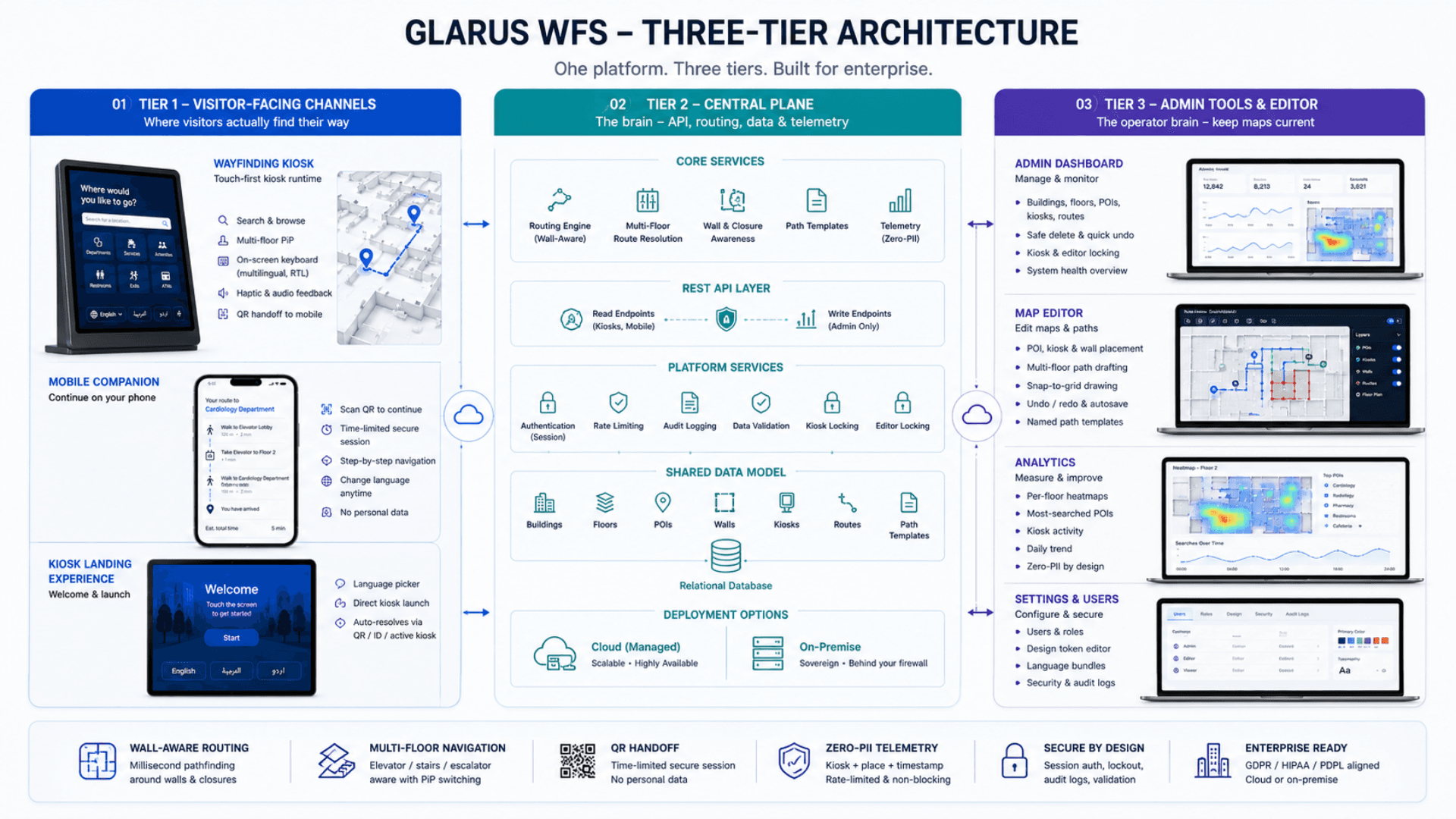
Tier 1 — Visitor-Facing Channels
Where visitors actually find their way
- Touch-first kiosk runtime running full-screen on mounted hardware
- Mobile companion for QR-handoff continuity with a time-limited secure session
- Kiosk landing experience with a language picker and direct kiosk launch
- Per-language on-screen keyboards with audio and haptic feedback
- Idle timeouts that always reset the screen to greet the next visitor cleanly
Tier 2 — Central Plane
The brain — admin portal, API, navigation, telemetry
- Standalone application server deployable behind the reverse proxy of your choice
- A REST API — read endpoints for kiosks, admin-gated write endpoints
- Multi-floor route resolution for elevator / stairs / escalator transitions
- Rate-limited telemetry endpoints that never slow the kiosk UI
- Session-based admin authentication with hashed passwords
- Structured audit logging streamable to your log platform for compliance
- A single shared data model — Building → Floor → POI hierarchy, route graph, walls, path templates
Tier 3 — Admin Tools & Editor
The operator brain — keep maps current as the building evolves
- Admin dashboard with tabbed management for buildings, floors, POIs, kiosks, and routes
- Safe delete with a quick undo window for POIs and kiosks
- Map editor — POI / kiosk / wall placement, path drafting, named templates
- Snap-to-grid drawing, keyboard shortcuts, undo / redo, continuous autosave
- Analytics dashboard with per-floor heatmaps, top POIs, daily trend
- Admin user management — create, edit, deactivate accounts and force a password reset
- Live design-token editor to match the kiosk and portal to your brand
Resilience & Real-Time Behavior
Real-time- Kiosk locking prevents two clients ever owning the same physical kiosk
- Per-floor editor locking prevents conflicting concurrent edits
- The wall-aware routing engine resolves a typical building in milliseconds — the kiosk feels instant even on standard hardware
- Non-blocking telemetry never slows the kiosk UI
- Standalone build deployable behind any reverse proxy; on-prem or managed cloud
- Rate-limited telemetry endpoints keep the platform stable under load
Wayfinding CMS vs Paper Directories vs Static Signs vs Consumer Map Apps — What You Need
Most "wayfinding" installations in the world are still paper. The next-most-common solution is fixed signage. Both fail the moment the building changes — and they generate zero data on what visitors actually need. An enterprise wayfinding CMS like GLARUS WFS is the only category that scales across a real estate and produces audit-ready analytics.
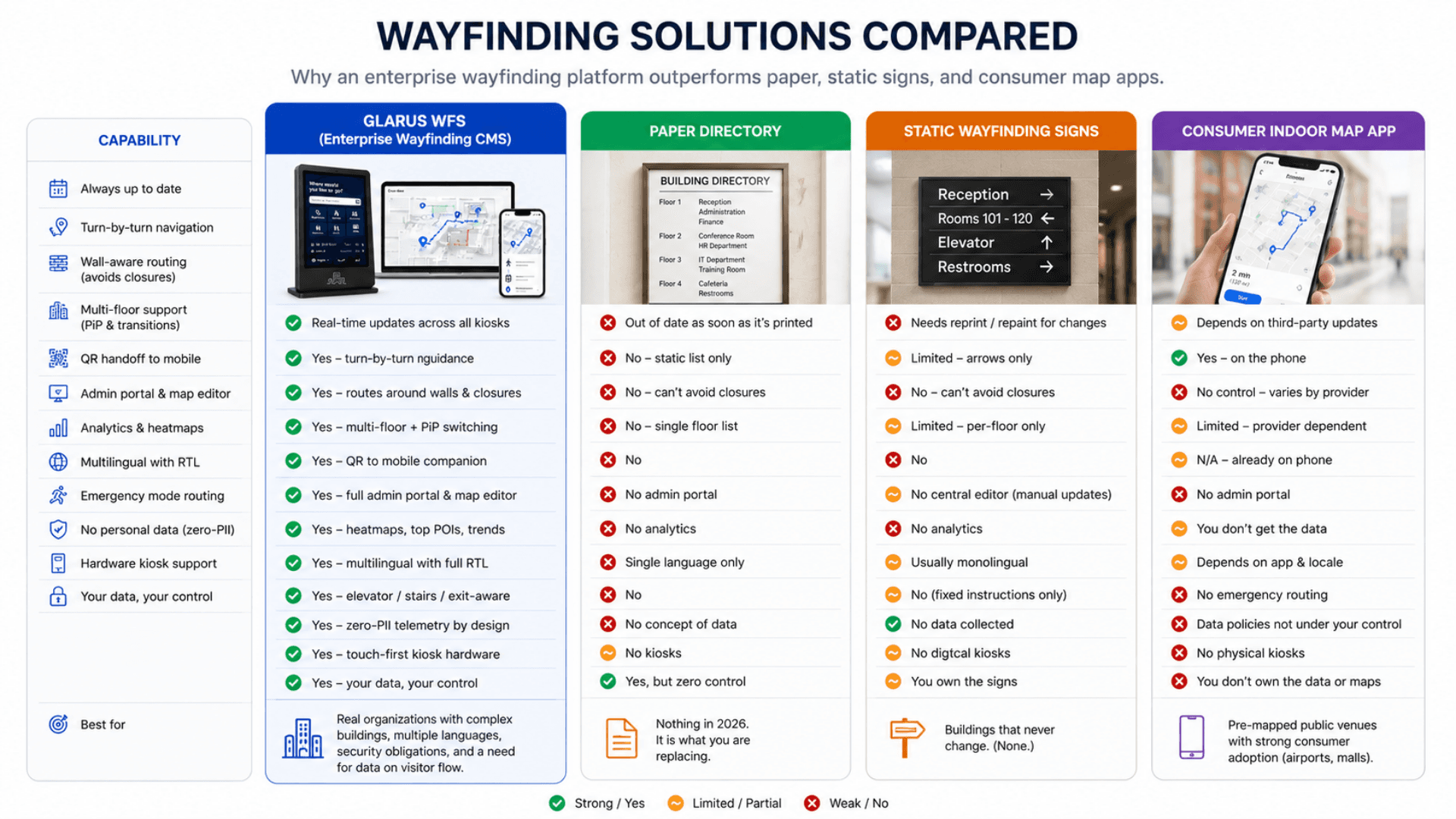
GLARUS WFS (Enterprise Wayfinding CMS)
Best for: Real organizations with complex buildings, multiple languages, security obligations, and a need for data on visitor flow.
- Touch-first kiosk + QR handoff to mobile companion + admin portal — all in one platform
- Wall-aware shortest-path routing that guides visitors around walls and closures + multi-floor route resolution
- Multi-floor picture-in-picture; elevator / stairs / escalator handling; emergency-mode routing
- Admin map editor with POI / kiosk / wall placement, path templates, undo / redo, autosave
- Multilingual with full RTL, extensible to any locale per engagement; per-language on-screen keyboards
- Per-floor analytics with heatmaps, top POIs, daily trend — zero PII by design
- GDPR / HIPAA / PDPL / ISO 27001 aligned; cloud or on-premise
Paper Building Directory
Best for: Nothing in 2026. It is what you are replacing.
- A printed list of room numbers + names laminated next to the elevator
- Updates require a print run (typically weekly to monthly)
- Always out of date the moment any tenant or department moves
- Single language; no audio; no haptic; no analytics
- No emergency rerouting; no closure handling; no QR handoff
Static Wayfinding Signs
Best for: Buildings that never change. (None.)
- Physical signs at corridor intersections with arrows and room numbers
- Re-painting / re-printing required for every layout change
- Multilingual at best; usually monolingual
- No closure-aware routing — visitors hit barriers and ask staff
- No emergency-mode rerouting; no telemetry
Consumer Indoor Map App
Best for: Pre-mapped public venues with strong consumer adoption (large airports, malls).
- Smartphone app from a third party (Google Indoor Maps, Apple Maps Connect, others)
- Requires visitor to download / sign in / accept terms
- No control over your data, your branding, or your routing logic
- Requires building owner to publish floor plans to a third-party catalog
- No physical kiosks; no emergency mode; no admin portal
Wayfinding System — Deployment Checklist
A practical 5-phase rollout playbook for going live with GLARUS WFS — from a single-building pilot to a multi-campus estate. Use it as a project plan with your Zeour partner.
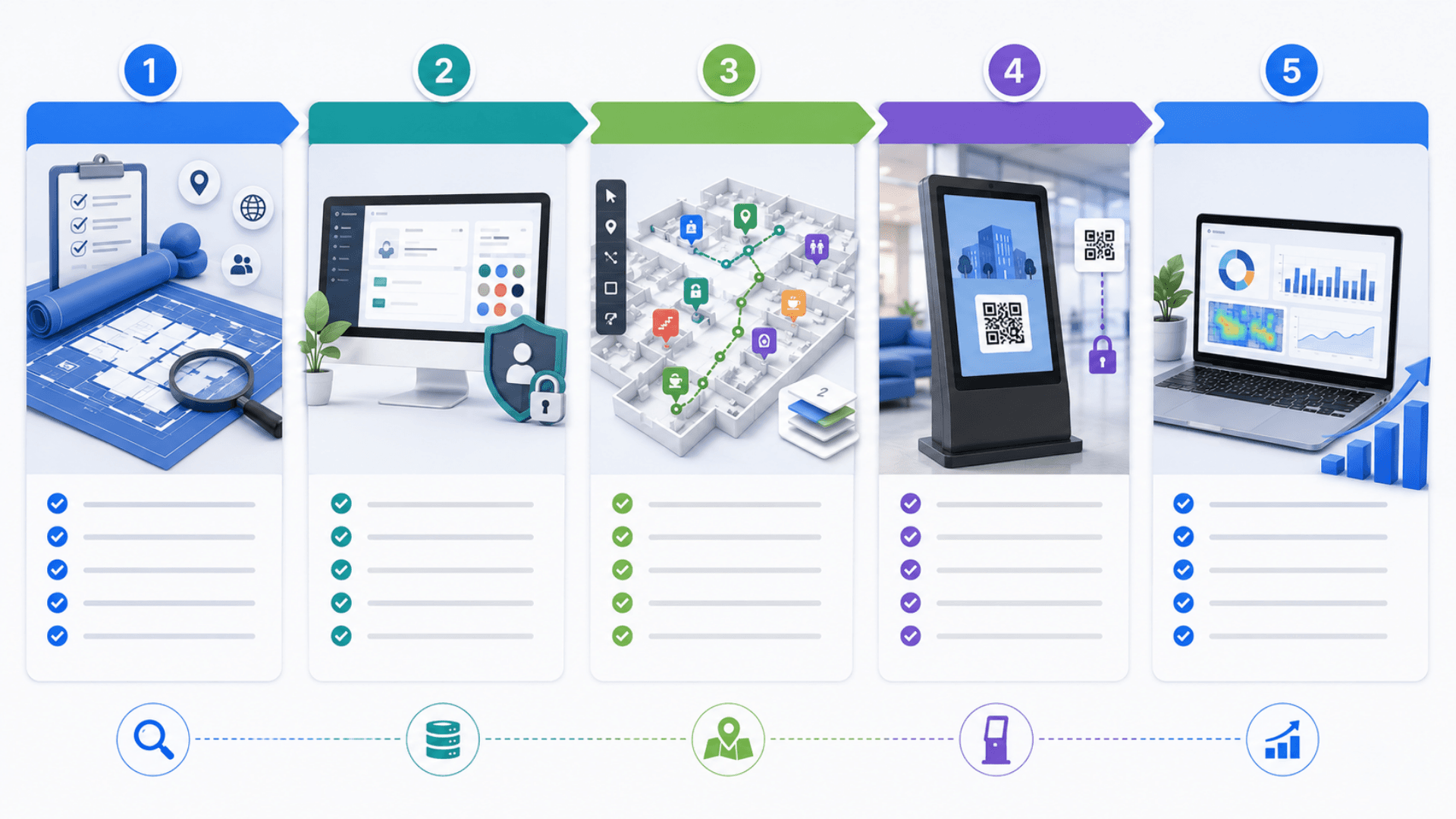
- 01
1) Discovery & Map Digitization
ChecklistInventory buildings, floors, POI categories, kiosk placement strategy, emergency policyDigitize floor plans (CAD / PDF / image) for upload to the map editorList POI types you need beyond the standard 10 (e.g. dialysis room, fasting room)Decide languages (Multilingual ship as a baseline; add other locales per engagement)Decide deployment model: managed cloud or on-premise (and choose data residency for cloud) - 02
2) Central Setup & Admin Bootstrap
ChecklistProvision the central plane and validate the deployment environmentCreate the first admin account with a forced password reset on first sign-inConfigure design tokens in the design settings editor to match your brandUpload a floor plan image per floor and order the floors to match the buildingSet up language bundles (Multilingual pre-built; add other locales per engagement) - 03
3) Map Editor — Place POIs, Walls, Kiosks
ChecklistOpen the map editor; place POIs (category + type + name) by clicking on the floor planDraw walls as polygons — these power the wall-aware routing enginePlace kiosks at their physical locations; assign each a unique QR code (printed on the kiosk body)Draft multi-floor paths through stairs / elevators / escalators and save as named templatesConfigure routes between floors, typed by transition and flagged for availability and emergency use - 04
4) Kiosk Pairing & Launch
ChecklistPhysically install kiosks (AUTO666, KIOSAPP066, or your existing touchscreen hardware)Print and affix unique QR codes per kiosk; point each kiosk's browser at the kiosk runtimeVerify each kiosk resolves itself via QR / ID / active-kiosk fallback and holds its lockTrain reception staff on the admin portal and on how to send visitors to a kioskPilot for 2 weeks at one building; measure search-to-route time, QR-handoff adoption, top POIs - 05
5) Optimize, Measure & Scale
ChecklistTrack weekly: total searches / sessions / active kiosks, top POIs, per-floor heatmaps, QR-handoff usageUse analytics to refine POI naming (rename POIs that get searched but never selected)Tune kiosk placement based on heatmaps — add kiosks where heatmaps go darkRoll out to additional buildings using the same admin patterns + path templatesPlan custom integrations (queue management, visitor management, digital signage) via the API
Wayfinding System Gallery
Visual highlights of GLARUS WFS — the wayfinding platform deployed in hospitals, airports, malls, universities, and governments worldwide.
Why Static Signage Fails
Static signage cannot adapt, cannot guide turn-by-turn, and cannot tell you what visitors look for — here is why digital wayfinding is essential.
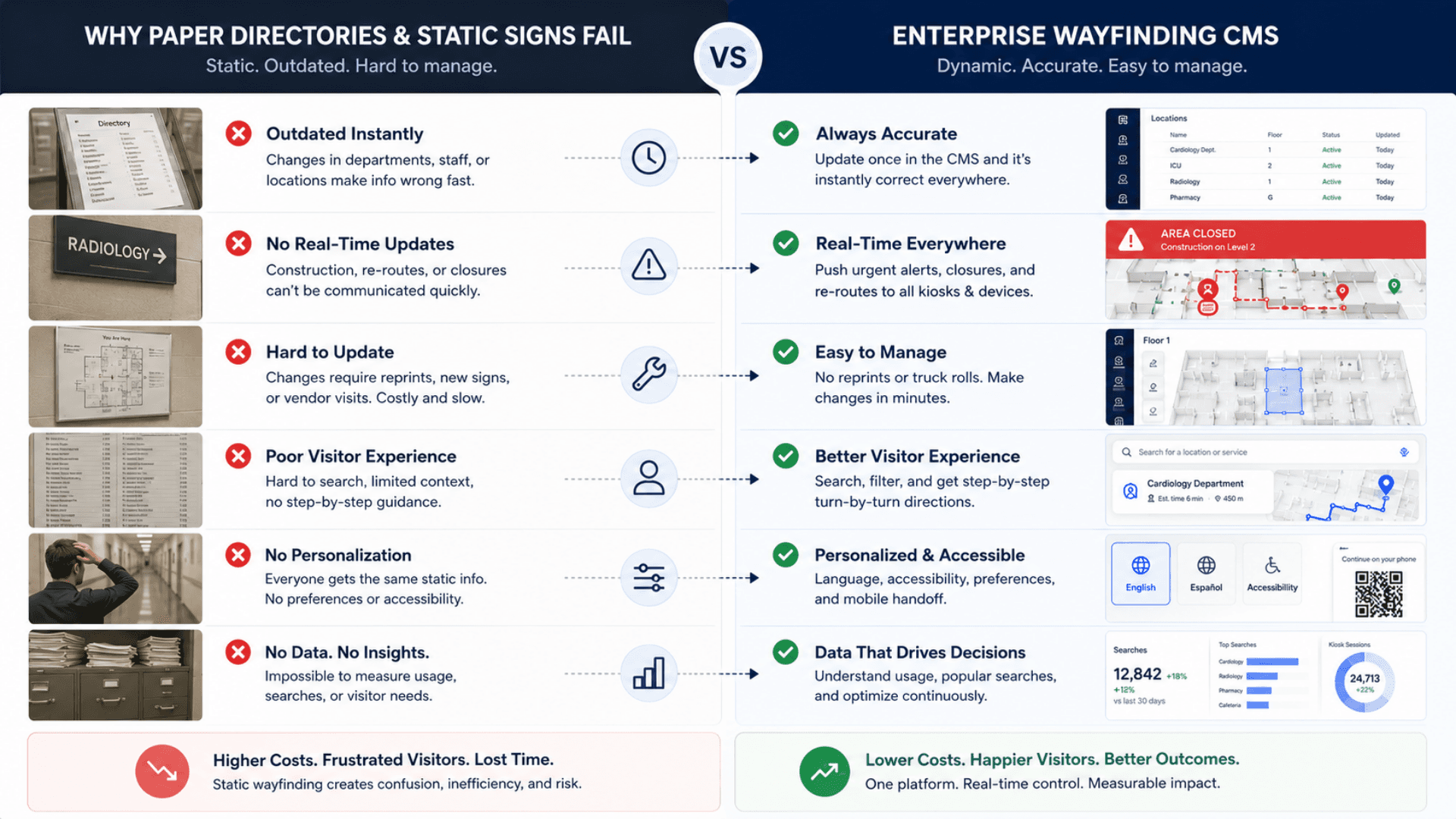
Paper Directories Are Wrong by Tuesday
You print a building directory on Monday. By Tuesday afternoon, three rooms have been re-assigned, a new clinic has opened on Floor 4, and the cafe has moved. The directory is wrong. Visitors don't know that — they trust it, walk to the wrong place, and end up asking reception anyway.
Maps Update in the Browser, Not the Printer
Admins edit the map in the GLARUS WFS map editor; kiosks pull the latest POI / wall / route data on every visit. A room re-assignment is a 30-second edit. The next visitor to the next kiosk sees the new layout instantly.
Static Signs Can't Reroute Around Closures
A corridor is closed for cleaning. The signs still point through it. The visitor follows the sign, hits a barrier, doesn't know which way to go, and asks the nearest staff member. Multiply that across a hospital with 800 visitors a day — and the maintenance team blames the lobby team.
Wall-Aware Routing Avoids Closures
A corridor closure is modelled the same way as a wall. The routing engine treats it as impassable and routes the visitor around it. No "barrier surprise" at the end of a wrong direction.
Reception Becomes the Direction-Giving Desk
In a typical 50,000-visitor-per-year facility, reception spends 30–40% of its time answering "where is …?" That's a person whose job description is "guest concierge" turned into a navigation service desk because the signage isn't doing its job.
Reception Goes Back to Concierge Work
A wayfinding kiosk handles "where is X?" in 2 seconds. Reception spends its time on appointments, VIP guests, and incidents — not directions. Per-floor heatmaps show which questions the kiosks answer best, so the front desk can be staffed for the rest.
No Visibility Into What Visitors Actually Look For
You bought beautiful signage three years ago. Is anyone using it? Which rooms get asked about most? Where are visitors getting lost? Without telemetry there's no way to know — and every signage upgrade is a guess.
Per-Floor Analytics + Most-Searched POIs
The analytics dashboard shows top-searched POIs, per-floor navigation heatmaps, and a daily trend — all without any visitor PII. You can finally answer "where are visitors getting lost?" with data.
Single Language, Single Audience
Your facility serves visitors in three languages but the signage only speaks one. International patients, foreign delegations, and tourists end up at reception every time. Multi-lingual physical signage is expensive to update, slow to change, and often doesn't handle RTL languages correctly.
Directions in the Visitor’s Language
Multilingual ship as a production baseline with proper RTL layout, locale-specific keyboard layouts, and translated voice / haptic feedback. Any other locale is a 3-file change. International visitors stop ending up at reception.
No Emergency Routing — Visitors Use Elevators in Fires
When the fire alarm rings, visitors instinctively head for the elevator they used to come in. Static signs say "in case of emergency use stairs" but they don't show which stairs or which route. People hesitate, mill around, panic, and slow the evacuation.
Emergency Mode Reroutes Every Kiosk
Each route can be flagged for emergency use and for availability. When emergency mode is activated — via the digital-signage emergency broadcast module or the kiosk's own emergency switch — the routing engine drops elevators and prioritizes stairs and designated exits. Every kiosk in the building reroutes in seconds.
Wayfinding Features
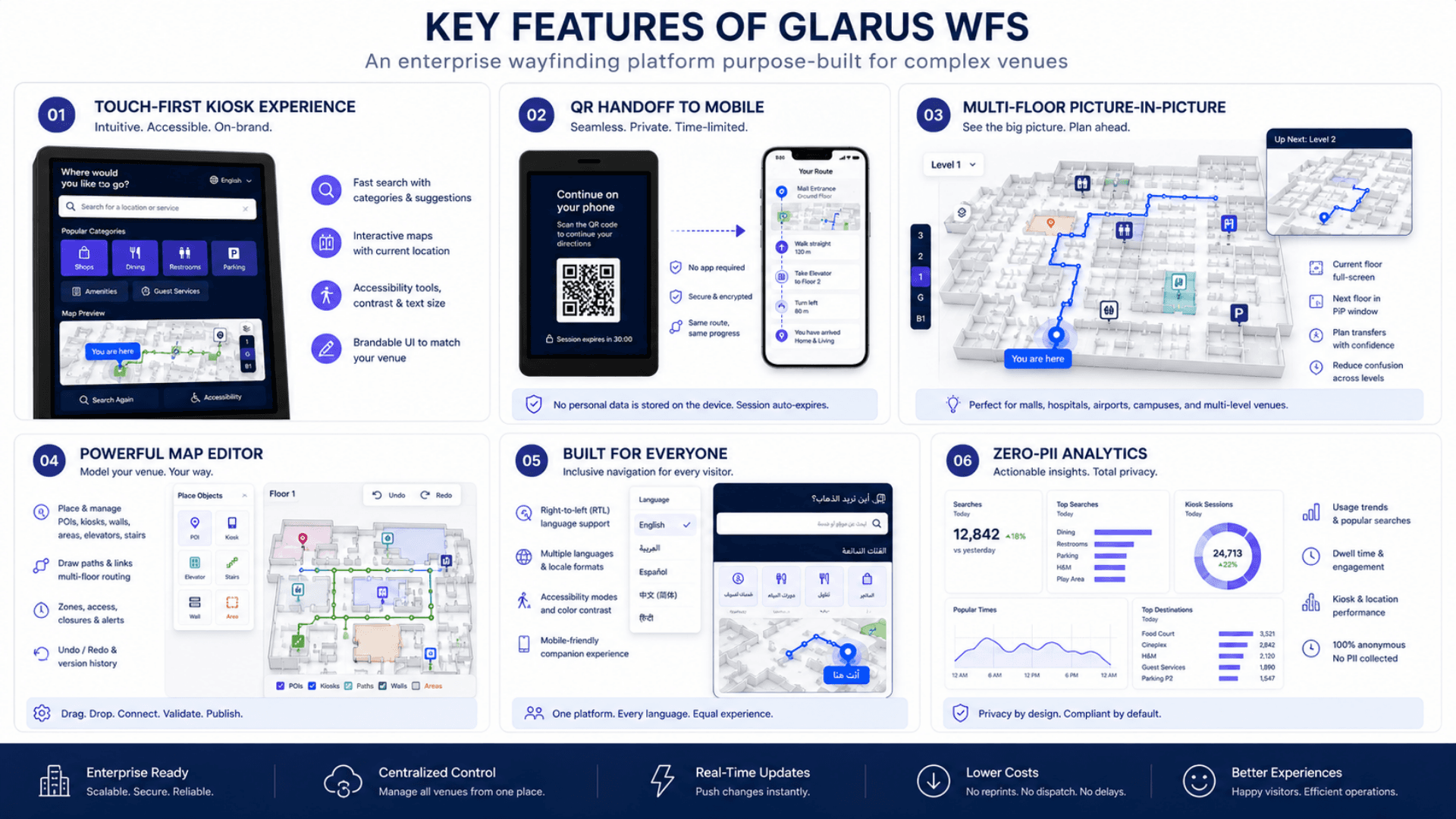
Touch-First Kiosk UI (full-screen, optimized for standard touchscreen hardware)
QR Handoff to a Mobile Companion with a Time-Limited Secure Session
Multi-Floor Pathfinding with Picture-in-Picture Floor Switching
Wall-Aware Shortest-Path Routing That Guides Visitors Around Walls and Closures
Multi-Floor Route Resolution Across Elevators / Stairs / Escalators
Building → Floor → POI Hierarchy with Safe Delete & Quick Undo
POI Categories & 10+ Types (rooms, services, amenities, exits, emergency)
Fast Predictive Search with Selection Telemetry
On-Screen Keyboards (Multilingual with full RTL baseline; extensible to any locale per engagement)
Haptic and Audio Touch Feedback for a Hardware-Grade Feel
Idle Timeout System That Always Resets the Screen for the Next Visitor
Admin Map Editor (POI / Kiosk / Wall placement, snap-to-grid drawing)
Multi-Floor Path Drafting & Named Path Templates
Reusable Path Templates Across Buildings
Stored-Path Validation Against the Building's Wall Geometry
Autosave with Recoverable Map Editor Drafts
Undo / Redo Stack with Per-Layer Visibility Toggles
Floor and Kiosk Locking to Prevent Conflicting Concurrent Edits
Safe Delete with Quick Undo for POIs and Kiosks
Non-Blocking Telemetry That Never Slows the Kiosk UI
Per-Floor Navigation Heatmaps + Most-Searched POIs Analytics
Daily Trend Dashboard for Searches, Sessions, and Active Kiosks
Multilingual UI (Multilingual baseline; extensible to any locale per engagement) with Full RTL Support
Session-Based Admin Authentication with Hashed Passwords
Brute-Force Lockout on Failed Logins + Rate-Limited Endpoints
No Personal Data in Telemetry — Kiosk + Place Only
GDPR / HIPAA / PDPL Aligned (cloud or on-premise)
On-Premise Deployment for Full Data Sovereignty
Wayfinding Components
Wayfinding Maps, Route Calculation and Mobile Handoff.
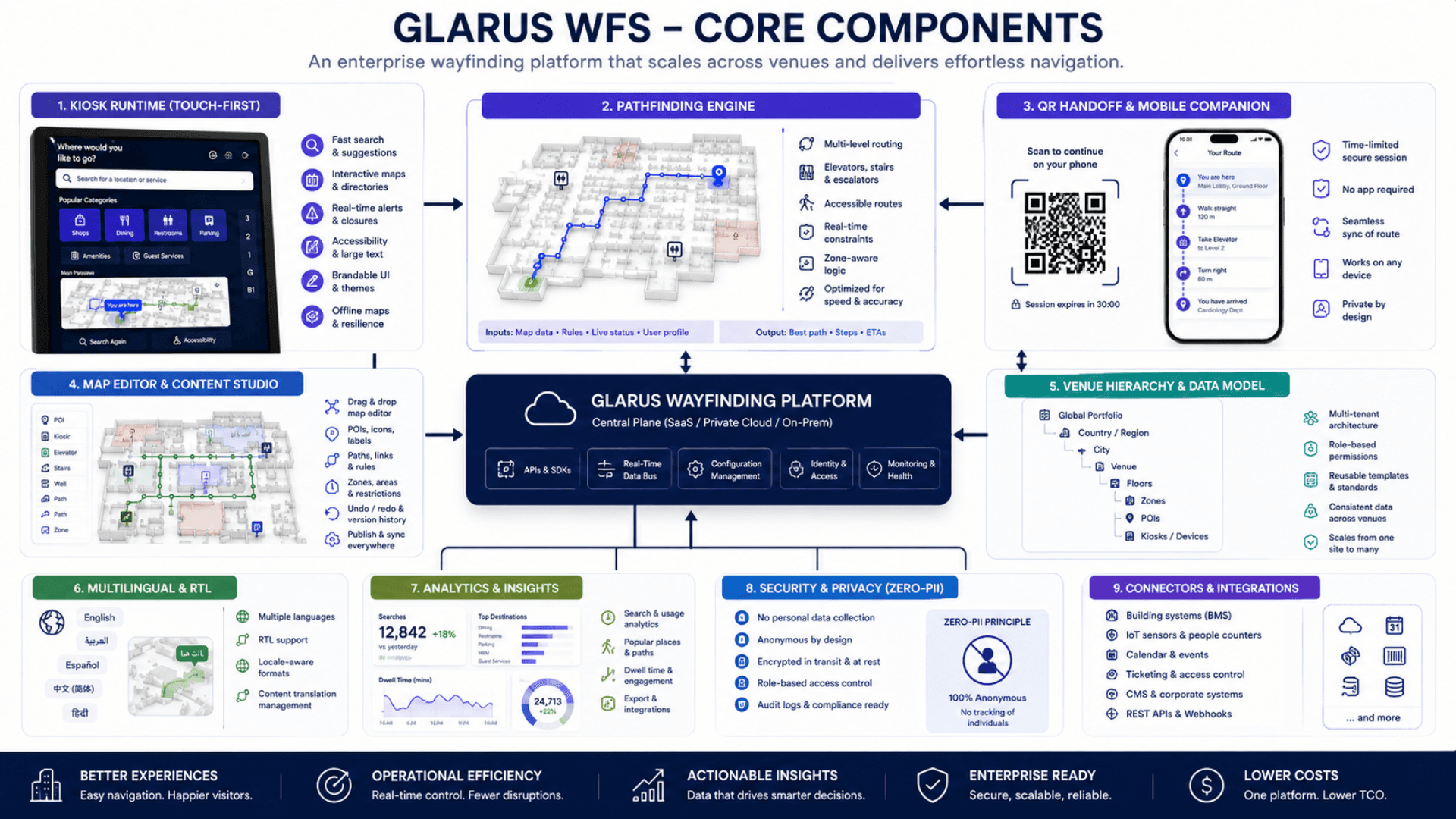
Multi-Floor Pathfinding Engine
A wall-aware routing engine — millisecond in-floor geometry plus multi-floor transition resolution.
- Wall-aware shortest-path routing that guides visitors around walls and closures
- Routes validated against the building's wall geometry before they are drawn
- Multi-floor route resolution across elevators / stairs / escalators with estimated walk times
- Picture-in-picture multi-floor display with one-tap swap
QR Handoff to Mobile Companion
Continue navigation on your phone without losing context. Secure, time-bound, no PII.
- QR code carries only the route context — starting point and destination, no personal data
- Time-limited secure session enforced on the mobile companion
- Standalone mobile page with a step-by-step navigation card and estimated time
- Re-language selection without losing the route
Multilingual UI
Multilingual ship as a production baseline with full RTL. Any other locale is added per engagement.
- Per-language translation bundles extensible to any locale per engagement
- Per-language on-screen keyboard layouts; additional layouts added per engagement
- Automatic RTL layout for right-to-left scripts
- Language preference remembered; the visitor can switch at any time
Zero-PII Analytics & Telemetry
Search and navigation events flow to analytics — anonymous, rate-limited, and non-blocking.
- Telemetry keyed by kiosk + place + timestamp (never user identity)
- Rate-limited telemetry endpoints to keep the platform stable
- Non-blocking delivery — telemetry never slows the kiosk UI
- Dashboard: total searches, sessions, active kiosks, per-floor heatmaps, top POIs, daily trend
Kiosk Sessions and Administrative Security
Built for regulated environments — session auth, brute-force lockout, audit log, on-prem option.
- Session-based admin authentication with hashed passwords
- Brute-force lockout on repeated failed logins; rate-limited endpoints
- Password complexity enforced on create, change, and reset
- GDPR / HIPAA / PDPL / ISO 27001 aligned; cloud or on-premise with full data sovereignty
Visitor Orientation and Reception Demand
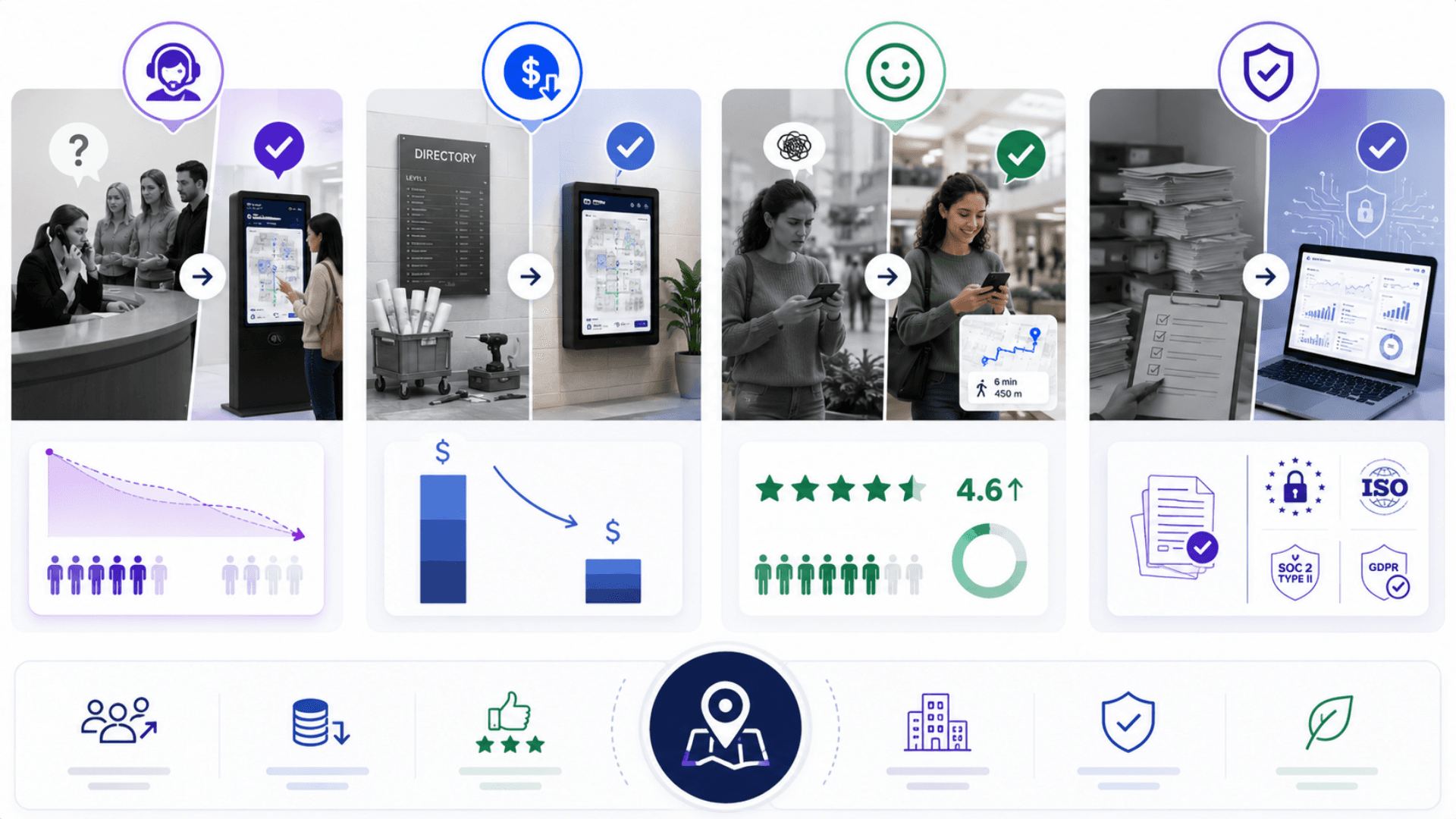
Cut "where is …?" reception interruptions by 60–80% across the estate
Eliminate visitor frustration with sub-second route resolution and live floor switching
Reduce wayfinding signage cost by 70% (no more reprinted floor plans every renovation)
Meet GDPR / HIPAA / PDPL compliance with zero-PII telemetry by design
Improve emergency-evacuation routing with elevator / stairs / route-type filters
Lift visitor satisfaction (CSAT / NPS) at hospitals, airports, and campuses by 25–40 points
Standardize the visitor experience across single-site to multi-campus deployments
Free reception and security staff for high-value interactions instead of giving directions
Visitor-completes-journey rate up 30–50% with mobile QR handoff continuity
Audit-ready analytics: top-searched POIs, per-floor heatmaps, kiosk activity, daily trend
From Destination Search to Indoor Route
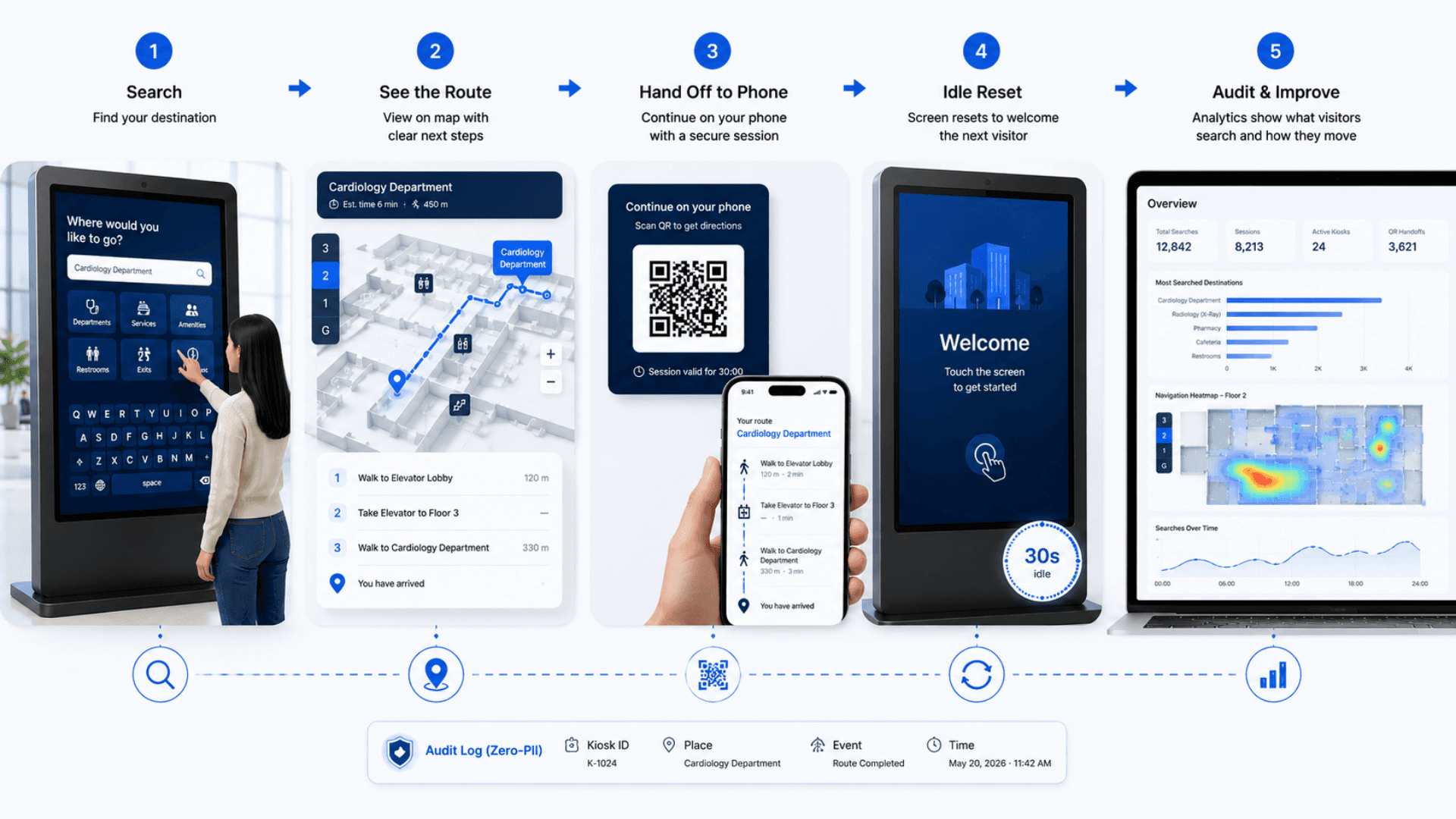
Visitors find a destination, review the route and continue directions on a kiosk or phone.
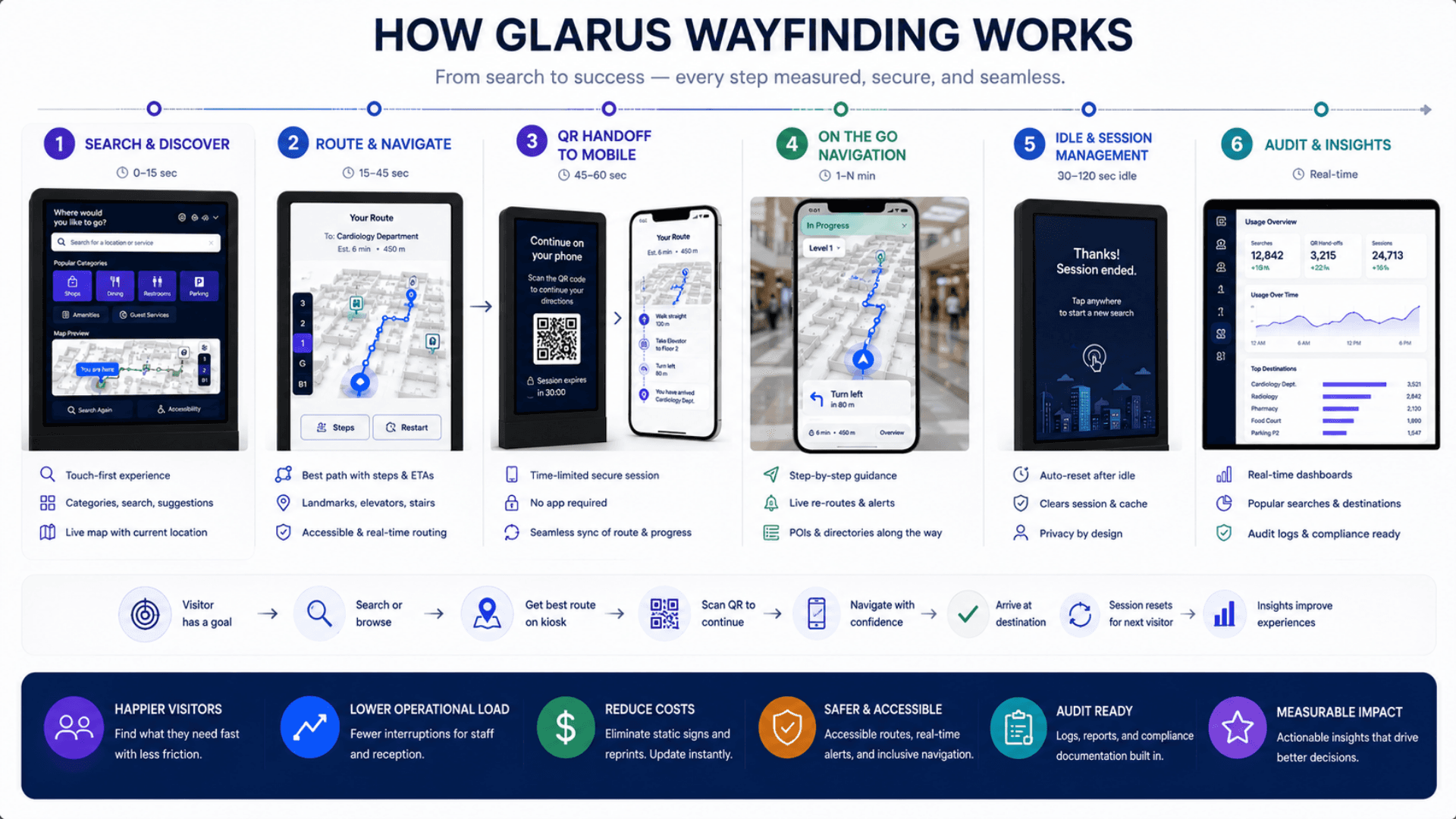
Map & Pathfind
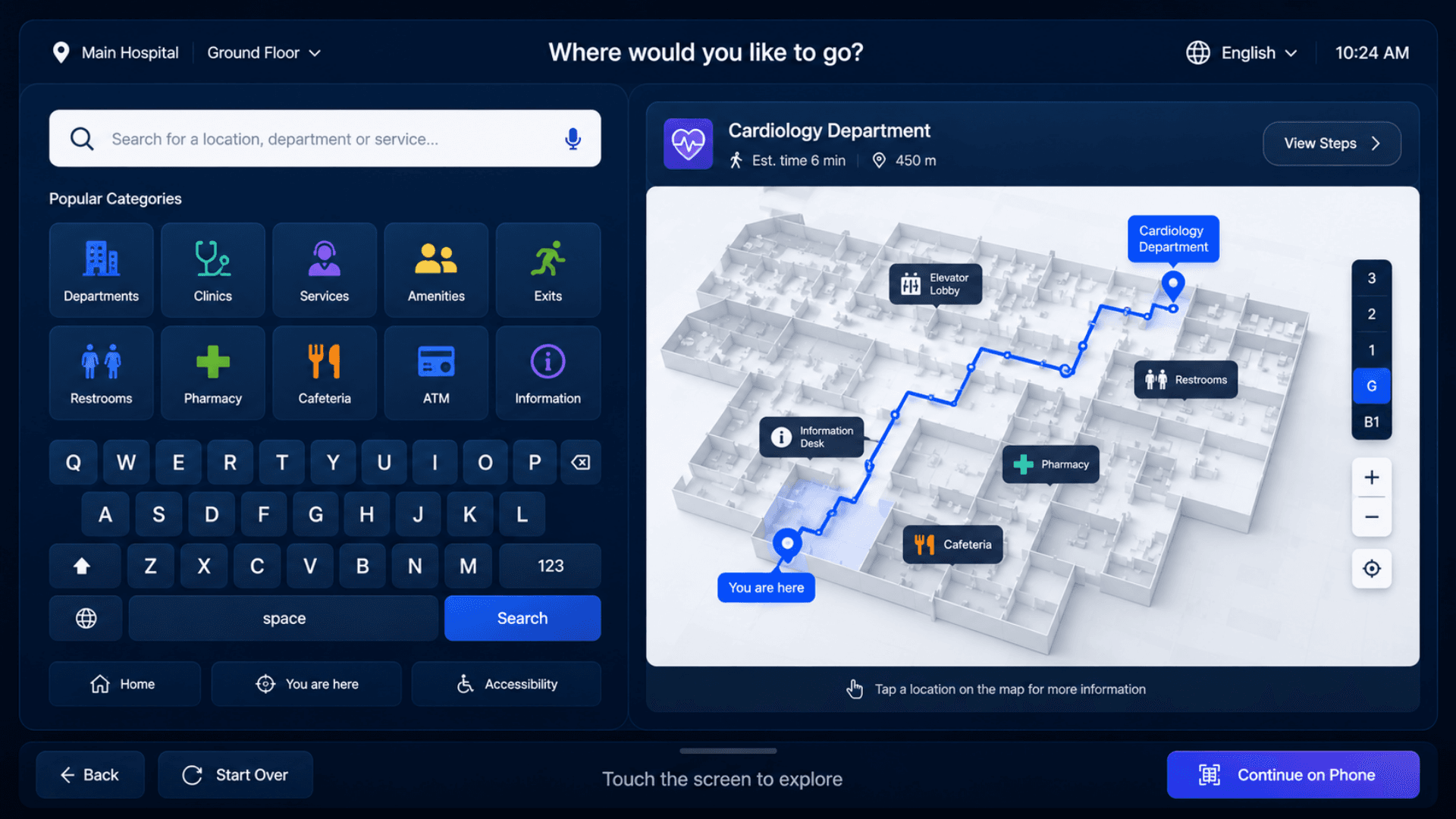
Visitor finds the kiosk, taps the screen, searches by name or browses categories (rooms, services, amenities, exits). Predictive search responds instantly, and the wall-aware routing engine resolves a clear route in milliseconds — guiding visitors around walls and closures.
See the Route Live
The route renders on the floor plan with a clear "you are here" marker. Multi-floor journeys trigger a picture-in-picture corner showing the next floor; tap to swap. Elevator / stairs / escalator transitions are surfaced as discrete navigation steps.
Hand Off to Phone (Optional)
Tap "Continue on phone" to generate a QR code. The visitor scans it; the mobile companion opens with a time-limited secure session and the same step-by-step navigation card — without re-entering anything. No personal data is ever encoded.
Idle, Reset, Repeat
After a short period of inactivity, the kiosk resets to its ambient greeting and the screen dims. Any touch wakes it instantly, so it always greets the next visitor cleanly. Kiosk locking prevents two clients ever owning the same physical screen.
Curate, Measure, Improve
Admins use the map editor (POI / kiosk / wall placement, snap-to-grid drawing, multi-floor path drafting, named templates, undo / redo, autosave) to keep maps current. Per-floor heatmaps, most-searched POIs, and a daily trend dashboard show what visitors actually want.
Wayfinding Use Cases by Industry
Explore the service environments relevant to wayfinding.
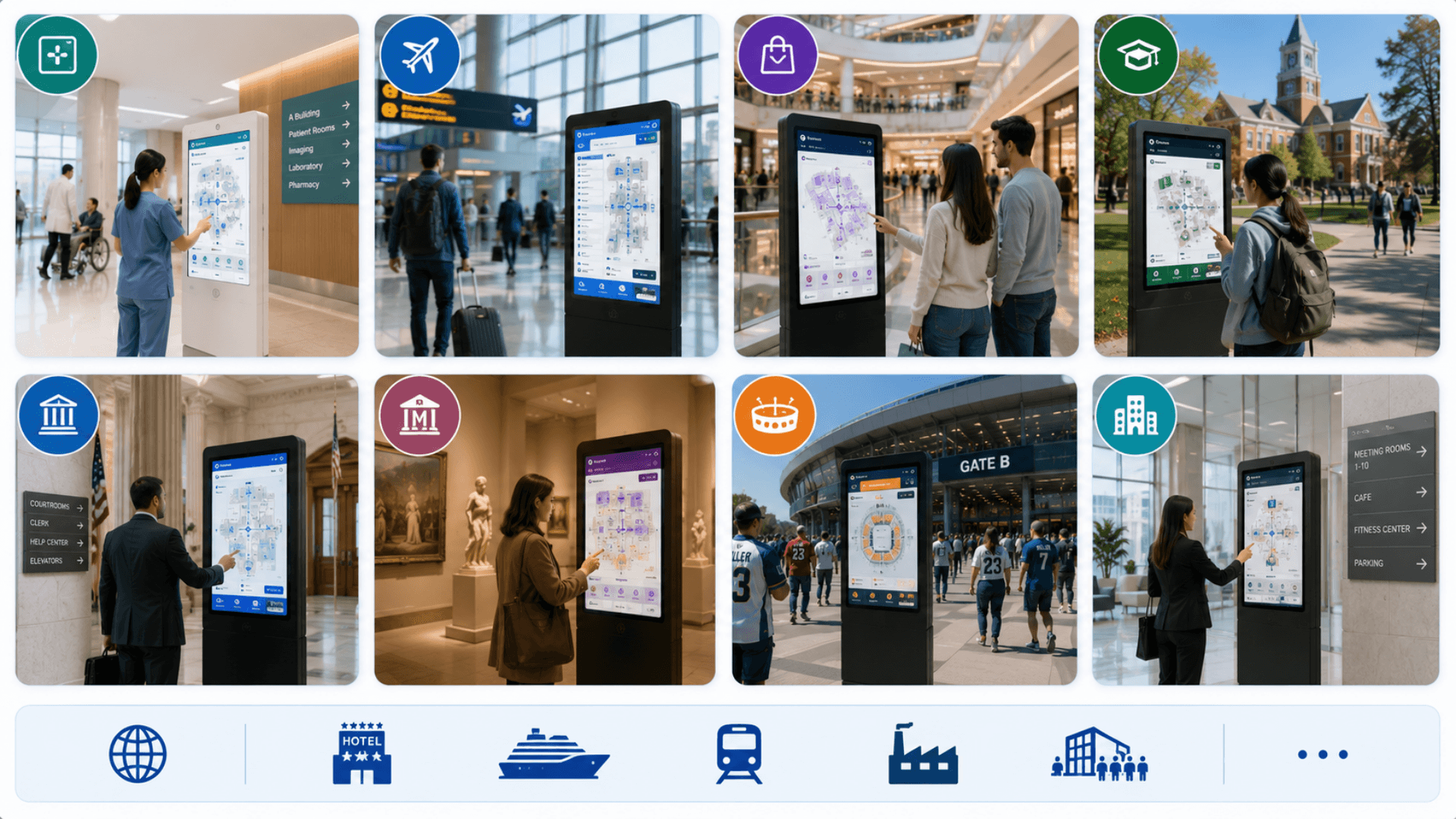
Open the deep dive by vertical
Customers running Wayfinding in production
1 featured deployment where Wayfinding ships today — a selection from a much wider production portfolio. Click any card for the full case-study deep dive.
Indoor Wayfinding System FAQs
Get answers to the most common questions about our wayfinding.
What is a wayfinding system?
Does wayfinding make sense for a single small building?
How does GLARUS WFS work?
How does the multi-floor picture-in-picture (PiP) work?
How does the QR handoff to mobile work?
How is the route actually calculated?
What languages are supported?
How are kiosks deployed and locked?
How are walls and routes managed?
What hardware does the kiosk run on?
Is GLARUS WFS GDPR / HIPAA / PDPL compliant?
How does emergency-mode wayfinding work?
What analytics does the admin portal show?
How does the map editor handle floor plans?
How do safe delete and undo work?
How does GLARUS WFS integrate with the rest of the platform?
How long does deployment take?
Cloud or on-premise — which do customers pick?
How do we get started?
Explore Related Solutions
Place building directions alongside registration, information screens and service arrival.
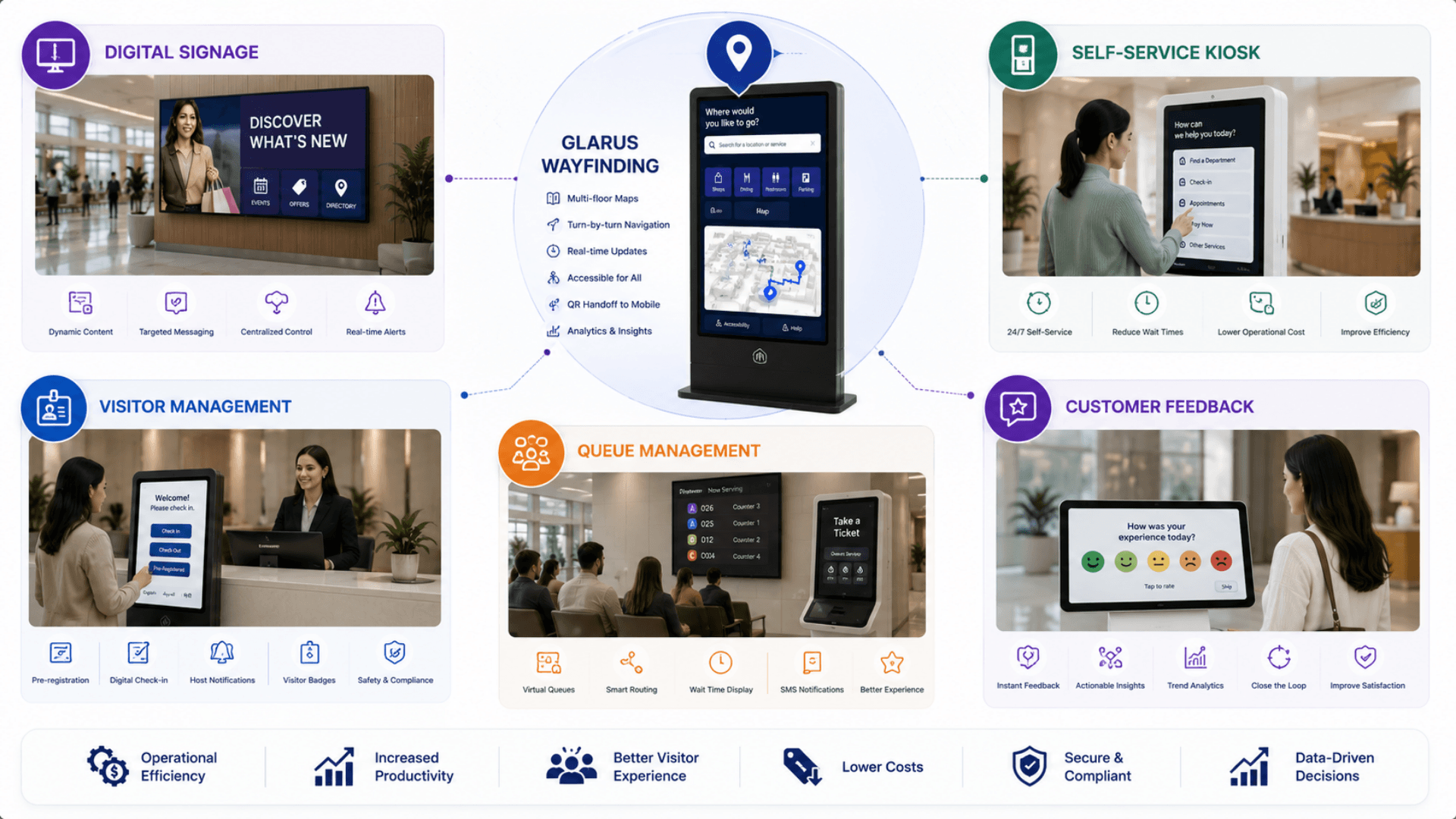
Ready to Transform Your Operations with Wayfinding?
Discuss your workflows, deployment requirements and integration scope with the Zeour team.
Wayfinding — concepts you'll meet
Definitions for the operational terms that appear across this page. Tap any chip to read the long-form entry plus its cross-links.