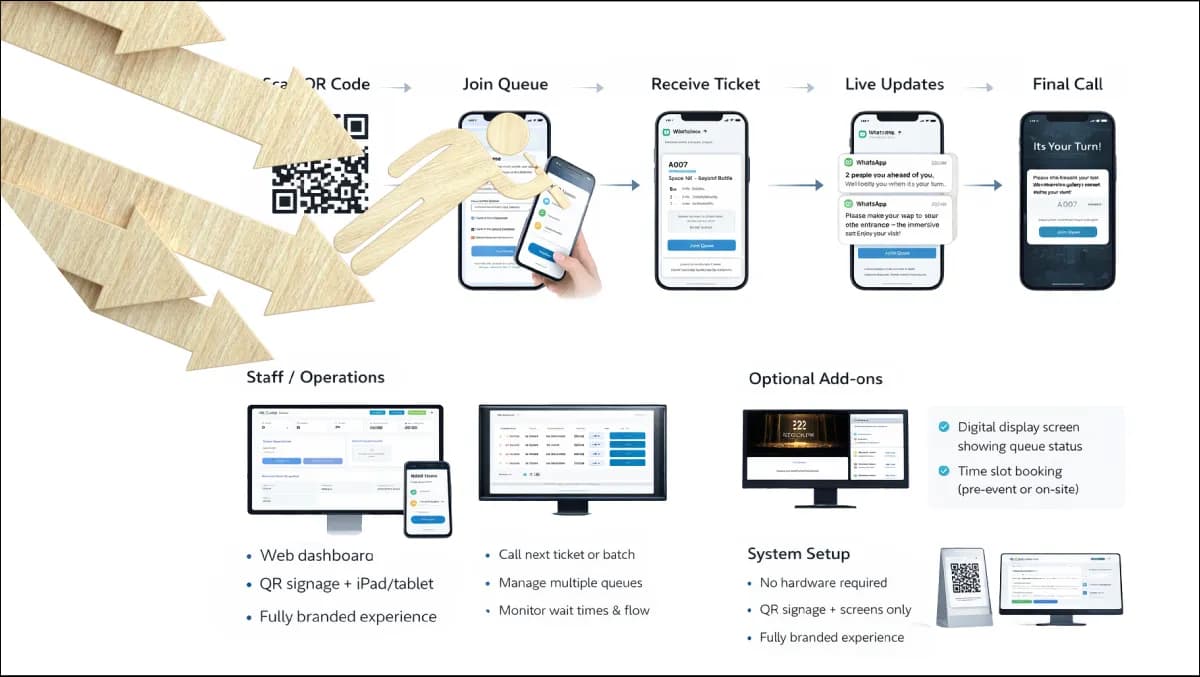
A queue management system is the software and hardware combination that turns a chaotic line of waiting customers into an instrumented service operation. At its simplest, it issues tickets, calls them in order, and shows the next customer where to go. At its most capable, it routes by service type and staff skill, balances load across counters, predicts wait times honestly, captures feedback at the end of each interaction, and feeds an analytics layer that finally tells you what your service operation is actually doing.
The components, and what each one is for
Every working QMS has the same six components, even if vendors disagree about how prominent each one needs to be in the architecture.
- Join channels. The customer enters the queue through a self-service kiosk in the lobby, a QR code, the operator's mobile app, a web link, a counter receptionist, or an appointment that was booked online. A serious QMS supports several of these in parallel and treats them as equal citizens of the same queue.
- Queue engine. The core. Holds the live state of every active queue, the position of every customer, the service-type-to-counter routing rules, and the priority logic for accessibility cases, VIPs, or appointment-holders. This is the part that has to be reliable; everything else depends on it.
- Display surfaces. Digital signage in the waiting area showing the current and recent calls, large counter displays showing the customer their counter number, and the customer's own phone showing live position updates.
- Counter terminal. The staff member's interface. Call next, recall, no-show, transfer to another service, complete with notes. Should be one screen and three keystrokes, not five clicks across two browser tabs.
- Notification layer. SMS, push, web-socket, in-kiosk audio. The customer needs to know their position now, the staff member needs to know when their counter is going idle, the supervisor needs to know when a queue is breaching its target wait time.
- Analytics layer. Real-time dashboards for the supervisor, historical reports for operations, the data feed that goes into the operator's BI tool. This is where the QMS pays for itself a second time, by showing the operator what they could not see before.
Most off-the-shelf products have all six, in name. The honest test is whether each component holds up when you push it: can the join channel handle a coach-load of arrivals in two minutes, does the queue engine survive a brief network blip, does the analytics layer let you ask the question you actually want answered.
What a good QMS materially changes
The headline outcome operators talk about is reduced wait time. That is a real outcome but it is downstream of three structural changes the QMS forces.
First, service capacity becomes visible. The number of customers in queue at a moment in time, the average service time per service type, and the conversion of capacity into served customers per hour all stop being guesses. Once they are visible, they get managed.
Second, customer flow stops being a single shared queue and becomes a routed graph. A customer arriving for a service that only counter three can perform does not sit behind a customer waiting for any-counter service. The queue logic does the routing the human queue could never do.
Third, the customer's expectation gets calibrated. A wait time stated up front, even if it is twenty minutes, is dramatically less abrasive than an open-ended wait of unknown length. The complaint rate at twenty minutes told is meaningfully lower than the complaint rate at fifteen minutes endured.
The combined effect — across the deployments we have run in healthcare, banking, government, retail, education, and telecom — is a service operation that costs about the same to run, serves more customers, and rates better in customer satisfaction. The investment lands within a year in most operations.
Deployment shapes that actually work
The two failure modes we see most often in queue management procurement are over-buying and under-buying.
Over-buying looks like a multi-site enterprise platform installed at a single branch that processes forty customers a day. The customer pays for capacity, integrations, and analytics they will never use, and the project takes a year to land because the deployment process was built for an operator with twenty sites.
Under-buying looks like a single-site standalone product rolled out across a forty-branch network. Every branch ends up with a slightly different version, the customer-facing experience drifts, and there is no enterprise dashboard because the product was never designed to roll up.
The sensible default for any operator with more than three sites is a multi-tenant central platform with per-site configuration, deployed on-premises inside the operator's perimeter or as a managed cloud where the operator prefers. Zeour's Queue Management System is built for exactly this shape and is currently in production across 1,247+ branches in 40+ countries — the same product, the same codebase, the same operator-owned deploy keys.
Sovereignty, languages, and the integration story
The QMS sees personally identifiable information at every join. Where the customer's name, phone number, ID, or appointment reason is captured, that data has to be governed under whichever data-protection regime the operator works in — UK GDPR, EU GDPR, the patchwork of Americas state laws, the data-protection regimes across GCC and MENA, the equivalents across Africa and Asia. Sovereign on-premises deployment is the cleanest path; the data never leaves the operator's perimeter and the retention policy is enforced by the operator's own system.
The customer-facing surfaces — kiosks, signage, mobile join page, SMS — render in the customer's language. English and Arabic with full right-to-left rendering are the production baseline; French, Spanish, German, Portuguese, Italian, Dutch, Turkish, Urdu, Hindi and other locales are added per engagement. The system records which language the customer chose; the staff member who calls them sees that signal on their counter terminal.
Integration-wise, the QMS earns its keep by talking to everything else: the CRM that knows the customer, the ticketing system that holds the case, the appointment system that backed the slot, the digital signage that shows the call, the customer feedback flow that captures the post-service rating, and the BI tool that holds the operational truth. The connectors are standard — REST, webhook, SCIM, ODBC — and the QMS does not become the integration bottleneck.
What the procurement document should actually ask for
A QMS RFP that asks the right questions filters the serious vendors from the dressed-up ones quickly. Five questions are worth keeping at the top of the document.
- Can the system run fully on-premises inside our perimeter, with the database, the queue engine, and the analytics layer all on our hardware? A vendor whose product only runs as a cloud service is asking for a procurement-level data-residency conversation that some operators cannot have.
- What languages render correctly in the customer-facing surfaces, including right-to-left scripts? A vendor that supports a language only in the menu strings and not in the badges, signage call-outs, or SMS messages is supporting it in marketing only.
- How are software upgrades delivered to a fleet of hundreds of sites without bringing the queue down at each one? The answer should be 'rolling, with rollback', not 'we schedule a maintenance window per site'.
- What integration patterns do you support out of the box, and which require custom development? Standard interfaces (REST, webhook, SCIM, SAML, OIDC) should be out of the box; proprietary middleware should be a red flag.
- Who owns the code, the license keys, and the deploy keys at the end of the engagement? The honest answer is 'the operator does, after a 90-day exit window'. A vendor whose answer is 'we do' is selling lock-in.
Where to start
Most operators arrive at queue management as part of a broader customer-flow modernisation. A short Discovery — one or two weeks, fixed-fee — is enough to map the existing flow, agree the routing logic, and produce a Build estimate. The codebase, license keys, and deploy keys land with the operator at engagement exit. Real deployments, owned by the operator, sized to the operation.